HomeNext Gen IT-InfraMonitoring & ManagementCyber SecurityBCP / DRAutomationDecoded
Next Gen IT-Infra
Cato’s SASE Supports Cybersecurity Skills Development

How Cato’s SASE Supports Cybersecurity Skills Development

🕓 April 8, 2025

How SASE Supports the Security Needs of SMBs

How SASE Supports the Security Needs of SMBs

🕓 February 9, 2025

Attack Surface Reduction with Cato’s SASE

Attack Surface Reduction with Cato’s SASE

🕓 February 10, 2025

SASE for Digital Transformation in UAE

SASE for Digital Transformation in UAE

🕓 February 8, 2025

Monitoring & Management
Understanding Atera’s SLA Management

Understanding Atera’s SLA Management

🕓 February 7, 2025

Cost-Performance Ratio: Finding the Right Balance in IT Management Networks

Cost-Performance Ratio: Finding the Right Balance in IT Management Networks

🕓 June 16, 2025

Customizing Atera with APIs

Customizing Atera with APIs

🕓 March 3, 2025

Power Up Your IT Team’s Strategy with Atera’s Communication Tools

Power Up Your IT Team’s Strategy with Atera’s Communication Tools

🕓 February 8, 2025

Cyber Security
Visual guide showing Cato CMA interface for configuring Internet and WAN firewall rules, enabling threat protection, and monitoring security events in real time for UAE IT teams.

Enforcing Firewall and Threat Protection Policies in Cato

🕓 July 25, 2025

Isometric illustration of professionals managing network performance, bandwidth analytics, and cloud-based optimization around the Cato Networks platform, symbolizing bandwidth control and QoS visibility.

Mastering Bandwidth Control and QoS in Cato Networks

🕓 July 26, 2025

Illustration of the Cato Cloud architecture showing its role in delivering SASE for secure, optimized global connectivity.

Understanding the Cato Cloud and Its Role in SASE

🕓 January 29, 2025

Global network backbone powering Cato SASE solution for secure, high-performance connectivity across regions.

Global Backbone: The Engine Powering Cato’s SASE Solution

🕓 January 30, 2025

BCP / DR
Illustration showing diverse business and IT professionals collaborating with cloud, backup, and security icons, representing Vembu use cases for SMBs, MSPs, and IT teams.

Who Uses Vembu? Real-World Use Cases for SMBs, MSPs & IT Teams

🕓 July 12, 2025

Graphic showcasing Vembu’s all-in-one backup and disaster recovery platform with icons for cloud, data protection, and business continuity for IT teams and SMBs.

What Is Vembu? A Deep Dive Into the All in One Backup & Disaster Recovery Platform

🕓 July 6, 2025

Illustration showing Vembu backup and disaster recovery system with cloud storage, server racks, analytics dashboard, and IT professionals managing data.

The Rising Cost of Data Loss: Why Backup Is No Longer Optional?

🕓 August 14, 2025

3D isometric illustration of cloud backup and data recovery infrastructure with laptop, data center stack, and digital business icons — FSD Tech

RPO & RTO: The Heart of Business Continuity

🕓 August 15, 2025

Automation
Cross-Functional Collaboration with ClickUp

Fostering Cross-Functional Collaboration with ClickUp for Multi-Departmental Projects

🕓 February 11, 2025

ClickUp Project Reporting

Revolutionizing Enterprise Reporting with ClickUp’s Advanced Analytics and Dashboards

🕓 June 16, 2025

ClickUp’s Design Collaboration and Asset Management Tools

Empowering Creative Teams with ClickUp’s Design Collaboration and Asset Management Tools

🕓 February 26, 2025

ClickUp Communication and Collaboration Tools

ClickUp Communication and Collaboration Tools: Empowering Remote Teams

🕓 March 12, 2025

Decoded
Multi-Factor Authentication (MFA)

Multi-Factor Authentication (MFA): All You Need to Know

🕓 December 7, 2025

L3 Switch

What Is an L3 Switch? L2 vs L3 & Why You Need Layer 3?

🕓 December 8, 2025

IPSec

IPSec Explained: Protocols, Modes, IKE & VPN Security

🕓 December 3, 2025

 Datagram Transport Layer Security (DTLS)

What is Datagram Transport Layer Security (DTLS)? How it works?

🕓 December 4, 2025

    Subscribe to our newsletter!

    About Us

    Follow Us

    Copyright © 2024 | Powered by 

    Cato SASE Architecture

    Inside Cato’s SASE Architecture: A Blueprint for Modern Security

    🕓 January 26, 2025

    Enterprise Data Security and Privacy with ClickUp

    Ensuring Enterprise Data Security and Privacy with ClickUp

    🕓 February 9, 2025

    DDoS protection SASE

    DDoS Protection and Cato’s Defence Mechanisms

    🕓 February 11, 2025

    Table of Contents

    What is Computer Virus? Types, Symptoms & Protection

    Surbhi Suhane
    January 8, 2026
    Comments
    Computer Virus

    Have you ever wondered what makes your computer slow down, display strange messages, or stop working altogether? A small, unseen piece of code often causes these frustrating issues. This code is a computer virus. These programs are designed to cause damage, steal information, or take control of your system.


    You need to know how these programs work to keep your system safe and ensure good computer viruses prevention. We will explain what a computer virus is, where it comes from, how it spreads, and what you can do to get the best computer viruses protection.


    What is a Computer Virus?

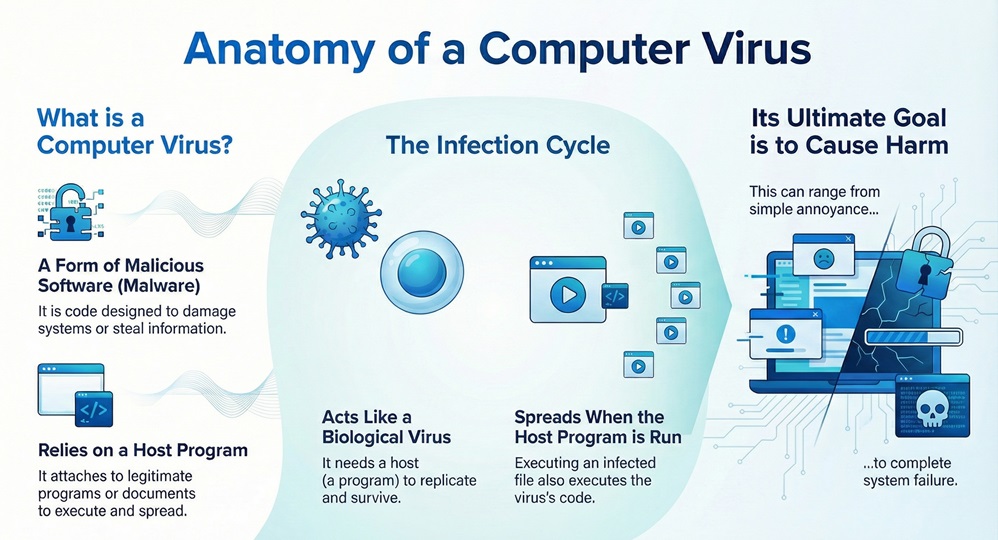
    A computer virus can be understood as a type of malicious software, known as malware. It attaches itself to another legitimate program or document. The virus then replicates itself and spreads to other files and systems. Computer viruses depend on a host program to execute and move around.
     

    computer virus infographic

    Computer Virus Description

    The computer virus description implies that this code acts much like a biological virus. Just as a biological virus needs a host cell to reproduce, a computer virus needs a host file or program to execute and replicate. Once the virus attaches to an executable file, the program becomes infected. When you run the infected program, the virus's code runs, too. This action allows the virus to duplicate itself and spread.


    It is important to note that a computer virus aims at causing harm. This harm can range from simple annoyance to complete system failure.


    Stop Computer Virus Now


    Who Discovered Computer Virus?

    Now, the question arises, who discovered computer virus as a concept? The term "computer virus" was formally coined in 1984 by computer scientist Fred Cohen. He defined a virus as "a program that can infect other programs by modifying them to include a possibly evolved copy of itself."


    However, before Cohen's definition, the concept was explored. In 1971, the Creeper program (which was more of a self-replicating experiment than a malicious virus) appeared on the ARPANET. Creeper would travel from one system to another, displaying the message: "I'M THE CREEPER : CATCH ME IF YOU CAN." The program known as Reaper was then created to eliminate Creeper.


    Also Read: What is Next-Gen Antivirus (NGAV)? UAE/GCC Trends & Protection


    Who Created Computer Viruses?

    The very first PC virus in the wild, called Elk Cloner, was created in 1982 by a 15-year-old named Rich Skrenta. This program attached itself to Apple II boot sectors and spread via floppy disks. Elk Cloner was relatively harmless, displaying a short poem after the system booted for the 50th time.


    The first virus to spread widely on IBM computers was the Brain virus. The computer virus Brain appeared in 1986. Two Pakistani brothers, Basit and Amjad Farooq Alvi, created the computer virus Brain. They claimed they only intended to track illegal copies of their software. However, Brain soon spread globally, marking a major turning point in malicious software.


     How Computer Viruses Spread?

    Computer viruses rely on human action to move from one system to another. They cannot start replicating on their own until a user executes the infected host file.

    Let us now discuss how computer viruses spread:


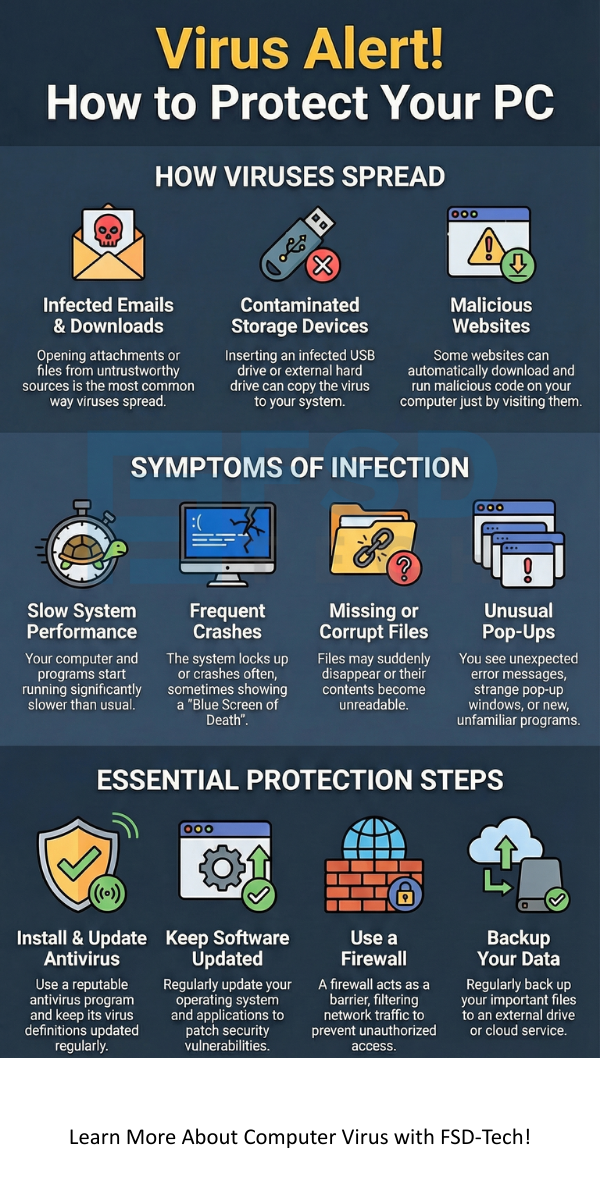
    1. Opening an Infected File: This is the most common way a computer virus spreads. When you open an infected attachment in an email or a program downloaded from an untrustworthy source, the virus's code executes.
    2. Infected Storage Devices: If you insert an infected USB drive, CD, or external hard drive into your computer, the virus can copy itself to your system. The Elk Cloner virus spread this way.
    3. Network Sharing: Viruses can travel across a network, especially in systems that use shared folders without proper computer viruses protection. When a user accesses an infected file on a shared network drive, the virus attempts to spread.
    4. Malicious Websites: Some websites automatically start a download or run malicious code when a user visits them, a method known as a drive-by download. This can lead to a direct system infection.


    Also Read: What is Web Application Firewall? | WAF Explained

    How Many Types of Viruses are There?

    Computer viruses types are numerous, but we can group them based on how they infect systems and what they aim to do. Understanding how many types of viruses are there helps you prepare for the different forms of threats.


    Computer Viruses Types

    1. Boot Sector Viruses: These viruses target the Master Boot Record (MBR) or the boot sector of a hard disk or removable storage device. They execute when you turn on the computer, before the operating system loads. The computer virus Brain is a classic example.
    2. Program/File Infector Viruses: These viruses attach themselves to executable files, such as files ending in .exe or .com. When you run the host program, the virus activates and infects other executable files on the system.
    3. Macro Viruses: These viruses are written in a macro language, such as Visual Basic for Applications (VBA). They infect files created by programs like Microsoft Word or Excel. When you open the infected document, the macro runs, and the virus spreads to other documents.
    4. Multipartite Viruses: A single multipartite virus computer virus description shows that it can infect in multiple ways. They infect both executable files and the boot sector. This makes them much harder to remove completely. If you only clean the files, the virus can still reinfect the system from the boot sector.
    5. Polymorphic Viruses: These viruses have the ability to change their code (mutate) each time they replicate. This is a form of camouflage. The constant changing of their signature makes detection by traditional signature-based antivirus software difficult.
    6. Stealth Viruses: This type of virus attempts to hide itself from antivirus software. Stealth viruses ensure that when the operating system or antivirus program tries to read an infected file, the virus presents a clean version of the file instead of the infected one.


    What a computer virus do to an infected system depends entirely on its design, but the goal is always malicious. It includes slowing system performance and displaying annoying messages.


    Computer Viruses Symptoms

    It is crucial to recognize the computer viruses symptoms in your system. Detecting these issues early allows you to take corrective action before major damage occurs.


    • Slowing System Performance: Your computer starts running significantly slower than usual. Programs take longer to open. Files take more time to save.
    • Frequent System Crashes: The system locks up or crashes often, leading to the "Blue Screen of Death" in Windows.
    • Unusual Messages: You see unexpected or strange error messages, pop-up windows, or graphics on your screen.
    • Missing or Corrupted Files: Files disappear, or their contents become garbled. This happens because the virus overwrites or deletes your data.
    • Changes to System Settings: Your browser homepage changes without your permission. New toolbars appear. Security settings become disabled.
    • New, Unfamiliar Programs: You notice new icons or programs on your desktop or in your system list that you did not install.
    • Disk Activity: Your hard drive light constantly flickers, even when you are not actively using the computer. This indicates a background process, possibly the virus, is running.
    • Email Spam: Your contacts start receiving email messages from your account that you did not send. The virus uses your email to spread itself.


    Also Read: What Is Spyware Software? Types, Signs & Removal Guide


    Computer Viruses Protection and Prevention

    Effective computer viruses protection requires a layered approach, combining specialized tools with safe user habits.


    What is Computer Virus and Antivirus?

    To get the best computer viruses protection, you need to understand the function of antivirus software. Antivirus software is a program designed to detect, prevent, and remove malicious software, including computer viruses, from a computer system.


    Antivirus software works by:

    1. Signature Detection: It scans files and compares their code signatures to a database of known computer viruses.
    2. Heuristic Analysis: It looks for suspicious behavior or characteristics in a file, such as attempts to modify the operating system's files. This helps detect new, unknown viruses.
    3. Real-time Protection: It constantly monitors the system for new infections and blocks malicious actions before they execute.


    Computer Viruses Prevention Best Practices

    You must implement these practices for strong computer viruses prevention:


    1. Install and Update Antivirus Software: Always use a reputable, reliable antivirus program. You must ensure the program is set to update its virus definitions regularly. This provides protection against the latest threats.
    2. Regular Software Updates: You should always update your operating system and all applications. Software updates often include security patches that close vulnerabilities computer viruses can exploit.
    3. Be Careful with Email Attachments: Never open attachments from senders you do not know. Even if you know the sender, use caution with unexpected attachments. The virus often sends itself from a trusted contact's infected machine.
    4. Use a Firewall: A firewall acts as a barrier between your computer and the internet. It monitors and filters incoming and outgoing network traffic, preventing unauthorized access.
    5. Backup Your Data: Always maintain regular backups of your important data. If a virus completely damages your system, you can still restore your files from the clean backup.
    6. Avoid Suspicious Websites: Never click on pop-up advertisements or download programs from unknown or untrustworthy websites.


    Also Read: What is a Next Generation Firewall (NGFW)? Why UAE/GCC businesses need it?


    Computer Virus vs. Other Malware

    People often confuse computer viruses with other types of malicious software. While they all fall under the category of malware (malicious software), they have distinct differences.


    Comparison of Malware Types

    Basis for ComparisonComputer VirusWormTrojan Horse
    ReplicationAttaches to a host file and requires a user to execute the host.Self-replicates and spreads independently without a host file or user action.Does not self-replicate.
    Spreading MechanismSpreads by infecting files, and via file transfer (e.g., email attachment).Spreads over networks using vulnerabilities and exploiting network protocols.Spreads by being disguised as legitimate software that a user willingly installs.
    Goal/PurposeCauses damage to files and the system.Consumes system resources (bandwidth, memory) and can carry a payload (like a virus or backdoor).Creates a backdoor in the system, allowing an attacker remote access and control.
    Key CharacteristicDependent on a host program and user action.Independent and fully self-contained.Deceptive and relies on social engineering.

    Conclusion

    Your computer holds your memories, your work, and your personal data. You have the power to defend this valuable information. Do not wait for a virus to strike and delete what you value most. Take action now. Update your security software and commit to safe browsing practices. Your dedication to strong computer viruses protection ensures your data remains secure and your system runs as it should. We believe in providing you with the knowledge to make smart decisions about your security.


    Proactive Virus Defense Contact our team
     

    computer virus


    Key Takeaways

    So, with the above discussion, we can say that a computer virus is a serious threat to the stability of your digital life. You must always maintain computer viruses protection.


    • A computer virus requires a host file and user action to execute and spread.
    • The first widely spread virus was the Brain virus.
    • Computer viruses types include Boot Sector, File Infector, and Polymorphic viruses.
    • Computer viruses symptoms include slow speed, file corruption, and system crashes.
    • The best computer viruses prevention strategy involves using updated antivirus software, keeping all your other software patched, and being cautious with files and websites.

    Frequently Asked Questions (FAQs)

    What is computer virus and antivirus?

    The computer virus is malicious code that replicates itself and damages your system. Antivirus is security software that detects, prevents, and removes the virus from your computer.


    Where does computer virus come from?

    The computer virus comes from an infected source. It could be an infected email attachment, a downloaded file from an untrustworthy website, an infected USB drive, or an infected file on a shared network.


    What computer virus do?

    A computer virus can steal private information, delete or corrupt your files, slow down your computer's performance, display frustrating advertisements, and sometimes take full control of your computer for malicious activities.


    Who make computer virus?

    A virus creator, often called a malware author or hacker, is someone with programming knowledge who creates computer viruses with the intent to cause harm, make money illegally, or protest an organization. They often use high-level programming languages.


    Why does computer virus protection play a vital role?

    Computer viruses protection plays a vital role because it ensures the integrity of your personal and financial data. Protection maintains the speed and functionality of your system and prevents major damage that could lead to costly repairs or information loss.

    What is Computer Virus? Types, Symptoms & Protection

    About The Author

    Surbhi Suhane

    Surbhi Suhane is an experienced digital marketing and content specialist with deep expertise in Getting Things Done (GTD) methodology and process automation. Adept at optimizing workflows and leveraging automation tools to enhance productivity and deliver impactful results in content creation and SEO optimization.

    Like This Story?

    Share it with friends!

    Subscribe to our newsletter!

    Atera

    (48)

    Cato Networks

    (111)

    ClickUp

    (68)

    FishOS

    (7)

    Miradore

    (21)

    PointGuard AI

    (9)

    Vembu

    (22)

    Xcitium

    (33)

    ZETA HRMS

    (69)

    Workflow Automation(5)

    Workforce Automation(1)

    AI Project Management(1)

    HR Data Automation(1)

    RMM(1)

    IT Workflow Automation(1)

    IT security(2)

    GCC compliance(4)

    Payroll Integration(2)

    IT support automation(3)

    procurement automation(1)

    lost device management(1)

    IT Management(5)

    IoT Security(2)

    Cato XOps(2)

    IT compliance(4)

    Task Automation(1)

    Workflow Management(1)

    OpenStack automation(1)

    Kubernetes lifecycle management(2)

    AI-powered cloud ops(1)

    SMB Security(8)

    Data Security(1)

    MDR (Managed Detection & Response)(4)

    Atera Integrations(2)

    MSP Automation(3)

    XDR Security(2)

    SMB Cyber Protection(1)

    Ransomware Defense(3)

    HR Tech Solutions(1)

    Zero Trust Network Access(3)

    Zero Trust Security(2)

    Endpoint Management(1)

    SaaS Security(1)

    Payroll Automation(5)

    IT Monitoring(2)

    Xcitium EDR SOC(15)

    Ransomware Protection GCC(1)

    M&A IT Integration(1)

    Network Consolidation UAE(1)

    MSSP for SMBs(1)

    FSD-Tech MSSP(25)

    SMB Cybersecurity GCC(1)

    Managed EDR FSD-Tech(1)

    Ransomware Protection(3)

    Antivirus vs EDR(1)

    Cybersecurity GCC(12)

    Endpoint Security(1)

    Endpoint Protection(1)

    Data Breach Costs(1)

    Managed Security Services(2)

    SMB Cybersecurity(8)

    Zero Dwell Containment(31)

    Xcitium EDR(30)

    Cloud Backup(1)

    Hybrid Backup(1)

    Backup & Recovery(1)

    pointguard ai(4)

    disaster recovery myths(1)

    backup myths(1)

    vembu(9)

    SMB data protection(9)

    Vembu BDR Suite(19)

    Disaster Recovery(4)

    DataProtection(1)

    GCCBusiness(1)

    Secure Access Service Edge(4)

    GCC HR software(15)

    Miradore EMM(15)

    Cato SASE(7)

    Cloud Security(8)

    Talent Development(1)

    AI Cybersecurity(12)

    AI Risk Management(1)

    AI Governance(4)

    AI Security(2)

    AI Compliance(2)

    GCC business security(1)

    GCC network integration(1)

    compliance automation(4)

    GCC cybersecurity(2)

    education security(1)

    App management UAE(1)

    BYOD security Dubai(8)

    Miradore EMM Premium+(5)

    HealthcareSecurity(1)

    MiddleEast(1)

    Team Collaboration(1)

    IT automation(10)

    Zscaler(1)

    SD-WAN(6)

    HR Integration(4)

    Cloud Networking(3)

    device management(9)

    RemoteWork(1)

    ZeroTrust(2)

    VPN(1)

    MPLS(1)

    Project Management(9)

    HR automation(16)

    share your thoughts

    Disaster Recovery in Cloud Computing

    What is Disaster Recovery in Cloud Computing?

    🕓 January 8, 2026

    Computer Virus

    What is Computer Virus? Types, Symptoms & Protection

    🕓 January 8, 2026

    Cyber Kill Chain

    What is the Cyber Kill Chain? Critical Cybersecurity Model

    🕓 January 7, 2026

    Decoded(55)

    Cyber Security(112)

    BCP / DR(22)

    Zeta HRMS(68)

    SASE(21)

    Automation(68)

    Next Gen IT-Infra(111)

    Monitoring & Management(69)

    ITSM(22)

    HRMS(21)

    Automation(24)