Are you worried about losing your important business data? Do you wonder how you can keep your digital services running even when major problems hit? For any company relying on technology, thinking about disaster recovery in cloud computing is not just a good idea—it is essential.
In a world where data loss or service failure can severely impact your profits and reputation, you simply cannot afford to wait for a disaster. We will explain the core concepts of cloud disaster recovery, show you its vital role, and detail the steps you must take to protect your business. Get ready to understand how the cloud keeps your operations safe and running smoothly.
What is Disaster Recovery in Cloud Computing?
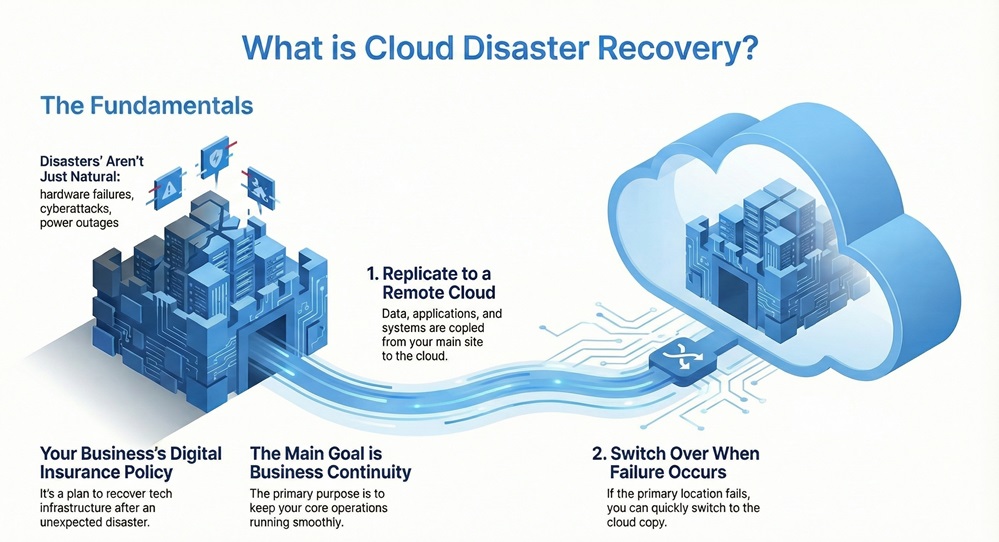
Disaster recovery in cloud computing refers to the set of policies, tools, and procedures that enables the recovery or continuation of vital technology infrastructure and systems following a natural or human-induced disaster. Simply put, it is your insurance policy for keeping your business running when the unexpected happens.
A disaster can be any event that stops your normal operations. This includes hardware failures, cyberattacks, power outages, and even natural events like floods or earthquakes. The main purpose of disaster recovery management is to ensure business continuity.
The process of disaster recovery is nothing but replicating your data, applications, and virtual machines (VMs) from your primary data center to a separate, remote cloud environment. This setup ensures that if the primary location fails, you can quickly switch operations to the cloud copy.
Why Disaster Management is Important for Your Business?
Why should your company invest in robust disaster recovery management? The answer is simple: to avoid catastrophic losses.
Minimizes Downtime: Disasters cause downtime. Downtime means lost sales, lost productivity, and unhappy customers. Effective disaster recovery dramatically reduces the time your systems are offline.
Ensures Data Protection: This is critical. Disaster recovery management maintains copies of your data in a safe, offsite location, protecting it from local failures. This directly addresses concerns about how data recovery from hard disk happens after a failure.
Maintains Compliance: Many industry regulations require specific plans for data protection and recovery. A strong plan helps you meet these legal and industry standards.
Preserves Reputation: When a service goes down, customers notice. Quickly restoring operations maintains customer trust and preserves your brand's reputation.
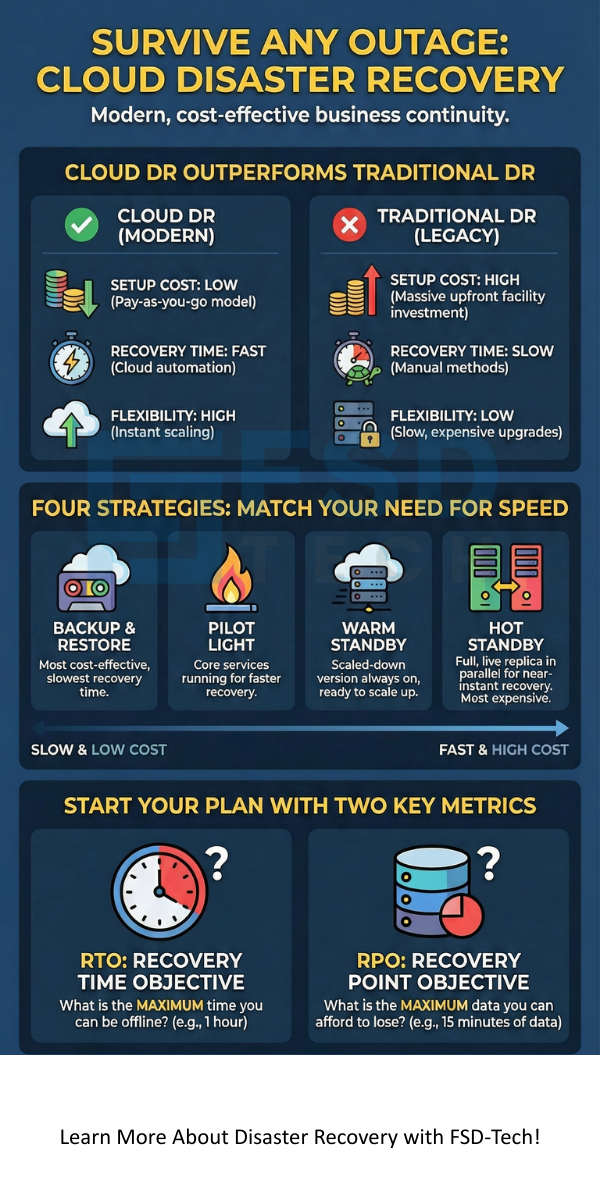
Historically, companies relied on traditional disaster recovery. This typically involved maintaining a second, dedicated physical data center—a costly and complex process. Disaster recovery in cloud computing offers a flexible, cost-effective alternative.
Let us compare the two approaches:
Basis for Comparison
Disaster Recovery in Cloud Computing
Traditional Disaster Recovery
Setup Cost
Low. You pay only for the storage and compute resources used during recovery.
Very High. Requires purchasing, setting up, and maintaining a second physical data center.
Flexibility and Scaling
High. You can easily adjust resources up or down as your needs change.
Low. Scaling requires physical hardware upgrades, which takes time and money.
Maintenance
Low. The cloud provider maintains the physical infrastructure.
High. Your team must manage and maintain both the primary and secondary sites.
Recovery Time
Generally Fast. Automated systems allow for rapid spin-up of services.
Variable. Often slower due to manual steps required to activate the physical secondary site.
Testing
Easy and Non-Disruptive. You can test in an isolated cloud environment without affecting the main system.
Complex and Expensive. Testing often requires taking the physical secondary site offline.
Types of Disaster Recovery in Cloud
The cloud offers various strategies for implementing disaster recovery in cloud computing. Your choice depends on your budget and how quickly you need to recover your systems.
1. Backup and Restore
Backup and restore is the simplest and most cost-effective method.
Definition Pattern:Disaster recovery in cloud using Backup and Restore can be understood as simply backing up data and application images to a cloud storage service.
Explanation Pattern: The data is stored, and in the event of a disaster, you download the backup files and restore them to a new environment, either in the cloud or on-premises. This means that the complete system environment is not running in the cloud until an actual disaster occurs.
Causation Pattern: Due to this cost-saving approach, recovery time is typically the longest compared to other methods, as you must spin up all compute resources after the failure.
2. Pilot Light
This strategy provides a faster recovery than basic backup without the high cost of a fully running duplicate environment.
Definition Pattern: The Pilot Light approach is nothing but maintaining a minimal, core set of resources—the "pilot light"—always running in the cloud.
Example Pattern: This minimal setup typically includes essential elements like your databases and network configuration.
Purpose Pattern: The action of keeping these core services running is so as to reduce the recovery time. When a disaster hits, you simply scale up the pre-configured resources and deploy the full application.
3. Warm Standby
The Warm Standby strategy is a more comprehensive and faster approach.
Definition Pattern:Warm Standby refers to the scenario where a minimal, scaled-down version of your entire production environment is running continuously in the cloud.
Explanation Pattern: This environment consists of servers and infrastructure components that are already warmed up and ready to go. The environment consistently receives replicated data from the primary site.
Conditional Pattern: If a disaster happens, you need only to scale up the compute and network resources to handle the full production workload.
4. Hot Standby (Multi-Site)
This is the most robust and fastest recovery method, though it is also the most expensive.
Definition Pattern:Hot Standby is defined as having a complete, live, and fully operational duplicate of your production environment running in the cloud or another data center at all times.
Causation Pattern: Due to the parallel nature of the setup, failover to the cloud is nearly instant. This approach ensures maximum business continuity.
Contrast Pattern: While this approach guarantees the shortest recovery time objective, it is the most costly because you pay for two full-scale environments.
A sound plan is the backbone of successful disaster recovery management. Creating this plan involves a systematic, step-by-step process.
1. Define Your Objectives
First, you must clearly define what you are trying to achieve.
Listing Pattern: This initial stage includes determining two key metrics: Recovery Time Objective (RTO) and Recovery Point Objective (RPO).
RTO:RTO refers to the maximum tolerable amount of time to restore your business processes after a disaster. A one-hour RTO means your system must be back online within one hour.
RPO:RPO is nothing but the maximum tolerable amount of data loss, measured in time. An RPO of 15 minutes means you can only afford to lose up to 15 minutes of data.
2. Identify Critical Systems and Risks
You cannot recover everything at once. Focus on the most important systems first.
Explanation Pattern: You identify the mission-critical applications—the ones your business cannot operate without—and prioritize them for recovery. This step also requires a risk assessment to determine the various threats, such as hardware failure or a cyberattack.
Questioning Pattern: Which applications and data are absolutely vital for your daily operations?
3. Choose Your Cloud DR Strategy
Based on your RTO, RPO, and budget, you must choose the appropriate cloud DR strategy.
Conditional Pattern: If you need near-instant recovery, then a Hot Standby is required. When a longer RTO is acceptable, Backup and Restore might be suitable. The chosen strategy directly influences the cost and complexity of the plan.
4. Implement Replication and Setup
This is where you execute the technical setup.
Purpose Pattern: You configure the tools and processes so as to replicate your data and applications to the cloud environment. This involves setting up networking, security groups, and cloud storage volumes.
Vocabulary Characteristics: Consistency is vital. You ensure that the configuration of the cloud environment is consistent with the primary data center.
5. Document the Plan
A documented plan ensures clarity when the pressure is on.
Explanation Pattern: The Disaster Recovery Plan must contain all the instructions, contact lists, and procedures required for failover and failback. It details which teams are responsible for which tasks and how they will communicate during a disaster.
6. Test Your Disaster Recovery in Cloud
A plan is useless if it is not tested. What is disaster recovery testing?
Definition Pattern:Disaster recovery testing can be understood as the process of simulating a real disaster to ensure the plan works as expected.
Sequential Pattern: First, you simulate the failure. Then, you execute the failover procedures documented in the plan. Finally, you measure the actual RTO and RPO against the defined objectives. You must perform testing regularly—at least annually.
Embracing disaster recovery in cloud computing offers significant advantages over older methods.
1. Superior Cost Efficiency
Vocabulary Characteristics: Cloud DR allows for efficient resource utilization.
Contrast Pattern: While traditional DR requires a large, fixed investment in a second data center, cloud DR relies on a pay-as-you-go model. You only pay for the full computing power when you are actually running the systems in recovery mode.
2. Faster and More Reliable Recovery
Explanation Pattern: Cloud providers offer vast, reliable infrastructure and built-in automation tools. This facilitates rapid recovery. The automation features significantly reduce the chance of human error during a high-stress failover event. This also means you do not worry about which data recovery software is best, as the cloud provides the tools.
3. Global Scalability and Reach
Action Verbs: The cloud facilitates recovery by offering multiple geographical regions.
Purpose Pattern: You can place your recovery site thousands of miles away from your primary site so as to protect against regional disasters. This level of geographical separation is often too expensive or complex to achieve with physical data centers.
4. Simplified Management and Maintenance
Explanation Pattern: The cloud service provider manages the underlying hardware, power, cooling, and physical security. This allows your internal IT team to focus on business-critical tasks rather than managing a second physical data center.
Conclusion
You now understand the vital role disaster recovery in cloud computing plays in the success and survival of your business. Preparing for a disaster is not optional; it is a fundamental requirement in the digital age. By moving your recovery strategy to the cloud, you minimize downtime, protect essential data, and gain a competitive edge through resilience.
At FSD-Tech, we are committed to helping you implement a rock-solid cloud disaster recovery plan that guarantees your business continuity and protects your investment, ensuring your operations remain stable, no matter what challenges arise.
Disaster Recovery in cloud computing is the process of moving your IT operations to a separate cloud location after a failure to ensure business continuity.
The four main types of disaster recovery are Backup and Restore, Pilot Light, Warm Standby, and Hot Standby. The right choice depends on your required RTO and RPO.
A robust plan includes six clear disaster recovery steps, starting with defining RTO/RPO and ending with mandatory, regular testing.
Cloud DR offers superior benefits, including cost efficiency, flexibility, and faster recovery times, compared to traditional methods.
Frequently Asked Questions About Disaster Recovery
Q. What is the difference between Disaster Recovery (DR) and Business Continuity (BC)?
Disaster recovery in cloud is a part of Business Continuity. Business Continuity refers to the broad plan for keeping all parts of a business running during a disruption. DR specifically deals with restoring IT operations and systems. Business Continuity aims at keeping the whole business going, while DR focuses on the technology that supports the business.
Q. Which Data Recovery Software is Best for Cloud?
You must not think about separate, third-party software for cloud DR. Major cloud providers like Amazon Web Services (AWS), Microsoft Azure, and Google Cloud Platform (GCP) offer native, integrated services that handle replication, failover, and orchestration. These built-in tools are usually the best because they are optimized for the cloud environment.
Q. How does a cloud disaster recovery solution protect against a ransomware attack?
Ransomware is a major concern. A good cloud DR plan protects you because it maintains immutable backups. An immutable backup cannot be altered or deleted, even by the user. If your live systems are encrypted by ransomware, you can simply restore from an uncorrupted, immutable backup stored in the cloud.
About The Author
Surbhi Suhane
Surbhi Suhane is an experienced digital marketing and content specialist with deep expertise in Getting Things Done (GTD) methodology and process automation. Adept at optimizing workflows and leveraging automation tools to enhance productivity and deliver impactful results in content creation and SEO optimization.
.webp&w=3840&q=75)






.webp&w=3840&q=75)






share your thoughts