HomeNext Gen IT-InfraMonitoring & ManagementCyber SecurityBCP / DRAutomationDecoded
Next Gen IT-Infra
Cato’s SASE Supports Cybersecurity Skills Development

How Cato’s SASE Supports Cybersecurity Skills Development

🕓 April 8, 2025

How SASE Supports the Security Needs of SMBs

How SASE Supports the Security Needs of SMBs

🕓 February 9, 2025

Attack Surface Reduction with Cato’s SASE

Attack Surface Reduction with Cato’s SASE

🕓 February 10, 2025

SASE for Digital Transformation in UAE

SASE for Digital Transformation in UAE

🕓 February 8, 2025

Monitoring & Management
Understanding Atera’s SLA Management

Understanding Atera’s SLA Management

🕓 February 7, 2025

Cost-Performance Ratio: Finding the Right Balance in IT Management Networks

Cost-Performance Ratio: Finding the Right Balance in IT Management Networks

🕓 June 16, 2025

Customizing Atera with APIs

Customizing Atera with APIs

🕓 March 3, 2025

Power Up Your IT Team’s Strategy with Atera’s Communication Tools

Power Up Your IT Team’s Strategy with Atera’s Communication Tools

🕓 February 8, 2025

Cyber Security
Illustration of the Cato Cloud architecture showing its role in delivering SASE for secure, optimized global connectivity.

Understanding the Cato Cloud and Its Role in SASE

🕓 January 29, 2025

Isometric illustration of professionals managing network performance, bandwidth analytics, and cloud-based optimization around the Cato Networks platform, symbolizing bandwidth control and QoS visibility.

Mastering Bandwidth Control and QoS in Cato Networks

🕓 July 26, 2025

Global network backbone powering Cato SASE solution for secure, high-performance connectivity across regions.

Global Backbone: The Engine Powering Cato’s SASE Solution

🕓 January 30, 2025

Illustration of team analyzing application traffic and usage insights on a large laptop screen using Cato’s dashboard, surrounded by network and cloud icons.

Cato Networks Application Visibility | Monitoring & Control

🕓 July 27, 2025

BCP / DR
Illustration showing diverse business and IT professionals collaborating with cloud, backup, and security icons, representing Vembu use cases for SMBs, MSPs, and IT teams.

Who Uses Vembu? Real-World Use Cases for SMBs, MSPs & IT Teams

🕓 July 12, 2025

Graphic showcasing Vembu’s all-in-one backup and disaster recovery platform with icons for cloud, data protection, and business continuity for IT teams and SMBs.

What Is Vembu? A Deep Dive Into the All in One Backup & Disaster Recovery Platform

🕓 July 6, 2025

Illustration showing Vembu backup and disaster recovery system with cloud storage, server racks, analytics dashboard, and IT professionals managing data.

The Rising Cost of Data Loss: Why Backup Is No Longer Optional?

🕓 August 14, 2025

3D isometric illustration of cloud backup and data recovery infrastructure with laptop, data center stack, and digital business icons — FSD Tech

RPO & RTO: The Heart of Business Continuity

🕓 August 15, 2025

Automation
Cross-Functional Collaboration with ClickUp

Fostering Cross-Functional Collaboration with ClickUp for Multi-Departmental Projects

🕓 February 11, 2025

ClickUp Project Reporting

Revolutionizing Enterprise Reporting with ClickUp’s Advanced Analytics and Dashboards

🕓 June 16, 2025

ClickUp’s Design Collaboration and Asset Management Tools

Empowering Creative Teams with ClickUp’s Design Collaboration and Asset Management Tools

🕓 February 26, 2025

ClickUp Communication and Collaboration Tools

ClickUp Communication and Collaboration Tools: Empowering Remote Teams

🕓 March 12, 2025

Decoded
Multi-Factor Authentication (MFA)

Multi-Factor Authentication (MFA): All You Need to Know

🕓 December 7, 2025

L3 Switch

What Is an L3 Switch? L2 vs L3 & Why You Need Layer 3?

🕓 December 8, 2025

IPSec

IPSec Explained: Protocols, Modes, IKE & VPN Security

🕓 December 3, 2025

 Datagram Transport Layer Security (DTLS)

What is Datagram Transport Layer Security (DTLS)? How it works?

🕓 December 4, 2025

    Subscribe to our newsletter!

    About Us

    Follow Us

    Copyright © 2024 | Powered by 

    Atera

    (57)

    Cato Networks

    (131)

    ClickUp

    (78)

    FishOS

    (7)

    Miradore

    (21)

    PointGuard AI

    (9)

    Vembu

    (22)

    Xcitium

    (33)

    ZETA HRMS

    (79)

    Table of Contents

    Cato Networks Application Visibility | Monitoring & Control

    Anas Abdu Rauf
    July 27, 2025
    Comments
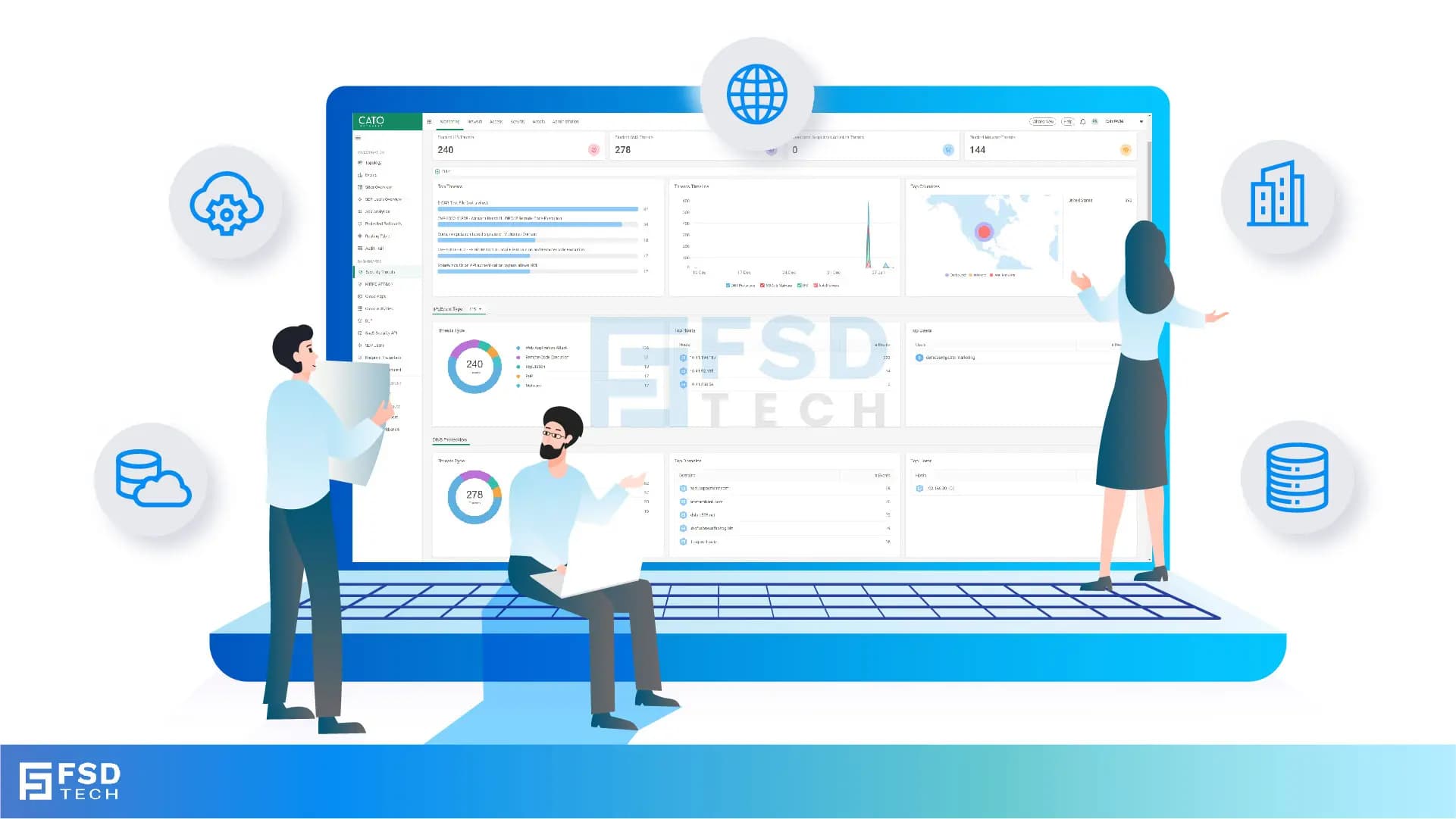
    Illustration of team analyzing application traffic and usage insights on a large laptop screen using Cato’s dashboard, surrounded by network and cloud icons.

    Cato Networks Application Visibility is a cloud-native monitoring capability that allows IT teams to identify, analyze, and manage all software traffic across the network. It uses deep packet inspection (DPI) to provide real-time data on bandwidth consumption, session counts, and user identity through a single management interface.


    Have you ever wondered exactly what is eating up your bandwidth at 2:00 PM on a Tuesday? In my experience, it is rarely the business-critical ERP system you’d expect. Usually, it is a rogue update or a group of users streaming high-definition media. Without clear sight, you are basically flying blind. Cato Networks solves this by giving you a "God view" of every bit and byte moving through your pipes.


    Get Started with Cato SASE
     

    Where to Find Application Insights in the New CMA?

    Cato's latest interface separates visibility from enforcement, making it easier to focus on the data you need.


    You can access app usage insights via:


    • Analytics > Application Analytics
    • Monitoring > Applications
    • Security > Threat Dashboard (for application-related threats)
       

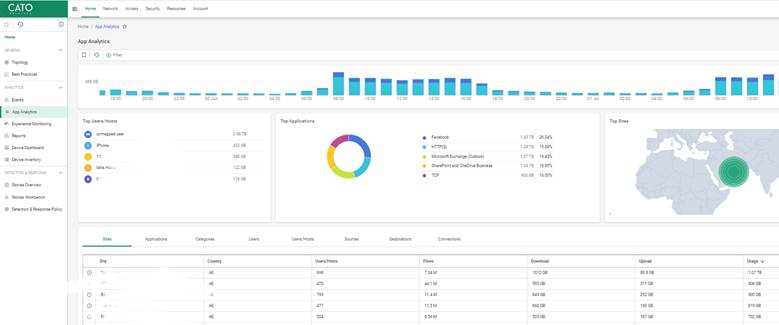
    Cato Networks App Analytics dashboard displaying application usage trends, bandwidth consumption, top users, and real-time traffic metrics across locations.


    Also Read: How the Cato Client Becomes the Identity Anchor for Zero Trust Access

    How Cato Classifies Applications

    Cato’s cloud-native engine uses deep packet inspection (DPI) and behavioral heuristics to automatically identify over 5,000 applications.


    Each app is tagged with:


    • Application name (e.g., Microsoft Teams)
    • Application category (e.g., Collaboration, File Transfer)
    • Risk level (Low/Medium/High)
    • Session count and total bandwidth consumed


    Unknown or custom apps can also be flagged for further review, and admins can tag them as custom entries.
     

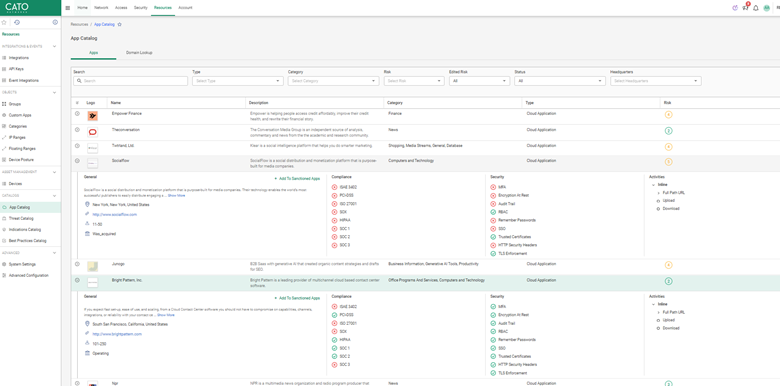
    Cato App Catalog interface showing categorized cloud applications with associated compliance scores, risk ratings, and supported user actions like upload, download, or browse.

    Key Metrics You Should Be Watching

    In the Application Analytics dashboard, focus on the following metrics:


    • Bandwidth Usage – Total MB/GB used per app per timeframe
    • Session Count – Number of connections opened by the app
    • Active Users – How many endpoints are accessing the app
    • Destination Domains – Where traffic is going (internal/external)

    Example Use Case

    A university's IT team noticed unexpected spikes in bandwidth from file-sharing apps. With Cato, they pinpointed usage to a handful of endpoints and adjusted policies accordingly to restrict them during peak hours.


    Identifying Shadow IT and Risky Behavior

    You can sort apps by:


    • Risk Level (as defined by Cato’s classification engine)
    • Category (e.g., Social Media, Remote Access)
    • Top Talkers (apps with the highest usage or number of users)
       

    This helps uncover:


    • Unauthorized apps like personal Dropbox or WhatsApp Desktop
    • Abnormally high usage of media streaming during business hours
    • Legacy or insecure protocols still in use
       

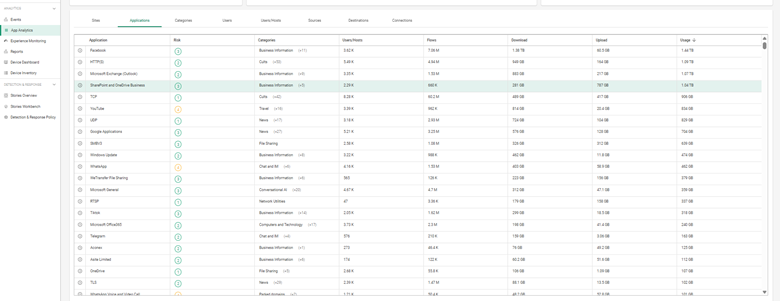
    Cato Networks application usage report listing bandwidth statistics, categories, user activity, download/upload data, and risk scores for all tracked apps.

    What to Do with This Data

    Once you’ve identified problematic or overused applications, you can take action:


    • Network > Network Rules: Create rules to throttle or block app categories
    • Network > Bandwidth Management: Prioritize business-critical apps
    • Security > Application Control: Enforce policy based on risk or compliance
    • Reports > Scheduled Reports: Export regular usage data for review
    • Integrate with SIEM or third-party analytics using Cato's REST API


    Note: As of now, you cannot configure threshold-based alerts for individual application bandwidth/session usage directly from the Application Analytics dashboard.


    Also Read: Platforms, Countries, and Origin of Connection: Advanced Device Criteria in Cato Firewall


    Checklist to Implement App Visibility Strategy

    1. Review top apps weekly under Analytics > Application Analytics
    2. Filter by category and risk to identify potential threats
    3. Tag unknown apps for future classification
       

    Create baseline reports to monitor usage trends across time

    1. Define network and security rules to manage app behavior


    Contact Our Cato SASE Specialist Today


    FAQ 

    Does Cato detect browser-based apps?

    Yes. It recognizes browser-accessed apps and web traffic.
     

    Can I block an app directly from the analytics page?

    Not directly—you’ll need to create a rule under Network Policies.
     

    Is app visibility available per user/device?

    Yes. Cato maps traffic by identity and endpoint.
     

    How accurate is app detection?

    Cato leverages DPI and heuristics, giving high accuracy across thousands of known apps.
     

    Can I export app usage data?

    Yes. Use the REST API or scheduled report features for integration with third-party systems.

    Cato Networks Application Visibility | Monitoring & Control

    About The Author

    Anas Abdu Rauf

    Anas is an Expert in Network and Security Infrastructure, With over seven years of industry experience, holding certifications Including CCIE- Enterprise, PCNSE, Cato SASE Expert, and Atera Certified Master. Anas provides his valuable insights and expertise to readers.

    TRY OUR PRODUCTS

    Like This Story?

    Share it with friends!

    Subscribe to our newsletter!

    FishOSCato SASEVembuXcitiumZeta HRMSAtera
    Isometric illustration of a centralized performance platform connected to analytics dashboards and team members, representing goal alignment, measurable outcomes, risk visibility, and strategic project tracking within ClickUp.

    How ClickUp Enables Outcome-Based Project Management (Not Just Task Tracking)

    🕓 February 15, 2026
    Isometric illustration of a centralized executive dashboard platform connected to analytics panels, performance charts, security indicators, and strategic milestones, representing real-time business visibility and decision control within ClickUp.

    Executive Visibility in ClickUp – How CXOs Gain Real-Time Control Without Micromanaging

    🕓 February 13, 2026

    Cato SASE Architecture

    Inside Cato’s SASE Architecture: A Blueprint for Modern Security

    🕓 January 26, 2025

    Workflow Automation(8)

    Workforce Automation(1)

    AI Project Management(1)

    HR Data Automation(1)

    RMM(2)

    IT Workflow Automation(1)

    GCC compliance(4)

    IT security(2)

    Payroll Integration(2)

    IT support automation(3)

    procurement automation(1)

    lost device management(1)

    IT Management(5)

    IoT Security(2)

    Cato XOps(1)

    IT compliance(4)

    Task Automation(1)

    Workflow Management(1)

    Kubernetes lifecycle management(2)

    AI-powered cloud ops(1)

    OpenStack automation(1)

    SMB Security(8)

    Data Security(1)

    MDR (Managed Detection & Response)(3)

    MSP Automation(3)

    Atera Integrations(2)

    Threat Detection & Response(1)

    XDR Security(2)

    SMB Cyber Protection(1)

    Ransomware Defense(3)

    HR Tech Solutions(1)

    Zero Trust Network Access(3)

    Quantum Security(1)

    Quantum Threat UAE & GCC(1)

    Post-Quantum Cryptography(1)

    Cloud IDE Security(1)

    Zero Trust Security(2)

    Endpoint Management(1)

    SaaS Security(2)

    Payroll Automation(5)

    IT Monitoring(2)

    Xcitium EDR SOC(15)

    Ransomware Protection GCC(1)

    Network Consolidation UAE(1)

    M&A IT Integration(1)

    MSSP for SMBs(1)

    Antivirus vs EDR(1)

    SMB Cybersecurity GCC(1)

    Ransomware Protection(3)

    Managed EDR FSD-Tech(1)

    FSD-Tech MSSP(25)

    Endpoint Security(1)

    Cybersecurity GCC(14)

    Data Breach Costs(1)

    Endpoint Protection(1)

    SMB Cybersecurity(8)

    Zero Dwell Containment(31)

    Xcitium EDR(30)

    Managed Security Services(2)

    Hybrid Backup(1)

    Cloud Backup(1)

    Backup & Recovery(1)

    pointguard ai(4)

    vembu(9)

    backup myths(1)

    SMB data protection(9)

    disaster recovery myths(1)

    Disaster Recovery(4)

    Vembu BDR Suite(19)

    GCCBusiness(1)

    DataProtection(1)

    Secure Access Service Edge(4)

    GCC IT Solutions(1)

    Unified Network Management(1)

    GCC HR software(20)

    open banking(1)

    financial cybersecurity(2)

    CC compliance(1)

    Miradore EMM(15)

    Government Security(1)

    Cato SASE(9)

    GCC Education(1)

    Hybrid Learning(1)

    Cloud Security(9)

    Talent Development(1)

    AI Governance(4)

    AI Compliance(2)

    AI Cybersecurity(13)

    AI Risk Management(1)

    AI Security(2)

    Secure Remote Access(1)

    GCC business security(1)

    GCC network integration(1)

    compliance automation(5)

    GCC cybersecurity(3)

    education security(1)

    App management UAE(1)

    BYOD security Dubai(8)

    Miradore EMM Premium+(5)

    MiddleEast(1)

    share your thoughts

    Isometric diagram showing Cato SASE troubleshooting workflow where device inventory, DHCP mapping, posture validation, and firewall event logs are analyzed to diagnose device-based rule enforcement issues.

    Troubleshooting Device-Based Firewall Rules in Cato SASE

    🕓 March 13, 2026

    Isometric diagram showing Cato SASE device inventory analyzing network traffic, DHCP data, and device attributes to support WAN and Internet firewall enforcement and device-aware security policies.

    Understanding Device Identification Limitations in Cato Device Inventory

    🕓 March 8, 2026

    Isometric diagram showing Cato SASE cloud analyzing network traffic, DHCP data, and MAC address fingerprints to identify devices and enable accurate device-based firewall enforcement.

    Why DHCP Configuration Matters for Device-Based Firewall Enforcement in Cato SASE

    🕓 March 7, 2026

    Decoded(166)

    Cyber Security(128)

    BCP / DR(22)

    Zeta HRMS(78)

    SASE(21)

    Automation(78)

    Next Gen IT-Infra(128)

    Monitoring & Management(78)

    ITSM(22)

    HRMS(21)

    Automation(24)