.webp&w=3840&q=75)
How ClickUp Enables Outcome-Based Project Management (Not Just Task Tracking)
🕓 February 15, 2026
You rely on a simple password every day to protect your bank accounts, your email, and your entire digital identity. But do you realize how fragile that single layer of defense truly is? A simple phishing email or a data breach can steal your password in seconds, leaving your life exposed.
Attackers know this weakness. They actively hunt for accounts secured by only one secret. So, how can you stop a criminal who already knows your password? The answer is Multi-Factor Authentication (MFA).
Multi-Factor Authentication (MFA) is the essential security measure that demands two or more separate verification factors for access. This system creates a protective layer that stolen passwords cannot penetrate. We define Multi-Factor Authentication as the requirement for evidence from different categories—something you know, something you have, or something you are.
By adopting MFA, you build an identity fortress. Now, let us explore how Multi-Factor Authentication works to secure your world.
Multi-Factor Authentication (MFA) refers to a security system that requires a user to provide two or more verification factors to gain access to an application, account, or system. The primary goal is to create multiple security barriers. Requiring multiple barriers makes it harder for unauthorized users to break into a system.
In simple words, Multi-Factor Authentication adds extra protection beyond just a username and a password. It is a critical layer of defense for securing sensitive data. When you set up this system, you make sure that only the correct person can log in, even if a criminal steals their password. This method greatly reduces the risk of credential theft.
Multi-Factor Authentication is also sometimes called strong authentication. It stops attackers who try to use stolen credentials. This crucial practice helps organizations secure their digital assets.
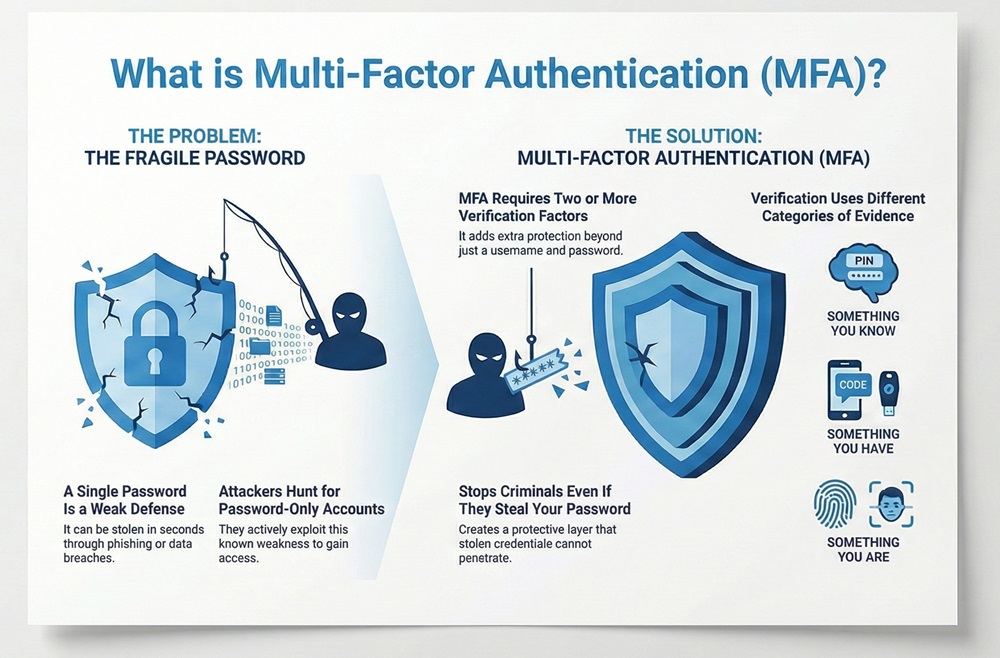
Multi-Factor Authentication always requires verification factors from different categories. Using two passwords is not Multi-Factor Authentication because both are in the same category. For true Multi-Factor Authentication, the factors must represent different and separate types of proof.
There are three main categories of authentication factors. You must use at least two of these factors for proper Multi-Factor Authentication to be in place.
Factor 1: Something You Know (Knowledge)
Multi-Factor Authentication often starts with a knowledge factor. This factor is information that only the user knows. This is the most common type of factor used for authentication.
Factor 2: Something You Have (Possession)
Multi-Factor Authentication needs a factor you physically possess. This factor relies on a physical item in the user's hand. If someone steals your password, they still cannot log in without this physical item.
Factor 3: Something You Are (Inherence)
Multi-Factor Authentication can also use inherent factors. This factor relies on a unique physical characteristic of the user. This is a very secure method because it is difficult to fake a person's physical self.
When implementing Multi-Factor Authentication, organizations must select the right combination of factors. The table below compares the three main factor categories. This comparison shows how each factor works and its general nature.
| Basis for Comparison | Something You Know (Knowledge) | Something You Have (Possession) | Something You Are (Inherence) |
|---|---|---|---|
| Meaning | Information that a user knows by heart. | A physical object that is in the user's control. | A unique biological trait of the user. |
| Nature | Cognitive (relies on memory). | Physical (relies on an object). | Biological (relies on a body part). |
| Examples | Password, PIN, Passphrase, Security Questions. | Security Token, Smartphone (for OTP), FIDO Key. | Fingerprint, Facial Scan, Voiceprint, Retina Scan. |
| Functions | Proves identity via recall. | Proves identity via ownership. | Proves identity via uniqueness. |
| Key Characteristics | Easily guessed, stolen, or forgotten. | Can be lost, stolen, or damaged. | Very difficult to fake, generally high security. |
Multi-Factor Authentication (MFA) comes in several forms. The specific method depends on the factor categories used. Using any two different categories achieves the goal of strong authentication.
Multi-Factor Authentication is often confused with Two-Factor Authentication (2FA). Two-Factor Authentication (2FA) is simply a version of MFA that uses exactly two factors. All 2FA is MFA, but not all MFA is 2FA (as MFA can use three or more factors).
Here are the most common types of Multi-Factor Authentication methods used today:
Also Read: What is an Intrusion Detection System (IDS)? Components and Types
Organizations and individual users gain significant security benefits by using Multi-Factor Authentication. The added barrier makes accounts much harder to compromise. Strong authentication protects both personal privacy and large corporate assets.
While the security gains are high, Multi-Factor Authentication is not without its difficulties. Companies must plan carefully to overcome these challenges during implementation.
Also Read: What is a Firewall as a Service (FWaaS)?
Implementing Multi-Factor Authentication requires a strategic approach. You must move away from easily compromised methods to truly strong authentication. This effort involves both policy and technology choices.
Multi-Factor Authentication represents an essential security measure in the modern digital landscape. This method dramatically improves security by requiring proof from multiple, different factor categories. It moves far beyond the weak protection of just a password.
Understanding the difference between something you know, something you have, and something you are is key. Ultimately, Multi-Factor Authentication is the most effective defense against credential theft and unauthorized access. Investing in MFA ensures the safety of data and the integrity of digital systems for everyone.
99.9 % of account takeovers stop with proper MFA. Ready to deploy it globally in minutes instead of months? Book a 15-minute Cato SASE discovery call.
Multi-Factor Authentication (MFA) is a security system that requires the user to successfully present two or more separate factors from different categories to prove their identity for a login.
MFA is necessary because it stops attackers who steal only a password. Even if an attacker knows your password, they still need the second factor—like your physical phone—to get into your account.
The three categories are: something you know (like a password), something you have (like a token or phone), and something you are (like a fingerprint or face scan).
No, not exactly. Two-Factor Authentication (2FA) is a subset of MFA. 2FA uses exactly two factors. MFA can use two, three, or more factors.
Hardware security keys and authenticator apps (TOTP) are considered the strongest forms of MFA. They protect better against sophisticated phishing attacks than SMS codes.
SMS codes are easy to use, but they are vulnerable. Attackers can perform SIM-swapping attacks to intercept the code. Experts now recommend stronger MFA methods.
No, MFA does not solve all security problems. It is a critical layer of defense against credential theft, but users must still use strong passwords and be careful about malware.
A TOTP is a temporary, unique code generated by an authenticator app that is valid for only a short time, usually 30 seconds. It serves as a strong possession factor in MFA.
You must use pre-set recovery codes or contact your service provider's IT department. A secure, multi-step recovery process must be in place to prevent account lockout.
A company should start implementing Multi-Factor Authentication (MFA) immediately. It is considered a baseline requirement for modern access control and security.

Surbhi Suhane is an experienced digital marketing and content specialist with deep expertise in Getting Things Done (GTD) methodology and process automation. Adept at optimizing workflows and leveraging automation tools to enhance productivity and deliver impactful results in content creation and SEO optimization.
Share it with friends!




.webp&w=3840&q=75)






share your thoughts