HomeNext Gen IT-InfraMonitoring & ManagementCyber SecurityBCP / DRAutomationDecoded
Next Gen IT-Infra
Cato’s SASE Supports Cybersecurity Skills Development

How Cato’s SASE Supports Cybersecurity Skills Development

🕓 April 8, 2025

How SASE Supports the Security Needs of SMBs

How SASE Supports the Security Needs of SMBs

🕓 February 9, 2025

Attack Surface Reduction with Cato’s SASE

Attack Surface Reduction with Cato’s SASE

🕓 February 10, 2025

SASE for Digital Transformation in UAE

SASE for Digital Transformation in UAE

🕓 February 8, 2025

Monitoring & Management
Understanding Atera’s SLA Management

Understanding Atera’s SLA Management

🕓 February 7, 2025

Cost-Performance Ratio: Finding the Right Balance in IT Management Networks

Cost-Performance Ratio: Finding the Right Balance in IT Management Networks

🕓 June 16, 2025

Customizing Atera with APIs

Customizing Atera with APIs

🕓 March 3, 2025

Power Up Your IT Team’s Strategy with Atera’s Communication Tools

Power Up Your IT Team’s Strategy with Atera’s Communication Tools

🕓 February 8, 2025

Cyber Security
Visual guide showing Cato CMA interface for configuring Internet and WAN firewall rules, enabling threat protection, and monitoring security events in real time for UAE IT teams.

Enforcing Firewall and Threat Protection Policies in Cato

🕓 July 25, 2025

Isometric illustration of professionals managing network performance, bandwidth analytics, and cloud-based optimization around the Cato Networks platform, symbolizing bandwidth control and QoS visibility.

Mastering Bandwidth Control and QoS in Cato Networks

🕓 July 26, 2025

Illustration of the Cato Cloud architecture showing its role in delivering SASE for secure, optimized global connectivity.

Understanding the Cato Cloud and Its Role in SASE

🕓 January 29, 2025

Global network backbone powering Cato SASE solution for secure, high-performance connectivity across regions.

Global Backbone: The Engine Powering Cato’s SASE Solution

🕓 January 30, 2025

BCP / DR
Illustration showing diverse business and IT professionals collaborating with cloud, backup, and security icons, representing Vembu use cases for SMBs, MSPs, and IT teams.

Who Uses Vembu? Real-World Use Cases for SMBs, MSPs & IT Teams

🕓 July 12, 2025

Graphic showcasing Vembu’s all-in-one backup and disaster recovery platform with icons for cloud, data protection, and business continuity for IT teams and SMBs.

What Is Vembu? A Deep Dive Into the All in One Backup & Disaster Recovery Platform

🕓 July 6, 2025

Illustration showing Vembu backup and disaster recovery system with cloud storage, server racks, analytics dashboard, and IT professionals managing data.

The Rising Cost of Data Loss: Why Backup Is No Longer Optional?

🕓 August 14, 2025

3D isometric illustration of cloud backup and data recovery infrastructure with laptop, data center stack, and digital business icons — FSD Tech

RPO & RTO: The Heart of Business Continuity

🕓 August 15, 2025

Automation
Cross-Functional Collaboration with ClickUp

Fostering Cross-Functional Collaboration with ClickUp for Multi-Departmental Projects

🕓 February 11, 2025

ClickUp Project Reporting

Revolutionizing Enterprise Reporting with ClickUp’s Advanced Analytics and Dashboards

🕓 June 16, 2025

ClickUp’s Design Collaboration and Asset Management Tools

Empowering Creative Teams with ClickUp’s Design Collaboration and Asset Management Tools

🕓 February 26, 2025

ClickUp Communication and Collaboration Tools

ClickUp Communication and Collaboration Tools: Empowering Remote Teams

🕓 March 12, 2025

Decoded
Multi-Factor Authentication (MFA)

Multi-Factor Authentication (MFA): All You Need to Know

🕓 December 7, 2025

L3 Switch

What Is an L3 Switch? L2 vs L3 & Why You Need Layer 3?

🕓 December 8, 2025

IPSec

IPSec Explained: Protocols, Modes, IKE & VPN Security

🕓 December 3, 2025

 Datagram Transport Layer Security (DTLS)

What is Datagram Transport Layer Security (DTLS)? How it works?

🕓 December 4, 2025

    Subscribe to our newsletter!

    About Us

    Follow Us

    Copyright © 2024 | Powered by 

    Cato SASE Architecture

    Inside Cato’s SASE Architecture: A Blueprint for Modern Security

    🕓 January 26, 2025

    Enterprise Data Security and Privacy with ClickUp

    Ensuring Enterprise Data Security and Privacy with ClickUp

    🕓 February 9, 2025

    DDoS protection SASE

    DDoS Protection and Cato’s Defence Mechanisms

    🕓 February 11, 2025

    Table of Contents

    What Is Spyware Software? Types, Signs & Removal Guide

    Surbhi Suhane
    December 17, 2025
    Comments
    spyware software

    Are you aware that some spyware software might be quietly sitting on your computer or phone? This type of malicious software is a big threat to your privacy and safety online. Many people use the internet every day for banking, shopping, and talking with friends. Because of this, learning about spyware software and how it works has become very important.


    In this guide, you will get to know about this digital danger. We will explain what spyware software is, how it gets onto your devices, and why you should care about it. We will also talk about the different kinds of spyware and, most importantly, show you simple ways to remove and prevent it. We are going to provide practical steps. Always remember that protecting your digital life is an ongoing task.


    Now, the question arises: Why is understanding spyware software a must for you? Because this malicious code secretly records what you do. It can steal your passwords, credit card numbers, and other personal data. You should take a read of this complete guide to keep your information safe and secure.


    Stop Spyware Attacks Now


    What is Spyware Software?

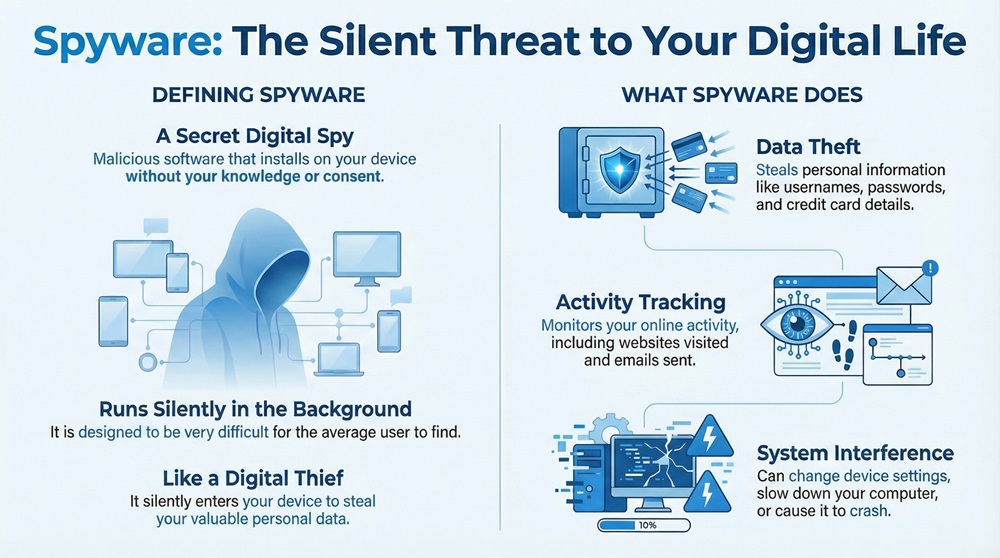
    Spyware software refers to a type of malicious software, or malware, that secretly installs itself on a computer or mobile device. As the name suggests, this spyware's primary purpose is to spy on you. It collects personal data and information about your activities without your knowledge or consent.


    It is to be noted that spyware software typically runs in the background. It does not openly show itself. This makes it very hard for the average user to find. Spyware can be understood as a digital thief who silently enters your home (your device) and takes your valuable information (your personal data).
     

    spyware software infographic


    To understand spyware software in clearer terms, here are its key functional purposes:


    • Data Theft: It steals personal information like usernames, passwords, and credit card details.
    • Activity Tracking: It monitors your online activity, including the websites you visit and the emails you send.
    • System Interference: It can change your device settings, which often slows down your computer or causes crashes.


    Spyware often comes bundled with other seemingly harmless software. It is a major threat to your digital security and data protection.


    How Does Spyware Software Invade Your Device?

    Spyware software is good at hiding. It uses several clever ways to sneak onto your computer or smartphone. If you want to stop spyware, you must first know how it gets in.


    Here are the most common ways spyware sneaks onto your device:


    • Bundled Software Installation: Spyware often piggybacks onto legitimate software. When you download a free application, for instance, the spyware software might be hidden in the installer. By clicking "Next" quickly during installation, you might accidentally agree to install this unwanted program.
    • Malicious Websites: Visiting a harmful website can lead to a "drive-by download." This means the spyware installs itself automatically without you clicking anything. This is why browsing safely is very important for preventing spyware.
    • Phishing Emails and Attachments: An email that looks real might ask you to click a link or download an attachment. If you click on it, the spyware software installs itself. Criminals use these emails to trick you into inviting the spyware in.
    • Compromised Mobile Apps: Particularly on Android, some apps in unofficial stores or even in official ones contain hidden spyware. Once you install the app, the spyware starts watching your phone activity.
    • Adware and Pop-ups: Clicking on a malicious pop-up ad can sometimes be enough for the spyware to infect your system. These ads trick you into clicking them to get the spyware software onto your device.


    Always remember that spyware installation happens when you are not careful. Being cautious about what you download and click is your first line of defense against spyware.


    Also Read: Spear Phishing: Learn About #1 CEO fraud


    Types of Spyware Software

    Not all spyware software is the same. Basically, several categories of spyware exist, each focusing on stealing a different kind of personal data. Knowing these types helps you understand the specific risks involved in spyware detection and removal.


    There are various types of spyware worth understanding:


    • Keyloggers (System Monitors): Keyloggers are a very dangerous kind of spyware software. They record every keystroke you make on your keyboard. This means they can capture your usernames, passwords, banking PINs, and everything you type in an email or document. This information is then sent to the attacker.
    • Adware:Adware can be seen as the less harmful cousin of spyware. While its main goal is to show you unwanted ads, it also tracks your browsing habits. This tracking allows companies to send targeted advertisements. Due to which, adware can lead to privacy problems and also slow down your system a lot.
    • Password Stealers: These spyware software types are made to grab saved login information from your web browser or password manager. They specifically search for files that store your cached passwords. This makes them a direct threat to your account security.
    • Infostealers:Infostealers are designed to search your device for a wide range of documents and files. They look for things like spreadsheets, text documents, or media files that contain personal data or valuable company information.
    • Banking Trojans: This advanced spyware targets your financial transactions. When you visit a bank website, the Trojan can change the page you see or steal the data you enter. This is a big threat to your financial security.
    • Mobile Spyware: This kind of spyware software targets your smartphone. It can track your GPS location, monitor your calls, read your text messages, and even turn on your phone's microphone or camera without you knowing. This is a growing concern for digital privacy.


    Each type of spyware needs a specific approach for spyware detection and removal. This makes using strong, multi-layered anti-spyware software necessary.


    Common Signs Your Device Has Spyware

    Sometimes, spyware software works so well that you don't even know it's there. However, most spyware leaves certain clues that you should watch out for. Learning these signs will help you in spyware detection before too much damage is done.


    Here are the key signs your computer or phone might have spyware software:


    • Slow Performance: Spyware runs hidden tasks in the background. This uses up your computer’s memory and processing power. Consequently, your device may start to run very slowly. Your apps might take forever to open, or your system might freeze often.
    • New, Unwanted Toolbars or Homepages: Did a new toolbar suddenly appear in your browser? Did your homepage change without your permission? This is a classic sign of spyware software or adware changing your browser settings.
    • Increased Pop-up Ads: If you start seeing many more pop-up ads than usual, even when you are not browsing the web, adware or spyware is likely the cause. These ads are a direct result of the spyware tracking your interests.
    • Hard Drive Activity: Even when you are not using your device, the hard drive light may flash often. This can show that a hidden program, like spyware, is busy collecting and sending your personal data over the internet.
    • Running Out of Disk Space: Some spyware software logs a lot of data and stores it on your hard drive before sending it out. If your available disk space suddenly drops, it might be due to spyware activity.
    • Increased Data Usage: Mobile spyware constantly sends your information to the attacker. So, if your mobile data usage suddenly jumps, it could mean a spyware app is running in the background.


    If you notice several of these signs, you should immediately perform a full scan with a reliable anti-spyware software.


    Also Read: What is Web Application Firewall? | WAF Explained


     How to Remove Spyware Software from Your Device

    Removing spyware software requires a careful, step-by-step process. Do not try to remove it manually unless you are an expert, as you could damage your system. Spyware detection and removal is best done using specialized anti-spyware software.


    Here is a step-by-step process for removing spyware software:


    1. Disconnect from the Internet

    Initially, you must disconnect your computer or phone from the internet. This stops the spyware from sending your collected personal data to the attacker. This is the first and most important step in spyware removal.


    2. Enter Safe Mode (For Computers)

    Next, restart your computer and enter Safe Mode. When you are in Safe Mode, only the minimum necessary programs load. This prevents most spyware software from running. This makes it easier for your anti-spyware tool to find and remove the malware.


    3. Run a Full Scan with Anti-Spyware Software

    Here, you need to use a strong, updated, and reputable anti-spyware software.


    • First, update your anti-spyware software to ensure it has the latest definitions.
    • Then, run a full system scan. The scan will look through all your files and find any hidden spyware software.
    • After the scan finishes, tell the anti-spyware program to quarantine or delete all the files it flagged as spyware.


    4. Clear Temporary Files and Browser Data

    Spyware often leaves behind temporary files and browser history. So, you must clear your temporary files, cache, and cookies. This gets rid of any leftover traces of the spyware software.


    5. Change All Your Passwords

    Since keyloggers or password stealers might have taken your logins, you must change all your important passwords right away. Only do this after you have cleaned your system completely, as changing them beforehand means the spyware could simply steal the new ones too.


    Anti-spyware software is your primary tool in this fight. Always use a tool with a high reputation for malware detection and removal.


    Also Read: Cloud Encryption Gateway (CEG): Keep Keys, Secure Data


    Preventing Spyware Software 

    The best defense against spyware software is to stop it from getting on your device in the first place. You can keep your system safe by adopting good digital security habits and using the right tools.


    To effectively prevent spyware installation, follow these key practices:


    • Use Up-to-Date Security Software: Always have strong anti-spyware software and a firewall running. Anti-spyware software can block spyware before it installs itself.
    • Keep Your Operating System and Apps Updated: Software updates often fix security gaps that spyware software tries to exploit. You should regularly install all operating system, browser, and application updates.
    • Be Smart About Downloads: Only download programs from trusted, official sources. Always read the End-User License Agreement (EULA) and uncheck any extra bundled software when installing a new app. This is crucial for preventing spyware.
    • Practice Email and Browsing Safety: Be careful with emails from unknown senders. Never click on links or download attachments in suspicious emails. Also, avoid visiting risky or untrustworthy websites.
    • Use a Standard User Account: On a computer, use a standard user account for daily tasks instead of an administrator account. This limits the ability of new spyware software to install itself or change important system settings.
    • Use Strong and Unique Passwords: Strong passwords make it harder for attackers to use stolen information. Consider using a trustworthy password manager. This helps your overall data protection.


    Preventing spyware is much easier and safer than having to do spyware removal. By being smart and using the right tools, you can greatly reduce the risk.


    Conclusion

    So, you now understand the serious risks that spyware software brings to your digital security and personal data. We have talked about how this malware works, its different types, and the simple steps for spyware detection and removal. Spyware is a silent and serious threat. Using strong anti-spyware software and practicing safe habits are the two most important steps to keep your information private.


    When you need robust digital security solutions, remember that protecting your data is our highest priority. When the situation requires advanced malware detection and removal, choosing a partner with a deep commitment to data protection is the recommended choice. We focus on providing complete security, so you can live your digital life with confidence.


    Worried About Hidden Spyware? Reach out now
     

    Spyware software


    Key Takeaways on Spyware Software

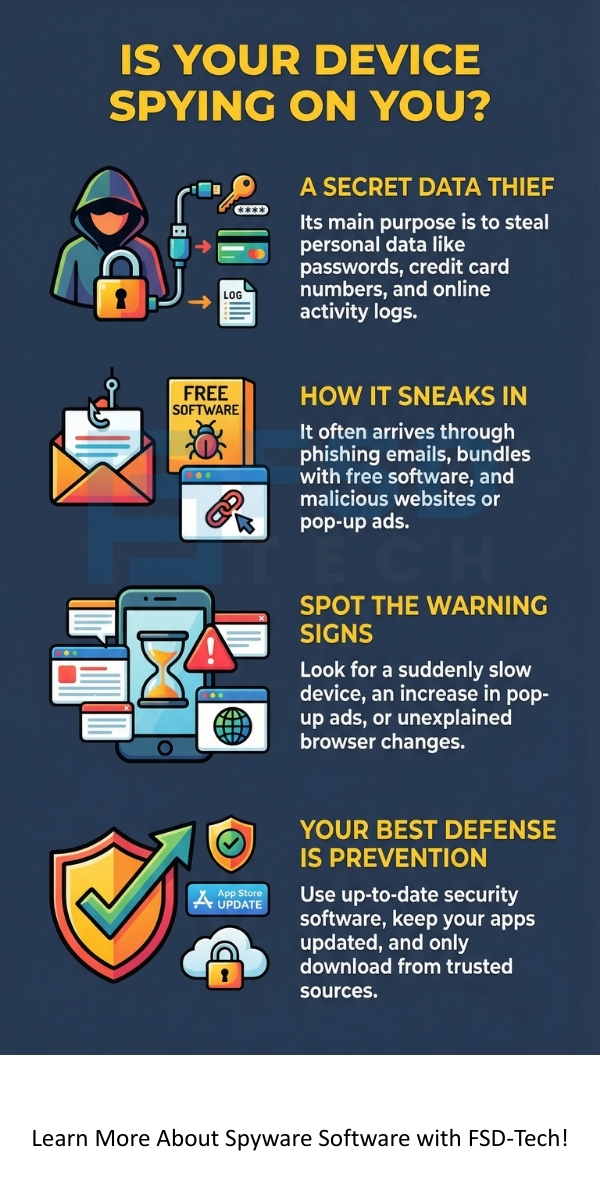
    1. Spyware is hidden malware that secretly monitors your activity, steals personal data like passwords and credit card details, and often runs unnoticed in the background.
    2. Common infection methods include bundled free software, malicious websites, phishing emails, and fake mobile apps – always download from trusted sources.
    3. Types vary in danger: Keyloggers record keystrokes, adware bombards with ads while tracking, infostealers grab files, and mobile spyware can activate cameras/mics.
    4. Signs of infection include slow performance, unexpected pop-ups, high data usage, new toolbars, or constant hard drive activity – scan immediately if noticed.
    5. Prevention is key: Use reputable anti-spyware with real-time protection, enable MFA, avoid suspicious links/downloads, keep software updated, and never reuse passwords.


    Frequently Asked Questions (FAQ) about Spyware Software

    This section addresses common questions about spyware software to provide a clearer understanding of digital privacy and security.


    What is the main difference between a virus and spyware software?

    A virus is a type of malware that replicates itself and spreads by infecting other files. On the other hand, spyware software focuses on monitoring your activity and stealing your personal data without self-replicating. While both are harmful, the virus's main goal is to damage files, whereas the spyware's main goal is to steal information.


    Can spyware software track me even if I am using an incognito window?

    Yes, spyware software can still track your activity in an incognito or private browsing window. Incognito mode only stops your browser from saving your local history, cookies, and site data. However, keyloggers and other spyware operate at the operating system level, capturing your keystrokes and screen activity regardless of your browser settings. It is to be noted that spyware detection and removal is the only way to truly stop the tracking.


    Is my mobile phone also at risk of spyware?

    Absolutely. Mobile spyware is a growing problem, especially on smartphones running the Android operating system, though iPhones are also vulnerable. This kind of spyware software can track your location, read your text messages, listen to your calls, and steal other sensitive mobile data. Installing apps only from official stores and being careful about permissions is very important for mobile device security.


    How often should I run a full anti-spyware software scan?

    You should run a full anti-spyware software scan at least once a week. However, a high-quality anti-spyware program should have real-time protection running constantly. This feature actively watches for and blocks threats before they can install themselves. Run a scan immediately if you notice any of the common signs of spyware software infection.

    What Is Spyware Software? Types, Signs & Removal Guide

    About The Author

    Surbhi Suhane

    Surbhi Suhane is an experienced digital marketing and content specialist with deep expertise in Getting Things Done (GTD) methodology and process automation. Adept at optimizing workflows and leveraging automation tools to enhance productivity and deliver impactful results in content creation and SEO optimization.

    Like This Story?

    Share it with friends!

    Subscribe to our newsletter!

    Atera

    (48)

    Cato Networks

    (109)

    ClickUp

    (61)

    FishOS

    (7)

    Miradore

    (21)

    PointGuard AI

    (9)

    Vembu

    (22)

    Xcitium

    (33)

    ZETA HRMS

    (63)

    Workflow Automation(2)

    Workforce Automation(1)

    AI Project Management(1)

    HR Data Automation(1)

    RMM(1)

    IT Workflow Automation(1)

    IT security(2)

    GCC compliance(3)

    Payroll Integration(2)

    IT support automation(2)

    procurement automation(1)

    lost device management(1)

    IT Management(5)

    IoT Security(2)

    Cato XOps(2)

    IT compliance(4)

    Workflow Management(1)

    Task Automation(1)

    OpenStack automation(1)

    AI-powered cloud ops(1)

    Kubernetes lifecycle management(2)

    SMB Security(8)

    Data Security(1)

    MDR (Managed Detection & Response)(4)

    MSP Automation(2)

    Atera Integrations(2)

    XDR Security(2)

    SMB Cyber Protection(1)

    Ransomware Defense(3)

    HR Tech Solutions(1)

    Zero Trust Network Access(3)

    Zero Trust Security(2)

    Endpoint Management(1)

    SaaS Security(1)

    Payroll Automation(5)

    IT Monitoring(2)

    Xcitium EDR SOC(15)

    Ransomware Protection GCC(1)

    M&A IT Integration(1)

    Network Consolidation UAE(1)

    MSSP for SMBs(1)

    Ransomware Protection(3)

    Managed EDR FSD-Tech(1)

    SMB Cybersecurity GCC(1)

    Antivirus vs EDR(1)

    FSD-Tech MSSP(25)

    Cybersecurity GCC(12)

    Endpoint Security(1)

    Endpoint Protection(1)

    Data Breach Costs(1)

    SMB Cybersecurity(8)

    Managed Security Services(2)

    Xcitium EDR(30)

    Zero Dwell Containment(31)

    Hybrid Backup(1)

    Cloud Backup(1)

    Backup & Recovery(1)

    pointguard ai(4)

    disaster recovery myths(1)

    backup myths(1)

    vembu(9)

    SMB data protection(9)

    Vembu BDR Suite(19)

    Disaster Recovery(4)

    GCCBusiness(1)

    DataProtection(1)

    Secure Access Service Edge(4)

    GCC HR software(14)

    Miradore EMM(15)

    Cato SASE(7)

    Cloud Security(8)

    Talent Development(1)

    AI Compliance(2)

    AI Governance(4)

    AI Risk Management(1)

    AI Security(2)

    AI Cybersecurity(12)

    GCC business security(1)

    GCC network integration(1)

    compliance automation(3)

    GCC cybersecurity(2)

    education security(1)

    Miradore EMM Premium+(5)

    BYOD security Dubai(8)

    App management UAE(1)

    MiddleEast(1)

    HealthcareSecurity(1)

    Team Collaboration(1)

    IT automation(9)

    Zscaler(1)

    SD-WAN(6)

    HR Integration(4)

    Cloud Networking(3)

    device management(9)

    VPN(1)

    ZeroTrust(2)

    RemoteWork(1)

    MPLS(1)

    Project Management(9)

    HR automation(14)

    share your thoughts

    Unified Threat Management (UTM)

    Unified Threat Management (UTM): Key Security Functions

    🕓 December 18, 2025

    Data leakage

    What Is Data Leakage? Causes, Prevention & ML Risks

    🕓 December 18, 2025

    Whaling Attack

    What Is a Whaling Attack? How It Works & Prevention

    🕓 December 17, 2025

    Decoded(25)

    Cyber Security(110)

    BCP / DR(22)

    Zeta HRMS(62)

    SASE(21)

    Automation(61)

    Next Gen IT-Infra(109)

    Monitoring & Management(69)

    ITSM(22)

    HRMS(21)

    Automation(24)