HomeNext Gen IT-InfraMonitoring & ManagementCyber SecurityBCP / DRAutomationDecoded
Next Gen IT-Infra
Cato’s SASE Supports Cybersecurity Skills Development

How Cato’s SASE Supports Cybersecurity Skills Development

🕓 April 8, 2025

How SASE Supports the Security Needs of SMBs

How SASE Supports the Security Needs of SMBs

🕓 February 9, 2025

Attack Surface Reduction with Cato’s SASE

Attack Surface Reduction with Cato’s SASE

🕓 February 10, 2025

SASE for Digital Transformation in UAE

SASE for Digital Transformation in UAE

🕓 February 8, 2025

Monitoring & Management
Understanding Atera’s SLA Management

Understanding Atera’s SLA Management

🕓 February 7, 2025

Cost-Performance Ratio: Finding the Right Balance in IT Management Networks

Cost-Performance Ratio: Finding the Right Balance in IT Management Networks

🕓 June 16, 2025

Customizing Atera with APIs

Customizing Atera with APIs

🕓 March 3, 2025

Power Up Your IT Team’s Strategy with Atera’s Communication Tools

Power Up Your IT Team’s Strategy with Atera’s Communication Tools

🕓 February 8, 2025

Cyber Security
Illustration of the Cato Cloud architecture showing its role in delivering SASE for secure, optimized global connectivity.

Understanding the Cato Cloud and Its Role in SASE

🕓 January 29, 2025

Isometric illustration of professionals managing network performance, bandwidth analytics, and cloud-based optimization around the Cato Networks platform, symbolizing bandwidth control and QoS visibility.

Mastering Bandwidth Control and QoS in Cato Networks

🕓 July 26, 2025

Global network backbone powering Cato SASE solution for secure, high-performance connectivity across regions.

Global Backbone: The Engine Powering Cato’s SASE Solution

🕓 January 30, 2025

Illustration of team analyzing application traffic and usage insights on a large laptop screen using Cato’s dashboard, surrounded by network and cloud icons.

Cato Networks Application Visibility | Monitoring & Control

🕓 July 27, 2025

BCP / DR
Illustration showing diverse business and IT professionals collaborating with cloud, backup, and security icons, representing Vembu use cases for SMBs, MSPs, and IT teams.

Who Uses Vembu? Real-World Use Cases for SMBs, MSPs & IT Teams

🕓 July 12, 2025

Graphic showcasing Vembu’s all-in-one backup and disaster recovery platform with icons for cloud, data protection, and business continuity for IT teams and SMBs.

What Is Vembu? A Deep Dive Into the All in One Backup & Disaster Recovery Platform

🕓 July 6, 2025

Illustration showing Vembu backup and disaster recovery system with cloud storage, server racks, analytics dashboard, and IT professionals managing data.

The Rising Cost of Data Loss: Why Backup Is No Longer Optional?

🕓 August 14, 2025

3D isometric illustration of cloud backup and data recovery infrastructure with laptop, data center stack, and digital business icons — FSD Tech

RPO & RTO: The Heart of Business Continuity

🕓 August 15, 2025

Automation
Cross-Functional Collaboration with ClickUp

Fostering Cross-Functional Collaboration with ClickUp for Multi-Departmental Projects

🕓 February 11, 2025

ClickUp Project Reporting

Revolutionizing Enterprise Reporting with ClickUp’s Advanced Analytics and Dashboards

🕓 June 16, 2025

ClickUp’s Design Collaboration and Asset Management Tools

Empowering Creative Teams with ClickUp’s Design Collaboration and Asset Management Tools

🕓 February 26, 2025

ClickUp Communication and Collaboration Tools

ClickUp Communication and Collaboration Tools: Empowering Remote Teams

🕓 March 12, 2025

Decoded
Multi-Factor Authentication (MFA)

Multi-Factor Authentication (MFA): All You Need to Know

🕓 December 7, 2025

L3 Switch

What Is an L3 Switch? L2 vs L3 & Why You Need Layer 3?

🕓 December 8, 2025

IPSec

IPSec Explained: Protocols, Modes, IKE & VPN Security

🕓 December 3, 2025

 Datagram Transport Layer Security (DTLS)

What is Datagram Transport Layer Security (DTLS)? How it works?

🕓 December 4, 2025

    Subscribe to our newsletter!

    About Us

    Follow Us

    Copyright © 2024 | Powered by 

    Atera

    (55)

    Cato Networks

    (121)

    ClickUp

    (78)

    FishOS

    (7)

    Miradore

    (21)

    PointGuard AI

    (9)

    Vembu

    (22)

    Xcitium

    (33)

    ZETA HRMS

    (79)

    Table of Contents

    Security Automation: How to Protect Your Data Without the Burnout

    Surbhi Suhane
    February 21, 2026
    Comments
    Security Automation

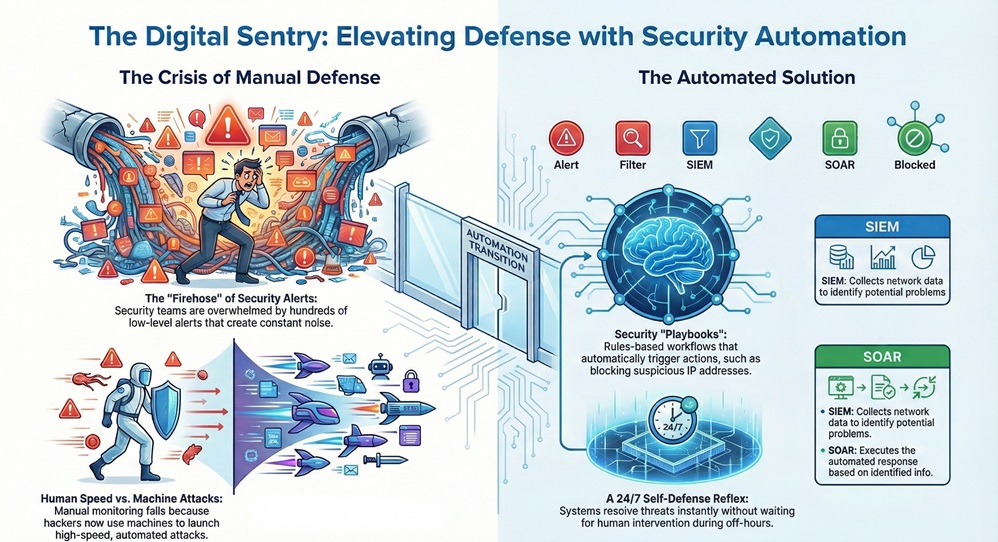
    Security automation refers to the use of software-driven workflows to detect and resolve cyber threats with minimal human help. Have you ever felt like you're trying to drink from a firehose while managing security alerts? We've all been there. Your inbox fills up, the dashboard turns red, and the pressure to react fast becomes heavy.


    To be honest, the old way of doing things manually just doesn't work anymore. Hackers use machines to attack you, so why are we still relying solely on human speed to defend ourselves? This guide will show you how security automation fixes that. We’ll look at how it works, why it’s a game-changer for your team, and how you can start using it today.


    What is Security Automation?

    At its heart, security automation is about taking the boring, repetitive tasks off your plate. Think about the hundreds of low-level alerts your system creates every day. Most of them are noise, but you still have to check them. Automation handles this by following a set of rules or "playbooks."


    security automation infographic


    When a specific event happens, the system knows exactly what to do. For example, if it sees a login attempt from a suspicious country, it can block that IP address immediately. It doesn't wait for you to wake up at 3 a.m. to click a button. By using security automation, you're basically giving your network a self-defense reflex.


    Automate My Defense


    The Role of SOAR and SIEM

    You might hear people talk about SOAR (Security Orchestration, Automation, and Response) or SIEM (Security Information and Event Management). These are the "brains" of the operation. A SIEM collects data from all over your network to find problems. Then, the SOAR takes that info and executes the response.


    Is it magic? Not quite. It's just smart software doing the heavy lifting so you don't have to.


    Why Your Team Needs Security Automation Now

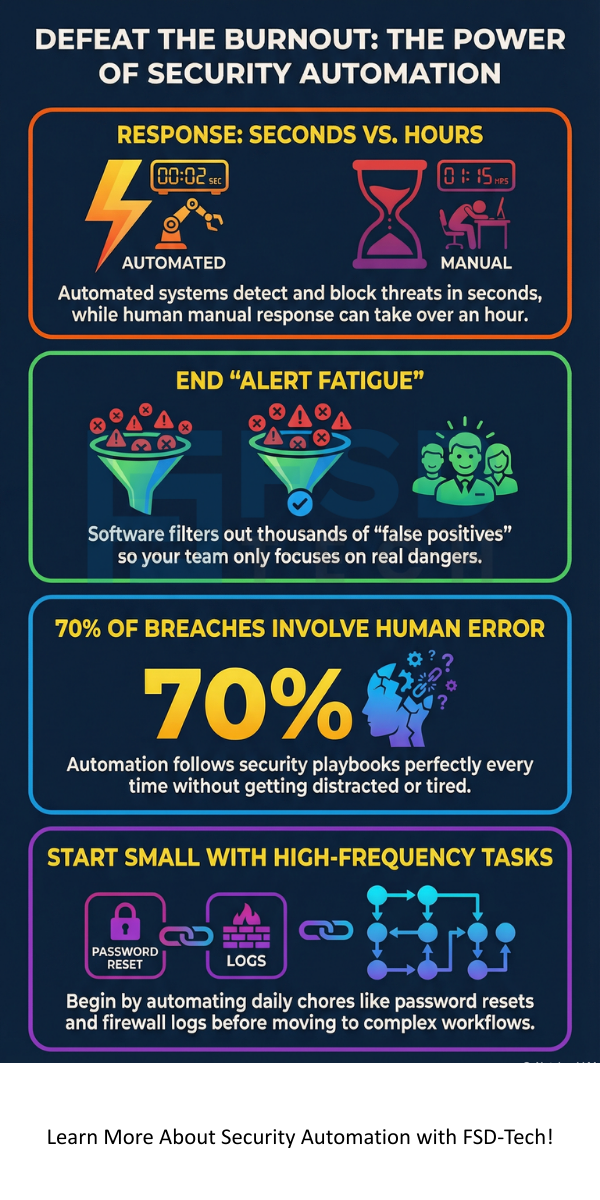
    The most obvious benefit of security automation is speed. In the world of cybersecurity, every second counts. If a piece of malware enters your system, it can spread to your servers in minutes. A human might take an hour to see the alert and investigate. An automated system does it in seconds.


    1. Stopping Alert Fatigue

    We often see talented security pros quit because they're tired of "alert fatigue." It’s exhausting to look at 1,000 alerts just to find the one that actually matters. Automation filters out the "false positives." This means your team only spends time on the real dangers.


    2. Reducing Human Error

    We’re only human, right? We make mistakes when we’re tired or rushed. According to some reports, over 70% of data breaches involve some form of human error. Security automation follows the plan perfectly every single time. It doesn't get distracted by a phone call or forget a step in the protocol.


    3. Scaling Your Defense

    As your company grows, so does your digital footprint. You’ll have more devices, more cloud accounts, and more data. You can't just keep hiring more people to watch every screen. Security automation allows your current team to protect a much larger environment without getting overwhelmed.


    Also Read: SIEM vs SOAR Comparison: 5 Key Differences


    Real-World Use Cases for Security Automation

    Let’s talk about how this actually looks in the real world. It isn't just about blocking IPs. It covers a lot of ground in your daily operations.


    • Phishing Response: When a user reports a weird email, the system can automatically scan the links, check the sender’s reputation, and delete the email from everyone else's inbox if it’s malicious.
    • Vulnerability Management: Instead of manually checking which computers need updates, security automation can scan your network, find the weak spots, and even apply the patches for you.
    • Endpoint Isolation: If a laptop gets infected with ransomware, the system can kick it off the network immediately. This stops the virus from jumping to your main servers.


    In my experience, the biggest win is often the simplest one. Automating password resets or basic user access saves hours of ticket time every week.


    Security Automation vs. Orchestration

    Wait, aren't those the same thing? Not quite. Here's a simple way to think about it:


    • Automation is about a single task. Like a musician playing a violin. It’s one action done well.
    • Orchestration is the conductor. It connects different automated tasks across different tools. It makes sure the violin, the drums, and the piano all play together to create a symphony.


    You need both. Automation gives you speed, but orchestration gives you a complete strategy. When you combine them, you get a "layered defense" that is very hard to break.


    Also Read: What is Cloud Identity and Access Management?


    How to Get Started with Security Automation?

    You don't have to automate everything on day one. In fact, please don't! That's a recipe for a broken network.


    Start Small

    Look for the tasks that happen every day and take up the most time. Are you manually checking firewall logs? Start there. Create a simple "if this, then that" rule. Once you trust the system, you can move on to more complex workflows.


    Use Playbooks

    A playbook is just a fancy word for a "how-to" guide for your software. You write down the steps a human would take to fix a problem, and then you teach the software to do those steps. Most modern tools come with pre-built playbooks for things like malware or unauthorized logins.


    Keep a Human in the Loop

    Roughly speaking, you want a "semi-automated" approach for big decisions. For example, the system can find and isolate a threat, but maybe you still want a human to give the final "okay" before wiping a server. This gives you the best of both worlds.


    Conclusion

    At the end of the day, security automation is about being proactive instead of reactive. We believe that every company deserves a defense that doesn't sleep. Our values are built on helping you stay safe without making your life more complicated. We focus on our clients' success by providing the tools they need to stay ahead of the bad guys.


    Are you ready to stop chasing alerts and start leading your security strategy? We’re here to help you every step of the way.


    Schedule a Strategy Session


    security automation


    Key Takeaways

    • Security automation handles repetitive tasks so your team can focus on high-priority threats.
    • It significantly reduces "MTTR" (Mean Time To Respond), which keeps breaches from getting out of hand.
    • Starting with low-risk, high-frequency tasks is the best way to build a reliable system.
    • It helps eliminate human error and reduces employee burnout by stopping alert fatigue.
    • You still need humans for strategic decision-making and complex investigations.


    FAQs About Security Automation

    Will security automation replace my job?

    To be honest, no. It replaces the boring parts of your job. It frees you up to do the "cool" stuff like threat hunting and architecture design.


    Is it expensive to set up?

    There is an upfront cost for tools and training. However, the ROI (Return on Investment) is huge when you consider the cost of a single data breach or the time saved by your staff.


    What if the automation makes a mistake?

    This is why we test everything in a "sandbox" first. You should always monitor your automated workflows and refine the rules as your network changes.

    Security Automation: How to Protect Your Data Without the Burnout

    About The Author

    Surbhi Suhane

    Surbhi Suhane is an experienced digital marketing and content specialist with deep expertise in Getting Things Done (GTD) methodology and process automation. Adept at optimizing workflows and leveraging automation tools to enhance productivity and deliver impactful results in content creation and SEO optimization.

    TRY OUR PRODUCTS

    Like This Story?

    Share it with friends!

    Subscribe to our newsletter!

    FishOSCato SASEVembuXcitiumZeta HRMSAtera
    Isometric illustration of a centralized performance platform connected to analytics dashboards and team members, representing goal alignment, measurable outcomes, risk visibility, and strategic project tracking within ClickUp.

    How ClickUp Enables Outcome-Based Project Management (Not Just Task Tracking)

    🕓 February 15, 2026
    Isometric illustration of a centralized executive dashboard platform connected to analytics panels, performance charts, security indicators, and strategic milestones, representing real-time business visibility and decision control within ClickUp.

    Executive Visibility in ClickUp – How CXOs Gain Real-Time Control Without Micromanaging

    🕓 February 13, 2026

    Cato SASE Architecture

    Inside Cato’s SASE Architecture: A Blueprint for Modern Security

    🕓 January 26, 2025

    Workflow Automation(8)

    Workforce Automation(1)

    AI Project Management(1)

    HR Data Automation(1)

    RMM(1)

    IT Workflow Automation(1)

    GCC compliance(4)

    IT security(2)

    Payroll Integration(2)

    IT support automation(3)

    procurement automation(1)

    lost device management(1)

    IT Management(5)

    IoT Security(2)

    Cato XOps(2)

    IT compliance(4)

    Task Automation(1)

    Workflow Management(1)

    Kubernetes lifecycle management(2)

    OpenStack automation(1)

    AI-powered cloud ops(1)

    SMB Security(8)

    Data Security(1)

    MDR (Managed Detection & Response)(4)

    MSP Automation(3)

    Atera Integrations(2)

    XDR Security(2)

    Ransomware Defense(3)

    SMB Cyber Protection(1)

    HR Tech Solutions(1)

    Zero Trust Network Access(3)

    Zero Trust Security(2)

    Endpoint Management(1)

    SaaS Security(1)

    Payroll Automation(5)

    IT Monitoring(2)

    Xcitium EDR SOC(15)

    Ransomware Protection GCC(1)

    Network Consolidation UAE(1)

    M&A IT Integration(1)

    MSSP for SMBs(1)

    FSD-Tech MSSP(25)

    Managed EDR FSD-Tech(1)

    SMB Cybersecurity GCC(1)

    Ransomware Protection(3)

    Antivirus vs EDR(1)

    Endpoint Security(1)

    Cybersecurity GCC(12)

    Data Breach Costs(1)

    Endpoint Protection(1)

    Xcitium EDR(30)

    Managed Security Services(2)

    SMB Cybersecurity(8)

    Zero Dwell Containment(31)

    Cloud Backup(1)

    Hybrid Backup(1)

    Backup & Recovery(1)

    pointguard ai(4)

    SMB data protection(9)

    backup myths(1)

    disaster recovery myths(1)

    vembu(9)

    Disaster Recovery(4)

    Vembu BDR Suite(19)

    DataProtection(1)

    GCCBusiness(1)

    GCC IT Solutions(1)

    Secure Access Service Edge(4)

    Unified Network Management(1)

    GCC HR software(20)

    CC compliance(1)

    open banking(1)

    financial cybersecurity(2)

    Miradore EMM(15)

    Government Security(1)

    Cato SASE(8)

    Hybrid Learning(1)

    Cloud Security(9)

    GCC Education(1)

    Talent Development(1)

    AI Risk Management(1)

    AI Compliance(2)

    AI Cybersecurity(12)

    AI Governance(4)

    AI Security(2)

    Secure Remote Access(1)

    GCC business security(1)

    GCC network integration(1)

    compliance automation(5)

    GCC cybersecurity(3)

    education security(1)

    BYOD security Dubai(8)

    Miradore EMM Premium+(5)

    App management UAE(1)

    MiddleEast(1)

    HealthcareSecurity(1)

    Team Collaboration(1)

    IT automation(12)

    Zscaler(1)

    SD-WAN(7)

    share your thoughts

    WAN Optimization

    What is WAN Optimization and Why Does Your Business Need It?

    🕓 February 21, 2026

    Security Automation

    Security Automation: How to Protect Your Data Without the Burnout

    🕓 February 21, 2026

    Insider Threat Detection

    Insider Threat Detection: How to Protect Your Business from the Inside Out

    🕓 February 20, 2026

    Decoded(123)

    Cyber Security(118)

    BCP / DR(22)

    Zeta HRMS(78)

    SASE(21)

    Automation(78)

    Next Gen IT-Infra(118)

    Monitoring & Management(76)

    ITSM(22)

    HRMS(21)

    Automation(24)