HomeNext Gen IT-InfraMonitoring & ManagementCyber SecurityBCP / DRAutomationDecoded
Next Gen IT-Infra
Cato’s SASE Supports Cybersecurity Skills Development

How Cato’s SASE Supports Cybersecurity Skills Development

🕓 April 8, 2025

How SASE Supports the Security Needs of SMBs

How SASE Supports the Security Needs of SMBs

🕓 February 9, 2025

Attack Surface Reduction with Cato’s SASE

Attack Surface Reduction with Cato’s SASE

🕓 February 10, 2025

SASE for Digital Transformation in UAE

SASE for Digital Transformation in UAE

🕓 February 8, 2025

Monitoring & Management
Understanding Atera’s SLA Management

Understanding Atera’s SLA Management

🕓 February 7, 2025

Cost-Performance Ratio: Finding the Right Balance in IT Management Networks

Cost-Performance Ratio: Finding the Right Balance in IT Management Networks

🕓 June 16, 2025

Customizing Atera with APIs

Customizing Atera with APIs

🕓 March 3, 2025

Power Up Your IT Team’s Strategy with Atera’s Communication Tools

Power Up Your IT Team’s Strategy with Atera’s Communication Tools

🕓 February 8, 2025

Cyber Security
Visual guide showing Cato CMA interface for configuring Internet and WAN firewall rules, enabling threat protection, and monitoring security events in real time for UAE IT teams.

Enforcing Firewall and Threat Protection Policies in Cato

🕓 July 25, 2025

Isometric illustration of professionals managing network performance, bandwidth analytics, and cloud-based optimization around the Cato Networks platform, symbolizing bandwidth control and QoS visibility.

Mastering Bandwidth Control and QoS in Cato Networks

🕓 July 26, 2025

Illustration of the Cato Cloud architecture showing its role in delivering SASE for secure, optimized global connectivity.

Understanding the Cato Cloud and Its Role in SASE

🕓 January 29, 2025

Global network backbone powering Cato SASE solution for secure, high-performance connectivity across regions.

Global Backbone: The Engine Powering Cato’s SASE Solution

🕓 January 30, 2025

BCP / DR
Illustration showing diverse business and IT professionals collaborating with cloud, backup, and security icons, representing Vembu use cases for SMBs, MSPs, and IT teams.

Who Uses Vembu? Real-World Use Cases for SMBs, MSPs & IT Teams

🕓 July 12, 2025

Graphic showcasing Vembu’s all-in-one backup and disaster recovery platform with icons for cloud, data protection, and business continuity for IT teams and SMBs.

What Is Vembu? A Deep Dive Into the All in One Backup & Disaster Recovery Platform

🕓 July 6, 2025

Illustration showing Vembu backup and disaster recovery system with cloud storage, server racks, analytics dashboard, and IT professionals managing data.

The Rising Cost of Data Loss: Why Backup Is No Longer Optional?

🕓 August 14, 2025

3D isometric illustration of cloud backup and data recovery infrastructure with laptop, data center stack, and digital business icons — FSD Tech

RPO & RTO: The Heart of Business Continuity

🕓 August 15, 2025

Automation
Cross-Functional Collaboration with ClickUp

Fostering Cross-Functional Collaboration with ClickUp for Multi-Departmental Projects

🕓 February 11, 2025

ClickUp Project Reporting

Revolutionizing Enterprise Reporting with ClickUp’s Advanced Analytics and Dashboards

🕓 June 16, 2025

ClickUp’s Design Collaboration and Asset Management Tools

Empowering Creative Teams with ClickUp’s Design Collaboration and Asset Management Tools

🕓 February 26, 2025

ClickUp Communication and Collaboration Tools

ClickUp Communication and Collaboration Tools: Empowering Remote Teams

🕓 March 12, 2025

Decoded
Multi-Factor Authentication (MFA)

Multi-Factor Authentication (MFA): All You Need to Know

🕓 December 7, 2025

L3 Switch

What Is an L3 Switch? L2 vs L3 & Why You Need Layer 3?

🕓 December 8, 2025

IPSec

IPSec Explained: Protocols, Modes, IKE & VPN Security

🕓 December 3, 2025

 Datagram Transport Layer Security (DTLS)

What is Datagram Transport Layer Security (DTLS)? How it works?

🕓 December 4, 2025

    Subscribe to our newsletter!

    About Us

    Follow Us

    Copyright © 2024 | Powered by 

    Cato SASE Architecture

    Inside Cato’s SASE Architecture: A Blueprint for Modern Security

    🕓 January 26, 2025

    Enterprise Data Security and Privacy with ClickUp

    Ensuring Enterprise Data Security and Privacy with ClickUp

    🕓 February 9, 2025

    DDoS protection SASE

    DDoS Protection and Cato’s Defence Mechanisms

    🕓 February 11, 2025

    Table of Contents

    What is Single Sign-On (SSO)? All You Need to Know

    Surbhi Suhane
    January 15, 2026
    Comments
    Single Sign-On (SSO)

    You use many different applications every day. Each one asks you for a username and password. Keeping track of all these login details becomes a major headache. Single Sign-On (SSO) solves this big problem.


    Single Sign-On (SSO) can be understood as an authentication process. This process allows a user to enter a single set of login credentials—like a username and password—to access multiple independent applications. Imagine one master key that unlocks every door you need to pass through. You enter the details once, and you are good to go for the rest of your session.


    What is Single Sign-On (SSO)? 

    Single Sign-On (SSO) is a session or user authentication service. This service permits you to use a single ID and password to access several applications. SSO helps you manage many user accounts and passwords. It reduces the time you spend logging in again and again.
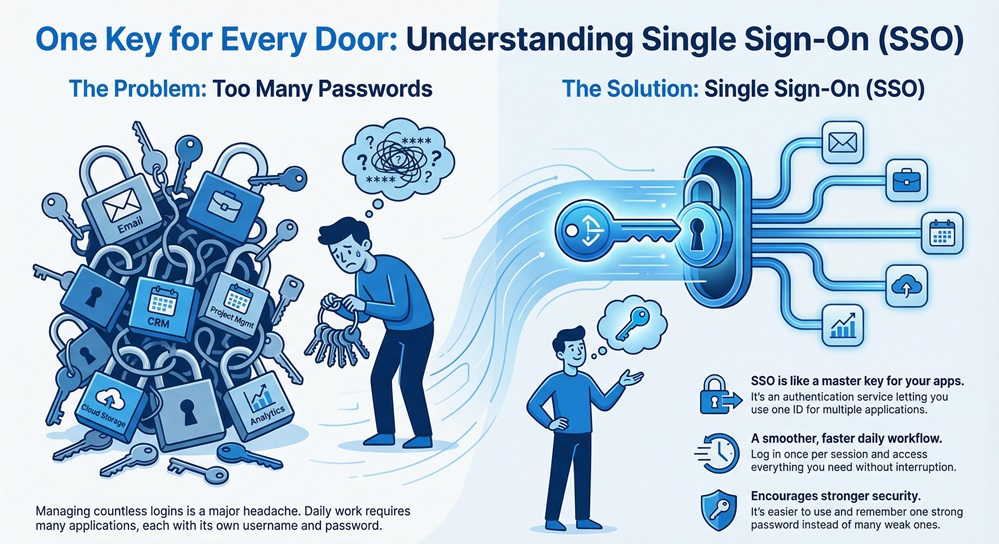
     

    single sign on infographic


    What does Single Sign-On mean for your daily work? It means a smoother, faster, and less frustrating user experience. It also means you use stronger passwords because you only need to remember one.


    Secure Single Login Fast


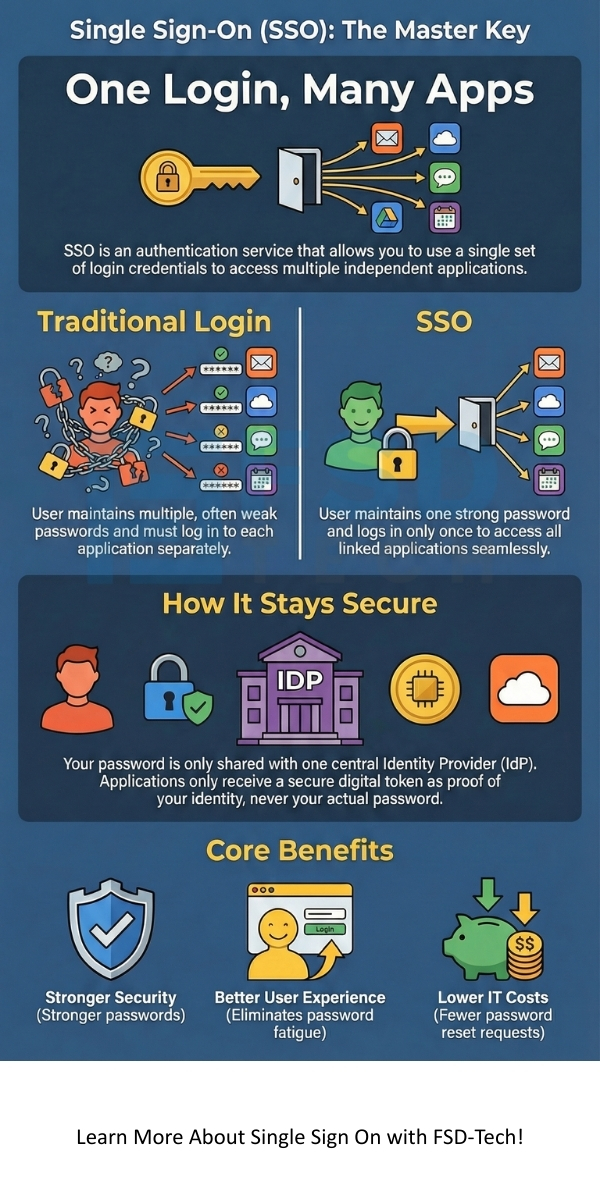
    Comparison: Traditional Login vs. Single Sign-On

    To understand the value of this technology, let us start by comparing it with the traditional login method.


    Basis for ComparisonTraditional LoginSingle Sign-On (SSO)
    Login FrequencyUser must log in separately to each application.User logs in once for all linked applications.
    Password ManagementUser maintains multiple passwords, often leading to weaker, reused passwords.User maintains one strong password, which simplifies management.
    Security RiskHigher risk of password fatigue and weak passwords.Lower risk due to the use of strong, centrally managed credentials.
    ProductivityReduced productivity due to frequent login interruptions.Enhanced productivity due to seamless application access.
    IT Support CostHigher costs due to frequent password reset requests.Lower IT support costs because fewer password resets happen.


    What is Single Sign-On Authentication

    Single Sign-On authentication refers to how the system verifies you as a valid user. It uses a trust relationship between two main entities:


    1. Identity Provider (IdP): This system verifies your identity. It is the one that asks you for your username and password. Examples include services like Okta or Active Directory.
    2. Service Provider (SP): This is the application or website you want to access, like a CRM or project management tool. It relies on the IdP to confirm your identity.


    The IdP manages the authentication process. It checks your credentials against its user database. When you successfully log in, the IdP generates a security token. This token acts as your digital passport. The Service Provider accepts this token as proof that you are the person you claim to be.


    SSO authentication relies heavily on security protocols. Why is Single Sign-On secure? It is secure because it does not share your password with every application. Only the Identity Provider ever sees your password.


    Also Read: What is Biometric Authentication? Methods & Security Guide


    How Single Sign-On Works?

    To understand how Single Sign-On works, we must look at the step-by-step process. This process involves the user, the application (Service Provider or SP), and the central system (Identity Provider or IdP).


    Let us explore the sequence of steps:


    1. Initial Access

    • The user tries to access a protected application, the Service Provider.
    • The Service Provider immediately notices that the user has no active session or security token.

    2. Redirection to the Identity Provider (IdP)

    • The Service Provider directs the user's web browser to the Identity Provider's login service.
    • This redirection includes a request for authentication. The SP essentially asks the IdP, "Please verify this user for me."

    3. Authentication by the IdP

    • The Identity Provider asks the user to enter their SSO login credentials.
    • The user inputs their username and the single, master password.
    • The IdP verifies these credentials against its centralized user directory. This process confirms your identity.

    4. Token Generation

    • Once the IdP confirms the user's identity, it creates a security token. This token is a small piece of digitally signed data. It contains information about the user, such as their username and access rights.
    • This process often uses a standard security protocol.

    5. Return to the Service Provider

    • The Identity Provider sends the user's browser back to the Service Provider. The security token is included in this communication.
    • The Service Provider receives this token.

    6. Token Validation and Access Grant

    • The Service Provider checks the digital signature on the token. It verifies that the token truly came from the trusted Identity Provider.
    • If the validation succeeds, the Service Provider confirms the user's identity.
    • The application grants the user access without asking for the username and password again. A secure session is established.


    This systematic flow ensures that your sensitive credentials stay safe with the Identity Provider. The application, or Service Provider, only sees the proof of authentication—the token.


    Also Read: What is Deepfake Detection? Role of Deepfake Detection Technology


    Key Protocols that Facilitate SSO

    Single Sign-On relies on several industry-standard protocols. These protocols define the structure of the communication and the security token. Knowing these helps you understand how does Single Sign-On work at a technical level.


    1. Security Assertion Markup Language (SAML)

    • SAML is the most common protocol for enterprise SSO.
    • SAML can be understood as an XML-based framework. This framework exchanges authentication and authorization data between the IdP and the SP.
    • The SAML assertion—the security token—proves that the IdP successfully authenticated the user.
    • Due to the use of digital signatures, the Service Provider can ensure that the assertion has not been tampered with.

    2. OpenID Connect (OIDC) and OAuth 2.0

    • OAuth 2.0 is an authorization framework. It allows an application to gain limited access to a user's account on an HTTP service.
    • OpenID Connect (OIDC) is an authentication layer. It sits on top of the OAuth 2.0 framework.
    • OIDC can be used to verify the user's identity. It obtains basic profile information about the user.
    • Many social media logins use this modern standard.

    3. Kerberos

    • Kerberos is a network authentication protocol. It uses secret-key cryptography.
    • Kerberos is the SSO standard for many internal corporate networks.
    • The user's password never travels across the network. Kerberos works on the principle of a trusted third party, called the Key Distribution Center (KDC).


    Single Sign-On Integration: Types and Implementations

    What is Single Sign-On integration? It refers to the technical steps involved in setting up the relationship between the IdP and the SP. How to implement Single Sign-On depends heavily on the type of applications you use.


    1. Federation-Based SSO

    • This is the most secure and modern approach. It uses protocols like SAML and OIDC.
    • Integration is based on mutual trust and the exchange of cryptographically signed tokens.
    • It works well for cloud applications and services outside the corporate network.

    2. Agent-Based SSO

    • This technique involves installing a small SSO agent or plug-in on the web server of the Service Provider.
    • The agent intercepts the user's access request. It then communicates with the central SSO server to check for a valid session.
    • This method is often used for in-house, legacy applications.

    3. Password Vaulting (Less Common/Legacy)

    • This approach stores all the user's application passwords in an encrypted vault.
    • The SSO system automatically enters the username and password for the user when needed.
    • While it achieves a form of single sign-on, it exposes the actual passwords to the system. This makes it less secure than token-based approaches.


    Also Read: What is Click Fraud? Detection, Prevention & Tools


    Benefits of Implementing SSO

    Implementing SSO provides significant benefits to both the user and the organization.


    1. Improved User Experience

    • Users only need to remember one password. This reduces password fatigue.
    • Access to different applications is instant and seamless.

    2. Enhanced Security

    • SSO encourages users to use a stronger, more complex single password. This is because they only have one to remember.
    • It reduces the risk of phishing attacks. Users are less likely to enter their credentials on fake login pages when they know only the central IdP asks for them.
    • Centralized logging allows the organization to track all access attempts in one place. This makes security audits and breach detection much easier.

    3. Reduced IT Costs

    • Password reset requests are the top reason for help desk calls. Single Sign-On significantly cuts down on these calls.
    • The cost savings in IT support make the initial investment in SSO hardware or software worthwhile.

    4. Simplified Compliance

    • SSO helps companies meet regulatory requirements for user access control and data protection.
    • The system automatically enforces password policies—such as complexity and expiration—across all integrated applications.


    Managing SSO: Enabling and Disabling

    The questions "Is Single Sign-On enabled?" and "How to enable Single Sign-On?" are common. The answers depend on your organization's setup.


    How to Enable Single Sign-On

    Enabling Single Sign-On involves a systematic process:

    1. Select an Identity Provider (IdP): You choose a suitable IdP system, like Microsoft Azure AD, Okta, or Ping Identity. The IdP serves as the central authority.
    2. Configure the IdP: You set up your corporate user directory within the IdP. This includes defining the user accounts and security policies.
    3. Integrate Applications: For each application (Service Provider) you want to protect, you configure the connection. This means exchanging metadata and certificates with the IdP. This step defines the Single Sign-On integration.
    4. Test and Deploy: You test the SSO connection for a small group of users. Once successful, you deploy it company-wide.

    How to Disable Single Sign-On

    In certain situations, you may need to disconnect a user or an application. How to disable Single Sign-On for a user is simple:

    • You immediately deactivate or delete the user's account within the central Identity Provider.
    • Because the Service Provider relies on the IdP for validation, the user loses access to all linked applications instantly. This makes SSO a powerful tool for rapid user off-boarding.

    Disabling SSO for a specific application involves removing the trust configuration between that Service Provider and the IdP. The application then reverts to its original login method.


    Conclusion

    So, with the above discussion, we can say that Single Sign-On (SSO) is an essential technology for modern organizations. SSO is nothing but the master key to a streamlined and safer digital experience. It addresses the twin problems of user frustration and weak security. It simplifies your life by requiring you to remember only one strong set of credentials. For the company, it plays a vital role in reducing IT support costs and improving overall security posture.


    You now understand what is Single Sign-On. You also see how Single Sign-On works using protocols like SAML and the core relationship between the Identity Provider and the Service Provider.


    Our focus remains on delivering solutions that ensure your organizational identity is protected. We offer expert guidance to help you successfully plan and execute your Single Sign-On integration. 


    Talk to our security specialists today to start building a future where your team works faster and safer.
     

    single sign on

    Key Takeaways

    • SSO requires only one set of credentials (username/password) to access multiple independent applications. This greatly improves user convenience.
    • The Identity Provider (IdP) authenticates the user, then issues a secure, non-password token to the application (Service Provider).
    • SSO enhances security because users create and use a single, strong password. It reduces common password-related cyber risks.
    • Protocols like SAML and OIDC form the technical foundation for SSO, enabling secure communication between the IdP and applications.
    • Implementing SSO reduces calls to the IT help desk for password resets, leading to significant cost savings and higher productivity.


    Frequently Asked Questions (FAQs)

    1. Is Single Sign-On Secure?

    Single Sign-On is secure when implemented correctly. It prevents users from creating weak passwords for many different services. The SSO system enforces strong security measures. For example, it often requires multi-factor authentication (MFA) at the point of the single login. This adds an extra layer of protection to your master credential.


    2. What is the difference between SSO and Multi-Factor Authentication (MFA)?

    SSO is about convenience and reducing the number of times you log in. MFA is about increasing security by requiring multiple proofs of identity. You can, and should, use them together. When you use SSO, you typically use MFA only once, at the start of your day, to prove your identity to the IdP.


    3. Does SSO store my password for every application?

    No. This is a common misunderstanding. The Identity Provider (IdP) stores your master password. Individual applications (Service Providers) never see your password. They only receive a temporary security token from the IdP. This token confirms your identity without revealing your secret password.


    4. What are the common challenges with SSO?

    The main challenge is the "single point of failure". If the central Identity Provider goes down, you lose access to all linked applications. Therefore, it is essential to ensure the IdP system is highly available and redundant. Also, the initial Single Sign-On integration can be complex, especially with older, non-standard applications.

    What is Single Sign-On (SSO)? All You Need to Know

    About The Author

    Surbhi Suhane

    Surbhi Suhane is an experienced digital marketing and content specialist with deep expertise in Getting Things Done (GTD) methodology and process automation. Adept at optimizing workflows and leveraging automation tools to enhance productivity and deliver impactful results in content creation and SEO optimization.

    Like This Story?

    Share it with friends!

    Subscribe to our newsletter!

    Atera

    (48)

    Cato Networks

    (113)

    ClickUp

    (70)

    FishOS

    (7)

    Miradore

    (21)

    PointGuard AI

    (9)

    Vembu

    (22)

    Xcitium

    (33)

    ZETA HRMS

    (71)

    Workflow Automation(8)

    Workforce Automation(1)

    AI Project Management(1)

    HR Data Automation(1)

    RMM(1)

    IT Workflow Automation(1)

    IT security(2)

    GCC compliance(4)

    Payroll Integration(2)

    IT support automation(3)

    procurement automation(1)

    lost device management(1)

    IT Management(5)

    IoT Security(2)

    Cato XOps(2)

    IT compliance(4)

    Task Automation(1)

    Workflow Management(1)

    Kubernetes lifecycle management(2)

    AI-powered cloud ops(1)

    OpenStack automation(1)

    SMB Security(8)

    Data Security(1)

    MDR (Managed Detection & Response)(4)

    MSP Automation(3)

    Atera Integrations(2)

    XDR Security(2)

    SMB Cyber Protection(1)

    Ransomware Defense(3)

    HR Tech Solutions(1)

    Zero Trust Network Access(3)

    Zero Trust Security(2)

    Endpoint Management(1)

    SaaS Security(1)

    Payroll Automation(5)

    IT Monitoring(2)

    Xcitium EDR SOC(15)

    Ransomware Protection GCC(1)

    M&A IT Integration(1)

    Network Consolidation UAE(1)

    MSSP for SMBs(1)

    FSD-Tech MSSP(25)

    Antivirus vs EDR(1)

    SMB Cybersecurity GCC(1)

    Ransomware Protection(3)

    Managed EDR FSD-Tech(1)

    Cybersecurity GCC(12)

    Endpoint Security(1)

    Data Breach Costs(1)

    Endpoint Protection(1)

    Zero Dwell Containment(31)

    Managed Security Services(2)

    Xcitium EDR(30)

    SMB Cybersecurity(8)

    Cloud Backup(1)

    Hybrid Backup(1)

    Backup & Recovery(1)

    pointguard ai(4)

    backup myths(1)

    vembu(9)

    SMB data protection(9)

    disaster recovery myths(1)

    Vembu BDR Suite(19)

    Disaster Recovery(4)

    DataProtection(1)

    GCCBusiness(1)

    Secure Access Service Edge(4)

    GCC HR software(16)

    Miradore EMM(15)

    Cato SASE(7)

    Cloud Security(8)

    Talent Development(1)

    AI Cybersecurity(12)

    AI Security(2)

    AI Governance(4)

    AI Risk Management(1)

    AI Compliance(2)

    GCC business security(1)

    GCC network integration(1)

    compliance automation(4)

    education security(1)

    GCC cybersecurity(2)

    Miradore EMM Premium+(5)

    BYOD security Dubai(8)

    App management UAE(1)

    HealthcareSecurity(1)

    MiddleEast(1)

    Team Collaboration(1)

    IT automation(12)

    Zscaler(1)

    SD-WAN(6)

    HR Integration(4)

    Cloud Networking(3)

    device management(9)

    RemoteWork(1)

    ZeroTrust(2)

    VPN(1)

    MPLS(1)

    Project Management(9)

    HR automation(16)

    share your thoughts

    Application Whitelisting in Cybersecurity

    What is Application Whitelisting in Cybersecurity?

    🕓 January 15, 2026

    Single Sign-On (SSO)

    What is Single Sign-On (SSO)? All You Need to Know

    🕓 January 15, 2026

    Asymmetric Encryption

    What is Asymmetric Encryption? Keys and How It Works

    🕓 January 14, 2026

    Decoded(66)

    Cyber Security(112)

    BCP / DR(22)

    Zeta HRMS(70)

    SASE(21)

    Automation(70)

    Next Gen IT-Infra(113)

    Monitoring & Management(69)

    ITSM(22)

    HRMS(21)

    Automation(24)