HomeNext Gen IT-InfraMonitoring & ManagementCyber SecurityBCP / DRAutomationDecoded
Next Gen IT-Infra
Cato’s SASE Supports Cybersecurity Skills Development

How Cato’s SASE Supports Cybersecurity Skills Development

🕓 April 8, 2025

How SASE Supports the Security Needs of SMBs

How SASE Supports the Security Needs of SMBs

🕓 February 9, 2025

Attack Surface Reduction with Cato’s SASE

Attack Surface Reduction with Cato’s SASE

🕓 February 10, 2025

SASE for Digital Transformation in UAE

SASE for Digital Transformation in UAE

🕓 February 8, 2025

Monitoring & Management
Understanding Atera’s SLA Management

Understanding Atera’s SLA Management

🕓 February 7, 2025

Cost-Performance Ratio: Finding the Right Balance in IT Management Networks

Cost-Performance Ratio: Finding the Right Balance in IT Management Networks

🕓 June 16, 2025

Customizing Atera with APIs

Customizing Atera with APIs

🕓 March 3, 2025

Power Up Your IT Team’s Strategy with Atera’s Communication Tools

Power Up Your IT Team’s Strategy with Atera’s Communication Tools

🕓 February 8, 2025

Cyber Security
Visual guide showing Cato CMA interface for configuring Internet and WAN firewall rules, enabling threat protection, and monitoring security events in real time for UAE IT teams.

Enforcing Firewall and Threat Protection Policies in Cato

🕓 July 25, 2025

Isometric illustration of professionals managing network performance, bandwidth analytics, and cloud-based optimization around the Cato Networks platform, symbolizing bandwidth control and QoS visibility.

Mastering Bandwidth Control and QoS in Cato Networks

🕓 July 26, 2025

Illustration of the Cato Cloud architecture showing its role in delivering SASE for secure, optimized global connectivity.

Understanding the Cato Cloud and Its Role in SASE

🕓 January 29, 2025

Global network backbone powering Cato SASE solution for secure, high-performance connectivity across regions.

Global Backbone: The Engine Powering Cato’s SASE Solution

🕓 January 30, 2025

BCP / DR
Illustration showing diverse business and IT professionals collaborating with cloud, backup, and security icons, representing Vembu use cases for SMBs, MSPs, and IT teams.

Who Uses Vembu? Real-World Use Cases for SMBs, MSPs & IT Teams

🕓 July 12, 2025

Graphic showcasing Vembu’s all-in-one backup and disaster recovery platform with icons for cloud, data protection, and business continuity for IT teams and SMBs.

What Is Vembu? A Deep Dive Into the All in One Backup & Disaster Recovery Platform

🕓 July 6, 2025

Illustration showing Vembu backup and disaster recovery system with cloud storage, server racks, analytics dashboard, and IT professionals managing data.

The Rising Cost of Data Loss: Why Backup Is No Longer Optional?

🕓 August 14, 2025

3D isometric illustration of cloud backup and data recovery infrastructure with laptop, data center stack, and digital business icons — FSD Tech

RPO & RTO: The Heart of Business Continuity

🕓 August 15, 2025

Automation
Cross-Functional Collaboration with ClickUp

Fostering Cross-Functional Collaboration with ClickUp for Multi-Departmental Projects

🕓 February 11, 2025

ClickUp Project Reporting

Revolutionizing Enterprise Reporting with ClickUp’s Advanced Analytics and Dashboards

🕓 June 16, 2025

ClickUp’s Design Collaboration and Asset Management Tools

Empowering Creative Teams with ClickUp’s Design Collaboration and Asset Management Tools

🕓 February 26, 2025

ClickUp Communication and Collaboration Tools

ClickUp Communication and Collaboration Tools: Empowering Remote Teams

🕓 March 12, 2025

Decoded
Multi-Factor Authentication (MFA)

Multi-Factor Authentication (MFA): All You Need to Know

🕓 December 7, 2025

L3 Switch

What Is an L3 Switch? L2 vs L3 & Why You Need Layer 3?

🕓 December 8, 2025

IPSec

IPSec Explained: Protocols, Modes, IKE & VPN Security

🕓 December 3, 2025

 Datagram Transport Layer Security (DTLS)

What is Datagram Transport Layer Security (DTLS)? How it works?

🕓 December 4, 2025

    Subscribe to our newsletter!

    About Us

    Follow Us

    Copyright © 2024 | Powered by 

    Cato SASE Architecture

    Inside Cato’s SASE Architecture: A Blueprint for Modern Security

    🕓 January 26, 2025

    Enterprise Data Security and Privacy with ClickUp

    Ensuring Enterprise Data Security and Privacy with ClickUp

    🕓 February 9, 2025

    DDoS protection SASE

    DDoS Protection and Cato’s Defence Mechanisms

    🕓 February 11, 2025

    Table of Contents

    What is Click Fraud? Detection, Prevention & Tools

    Surbhi Suhane
    January 2, 2026
    Comments
    Click Fraud

    Are you paying for real customers, or are you handing over your budget to scammers? If you run Pay-Per-Click (PPC) campaigns on platforms like Google Ads, your advertising budget faces a constant threat. This threat is called click fraud.


    Click fraud can be understood as the act of illegitimately clicking on a PPC advertisement. This is done with the aim of either draining the advertiser's budget or gaining an unfair advantage over a competitor. It is nothing but a type of digital theft. 


    You are charged for every click, but when the click comes from a bot or a malicious user, you gain no actual business value. This misuse of advertising funds seriously affects your return on investment (ROI).


    You need powerful tools and strategies to protect your marketing spend. This guide will fully explain click fraud detection software and how it works to protect your advertising campaigns. We will also discuss methods for ad fraud prevention.


    Stop Click Fraud Now


    What is Click Fraud?

    The main keyword here is click fraud definition. Click fraud refers to the deceptive practice where a person, an automated script, or a computer program imitates a legitimate user clicking on a PPC ad. This fraudulent click causes the advertiser to pay a fee to the host platform (like Google or Facebook) for a click that holds no real potential for conversion or business.


    This practice falls under the umbrella of what is click fraud in cyber security. While often related to financial loss, it also comprises the use of automated systems and botnets—a major security concern. In simple words, it is a sophisticated method of stealing advertising money.
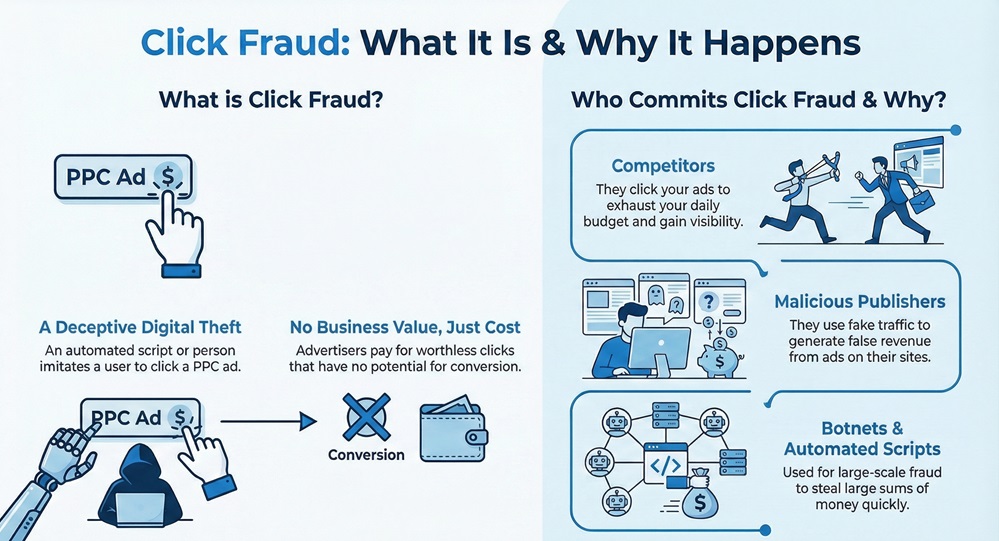
     

    click fraud infographic


    Why Does Click Fraud Happen?

    Now, the question arises, why would someone engage in click fraud? The motivations are mainly financial.


    • Competitors: A competitor might aim to drain your advertising budget. If they quickly exhaust your daily budget, your ads disappear, leaving their own ads to gain visibility. This action leads to a direct loss for you and an advantage for them.
    • Malicious Publishers: Publishers earn revenue every time a user clicks on an ad placed on their website. Some publishers use fake traffic or bots to click on ads hosted on their sites to generate false revenue.
    • Botnets and Automated Scripts: These are sophisticated software programs that automatically perform the clicks at scale, making the ad fraud detection process more difficult. The fraudster often aims at draining a huge amount of money in a very short time.


    Also Read: What is a Botnet? How Botnet Attacks Work & Prevention


    Real Clicks Versus Click Fraud

    To understand how click fraud detection software works, you must first know how a real click differs from a fraudulent one. Let us now discuss the key differences.


    Basis for ComparisonReal ClickClick Fraud
    SourceA genuine human user actively searching for your product or service.Bots, scripts, click farms, or malicious competitors.
    IntentIntent to learn more, purchase, or sign up (conversion intent).Intent to deplete the budget or generate false revenue (malicious intent).
    BehaviorNatural movement, browsing multiple pages, and spending a reasonable time on the site.High speed, single-page visits, immediate bounce, and often multiple clicks from the same IP address.
    Data TrailComplete user data, including browser type, device details, and typical browsing patterns.Missing or falsified data, the use of Virtual Private Networks (VPNs) or proxies to hide the real location.


    Click Fraud Detection Software

    Click fraud detection software is nothing but a specialized tool that actively monitors your PPC campaigns. It analyzes every single click in real-time. This software employs advanced algorithms and machine learning to identify and filter out fraudulent or invalid traffic before it costs you money. It acts as an essential shield for your marketing budget.


    You can consider this software as the security guard for your advertisements. It examines the behavior and origin of every click to determine its legitimacy. Ad fraud detection tools use several parameters to perform this task.


    How Does Click Fraud Detection Software Work?

    This is where the software plays a vital role in ad fraud prevention. The process typically involves several sequential steps.


    1. Click Monitoring and Data Collection: The software first monitors every click that your ads receive. It collects data points like the Internet Protocol (IP) address of the visitor, the time of the click, the device used, the visitor's location, and their past interaction history.
    2. Behavioral Analysis: This step is crucial. The software evaluates the user's behavior after the click. Does the visitor stay for a long time? Do they navigate to other pages? Or do they click and immediately leave (a bounce)? When a visitor exhibits unnatural patterns—such as clicking multiple times within seconds or showing a completely random mouse movement—the system flags the activity as suspicious.
    3. Pattern Recognition (Fraud Signatures): The system maintains a large database of known fraud patterns, also called fraud signatures. These include common bot IP addresses, proxy networks, and rapid-fire clicking patterns that resemble automation. The software constantly compares incoming clicks against this database.
    4. Anomaly Detection: Advanced click fraud detection software uses machine learning to identify clicks that deviate from the normal, expected user behavior. If a click comes from a location or device type that never converts, or if a user repeats the same click-and-leave action many times, it indicates an anomaly.
    5. Automated Blocking: Once the software determines that a click is fraudulent, it automatically blocks the source. This typically involves adding the fraudulent IP address or IP range to an exclusion list. The ad platform (like Google) then stops showing your ads to that blocked source, preventing further charges.
    6. Reporting and Analysis: Finally, the software provides detailed reports showing you exactly how much fraud it prevented, where the fraud originated, and how much money it saved you.


    Also Read: Multi-Factor Authentication (MFA): All You Need to Know


     Key Features of the Best Click Fraud Software

    When selecting an ad fraud detection tool, you need to look for specific features that guarantee comprehensive protection. These tools help you how to detect click fraud.


    • Real-time IP Blocking: The essential feature allows the software to identify and block a fraudulent source instantly. This ensures that a bot cannot quickly deplete your budget before the system catches up.
    • Geo-targeting Analysis: The software allows you to compare the geography of clicks with the geography of conversions. If you consistently get clicks from regions you do not target or regions with extremely high fraud rates, the software helps identify this waste.
    • VPN and Proxy Detection: Fraudsters often hide their real location and identity using Virtual Private Networks (VPNs) and proxy servers. The best click fraud software can detect the use of these masking technologies and block them.
    • Customizable Rules and Sensitivity: While automated rules are useful, you should have the ability to customize your own ad fraud prevention rules. This allows you to set specific parameters, such as blocking any IP that clicks more than three times in 60 seconds.
    • Integration with Ad Platforms: The software must integrate seamlessly with your PPC platforms. This is necessary so that it can automatically send the excluded IP lists to Google Ads or other platforms, thereby ensuring that how to stop click fraud becomes a seamless process.


    Strategies for Ad Fraud Prevention

    While click fraud detection software handles the technical heavy lifting, you also play a vital role in ad fraud prevention. This involves making smart choices within your advertising platform itself.


    1. Adjusting Ad Platform Settings

    You can use the built-in features of your ad platform to set up some basic defenses.


    • Review IP Exclusions: Regularly review and manually update your IP exclusion lists. The detection software helps with automation, but you should still check the data it provides.
    • Geographic Targeting: Carefully manage your geographic targeting. If you only serve customers in New York, you should exclude all other locations from your campaign.
    • Time-of-Day/Day-of-Week Bidding: Analyze your conversion data. If you never get conversions between 1 AM and 5 AM, reduce your bids or pause your ads during those times. This reduces the time window for fraudulent clicks to occur.


    2. Monitoring and Analysis

    Consistent analysis of your campaign performance helps you learn how to detect click fraud manually.


    • Check Conversion Rates: A sudden, significant drop in conversion rate, accompanied by a spike in clicks, is a strong indicator of click fraud. You are paying for clicks, but no business is coming through.
    • Analyze User Metrics: Look for high bounce rates, low pages-per-session, and very short session durations among groups of clicks. For instance, if 50 clicks came from a single city and all sessions lasted less than 5 seconds, this signals fraud.
    • Use Analytics: Compare the click data from your advertising platform with the user data recorded in your web analytics tool (e.g., Google Analytics). Large discrepancies between the two datasets often point towards invalid traffic.


    3. Campaign Structure

    The way you structure your campaigns can also serve as a protective layer.


    • Focus on Long-Tail Keywords: Ad fraud detection is often easier on campaigns using long-tail keywords. Fraudsters prefer to target the most competitive, expensive, and shortest keywords to maximize their budget drain. Targeting specific, less common phrases naturally reduces the volume of bot traffic.
    • Use Negative Keywords: Use an extensive list of negative keywords. This ensures that your ads do not show up for unrelated searches, thereby reducing the chances of irrelevant (and potentially fraudulent) clicks.


    Also Read: Cyber Threat Intelligence (CTI) in Cybersecurity


    What if You Click on a Phishing Link?

    While discussing click fraud, it is important to briefly touch upon a related, but different, cyber threat: phishing. The question of what if you click on a phishing link is relevant because both attacks rely on a malicious click.


    Phishing aims at stealing your sensitive personal data (passwords, credit card numbers) by tricking you into entering the information on a fake website or downloading malware. The criminal is targeting you directly.


    If you accidentally click on a phishing link, immediately take these actions:


    1. Disconnect: Disconnect your device from the internet to stop any further communication with the malicious server.
    2. Run a Scan: Use a reputable anti-virus or anti-malware program to check your system for any downloaded threats.
    3. Change Passwords: If you entered any password after clicking the link, change it immediately on a clean device. This is a critical step in prevention.


    Understanding the threat model of phishing reinforces the need for robust security, just as ad fraud prevention protects your financial assets.


    Conclusion

    So, with the above discussion, we can say that click fraud is a sophisticated, costly threat that actively drains your vital PPC budget. It is nothing but digital theft targeting your marketing investment. You cannot rely on ad platforms alone; you must implement specialized click fraud detection software. This tool uses real-time behavioral analysis and pattern recognition to identify fraudulent clicks. Its ability to automatically block malicious IP addresses ensures effective ad fraud prevention. 


    By integrating the best click fraud software and maintaining smart campaign targeting, you stop wasting money on bots and competitors. You secure your funds and ensure your ads reach actual customers. Take proactive control of your advertising budget today and ensure every click works toward your business growth.


    Worried About Ad Fraud? Reach out to us for immediate help


     Key Takeaways on Ad Fraud Prevention

    So, with the above discussion, we can say that click fraud is a real and costly problem for any business using paid advertising. Protecting your budget is not an option; it is a necessity for your business growth.
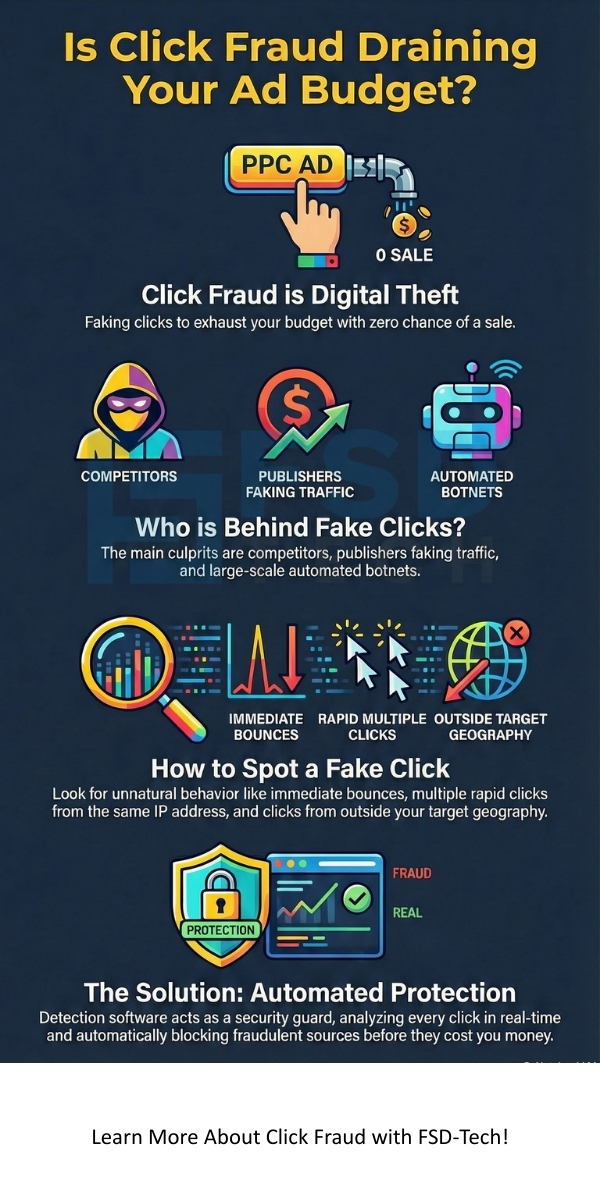
     

    • Click fraud detection software is a specialized defense mechanism. It uses advanced behavioral analysis to distinguish genuine customers from malicious bots and competitors.
    • The primary function of the best click fraud software is real-time blocking of fraudulent IP addresses and networks. This stops the thief at the door.
    • Your strategy for ad fraud prevention should be twofold: use reliable ad fraud detection tools and implement smart campaign management practices like tight geo-targeting and the use of long-tail keywords.


    Click Fraud


    FAQs about Click Fraud

    Let us now address common questions you may have about click fraud.


    What is the typical cost of click fraud to businesses?

    Click fraud costs businesses billions of dollars worldwide every year. According to various reports, a significant percentage of all paid search traffic—often estimated between 10% and 20%—is fraudulent. Therefore, if you spend $10,000 per month on PPC, you could potentially be losing up to $2,000 every month on fake clicks.


    Does Google Ads already have its own ad fraud detection?

    Yes, Google, as well as other major ad platforms, has built-in systems to detect and filter out invalid clicks. However, sophisticated fraud often bypasses these general systems. Click fraud detection software provides a more in-depth, customizable, and real-time defense layer, working in addition to Google's basic protection. This specialized software is often more advanced at catching automated bot clicks.


    Will using a click fraud detection software slow down my website?

    No, the software operates by placing a small piece of code on your website or integrating directly via an Application Programming Interface (API). The process of click analysis and blocking happens incredibly fast—in milliseconds—and does not noticeably affect the loading speed of your pages.


    How soon will I see results after implementing a best click fraud software?

    You typically see results almost immediately. Within the first 24 to 48 hours of implementation, the software often identifies and blocks a large number of fraudulent sources that were already clicking your ads. The savings will become clear in your daily reporting.

    What is Click Fraud? Detection, Prevention & Tools

    About The Author

    Surbhi Suhane

    Surbhi Suhane is an experienced digital marketing and content specialist with deep expertise in Getting Things Done (GTD) methodology and process automation. Adept at optimizing workflows and leveraging automation tools to enhance productivity and deliver impactful results in content creation and SEO optimization.

    Like This Story?

    Share it with friends!

    Subscribe to our newsletter!

    Atera

    (48)

    Cato Networks

    (111)

    ClickUp

    (65)

    FishOS

    (7)

    Miradore

    (21)

    PointGuard AI

    (9)

    Vembu

    (22)

    Xcitium

    (33)

    ZETA HRMS

    (67)

    Workflow Automation(5)

    Workforce Automation(1)

    AI Project Management(1)

    HR Data Automation(1)

    RMM(1)

    IT Workflow Automation(1)

    IT security(2)

    GCC compliance(4)

    Payroll Integration(2)

    IT support automation(3)

    procurement automation(1)

    lost device management(1)

    IT Management(5)

    IoT Security(2)

    Cato XOps(2)

    IT compliance(4)

    Task Automation(1)

    Workflow Management(1)

    OpenStack automation(1)

    Kubernetes lifecycle management(2)

    AI-powered cloud ops(1)

    SMB Security(8)

    Data Security(1)

    MDR (Managed Detection & Response)(4)

    Atera Integrations(2)

    MSP Automation(3)

    XDR Security(2)

    SMB Cyber Protection(1)

    Ransomware Defense(3)

    HR Tech Solutions(1)

    Zero Trust Network Access(3)

    Zero Trust Security(2)

    Endpoint Management(1)

    SaaS Security(1)

    Payroll Automation(5)

    IT Monitoring(2)

    Xcitium EDR SOC(15)

    Ransomware Protection GCC(1)

    M&A IT Integration(1)

    Network Consolidation UAE(1)

    MSSP for SMBs(1)

    FSD-Tech MSSP(25)

    SMB Cybersecurity GCC(1)

    Managed EDR FSD-Tech(1)

    Ransomware Protection(3)

    Antivirus vs EDR(1)

    Cybersecurity GCC(12)

    Endpoint Security(1)

    Endpoint Protection(1)

    Data Breach Costs(1)

    Managed Security Services(2)

    SMB Cybersecurity(8)

    Zero Dwell Containment(31)

    Xcitium EDR(30)

    Cloud Backup(1)

    Hybrid Backup(1)

    Backup & Recovery(1)

    pointguard ai(4)

    disaster recovery myths(1)

    backup myths(1)

    vembu(9)

    SMB data protection(9)

    Vembu BDR Suite(19)

    Disaster Recovery(4)

    DataProtection(1)

    GCCBusiness(1)

    Secure Access Service Edge(4)

    GCC HR software(15)

    Miradore EMM(15)

    Cato SASE(7)

    Cloud Security(8)

    Talent Development(1)

    AI Cybersecurity(12)

    AI Risk Management(1)

    AI Governance(4)

    AI Security(2)

    AI Compliance(2)

    GCC business security(1)

    GCC network integration(1)

    compliance automation(4)

    GCC cybersecurity(2)

    education security(1)

    App management UAE(1)

    BYOD security Dubai(8)

    Miradore EMM Premium+(5)

    HealthcareSecurity(1)

    MiddleEast(1)

    Team Collaboration(1)

    IT automation(10)

    Zscaler(1)

    SD-WAN(6)

    HR Integration(4)

    Cloud Networking(3)

    device management(9)

    RemoteWork(1)

    ZeroTrust(2)

    VPN(1)

    MPLS(1)

    Project Management(9)

    HR automation(16)

    share your thoughts

    Click Fraud

    What is Click Fraud? Detection, Prevention & Tools

    🕓 January 2, 2026

    Business Email Compromise (BEC)

    What is Business Email Compromise (BEC)? How to Prevent?

    🕓 January 2, 2026

    Phishing Simulation

    What is Phishing Simulation? Benefits & Best Practices

    🕓 January 1, 2026

    Decoded(48)

    Cyber Security(112)

    BCP / DR(22)

    Zeta HRMS(66)

    SASE(21)

    Automation(65)

    Next Gen IT-Infra(111)

    Monitoring & Management(69)

    ITSM(22)

    HRMS(21)

    Automation(24)









