HomeNext Gen IT-InfraMonitoring & ManagementCyber SecurityBCP / DRAutomationDecoded
Next Gen IT-Infra
Cato’s SASE Supports Cybersecurity Skills Development

How Cato’s SASE Supports Cybersecurity Skills Development

🕓 April 8, 2025

How SASE Supports the Security Needs of SMBs

How SASE Supports the Security Needs of SMBs

🕓 February 9, 2025

Attack Surface Reduction with Cato’s SASE

Attack Surface Reduction with Cato’s SASE

🕓 February 10, 2025

SASE for Digital Transformation in UAE

SASE for Digital Transformation in UAE

🕓 February 8, 2025

Monitoring & Management
Understanding Atera’s SLA Management

Understanding Atera’s SLA Management

🕓 February 7, 2025

Cost-Performance Ratio: Finding the Right Balance in IT Management Networks

Cost-Performance Ratio: Finding the Right Balance in IT Management Networks

🕓 June 16, 2025

Customizing Atera with APIs

Customizing Atera with APIs

🕓 March 3, 2025

Power Up Your IT Team’s Strategy with Atera’s Communication Tools

Power Up Your IT Team’s Strategy with Atera’s Communication Tools

🕓 February 8, 2025

Cyber Security
Illustration of the Cato Cloud architecture showing its role in delivering SASE for secure, optimized global connectivity.

Understanding the Cato Cloud and Its Role in SASE

🕓 January 29, 2025

Isometric illustration of professionals managing network performance, bandwidth analytics, and cloud-based optimization around the Cato Networks platform, symbolizing bandwidth control and QoS visibility.

Mastering Bandwidth Control and QoS in Cato Networks

🕓 July 26, 2025

Global network backbone powering Cato SASE solution for secure, high-performance connectivity across regions.

Global Backbone: The Engine Powering Cato’s SASE Solution

🕓 January 30, 2025

Illustration of team analyzing application traffic and usage insights on a large laptop screen using Cato’s dashboard, surrounded by network and cloud icons.

Cato Networks Application Visibility | Monitoring & Control

🕓 July 27, 2025

BCP / DR
Illustration showing diverse business and IT professionals collaborating with cloud, backup, and security icons, representing Vembu use cases for SMBs, MSPs, and IT teams.

Who Uses Vembu? Real-World Use Cases for SMBs, MSPs & IT Teams

🕓 July 12, 2025

Graphic showcasing Vembu’s all-in-one backup and disaster recovery platform with icons for cloud, data protection, and business continuity for IT teams and SMBs.

What Is Vembu? A Deep Dive Into the All in One Backup & Disaster Recovery Platform

🕓 July 6, 2025

Illustration showing Vembu backup and disaster recovery system with cloud storage, server racks, analytics dashboard, and IT professionals managing data.

The Rising Cost of Data Loss: Why Backup Is No Longer Optional?

🕓 August 14, 2025

3D isometric illustration of cloud backup and data recovery infrastructure with laptop, data center stack, and digital business icons — FSD Tech

RPO & RTO: The Heart of Business Continuity

🕓 August 15, 2025

Automation
Cross-Functional Collaboration with ClickUp

Fostering Cross-Functional Collaboration with ClickUp for Multi-Departmental Projects

🕓 February 11, 2025

ClickUp Project Reporting

Revolutionizing Enterprise Reporting with ClickUp’s Advanced Analytics and Dashboards

🕓 June 16, 2025

ClickUp’s Design Collaboration and Asset Management Tools

Empowering Creative Teams with ClickUp’s Design Collaboration and Asset Management Tools

🕓 February 26, 2025

ClickUp Communication and Collaboration Tools

ClickUp Communication and Collaboration Tools: Empowering Remote Teams

🕓 March 12, 2025

Decoded
Multi-Factor Authentication (MFA)

Multi-Factor Authentication (MFA): All You Need to Know

🕓 December 7, 2025

L3 Switch

What Is an L3 Switch? L2 vs L3 & Why You Need Layer 3?

🕓 December 8, 2025

IPSec

IPSec Explained: Protocols, Modes, IKE & VPN Security

🕓 December 3, 2025

 Datagram Transport Layer Security (DTLS)

What is Datagram Transport Layer Security (DTLS)? How it works?

🕓 December 4, 2025

    Subscribe to our newsletter!

    About Us

    Follow Us

    Copyright © 2024 | Powered by 

    Atera

    (55)

    Cato Networks

    (126)

    ClickUp

    (78)

    FishOS

    (7)

    Miradore

    (21)

    PointGuard AI

    (9)

    Vembu

    (22)

    Xcitium

    (33)

    ZETA HRMS

    (79)

    Table of Contents

    What is Application Whitelisting in Cybersecurity?

    Surbhi Suhane
    January 15, 2026
    Comments
    Application Whitelisting in Cybersecurity

    The digital world faces constant security threats. You constantly search for robust ways to protect your systems. Application Whitelisting (AWL) provides a highly effective, foundational approach to this protection. It is a critical security control that ensures only trusted programs can execute on a system.


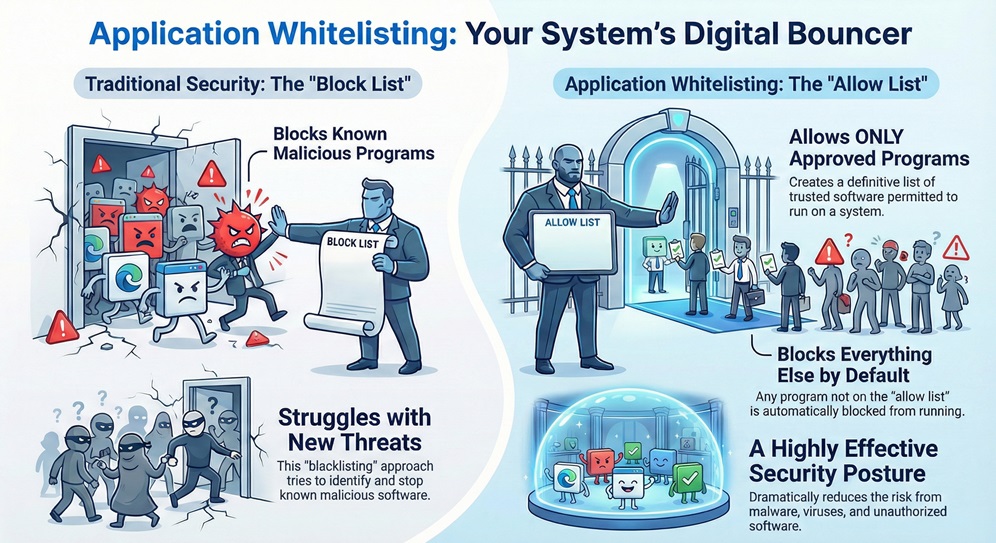
    Application Whitelisting can be understood as a security method that creates a definitive list of approved, or "whitelisted," applications and code allowed to run on a computer or network. This action fundamentally shifts the security posture from a denial-based model to an allowance-based model. Only authorized applications will run, and the system automatically blocks everything else.


    This practice is essential, especially when you consider that traditional antivirus methods often struggle to keep up with the constant emergence of new, unknown threats. Application whitelisting offers a simple, powerful solution. It permits only known-good files to execute, dramatically reducing the chances of malware, viruses, and unauthorized software affecting your business.


    We will now explore this powerful security measure in detail. We will examine how this strategy works, why you need it, and how you can implement it effectively using the right application whitelisting software.


    Defining Application Whitelisting

    Application whitelisting refers to the technique of specifying an explicit list of software programs that a system permits to run. This method of security control provides a contrast to the widely used "blacklisting" approach, which tries to identify and block known malicious programs.


    Application Whitelisting


    In a system protected by AWL, any program that is not on the approved list receives an automatic block. This block occurs regardless of whether the system knows the program to be good or bad. This acts as a digital bouncer, allowing only those with an invitation to enter.


    Whitelisting Risk? Contact us


    How Does Application Whitelisting Work?

    To understand this better, we must explore the process that application whitelisting follows to ensure system integrity. The principle works on a simple but powerful premise: trust nothing unless explicitly permitted.


    The process of implementing an effective application whitelisting tool generally involves three key phases:


    1. Inventory Creation: First, the system scans and records all existing applications, libraries, and executables on the target machine. This initial inventory forms the primary, approved list. This ensures continuity for essential business operations.
    2. Policy Development: Next, the system administrator defines the rules for the whitelist. These rules specify what can run, who can run it, and where it can run. Application whitelisting solutions use various attributes, such as cryptographic hash, file path, and digital signature, to identify and validate applications.
    3. Enforcement: Finally, the system implements the policy. When a user or process attempts to execute a program, the system verifies its attributes against the approved whitelist. If the attributes match, the program runs. If the program is not on the list, the system blocks its execution and may trigger an alert.


    This verification process ensures that even if a new piece of malware enters the system, the system cannot execute it because it is not an authorized application. This drastically reduces the attack surface.


    Also Read: What Is Application Security? Tools, Testing & Best Practices


    What are the Key Components of Application Whitelisting Policy?

    A robust application whitelisting policy consists of several crucial elements. Application whitelisting implementation depends on how strictly you define these attributes.


    • File Path: This refers to the location of the executable file. For example, a program in the Program Files directory might be allowed, but the same program in a Temporary directory might be blocked.
    • File Name: The policy can permit or deny specific file names. However, simple file names are easy to spoof, so administrators use this attribute cautiously.
    • Cryptographic Hash: This is the most reliable method. A cryptographic hash generates a unique, fixed-length value for a file. Even a small change in the file content results in a completely different hash. This ensures that the system can verify the exact integrity of the application.
    • Digital Signature: A digital signature proves the authenticity of the software. Application whitelisting software often relies on certificates from trusted software vendors, allowing only programs signed by these authorities to run.
    • User/Group Permissions: The policy determines which users or user groups have the authority to run certain whitelisted programs. This ensures necessary separation of duties.


    Application Whitelisting vs. Blacklisting

    To fully appreciate the power of AWL, you should understand how it differs from traditional antivirus approaches, which primarily use blacklisting.


    Basis for ComparisonApplication Whitelisting (AWL)Application Blacklisting
    Core PrincipleAllows only known, approved applications to run.Prevents only known, unapproved (malicious) applications from running.
    Security PostureDefault Deny: Everything is blocked unless explicitly allowed.Default Allow: Everything is permitted unless explicitly blocked.
    New/Unknown ThreatsEffectively prevents unknown threats (Zero-Day attacks) since they are not on the approved list.Ineffective against unknown threats until a security vendor creates a signature and updates the list.
    MaintenanceRequires effort to maintain and update the list of approved applications when changes occur.Requires continuous, daily updates to the blacklist of known threats.
    Impact on SystemHigher security, more predictable environment, but requires careful initial setup.Lower security assurance, but simpler initial setup.
    Long-Tail Keywordtop 10 application whitelisting softwareTraditional Antivirus Solutions


    Application whitelisting is fundamentally a much stronger security approach. While blacklisting struggles to keep up with the pace of new malware, AWL simply denies all non-approved executables right from the start.


    Also Read: Quantum Cryptography - QKD, Security & Future Guide


    Why You Need Application Whitelisting?

    Implementing application whitelisting provides several significant benefits that strengthen your security posture. This security measure plays a vital role in modern threat defense.


    1. Robust Protection Against Malware and Zero-Day Threats

    Application whitelisting offers immediate, high-level protection against all forms of unauthorized code. This includes:


    • Malware and Viruses: The system blocks malware execution because the malware's unique hash does not appear on the whitelist.
    • Zero-Day Exploits: When a threat uses a vulnerability that the security community has not yet discovered (a "zero-day"), blacklisting solutions fail. AWL blocks the malicious executable regardless of the vulnerability it targets, ensuring the system remains protected.
    • Unauthorized Scripts: The policy also controls the execution of scripting languages like PowerShell or Python, preventing attackers from using these trusted system tools maliciously.


    2. Regulatory Compliance and Control

    Many industry regulations and security frameworks specifically recommend or mandate the use of whitelisting. Application whitelisting solutions facilitate compliance with standards such as the National Institute of Standards and Technology (NIST) Special Publication 800-167 and guidelines from the Cybersecurity and Infrastructure Security Agency (CISA). This helps you meet required security baselines.


    3. Effective License and Resource Management

    Implementing a strict whitelist also helps in maintaining control over the software installed and running on your network. This leads to several operational advantages:


    • Reduces Software Bloat: It prevents users from installing unauthorized or unnecessary programs, saving disk space and processing power.
    • Optimizes Resource Use: Only approved, essential business applications consume system resources, which ensures better system performance.
    • Aids in Software Auditing: You know exactly which applications are running, simplifying software license compliance and inventory management.


    4. Strong Defense for Industrial Control Systems (ICS)

    Application whitelisting is a critical security measure for Industrial Control Systems (ICS) and Operational Technology (OT) environments, as outlined in CISA guidelines. These systems often run legacy operating systems and cannot tolerate unexpected reboots or patches. AWL provides a stable security layer, permitting only the pre-approved industrial software and drivers to execute, thereby maintaining the operational continuity of essential services.


    Also Read: What is Sandboxing in CyberSecurity? How It Works?


    Implementing Application Whitelisting

    Successfully deploying an application whitelisting solution requires careful planning and a systematic, sequential process. Let us now discuss the steps you must follow.


    Step 1: Initial Discovery and Inventory

    First, you must establish a comprehensive baseline. This involves:


    1. Identify Target Systems: Determine which servers, endpoints, and industrial systems require AWL protection.
    2. Generate a List: Use the application whitelisting software to scan and automatically generate an inventory of all currently running and installed executables, libraries, and scripts. This list should include the file path, size, and especially the cryptographic hash of each file.
    3. Review and Validate: You must carefully review this initial list to ensure that it only contains necessary and authorized applications.


    Step 2: Develop and Test the Policy

    Next, you define the rules for enforcement. Application whitelisting policy development requires precision.


    1. Define Rules: Create rules based on the least privilege principle. For example, allow the operating system files based on their digital signature, but allow third-party applications based on their cryptographic hash.
    2. Use Audit Mode: Deploy the policy in a non-enforcing audit mode first. This allows the system to log what it would have blocked without actually blocking it.
    3. Monitor and Refine: Monitor the logs carefully for a defined period (e.g., 30 days). Adjust the whitelist to include necessary applications that the audit mode flagged as blocked. This step prevents business disruption.


    Step 3: Implement Enforcement and Management

    After thorough testing, you can activate the protection.


    1. Switch to Enforcement Mode: Change the policy from audit mode to enforcement mode. The application whitelisting tool now blocks the execution of any non-whitelisted item.
    2. Establish Change Management: Create a formal process for introducing new applications or updating existing ones. When you install a software patch, the file's hash changes, requiring you to update the whitelist with the new hash.
    3. Manage Exceptions: Define limited exceptions for specific users or roles. For example, the IT department might require an exemption for specific diagnostic tools.


    What are Common Application Whitelisting Examples in Practice?

    • Industrial Networks: An electricity grid operator uses application whitelisting on its control servers to ensure that only SCADA (Supervisory Control and Data Acquisition) software and necessary operating system processes can run. This prevents a cyberattack from compromising the physical infrastructure.
    • Point-of-Sale (POS) Systems: A retail business deploys AWL on its POS terminals. The whitelist only permits the POS software, the payment processing client, and the operating system files. This protects the sensitive cardholder data from malware designed to scrape financial information.
    • Shared Workstations: A university computer lab implements application whitelisting to ensure students can only run authorized academic software, preventing unauthorized game installation or other disruptive programs.


    Also Read: What is Vulnerability Assessment? Process & Tools


    Choosing the Right Application Whitelisting Software and Tools

    Selecting the right application whitelisting software is crucial for successful implementation. Various application whitelisting tools exist, each offering a specific set of features.


    When evaluating application whitelisting solutions, you should look for the following characteristics:


    • Low Overhead: The tool should not significantly affect system performance.
    • Flexible Policy Management: It must allow easy creation, modification, and deployment of complex whitelisting rules based on digital signatures, hashes, and file paths.
    • Centralized Management: The best application whitelisting tools provide a central console to manage policies across a large number of endpoints simultaneously.
    • Audit and Logging Capabilities: The software must provide detailed logs of blocked executions and attempted violations.
    • Automatic Updates: The solution should simplify the process of updating the whitelist when trusted, approved applications receive updates.


    Conclusion

    Security is an ongoing commitment, not a one-time fix. Implementing a powerful application whitelisting solution dramatically reduces the attack surface of your critical systems, ensuring stability and compliance. We specialize in deploying foundational security controls that bring clarity and certainty to your operations. 


    Contact us today to explore how our expertise in application whitelisting can protect your most valuable digital assets.


    Key Takeaways

    Application whitelisting serves as an indispensable security control in today's threat environment. It provides a significant and necessary shift from trying to identify bad programs to only permitting known-good programs.


    • Core Function: Application whitelisting creates an explicit list of authorized executables, blocking everything else by default.
    • Superior Defense: This method offers a robust, preventative defense against both known and unknown (zero-day) malware threats.
    • Effective Implementation: Successful use requires a systematic approach: inventory, audit mode testing, policy enforcement, and a strong change management process.
    • Tool Choice: You must select a robust application whitelisting software that provides centralized management and flexible rule creation based on cryptographic hashes and digital signatures.

    Frequently Asked Questions (FAQs) About Application Whitelisting

    Q: Does application whitelisting replace my antivirus software?

    AWL complements, but does not completely replace, your antivirus solution. While AWL prevents the execution of unauthorized code, your antivirus still serves a role by detecting and removing known malware from storage and scanning email attachments or downloaded files. Together, they provide a layered defense.

    Q: How do I manage software updates with application whitelisting?

    This is the most common challenge. When an approved application updates, its file hash changes. The application whitelisting tool must offer a mechanism—often by trusting the vendor's digital certificate—to automatically approve the update. Alternatively, the administrator must manually update the whitelist with the new file hashes through the change management process.

    Q: Can I use application whitelisting on all my devices?

    Yes, you can use application whitelisting on a wide range of devices, including servers, desktop computers, Industrial Control Systems (ICS), and even embedded devices. Its effectiveness is particularly high on systems with a stable and predictable software footprint, such as servers or specialized workstations.

    Q: What is application blacklisting?

    Application blacklisting is nothing but a security approach that lists known malicious files or applications. The system permits everything except the items on the blacklist. Blacklisting is reactive, as it requires prior knowledge of the threat.


    What is Application Whitelisting in Cybersecurity?

    About The Author

    Surbhi Suhane

    Surbhi Suhane is an experienced digital marketing and content specialist with deep expertise in Getting Things Done (GTD) methodology and process automation. Adept at optimizing workflows and leveraging automation tools to enhance productivity and deliver impactful results in content creation and SEO optimization.

    TRY OUR PRODUCTS

    Like This Story?

    Share it with friends!

    Subscribe to our newsletter!

    FishOSCato SASEVembuXcitiumZeta HRMSAtera
    Isometric illustration of a centralized performance platform connected to analytics dashboards and team members, representing goal alignment, measurable outcomes, risk visibility, and strategic project tracking within ClickUp.

    How ClickUp Enables Outcome-Based Project Management (Not Just Task Tracking)

    🕓 February 15, 2026
    Isometric illustration of a centralized executive dashboard platform connected to analytics panels, performance charts, security indicators, and strategic milestones, representing real-time business visibility and decision control within ClickUp.

    Executive Visibility in ClickUp – How CXOs Gain Real-Time Control Without Micromanaging

    🕓 February 13, 2026

    Cato SASE Architecture

    Inside Cato’s SASE Architecture: A Blueprint for Modern Security

    🕓 January 26, 2025

    Workflow Automation(8)

    Workforce Automation(1)

    AI Project Management(1)

    HR Data Automation(1)

    RMM(1)

    IT Workflow Automation(1)

    GCC compliance(4)

    IT security(2)

    Payroll Integration(2)

    IT support automation(3)

    procurement automation(1)

    lost device management(1)

    IT Management(5)

    IoT Security(2)

    Cato XOps(2)

    IT compliance(4)

    Workflow Management(1)

    Task Automation(1)

    AI-powered cloud ops(1)

    Kubernetes lifecycle management(2)

    OpenStack automation(1)

    SMB Security(8)

    Data Security(1)

    MDR (Managed Detection & Response)(4)

    Atera Integrations(2)

    MSP Automation(3)

    XDR Security(2)

    Threat Detection & Response(1)

    SMB Cyber Protection(1)

    Ransomware Defense(3)

    HR Tech Solutions(1)

    Zero Trust Network Access(3)

    Zero Trust Security(2)

    Endpoint Management(1)

    SaaS Security(1)

    Payroll Automation(5)

    IT Monitoring(2)

    Xcitium EDR SOC(15)

    Ransomware Protection GCC(1)

    M&A IT Integration(1)

    Network Consolidation UAE(1)

    MSSP for SMBs(1)

    Managed EDR FSD-Tech(1)

    SMB Cybersecurity GCC(1)

    Ransomware Protection(3)

    Antivirus vs EDR(1)

    FSD-Tech MSSP(25)

    Cybersecurity GCC(13)

    Endpoint Security(1)

    Endpoint Protection(1)

    Data Breach Costs(1)

    Managed Security Services(2)

    Xcitium EDR(30)

    Zero Dwell Containment(31)

    SMB Cybersecurity(8)

    Cloud Backup(1)

    Hybrid Backup(1)

    Backup & Recovery(1)

    pointguard ai(4)

    SMB data protection(9)

    backup myths(1)

    disaster recovery myths(1)

    vembu(9)

    Disaster Recovery(4)

    Vembu BDR Suite(19)

    DataProtection(1)

    GCCBusiness(1)

    GCC IT Solutions(1)

    Unified Network Management(1)

    Secure Access Service Edge(4)

    GCC HR software(20)

    CC compliance(1)

    open banking(1)

    financial cybersecurity(2)

    Miradore EMM(15)

    Government Security(1)

    Cato SASE(8)

    Hybrid Learning(1)

    Cloud Security(9)

    GCC Education(1)

    Talent Development(1)

    AI Governance(4)

    AI Cybersecurity(13)

    AI Risk Management(1)

    AI Security(2)

    AI Compliance(2)

    Secure Remote Access(1)

    GCC business security(1)

    GCC network integration(1)

    compliance automation(5)

    education security(1)

    GCC cybersecurity(3)

    App management UAE(1)

    BYOD security Dubai(8)

    Miradore EMM Premium+(5)

    HealthcareSecurity(1)

    MiddleEast(1)

    Team Collaboration(1)

    IT automation(12)

    Zscaler(1)

    share your thoughts

    Multi-Protocol Label Switching

    What is Multi-Protocol Label Switching (MPLS)?

    🕓 February 28, 2026

    Data Loss Prevention

    What is Data Loss Prevention? Protect Sensitive Information

    🕓 February 27, 2026

    Red Team

    What is a Red Team and How Does It Secure Your Business?

    🕓 February 27, 2026

    Decoded(134)

    Cyber Security(123)

    BCP / DR(22)

    Zeta HRMS(78)

    SASE(21)

    Automation(78)

    Next Gen IT-Infra(123)

    Monitoring & Management(76)

    ITSM(22)

    HRMS(21)

    Automation(24)