HomeNext Gen IT-InfraMonitoring & ManagementCyber SecurityBCP / DRAutomationDecoded
Next Gen IT-Infra
Cato’s SASE Supports Cybersecurity Skills Development

How Cato’s SASE Supports Cybersecurity Skills Development

🕓 April 8, 2025

How SASE Supports the Security Needs of SMBs

How SASE Supports the Security Needs of SMBs

🕓 February 9, 2025

Attack Surface Reduction with Cato’s SASE

Attack Surface Reduction with Cato’s SASE

🕓 February 10, 2025

SASE for Digital Transformation in UAE

SASE for Digital Transformation in UAE

🕓 February 8, 2025

Monitoring & Management
Understanding Atera’s SLA Management

Understanding Atera’s SLA Management

🕓 February 7, 2025

Cost-Performance Ratio: Finding the Right Balance in IT Management Networks

Cost-Performance Ratio: Finding the Right Balance in IT Management Networks

🕓 June 16, 2025

Customizing Atera with APIs

Customizing Atera with APIs

🕓 March 3, 2025

Power Up Your IT Team’s Strategy with Atera’s Communication Tools

Power Up Your IT Team’s Strategy with Atera’s Communication Tools

🕓 February 8, 2025

Cyber Security
Visual guide showing Cato CMA interface for configuring Internet and WAN firewall rules, enabling threat protection, and monitoring security events in real time for UAE IT teams.

Enforcing Firewall and Threat Protection Policies in Cato

🕓 July 25, 2025

Isometric illustration of professionals managing network performance, bandwidth analytics, and cloud-based optimization around the Cato Networks platform, symbolizing bandwidth control and QoS visibility.

Mastering Bandwidth Control and QoS in Cato Networks

🕓 July 26, 2025

Illustration of the Cato Cloud architecture showing its role in delivering SASE for secure, optimized global connectivity.

Understanding the Cato Cloud and Its Role in SASE

🕓 January 29, 2025

Global network backbone powering Cato SASE solution for secure, high-performance connectivity across regions.

Global Backbone: The Engine Powering Cato’s SASE Solution

🕓 January 30, 2025

BCP / DR
Illustration showing diverse business and IT professionals collaborating with cloud, backup, and security icons, representing Vembu use cases for SMBs, MSPs, and IT teams.

Who Uses Vembu? Real-World Use Cases for SMBs, MSPs & IT Teams

🕓 July 12, 2025

Graphic showcasing Vembu’s all-in-one backup and disaster recovery platform with icons for cloud, data protection, and business continuity for IT teams and SMBs.

What Is Vembu? A Deep Dive Into the All in One Backup & Disaster Recovery Platform

🕓 July 6, 2025

Illustration showing Vembu backup and disaster recovery system with cloud storage, server racks, analytics dashboard, and IT professionals managing data.

The Rising Cost of Data Loss: Why Backup Is No Longer Optional?

🕓 August 14, 2025

3D isometric illustration of cloud backup and data recovery infrastructure with laptop, data center stack, and digital business icons — FSD Tech

RPO & RTO: The Heart of Business Continuity

🕓 August 15, 2025

Automation
Cross-Functional Collaboration with ClickUp

Fostering Cross-Functional Collaboration with ClickUp for Multi-Departmental Projects

🕓 February 11, 2025

ClickUp Project Reporting

Revolutionizing Enterprise Reporting with ClickUp’s Advanced Analytics and Dashboards

🕓 June 16, 2025

ClickUp’s Design Collaboration and Asset Management Tools

Empowering Creative Teams with ClickUp’s Design Collaboration and Asset Management Tools

🕓 February 26, 2025

ClickUp Communication and Collaboration Tools

ClickUp Communication and Collaboration Tools: Empowering Remote Teams

🕓 March 12, 2025

Decoded
Multi-Factor Authentication (MFA)

Multi-Factor Authentication (MFA): All You Need to Know

🕓 December 7, 2025

L3 Switch

What Is an L3 Switch? L2 vs L3 & Why You Need Layer 3?

🕓 December 8, 2025

IPSec

IPSec Explained: Protocols, Modes, IKE & VPN Security

🕓 December 3, 2025

 Datagram Transport Layer Security (DTLS)

What is Datagram Transport Layer Security (DTLS)? How it works?

🕓 December 4, 2025

    Subscribe to our newsletter!

    About Us

    Follow Us

    Copyright © 2024 | Powered by 

    Cato SASE Architecture

    Inside Cato’s SASE Architecture: A Blueprint for Modern Security

    🕓 January 26, 2025

    Enterprise Data Security and Privacy with ClickUp

    Ensuring Enterprise Data Security and Privacy with ClickUp

    🕓 February 9, 2025

    DDoS protection SASE

    DDoS Protection and Cato’s Defence Mechanisms

    🕓 February 11, 2025

    Table of Contents

    What is Role-Based Access Control (RBAC)?

    Surbhi Suhane
    January 17, 2026
    Comments
    Role-Based Access Control (RBAC)

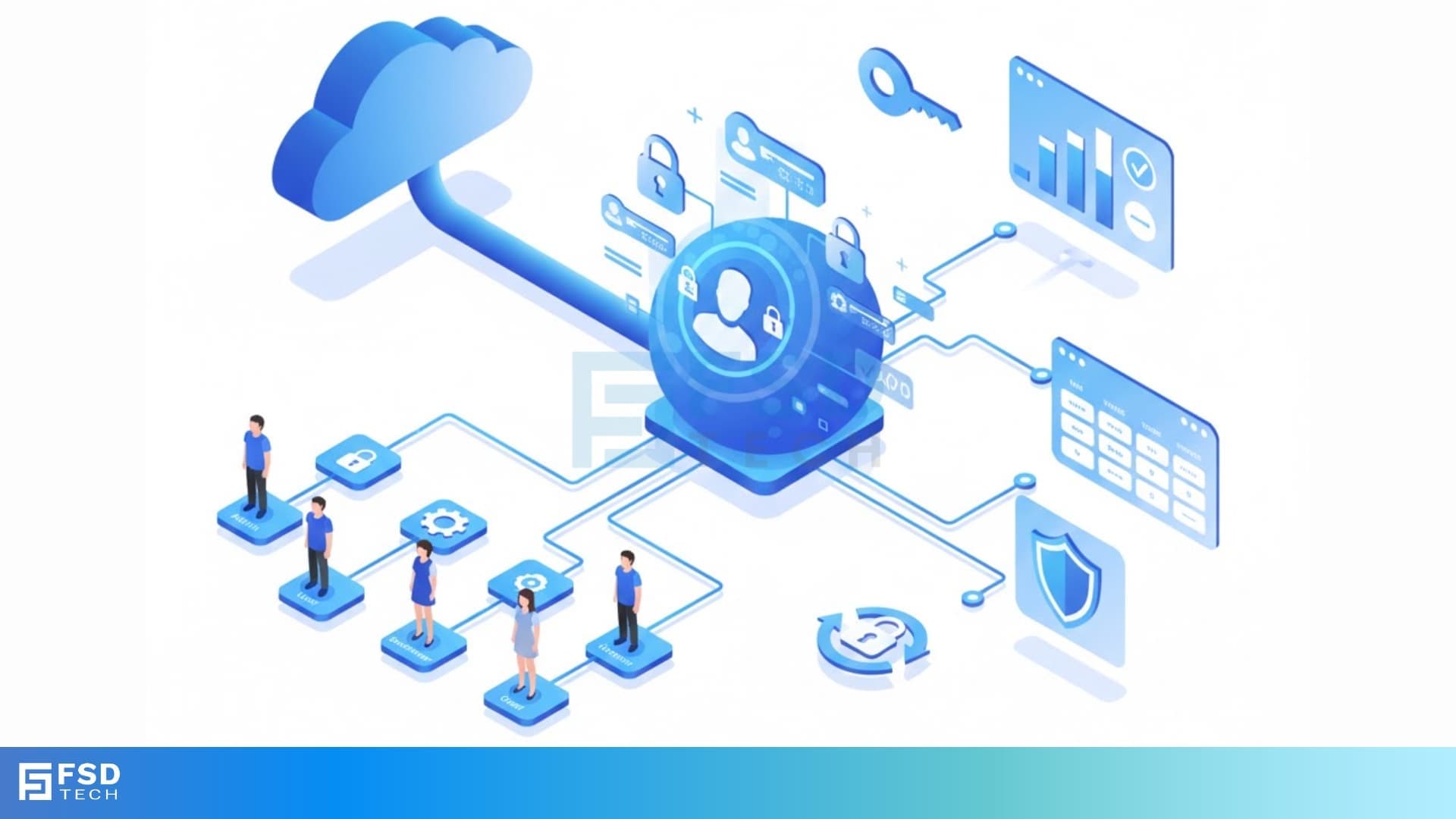
    You want to protect your company's valuable information, right? Every organization must control who accesses which resources, whether it is a sensitive financial report or a critical system function. Role-Based Access Control (RBAC) provides a powerful and practical solution to this fundamental security challenge.


    But, how exactly does RBAC work? And why is it considered the standard approach for managing rbac permissions in modern systems? Keep reading as we explain what is role-based access control RBAC, how it is structured, and how it helps you implement a robust security posture without the hassle of managing individual user rights.


    Understanding the RBAC Definition

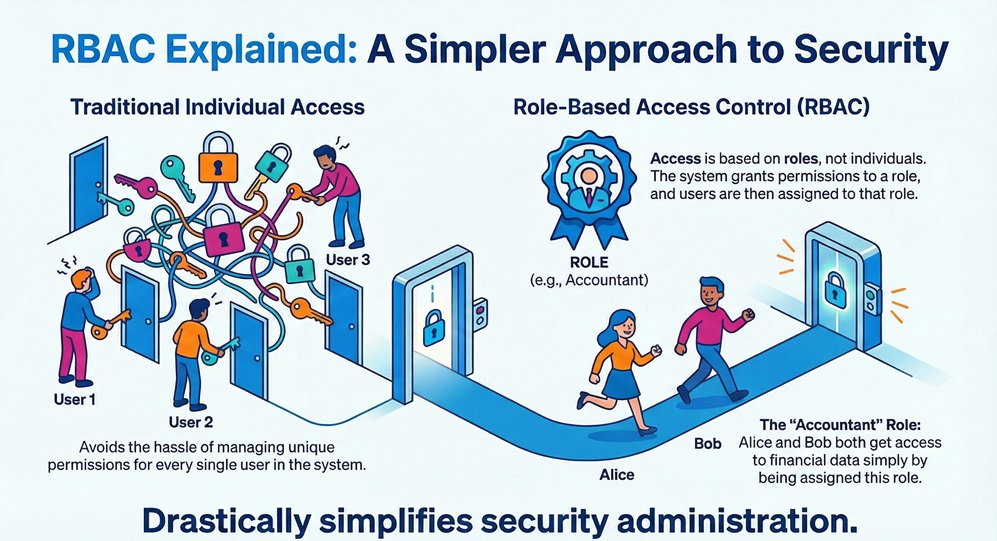
    Let us start with the rbac definition. Role-Based Access Control (RBAC) can be understood as a policy-neutral access control mechanism that manages and enforces security access based on the roles of individual users within an organization. This means the system grants access rights not directly to the individual user, but to the role the user possesses.
     

    RBAC Infographic


    In simple words, you do not manage Alice's or Bob's access specifically. Instead, you define an "Accountant" role with specific access to financial data, and you simply assign Alice and Bob that rbac role. This approach greatly simplifies administration.


    RBAC full form is Role-Based Access Control. This term refers to the method where access rights, which include permissions to perform specific operations, depend on the role a user possesses.


    RBAC Questions? Contact us


    Core Components of Role-Based Access Control RBAC

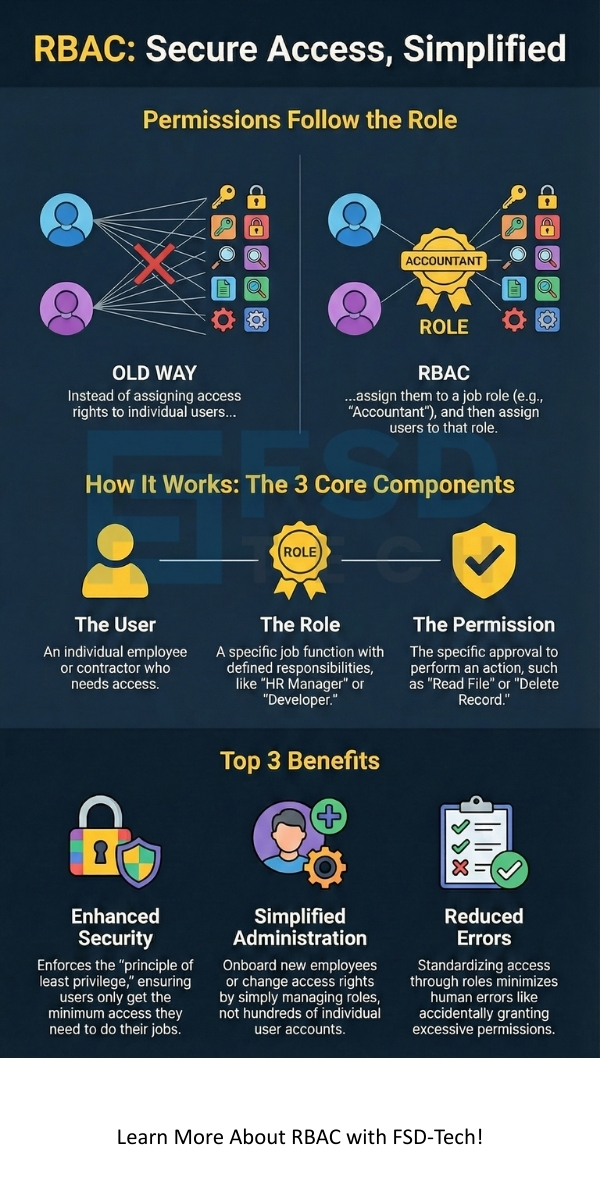
    To understand how Role-Based Access Control (RBAC) functions, you must be familiar with its three fundamental elements. RBAC works on the principle of linking these components together to ensure that access is both secure and manageable.


    1. The User Component

    The User refers to any person or entity that requests access to a system resource. These are the individuals in your organization—employees, contractors, partners—who perform various functions.


    • RBAC does not focus on the individual characteristics of the user.
    • The system identifies the user and checks which roles the user possesses.
    • A single user can be assigned multiple roles, as an employee might be both a "Developer" and a "Team Leader."


    2. The Role Component

    The Role is nothing but a job function or a level of authority within the organization. Role-based access control RBAC defines roles like "System Administrator," "Auditor," "HR Manager," or "Guest."


    • The Role serves as a link between the user and the permissions.
    • Each role comprises a specific set of permissions that are necessary to perform the job function.
    • RBAC simplifies management by grouping users under a role rather than managing permissions individually for each user.


    3. The Permission Component

    The Permission refers to the approval to conduct a specific operation on a specific object or resource. RBAC permissions are the most granular level of control. Examples include:


    • Read a document.
    • Write data to a file.
    • Execute a program or function.
    • Delete a record.


    Permissions are granted to roles, and roles are assigned to users. This structure ensures that users only get the exact permissions they need to do their jobs.


    Also Read: What is Attribute Based Access Control (ABAC)?


    How Does RBAC Login Work?

    When a user attempts an action within an RBAC-enabled system, a systematic process is executed to determine if access is permitted. Let us now discuss the sequential steps for an rbac login and access check.


    First: The Authentication Step

    The user must provide their credentials, such as a username and password, to the system.


    • The system verifies these credentials to confirm the user’s identity.
    • Successful verification indicates that the user is authentic.


    Second: The Role Assignment Check

    Upon successful authentication, the system determines which roles the user possesses.


    • This process involves looking up the user’s entry in the access control list or database.
    • The system retrieves all roles assigned to that specific user.


    Third: The Access Request

    The authenticated user attempts to perform an action, such as viewing a sensitive customer database.


    • This action constitutes a request for a specific rbac permission (e.g., "Read Customer Data").


    Fourth: The Permission Check

    The system compares the requested permission against the collective permissions of all roles assigned to the user.


    • If any of the user’s roles includes the required permission, access is granted.
    • If none of the user’s roles includes the required permission, access is denied, and the action fails.


    In this way, the RBAC system controls access dynamically at the time of the request.


    Exploring the Essential RBAC Models

    Role-Based Access Control (RBAC) is not a single, rigid model. The National Institute of Standards and Technology (NIST) defines several standard rbac models that organizations can implement based on their specific security needs and complexity.


    1. RBAC0: The Core Model

    RBAC0 is nothing but the fundamental model of Role-Based Access Control. It provides the basic framework.


    • It defines the three core sets: Users (U), Roles (R), and Permissions (P).
    • It establishes the user-to-role assignment (UA) and the role-to-permission assignment (PA).
    • This model permits many-to-many relationships: a user can have many roles, and a role can have many permissions.


    2. RBAC1: Adding Role Hierarchy

    RBAC1 extends the basic RBAC0 model by introducing a role hierarchy. This is crucial for larger organizations.


    • A hierarchy means that one role can inherit permissions from another role.
    • For example, a "Senior Developer" role inherits all the permissions of a "Junior Developer" role, plus additional, higher-level permissions.
    • This structure simplifies management, as you only need to grant permissions to the base role once.


    3. RBAC2: Including Constraints

    RBAC2 introduces the concept of constraints or Separation of Duty (SoD) policies. Constraints are rules that govern the creation and usage of roles.


    • Constraintsensure that no single user can perform a critical, high-risk task alone.
    • For example, a constraint can prevent the "Request Payment" role and the "Approve Payment" role from being assigned to the same user.
    • This model minimizes fraud and errors, thus improving security.


    4. RBAC3: Combining Hierarchy and Constraints

    RBAC3 is nothing but the comprehensive model. It combines the role hierarchy (RBAC1) and the constraints (RBAC2) with the core features (RBAC0).


    • This model provides the highest degree of security and flexibility for complex environments.
    • It allows for inheritance while also enforcing strict SoD rules.


    Also Read: What is Internet Key Exchange (IKE)?


    What is RBAC in Security?

    Why implement Role-Based Access Control (RBAC)? RBAC plays a vital role in modern security architectures. It ensures that users operate with the principle of least privilege. This principle dictates that a user must possess only the minimum rbac permissions they need to perform their job.


    1. Enhanced Security and Compliance

    RBAC reduces the risk of internal threats and data breaches.


    • It restricts access to sensitive data for anyone who does not require it for their daily tasks.
    • The clear structure assists organizations in meeting regulatory compliance standards like HIPAA or GDPR, which demand strict access controls.


    2. Simplified Administration

    Managing permissions for hundreds or thousands of individual users is complex.


    • RBACstreamlines the process: you only modify the permissions of the role, and all assigned users automatically inherit the change.
    • Adding a new employee simply involves assigning the relevant pre-defined roles.


    3. Improved Operational Efficiency

    Users can find that RBAC facilitates easier and faster access to the resources they need.


    • The clarity of roles prevents access bottlenecks or delays that can occur when managing individual permissions manually.
    • This improves the speed at which employees can perform their core functions.


    4. Reduced Errors

    Manual permission management leads to errors, such as over-granting permissions or overlooking necessary ones.


    • RBACminimizes these human errors by standardizing access through roles.
    • A centralized management system ensures consistency across the entire organization.


    RBAC Examples in Real-World Systems

    To understand the practical application of Role-Based Access Control, let us examine a common scenario.


    Example: A Corporate HR System

    • Role: HR Recruiter
      • Permissions: Read (Candidate Profiles), Write (New Candidate Data), Execute (Send Interview Invites).
      • Role Hierarchy: This role inherits permissions from the "Employee" role.
    • Role: Payroll Specialist
      • Permissions: Read (Salary Data), Write (Bank Transfer Details), Execute (Approve Payroll Batch).
      • RBAC2 Constraint: The Payroll Specialist cannot also be assigned the "Auditor" role (Separation of Duties).
    • Role: Employee
      • Permissions: Read (Own Pay Stub), Write (Update Own Contact Information), Read (Company Policy).


    This RBAC example clearly shows how access depends on the user's specific job function. The system ensures that a Recruiter cannot access confidential salary data, and a Payroll Specialist cannot be the sole person who both processes and audits the payment.


    Also Read: What is Disaster Recovery in Cloud Computing?


    What is RBAC in Kubernetes?

    Kubernetes is nothing but an open-source system for automating deployment, scaling, and management of containerized applications. Within this platform, rbac in kubernetes plays a critical role in cluster security.


    • Kubernetes RBAC allows administrators to dynamically configure policies through the Kubernetes API.
    • This system defines who (the User or a Service Account) can perform what action (the Verb) on which resources (e.g., Pods, Deployments) within a specific scope (Namespaces or Cluster-wide).


    Kubernetes RBAC uses four key objects:


    1. Role:Comprises a set of permissions within a specific Namespace.
    2. ClusterRole:Consists of permissions that apply across the entire cluster.
    3. RoleBinding:Binds a user or group to a Role in a specific Namespace.
    4. ClusterRoleBinding:Binds a user or group to a ClusterRole across the whole cluster.


    Kubernetes RBAC ensures that a developer can only deploy applications to their assigned Namespace, while a cluster administrator maintains control over the entire system.


    RBAC vs ABAC

    When considering access control systems, you will often encounter the debate of rbac vs abac. While both aim at securing resources, they work on entirely different principles. ABAC and RBAC each offer distinct advantages.


    Basis for ComparisonRole-Based Access Control (RBAC)Attribute-Based Access Control (ABAC)
    RBAC Meaning / PrincipleAccess depends on the user's Role (job function).Access depends on a set of Attributes (characteristics) of the user, resource, and environment.
    PolicyPolicy is static and role-centric. Predetermines permissions for each role.Policy is dynamic and rule-centric. Evaluates a set of rules at the time of access.
    ComplexitySimpler to implement and manage for small to medium complexity.More complex to set up but provides fine-grained control for high complexity.
    ScalabilityCan become complex to manage with a high number of roles.Scales well by allowing virtually infinite combinations of attributes.
    Policy ChangeRequires an administrator to change the role's permissions.Requires an administrator to change the rule set.
    Best Suited ForOrganizations with clear, well-defined job functions.Highly dynamic environments and systems requiring highly specific access rules (e.g., time-of-day access).


    What about RBAC vs ABAC vs PBAC?

    Now, the question arises, what is PBAC? PBAC stands for Policy-Based Access Control.


    • PBAC is nothing but a broader category that includes ABAC.
    • PBACfocuses on evaluating policies and rules to determine access. ABAC is a type of PBAC where the rules are based on attributes.
    • RBAC vs ABAC vs PBAC indicates that RBAC is a simpler, role-centric model, while ABAC and PBAC are flexible, rule-centric models.


    Conclusion

    So, with the above discussion, we can say that Role-Based Access Control (RBAC) serves as the essential backbone for security and access management in nearly every modern enterprise system, from basic corporate applications to complex systems like kubernetes RBAC.


    The methodology is simple: assign permissions to roles, and assign roles to users. This focuses the management effort on defining job functions rather than tracking countless individual user rights. RBAC ensures that every user—and only that user—possesses the precise level of access required to perform their job, which results in a security model that is more secure, easier to manage, and significantly more compliant.


    We are committed to helping organizations like yours implement security solutions that ensure your data is protected and your operations remain efficient. 


    Contact us today to explore how our expertise can optimize your security architecture.
     

    RBAC


    Key Takeaways on Role-Based Access Control (RBAC)

    1. Access is Role-Driven: RBAC means you assign permissions to job roles (e.g., "Manager," "Auditor") rather than to individual users, which simplifies management.
    2. Enforces Least Privilege: The system ensures users only possess the minimum rbac permissions necessary to perform their assigned duties, improving security.
    3. Reduces Administrative Overhead: Managing roles is simpler than managing permissions for every user, reducing errors and streamlining onboarding tasks.
    4. Supports Security Constraints: Advanced models like RBAC2 implement Separation of Duty (SoD) policies, which prevent single users from executing high-risk functions.
    5. Standard for Enterprise Security: RBAC serves as the essential framework for controlling access in complex environments, including systems like Kubernetes RBAC.


    Frequently Asked Questions (FAQs) about RBAC

    1. Is RBAC Login More Secure than Traditional Access Control?

    Yes, RBAC is significantly more secure than traditional Discretionary Access Control (DAC), where users can grant or revoke access to their own files. RBAC enforces a central security policy and implements the crucial principle of least privilege, which minimizes the attack surface.


    2. Can a User Have Multiple RBAC Roles?

    Absolutely, a single user can be assigned multiple rbac roles. For example, a "Software Engineer" who also leads a small project can possess both the "Developer" role and the "Project Leader" role. The system combines the permissions of all assigned roles to determine the user's total access rights.


    3. What is the biggest challenge of implementing RBAC?

    The primary challenge of Role-Based Access Control involves the initial definition of roles and permissions. If the roles are not properly designed or reflect the actual job functions, you can end up with too many roles or overlapping permissions, which creates a phenomenon known as "role explosion." Regular audits are required to maintain role clarity.

    What is Role-Based Access Control (RBAC)?

    About The Author

    Surbhi Suhane

    Surbhi Suhane is an experienced digital marketing and content specialist with deep expertise in Getting Things Done (GTD) methodology and process automation. Adept at optimizing workflows and leveraging automation tools to enhance productivity and deliver impactful results in content creation and SEO optimization.

    Like This Story?

    Share it with friends!

    Subscribe to our newsletter!

    Atera

    (48)

    Cato Networks

    (113)

    ClickUp

    (70)

    FishOS

    (7)

    Miradore

    (21)

    PointGuard AI

    (9)

    Vembu

    (22)

    Xcitium

    (33)

    ZETA HRMS

    (71)

    Workflow Automation(8)

    Workforce Automation(1)

    AI Project Management(1)

    HR Data Automation(1)

    RMM(1)

    IT Workflow Automation(1)

    IT security(2)

    GCC compliance(4)

    Payroll Integration(2)

    IT support automation(3)

    procurement automation(1)

    lost device management(1)

    IT Management(5)

    IoT Security(2)

    Cato XOps(2)

    IT compliance(4)

    Workflow Management(1)

    Task Automation(1)

    AI-powered cloud ops(1)

    Kubernetes lifecycle management(2)

    OpenStack automation(1)

    SMB Security(8)

    Data Security(1)

    MDR (Managed Detection & Response)(4)

    MSP Automation(3)

    Atera Integrations(2)

    XDR Security(2)

    Ransomware Defense(3)

    SMB Cyber Protection(1)

    HR Tech Solutions(1)

    Zero Trust Network Access(3)

    Zero Trust Security(2)

    Endpoint Management(1)

    SaaS Security(1)

    Payroll Automation(5)

    IT Monitoring(2)

    Xcitium EDR SOC(15)

    Ransomware Protection GCC(1)

    M&A IT Integration(1)

    Network Consolidation UAE(1)

    MSSP for SMBs(1)

    FSD-Tech MSSP(25)

    Antivirus vs EDR(1)

    Ransomware Protection(3)

    Managed EDR FSD-Tech(1)

    SMB Cybersecurity GCC(1)

    Cybersecurity GCC(12)

    Endpoint Security(1)

    Data Breach Costs(1)

    Endpoint Protection(1)

    Zero Dwell Containment(31)

    Managed Security Services(2)

    Xcitium EDR(30)

    SMB Cybersecurity(8)

    Cloud Backup(1)

    Hybrid Backup(1)

    Backup & Recovery(1)

    pointguard ai(4)

    backup myths(1)

    vembu(9)

    SMB data protection(9)

    disaster recovery myths(1)

    Vembu BDR Suite(19)

    Disaster Recovery(4)

    DataProtection(1)

    GCCBusiness(1)

    Secure Access Service Edge(4)

    GCC HR software(16)

    Miradore EMM(15)

    Cato SASE(7)

    Cloud Security(8)

    Talent Development(1)

    AI Cybersecurity(12)

    AI Security(2)

    AI Governance(4)

    AI Risk Management(1)

    AI Compliance(2)

    GCC business security(1)

    GCC network integration(1)

    compliance automation(4)

    education security(1)

    GCC cybersecurity(2)

    Miradore EMM Premium+(5)

    BYOD security Dubai(8)

    App management UAE(1)

    HealthcareSecurity(1)

    MiddleEast(1)

    Team Collaboration(1)

    IT automation(12)

    Zscaler(1)

    SD-WAN(6)

    HR Integration(4)

    Cloud Networking(3)

    device management(9)

    RemoteWork(1)

    ZeroTrust(2)

    VPN(1)

    MPLS(1)

    Project Management(9)

    HR automation(16)

    share your thoughts

    Role-Based Access Control (RBAC)

    What is Role-Based Access Control (RBAC)?

    🕓 January 17, 2026

    RADIUS Protocol

    What is RADIUS Protocol? AAA, Setup & Security

    🕓 January 17, 2026

    Supply Chain Attack

    What is Supply Chain Attack? Types & Prevention

    🕓 January 16, 2026

    Decoded(70)

    Cyber Security(112)

    BCP / DR(22)

    Zeta HRMS(70)

    SASE(21)

    Automation(70)

    Next Gen IT-Infra(113)

    Monitoring & Management(69)

    ITSM(22)

    HRMS(21)

    Automation(24)