HomeNext Gen IT-InfraMonitoring & ManagementCyber SecurityBCP / DRAutomationDecoded
Next Gen IT-Infra
Cato’s SASE Supports Cybersecurity Skills Development

How Cato’s SASE Supports Cybersecurity Skills Development

🕓 April 8, 2025

How SASE Supports the Security Needs of SMBs

How SASE Supports the Security Needs of SMBs

🕓 February 9, 2025

Attack Surface Reduction with Cato’s SASE

Attack Surface Reduction with Cato’s SASE

🕓 February 10, 2025

SASE for Digital Transformation in UAE

SASE for Digital Transformation in UAE

🕓 February 8, 2025

Monitoring & Management
Understanding Atera’s SLA Management

Understanding Atera’s SLA Management

🕓 February 7, 2025

Cost-Performance Ratio: Finding the Right Balance in IT Management Networks

Cost-Performance Ratio: Finding the Right Balance in IT Management Networks

🕓 June 16, 2025

Customizing Atera with APIs

Customizing Atera with APIs

🕓 March 3, 2025

Power Up Your IT Team’s Strategy with Atera’s Communication Tools

Power Up Your IT Team’s Strategy with Atera’s Communication Tools

🕓 February 8, 2025

Cyber Security
Visual guide showing Cato CMA interface for configuring Internet and WAN firewall rules, enabling threat protection, and monitoring security events in real time for UAE IT teams.

Enforcing Firewall and Threat Protection Policies in Cato

🕓 July 25, 2025

Isometric illustration of professionals managing network performance, bandwidth analytics, and cloud-based optimization around the Cato Networks platform, symbolizing bandwidth control and QoS visibility.

Mastering Bandwidth Control and QoS in Cato Networks

🕓 July 26, 2025

Illustration of the Cato Cloud architecture showing its role in delivering SASE for secure, optimized global connectivity.

Understanding the Cato Cloud and Its Role in SASE

🕓 January 29, 2025

Global network backbone powering Cato SASE solution for secure, high-performance connectivity across regions.

Global Backbone: The Engine Powering Cato’s SASE Solution

🕓 January 30, 2025

BCP / DR
Illustration showing diverse business and IT professionals collaborating with cloud, backup, and security icons, representing Vembu use cases for SMBs, MSPs, and IT teams.

Who Uses Vembu? Real-World Use Cases for SMBs, MSPs & IT Teams

🕓 July 12, 2025

Graphic showcasing Vembu’s all-in-one backup and disaster recovery platform with icons for cloud, data protection, and business continuity for IT teams and SMBs.

What Is Vembu? A Deep Dive Into the All in One Backup & Disaster Recovery Platform

🕓 July 6, 2025

Illustration showing Vembu backup and disaster recovery system with cloud storage, server racks, analytics dashboard, and IT professionals managing data.

The Rising Cost of Data Loss: Why Backup Is No Longer Optional?

🕓 August 14, 2025

3D isometric illustration of cloud backup and data recovery infrastructure with laptop, data center stack, and digital business icons — FSD Tech

RPO & RTO: The Heart of Business Continuity

🕓 August 15, 2025

Automation
Cross-Functional Collaboration with ClickUp

Fostering Cross-Functional Collaboration with ClickUp for Multi-Departmental Projects

🕓 February 11, 2025

ClickUp Project Reporting

Revolutionizing Enterprise Reporting with ClickUp’s Advanced Analytics and Dashboards

🕓 June 16, 2025

ClickUp’s Design Collaboration and Asset Management Tools

Empowering Creative Teams with ClickUp’s Design Collaboration and Asset Management Tools

🕓 February 26, 2025

ClickUp Communication and Collaboration Tools

ClickUp Communication and Collaboration Tools: Empowering Remote Teams

🕓 March 12, 2025

Decoded
Multi-Factor Authentication (MFA)

Multi-Factor Authentication (MFA): All You Need to Know

🕓 December 7, 2025

L3 Switch

What Is an L3 Switch? L2 vs L3 & Why You Need Layer 3?

🕓 December 8, 2025

IPSec

IPSec Explained: Protocols, Modes, IKE & VPN Security

🕓 December 3, 2025

 Datagram Transport Layer Security (DTLS)

What is Datagram Transport Layer Security (DTLS)? How it works?

🕓 December 4, 2025

    Subscribe to our newsletter!

    About Us

    Follow Us

    Copyright © 2024 | Powered by 

    Cato SASE Architecture

    Inside Cato’s SASE Architecture: A Blueprint for Modern Security

    🕓 January 26, 2025

    Enterprise Data Security and Privacy with ClickUp

    Ensuring Enterprise Data Security and Privacy with ClickUp

    🕓 February 9, 2025

    DDoS protection SASE

    DDoS Protection and Cato’s Defence Mechanisms

    🕓 February 11, 2025

    Table of Contents

    What is RADIUS Protocol? AAA, Setup & Security

    Surbhi Suhane
    January 17, 2026
    Comments
    RADIUS Protocol

    The world of networking feels huge, but controlling who accesses your services is vital for security. You need a reliable gatekeeper—a system that ensures only authorized users step inside your digital home. What if a single, proven standard could handle all the authentication, authorization, and accounting for your entire network, from Wi-Fi to VPNs?


    This guide will walk you through the inner workings of the Remote Authentication Dial-In User Service (RADIUS) protocol. You will learn exactly how this foundational technology manages access control. We will discuss its components, how it secures information, and why it remains an essential, vital, critical tool for network professionals globally. By the end, you will understand the clear advantages this system offers your network security posture.


    What is the RADIUS Protocol?

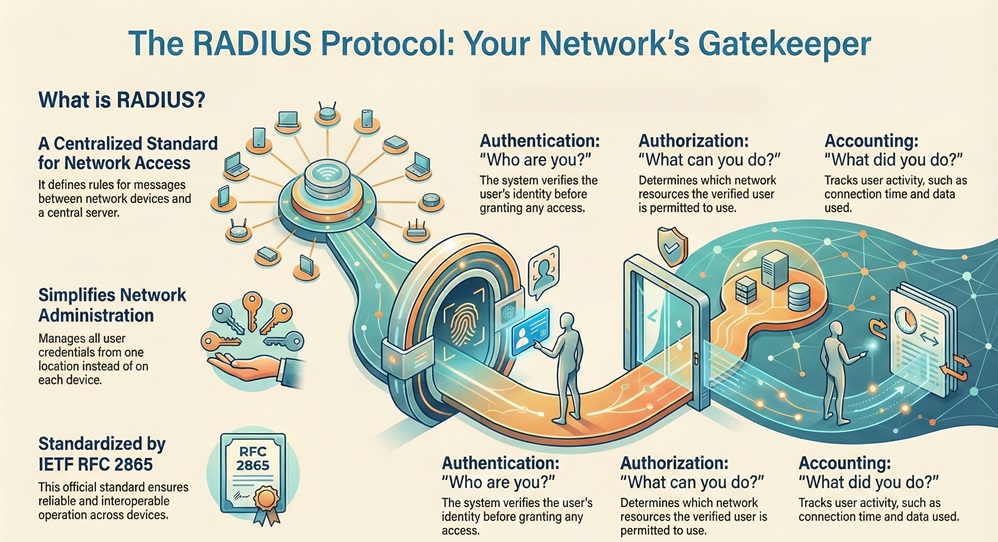
    The RADIUS protocol is a networking standard that provides centralized Authentication, Authorization, and Accounting (AAA) management for users connecting to a network service. This protocol ensures that only authorized users access network resources. RADIUS protocol usage began in the early 1990s as a solution for dial-up access but quickly adapted for modern networks.


    Is RADIUS a protocol? 


    Yes, it is. The RADIUS protocol defines the rules and format for messages exchanged between network devices and a central server. This robust structure enables effective security management. The RADIUS protocol is nothing but a mechanism that governs the user access process. It is important to note that the Internet Engineering Task Force (IETF) defines the RADIUS protocol rfc, specifically RFC 2865, which sets the standard for its operation.
     

    RADIUS protocol


    RADIUS primarily serves three distinct functions:


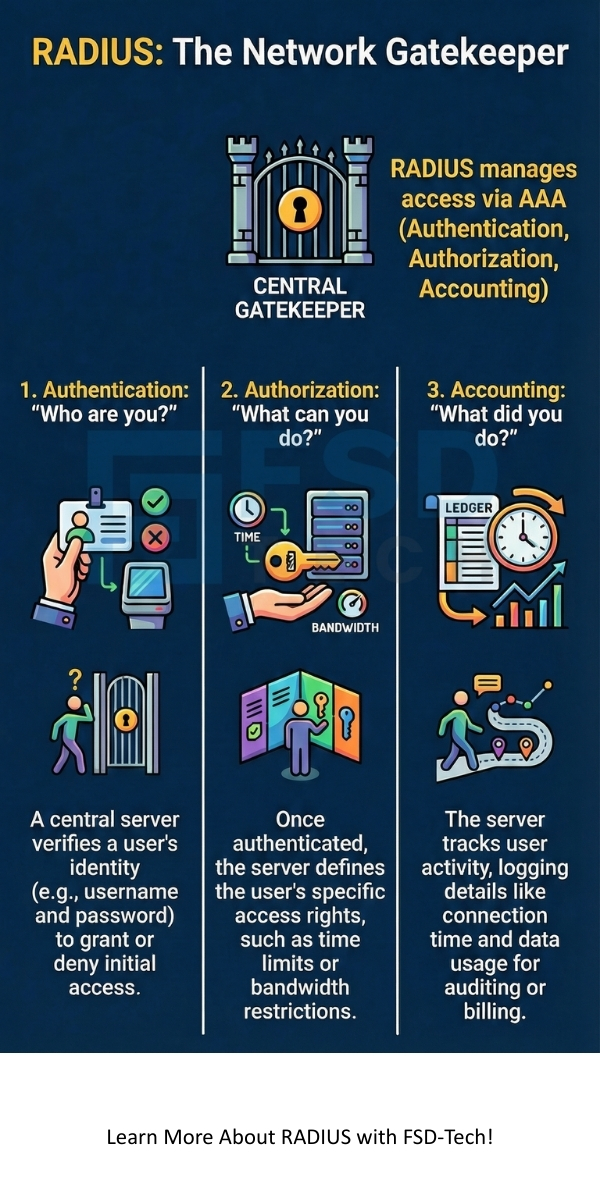
    • Authentication: The system verifies the user’s identity.
    • Authorization: The system determines what the user can do once connected.
    • Accounting: The system tracks the user’s activity, such as connection time and data used.


    The design of the RADIUS protocol separates the core access functions from the Network Access Server (NAS). This separation allows you to manage all user credentials from one location—the central RADIUS server. This approach vastly simplifies network administration and secures your environment.


    Network Access Contact


    How RADIUS Authentication Works?

    To secure your network, the RADIUS protocol relies on a clear, three-part process known as AAA. You must understand this sequential pattern to grasp the flow of network access.


    The access process follows these steps:


    1. The Access Request: A user attempts to connect to a Network Access Server (NAS) via Wi-Fi or VPN. The NAS acts as the RADIUS client.
    2. Authentication and Authorization: The NAS sends a request to the RADIUS server. The server checks the user's credentials and determines their access rights.
    3. Accounting: Once access is granted, the NAS and RADIUS server begin tracking the user's session data.


    How RADIUS authentication works effectively determines whether a user is who they claim to be. This process is crucial for preventing unauthorized entry into your infrastructure.


    Also Read: Multi-Factor Authentication (MFA): All You Need to Know


    The Client-Server Model

    The RADIUS protocol operates on a basic client-server model. This model ensures the central server handles all sensitive operations.


    • The RADIUS Client (NAS): This device—a Wi-Fi access point, VPN concentrator, or switch—initiates the communication. It acts as the gateway to the network. The client comprises the point of entry for the user.
    • The RADIUS Server: This central service stores the user credentials and applies the defined access policies. The RADIUS server maintains the critical information for the entire system.


    When a user tries to access the network, the client forwards the request, and the server provides the answer. This clear division of labor ensures that the authorization logic resides securely on the server, away from the access points.


    Understanding RADIUS Authentication

    RADIUS authentication begins when the user provides a username and password to the NAS. The NAS does not directly verify these credentials. Instead, the NAS sends an Access-Request message to the RADIUS server.


    The RADIUS server performs the following actions:


    • The server checks the supplied username against its database (or an external directory like LDAP).
    • The server attempts to verify the password using various supported methods, often involving encryption or hashing.
    • The server responds to the NAS with one of three potential messages:
      • Access-Accept: Authentication is successful, and the user is permitted entry.
      • Access-Reject: Authentication failed, and the user is denied access.
      • Access-Challenge: The server requires more information, such as a second factor for authentication.


    RADIUS authentication relies on a shared secret key configured on both the client and the server. This secret key ensures that no third party can easily listen to or tamper with the communication.


    Also Read: What is Web Application Firewall? | WAF Explained


    Authorization and Accounting in the RADIUS Protocol

    Once the user authenticates successfully, authorization begins. RADIUS authorization determines what resources the newly connected user can access.


    • Authorization: The RADIUS server includes specific instructions within the Access-Accept message. These instructions are known as Attribute-Value Pairs (AVPs). These AVPs determine the level of service, the time limits, and the physical ports the user can use. For example, an AVP might dictate that a user only gets limited bandwidth.
    • Accounting:RADIUS accounting keeps a record of how the user utilized the network service. This function is essential for billing, auditing, and capacity planning. The client sends Accounting-Request messages at the start and end of the session, and periodically in between. RADIUS accounting maintains a complete log of network usage.


    What Protocol Does RADIUS Use?

    The RADIUS protocol itself is an application-layer protocol, but it relies on a transport layer protocol to move its messages across the network. What protocol does RADIUS use for transport? It uses the User Datagram Protocol (UDP).


    UDP is a connectionless protocol. This means that the server does not establish a persistent connection before sending a response. It simply sends the data. The RADIUS protocol uses UDP primarily for efficiency and speed, which are essential when managing many simultaneous access requests.


    RADIUS typically operates over the following UDP ports:


    • Port 1812: Used for Authentication and Authorization traffic.
    • Port 1813: Used for Accounting traffic.


    Some older systems may still use the original ports 1645 (Authentication/Authorization) and 1646 (Accounting). RADIUS protocol implementations often support both sets, but modern networks primarily rely on ports 1812 and 1813. Since UDP does not guarantee delivery, the RADIUS client implements its own retransmission and timeout mechanisms.


    Also Read: Cyber Threat Intelligence (CTI) in Cybersecurity


    Understanding the RADIUS Server Functionality

    A RADIUS server is the cornerstone of any network implementing centralized access control. Its functionality comprises more than just checking usernames and passwords. It acts as a policy engine for the entire network.


    The RADIUS server performs several roles:


    • Central Credential Management: The server stores or links to all user authentication data. This allows you to manage thousands of users from a single console.
    • Policy Enforcement: It determines the specific rules (e.g., time of day restrictions, bandwidth limits) that apply to the authenticated user.
    • Proxy Functionality: If the server cannot authenticate the user locally, it may forward the request to another RADIUS server in a different domain or company. This allows for federated network access.
    • Reporting and Auditing: The server logs all successful and failed authentication attempts and full session accounting data.


    What radius server solution you choose often depends on the scale and complexity of your network. Both open-source options, like FreeRADIUS, and commercial solutions are available to handle these critical tasks. The RADIUS server plays a vital role in network security and operations.


    Key Features and RADIUS Protocol Security

    RADIUS protocol security is a significant consideration, especially since the messages often carry sensitive authentication details. While the protocol uses UDP (which is inherently insecure), the RADIUS protocol has built-in mechanisms to provide necessary protection.


    Shared Secret Mechanism

    The shared secret is the foundational layer of RADIUS protocol security. This shared secret is nothing but a text string known only to the NAS (client) and the RADIUS server.


    • The client uses the shared secret to create a message authenticator within the Access-Request. This authenticator ensures the message truly originates from a trusted client.
    • More importantly, the shared secret ensures that the user's password is never sent across the network in plaintext. The password field is encrypted using the shared secret and other information in the packet.


    Message Format and Attribute Value Pairs (AVPs)

    All communication in the RADIUS protocol uses a specific message format. This consistent structure includes a Code, Identifier, Length, and Authenticator field.


    The actual data is contained in the Attribute-Value Pairs (AVPs). The AVP is a powerful and flexible concept.


    • An AVP refers to a piece of information that the server uses to authenticate or authorize a user.
    • Examples of AVPs include the User-Name, User-Password, Service-Type, and Framed-IP-Address.


    The flexibility of AVPs allows vendors to add custom attributes. This adaptability makes the RADIUS protocol a comprehensive tool for various network needs, facilitating a smooth exchange of necessary details.


    RADIUS Message Types

    The RADIUS protocol defines specific message types used to perform the AAA functions. These messages are vital for sequential information flow.


    CodeMessage TypePurpose
    1Access-RequestClient asks the server for user authentication.
    2Access-AcceptServer confirms successful authentication and authorization.
    3Access-RejectServer denies user access.
    4Accounting-RequestClient sends accounting data (start, stop, or interim).
    5Accounting-ResponseServer confirms receipt of accounting data.
    11Access-ChallengeServer requests additional information from the client.

    When you use the RADIUS protocol, the system must correctly process these codes to ensure that network access is granted or denied accurately.


    RADIUS Protocol vs. TACACS+: A Comparison

    While the RADIUS protocol is the dominant standard, another system, Terminal Access Controller Access-Control System Plus (TACACS+), serves a similar function. Understanding the differences helps you determine the best solution for your network security.


    Basis for ComparisonRADIUS ProtocolTACACS+ Protocol
    Transport ProtocolUDP (Ports 1812/1813)TCP (Port 49)
    EncryptionOnly the user password is encrypted; other data (AVPs) are visible.The entire packet body is encrypted.
    Separation of AAACombines Authentication and Authorization functions.Separates Authentication, Authorization, and Accounting.
    VendorOpen Standard (IETF RFCs).Cisco proprietary, but widely supported.
    Authorization DetailLess granular, limited command authorization.Very granular, extensive command authorization.


    Here are the key distinctions you should keep in mind:


    1. Transport Protocol: The RADIUS protocol uses the connectionless UDP, making it faster but less reliable without its own retransmission mechanism. On the other hand, TACACS+ uses the connection-oriented Transmission Control Protocol (TCP), which guarantees packet delivery and is inherently more reliable.
    2. Encryption:RADIUS protocol security only encrypts the password field. This means other authorization information (AVPs) are sent in clear text, which is a major security consideration. In contrast, TACACS+ encrypts the entire packet body, thus ensuring that the communication is more secure end-to-end.
    3. AAA Separation: The RADIUS protocol combines the Authentication and Authorization steps into one exchange. TACACS+ handles all three A's—Authentication, Authorization, and Accounting—as separate processes. This separation allows for much more flexible and detailed control over what an authenticated user can do.
    4. Application:RADIUS tends to dominate in Network Access scenarios (Wi-Fi, VPNs). TACACS+ is mainly used for Device Access Control (e.g., controlling administrative access to routers and switches) due to its superior granular command authorization.


    If you require high-security control over specific device commands, TACACS+ often provides a better fit. However, for general network access, the ubiquity and simplicity of the RADIUS protocol explained make it the most common choice.


    Also Read: What is Phishing Simulation? Benefits & Best Practices


    Who Regulates the RADIUS Protocol?

    The RADIUS protocol is an open standard, meaning no single company or entity fully owns or controls it. Who regulates the RADIUS protocol? The protocol is governed by a series of Request for Comments (RFCs) published by the Internet Engineering Task Force (IETF).


    The IETF is the primary standards organization for the internet protocol suite. It is important to note that the IETF maintains the core specifications, ensuring interoperability and setting the rules for vendors. This open standard approach has been a major factor in the widespread adoption of the RADIUS protocol. Since its core specifications are publicly available, multiple vendors and developers can create compatible implementations, which benefits you by preventing vendor lock-in.


    Practical Applications of the RADIUS Protocol Explained

    The RADIUS protocol is not just for dial-up anymore. Its flexibility and centralized AAA capability have made it essential across a wide range of modern networking services.


    • Wireless Networking (802.1X): When you connect to a corporate Wi-Fi network that requires a username and password, you are almost certainly using the RADIUS protocol. This application ensures that only employees with valid credentials can join the wireless network. RADIUS provides the authentication framework for your secure wireless connections.
    • Virtual Private Networks (VPNs): Companies rely on the RADIUS protocol to manage access to their private networks via VPNs. When you log in to your company VPN, the gateway acts as the client and contacts the central RADIUS server to verify your identity and authorize your access level.
    • Digital Subscriber Line (DSL): Internet service providers (ISPs) often use the RADIUS protocol to manage customer sessions. This includes authenticating the customer, setting bandwidth limits, and tracking usage for billing purposes.
    • Network Management and Administration: Beyond user access, the RADIUS protocol can be used to control administrative access to network devices, such as firewalls and routers, so as to limit who can make configuration changes.


    RADIUS protocol explained clearly how a centralized system can manage diverse access points. This concentration of management significantly reduces the effort required to maintain a secure and auditable network environment.


    Conclusion

    We have discussed how the RADIUS protocol serves as the essential, vital backbone for centralized network access control. You now understand that it provides the critical AAA services—Authentication, Authorization, and Accounting—that your organization needs. By using a secure, central RADIUS server, you effectively manage all user access points, from Wi-Fi to VPNs. Therefore, the protocol helps you enforce strong security policies and track all user activities reliably.


    Implementing the RADIUS protocol means you are choosing a proven, industry-standard solution governed by IETF RFCs. This decision ensures that your network access management is efficient, secure, and ready to scale with your organization's growth. We focus on providing you with tools and knowledge that guarantee network integrity and client focus. Secure access to your network resources is nothing but our commitment to your operational success.


    Proactive RADIUS Defense Contact our team
     

    RADIUS infographic


    Key Takeaways

    1. The RADIUS protocol provides centralized AAA (Authentication, Authorization, Accounting) for network access.
    2. It uses a client-server model where the Network Access Server (NAS) is the client, and the RADIUS server performs the central AAA checks.
    3. RADIUS leverages the connectionless UDP protocol, typically on ports 1812 and 1813.
    4. For RADIUS protocol security, it encrypts the user password using a shared secret known only to the client and server.
    5. All communication relies on flexible Attribute-Value Pairs (AVPs) to convey authentication and authorization data.
    6. The RADIUS protocol is an open standard governed by the IETF (RFC 2865).
    7. It is widely used for secure Wi-Fi (802.1X), VPNs, and ISP subscriber access.


    Frequently Asked Questions

    What radius server software options are available?

    RADIUS server software comprises both commercial and open-source options. For example, you can choose solutions like Microsoft NPS (Network Policy Server) or FreeRADIUS. The choice depends on your operating system environment and the complexity of your requirements.


    Is RADIUS a protocol that guarantees security?

    RADIUS provides security through the shared secret and password encryption, but it does not encrypt the entire message body. Due to this limitation, RADIUS protocol security often requires the addition of other transport security layers, such as IPsec, to fully protect all information.


    How radius authentication works if the server is down?

    If the RADIUS server is unavailable, the client (NAS) will fail to authenticate new users. To prevent a complete service outage, network designs generally include redundant, secondary RADIUS servers. This conditional pattern ensures that if one server fails, the client automatically attempts to connect to the next one.


    What protocol does RADIUS use to manage authorization?

    RADIUS manages authorization using the same authentication message exchange. The Access-Accept message sent back from the server includes specific Attribute-Value Pairs (AVPs). These AVPs determine the specific access rights, such as VLAN assignment or bandwidth limits, thereby defining the authorization level.


    What is RADIUS Protocol? AAA, Setup & Security

    About The Author

    Surbhi Suhane

    Surbhi Suhane is an experienced digital marketing and content specialist with deep expertise in Getting Things Done (GTD) methodology and process automation. Adept at optimizing workflows and leveraging automation tools to enhance productivity and deliver impactful results in content creation and SEO optimization.

    Like This Story?

    Share it with friends!

    Subscribe to our newsletter!

    Atera

    (48)

    Cato Networks

    (113)

    ClickUp

    (70)

    FishOS

    (7)

    Miradore

    (21)

    PointGuard AI

    (9)

    Vembu

    (22)

    Xcitium

    (33)

    ZETA HRMS

    (71)

    Workflow Automation(8)

    Workforce Automation(1)

    AI Project Management(1)

    HR Data Automation(1)

    RMM(1)

    IT Workflow Automation(1)

    IT security(2)

    GCC compliance(4)

    Payroll Integration(2)

    IT support automation(3)

    procurement automation(1)

    lost device management(1)

    IT Management(5)

    IoT Security(2)

    Cato XOps(2)

    IT compliance(4)

    Workflow Management(1)

    Task Automation(1)

    AI-powered cloud ops(1)

    Kubernetes lifecycle management(2)

    OpenStack automation(1)

    SMB Security(8)

    Data Security(1)

    MDR (Managed Detection & Response)(4)

    MSP Automation(3)

    Atera Integrations(2)

    XDR Security(2)

    Ransomware Defense(3)

    SMB Cyber Protection(1)

    HR Tech Solutions(1)

    Zero Trust Network Access(3)

    Zero Trust Security(2)

    Endpoint Management(1)

    SaaS Security(1)

    Payroll Automation(5)

    IT Monitoring(2)

    Xcitium EDR SOC(15)

    Ransomware Protection GCC(1)

    M&A IT Integration(1)

    Network Consolidation UAE(1)

    MSSP for SMBs(1)

    FSD-Tech MSSP(25)

    Antivirus vs EDR(1)

    Ransomware Protection(3)

    Managed EDR FSD-Tech(1)

    SMB Cybersecurity GCC(1)

    Cybersecurity GCC(12)

    Endpoint Security(1)

    Data Breach Costs(1)

    Endpoint Protection(1)

    Zero Dwell Containment(31)

    Managed Security Services(2)

    Xcitium EDR(30)

    SMB Cybersecurity(8)

    Cloud Backup(1)

    Hybrid Backup(1)

    Backup & Recovery(1)

    pointguard ai(4)

    backup myths(1)

    vembu(9)

    SMB data protection(9)

    disaster recovery myths(1)

    Vembu BDR Suite(19)

    Disaster Recovery(4)

    DataProtection(1)

    GCCBusiness(1)

    Secure Access Service Edge(4)

    GCC HR software(16)

    Miradore EMM(15)

    Cato SASE(7)

    Cloud Security(8)

    Talent Development(1)

    AI Cybersecurity(12)

    AI Security(2)

    AI Governance(4)

    AI Risk Management(1)

    AI Compliance(2)

    GCC business security(1)

    GCC network integration(1)

    compliance automation(4)

    education security(1)

    GCC cybersecurity(2)

    Miradore EMM Premium+(5)

    BYOD security Dubai(8)

    App management UAE(1)

    HealthcareSecurity(1)

    MiddleEast(1)

    Team Collaboration(1)

    IT automation(12)

    Zscaler(1)

    SD-WAN(6)

    HR Integration(4)

    Cloud Networking(3)

    device management(9)

    RemoteWork(1)

    ZeroTrust(2)

    VPN(1)

    MPLS(1)

    Project Management(9)

    HR automation(16)

    share your thoughts

    Role-Based Access Control (RBAC)

    What is Role-Based Access Control (RBAC)?

    🕓 January 17, 2026

    RADIUS Protocol

    What is RADIUS Protocol? AAA, Setup & Security

    🕓 January 17, 2026

    Supply Chain Attack

    What is Supply Chain Attack? Types & Prevention

    🕓 January 16, 2026

    Decoded(70)

    Cyber Security(112)

    BCP / DR(22)

    Zeta HRMS(70)

    SASE(21)

    Automation(70)

    Next Gen IT-Infra(113)

    Monitoring & Management(69)

    ITSM(22)

    HRMS(21)

    Automation(24)