.webp&w=3840&q=75)
How ClickUp Enables Outcome-Based Project Management (Not Just Task Tracking)
🕓 February 15, 2026
Unified Endpoint Management is the modern way to handle every device in your company from a single screen. Have you ever felt like you're playing a game of "whack-a-mole" with company laptops and phones? One day a tablet needs an update, and the next, a remote employee loses their smartphone. It is a lot to handle.
In my experience, trying to manage these devices separately is a recipe for a headache. You have one tool for Windows, another for iPhones, and maybe a third for rugged warehouse scanners. It’s messy. That is why we are seeing a shift toward a single, cohesive strategy.
But what exactly goes into this tech? Simply put, it combines mobile management and traditional computer desktop control. It lets your IT team push apps, wipe data, and fix bugs without ever touching the physical device.
Think about how we work today. We aren't just sitting at desks in a big office building anymore. We work from cafes, home offices, and even airplanes. This "work from anywhere" world creates a lot of gaps in security. How do you make sure a coffee shop's Wi-Fi doesn't compromise your company data?
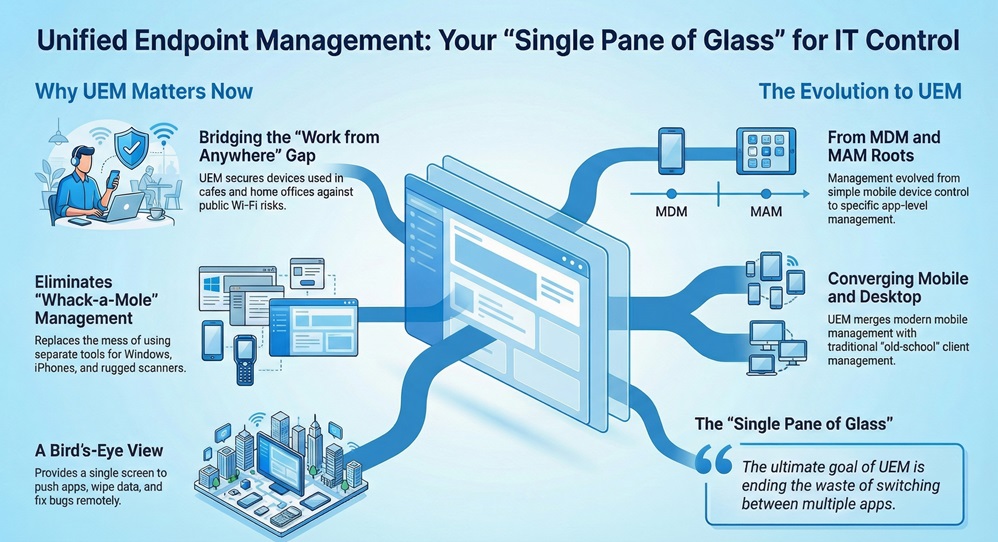
A Unified Endpoint Management solution acts as the glue for your digital workspace. It doesn't matter if the device is a Mac, a PC, or an Android phone. You see them all in one place. To be honest, without this kind of bird's-eye view, you're basically flying blind.
Get My Unified Security Shield
To understand where we are, we have to look at where we started. We used to only care about Mobile Device Management (MDM). That was back when smartphones first hit the office. Then came Mobile Application Management (MAM), which focused only on the apps themselves.
Eventually, IT pros realized that switching between five different apps was a waste of time. They needed one "pane of glass." That is how UEM (Unified Endpoint Management) was born. It took the best parts of mobile management and merged them with old-school client management.
Yes, it is. While MDM just looks at mobile devices, UEM looks at everything. It includes:
Isn't it easier to have one password and one dashboard for all of that? We’ve all been there, trying to remember which software manages which laptop. UEM ends that confusion.
Also Read: Phishing Attacks: The Email That Could Sink Your Business
When you look for a Unified Endpoint Management tool, you'll see a lot of fancy talk. Let's break down what actually matters for your daily operations.
1. Automated Patch Management
We all hate those "Update Required" pop-ups. But in a business, ignoring them is dangerous. A good UEM system pushes these updates automatically. It ensures that every laptop in your fleet has the latest security fix. This keeps hackers out without you having to nag your employees.
2. Remote Wiping and Security
Picture this: An employee leaves their tablet in a taxi. It has your client's private info on it. With a UEM platform, you can "wipe" that device in seconds. You can delete the business data while leaving the person's private photos alone. This is often called "containerization."
3. Zero-Touch Deployment
Remember when IT had to unbox every new laptop to set it up? Those days are gone. With UEM, you can ship a shrink-wrapped laptop directly to a new hire's house. As soon as they turn it on and log in, the UEM pulls down all their apps and settings. It is like magic, but for IT.
You might have heard the term "Zero Trust" recently. It is a security model that basically says, "Trust no one, verify everyone." In my view, you can't really do Zero Trust without a Unified Endpoint Management strategy.
Since the UEM knows the "health" of a device, it can decide if that device should be allowed into your network. If a phone is "jailbroken" or missing a passcode, the UEM blocks its access to your email. It checks the device every single time someone tries to log in. This keeps your "front door" locked tight.
Also Read: Ransomware: The Day Your Data Gets Held Hostage
Remote work isn't going away. Roughly half of the modern workforce uses at least two devices for their jobs. That is a lot of endpoints to track! Using a Unified Endpoint Management tool makes this manageable.
We've seen cases where companies reduced their IT ticket volume by 30% just by switching to UEM. Why? Because the system fixes things in the background. If a worker's VPN stops working, the UEM can reconfigure it automatically.
Actually, it helps. When things work correctly, employees are happier. They don't have to wait for IT to "remote in" and take over their screen for hours. Everything happens silently.
Starting with UEM might feel like a big mountain to climb. But you can take it in steps. Most teams start by migrating their mobile devices first. Once that is stable, they move their Windows or Mac laptops over.
Here is a quick checklist for choosing a provider:
Managing a modern fleet of devices doesn't have to be a nightmare. By using Unified Endpoint Management, you give your IT team the power to protect your data without slowing down your workers. It is about being proactive instead of reactive.
At our core, we believe that technology should serve people, not the other way around. Our team focuses on building secure, simple paths for your business to grow. We're here to make sure your digital tools are always an asset, never a liability. Your security is our top priority, and we're committed to helping you navigate the ever-changing world of tech with confidence.
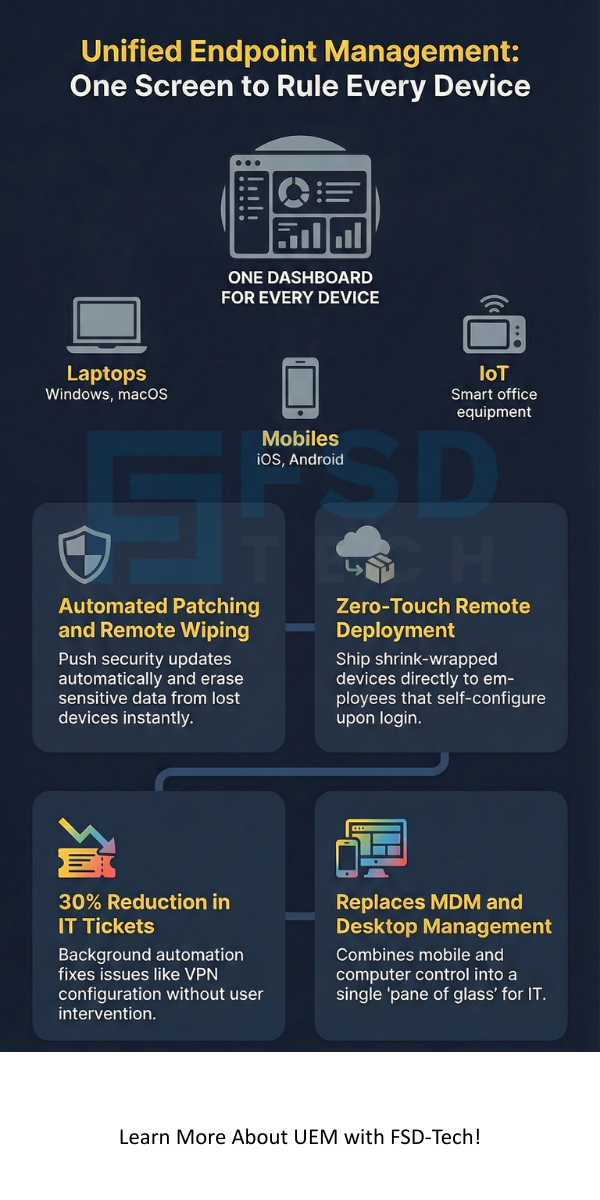
MDM only manages mobile devices like phones. UEM manages everything, including laptops, desktops, and even smart office equipment.
Usually, no. Most UEM tools use "work profiles." This separates your personal apps from your work apps. Your boss can see the work email, but not your vacation photos.
Yes. Modern UEM solutions are built to handle both. This is great for "bring your own device" (BYOD) offices where people use different types of computers.
While there is an upfront cost, most businesses save money in the long run. You save on IT labor and avoid the massive costs of a data breach.

Surbhi Suhane is an experienced digital marketing and content specialist with deep expertise in Getting Things Done (GTD) methodology and process automation. Adept at optimizing workflows and leveraging automation tools to enhance productivity and deliver impactful results in content creation and SEO optimization.
Share it with friends!




.webp&w=3840&q=75)






share your thoughts