.webp&w=3840&q=75)
How ClickUp Enables Outcome-Based Project Management (Not Just Task Tracking)
🕓 February 15, 2026
Effective team management in UAE enterprises demands a workspace structure that balances departmental independence with company-wide alignment. As organizations grow, the risk of silos and miscommunication increases—especially when teams like Marketing, Operations, and Finance need to collaborate on shared objectives. ClickUp’s flexible hierarchy offers a proven framework for structuring multi-department workspaces, enabling scalable team management and seamless cross-department collaboration.
This guide provides a strategic approach for PMOs and department leads to design, implement, and optimize integrated team structures in ClickUp—reducing silos, improving visibility, and supporting enterprise growth in the UAE and beyond.
The UAE’s dynamic business environment is characterized by rapid expansion, diverse teams, and a strong emphasis on operational excellence. As organizations scale, clear workspace structures become essential for:
A well-designed ClickUp workspace structure empowers UAE enterprises to address these challenges, supporting both departmental autonomy and unified company goals.
ClickUp’s organizational model is built on a logical, scalable hierarchy:
| Level | Purpose | Example for UAE Enterprise |
|---|---|---|
| Workspace | Company-wide container | “ABC Holdings LLC” |
| Space | Department or major function | “Marketing”, “Operations”, “Finance” |
| Folder | Project group or process phase | “Campaigns”, “Quarterly Reports” |
| List | Specific project, workflow, or KPI set | “Q1 Product Launch”, “Audit Prep” |
| Task/Subtask | Actionable items, deliverables, or steps | “Book venue”, “Approve budget” |
This structure allows organizations to scale their ClickUp environment as new departments, projects, or teams are added—without sacrificing clarity or control.
This hierarchy is the foundation for scalable team management, supporting both departmental specialization and cross-team collaboration.
For UAE enterprises, it’s best practice to create a separate space for each major department. For example:
Each space can be customized with its own statuses, custom fields, and ClickApps, allowing departments to tailor workflows to their needs while remaining part of the larger organizational structure.
ClickUp’s robust permissions system enables granular control over who can view, edit, or manage content:
This approach ensures sensitive information is protected, while still enabling the sharing of relevant data for collaborative projects.
Organizing work into folders and lists within each space prevents information overload and streamlines navigation:
This structure allows teams to quickly find what they need, reducing miscommunication and ensuring accountability.
Collaboration between departments is often essential for project success. ClickUp enables this by:
This reduces bottlenecks and ensures everyone is working from the same source of truth.
ClickUp’s flexible views and dashboards provide real-time insights across departments:
These tools support agile decision-making and proactive issue resolution.
A UAE retail enterprise sets up a Marketing space with a “Campaigns” folder. For a major product launch, Marketing creates a list for the campaign and shares it with Operations. Operations adds logistics tasks venue booking, shipment tracking, vendor coordination directly to the shared list. Automations notify both teams of status changes, ensuring seamless coordination and reducing manual follow-up.
Finance maintains a “Budget Approvals” list within its space. Marketing submits campaign spend requests via linked tasks. Finance reviews, approves, or requests changes, with automated updates sent to Marketing. This workflow ensures financial oversight without slowing down campaign execution, and all approvals are logged for audit purposes.
The PMO creates a dashboard pulling data from all departmental spaces—campaign performance, logistics milestones, budget status. Leadership reviews this dashboard in weekly meetings, identifying cross-team dependencies and reallocating resources as needed. This centralized reporting supports strategic decision-making and continuous improvement.
Improve cross-department alignment without sacrificing control → Book a free 30-minute ClickUp workspace optimization session.
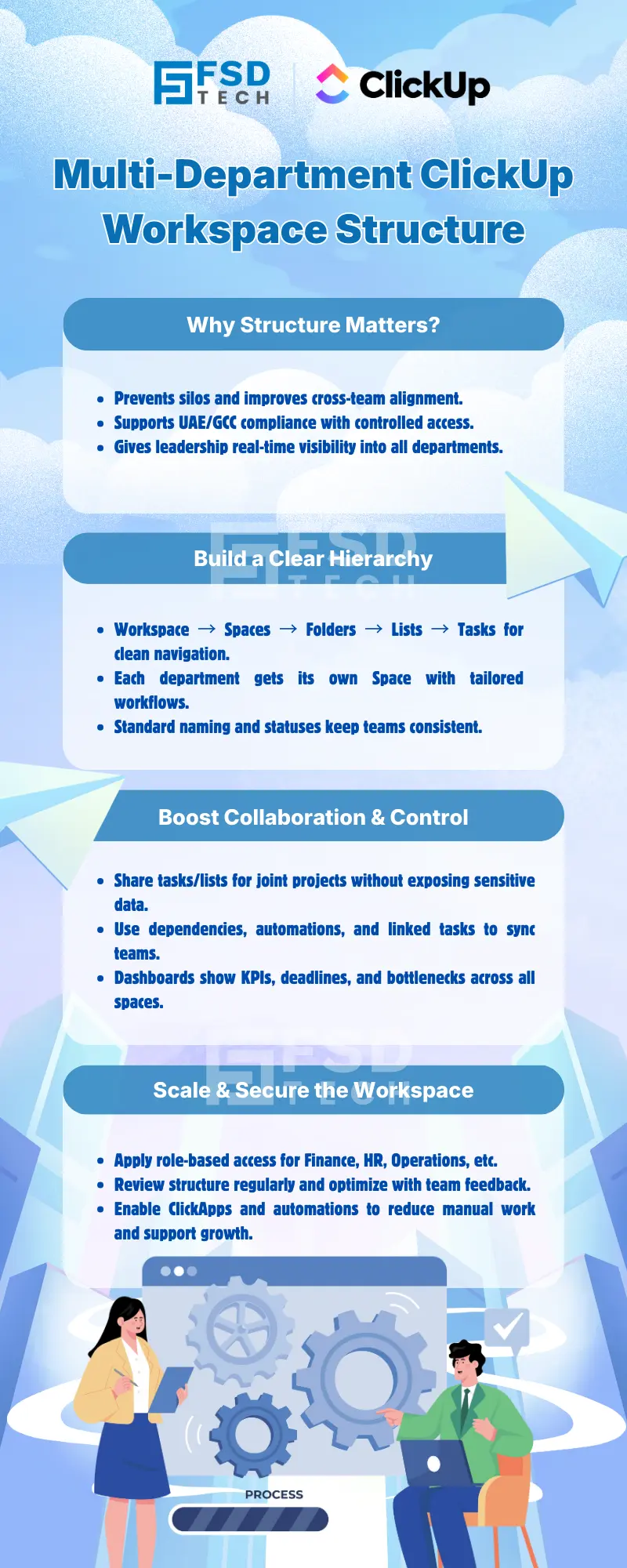
ClickUp’s hierarchy—Workspace, Spaces, Folders, Lists, and Tasks—enables UAE enterprises to create distinct, organized areas for each department. This structure supports departmental independence while maintaining unified oversight, making it easier to manage complex, multi-team environments and adapt as the organization grows.
Yes. ClickUp allows you to set spaces, folders, or lists as private, and assign user roles (Admin, Member, Guest) for granular access control. This ensures sensitive data is only visible to authorized users, supporting compliance with UAE data privacy standards.
Departments can maintain their own spaces and workflows, but share specific folders, lists, or tasks for joint projects. Automations and dashboards help synchronize work, while permissions ensure each team retains control over its core processes.
Create shared folders or lists for collaborative initiatives, and use automations to assign tasks and update statuses across teams. Dashboards can aggregate progress and KPIs, giving PMOs and leadership a unified view of project health.
ClickUp’s custom views (List, Board, Calendar, Gantt) and dashboards provide real-time insights into tasks, deadlines, and dependencies. PMOs can monitor progress, identify bottlenecks, and make informed decisions based on up-to-date data from all departments.
Absolutely. ClickUp’s flexible hierarchy and customization options allow you to add new spaces, folders, and automations as your organization expands. This scalability ensures your workspace structure remains effective, even as team size and complexity increase.
Schedule regular reviews with department leads, gather feedback, and iterate on your setup. Use ClickApps and automations to streamline processes, and adjust your hierarchy as business needs evolve to maintain clarity and efficiency.
ClickUp provides robust security, including role-based access controls, data encryption, and compliance with GDPR—important for UAE and GCC enterprises. These features help protect sensitive information and support regulatory requirements.
Automations can assign tasks, update statuses, and send notifications when dependencies are met, reducing manual follow-up and ensuring everyone stays aligned. This is especially valuable for UAE enterprises managing complex, multi-team projects.
ClickApps are modular features in ClickUp that enhance functionality—such as time tracking, custom fields, and advanced reporting. Enabling relevant ClickApps helps teams tailor their workspace to specific departmental needs, improving productivity and oversight.
Yes. Each department can choose the view (List, Board, Calendar, Gantt) that best suits its workflow. For example, Marketing might use Board view for campaign management, while Finance prefers List view for tracking budgets. This flexibility supports diverse working styles within one platform.
Create a new space for each department, set up relevant folders and lists, and assign appropriate roles and permissions. Provide onboarding materials or templates to ensure consistency, and encourage feedback to refine the setup as teams become familiar with ClickUp.
Dashboards in ClickUp can aggregate data from all departmental spaces, providing real-time reporting on KPIs, project status, and resource allocation. This supports PMOs in making data-driven decisions and presenting clear updates to leadership.
Tasks can be linked using relationships or dependencies, allowing updates in one department’s list to trigger actions or notifications in another. This is especially useful for workflows like Marketing requesting budget approvals from Finance, ensuring seamless cross-team coordination.
Yes. Regularly review user roles and permissions, audit access to sensitive spaces, and update security settings as teams change. ClickUp’s role-based controls and audit logs help UAE enterprises maintain compliance and protect critical information as they scale.
ClickUp’s security features, including data encryption and role-based access, help enterprises meet regional compliance requirements. By structuring workspaces with clear permissions and audit trails, organizations can demonstrate adherence to local data privacy and operational standards.
Gather feedback from users, identify pain points, and adjust the hierarchy, naming conventions, or views as needed. Iterative optimization, supported by ClickUp’s flexible configuration options, ensures the workspace remains intuitive and effective for all departments.
Track metrics such as task completion rates, cross-department project timelines, and user adoption. Use dashboards to monitor KPIs and gather feedback from department leads to identify areas for improvement and ensure the workspace supports business objectives.
ClickUp offers integrations with popular business tools, supporting seamless data flow and collaboration across platforms. This is especially valuable for UAE organizations with diverse tech stacks, ensuring all teams can work efficiently within a unified environment.
ClickUp provides comprehensive documentation, help articles, and community forums. UAE-based organizations can also benefit from regional consultants or ClickUp partners with expertise in local business practices and compliance needs, ensuring a smooth implementation and ongoing support.

Nhaif is an AI Automation Engineer & Business Analyst focused on ClickUp, AI, Automation, and Workflow Optimization. He helps businesses shift from scattered processes to streamlined, data-driven operations. With hands-on expertise, he simplifies complex tools into clear, easy-to-apply solutions.
Share it with friends!




.webp&w=3840&q=75)






share your thoughts