HomeNext Gen IT-InfraMonitoring & ManagementCyber SecurityBCP / DRAutomationDecoded
Next Gen IT-Infra
Cato’s SASE Supports Cybersecurity Skills Development

How Cato’s SASE Supports Cybersecurity Skills Development

🕓 April 8, 2025

How SASE Supports the Security Needs of SMBs

How SASE Supports the Security Needs of SMBs

🕓 February 9, 2025

Attack Surface Reduction with Cato’s SASE

Attack Surface Reduction with Cato’s SASE

🕓 February 10, 2025

SASE for Digital Transformation in UAE

SASE for Digital Transformation in UAE

🕓 February 8, 2025

Monitoring & Management
Understanding Atera’s SLA Management

Understanding Atera’s SLA Management

🕓 February 7, 2025

Cost-Performance Ratio: Finding the Right Balance in IT Management Networks

Cost-Performance Ratio: Finding the Right Balance in IT Management Networks

🕓 June 16, 2025

Customizing Atera with APIs

Customizing Atera with APIs

🕓 March 3, 2025

Power Up Your IT Team’s Strategy with Atera’s Communication Tools

Power Up Your IT Team’s Strategy with Atera’s Communication Tools

🕓 February 8, 2025

Cyber Security
Visual guide showing Cato CMA interface for configuring Internet and WAN firewall rules, enabling threat protection, and monitoring security events in real time for UAE IT teams.

Enforcing Firewall and Threat Protection Policies in Cato

🕓 July 25, 2025

Isometric illustration of professionals managing network performance, bandwidth analytics, and cloud-based optimization around the Cato Networks platform, symbolizing bandwidth control and QoS visibility.

Mastering Bandwidth Control and QoS in Cato Networks

🕓 July 26, 2025

Illustration of the Cato Cloud architecture showing its role in delivering SASE for secure, optimized global connectivity.

Understanding the Cato Cloud and Its Role in SASE

🕓 January 29, 2025

Global network backbone powering Cato SASE solution for secure, high-performance connectivity across regions.

Global Backbone: The Engine Powering Cato’s SASE Solution

🕓 January 30, 2025

BCP / DR
Illustration showing diverse business and IT professionals collaborating with cloud, backup, and security icons, representing Vembu use cases for SMBs, MSPs, and IT teams.

Who Uses Vembu? Real-World Use Cases for SMBs, MSPs & IT Teams

🕓 July 12, 2025

Graphic showcasing Vembu’s all-in-one backup and disaster recovery platform with icons for cloud, data protection, and business continuity for IT teams and SMBs.

What Is Vembu? A Deep Dive Into the All in One Backup & Disaster Recovery Platform

🕓 July 6, 2025

Illustration showing Vembu backup and disaster recovery system with cloud storage, server racks, analytics dashboard, and IT professionals managing data.

The Rising Cost of Data Loss: Why Backup Is No Longer Optional?

🕓 August 14, 2025

3D isometric illustration of cloud backup and data recovery infrastructure with laptop, data center stack, and digital business icons — FSD Tech

RPO & RTO: The Heart of Business Continuity

🕓 August 15, 2025

Automation
Cross-Functional Collaboration with ClickUp

Fostering Cross-Functional Collaboration with ClickUp for Multi-Departmental Projects

🕓 February 11, 2025

ClickUp Project Reporting

Revolutionizing Enterprise Reporting with ClickUp’s Advanced Analytics and Dashboards

🕓 June 16, 2025

ClickUp’s Design Collaboration and Asset Management Tools

Empowering Creative Teams with ClickUp’s Design Collaboration and Asset Management Tools

🕓 February 26, 2025

ClickUp Communication and Collaboration Tools

ClickUp Communication and Collaboration Tools: Empowering Remote Teams

🕓 March 12, 2025

Decoded
Multi-Factor Authentication (MFA)

Multi-Factor Authentication (MFA): All You Need to Know

🕓 December 7, 2025

L3 Switch

What Is an L3 Switch? L2 vs L3 & Why You Need Layer 3?

🕓 December 8, 2025

IPSec

IPSec Explained: Protocols, Modes, IKE & VPN Security

🕓 December 3, 2025

 Datagram Transport Layer Security (DTLS)

What is Datagram Transport Layer Security (DTLS)? How it works?

🕓 December 4, 2025

    Subscribe to our newsletter!

    About Us

    Follow Us

    Copyright © 2024 | Powered by 

    Cato SASE Architecture

    Inside Cato’s SASE Architecture: A Blueprint for Modern Security

    🕓 January 26, 2025

    Enterprise Data Security and Privacy with ClickUp

    Ensuring Enterprise Data Security and Privacy with ClickUp

    🕓 February 9, 2025

    DDoS protection SASE

    DDoS Protection and Cato’s Defence Mechanisms

    🕓 February 11, 2025

    Table of Contents

    What is Attribute Based Access Control (ABAC)?

    Surbhi Suhane
    January 14, 2026
    Comments
    Attribute Based Access Control (ABAC)

    Let us understand a powerful security model that protects your data with intelligence and flexibility. You probably already know about simple security rules. But as companies grow, these old rules often fail. We are talking about Attribute Based Access Control (ABAC). This is a logical access control system. 


    It controls access to objects based on the attributes of the user, the resource, and the environment. You are seeking a modern way to manage who can see what. ABAC provides a sophisticated answer.


    ABAC uses policies that consider many factors, unlike simpler methods that only look at a user’s role or name. This allows for very fine-grained control. Attribute Based Access Control is a next-generation security solution. It ensures only the right people get access under the right conditions.


    Attribute Based Access Control (ABAC) Definition

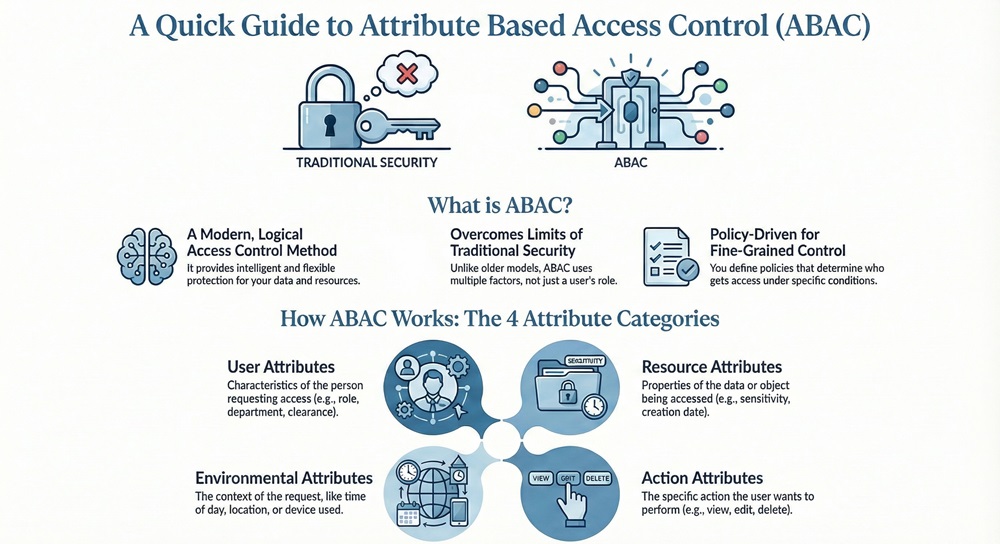
    Attribute Based Access Control can be understood as a logical access control method. This method regulates access to resources based on the evaluation of attributes. These attributes belong to four distinct categories: user, resource, environment, and the action requested.
     

    Attribute Based Access Control (ABAC)


    Simply put, ABAC is an access control model that evaluates a set of attributes and context before allowing or denying a user’s access request. It is a policy-driven model. This means that you define policies. These policies determine the access permissions.


    Deploy ABAC Now


    What is the core idea behind ABAC?

    The core idea is to move beyond fixed roles. This system enables decision-making based on who you are, what you are trying to access, how you are trying to access it, and when/where you are doing it.


    Comparison Chart: ABAC vs. Other Access Control Models

    To understand this better, let us compare Attribute Based Access Control with its predecessors, Discretionary Access Control (DAC) and Role-Based Access Control (RBAC).

    Basis for ComparisonAttribute Based Access Control (ABAC)Role-Based Access Control (RBAC)Discretionary Access Control (DAC)
    Primary FocusUser, resource, and environment attributesUser's role within the organizationUser's identity and resource owner
    Control GranularityVery Fine-Grained (Dynamic and context-aware)Medium-Grained (Static roles and permissions)Coarse-Grained (Owner controls access)
    Policy BasisRules defined using attributes (e.g., job title, security clearance, time of day)Permissions tied to specific roles (e.g., 'Manager,' 'Engineer')Access granted by the resource owner
    ScalabilityHigh: Scales well with a large number of users and resources by managing fewer policiesMedium: Can become complex with too many roles or role-permission mappingsLow: Management becomes difficult as the number of users and resources increases
    Implementation ComplexityHighMediumLow


    Also Read: What is Business Email Compromise (BEC)? How to Prevent?


    Attribute Based Access Control Model Components

    The Attribute Based Access Control model comprises several essential parts. These parts work together to determine access. Understanding these components helps in proper Attribute Based Access Control implementation.


    1. Attributes

    Attributes are nothing but characteristics. These characteristics describe a user, a resource, an action, or the environment. They are the fundamental building blocks of an ABAC policy. The system uses them to evaluate access requests.


    ABAC utilizes four main types of attributes:


    • User Attributes: These refer to the characteristics of the person or entity requesting access. Examples include: user's job role, department, security clearance level, user's location, or training status.
    • Resource Attributes: These define the object or resource being accessed. Examples include: file sensitivity (resource's security classification), data type, department ownership, or creation date.
    • Action Attributes: This signifies the operation the user attempts to perform on the resource. Examples include: read, write, delete, edit, or view.
    • Environment Attributes: These refer to the context of the access attempt. Examples include: time of day (e.g., business hours), network location (e.g., internal network), or current threat level.


    2. Policy Enforcement Point (PEP)

    The Policy Enforcement Point is the gatekeeper. It acts as an intermediary between the user and the resource. When a user attempts access, the PEP intercepts the request.


    The PEP's role is critical. It sends the access request and relevant attributes to the Policy Decision Point (PDP). The PEP then enforces the final decision—allowing or denying access—that it receives back from the PDP.


    3. Policy Decision Point (PDP)

    The Policy Decision Point is the brain of the Attribute Based Access Control system. It receives the access request from the PEP.


    The PDP then evaluates the request against the defined set of Attribute Based Access Control policies. To do this, it requests the necessary attribute values from the Policy Information Point (PIP). The PDP determines the final access decision—Permit or Deny—and sends it back to the PEP for enforcement.


    4. Policy Information Point (PIP)

    The Policy Information Point is the source of all attribute values. It serves as the point of contact for the PDP.


    The PIP's function is to collect the required attribute data from various external sources. These sources often include corporate directories, identity management systems, databases, or environmental sensors. It provides the necessary context for the PDP to make an informed decision.


    5. Policy Administration Point (PAP)

    The Policy Administration Point allows administrators to create, manage, and update the Attribute Based Access Control policies. This component ensures the policies are accurate and current. PAP defines the rules that govern access throughout the system.


    Also Read: What is Patch Management? Securing Your Digital Assets


    Attribute Based Access Control Policy

    An Attribute Based Access Control policy is the rule set that the PDP uses to evaluate access. It is not tied to a specific user or role. Instead, it relies on logical expressions built from the attributes.


    A policy often follows a structure like: "If [User Attribute] AND [Resource Attribute] AND [Environment Attribute], then [Permit/Deny] the [Action Attribute]."


    Attribute Based Access Control example of a policy:


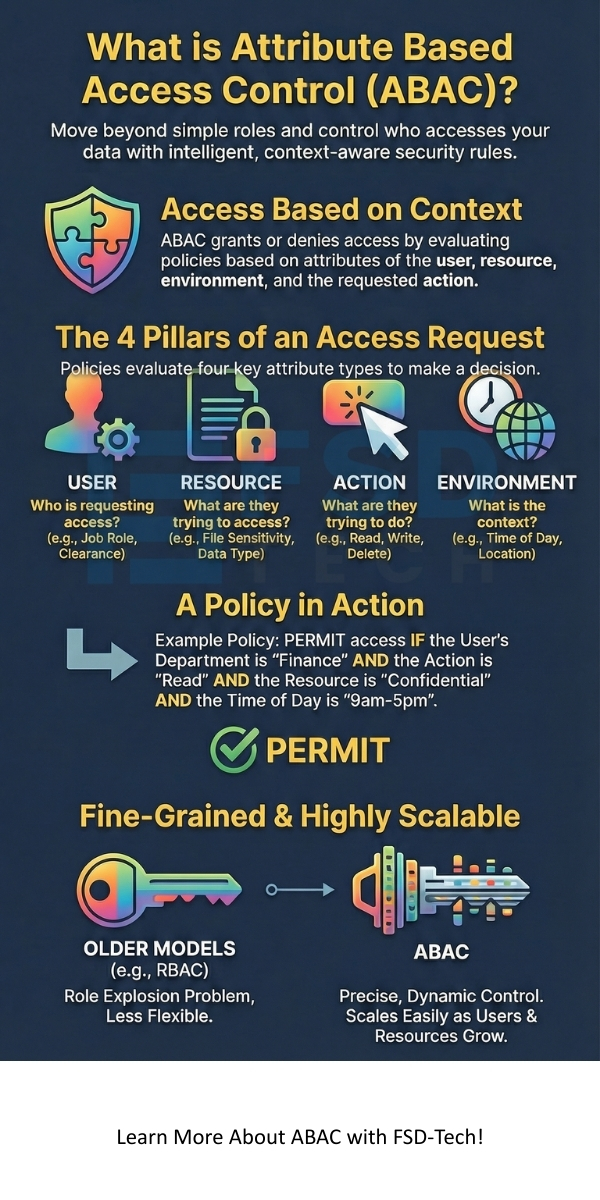
    Policy: If the User's Department is 'Finance' AND the Resource's Classification is 'Confidential-Financial' AND the Action is 'Read' AND the Time of Day is between 9:00 AM and 5:00 PM, THEN Permit access.


    This simple Attribute Based Access Control example shows how the system can automatically deny access to a Finance user attempting to view the same file at 10:00 PM. This is because the Environment Attribute condition is no longer met.


    How to Implement Attribute Based Access Control

    Attribute Based Access Control implementation is a structured process. It ensures the model is correctly deployed and effectively manages access.


    Step 1: Identify and Define Relevant Attributes

    First, you must identify the critical attributes in your environment. This involves understanding your users, resources, and operational context.


    • User Attributes should reflect identity and authorization details (e.g., job level, clearance).
    • Resource Attributes must define sensitivity and ownership (e.g., security tag, owner ID).
    • Environment Attributes focus on external factors (e.g., device health, geo-location).


    Step 2: Develop the ABAC Policy Set

    Next, you create the actual ABAC policies. This involves translating your organization's security requirements into attribute-based logical rules. Developing a robust Attribute Based Access Control policy set requires deep consultation with stakeholders.


    Policies should be comprehensive. They cover all necessary access scenarios. You use the identified attributes to build the "If... Then..." statements.


    Step 3: Integrate and Configure ABAC Components

    This step involves setting up the technical framework. You integrate the PEPs into the applications and systems where access needs control.


    You then configure the PDP to receive requests and connect the PIP to all attribute data sources. A properly configured PDP is vital. It ensures accurate and timely access decisions.


    Step 4: Test, Review, and Refine Policies

    After deployment, you must thoroughly test the ABAC system. Testing involves simulating various access requests. You must verify that the policies produce the intended access decisions.


    Continuous review and refinement are essential. The system must adapt as organizational attributes, like new departments or resource classifications, change.


    Also Read: What is a Network Switch? Core of Modern Networking


    Attribute Based Access Control in Cyber Security

    Attribute Based Access Control in cyber security plays a vital role in modern security architectures. It moves beyond simple perimeter defense. It supports the principle of Zero Trust.


    ABAC provides a key feature: dynamic access control. This means access decisions are made in real-time, at the moment of the request. This capability allows the system to respond instantly to changes in the environment or user status.


    • Continuous Monitoring: ABAC enables continuous risk assessment. The system re-evaluates access if, for example, a user's device health changes (Environment Attribute).
    • Reduced Over-Privileging: Unlike RBAC, where a user retains all permissions associated with a role, ABAC policies can be fine-tuned. This minimizes the risk of a user having excessive, unnecessary permissions.
    • Simplified Auditing: The policy-driven nature of ABAC facilitates easier auditing. Security teams can focus on verifying the policies rather than checking individual user permissions.


    Attribute Based Access Control Database Design

    Designing a system for Attribute Based Access Control database design involves a few key tables. These tables maintain the attribute information that the PIP collects.

    1. Attribute Definitions Table: This table stores all possible attribute keys (e.g., 'User_Clearance', 'Resource_Sensitivity'). It helps in maintaining consistency.
    2. Entity Attribute Values Tables: Separate tables link the specific attribute values to entities. For example, a 'User_Attributes' table links a User ID to a value (e.g., 'Level 3').
    3. Policy Table: This table stores the actual ABAC policy rules. It includes the logical expressions (e.g., 'IF User_Clearance >= Resource_Sensitivity THEN PERMIT'). The PDP references this table.


    The structure of the data ensures that the system can quickly retrieve the needed attributes. Fast retrieval is crucial for real-time access decisions.


    Conclusion

    Your data’s security is our highest priority. We believe that modern access control should be intelligent, flexible, and fully aligned with your business operations. Our solutions focus on empowering you with robust, fine-grained access management systems. 


    This ensures that you can move forward with confidence, knowing your critical information is protected precisely as your policies dictate. We commit to providing you with the necessary expertise. This expertise allows you to implement Attribute Based Access Control efficiently and maintain a strong security posture.


    Worried About Access Risks? Reach us for immediate help
     

    ABAC infographic


    Key Takeaways on Attribute Based Access Control

    • Attribute Based Access Control is a dynamic, policy-driven access model. It evaluates a request based on user, resource, action, and environment attributes.
    • The ABAC model relies on five core components: Attributes, PEP, PDP, PIP, and PAP. The PDP determines the final access decision.
    • An Attribute Based Access Control policy is a logical rule. It uses attributes to precisely define access permissions. For example, it restricts access to confidential files based on the user's job role and time of day.
    • ABAC in cyber security is a fundamental enabler of Zero Trust. It ensures real-time, context-aware access control.
    • Attribute Based Access Control implementation requires a clear strategy. You must define attributes first and then develop a comprehensive policy set.


    Frequently Asked Questions about ABAC

    What is the main benefit of Attribute Based Access Control?

    The main benefit is its flexibility and fine-grained control. ABAC allows security teams to create policies that are much more precise than those in traditional models. This precision reduces security risk by only granting the minimum necessary access.


    Why does ABAC replace RBAC?

    ABAC does not always replace RBAC completely. Often, it augments or extends RBAC. However, in complex, dynamic environments, ABAC is superior. It avoids the role explosion problem where too many roles make RBAC management impossible. ABAC uses a smaller set of attributes to manage a much larger number of access scenarios.


    Is Attribute Based Access Control harder to manage?

    Initial Attribute Based Access Control implementation is more complex than RBAC. This is because defining the attributes and initial policies requires careful planning. Once deployed, however, a well-structured ABAC system reduces the ongoing administrative burden. You only update the policy or the attribute values, not individual permissions.

    What is Attribute Based Access Control (ABAC)?

    About The Author

    Surbhi Suhane

    Surbhi Suhane is an experienced digital marketing and content specialist with deep expertise in Getting Things Done (GTD) methodology and process automation. Adept at optimizing workflows and leveraging automation tools to enhance productivity and deliver impactful results in content creation and SEO optimization.

    Like This Story?

    Share it with friends!

    Subscribe to our newsletter!

    Atera

    (48)

    Cato Networks

    (111)

    ClickUp

    (68)

    FishOS

    (7)

    Miradore

    (21)

    PointGuard AI

    (9)

    Vembu

    (22)

    Xcitium

    (33)

    ZETA HRMS

    (71)

    Workflow Automation(5)

    Workforce Automation(1)

    AI Project Management(1)

    HR Data Automation(1)

    RMM(1)

    IT Workflow Automation(1)

    GCC compliance(4)

    IT security(2)

    Payroll Integration(2)

    IT support automation(3)

    procurement automation(1)

    lost device management(1)

    IT Management(5)

    IoT Security(2)

    Cato XOps(2)

    IT compliance(4)

    Workflow Management(1)

    Task Automation(1)

    OpenStack automation(1)

    AI-powered cloud ops(1)

    Kubernetes lifecycle management(2)

    SMB Security(8)

    Data Security(1)

    MDR (Managed Detection & Response)(4)

    Atera Integrations(2)

    MSP Automation(3)

    XDR Security(2)

    SMB Cyber Protection(1)

    Ransomware Defense(3)

    HR Tech Solutions(1)

    Zero Trust Network Access(3)

    Zero Trust Security(2)

    Endpoint Management(1)

    SaaS Security(1)

    Payroll Automation(5)

    IT Monitoring(2)

    Xcitium EDR SOC(15)

    Ransomware Protection GCC(1)

    M&A IT Integration(1)

    Network Consolidation UAE(1)

    MSSP for SMBs(1)

    FSD-Tech MSSP(25)

    Ransomware Protection(3)

    SMB Cybersecurity GCC(1)

    Managed EDR FSD-Tech(1)

    Antivirus vs EDR(1)

    Cybersecurity GCC(12)

    Endpoint Security(1)

    Endpoint Protection(1)

    Data Breach Costs(1)

    Managed Security Services(2)

    SMB Cybersecurity(8)

    Zero Dwell Containment(31)

    Xcitium EDR(30)

    Cloud Backup(1)

    Hybrid Backup(1)

    Backup & Recovery(1)

    pointguard ai(4)

    disaster recovery myths(1)

    backup myths(1)

    vembu(9)

    SMB data protection(9)

    Vembu BDR Suite(19)

    Disaster Recovery(4)

    DataProtection(1)

    GCCBusiness(1)

    Secure Access Service Edge(4)

    GCC HR software(16)

    Miradore EMM(15)

    Cato SASE(7)

    Cloud Security(8)

    Talent Development(1)

    AI Cybersecurity(12)

    AI Risk Management(1)

    AI Governance(4)

    AI Security(2)

    AI Compliance(2)

    GCC business security(1)

    GCC network integration(1)

    compliance automation(4)

    GCC cybersecurity(2)

    education security(1)

    App management UAE(1)

    BYOD security Dubai(8)

    Miradore EMM Premium+(5)

    HealthcareSecurity(1)

    MiddleEast(1)

    Team Collaboration(1)

    IT automation(10)

    Zscaler(1)

    SD-WAN(6)

    HR Integration(4)

    Cloud Networking(3)

    device management(9)

    RemoteWork(1)

    ZeroTrust(2)

    VPN(1)

    MPLS(1)

    Project Management(9)

    HR automation(16)

    share your thoughts

    Asymmetric Encryption

    What is Asymmetric Encryption? Keys and How It Works

    🕓 January 14, 2026

    Attribute Based Access Control (ABAC)

    What is Attribute Based Access Control (ABAC)?

    🕓 January 14, 2026

    Biometric Authentication

    What is Biometric Authentication? Methods & Security Guide

    🕓 January 13, 2026

    Decoded(64)

    Cyber Security(112)

    BCP / DR(22)

    Zeta HRMS(70)

    SASE(21)

    Automation(68)

    Next Gen IT-Infra(111)

    Monitoring & Management(69)

    ITSM(22)

    HRMS(21)

    Automation(24)