HomeNext Gen IT-InfraMonitoring & ManagementCyber SecurityBCP / DRAutomationDecoded
Next Gen IT-Infra
Cato’s SASE Supports Cybersecurity Skills Development

How Cato’s SASE Supports Cybersecurity Skills Development

🕓 April 8, 2025

How SASE Supports the Security Needs of SMBs

How SASE Supports the Security Needs of SMBs

🕓 February 9, 2025

Attack Surface Reduction with Cato’s SASE

Attack Surface Reduction with Cato’s SASE

🕓 February 10, 2025

SASE for Digital Transformation in UAE

SASE for Digital Transformation in UAE

🕓 February 8, 2025

Monitoring & Management
Understanding Atera’s SLA Management

Understanding Atera’s SLA Management

🕓 February 7, 2025

Cost-Performance Ratio: Finding the Right Balance in IT Management Networks

Cost-Performance Ratio: Finding the Right Balance in IT Management Networks

🕓 June 16, 2025

Customizing Atera with APIs

Customizing Atera with APIs

🕓 March 3, 2025

Power Up Your IT Team’s Strategy with Atera’s Communication Tools

Power Up Your IT Team’s Strategy with Atera’s Communication Tools

🕓 February 8, 2025

Cyber Security
Illustration of the Cato Cloud architecture showing its role in delivering SASE for secure, optimized global connectivity.

Understanding the Cato Cloud and Its Role in SASE

🕓 January 29, 2025

Isometric illustration of professionals managing network performance, bandwidth analytics, and cloud-based optimization around the Cato Networks platform, symbolizing bandwidth control and QoS visibility.

Mastering Bandwidth Control and QoS in Cato Networks

🕓 July 26, 2025

Global network backbone powering Cato SASE solution for secure, high-performance connectivity across regions.

Global Backbone: The Engine Powering Cato’s SASE Solution

🕓 January 30, 2025

Illustration of IT team managing user roles and permissions on the Cato CMA dashboard via laptops and cloud interfaces.

Setting Up Role-Based Access Control (RBAC) in Cato

🕓 July 28, 2025

BCP / DR
Illustration showing diverse business and IT professionals collaborating with cloud, backup, and security icons, representing Vembu use cases for SMBs, MSPs, and IT teams.

Who Uses Vembu? Real-World Use Cases for SMBs, MSPs & IT Teams

🕓 July 12, 2025

Graphic showcasing Vembu’s all-in-one backup and disaster recovery platform with icons for cloud, data protection, and business continuity for IT teams and SMBs.

What Is Vembu? A Deep Dive Into the All in One Backup & Disaster Recovery Platform

🕓 July 6, 2025

Illustration showing Vembu backup and disaster recovery system with cloud storage, server racks, analytics dashboard, and IT professionals managing data.

The Rising Cost of Data Loss: Why Backup Is No Longer Optional?

🕓 August 14, 2025

3D isometric illustration of cloud backup and data recovery infrastructure with laptop, data center stack, and digital business icons — FSD Tech

RPO & RTO: The Heart of Business Continuity

🕓 August 15, 2025

Automation
Cross-Functional Collaboration with ClickUp

Fostering Cross-Functional Collaboration with ClickUp for Multi-Departmental Projects

🕓 February 11, 2025

ClickUp Project Reporting

Revolutionizing Enterprise Reporting with ClickUp’s Advanced Analytics and Dashboards

🕓 June 16, 2025

ClickUp’s Design Collaboration and Asset Management Tools

Empowering Creative Teams with ClickUp’s Design Collaboration and Asset Management Tools

🕓 February 26, 2025

ClickUp Communication and Collaboration Tools

ClickUp Communication and Collaboration Tools: Empowering Remote Teams

🕓 March 12, 2025

Decoded
Multi-Factor Authentication (MFA)

Multi-Factor Authentication (MFA): All You Need to Know

🕓 December 7, 2025

L3 Switch

What Is an L3 Switch? L2 vs L3 & Why You Need Layer 3?

🕓 December 8, 2025

IPSec

IPSec Explained: Protocols, Modes, IKE & VPN Security

🕓 December 3, 2025

 Datagram Transport Layer Security (DTLS)

What is Datagram Transport Layer Security (DTLS)? How it works?

🕓 December 4, 2025

    Subscribe to our newsletter!

    About Us

    Follow Us

    Copyright © 2024 | Powered by 

    Cato SASE Architecture

    Inside Cato’s SASE Architecture: A Blueprint for Modern Security

    🕓 January 26, 2025

    Enterprise Data Security and Privacy with ClickUp

    Ensuring Enterprise Data Security and Privacy with ClickUp

    🕓 February 9, 2025

    DDoS protection SASE

    DDoS Protection and Cato’s Defence Mechanisms

    🕓 February 11, 2025

    Table of Contents

    What is Network Sniffing? Attack and Prevention

    Surbhi Suhane
    January 28, 2026
    Comments
    Network Sniffing

    Have you ever wondered if someone is watching your data move across the internet? You send an email or log into a site and assume your data is safe. But what if a silent observer is catching every bit of that info? You might feel safe behind your screen. Yet, there are ways for others to see your private traffic. This happens through a process that experts call network sniffing. Do you want to know how people do this? Can you protect yourself from these hidden eyes? We will look at how this works and what it means for your privacy.


    Network Sniffing Meaning and Basics

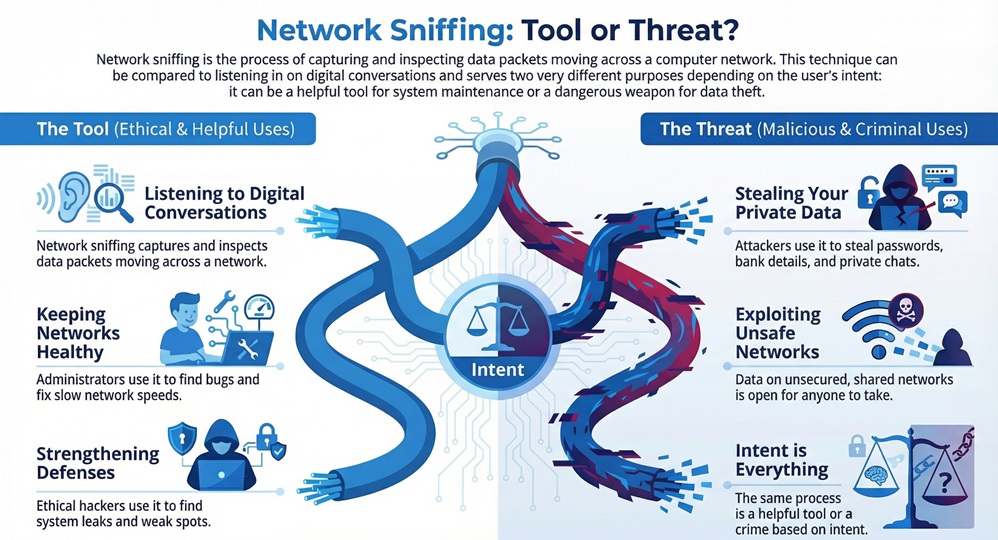
    Network sniffing refers to the act of capturing and inspecting data packets as they move across a computer network. You can think of it as a way to listen to digital conversations. When you send data, it breaks into small pieces called packets. Network sniffing allows a person or a tool to grab these packets and read them.
     

    Network Sniffing infographic


    Network sniffing is a core part of how the internet stays healthy. It helps admins find bugs and fix slow speeds. But, in the wrong hands, it becomes a tool for theft. It is vital to know that this process works at the Data Link layer of the network. This is where physical hardware talks to the digital world.


    Stop Network Sniffing


    What is Network Sniffing in cyber security?

    Network sniffing in cyber security serves two main masters. Ethical hackers use it to test how strong a system is. They look for leaks or weak spots. On the other side, bad actors use a network sniffing attack to steal your passwords or bank details.


    Network sniffing meaning changes based on intent. If you use it to fix your office Wi-Fi, it is a great tool. If a stranger uses it to read your private chats, it is a crime. Why is this so easy to do? Most data travels through shared spaces. If those spaces are not safe, your data is open for anyone to take.


    Comparing Types of Network Sniffing

    To understand this topic, you must see the difference between active and passive methods.

    Basis for ComparisonPassive Network SniffingActive Network Sniffing
    Network TypeUses HubsUses Switches
    DetectionVery hard to findEasier to spot
    MethodJust listens to trafficSends packets to the network
    Risk LevelLow risk for the snifferHigh risk of being caught
    HardwareWorks with standard NICNeeds special injection tools


    How Network Sniffing Works in Real Time?

    Network sniffing works by changing how your computer hardware sees data. Normally, a computer only looks at data meant for its own address. It ignores everything else. Network sniffing software tells the Network Interface Card (NIC) to enter "promiscuous mode."


    Network sniffing in this mode means the NIC sees every single packet on the network. It does not matter who the packet is for. The card grabs it all. Once the hardware captures the packet, the software decodes it. It turns raw bits into words and images you can read.


    How packet sniffing works depends on the network setup. On an old hub, every packet goes to every port. You just plug in and start reading. On a modern switch, the network is smarter. You have to trick the switch into sending you data. You might use ARP spoofing to do this. This forces the switch to think your computer is the router.


    Also Read: What is an Access Control System (ACS) for your security?


    Steps in the Sniffing Process

    1. The user installs network sniffing software on a device.
    2. The user sets the network card to promiscuous mode.
    3. The tool captures raw data moving through the cable or air.
    4. The software organizes the data into a readable format.
    5. The user analyzes the data for specific info like passwords.


    Common Network Sniffing Software and Tools

    Network sniffing tools are programs that make it easy to see traffic. Some are free and open-source. Others cost a lot of money and work for big companies. Do you know which tools the pros use?


    Network sniffing software like Wireshark is the most famous. It lets you see every detail of a packet. It shows headers, payloads, and timing. Another tool is Tcpdump. This is a command-line tool. It is fast and works well on Linux systems.


    Which of the following are network sniffing tools that you might encounter? Here is a list:


    • Wireshark: The gold standard for deep packet analysis.
    • Tcpdump: A lightweight tool for text-based sniffing.
    • Ettercap: A tool often used for an network sniffing attack like man-in-the-middle.
    • Kismet: This is the best choice for sniffing wireless Wi-Fi signals.
    • BetterCAP: A modern and powerful tool for network probes.


    Also Read: What is Hash Function? Data Integrity and Security


    Why Network Sniffing Helps Your Business?

    Network sniffing is not just for hackers. It is a key part of IT work. Have you ever had a slow internet connection at work? Your IT team likely used network sniffing to find the cause.

    Why network monitoring is important comes down to three things: speed, health, and safety. By looking at packets, admins see where the traffic jams are. They can see if one computer is using too much data. This keeps the whole system running fast for you.


    It also helps find viruses. Some bad software sends data back to a hacker. A sniffer sees this strange traffic. It acts like an alarm. It tells the team that a device is sick. Without these tools, a virus could hide for months.


    How to Stop a Network Sniffing Attack

    Network sniffing can be scary if you are the target. But you have power. You can take steps to hide your data. How do you stay safe on a public network?


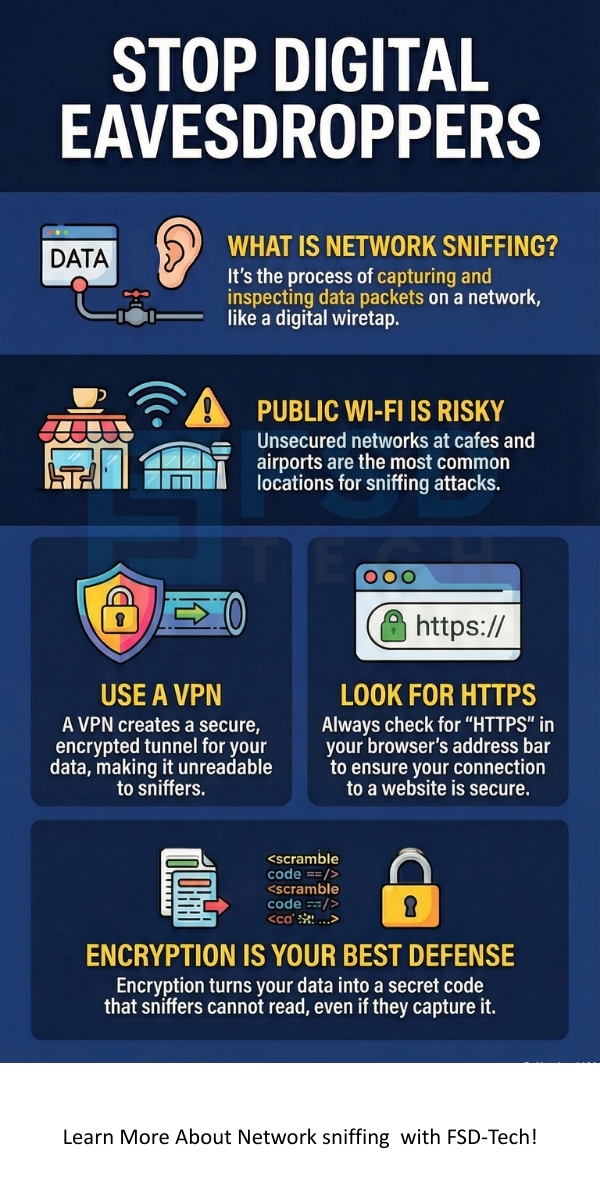
    Which is the best defense against network sniffing? The answer is encryption. When you encrypt data, it turns into a secret code. Even if a sniffer grabs the packet, they cannot read it. They only see random letters and numbers.


    Network sniffing becomes useless when you use a VPN. A VPN creates a safe tunnel for your data. It wraps your traffic in a layer of strong security. Also, always look for "HTTPS" in your browser. This means your data is safe between you and the website.


    Ways to stay safe:

    • Use a VPN: This is your best shield on public Wi-Fi.
    • Encrypt everything: Use tools like PGP for emails.
    • Avoid hubs: Use switches and secure routers.
    • Monitor your own network: Watch for new or unknown devices.
    • Update software: Keep your NIC drivers and OS fresh.


    Analyzing a Network Sniffing Attack

    Network sniffing attacks usually happen in stages. The attacker first gets onto your network. This is why public Wi-Fi is so dangerous. Once they are in, they start the software.


    Network sniffing in an active attack might involve ARP poisoning. The attacker sends fake messages to your router. They want the router to send your data to them instead of the web. This is a very common way to steal login info.


    How sniffing works in these cases is sneaky. You will not see a change in your speed. Your screen looks normal. But in the background, every site you visit is being logged. This is why you must never do banking on a network you do not trust.


    Deep Dive into Packet Components

    Network sniffing allows us to see what is inside a packet. Every packet has three parts. There is the header, the payload, and the trailer.


    The tools show you the header first. The header has the source and destination. It is like the address on an envelope. The payload is the actual data. This could be a piece of an image or a word from a chat. The trailer tells the receiving computer that the packet is over.


    How packet sniffing works is by reading these parts one by one. If the data is not encrypted, the payload is clear. Anyone with a sniffer can see your messages. This is why modern apps use end-to-end encryption. It protects the payload from prying eyes.


    Also Read: What is Security Information and Event Management (SIEM)?


    Role of NIC in Network Sniffing

    Network sniffing relies heavily on the NIC. This is the hardware in your phone or laptop that talks to the router. Usually, the NIC has a filter. It says, "If this packet is not for me, throw it away."


    Network sniffing software breaks this filter. It puts the card into a special state. In this state, the card keeps everything. This is the first step in any sniffing task. If your hardware does not support this mode, you cannot sniff the network.


    Conclusion

    Network sniffing is a powerful force in the digital world. It serves as a vital tool for those who maintain our systems. At the same time, it poses a real threat to those who do not take security seriously. You must understand that your data is only as safe as the network you use. By using encryption and staying alert, you can enjoy the web without fear.


    Our team believes in a world where data is secure and private for everyone. We focus on providing you with the knowledge to stay safe in a complex world. Your security is our top priority. We are here to help you build a safer digital life with expert advice and the latest tools. Let us work together to keep your private information truly private.
     

    Sniffing Threat? Contact us


    Network sniffing


    Key Takeaways

    • Network sniffing captures data packets for analysis.
    • It works by putting a network card into promiscuous mode.
    • Network sniffing tools like Wireshark are used for both good and bad reasons.
    • Encryption is the primary way to defend against a network sniffing attack.
    • Ethical use of these tools keeps networks healthy and fast.
    • Public Wi-Fi is the most common place for sniffing risks.
    • Always look for HTTPS to ensure your web session is private.


    Frequently Asked Questions

    What is network sniffing in simple terms?

    Network sniffing is the process of watching and recording data as it moves through a network. It is like a digital wiretap.


    Is network sniffing legal?

    Network sniffing is legal if you own the network or have permission. It is illegal if you use it to steal data or watch others without their consent.


    Which is the best defense against network sniffing attacks?

    Strong encryption is the best defense. Using a VPN and HTTPS ensures that sniffers cannot read your data even if they catch it.


    Can network sniffing work on Wi-Fi?

    Yes, network sniffing is very common on wireless networks. Attackers use tools like Kismet to catch packets out of the air.


    Why do companies use network sniffing software?

    Companies use these tools to find network errors. It helps them fix slow speeds and find security leaks before hackers do.

    What is Network Sniffing? Attack and Prevention

    About The Author

    Surbhi Suhane

    Surbhi Suhane is an experienced digital marketing and content specialist with deep expertise in Getting Things Done (GTD) methodology and process automation. Adept at optimizing workflows and leveraging automation tools to enhance productivity and deliver impactful results in content creation and SEO optimization.

    Like This Story?

    Share it with friends!

    Subscribe to our newsletter!

    Atera

    (48)

    Cato Networks

    (118)

    ClickUp

    (70)

    FishOS

    (7)

    Miradore

    (21)

    PointGuard AI

    (9)

    Vembu

    (22)

    Xcitium

    (33)

    ZETA HRMS

    (76)

    Workflow Automation(8)

    Workforce Automation(1)

    AI Project Management(1)

    HR Data Automation(1)

    RMM(1)

    IT Workflow Automation(1)

    IT security(2)

    GCC compliance(4)

    Payroll Integration(2)

    IT support automation(3)

    procurement automation(1)

    lost device management(1)

    IT Management(5)

    IoT Security(2)

    Cato XOps(2)

    IT compliance(4)

    Workflow Management(1)

    Task Automation(1)

    OpenStack automation(1)

    Kubernetes lifecycle management(2)

    AI-powered cloud ops(1)

    SMB Security(8)

    Data Security(1)

    MDR (Managed Detection & Response)(4)

    Atera Integrations(2)

    MSP Automation(3)

    XDR Security(2)

    SMB Cyber Protection(1)

    Ransomware Defense(3)

    HR Tech Solutions(1)

    Zero Trust Network Access(3)

    Zero Trust Security(2)

    Endpoint Management(1)

    SaaS Security(1)

    Payroll Automation(5)

    IT Monitoring(2)

    Xcitium EDR SOC(15)

    Ransomware Protection GCC(1)

    M&A IT Integration(1)

    Network Consolidation UAE(1)

    MSSP for SMBs(1)

    Managed EDR FSD-Tech(1)

    Ransomware Protection(3)

    SMB Cybersecurity GCC(1)

    FSD-Tech MSSP(25)

    Antivirus vs EDR(1)

    Endpoint Security(1)

    Cybersecurity GCC(12)

    Data Breach Costs(1)

    Endpoint Protection(1)

    SMB Cybersecurity(8)

    Zero Dwell Containment(31)

    Managed Security Services(2)

    Xcitium EDR(30)

    Cloud Backup(1)

    Hybrid Backup(1)

    Backup & Recovery(1)

    pointguard ai(4)

    backup myths(1)

    vembu(9)

    SMB data protection(9)

    disaster recovery myths(1)

    Disaster Recovery(4)

    Vembu BDR Suite(19)

    GCCBusiness(1)

    DataProtection(1)

    Secure Access Service Edge(4)

    GCC HR software(18)

    Miradore EMM(15)

    Cato SASE(7)

    Cloud Security(8)

    Talent Development(1)

    AI Cybersecurity(12)

    AI Governance(4)

    AI Security(2)

    AI Compliance(2)

    AI Risk Management(1)

    GCC business security(1)

    GCC network integration(1)

    compliance automation(5)

    education security(1)

    GCC cybersecurity(2)

    BYOD security Dubai(8)

    App management UAE(1)

    Miradore EMM Premium+(5)

    MiddleEast(1)

    HealthcareSecurity(1)

    Team Collaboration(1)

    IT automation(12)

    Zscaler(1)

    SD-WAN(6)

    HR Integration(4)

    Cloud Networking(3)

    device management(9)

    VPN(1)

    RemoteWork(1)

    ZeroTrust(2)

    MPLS(1)

    Project Management(9)

    HR automation(16)

    share your thoughts

    Zombie Computer

    What Is a Zombie Computer? Botnet Threats Guide

    🕓 January 29, 2026

    Metadata Analysis

    What is Metadata Analysis? Guide to Data Insights

    🕓 January 29, 2026

    Decryption and Encryption

    What is Decryption and Encryption in Modern Data Security?

    🕓 January 28, 2026

    Decoded(87)

    Cyber Security(118)

    BCP / DR(22)

    Zeta HRMS(75)

    SASE(21)

    Automation(70)

    Next Gen IT-Infra(118)

    Monitoring & Management(69)

    ITSM(22)

    HRMS(21)

    Automation(24)