HomeNext Gen IT-InfraMonitoring & ManagementCyber SecurityBCP / DRAutomationDecoded
Next Gen IT-Infra
Cato’s SASE Supports Cybersecurity Skills Development

How Cato’s SASE Supports Cybersecurity Skills Development

🕓 April 8, 2025

How SASE Supports the Security Needs of SMBs

How SASE Supports the Security Needs of SMBs

🕓 February 9, 2025

Attack Surface Reduction with Cato’s SASE

Attack Surface Reduction with Cato’s SASE

🕓 February 10, 2025

SASE for Digital Transformation in UAE

SASE for Digital Transformation in UAE

🕓 February 8, 2025

Monitoring & Management
Understanding Atera’s SLA Management

Understanding Atera’s SLA Management

🕓 February 7, 2025

Cost-Performance Ratio: Finding the Right Balance in IT Management Networks

Cost-Performance Ratio: Finding the Right Balance in IT Management Networks

🕓 June 16, 2025

Customizing Atera with APIs

Customizing Atera with APIs

🕓 March 3, 2025

Power Up Your IT Team’s Strategy with Atera’s Communication Tools

Power Up Your IT Team’s Strategy with Atera’s Communication Tools

🕓 February 8, 2025

Cyber Security
Illustration of the Cato Cloud architecture showing its role in delivering SASE for secure, optimized global connectivity.

Understanding the Cato Cloud and Its Role in SASE

🕓 January 29, 2025

Isometric illustration of professionals managing network performance, bandwidth analytics, and cloud-based optimization around the Cato Networks platform, symbolizing bandwidth control and QoS visibility.

Mastering Bandwidth Control and QoS in Cato Networks

🕓 July 26, 2025

Global network backbone powering Cato SASE solution for secure, high-performance connectivity across regions.

Global Backbone: The Engine Powering Cato’s SASE Solution

🕓 January 30, 2025

Illustration of IT team managing user roles and permissions on the Cato CMA dashboard via laptops and cloud interfaces.

Setting Up Role-Based Access Control (RBAC) in Cato

🕓 July 28, 2025

BCP / DR
Illustration showing diverse business and IT professionals collaborating with cloud, backup, and security icons, representing Vembu use cases for SMBs, MSPs, and IT teams.

Who Uses Vembu? Real-World Use Cases for SMBs, MSPs & IT Teams

🕓 July 12, 2025

Graphic showcasing Vembu’s all-in-one backup and disaster recovery platform with icons for cloud, data protection, and business continuity for IT teams and SMBs.

What Is Vembu? A Deep Dive Into the All in One Backup & Disaster Recovery Platform

🕓 July 6, 2025

Illustration showing Vembu backup and disaster recovery system with cloud storage, server racks, analytics dashboard, and IT professionals managing data.

The Rising Cost of Data Loss: Why Backup Is No Longer Optional?

🕓 August 14, 2025

3D isometric illustration of cloud backup and data recovery infrastructure with laptop, data center stack, and digital business icons — FSD Tech

RPO & RTO: The Heart of Business Continuity

🕓 August 15, 2025

Automation
Cross-Functional Collaboration with ClickUp

Fostering Cross-Functional Collaboration with ClickUp for Multi-Departmental Projects

🕓 February 11, 2025

ClickUp Project Reporting

Revolutionizing Enterprise Reporting with ClickUp’s Advanced Analytics and Dashboards

🕓 June 16, 2025

ClickUp’s Design Collaboration and Asset Management Tools

Empowering Creative Teams with ClickUp’s Design Collaboration and Asset Management Tools

🕓 February 26, 2025

ClickUp Communication and Collaboration Tools

ClickUp Communication and Collaboration Tools: Empowering Remote Teams

🕓 March 12, 2025

Decoded
Multi-Factor Authentication (MFA)

Multi-Factor Authentication (MFA): All You Need to Know

🕓 December 7, 2025

L3 Switch

What Is an L3 Switch? L2 vs L3 & Why You Need Layer 3?

🕓 December 8, 2025

IPSec

IPSec Explained: Protocols, Modes, IKE & VPN Security

🕓 December 3, 2025

 Datagram Transport Layer Security (DTLS)

What is Datagram Transport Layer Security (DTLS)? How it works?

🕓 December 4, 2025

    Subscribe to our newsletter!

    About Us

    Follow Us

    Copyright © 2024 | Powered by 

    Cato SASE Architecture

    Inside Cato’s SASE Architecture: A Blueprint for Modern Security

    🕓 January 26, 2025

    Enterprise Data Security and Privacy with ClickUp

    Ensuring Enterprise Data Security and Privacy with ClickUp

    🕓 February 9, 2025

    DDoS protection SASE

    DDoS Protection and Cato’s Defence Mechanisms

    🕓 February 11, 2025

    Table of Contents

    What is Decryption and Encryption in Modern Data Security?

    Surbhi Suhane
    January 28, 2026
    Comments
    Decryption and Encryption

    Data security keeps your private information safe. When you send a message or save a file, you want it to stay private. This is where the process of hiding and revealing data comes into play. You might wonder, what is decryption and how does it protect you?


    In simple terms, it is the process of changing unreadable data back into its original form. Without this process, your scrambled data would be useless. Have you ever thought about how your bank keeps your password safe? They use a secret code. But how do you get that information back when you need it?


    Let us explore the world of secret codes and how they work. You will learn about the tools used to lock and unlock digital files. By the end of this guide, you will understand what is decryption in computer systems and why it matters to your daily life.


    What is Decryption and Encryption?

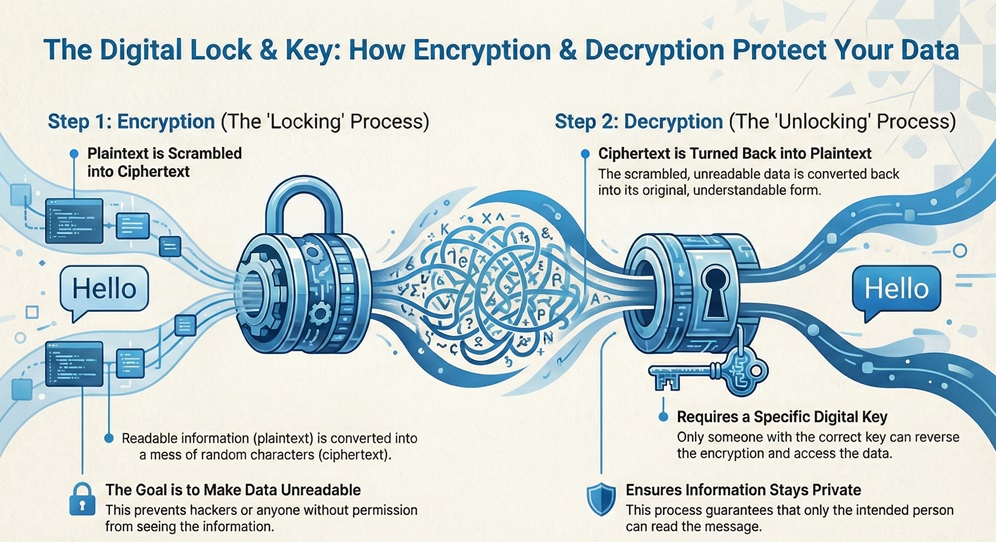
    To understand one, you must understand the other. These two processes work together like a lock and a key.
     

    Decryption and Encryption


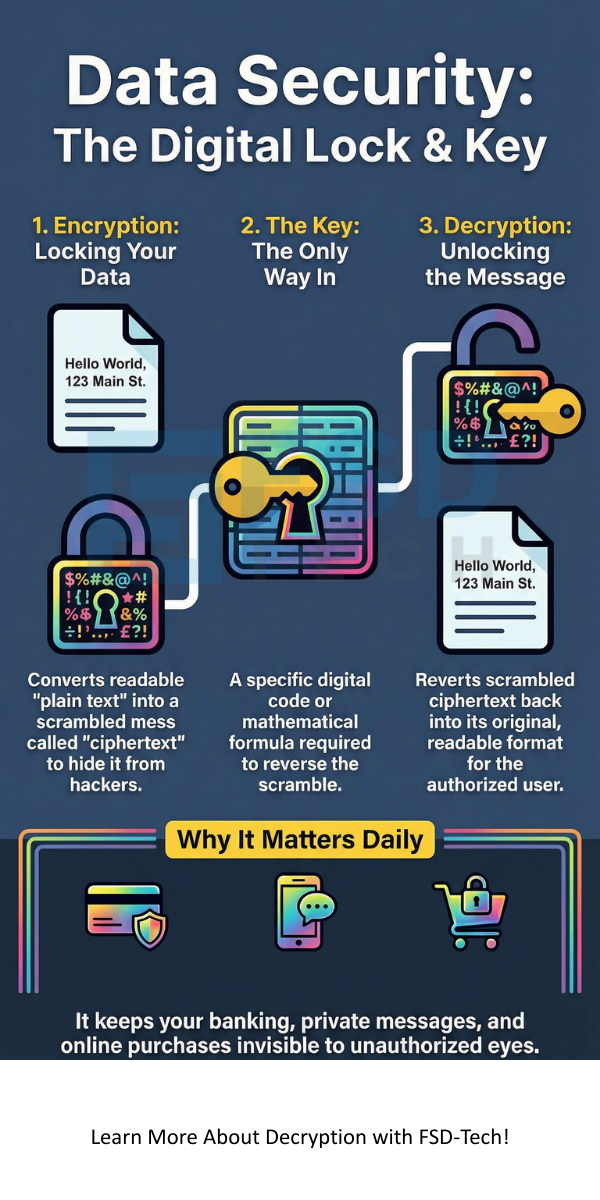
    Encryption is the first step. It takes your plain text, like a "Hello" message, and turns it into a mess of random characters. This scrambled text is called ciphertext. The goal is to make the data unreadable to hackers or anyone who does not have permission to see it.


    Decryption is the second step. It is the reverse of encryption. It takes that scrambled ciphertext and turns it back into the original message. To do this, you need a specific digital key.


    Protect Your Data


    Why Data Decryption is Necessary?

    Data decryption is necessary because it allows authorized users to access their information. If we only had encryption, our data would be locked forever. We need a way to read the files we protect.


    This process ensures that:


    • Only the right person reads the message.
    • The data remains unchanged during travel.
    • Your private files stay private on your hard drive.


    Also Read: What is Asymmetric Encryption? Keys and How It Works


    Difference Between Encryption and Decryption

    While they are parts of the same system, they serve opposite goals. One hides information, while the other reveals it.


    Basis for ComparisonEncryptionDecryption
    Primary GoalTo hide data from unauthorized users.To recover original data for authorized users.
    Input DataPlain text (readable).Ciphertext (scrambled).
    Output DataCiphertext (unreadable).Plain text (readable).
    Process TimingOccurs at the sender's end.Occurs at the receiver's end.
    Key UsageUses a key to lock information.Uses a key to unlock information.
    ComplexityFocuses on creating a hard-to-crack code.Focuses on reversing the specific algorithm.


    What Does Decryption Mean in Daily Use?

    When you ask what does decryption mean, you are looking at the final stage of a secure conversation. Think about your smartphone. When you use your fingerprint to open an app, the phone might be unlocking encrypted files.


    Decryption signifies the restoration of data. In a computer system, this happens in the background. You usually do not see it working. For example, when you visit a website with a padlock icon in the browser, your computer is constantly revealing the data sent by that site.


    Example of Decryption

    Let us look at a basic example of decryption. Imagine you use a simple shift code where every letter moves one spot forward in the alphabet.


    1. Original Message: "CAT"
    2. Encryption: C becomes D, A becomes B, T becomes U.
    3. Ciphertext: "DBU"
    4. Decryption: You move the letters one spot back. D becomes C, B becomes A, U becomes T.
    5. Result: "CAT"


    In modern computers, these "shifts" are based on complex math and very long numbers called keys.


    Also Read: What is API Security and Why it matters for your Business?


    How Decrypt Encrypted Files Works?

    Many people ask how decrypt encrypted files is possible if they lose their password. The truth is, it is very difficult by design.


    To reveal a file, the computer follows these steps:


    1. The system identifies the algorithm used to lock the file.
    2. The user provides a "key" or password.
    3. The software applies the key to the scrambled data.
    4. The mathematical formula reverses the scramble.
    5. The file opens in its original format.


    If you have the right key, the process is instant. If you do not have the key, you would need to try billions of combinations. This is why strong passwords are so important.


    Where Encryption is Used Today?

    You might not realize it, but you use these tools every hour. Where encryption is used defines how safe the internet feels.


    • Online Banking: Banks lock your transaction details so hackers cannot steal your money.
    • Messaging Apps: Apps like WhatsApp use "end-to-end" security. Only you and the receiver can reveal the messages.
    • E-commerce: When you buy something online, your credit card number is hidden during the payment.
    • Cloud Storage: Services like Google Drive or Dropbox hide your files on their servers.
    • Government Records: Sensitive data about citizens is kept in secret codes to prevent identity theft.


    How Decrypt Password Systems Protect You

    Passwords themselves are rarely stored as plain text. Instead, they are often "hashed" or encrypted. When you ask how decrypt password systems function, you are looking at how a website checks if you are who you say you are.


    When you type your password, the site turns it into a code. It then compares that code to the one in its database. If they match, you get in. This protects you because even if a hacker steals the database, they only see the codes, not your actual password.


    Also Read: What is Zero Trust Security Model? All You Need to Know


    Which Encryption Type Ransomwares Uses?

    Not all uses of this technology are good. Cybercriminals use these same tools to hurt people. You might wonder which encryption type ransomwares uses to lock your computer.


    Most ransomware uses a mix of AES (Advanced Encryption Standard) and RSA.


    • AES is used to lock your files quickly because it is very fast.
    • RSA is used to protect the key that unlocks the AES.


    Ransomware is dangerous because the hackers hold the decryption key. They demand money in exchange for that key. Without it, your files may stay locked forever. This is why backing up your data is the best defense.


    Common Methods of Decryption

    There are two main ways that keys work in the digital world. These are Symmetric and Asymmetric methods.


    1. Symmetric Key Decryption

    In this method, the sender and the receiver use the exact same key. It is fast and simple. However, the big problem is sharing the key. If someone steals the key while you are sending it to a friend, they can read all your secret messages.


    2. Asymmetric Key Decryption

    This is also known as Public Key Cryptography. It uses a pair of keys.


    • Public Key: Everyone can see this. It is used to lock the data.
    • Private Key: Only you have this. It is the only key that can reveal the data.


    This is much safer for the internet because you never have to share your private key.


    Conclusion

    Understanding what is decryption helps you see how the digital world stays safe. It is the vital bridge between hidden data and usable information. From your private chats to your bank account, this process works every second to protect your privacy.


    While the math behind it is complex, the goal is simple. It ensures that your data belongs only to you. As hackers get smarter, these methods must become even stronger.


    At FSD-Tech, we value the trust of our clients above all else. We stay at the edge of security technology to keep your business safe. Your data deserves the best protection possible. We are here to ensure your digital future remains secure and private. Let us help you navigate the complex world of data security with ease.


    Defend with Encryption Talk to a specialist
     

    decryption infographic


    Key Takeaways

    • Decryption is the act of turning ciphertext back into plain text.
    • Encryption and decryption are two sides of the same security coin.
    • Public and Private keys are the most common tools for securing internet data.
    • Ransomware uses these same tools for bad reasons, making backups essential.
    • Data decryption is necessary for any system that needs to store information safely but still use it later.


    Frequently Asked Questions on Decryption and Encryption

    What is the simplest definition of decryption?

    It is the process of converting hidden or coded information back into a format that a human or computer can read.


    Can I reveal a file without the key?

    Generally, no. Modern security is built to be impossible to break without the specific key. Some experts use "Brute Force" to guess keys, but this can take millions of years for strong codes.


    Is decryption illegal?

    No, it is a standard part of computer science. However, using it to bypass security on files you do not own can be a crime.


    Why does my computer slow down during this process?

    Revealing large files requires a lot of math. Your computer's processor has to work hard to run the algorithms, which can sometimes slow down other tasks.


    What is the difference between a code and a cipher?

    A code replaces whole words with other words. A cipher uses a mathematical algorithm to change individual letters or bits of data.

    What is Decryption and Encryption in Modern Data Security?

    About The Author

    Surbhi Suhane

    Surbhi Suhane is an experienced digital marketing and content specialist with deep expertise in Getting Things Done (GTD) methodology and process automation. Adept at optimizing workflows and leveraging automation tools to enhance productivity and deliver impactful results in content creation and SEO optimization.

    Like This Story?

    Share it with friends!

    Subscribe to our newsletter!

    Atera

    (48)

    Cato Networks

    (118)

    ClickUp

    (70)

    FishOS

    (7)

    Miradore

    (21)

    PointGuard AI

    (9)

    Vembu

    (22)

    Xcitium

    (33)

    ZETA HRMS

    (76)

    Workflow Automation(8)

    Workforce Automation(1)

    AI Project Management(1)

    HR Data Automation(1)

    RMM(1)

    IT Workflow Automation(1)

    IT security(2)

    GCC compliance(4)

    Payroll Integration(2)

    IT support automation(3)

    procurement automation(1)

    lost device management(1)

    IT Management(5)

    IoT Security(2)

    Cato XOps(2)

    IT compliance(4)

    Workflow Management(1)

    Task Automation(1)

    OpenStack automation(1)

    Kubernetes lifecycle management(2)

    AI-powered cloud ops(1)

    SMB Security(8)

    Data Security(1)

    MDR (Managed Detection & Response)(4)

    Atera Integrations(2)

    MSP Automation(3)

    XDR Security(2)

    SMB Cyber Protection(1)

    Ransomware Defense(3)

    HR Tech Solutions(1)

    Zero Trust Network Access(3)

    Zero Trust Security(2)

    Endpoint Management(1)

    SaaS Security(1)

    Payroll Automation(5)

    IT Monitoring(2)

    Xcitium EDR SOC(15)

    Ransomware Protection GCC(1)

    M&A IT Integration(1)

    Network Consolidation UAE(1)

    MSSP for SMBs(1)

    Managed EDR FSD-Tech(1)

    Ransomware Protection(3)

    SMB Cybersecurity GCC(1)

    FSD-Tech MSSP(25)

    Antivirus vs EDR(1)

    Endpoint Security(1)

    Cybersecurity GCC(12)

    Data Breach Costs(1)

    Endpoint Protection(1)

    SMB Cybersecurity(8)

    Zero Dwell Containment(31)

    Managed Security Services(2)

    Xcitium EDR(30)

    Cloud Backup(1)

    Hybrid Backup(1)

    Backup & Recovery(1)

    pointguard ai(4)

    backup myths(1)

    vembu(9)

    SMB data protection(9)

    disaster recovery myths(1)

    Disaster Recovery(4)

    Vembu BDR Suite(19)

    GCCBusiness(1)

    DataProtection(1)

    Secure Access Service Edge(4)

    GCC HR software(18)

    Miradore EMM(15)

    Cato SASE(7)

    Cloud Security(8)

    Talent Development(1)

    AI Cybersecurity(12)

    AI Governance(4)

    AI Security(2)

    AI Compliance(2)

    AI Risk Management(1)

    GCC business security(1)

    GCC network integration(1)

    compliance automation(5)

    education security(1)

    GCC cybersecurity(2)

    BYOD security Dubai(8)

    App management UAE(1)

    Miradore EMM Premium+(5)

    MiddleEast(1)

    HealthcareSecurity(1)

    Team Collaboration(1)

    IT automation(12)

    Zscaler(1)

    SD-WAN(6)

    HR Integration(4)

    Cloud Networking(3)

    device management(9)

    VPN(1)

    RemoteWork(1)

    ZeroTrust(2)

    MPLS(1)

    Project Management(9)

    HR automation(16)

    share your thoughts

    Zombie Computer

    What Is a Zombie Computer? Botnet Threats Guide

    🕓 January 29, 2026

    Metadata Analysis

    What is Metadata Analysis? Guide to Data Insights

    🕓 January 29, 2026

    Decryption and Encryption

    What is Decryption and Encryption in Modern Data Security?

    🕓 January 28, 2026

    Decoded(87)

    Cyber Security(118)

    BCP / DR(22)

    Zeta HRMS(75)

    SASE(21)

    Automation(70)

    Next Gen IT-Infra(118)

    Monitoring & Management(69)

    ITSM(22)

    HRMS(21)

    Automation(24)