HomeNext Gen IT-InfraMonitoring & ManagementCyber SecurityBCP / DRAutomationDecoded
Next Gen IT-Infra
Cato’s SASE Supports Cybersecurity Skills Development

How Cato’s SASE Supports Cybersecurity Skills Development

🕓 April 8, 2025

How SASE Supports the Security Needs of SMBs

How SASE Supports the Security Needs of SMBs

🕓 February 9, 2025

Attack Surface Reduction with Cato’s SASE

Attack Surface Reduction with Cato’s SASE

🕓 February 10, 2025

SASE for Digital Transformation in UAE

SASE for Digital Transformation in UAE

🕓 February 8, 2025

Monitoring & Management
Understanding Atera’s SLA Management

Understanding Atera’s SLA Management

🕓 February 7, 2025

Cost-Performance Ratio: Finding the Right Balance in IT Management Networks

Cost-Performance Ratio: Finding the Right Balance in IT Management Networks

🕓 June 16, 2025

Customizing Atera with APIs

Customizing Atera with APIs

🕓 March 3, 2025

Power Up Your IT Team’s Strategy with Atera’s Communication Tools

Power Up Your IT Team’s Strategy with Atera’s Communication Tools

🕓 February 8, 2025

Cyber Security
Illustration of the Cato Cloud architecture showing its role in delivering SASE for secure, optimized global connectivity.

Understanding the Cato Cloud and Its Role in SASE

🕓 January 29, 2025

Isometric illustration of professionals managing network performance, bandwidth analytics, and cloud-based optimization around the Cato Networks platform, symbolizing bandwidth control and QoS visibility.

Mastering Bandwidth Control and QoS in Cato Networks

🕓 July 26, 2025

Global network backbone powering Cato SASE solution for secure, high-performance connectivity across regions.

Global Backbone: The Engine Powering Cato’s SASE Solution

🕓 January 30, 2025

Illustration of IT team managing user roles and permissions on the Cato CMA dashboard via laptops and cloud interfaces.

Setting Up Role-Based Access Control (RBAC) in Cato

🕓 July 28, 2025

BCP / DR
Illustration showing diverse business and IT professionals collaborating with cloud, backup, and security icons, representing Vembu use cases for SMBs, MSPs, and IT teams.

Who Uses Vembu? Real-World Use Cases for SMBs, MSPs & IT Teams

🕓 July 12, 2025

Graphic showcasing Vembu’s all-in-one backup and disaster recovery platform with icons for cloud, data protection, and business continuity for IT teams and SMBs.

What Is Vembu? A Deep Dive Into the All in One Backup & Disaster Recovery Platform

🕓 July 6, 2025

Illustration showing Vembu backup and disaster recovery system with cloud storage, server racks, analytics dashboard, and IT professionals managing data.

The Rising Cost of Data Loss: Why Backup Is No Longer Optional?

🕓 August 14, 2025

3D isometric illustration of cloud backup and data recovery infrastructure with laptop, data center stack, and digital business icons — FSD Tech

RPO & RTO: The Heart of Business Continuity

🕓 August 15, 2025

Automation
Cross-Functional Collaboration with ClickUp

Fostering Cross-Functional Collaboration with ClickUp for Multi-Departmental Projects

🕓 February 11, 2025

ClickUp Project Reporting

Revolutionizing Enterprise Reporting with ClickUp’s Advanced Analytics and Dashboards

🕓 June 16, 2025

ClickUp’s Design Collaboration and Asset Management Tools

Empowering Creative Teams with ClickUp’s Design Collaboration and Asset Management Tools

🕓 February 26, 2025

ClickUp Communication and Collaboration Tools

ClickUp Communication and Collaboration Tools: Empowering Remote Teams

🕓 March 12, 2025

Decoded
Multi-Factor Authentication (MFA)

Multi-Factor Authentication (MFA): All You Need to Know

🕓 December 7, 2025

L3 Switch

What Is an L3 Switch? L2 vs L3 & Why You Need Layer 3?

🕓 December 8, 2025

IPSec

IPSec Explained: Protocols, Modes, IKE & VPN Security

🕓 December 3, 2025

 Datagram Transport Layer Security (DTLS)

What is Datagram Transport Layer Security (DTLS)? How it works?

🕓 December 4, 2025

    Subscribe to our newsletter!

    About Us

    Follow Us

    Copyright © 2024 | Powered by 

    Cato SASE Architecture

    Inside Cato’s SASE Architecture: A Blueprint for Modern Security

    🕓 January 26, 2025

    Enterprise Data Security and Privacy with ClickUp

    Ensuring Enterprise Data Security and Privacy with ClickUp

    🕓 February 9, 2025

    DDoS protection SASE

    DDoS Protection and Cato’s Defence Mechanisms

    🕓 February 11, 2025

    Table of Contents

    What is Kerberoasting Attack? Detection & Prevention

    Surbhi Suhane
    January 27, 2026
    Comments
    Kerberoasting Attack

    Have you ever wondered how a single weak password can bring down an entire corporate network? You might feel safe behind your firewall and antivirus software. However, hackers have a quiet way to steal secrets without even touching your servers. They use a trick that hides in plain sight within the very system that logs you in every morning. This method is called Kerberoasting.


    Kerberoasting is a specific type of attack that targets the Kerberos protocol in a Windows Active Directory environment. It does not require special administrative rights to start. Any user on your network can try it. Do you want to know why it is so popular among cyber criminals? It is because the attack happens mostly offline where your security tools cannot see it.


    In this guide, we will look at how this threat works. You will learn how to spot it before it causes damage. We will also talk about the best ways to protect your data. This is not just technical talk. It is about keeping your digital identity safe from clever thieves.


    What is Kerberoasting?

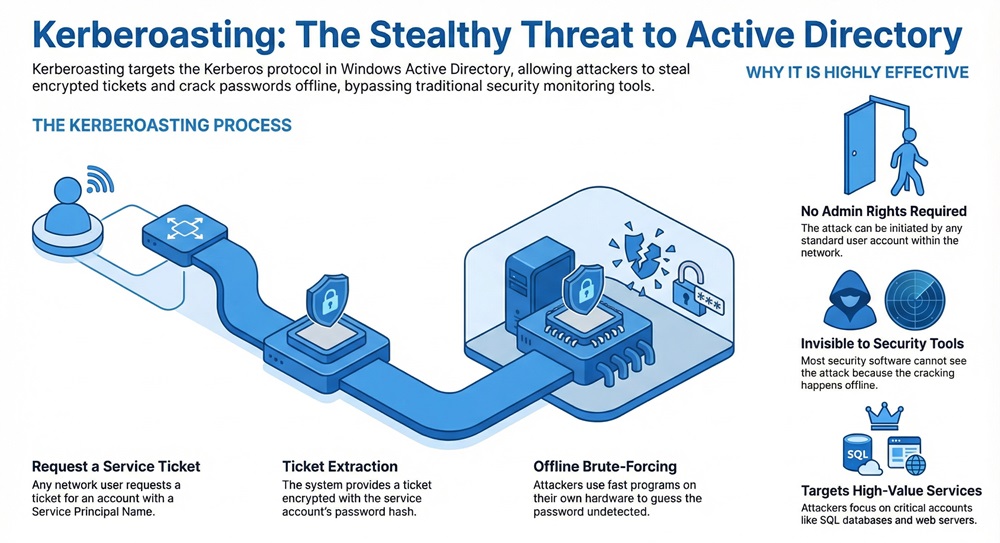
    Kerberoasting is an attack where a hacker steals a service ticket from a network and tries to crack the password offline. The hacker looks for accounts that have a Service Principal Name or SPN. These accounts usually belong to services like SQL databases or web servers.
     

    Kerberoasting infographic


    Kerberoasting exploits the way the Kerberos protocol hands out tickets. When you want to use a service, the system gives you an encrypted ticket. This ticket is encrypted with the password hash of the service account. The hacker simply asks for this ticket and then takes it to their own computer. They use fast programs to guess the password until they find a match.


    Stop Kerberoasting Now


    Kerberoasting vs AS-REP Roasting

    It is helpful to compare this attack to other common threats. Many people confuse this with AS-REP Roasting. While they both target the same protocol, they work in different ways.


    FeatureKerberoastingAS-REP Roasting
    Primary TargetService Accounts with an SPNUser accounts without pre-authentication
    User Rights NeededAny valid domain userNo user login needed initially
    Ticket TypeTGS (Service Ticket)AS-REP (Authentication Response)
    VisibilityVery low visibilityEasy to find in logs
    GoalGet the service account passwordGet the user account password


    Why Kerberoasting Works So Well?

    Kerberoasting works because of a design choice in Active Directory. The system wants to make it easy for users to access services. Because of this, any user can ask for a ticket for any service. The Domain Controller does not check if you actually have permission to use the service yet. It just gives you the ticket.


    It relies on the fact that service tickets use the service's password for encryption. If that password is weak, a computer can guess it very quickly. Think about how many old service accounts might have simple passwords in your office. This makes it a gold mine for hackers.


    Role of Service Principal Names

    Kerberoasting cannot happen without a Service Principal Name. An SPN is a unique identifier for a service instance. It links a service to a specific login account in the system. When a hacker scans the network, they look for these links.


    Kerberoasting tools find these accounts easily. They look for accounts where the "servicePrincipalName" attribute is not empty. Once they find these names, they know exactly which accounts to target. These accounts often have more power than a regular user account, which makes them very valuable.


    Also Read: What is Application Whitelisting in Cybersecurity?


    Step by Step Kerberoasting Process

    Kerberoasting follows a simple path. It starts with a hacker getting onto a single computer in your network. They do not need to be an admin. They just need to be a regular user.


    1. Finding the Targets

    It begins with a search. The hacker uses scripts to list all accounts that have an SPN. They use tools like PowerView or simple LDAP queries. This step is quiet because looking up information in the directory is a normal part of how Windows works.


    2. Requesting the Service Tickets

    Kerberoasting then moves to the request phase. The hacker asks the Key Distribution Center or KDC for a Ticket Granting Service or TGS ticket. They ask for tickets for all the service accounts they found in the first step. The system sends these tickets back to the hacker's machine.


    3. Extracting the Tickets from Memory

    It requires the hacker to pull these tickets out of the computer's memory. They use tools to save the tickets to a file. These files contain the encrypted password data. At this point, the hacker can leave your network. They have everything they need on their own laptop.


    4. Cracking the Password Offline

    It reaches its final stage in a lab or on a powerful server. The hacker uses a tool like Hashcat or John the Ripper. These programs guess millions of passwords every second. If the service account used a simple password, the hacker finds it in minutes.


    Popular Tools for Kerberoasting

    Kerberoasting is easy to do because many free tools exist for it. You can find these tools on sites like GitHub. Security researchers and hackers both use them.


    • Rubeus: This is a powerful tool for interacting with the Kerberos protocol. It can request tickets and even perform the cracking process.
    • Invoke-Kerberoast: This is a PowerShell script. It is very popular because it is easy to run on almost any Windows machine.
    • Mimikatz: This tool is famous for stealing passwords from memory. It also has features to help with this attack.
    • Impacket: This is a collection of Python scripts. Hackers use it to perform the attack from a Linux computer instead of a Windows one.


    Also Read: What is Biometric Authentication? Methods & Security Guide


    Detecting Kerberoasting Attacks

    Kerberoasting is hard to catch because it looks like normal traffic. However, you can find it if you know what to look for. You must watch your logs closely.


    Monitoring Event Logs

    Kerberoasting leaves a trail in the Windows Event Logs. You should look for Event ID 4769. This event happens when a user requests a service ticket. If you see one user asking for hundreds of tickets in a few seconds, it is likely an attack.


    Kerberoasting detection also involves looking at the encryption type. Old encryption like RC4 is much easier to crack than newer AES encryption. If you see many requests using RC4, you should investigate immediately.


    Using Machine Learning for Detection

    Kerberoasting can also be spotted using smart software. Some new systems use machine learning to learn what normal behavior looks like. If a user suddenly starts acting like a hacker, the system sends an alert. This helps find attacks that humans might miss.


    How to Prevent Kerberoasting?

    Kerberoasting is a serious threat, but you can stop it. Prevention is mostly about making the hacker's job too hard to finish.


    Use Strong and Long Passwords

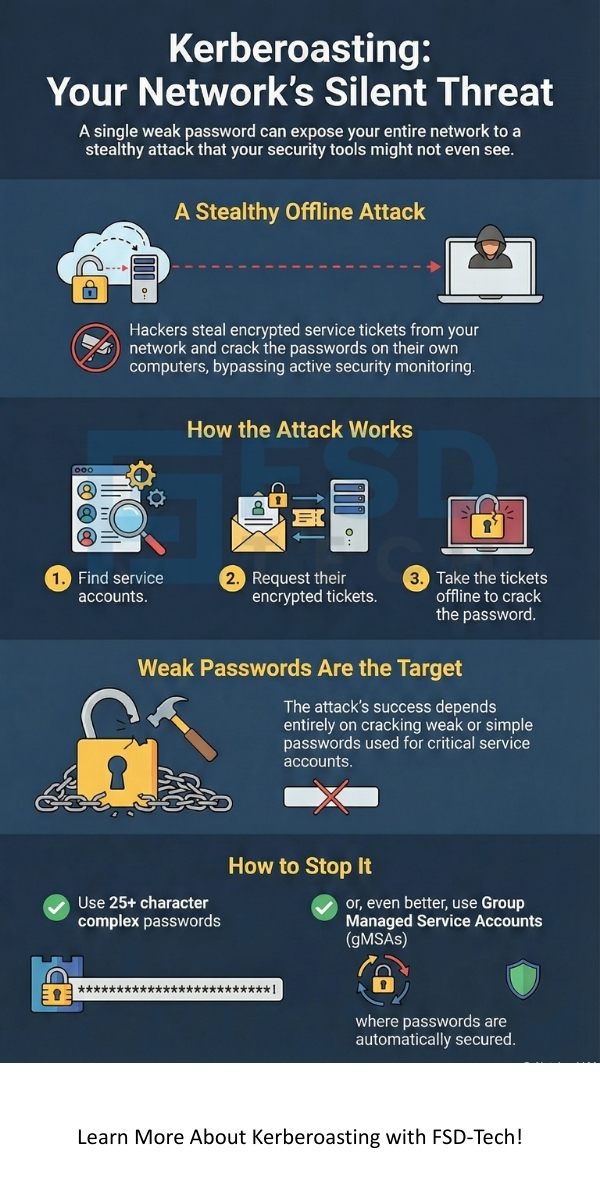
    Kerberoasting depends on weak passwords. If your service accounts have passwords that are 25 characters or longer, a hacker cannot crack them. You should use random characters and symbols. Never use the same password for two different services.


    Implement Managed Service Accounts

    Kerberoasting becomes much harder if you use Group Managed Service Accounts or gMSA. These are special accounts where Windows handles the password for you. The passwords are very long and change automatically every 30 days. Hackers cannot crack these easily.


    Move to AES Encryption

    Kerberoasting is much faster if you use the old RC4 encryption. You should change your settings to only allow AES128 or AES256. These are much stronger. It takes much more computer power to crack a ticket that uses AES.


    Also Read: What is Cloud Virtual Private Network (VPN)?


    Impact of a Successful Attack

    Kerberoasting can lead to a total network takeover. Once a hacker has the password for a service account, they can act as that service. If the service is a database, they can steal all your customer data. If the service has admin rights, they can create new users or delete your backups.


    It often serves as a stepping stone. A hacker starts as a regular user and then moves to a service account. From there, they might try to get a Domain Admin password. This is why you must take this threat seriously. It is a key part of many big data breaches you see in the news.


    Conclusion

    Kerberoasting is a clever way for hackers to move through your network. It turns a simple user login into a powerful tool for theft. By understanding how it works, you can take the right steps to lock your digital doors. Always remember that your security is only as strong as your weakest password.


    At FSD-Tech, we care about your safety above everything else. We work hard to stay ahead of these threats so you do not have to worry. Our team focuses on giving you clear advice and strong tools to protect your business. We believe that every client deserves a secure environment where they can grow without fear.


    Prevent Kerberoasting Contact FSD-Tech today
     

    Kerberoasting


    Key Takeaways

    • Kerberoasting targets accounts with a Service Principal Name.
    • Any domain user can request tickets for these accounts.
    • The attack happens offline, which makes it hard to detect.
    • Weak passwords are the biggest risk factor.
    • Event ID 4769 is the best way to find this activity in your logs.
    • Managed Service Accounts are the best way to stay safe.


    FAQs About Kerberoasting

    What is the main weakness Kerberoasting uses?

    It uses the fact that service tickets are encrypted with the service account's password hash. This allows for offline cracking.


    Do you need to be an admin to perform Kerberoasting?

    No, you do not. Any regular domain user can request these tickets and start the attack.


    Can antivirus software stop Kerberoasting?

    Most basic antivirus tools will not stop it. This is because requesting a ticket is a normal Windows function. You need special tools that watch for weird behavior.


    Is Kerberoasting still a threat?

    Yes, it is still very common. Many companies still have old accounts and weak passwords that make this attack easy.


    How long does it take to crack a Kerberoasted ticket?

    If the password is short, it can take seconds. If the password is very long and complex, it could take years.

    What is Kerberoasting Attack? Detection & Prevention

    About The Author

    Surbhi Suhane

    Surbhi Suhane is an experienced digital marketing and content specialist with deep expertise in Getting Things Done (GTD) methodology and process automation. Adept at optimizing workflows and leveraging automation tools to enhance productivity and deliver impactful results in content creation and SEO optimization.

    Like This Story?

    Share it with friends!

    Subscribe to our newsletter!

    Atera

    (48)

    Cato Networks

    (118)

    ClickUp

    (70)

    FishOS

    (7)

    Miradore

    (21)

    PointGuard AI

    (9)

    Vembu

    (22)

    Xcitium

    (33)

    ZETA HRMS

    (76)

    Workflow Automation(8)

    Workforce Automation(1)

    AI Project Management(1)

    HR Data Automation(1)

    RMM(1)

    IT Workflow Automation(1)

    IT security(2)

    GCC compliance(4)

    Payroll Integration(2)

    IT support automation(3)

    procurement automation(1)

    lost device management(1)

    IT Management(5)

    IoT Security(2)

    Cato XOps(2)

    IT compliance(4)

    Workflow Management(1)

    Task Automation(1)

    OpenStack automation(1)

    Kubernetes lifecycle management(2)

    AI-powered cloud ops(1)

    SMB Security(8)

    Data Security(1)

    MDR (Managed Detection & Response)(4)

    Atera Integrations(2)

    MSP Automation(3)

    XDR Security(2)

    SMB Cyber Protection(1)

    Ransomware Defense(3)

    HR Tech Solutions(1)

    Zero Trust Network Access(3)

    Zero Trust Security(2)

    Endpoint Management(1)

    SaaS Security(1)

    Payroll Automation(5)

    IT Monitoring(2)

    Xcitium EDR SOC(15)

    Ransomware Protection GCC(1)

    M&A IT Integration(1)

    Network Consolidation UAE(1)

    MSSP for SMBs(1)

    Managed EDR FSD-Tech(1)

    Ransomware Protection(3)

    SMB Cybersecurity GCC(1)

    FSD-Tech MSSP(25)

    Antivirus vs EDR(1)

    Endpoint Security(1)

    Cybersecurity GCC(12)

    Data Breach Costs(1)

    Endpoint Protection(1)

    SMB Cybersecurity(8)

    Zero Dwell Containment(31)

    Managed Security Services(2)

    Xcitium EDR(30)

    Cloud Backup(1)

    Hybrid Backup(1)

    Backup & Recovery(1)

    pointguard ai(4)

    backup myths(1)

    vembu(9)

    SMB data protection(9)

    disaster recovery myths(1)

    Disaster Recovery(4)

    Vembu BDR Suite(19)

    GCCBusiness(1)

    DataProtection(1)

    Secure Access Service Edge(4)

    GCC HR software(18)

    Miradore EMM(15)

    Cato SASE(7)

    Cloud Security(8)

    Talent Development(1)

    AI Cybersecurity(12)

    AI Governance(4)

    AI Security(2)

    AI Compliance(2)

    AI Risk Management(1)

    GCC business security(1)

    GCC network integration(1)

    compliance automation(5)

    education security(1)

    GCC cybersecurity(2)

    BYOD security Dubai(8)

    App management UAE(1)

    Miradore EMM Premium+(5)

    MiddleEast(1)

    HealthcareSecurity(1)

    Team Collaboration(1)

    IT automation(12)

    Zscaler(1)

    SD-WAN(6)

    HR Integration(4)

    Cloud Networking(3)

    device management(9)

    VPN(1)

    RemoteWork(1)

    ZeroTrust(2)

    MPLS(1)

    Project Management(9)

    HR automation(16)

    share your thoughts

    Zombie Computer

    What Is a Zombie Computer? Botnet Threats Guide

    🕓 January 29, 2026

    Metadata Analysis

    What is Metadata Analysis? Guide to Data Insights

    🕓 January 29, 2026

    Decryption and Encryption

    What is Decryption and Encryption in Modern Data Security?

    🕓 January 28, 2026

    Decoded(87)

    Cyber Security(118)

    BCP / DR(22)

    Zeta HRMS(75)

    SASE(21)

    Automation(70)

    Next Gen IT-Infra(118)

    Monitoring & Management(69)

    ITSM(22)

    HRMS(21)

    Automation(24)