.webp&w=3840&q=75)
How ClickUp Enables Outcome-Based Project Management (Not Just Task Tracking)
🕓 February 15, 2026

Do you ever wonder how your phone stays safe when you join a wireless network? You might think a simple password does all the work. It does not. There is a hidden system that keeps hackers away. It manages how you prove who you are to the network. This system is flexible and powerful. It can handle many different ways to log in. In this guide, you will learn about a tool that secures millions of devices every day. Let us explore the world of network security.
Extensible Authentication Protocol can be understood as a framework for network security. It provides the rules for how devices talk to each other during a login. Most people just call it EAP. It does not specify a single way to check your identity. Instead, it acts as a carrier for different security methods. This means you can use passwords, digital certificates, or even smart cards.
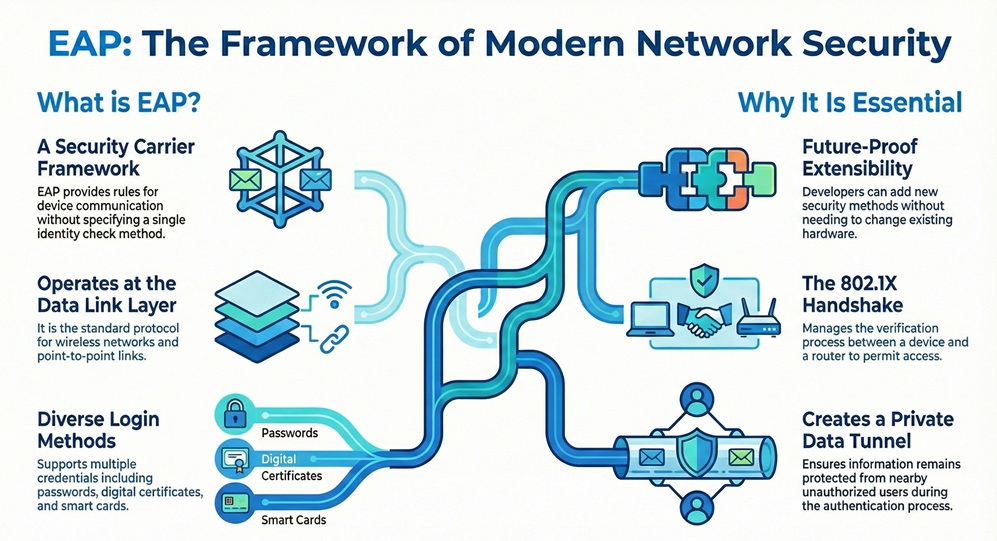
It refers to a protocol that works at the data link layer. It is very common in wireless networks and point-to-point links. Do you know why it is called extensible? It is because developers can add new security methods without changing the hardware. This flexibility makes it a favorite for big companies. It ensures that your network stays up to date with the latest security standards.
Extensible Authentication Protocol plays a vital role in the 802.1X standard. When you try to connect to a secure Wi-Fi, EAP starts its work. It handles the "handshake" between your laptop and the router. This handshake proves that you have the right to use the network. Without this protocol, your data would be open to anyone nearby. It provides a safe tunnel for your private information.
Secure Your Wi-Fi Reach our experts
| Basis for Comparison | EAP-TLS | EAP-TTLS | PEAP |
|---|---|---|---|
| Security Level | Very High | High | High |
| Client Requirement | Needs a Certificate | Needs a Password | Needs a Password |
| Server Requirement | Needs a Certificate | Needs a Certificate | Needs a Certificate |
| Ease of Setup | Hard | Medium | Easy |
| Outer Tunnel | None | Yes (TLS Tunnel) | Yes (TLS Tunnel) |
| Main Use | Large Corporations | General Business | Windows Networks |
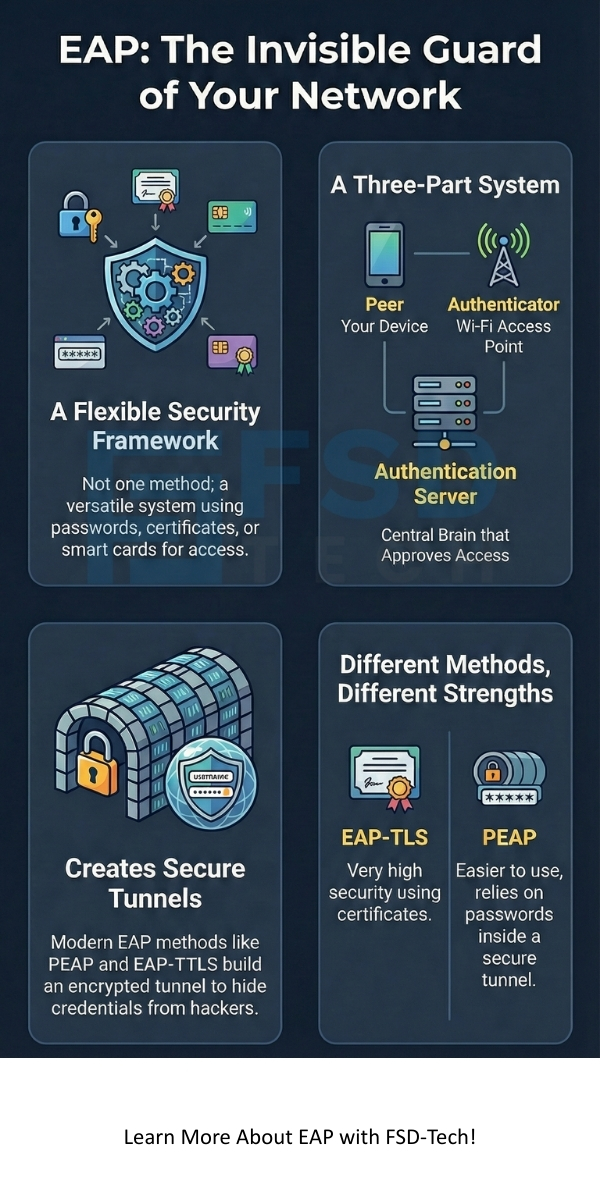
Extensible Authentication Protocol consists of three specific roles to make a connection work. You can think of these as three people talking to each other. The first role is the Peer. This is your device, such as your phone or laptop. It wants to get onto the network. The peer must prove its identity to the system.
It also requires an Authenticator. This is usually a network switch or a wireless access point. The authenticator acts like a gatekeeper. It does not decide if you are allowed in. Instead, it passes your information to a smarter machine. It facilitates the talk between your phone and the main security computer.
It relies on an Authentication Server for the final decision. This is often a RADIUS server. It holds a list of all users and their passwords. When the server gets your info, it checks if it is correct. If everything looks good, it tells the gatekeeper to let you in. This three-part system keeps the network very safe.
Also Read: What is Geofencing Technology? All You Need to Know
Extensible Authentication Protocol begins its process when you click "connect" on your device. First, the authenticator sends a "Request" packet to your device. It asks you who you are. This is the start of the identity check. Your device answers with a "Response" packet. It gives your username or ID.
EAP then moves the conversation to the backend server. The gatekeeper sends your ID to the RADIUS server. Now, the server chooses a specific security method. It might ask for a password or a digital code. This is a back-and-forth talk. Your device and the server might send several packets to finish the check.
Extensible Authentication Protocol ends with a final result. If your proof is good, the server sends a "Success" packet. The gatekeeper then opens the port for your traffic. Now you can browse the web. If the proof is bad, the server sends a "Failure" packet. The gatekeeper blocks your device from the network. Why is this so effective? It keeps the secret keys away from the gatekeeper so hackers cannot steal them.
Extensible Authentication Protocol methods vary based on how they handle security. One famous type is EAP-TLS. It is very strong because it uses digital certificates on both the server and your device. It does not use passwords. This makes it very hard for hackers to break in. However, it takes a lot of work to manage all those certificates.
EAP also includes PEAP. This stands for Protected Extensible Authentication Protocol. It is very popular because it is easy to use. It creates a safe "tunnel" using a server certificate. Inside that tunnel, you can use a simple password. This protects your password from being seen by others in the air. Most Windows computers use PEAP by default.
It can also use EAP-TTLS. This is similar to PEAP. It also uses a tunnel to hide your login details. The main difference is that it can support older ways of checking passwords. This makes it very flexible for companies with old systems. It ensures that everyone can connect safely regardless of their device age.
Also Read: What is Zero Knowledge Proof (ZKP)? Blockchain Technology
Extensible Authentication Protocol serves as the language for the 802.1X standard. 802.1X is a way to lock a network port until a user logs in. It acts like a physical lock on a door. EAP is the key that opens that lock. When you plug in a cable or join Wi-Fi, the lock is active. You cannot send any data except for EAP packets.
EAP carries the login data through the locked port. This process is called EAP over LAN or EAPOL. It allows your device to talk to the security server even before you are "on" the network. This is a clever way to keep the network clean. It prevents unauthorized devices from even sending a single ping to other computers.
It helps the network handle many users at once. Since the server does the hard work, the switches stay fast. The switch only needs to know if the server said "yes" or "no." This design allows big colleges and offices to stay secure. It ensures that only the right people get access to sensitive files.
Extensible Authentication Protocol uses four main types of messages to communicate. These are Request, Response, Success, and Failure. Each packet has a specific job. The Request packet always comes from the authenticator or server. It asks for information. For example, it might ask for your password or a token.
EAP uses the Response packet to send data back. Your device fills this packet with the answers the server needs. Every Request must have a matching Response. If a packet gets lost, the system waits and tries again. This makes the protocol very reliable even on bad wireless connections.
Extensible Authentication Protocol success and failure packets are the final steps. They are very short. They simply tell the device if it can enter or if it must stay out. Once a Success packet arrives, the device and the switch set up encryption keys. These keys protect all your future web traffic. This is how your data stays private from neighbors.
Extensible Authentication Protocol is generally very safe, but it depends on the method you choose. Some old versions like LEAP are not safe anymore. Hackers found ways to guess the passwords used in LEAP. That is why you should always use modern versions like PEAP or EAP-TLS. These modern versions use strong math to hide your data.
It keeps your credentials safe by using tunnels. A tunnel is like a lead pipe inside a room. Even if someone is in the room, they cannot see what is inside the pipe. PEAP and TTLS build this pipe first. Then they send your username and password through it. This prevents "man-in-the-middle" attacks where a hacker pretends to be the router.
EAP also protects against fake access points. When you use EAP-TLS, your phone checks the server's ID. If the ID does not match, your phone will not connect. This stops you from joining a hacker's Wi-Fi by mistake. It acts as a double check for your safety. Do you feel better knowing your device is this smart?
Also Read: What is RADIUS Protocol? AAA, Setup & Security
Extensible Authentication Protocol implementation requires a good backend system. Most offices use a RADIUS server like FreeRADIUS or Cisco ISE. These servers act as the brain of the operation. They talk to the office directory to see who is active. If an employee leaves the company, the admin just turns off their account in the directory.
EAP then automatically blocks that person from the Wi-Fi. There is no need to change the Wi-Fi password for everyone else. This is a huge time saver for IT teams. It provides a central place to manage security for the whole building. It ensures that only current staff can access the internal servers.
It also allows for "guest" access. You can set up the server to give guests a limited connection. They might only get to see the internet but not the company files. This keeps your private data away from visitors. It facilitates a professional and secure environment for everyone.
Extensible Authentication Protocol offers many advantages for modern networks. First, it is very flexible. You can start with simple passwords and move to smart cards later. You do not have to buy new routers to make this change. This protects your investment in hardware.
It also provides great scaling. It can handle ten users or ten thousand users. Since the RADIUS server does the checking, the load is spread out. This keeps the network fast for everyone. It helps in maintaining a smooth experience during busy hours.
It improves user experience as well. With PEAP, users just type their normal office password. They do not need to learn a new system. It makes security feel natural and easy. When security is easy, people are more likely to follow the rules. This leads to a safer workplace for you and your team.
Extensible Authentication Protocol setup starts with choosing your server. You can use a Windows Server or a Linux box with FreeRADIUS. First, you must install a digital certificate on this server. This certificate proves the server is real. It is a vital step for the security tunnel.
EAP configuration then moves to the access points. You must tell your Wi-Fi routers where the RADIUS server is. You give them the IP address and a "shared secret." This secret allows the router and the server to trust each other. It ensures that no one can spoof your security server.
It finally requires user setup. On a laptop, you select "WPA2-Enterprise" or "WPA3-Enterprise." You then choose the EAP type, like PEAP. When you try to connect, the computer will ask for your login. Once you enter it, the handshake begins. It is that simple for the end user.
Extensible Authentication Protocol can sometimes fail due to certificate issues. If the clock on your laptop is wrong, the certificate might look expired. This will stop the connection immediately. Always make sure your devices have the correct date and time. It is a simple fix for a common headache.
Extensible Authentication Protocol might also struggle with "identity privacy." Some systems send your real username in the first packet. This is not good because hackers can see who is logging in. Better setups use an "anonymous" identity for the first step. This keeps your real name hidden inside the encrypted tunnel.
These issues can also come from weak signals. If the Wi-Fi signal is very low, the packets might drop. Since EAP needs several back-and-forth messages, a bad signal can break the login. If you cannot connect, try moving closer to the router. This often solves the problem quickly.
Extensible Authentication Protocol continues to grow with new standards. The latest version is part of WPA3. It uses even stronger encryption to protect you. It also has better ways to handle "IoT" devices like smart lights and cameras. These devices often do not have screens, so they need special EAP methods.
EAP will likely use more biometrics in the future. Imagine logging into your office Wi-Fi with just a thumbprint on your phone. EAP can carry that data to the server just like a password. This will make networks even safer and easier to use. It shows how the protocol can adapt to any new technology.
It remains the gold standard for network access. As long as we need to prove who we are, EAP will be there. It is the invisible guard that stays on watch. It protects your secrets and keeps the digital world running. Are you ready to make your network more secure?
At our company, we believe that security should be simple but strong. We focus on giving you the best tools to protect your data. Your safety is our main goal every day. We work hard to stay ahead of threats so you do not have to worry. Let us help you build a network that you can trust.
Contact our team today to learn how we can secure your business with the best protocols available. Your peace of mind is just one step away.
PEAP is usually the best choice. It is easy to set up and works with most devices. You only need one certificate for your server. Users can then log in with their existing usernames and passwords.
Yes, it works on both wired and wireless networks. On a wired network, it uses the 802.1X standard to lock the wall jacks. This prevents strangers from plugging in their laptops and getting access.
If you use old methods like LEAP or MD5-Challenge, yes. But modern methods like EAP-TLS are very hard to hack. Always make sure your server is set up correctly to avoid weak spots.
Most business-grade routers and switches support EAP. Home routers often do not have this feature. Check for "WPA-Enterprise" or "802.1X" support in the manual.
No, they are different. EAP gets you onto the local network safely. A VPN creates a secure path over the public internet to a distant network. You might use EAP to join your office Wi-Fi and then use a VPN to reach a different branch.

Surbhi Suhane is an experienced digital marketing and content specialist with deep expertise in Getting Things Done (GTD) methodology and process automation. Adept at optimizing workflows and leveraging automation tools to enhance productivity and deliver impactful results in content creation and SEO optimization.
Share it with friends!




.webp&w=3840&q=75)






share your thoughts