HomeNext Gen IT-InfraMonitoring & ManagementCyber SecurityBCP / DRAutomationDecoded
Next Gen IT-Infra
Cato’s SASE Supports Cybersecurity Skills Development

How Cato’s SASE Supports Cybersecurity Skills Development

🕓 April 8, 2025

How SASE Supports the Security Needs of SMBs

How SASE Supports the Security Needs of SMBs

🕓 February 9, 2025

Attack Surface Reduction with Cato’s SASE

Attack Surface Reduction with Cato’s SASE

🕓 February 10, 2025

SASE for Digital Transformation in UAE

SASE for Digital Transformation in UAE

🕓 February 8, 2025

Monitoring & Management
Understanding Atera’s SLA Management

Understanding Atera’s SLA Management

🕓 February 7, 2025

Cost-Performance Ratio: Finding the Right Balance in IT Management Networks

Cost-Performance Ratio: Finding the Right Balance in IT Management Networks

🕓 June 16, 2025

Customizing Atera with APIs

Customizing Atera with APIs

🕓 March 3, 2025

Power Up Your IT Team’s Strategy with Atera’s Communication Tools

Power Up Your IT Team’s Strategy with Atera’s Communication Tools

🕓 February 8, 2025

Cyber Security
Visual guide showing Cato CMA interface for configuring Internet and WAN firewall rules, enabling threat protection, and monitoring security events in real time for UAE IT teams.

Enforcing Firewall and Threat Protection Policies in Cato

🕓 July 25, 2025

Isometric illustration of professionals managing network performance, bandwidth analytics, and cloud-based optimization around the Cato Networks platform, symbolizing bandwidth control and QoS visibility.

Mastering Bandwidth Control and QoS in Cato Networks

🕓 July 26, 2025

Illustration of the Cato Cloud architecture showing its role in delivering SASE for secure, optimized global connectivity.

Understanding the Cato Cloud and Its Role in SASE

🕓 January 29, 2025

Global network backbone powering Cato SASE solution for secure, high-performance connectivity across regions.

Global Backbone: The Engine Powering Cato’s SASE Solution

🕓 January 30, 2025

BCP / DR
Illustration showing diverse business and IT professionals collaborating with cloud, backup, and security icons, representing Vembu use cases for SMBs, MSPs, and IT teams.

Who Uses Vembu? Real-World Use Cases for SMBs, MSPs & IT Teams

🕓 July 12, 2025

Graphic showcasing Vembu’s all-in-one backup and disaster recovery platform with icons for cloud, data protection, and business continuity for IT teams and SMBs.

What Is Vembu? A Deep Dive Into the All in One Backup & Disaster Recovery Platform

🕓 July 6, 2025

Illustration showing Vembu backup and disaster recovery system with cloud storage, server racks, analytics dashboard, and IT professionals managing data.

The Rising Cost of Data Loss: Why Backup Is No Longer Optional?

🕓 August 14, 2025

3D isometric illustration of cloud backup and data recovery infrastructure with laptop, data center stack, and digital business icons — FSD Tech

RPO & RTO: The Heart of Business Continuity

🕓 August 15, 2025

Automation
Cross-Functional Collaboration with ClickUp

Fostering Cross-Functional Collaboration with ClickUp for Multi-Departmental Projects

🕓 February 11, 2025

ClickUp Project Reporting

Revolutionizing Enterprise Reporting with ClickUp’s Advanced Analytics and Dashboards

🕓 June 16, 2025

ClickUp’s Design Collaboration and Asset Management Tools

Empowering Creative Teams with ClickUp’s Design Collaboration and Asset Management Tools

🕓 February 26, 2025

ClickUp Communication and Collaboration Tools

ClickUp Communication and Collaboration Tools: Empowering Remote Teams

🕓 March 12, 2025

Decoded
Multi-Factor Authentication (MFA)

Multi-Factor Authentication (MFA): All You Need to Know

🕓 December 7, 2025

L3 Switch

What Is an L3 Switch? L2 vs L3 & Why You Need Layer 3?

🕓 December 8, 2025

IPSec

IPSec Explained: Protocols, Modes, IKE & VPN Security

🕓 December 3, 2025

 Datagram Transport Layer Security (DTLS)

What is Datagram Transport Layer Security (DTLS)? How it works?

🕓 December 4, 2025

    Subscribe to our newsletter!

    About Us

    Follow Us

    Copyright © 2024 | Powered by 

    Cato SASE Architecture

    Inside Cato’s SASE Architecture: A Blueprint for Modern Security

    🕓 January 26, 2025

    Enterprise Data Security and Privacy with ClickUp

    Ensuring Enterprise Data Security and Privacy with ClickUp

    🕓 February 9, 2025

    DDoS protection SASE

    DDoS Protection and Cato’s Defence Mechanisms

    🕓 February 11, 2025

    Table of Contents

    What is Geofencing Technology? All You Need to Know

    Surbhi Suhane
    January 23, 2026
    Comments
    Geofencing-technology

    Have you ever walked past your favorite clothing store and suddenly received a discount coupon on your phone? It feels like the store was waiting for you. This is not a coincidence. It is a smart strategy that helps businesses talk to you at the right time. You might wonder how a store knows you are nearby. The answer lies in a clever tool that connects the digital world to physical locations. Let us explore this tool and see how it changes the way we use technology every day.


    Meaning of Geofencing

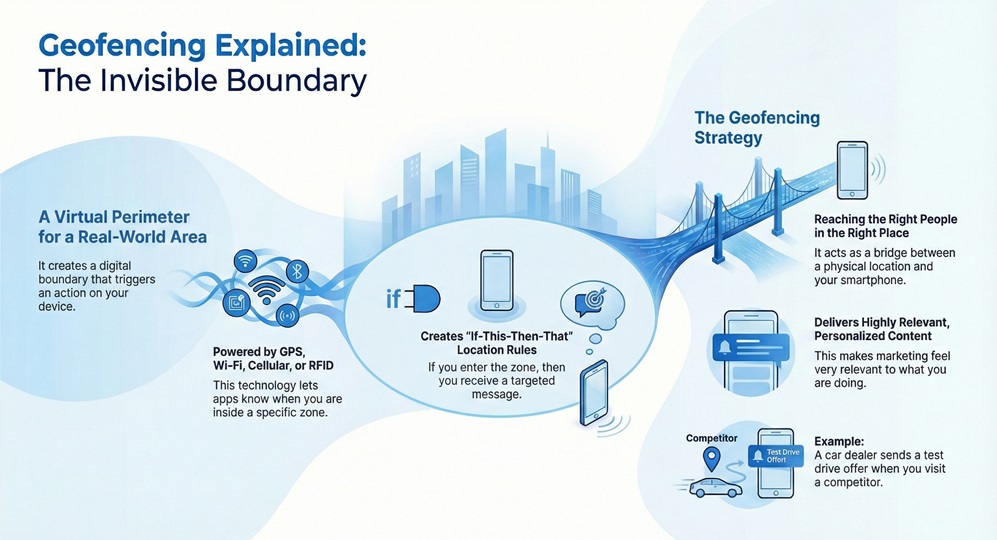
    Geofencing meaning refers to the use of a digital boundary around a specific location. Imagine drawing a circle on a map. When a person with a mobile device enters or leaves that circle, it triggers a response. This response could be a text message, an app notification, or a social media ad. Geofencing creates a virtual perimeter for real-world areas.
     

    Geofencing


    Geofencing uses global positioning system (GPS) data or cellular data to work. It can also use Wi-Fi signals or Radio Frequency Identification (RFID). This technology helps apps know when you are in a certain zone. In simple terms, it is a way to set up "if-this-then-that" rules based on location.


    Deploy Geofencing Now


    What is a Geofencing Strategy?

    Geofencing strategy involves more than just drawing circles. It is about reaching the right people in the right place. Businesses use it to catch your attention when you are near their shop. It acts as a bridge between a physical space and your smartphone.


    It allows companies to send personalized content. For example, a car dealership might send an invite for a test drive when you visit a competitor nearby. This makes the marketing feel very relevant to what you are doing. Now, the question arises, how does this differ from other location tools?


    Comparison of Location-Based Technologies

    Basis for ComparisonGeofencingGeotargetingBeacon Technology
    Primary TechnologyGPS, Wi-Fi, CellularIP Address, User DataBluetooth (BLE)
    RangeLarge (meters to kilometers)City or Zip Code levelVery Short (under 50 meters)
    PrecisionMediumLow to MediumHigh (Indoor accuracy)
    Main UseEntering/Exiting a zoneReaching specific demographicsPrecise indoor tracking
    Battery ImpactModerateLowLow


    Also Read: What is Network Access Control (NAC)? with Process

    Exploring the Geofencing Define Concept

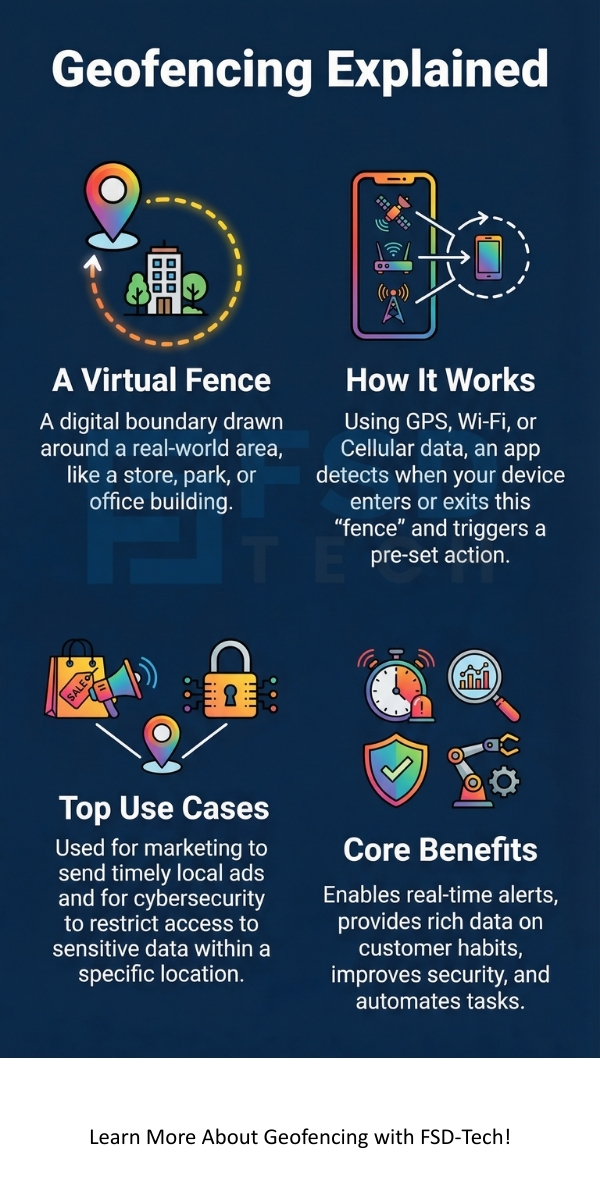
    Geofencing define helps us see it as a location-based service. In this service, an app or software uses location data to trigger a pre-programmed action. This action happens when a mobile device enters or exits a virtual boundary. These boundaries are called geofences.


    It can be of different shapes. Some are simple circles around a point. Others are complex polygons that follow the exact lines of a building or a park. This flexibility allows for very specific targeting. Let us now discuss the technology that makes this possible.


    What is Geofencing Technology Basics?

    Geofencing technology starts with the hardware in your pocket. Your smartphone constantly talks to satellites and cell towers. This tells the device exactly where it is on the planet. The geofencing software compares your location to the boundaries set by the user.


    It relies on three main parts. First, you need a management platform to set the boundaries. Second, you need a mobile app that the user has installed. Third, you need the location services on the device to be active. When these three parts work together, the system can trigger alerts instantly.


    How Geofencing Works Step by Step

    Geofencing follows a clear sequence of events. First, an administrator creates a virtual fence in a software portal. This fence covers a specific area like a mall or an airport. Second, the software defines the action that should happen. This might be showing an ad or logging a work time.


    Geofencing then waits for a device to cross the line. When you carry your phone into the fenced area, the app notices the change. It sends a signal back to the server. The server then executes the action immediately. In this way, the process is fast and automatic.


    The Standard Process Flow

    1. Setting the Boundary: The user draws a virtual zone on a map.
    2. Developing the Trigger: The user decides what happens when the fence is crossed.
    3. Location Detection: The mobile device shares its coordinates with the app.
    4. Trigger Execution: The system sends the message or alert to the device.
    5. Data Analysis: The system records the entry and exit for future study.


    Also Read: What is Role-Based Access Control (RBAC)?


    What is Geofencing in Marketing and Advertising?

    Geofencing in marketing focuses on increasing sales by being local. It helps brands talk to customers who are already in the neighborhood. This is very powerful because it targets people who can actually visit the store right now. It reduces the waste of showing ads to people who are too far away.


    It also helps with "conquesting." This is when you set a fence around a competitor's store. If a customer goes there, they get a message from you instead. This is a very bold way to win new business. Does this really help the customer? Yes, because they get better deals and useful information.


    Why Use Geofencing Marketing for Your Business?

    Geofencing marketing offers many benefits for local shops. It provides high levels of engagement. People are much more likely to click an ad if it is for a shop they are standing next to. It also provides great data. You can see how many people walked into your store after seeing an ad.


    It helps you understand customer habits. You can see which areas your customers visit most often. This helps you choose the best spots for new stores or billboards. It makes your marketing budget work much harder.


    What is Geofencing in Cyber Security Applications?

    Geofencing in cyber security protects data by using location. It acts as a digital lock for sensitive information. A company can set a geofence around its office. This ensures that employees can only access certain files while they are inside the building.


    It helps prevent remote hacking. If someone tries to log in from another country, the system can block them automatically. It adds a physical layer to digital safety. This is very important for banks and government offices. In this section, we see how location keeps us safe.


    How Much Does Geofencing Cost for Most Users?

    Geofencing cost depends on how many people you want to reach. Most providers charge based on "CPM," which means cost per thousand views. Usually, this price stays between $4 and $15. The more specific you want to be, the more you might pay.


    It also involves setup fees. Some platforms charge a monthly fee to use their software. Others take a percentage of your total ad spend. You should also think about the cost of making the ads. All in all, it is often cheaper than traditional TV or radio ads.


    Also Read: What is Attribute Based Access Control (ABAC)?


    The Benefits of Geofencing Technology

    Geofencing technology provides many advantages across different fields. In logistics, it helps managers know when a truck arrives at a warehouse. In human resources, it helps track when employees arrive at a job site. It automates tasks that used to take a lot of time.


    It also improves the user experience. Smart homes use it to turn on lights when you drive into your driveway. It makes life easier by doing things for you without you asking. The following list shows some key benefits:


    • Better Targeting: Reach people based on where they go.
    • Real-Time Alerts: Send info exactly when it is needed.
    • Improved Safety: Block access to data in unsafe areas.
    • Rich Data: Learn where customers spend their time.
    • Automation: Trigger actions without manual work.


    Common Challenges with Geofencing

    Geofencing is not perfect. It can drain the battery of a phone if the app checks the location too often. If the GPS signal is weak, like inside a large metal building, the geofence might not trigger. This can lead to missed opportunities.


    It also requires the user to give permission. If a user turns off their location services, the system cannot see them. There are also privacy concerns to keep in mind. You must be transparent with your users about how you use their data.


    Best Practices for Geofencing Marketing

    Geofencing marketing works best when you keep the fence small. If your fence is too large, you might message people who are too far away to visit. You should also make your message very clear. Give the user a reason to act right now.


    It requires a strong call to action. Tell the user exactly what to do. Use phrases like "Visit us now for 20% off" or "Show this message at the desk." It is also smart to test different messages to see what people like most. Let us now look at some frequently asked questions.


    Conclusion

    Geofencing is a powerful tool that connects businesses with people in a meaningful way. It turns location data into a conversation. Whether you are trying to sell a product or protect a secret, this technology offers a smart solution. It focuses on the most important factor in any interaction: being in the right place at the right time.


    At our company, we believe in using technology to build better relationships. We value your trust and focus on your success. Our team works hard to make sure every digital boundary we build leads to a real-world win for you. We are here to help you navigate the world of location-based tools with ease and honesty.


    Boost Your Local Reach Reach our experts
     

    Geofencing Infographic


    Key Takeaways

    • Geofencing creates digital boundaries around physical locations.
    • It uses GPS, Wi-Fi, and RFID to track when devices cross these lines.
    • Marketing teams use it to send timely and local ads to customers.
    • Cyber security teams use it to limit data access to safe zones.
    • The cost is usually based on how many people see your ads.
    • It requires user permission and location services to be turned on.


    Frequently Asked Questions about Geofencing

    What is the difference between geofencing and geotargeting?

    Geofencing uses a virtual border to trigger an action for anyone inside. Geotargeting delivers content to people based on their location plus other factors like age or interests.


    Does geofencing work indoors?

    Geofencing that uses GPS often struggles indoors. However, if the system uses Wi-Fi or RFID, it can work very well inside malls or large offices.


    Is geofencing legal?

    Geofencing is legal as long as you follow privacy laws. You must ask users for permission to track their location. You also need to protect the data you collect.


    Can I use geofencing without an app?

    Geofencing usually requires an app to be installed on the phone. However, some mobile web ads can use location data through the browser.


    How big should a geofence be?

    Geofencing circles for retail are usually small. Most experts suggest a radius of about 500 feet to 1,000 feet for the best results.


    What is Geofencing Technology? All You Need to Know

    About The Author

    Surbhi Suhane

    Surbhi Suhane is an experienced digital marketing and content specialist with deep expertise in Getting Things Done (GTD) methodology and process automation. Adept at optimizing workflows and leveraging automation tools to enhance productivity and deliver impactful results in content creation and SEO optimization.

    Like This Story?

    Share it with friends!

    Subscribe to our newsletter!

    Atera

    (48)

    Cato Networks

    (116)

    ClickUp

    (70)

    FishOS

    (7)

    Miradore

    (21)

    PointGuard AI

    (9)

    Vembu

    (22)

    Xcitium

    (33)

    ZETA HRMS

    (73)

    Workflow Automation(8)

    Workforce Automation(1)

    AI Project Management(1)

    HR Data Automation(1)

    RMM(1)

    IT Workflow Automation(1)

    IT security(2)

    GCC compliance(4)

    Payroll Integration(2)

    IT support automation(3)

    procurement automation(1)

    lost device management(1)

    IT Management(5)

    IoT Security(2)

    Cato XOps(2)

    IT compliance(4)

    Task Automation(1)

    Workflow Management(1)

    AI-powered cloud ops(1)

    Kubernetes lifecycle management(2)

    OpenStack automation(1)

    SMB Security(8)

    Data Security(1)

    MDR (Managed Detection & Response)(4)

    Atera Integrations(2)

    MSP Automation(3)

    XDR Security(2)

    SMB Cyber Protection(1)

    Ransomware Defense(3)

    HR Tech Solutions(1)

    Zero Trust Network Access(3)

    Zero Trust Security(2)

    Endpoint Management(1)

    SaaS Security(1)

    Payroll Automation(5)

    IT Monitoring(2)

    Xcitium EDR SOC(15)

    Ransomware Protection GCC(1)

    Network Consolidation UAE(1)

    M&A IT Integration(1)

    MSSP for SMBs(1)

    Antivirus vs EDR(1)

    FSD-Tech MSSP(25)

    Ransomware Protection(3)

    Managed EDR FSD-Tech(1)

    SMB Cybersecurity GCC(1)

    Cybersecurity GCC(12)

    Endpoint Security(1)

    Endpoint Protection(1)

    Data Breach Costs(1)

    Xcitium EDR(30)

    Zero Dwell Containment(31)

    SMB Cybersecurity(8)

    Managed Security Services(2)

    Hybrid Backup(1)

    Cloud Backup(1)

    Backup & Recovery(1)

    pointguard ai(4)

    backup myths(1)

    vembu(9)

    SMB data protection(9)

    disaster recovery myths(1)

    Disaster Recovery(4)

    Vembu BDR Suite(19)

    GCCBusiness(1)

    DataProtection(1)

    Secure Access Service Edge(4)

    GCC HR software(16)

    Miradore EMM(15)

    Cato SASE(7)

    Cloud Security(8)

    Talent Development(1)

    AI Governance(4)

    AI Risk Management(1)

    AI Security(2)

    AI Cybersecurity(12)

    AI Compliance(2)

    GCC business security(1)

    GCC network integration(1)

    compliance automation(5)

    education security(1)

    GCC cybersecurity(2)

    BYOD security Dubai(8)

    App management UAE(1)

    Miradore EMM Premium+(5)

    MiddleEast(1)

    HealthcareSecurity(1)

    Team Collaboration(1)

    IT automation(12)

    Zscaler(1)

    SD-WAN(6)

    HR Integration(4)

    Cloud Networking(3)

    device management(9)

    VPN(1)

    RemoteWork(1)

    ZeroTrust(2)

    MPLS(1)

    Project Management(9)

    HR automation(16)

    share your thoughts

    Cloud access security broker

    What is Cloud Access Security Broker (CASB)?

    🕓 January 23, 2026

    Geofencing-technology

    What is Geofencing Technology? All You Need to Know

    🕓 January 23, 2026

    Advanced Persistent Threat (APT)

    What is Advanced Persistent Threat (APT)?

    🕓 January 22, 2026

    Decoded(80)

    Cyber Security(116)

    BCP / DR(22)

    Zeta HRMS(72)

    SASE(21)

    Automation(70)

    Next Gen IT-Infra(116)

    Monitoring & Management(69)

    ITSM(22)

    HRMS(21)

    Automation(24)