HomeNext Gen IT-InfraMonitoring & ManagementCyber SecurityBCP / DRAutomationDecoded
Next Gen IT-Infra
Cato’s SASE Supports Cybersecurity Skills Development

How Cato’s SASE Supports Cybersecurity Skills Development

🕓 April 8, 2025

How SASE Supports the Security Needs of SMBs

How SASE Supports the Security Needs of SMBs

🕓 February 9, 2025

Attack Surface Reduction with Cato’s SASE

Attack Surface Reduction with Cato’s SASE

🕓 February 10, 2025

SASE for Digital Transformation in UAE

SASE for Digital Transformation in UAE

🕓 February 8, 2025

Monitoring & Management
Understanding Atera’s SLA Management

Understanding Atera’s SLA Management

🕓 February 7, 2025

Cost-Performance Ratio: Finding the Right Balance in IT Management Networks

Cost-Performance Ratio: Finding the Right Balance in IT Management Networks

🕓 June 16, 2025

Customizing Atera with APIs

Customizing Atera with APIs

🕓 March 3, 2025

Power Up Your IT Team’s Strategy with Atera’s Communication Tools

Power Up Your IT Team’s Strategy with Atera’s Communication Tools

🕓 February 8, 2025

Cyber Security
Illustration of the Cato Cloud architecture showing its role in delivering SASE for secure, optimized global connectivity.

Understanding the Cato Cloud and Its Role in SASE

🕓 January 29, 2025

Isometric illustration of professionals managing network performance, bandwidth analytics, and cloud-based optimization around the Cato Networks platform, symbolizing bandwidth control and QoS visibility.

Mastering Bandwidth Control and QoS in Cato Networks

🕓 July 26, 2025

Global network backbone powering Cato SASE solution for secure, high-performance connectivity across regions.

Global Backbone: The Engine Powering Cato’s SASE Solution

🕓 January 30, 2025

Illustration of team analyzing application traffic and usage insights on a large laptop screen using Cato’s dashboard, surrounded by network and cloud icons.

Cato Networks Application Visibility | Monitoring & Control

🕓 July 27, 2025

BCP / DR
Illustration showing diverse business and IT professionals collaborating with cloud, backup, and security icons, representing Vembu use cases for SMBs, MSPs, and IT teams.

Who Uses Vembu? Real-World Use Cases for SMBs, MSPs & IT Teams

🕓 July 12, 2025

Graphic showcasing Vembu’s all-in-one backup and disaster recovery platform with icons for cloud, data protection, and business continuity for IT teams and SMBs.

What Is Vembu? A Deep Dive Into the All in One Backup & Disaster Recovery Platform

🕓 July 6, 2025

Illustration showing Vembu backup and disaster recovery system with cloud storage, server racks, analytics dashboard, and IT professionals managing data.

The Rising Cost of Data Loss: Why Backup Is No Longer Optional?

🕓 August 14, 2025

3D isometric illustration of cloud backup and data recovery infrastructure with laptop, data center stack, and digital business icons — FSD Tech

RPO & RTO: The Heart of Business Continuity

🕓 August 15, 2025

Automation
Cross-Functional Collaboration with ClickUp

Fostering Cross-Functional Collaboration with ClickUp for Multi-Departmental Projects

🕓 February 11, 2025

ClickUp Project Reporting

Revolutionizing Enterprise Reporting with ClickUp’s Advanced Analytics and Dashboards

🕓 June 16, 2025

ClickUp’s Design Collaboration and Asset Management Tools

Empowering Creative Teams with ClickUp’s Design Collaboration and Asset Management Tools

🕓 February 26, 2025

ClickUp Communication and Collaboration Tools

ClickUp Communication and Collaboration Tools: Empowering Remote Teams

🕓 March 12, 2025

Decoded
Multi-Factor Authentication (MFA)

Multi-Factor Authentication (MFA): All You Need to Know

🕓 December 7, 2025

L3 Switch

What Is an L3 Switch? L2 vs L3 & Why You Need Layer 3?

🕓 December 8, 2025

IPSec

IPSec Explained: Protocols, Modes, IKE & VPN Security

🕓 December 3, 2025

 Datagram Transport Layer Security (DTLS)

What is Datagram Transport Layer Security (DTLS)? How it works?

🕓 December 4, 2025

    Subscribe to our newsletter!

    About Us

    Follow Us

    Copyright © 2024 | Powered by 

    Atera

    (56)

    Cato Networks

    (130)

    ClickUp

    (78)

    FishOS

    (7)

    Miradore

    (21)

    PointGuard AI

    (9)

    Vembu

    (22)

    Xcitium

    (33)

    ZETA HRMS

    (79)

    Table of Contents

    Why Code Signing Matters for Your Software Security?

    Surbhi Suhane
    March 12, 2026
    Comments
    Code signing

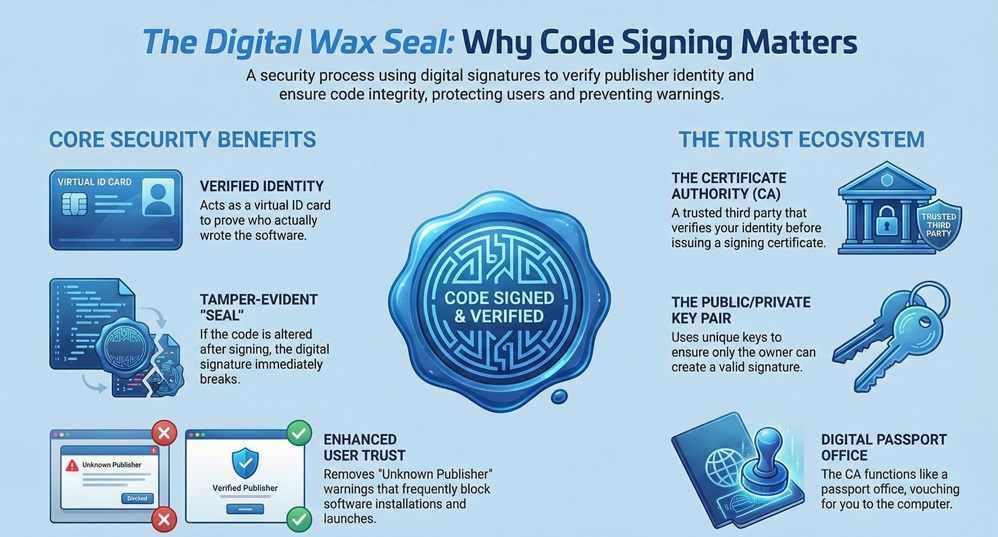
    Code signing is the digital equivalent of a wax seal on a royal letter. To be honest, we’ve all been there: you download a cool new app, try to install it, and a giant red warning pops up saying "Unknown Publisher." It’s frustrating for you and even worse for the person who wrote the code. That’s where a digital signature steps in to save the day.


    When you sign your work, you’re telling the world, "Hey, I wrote this, and it’s safe to use." It isn't just about vanity or branding. It is about deep-rooted security. In my experience, developers often ignore this step until a browser blocks their launch. Don't let that be you.


    How does it actually work under the hood? It uses a mix of math and trust. By the end of this, you’ll see why skipping this step is like leaving your front door wide open in a storm.


    What is Code Signing?

    The term code signing refers to the process of using a certificate-based digital signature to sign executables and scripts. Think of it as a virtual ID card. When you apply this signature, you achieve two main things: you prove your identity and you lock the code.


    Code Signing


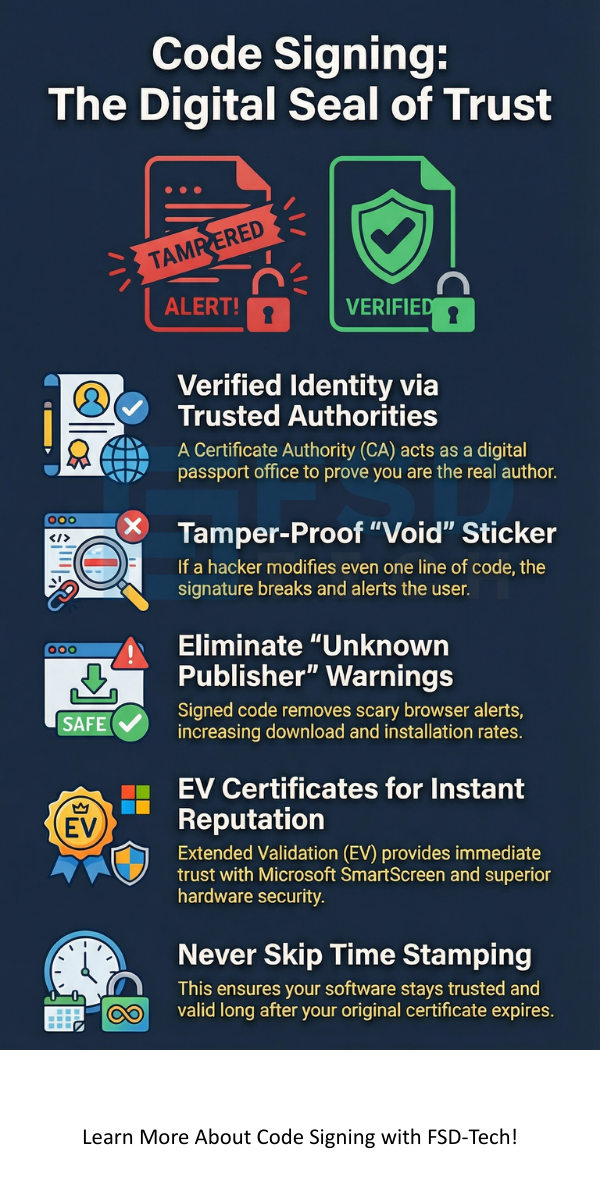
    If a hacker tries to slip a bit of malware into your file after you’ve signed it, the signature breaks. It’s like a "void if tampered" sticker on a medicine bottle. This tells the user's computer that the file is no longer the original version you sent out.


    Is it hard to set up? Not really, but you need the right tools. Most developers use a private key to sign the file and a public key to let others verify it. This pair ensures that only you could have created that specific signature.


    Secure Your Code Now


    Why Do We Need a Certificate Authority?

    We can't just vouch for ourselves in the digital world. We need a trusted third party. A Certificate Authority (CA) is an organization that checks who you are before giving you a code signing certificate. They act like a passport office.


    When a computer sees a signed file, it checks who issued the certificate. If it’s a well-known CA, the computer relaxes. If you try to sign your own code without a CA, the computer will likely still throw a "Windows Protected Your PC" warning. This is because the system doesn't know who "You" are yet.


    Using a CA ensures that the trust chain remains unbroken. We've seen software supply chain attacks skyrocket lately. By using a verified CA, you’re showing that you take your user's safety seriously. It's a small step that builds massive credibility.


    Also Read: What is Managed Detection and Response (MDR)?


    Regular vs. EV Code Signing: Which One?

    You might hear people talk about EV certificates. This stands for Extended Validation. While a standard certificate is great, EV code signing takes things to a whole new level. It requires a much stricter background check on your company.


    The biggest perk? Immediate trust with Microsoft’s SmartScreen. If you use a regular certificate, you might still see warnings until you build up a "reputation." With an EV certificate, those warnings disappear instantly. It's like having a VIP pass at a crowded club.


    However, EV certificates also require hardware security. You usually get a physical USB token or use a cloud-based Hardware Security Module (HSM). This means your private key isn't just sitting on your laptop where a thief could find it. It's locked away.


    How the Code Signing Process Works

    Let's break down the technical side. First, you create a "hash" of your code. A hash is a unique string of characters that represents your file. If even one comma changes in your code, the hash changes completely.


    Next, your software uses your private key to encrypt that hash. This encrypted hash is your digital signature. You then bundle this signature and your certificate with the software.


    When a user downloads your app, their computer does the same math. It creates its own hash of the file and decrypts your signature using your public key. If the two hashes match perfectly, the computer knows the file is safe. It’s a beautiful, automated way to keep everyone honest.


    Also Read: What is Cybersecurity? Guide to Digital Safety


    The Role of Time Stamping

    Picture this: you sign your software today, and your certificate expires in two years. Does your software stop working in two years? Not if you use time stamping.


    Time stamping is a piece of data that says, "This signature was valid at the time the code was signed." It’s an extra layer of proof. Without it, your software would trigger warnings the moment your certificate reaches its end date. We always recommend adding a time stamp. It ensures your software stays trusted for years, even after your original certificate is gone.


    Protecting Your Private Keys

    Here is the thing: your signature is only as safe as your private key. If a hacker steals your key, they can sign malware as "You." This has happened to giant companies, and it’s a nightmare to fix.


    Roughly 60% of security breaches involving signed code happen because keys were left in plain text or on unprotected servers. You must treat your key like the combination to a bank vault. Use passwords, use tokens, and never, ever share it.


    If you’re working in a team, look into a Software Trust Manager. These tools let you sign code without actually giving every developer a copy of the key. It keeps the "gold" in the vault while letting the workers do their jobs.


    Common Myths About Signed Code

    Some people think that signing code makes it "virus-proof." That’s not true. Code signing only tells you who wrote the code and that it hasn't changed. A bad person could still sign a virus if they manage to get a certificate.


    However, because the CA checks identities, bad actors are usually caught quickly. If a signed file is found to be malicious, the CA can revoke the certificate. This "kill switch" makes the software show a major warning on every computer in the world instantly.


    Another myth is that it’s too expensive. While certificates cost money, the cost of losing a customer’s trust is much higher. Think of it as an insurance policy for your reputation.


    The Future of Software Supply Chain Security

    We're moving toward a world where unsigned code won't run at all. Mobile phones already do this, and desktops are following. As we've already discussed, the software supply chain is under constant attack.

    In my view, we will see more automation in this space. Tools are getting better at signing code as part of the build process. This means developers don't have to stop and do it manually. It just happens.


    Will we see more cloud-based signing? Absolutely. It’s safer and easier to manage for remote teams. The goal is to make security so easy that there's no excuse to skip it.


    Conclusion

    At the end of the day, code signing is about showing your users that you care. We've all seen how quickly trust can vanish in the tech world. By taking the time to secure your software with a digital signature, you're building a foundation of safety. We pride ourselves on helping developers navigate these technical waters with ease. Our focus is always on your success and your clients' peace of mind. Let's make the internet a safer place together.


    Code Signing


    Talk to a security expert today


    Key Takeaways

    • Trust is everything: Code signing proves you are the author and the code is original.
    • Integrity matters: If the code is changed, the signature breaks.
    • CA's are the backbone: You need a Certificate Authority to verify your identity.
    • EV is the gold standard: Use Extended Validation for immediate trust and better key security.
    • Never skip time stamping: It keeps your software valid long after the certificate expires.
    • Guard your keys: A stolen private key is a direct threat to your brand.


    Frequently Asked Questions

    What happens if I don't sign my code?

    Your users will see scary warnings from their operating system. Browsers might even block the download entirely, which kills your conversion rates.


    How long does a certificate last?

    Usually, you can buy them for one to three years. After that, you need to renew them and verify your identity again.


    Can I sign different types of files?

    Yes! You can sign .exe, .msi, .cab, .dll, and even Apple or Android apps. Each platform has its own specific tools for the job.


    Does signing slow down my app?

    Not at all. The check happens during installation or when the app first opens. It doesn't affect how the software actually runs.

    Why Code Signing Matters for Your Software Security?

    About The Author

    Surbhi Suhane

    Surbhi Suhane is an experienced digital marketing and content specialist with deep expertise in Getting Things Done (GTD) methodology and process automation. Adept at optimizing workflows and leveraging automation tools to enhance productivity and deliver impactful results in content creation and SEO optimization.

    TRY OUR PRODUCTS

    Like This Story?

    Share it with friends!

    Subscribe to our newsletter!

    FishOSCato SASEVembuXcitiumZeta HRMSAtera
    Isometric illustration of a centralized performance platform connected to analytics dashboards and team members, representing goal alignment, measurable outcomes, risk visibility, and strategic project tracking within ClickUp.

    How ClickUp Enables Outcome-Based Project Management (Not Just Task Tracking)

    🕓 February 15, 2026
    Isometric illustration of a centralized executive dashboard platform connected to analytics panels, performance charts, security indicators, and strategic milestones, representing real-time business visibility and decision control within ClickUp.

    Executive Visibility in ClickUp – How CXOs Gain Real-Time Control Without Micromanaging

    🕓 February 13, 2026

    Cato SASE Architecture

    Inside Cato’s SASE Architecture: A Blueprint for Modern Security

    🕓 January 26, 2025

    Workflow Automation(8)

    Workforce Automation(1)

    AI Project Management(1)

    HR Data Automation(1)

    RMM(2)

    IT Workflow Automation(1)

    IT security(2)

    GCC compliance(4)

    Payroll Integration(2)

    IT support automation(3)

    procurement automation(1)

    lost device management(1)

    IT Management(5)

    IoT Security(2)

    Cato XOps(1)

    IT compliance(4)

    Workflow Management(1)

    Task Automation(1)

    Kubernetes lifecycle management(2)

    AI-powered cloud ops(1)

    OpenStack automation(1)

    SMB Security(8)

    Data Security(1)

    MDR (Managed Detection & Response)(3)

    MSP Automation(3)

    Atera Integrations(2)

    XDR Security(2)

    Threat Detection & Response(1)

    Ransomware Defense(3)

    SMB Cyber Protection(1)

    HR Tech Solutions(1)

    Zero Trust Network Access(3)

    Post-Quantum Cryptography(1)

    Quantum Threat UAE & GCC(1)

    Quantum Security(1)

    Cloud IDE Security(1)

    Zero Trust Security(2)

    Endpoint Management(1)

    SaaS Security(2)

    Payroll Automation(5)

    IT Monitoring(2)

    Xcitium EDR SOC(15)

    Ransomware Protection GCC(1)

    M&A IT Integration(1)

    Network Consolidation UAE(1)

    MSSP for SMBs(1)

    Antivirus vs EDR(1)

    Managed EDR FSD-Tech(1)

    Ransomware Protection(3)

    SMB Cybersecurity GCC(1)

    FSD-Tech MSSP(25)

    Endpoint Security(1)

    Cybersecurity GCC(14)

    Data Breach Costs(1)

    Endpoint Protection(1)

    SMB Cybersecurity(8)

    Xcitium EDR(30)

    Zero Dwell Containment(31)

    Managed Security Services(2)

    Cloud Backup(1)

    Hybrid Backup(1)

    Backup & Recovery(1)

    pointguard ai(4)

    vembu(9)

    SMB data protection(9)

    backup myths(1)

    disaster recovery myths(1)

    Disaster Recovery(4)

    Vembu BDR Suite(19)

    DataProtection(1)

    GCCBusiness(1)

    Secure Access Service Edge(4)

    GCC IT Solutions(1)

    Unified Network Management(1)

    GCC HR software(20)

    open banking(1)

    financial cybersecurity(2)

    CC compliance(1)

    Miradore EMM(15)

    Government Security(1)

    Cato SASE(9)

    GCC Education(1)

    Cloud Security(9)

    Hybrid Learning(1)

    Talent Development(1)

    AI Governance(4)

    AI Cybersecurity(13)

    AI Compliance(2)

    AI Security(2)

    AI Risk Management(1)

    Secure Remote Access(1)

    GCC business security(1)

    GCC network integration(1)

    compliance automation(5)

    education security(1)

    GCC cybersecurity(3)

    App management UAE(1)

    BYOD security Dubai(8)

    Miradore EMM Premium+(5)

    HealthcareSecurity(1)

    share your thoughts

     Identity Provider (IdP)

    What is an Identity Provider? Guide to IdP & Security

    🕓 March 12, 2026

    Code signing

    Why Code Signing Matters for Your Software Security?

    🕓 March 12, 2026

    Rootkit Attacks

    Rootkit Attacks: How Stealthy Malware Hides Inside Your System

    🕓 March 11, 2026

    Decoded(152)

    Cyber Security(127)

    BCP / DR(22)

    Zeta HRMS(78)

    SASE(21)

    Automation(78)

    Next Gen IT-Infra(127)

    Monitoring & Management(77)

    ITSM(22)

    HRMS(21)

    Automation(24)