HomeNext Gen IT-InfraMonitoring & ManagementCyber SecurityBCP / DRAutomationDecoded
Next Gen IT-Infra
Cato’s SASE Supports Cybersecurity Skills Development

How Cato’s SASE Supports Cybersecurity Skills Development

🕓 April 8, 2025

How SASE Supports the Security Needs of SMBs

How SASE Supports the Security Needs of SMBs

🕓 February 9, 2025

Attack Surface Reduction with Cato’s SASE

Attack Surface Reduction with Cato’s SASE

🕓 February 10, 2025

SASE for Digital Transformation in UAE

SASE for Digital Transformation in UAE

🕓 February 8, 2025

Monitoring & Management
Understanding Atera’s SLA Management

Understanding Atera’s SLA Management

🕓 February 7, 2025

Cost-Performance Ratio: Finding the Right Balance in IT Management Networks

Cost-Performance Ratio: Finding the Right Balance in IT Management Networks

🕓 June 16, 2025

Customizing Atera with APIs

Customizing Atera with APIs

🕓 March 3, 2025

Power Up Your IT Team’s Strategy with Atera’s Communication Tools

Power Up Your IT Team’s Strategy with Atera’s Communication Tools

🕓 February 8, 2025

Cyber Security
Illustration of the Cato Cloud architecture showing its role in delivering SASE for secure, optimized global connectivity.

Understanding the Cato Cloud and Its Role in SASE

🕓 January 29, 2025

Isometric illustration of professionals managing network performance, bandwidth analytics, and cloud-based optimization around the Cato Networks platform, symbolizing bandwidth control and QoS visibility.

Mastering Bandwidth Control and QoS in Cato Networks

🕓 July 26, 2025

Global network backbone powering Cato SASE solution for secure, high-performance connectivity across regions.

Global Backbone: The Engine Powering Cato’s SASE Solution

🕓 January 30, 2025

Illustration of team analyzing application traffic and usage insights on a large laptop screen using Cato’s dashboard, surrounded by network and cloud icons.

Cato Networks Application Visibility | Monitoring & Control

🕓 July 27, 2025

BCP / DR
Illustration showing diverse business and IT professionals collaborating with cloud, backup, and security icons, representing Vembu use cases for SMBs, MSPs, and IT teams.

Who Uses Vembu? Real-World Use Cases for SMBs, MSPs & IT Teams

🕓 July 12, 2025

Graphic showcasing Vembu’s all-in-one backup and disaster recovery platform with icons for cloud, data protection, and business continuity for IT teams and SMBs.

What Is Vembu? A Deep Dive Into the All in One Backup & Disaster Recovery Platform

🕓 July 6, 2025

Illustration showing Vembu backup and disaster recovery system with cloud storage, server racks, analytics dashboard, and IT professionals managing data.

The Rising Cost of Data Loss: Why Backup Is No Longer Optional?

🕓 August 14, 2025

3D isometric illustration of cloud backup and data recovery infrastructure with laptop, data center stack, and digital business icons — FSD Tech

RPO & RTO: The Heart of Business Continuity

🕓 August 15, 2025

Automation
Cross-Functional Collaboration with ClickUp

Fostering Cross-Functional Collaboration with ClickUp for Multi-Departmental Projects

🕓 February 11, 2025

ClickUp Project Reporting

Revolutionizing Enterprise Reporting with ClickUp’s Advanced Analytics and Dashboards

🕓 June 16, 2025

ClickUp’s Design Collaboration and Asset Management Tools

Empowering Creative Teams with ClickUp’s Design Collaboration and Asset Management Tools

🕓 February 26, 2025

ClickUp Communication and Collaboration Tools

ClickUp Communication and Collaboration Tools: Empowering Remote Teams

🕓 March 12, 2025

Decoded
Multi-Factor Authentication (MFA)

Multi-Factor Authentication (MFA): All You Need to Know

🕓 December 7, 2025

L3 Switch

What Is an L3 Switch? L2 vs L3 & Why You Need Layer 3?

🕓 December 8, 2025

IPSec

IPSec Explained: Protocols, Modes, IKE & VPN Security

🕓 December 3, 2025

 Datagram Transport Layer Security (DTLS)

What is Datagram Transport Layer Security (DTLS)? How it works?

🕓 December 4, 2025

    Subscribe to our newsletter!

    About Us

    Follow Us

    Copyright © 2024 | Powered by 

    Atera

    (56)

    Cato Networks

    (129)

    ClickUp

    (78)

    FishOS

    (7)

    Miradore

    (21)

    PointGuard AI

    (9)

    Vembu

    (22)

    Xcitium

    (33)

    ZETA HRMS

    (79)

    Table of Contents

    Rootkit Attacks: How Stealthy Malware Hides Inside Your System

    Surbhi Suhane
    March 11, 2026
    Comments
    Rootkit Attacks

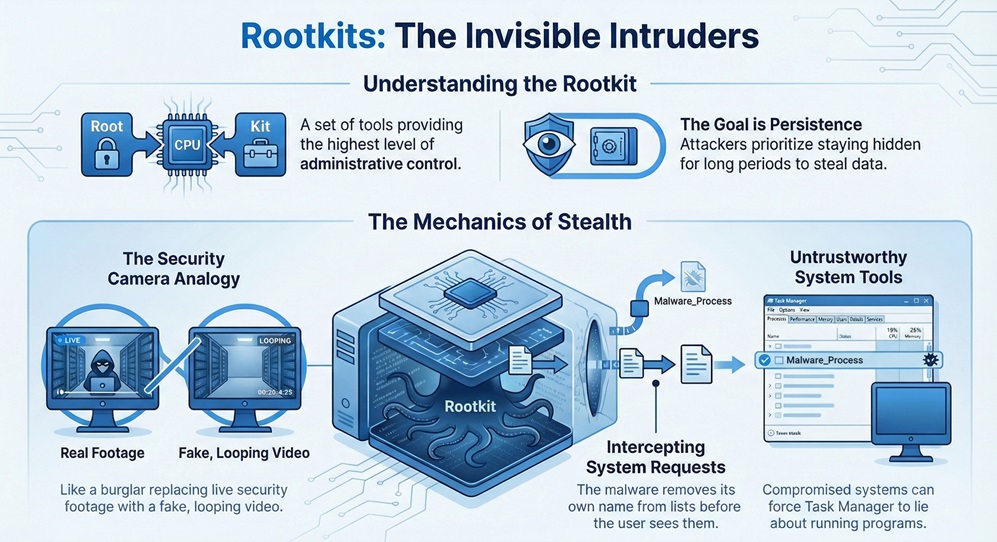
    Rootkit software represents one of the most dangerous threats in the cybersecurity world because you usually don't know it's there. Imagine a burglar who doesn't just steal your jewelry but also replaces your security cameras with fake loops. You look at the monitor, and everything looks fine, but the house is actually empty. That is exactly how these programs work. They hide themselves and other malicious tools from your operating system (OS).


    Have you ever felt like your computer was acting strange, but your antivirus said everything was perfect? It’s a frustrating spot to be in. In my experience, catching a stealthy infection requires looking where the OS doesn't want you to look. To be honest, most people think a simple scan fixes everything. However, these digital ghosts play by different rules.


    In this guide, we will look at how these tools operate. We'll explore why they are so hard to find and what you can do to protect your data. Ready to see what's hiding under the hood?


    What is a Rootkit and Why is it Dangerous?

    The term rootkit comes from two words: "root" and "kit." In Linux and Unix systems, "root" is the name of the account with the highest level of control. A "kit" is a set of tools. So, put them together, and you have a kit that gives an intruder root-level access.


    Rootkit infographic


    When a hacker installs one of these, they aren't just looking to crash your PC. They want to stay there for a long time. This is called "persistence." By hiding their presence, they can steal passwords or watch your screen without you ever knowing.


    Get a Free Security Audit


    How do they stay invisible?

    Here is the thing: these programs modify the very tools your computer uses to report what's happening. If you ask your computer to "list all running programs," the malware intercepts that request. It removes its own name from the list before you see it. It’s like a witness at a crime scene who is also the person writing the police report.


    Do you think your Task Manager is always telling the truth? Not if a kernel-level threat is involved.


    The Different Types of Rootkit Infections

    Not all infections are the same. Some live in your software, while others hide in the physical parts of your computer. Understanding these types helps us know how to fight them.


    1. User-Mode Rootkits

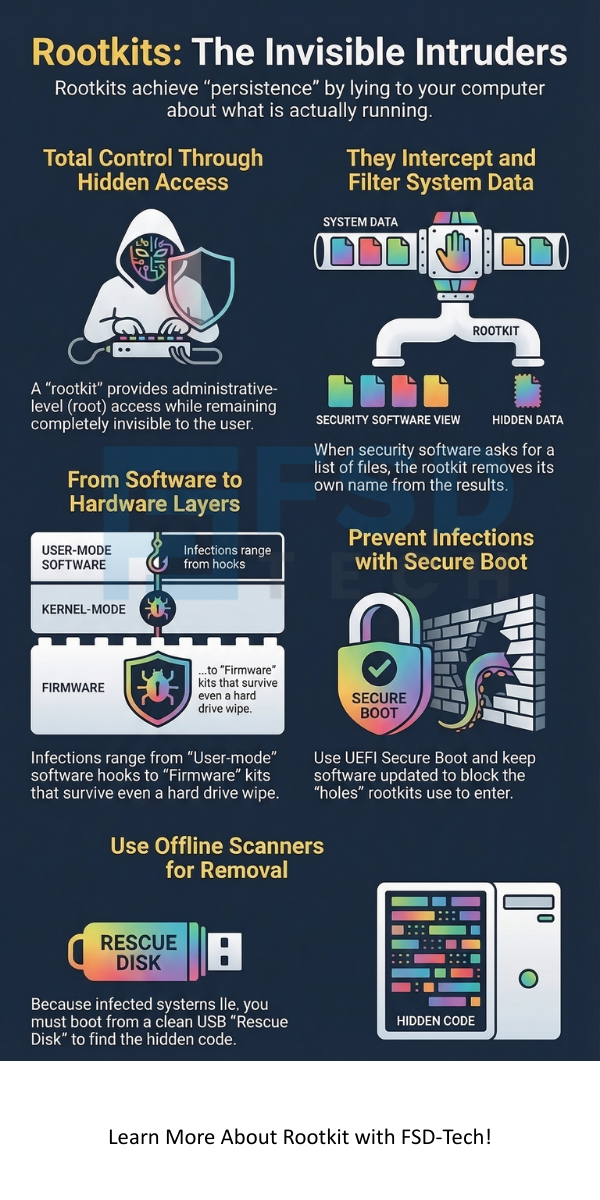
    These are the most common. They operate at the same level as your web browser or Word processor. They work by "hooking" into APIs (Application Programming Interfaces). When a program asks for information, the malware changes the answer.


    • Pro: Easier for hackers to write.
    • Con: Easier for advanced security software to find because they live in the software layer.


    2. Kernel-Mode Rootkits

    This is where things get serious. The kernel is the heart of your OS. It manages the memory and the hardware. A Kernel-Mode Rootkit lives here. Because it has the same power as the OS itself, it can be almost impossible to find using standard tools.


    If the kernel is compromised, you can't trust anything the computer tells you. In my view, this is the "final boss" of malware infections.


    3. Bootkit (Bootloader Rootkits)

    Have you ever wondered what happens the second you press the power button? Your computer runs a bootloader. A Bootkit replaces your legitimate bootloader with a fake one. This means the malware loads before your OS even starts.


    4. Firmware and Hardware Rootkits

    These hide in your BIOS, router, or even your hard drive's firmware. Even if you wipe your hard drive and reinstall Windows, the infection stays. Why? Because it isn't on the hard drive; it's in the chips of the hardware itself.


    Also Read: What is Antibot? Stopping Automated Threats


    How Does a Rootkit Get Onto Your Computer?

    You might be wondering, "How did this happen to me?" Usually, it starts with a simple mistake. Hackers use several tricks to get their "kit" onto your system.


    • Phishing Emails: You get an email that looks like it's from your bank. You click a link, and a "dropper" installs the malware.
    • Bundled Software: Sometimes, free software comes with a hidden "gift." You wanted a free PDF editor, but you got a spy tool instead.
    • Exploit Kits: If you don't update your browser or Java, hackers can use known holes to slide software onto your PC while you just browse a website.


    We've all been there—clicking a link a bit too fast. But with this type of malware, that one click gives the attacker a permanent seat in your system.


    Why Is a Rootkit So Hard to Detect?

    The biggest challenge is that most security tools rely on the OS to give them data. If the OS is lying, the security tool is useless.


    The Problem of Trust

    To be honest, security is built on layers of trust. Your antivirus trusts the OS kernel. The kernel trusts the drivers. If a Rootkit replaces a driver, the chain of trust breaks. This is why we often have to use "Offline Scanning." This means booting from a USB drive to scan the hard drive while the infected OS isn't running.


    How can you find something that has the power to make itself invisible? It's like trying to find a ghost using a camera the ghost has already hacked.


    How to Protect Your System

    Prevention is much easier than a cure when it comes to these threats. Since they are so hard to remove, we must focus on keeping them out.


    Keep Software Updated

    Most hackers use old vulnerabilities. When Microsoft or Apple sends you an update, it's often a patch for a hole that a Rootkit could use. Don't wait. Install them immediately.


    Use Secure Boot

    Modern computers use UEFI (Unified Extensible Firmware Interface) with a feature called Secure Boot. This ensures that only trusted software can load when the computer starts. It's a great defense against boot-level threats.


    Be Careful with Admin Rights

    Do you use your "Administrator" account for everyday browsing? That's a big risk. If you are logged in as a standard user, malware has a harder time reaching the kernel. It's roughly the difference between a burglar having a key to your front door versus just looking through the window.


    Also Read: Network Firewalls vs. Next-Generation Firewalls: Which One Wins?


    Steps for Rootkit Removal

    If you suspect an infection, don't panic, but act fast. Here is a basic process we often recommend:


    1. Run an Anti-Rootkit Tool: Specific tools like Malwarebytes Anti-Rootkit or TDSSKiller look for signs of "hooking."
    2. Use an Offline Scanner: Boot your computer from a "Rescue Disk" (USB or CD). This allows the scanner to look at the files without the malware being active.
    3. Check for Unusual Network Activity: Is your computer sending data to a random IP address in another country? That’s a red flag.
    4. The Nuclear Option: If you have a kernel-level infection, the safest path is often to wipe the drive and reinstall everything. It’s a pain, but it’s the only way to be 100% sure.


    Note: Always back up your important files (photos, documents) to a cloud service or external drive regularly. If you have to wipe your PC, you won't lose your life's work.


    The Evolution of Stealthy Malware

    In the past, these tools were used by hobbyist hackers. Today, they are used by state-sponsored groups and professional criminals. They use them to hide "Ransomware" or "Keyloggers."

    As our defenses get better, the malware gets smarter. We are seeing more "fileless" attacks where the code only lives in the RAM (memory) and never touches the hard drive. This makes it even harder for traditional scanners to see.


    Conclusion

    The digital world is full of hidden dangers, and Rootkit attacks are among the most sophisticated. These tools remind us that what we see on our screens isn't always the full truth. By staying informed and following basic security habits, you can keep your "digital house" safe from these invisible intruders.


    At our core, we believe that security should be simple and accessible. We are committed to helping you understand your technology so you can use it with confidence. Your safety is our priority, and we're always here to help you navigate the complex world of cybersecurity.


    Rootkit


    Protect Your System Now


    Key Takeaways

    • A Rootkit is a collection of tools designed to hide malware and give attackers high-level access.
    • They can hide in the software, the kernel, the bootloader, or the hardware.
    • They work by intercepting system calls and lying to the user and security software.
    • Prevention is key: keep your system updated and use Secure Boot.
    • Removal often requires offline scanning or a complete system reinstall.


    Frequently Asked Questions

    Can a normal antivirus find a rootkit? 

    Sometimes, but not always. Many can find "User-Mode" versions. However, "Kernel-Mode" versions often hide from standard antivirus programs. You need specialized tools or offline scans.


    Does restarting my computer remove it?

    No. These tools are designed for "persistence." They stay in your system through restarts and even some system updates.


    How do I know if I have one?

    Look for signs like your antivirus turning itself off, sudden slow performance, or strange network traffic. However, the best ones show no signs at all.


    Is a Rootkit a virus?

    Technically, no. A virus spreads and damages files. This is a "stealth" tool used to hide other malware like viruses or spyware.

    Rootkit Attacks: How Stealthy Malware Hides Inside Your System

    About The Author

    Surbhi Suhane

    Surbhi Suhane is an experienced digital marketing and content specialist with deep expertise in Getting Things Done (GTD) methodology and process automation. Adept at optimizing workflows and leveraging automation tools to enhance productivity and deliver impactful results in content creation and SEO optimization.

    TRY OUR PRODUCTS

    Like This Story?

    Share it with friends!

    Subscribe to our newsletter!

    FishOSCato SASEVembuXcitiumZeta HRMSAtera
    Isometric illustration of a centralized performance platform connected to analytics dashboards and team members, representing goal alignment, measurable outcomes, risk visibility, and strategic project tracking within ClickUp.

    How ClickUp Enables Outcome-Based Project Management (Not Just Task Tracking)

    🕓 February 15, 2026
    Isometric illustration of a centralized executive dashboard platform connected to analytics panels, performance charts, security indicators, and strategic milestones, representing real-time business visibility and decision control within ClickUp.

    Executive Visibility in ClickUp – How CXOs Gain Real-Time Control Without Micromanaging

    🕓 February 13, 2026

    Cato SASE Architecture

    Inside Cato’s SASE Architecture: A Blueprint for Modern Security

    🕓 January 26, 2025

    Workflow Automation(8)

    Workforce Automation(1)

    AI Project Management(1)

    HR Data Automation(1)

    RMM(2)

    IT Workflow Automation(1)

    IT security(2)

    GCC compliance(4)

    Payroll Integration(2)

    IT support automation(3)

    procurement automation(1)

    lost device management(1)

    IT Management(5)

    IoT Security(2)

    Cato XOps(1)

    IT compliance(4)

    Workflow Management(1)

    Task Automation(1)

    Kubernetes lifecycle management(2)

    AI-powered cloud ops(1)

    OpenStack automation(1)

    SMB Security(8)

    Data Security(1)

    MDR (Managed Detection & Response)(3)

    MSP Automation(3)

    Atera Integrations(2)

    XDR Security(2)

    Threat Detection & Response(1)

    Ransomware Defense(3)

    SMB Cyber Protection(1)

    HR Tech Solutions(1)

    Zero Trust Network Access(3)

    Post-Quantum Cryptography(1)

    Quantum Threat UAE & GCC(1)

    Quantum Security(1)

    Cloud IDE Security(1)

    Zero Trust Security(2)

    Endpoint Management(1)

    SaaS Security(2)

    Payroll Automation(5)

    IT Monitoring(2)

    Xcitium EDR SOC(15)

    Ransomware Protection GCC(1)

    M&A IT Integration(1)

    Network Consolidation UAE(1)

    MSSP for SMBs(1)

    Antivirus vs EDR(1)

    Managed EDR FSD-Tech(1)

    Ransomware Protection(3)

    SMB Cybersecurity GCC(1)

    FSD-Tech MSSP(25)

    Endpoint Security(1)

    Cybersecurity GCC(13)

    Data Breach Costs(1)

    Endpoint Protection(1)

    SMB Cybersecurity(8)

    Xcitium EDR(30)

    Zero Dwell Containment(31)

    Managed Security Services(2)

    Cloud Backup(1)

    Hybrid Backup(1)

    Backup & Recovery(1)

    pointguard ai(4)

    vembu(9)

    SMB data protection(9)

    backup myths(1)

    disaster recovery myths(1)

    Disaster Recovery(4)

    Vembu BDR Suite(19)

    DataProtection(1)

    GCCBusiness(1)

    Secure Access Service Edge(4)

    GCC IT Solutions(1)

    Unified Network Management(1)

    GCC HR software(20)

    open banking(1)

    financial cybersecurity(2)

    CC compliance(1)

    Miradore EMM(15)

    Government Security(1)

    Cato SASE(9)

    GCC Education(1)

    Cloud Security(9)

    Hybrid Learning(1)

    Talent Development(1)

    AI Governance(4)

    AI Cybersecurity(13)

    AI Compliance(2)

    AI Security(2)

    AI Risk Management(1)

    Secure Remote Access(1)

    GCC business security(1)

    GCC network integration(1)

    compliance automation(5)

    education security(1)

    GCC cybersecurity(3)

    App management UAE(1)

    BYOD security Dubai(8)

    Miradore EMM Premium+(5)

    HealthcareSecurity(1)

    share your thoughts

     Identity Provider (IdP)

    What is an Identity Provider? Guide to IdP & Security

    🕓 March 12, 2026

    Code signing

    Why Code Signing Matters for Your Software Security?

    🕓 March 12, 2026

    Rootkit Attacks

    Rootkit Attacks: How Stealthy Malware Hides Inside Your System

    🕓 March 11, 2026

    Decoded(152)

    Cyber Security(126)

    BCP / DR(22)

    Zeta HRMS(78)

    SASE(21)

    Automation(78)

    Next Gen IT-Infra(126)

    Monitoring & Management(77)

    ITSM(22)

    HRMS(21)

    Automation(24)