HomeNext Gen IT-InfraMonitoring & ManagementCyber SecurityBCP / DRAutomationDecoded
Next Gen IT-Infra
Cato’s SASE Supports Cybersecurity Skills Development

How Cato’s SASE Supports Cybersecurity Skills Development

🕓 April 8, 2025

How SASE Supports the Security Needs of SMBs

How SASE Supports the Security Needs of SMBs

🕓 February 9, 2025

Attack Surface Reduction with Cato’s SASE

Attack Surface Reduction with Cato’s SASE

🕓 February 10, 2025

SASE for Digital Transformation in UAE

SASE for Digital Transformation in UAE

🕓 February 8, 2025

Monitoring & Management
Understanding Atera’s SLA Management

Understanding Atera’s SLA Management

🕓 February 7, 2025

Cost-Performance Ratio: Finding the Right Balance in IT Management Networks

Cost-Performance Ratio: Finding the Right Balance in IT Management Networks

🕓 June 16, 2025

Customizing Atera with APIs

Customizing Atera with APIs

🕓 March 3, 2025

Power Up Your IT Team’s Strategy with Atera’s Communication Tools

Power Up Your IT Team’s Strategy with Atera’s Communication Tools

🕓 February 8, 2025

Cyber Security
Visual guide showing Cato CMA interface for configuring Internet and WAN firewall rules, enabling threat protection, and monitoring security events in real time for UAE IT teams.

Enforcing Firewall and Threat Protection Policies in Cato

🕓 July 25, 2025

Isometric illustration of professionals managing network performance, bandwidth analytics, and cloud-based optimization around the Cato Networks platform, symbolizing bandwidth control and QoS visibility.

Mastering Bandwidth Control and QoS in Cato Networks

🕓 July 26, 2025

Illustration of the Cato Cloud architecture showing its role in delivering SASE for secure, optimized global connectivity.

Understanding the Cato Cloud and Its Role in SASE

🕓 January 29, 2025

Global network backbone powering Cato SASE solution for secure, high-performance connectivity across regions.

Global Backbone: The Engine Powering Cato’s SASE Solution

🕓 January 30, 2025

BCP / DR
Illustration showing diverse business and IT professionals collaborating with cloud, backup, and security icons, representing Vembu use cases for SMBs, MSPs, and IT teams.

Who Uses Vembu? Real-World Use Cases for SMBs, MSPs & IT Teams

🕓 July 12, 2025

Graphic showcasing Vembu’s all-in-one backup and disaster recovery platform with icons for cloud, data protection, and business continuity for IT teams and SMBs.

What Is Vembu? A Deep Dive Into the All in One Backup & Disaster Recovery Platform

🕓 July 6, 2025

Illustration showing Vembu backup and disaster recovery system with cloud storage, server racks, analytics dashboard, and IT professionals managing data.

The Rising Cost of Data Loss: Why Backup Is No Longer Optional?

🕓 August 14, 2025

3D isometric illustration of cloud backup and data recovery infrastructure with laptop, data center stack, and digital business icons — FSD Tech

RPO & RTO: The Heart of Business Continuity

🕓 August 15, 2025

Automation
Cross-Functional Collaboration with ClickUp

Fostering Cross-Functional Collaboration with ClickUp for Multi-Departmental Projects

🕓 February 11, 2025

ClickUp Project Reporting

Revolutionizing Enterprise Reporting with ClickUp’s Advanced Analytics and Dashboards

🕓 June 16, 2025

ClickUp’s Design Collaboration and Asset Management Tools

Empowering Creative Teams with ClickUp’s Design Collaboration and Asset Management Tools

🕓 February 26, 2025

ClickUp Communication and Collaboration Tools

ClickUp Communication and Collaboration Tools: Empowering Remote Teams

🕓 March 12, 2025

Decoded
Multi-Factor Authentication (MFA)

Multi-Factor Authentication (MFA): All You Need to Know

🕓 December 7, 2025

L3 Switch

What Is an L3 Switch? L2 vs L3 & Why You Need Layer 3?

🕓 December 8, 2025

IPSec

IPSec Explained: Protocols, Modes, IKE & VPN Security

🕓 December 3, 2025

 Datagram Transport Layer Security (DTLS)

What is Datagram Transport Layer Security (DTLS)? How it works?

🕓 December 4, 2025

    Subscribe to our newsletter!

    About Us

    Follow Us

    Copyright © 2024 | Powered by 

    Cato SASE Architecture

    Inside Cato’s SASE Architecture: A Blueprint for Modern Security

    🕓 January 26, 2025

    Enterprise Data Security and Privacy with ClickUp

    Ensuring Enterprise Data Security and Privacy with ClickUp

    🕓 February 9, 2025

    DDoS protection SASE

    DDoS Protection and Cato’s Defence Mechanisms

    🕓 February 11, 2025

    Table of Contents

    What is Patch Management? Securing Your Digital Assets

    Surbhi Suhane
    December 30, 2025
    Comments
    Patch Management

    Every organization relies on software. This software, including operating systems and applications, often contains flaws. These flaws, known as vulnerabilities, create security risks. To fix these issues, software vendors release updates or corrections—these are called patches. The systematic process of acquiring, testing, and applying these patches is what we call patch management.


    Patch management is nothing but a controlled process. This process ensures that you install necessary software updates promptly across all your systems. By consistently performing this task, you significantly reduce the risk of cyberattacks and maintain the stability of your entire IT structure.


    Do you really need a structured way to handle software updates? Absolutely. Simply applying every update immediately can sometimes break other systems. A methodical patch management system determines what to patch, when to patch, and how to verify the installation's success.


    What is Patch Management?

    Patch management meaning refers to the systematic process of installing, testing, and verifying software updates—known as patches—across all your computing devices. Every software, from operating systems to applications, contains flaws or vulnerabilities. Software vendors release patches to fix these security issues or bugs.
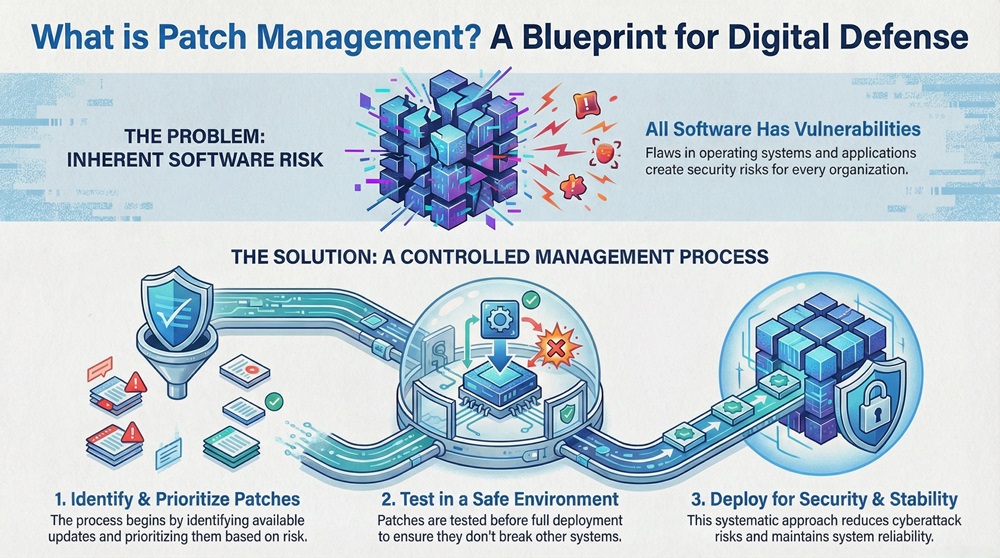
     

    Patch management infographic


    You do not simply install every patch immediately. A successful patch management system first identifies necessary updates, prioritizes them based on risk, and tests them in a safe environment. Only then does the system deploy the updates using automated patch management tools. 


    This structured approach significantly reduces the risk of cyberattacks and maintains system stability. Consistently performing security patch management is vital for protecting your digital assets and ensuring compliance.


    Start Patch Management Now

     Patch Management vs. Vulnerability Management

    Before we explore the full process, let us first clarify two key terms that often cause confusion: patch management and vulnerability management. While both are crucial for security patch management, they represent different steps in the overall defense strategy. We present the key differences in the table below.


    Basis for ComparisonPatch ManagementVulnerability Management
    DefinitionThe process of applying software updates (patches) to fix existing flaws.The comprehensive process of identifying, evaluating, treating, and reporting security flaws.
    Primary GoalTo implement the fix provided by the vendor.To identify and prioritize all security weaknesses, whether a patch is available or not.
    ScopeFocuses on the implementation of vendor-provided software fixes.Broader scope; includes risk assessment, remediation planning, and sometimes asset inventory.
    ActionAn implementation action—installing a patch.An analytic and strategic action—finding and prioritizing risks.
    When to UseWhen a vendor releases a specific patch for a known issue.Continuously, to assess the overall security posture of the network.


    Vulnerability patch management refers to the stage where you decide to implement a patch for a specific, identified vulnerability. Patch management, on the other hand, acts as a tool for vulnerability management.


    Also Read: What is Vulnerability Assessment? Process & Tools


    Components of a Patch Management System

    A reliable patch management system comprises several essential elements. You need these elements to ensure effective and comprehensive coverage across your organization's IT infrastructure.


    The following are the core components that make up an effective patch deployment solution:


    • Discovery and Inventory: The system must accurately identify and list every software and hardware asset in your network. This includes operating systems, third-party applications, and network devices. A complete inventory is essential because you cannot patch what you cannot see.
    • Centralized Patch Repository: This acts as the main storage location for all validated and approved patches. It ensures that your endpoints download the patches from a trusted source, avoiding security risks.
    • Scanning and Assessment Tools: These tools for patch management constantly scan your assets. They compare the current software versions against the latest patch releases from vendors. This helps in identifying which systems are missing which specific patches.
    • Testing and Staging Environment: Before deployment, the system needs a secure area. You use this area to test new patches on a small group of non-critical devices. This step significantly reduces the risk of a patch causing system instability or compatibility issues.
    • Deployment and Distribution Engine: This is the core engine that pushes the approved patches to the target machines. The engine handles scheduling, distribution logic, and bandwidth control.
    • Reporting and Auditing: A critical component is the ability to generate reports. These reports confirm which systems successfully received the patch and which ones failed. The reports allow you to maintain a comprehensive audit trail for compliance purposes.


    Patch Management Life Cycle

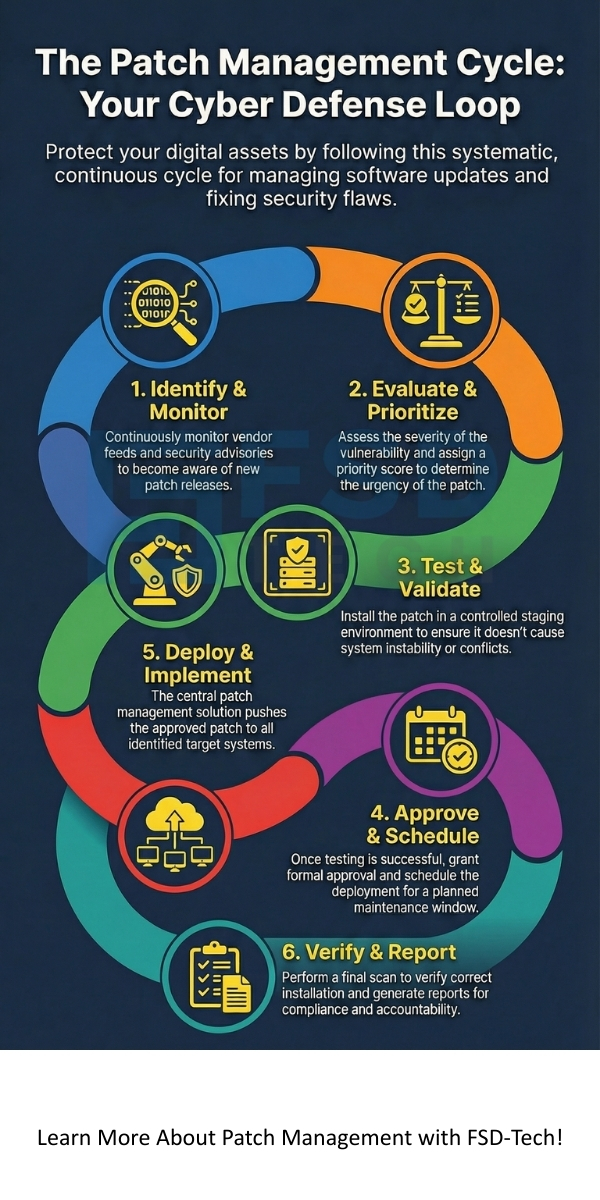
    Effective patch management in cyber security follows a structured, continuous cycle. This patch management life cycle ensures that every step, from identifying a need to confirming the fix, is completed systematically.


    1. Identify and Monitor New Patches


    • What is the starting point? The cycle begins with monitoring. Your team monitors vendor feeds, security advisories, and industry news for new patch releases.
    • What does this involve? This stage involves tracking patches for operating systems (Windows, Linux, macOS), browsers, and critical third party patch management applications.
    • Goal: To become aware of a new patch as soon as the software vendor releases it.


    2. Evaluate and Prioritize


    • Evaluation Pattern: The team receives an alert about a new patch. They immediately evaluate its severity and relevance. What are the risks if we do not install the patch?
    • Prioritization Pattern: The severity of the underlying vulnerability determines the urgency. Due to a critical zero-day exploit, a patch receives high priority. On the other hand, a patch for a minor cosmetic issue gets a lower rank.
    • Action Verbs: The security team determines the risk level and assigns a priority score.


    3. Test and Validate


    • Conditional Pattern: If you immediately deploy a critical patch without testing, then you risk crippling your entire production environment.
    • Sequential Pattern: First, your team installs the patch on a small, controlled group of test machines—the staging environment. Then, they run essential business applications to check for conflicts or performance drops.
    • Purpose Pattern: Testing is performed so as to ensure the patch functions as intended and does not cause unexpected issues.


    4. Approve and Schedule Deployment


    • Approval: Once testing is complete and successful, the team grants formal approval for deployment across the production network.
    • Scheduling:Automated patch management requires careful scheduling. Patches are often deployed after business hours or during planned maintenance windows to minimize disruption to users. You must communicate this schedule to all affected users.
    • Action Verbs: The team approves the patch and facilitates its scheduled distribution.


    5. Deployment and Implementation


    • Deployment Pattern: The central patch management solution pushes the approved patch to all the identified target systems. The system carefully manages bandwidth to prevent network slowdowns.
    • Implementation Pattern: The installation is often a two-step process. First, the patch installs. Second, the system requires a reboot to complete the fix.


    6. Verify and Report


    • Verification: After deployment, the system performs a final scan. This scan verifies that the patch is correctly installed on all target machines.
    • Reporting: The system generates a comprehensive report. This report indicates the successful systems, the failed systems, and the reasons for failure. This step ensures compliance and accountability.
    • Causation Pattern: Due to this reporting, the IT team can immediately address any failed installations, which leads to a higher overall security posture.


    Also Read: What Is Endpoint Detection & Response (EDR) in Cybersecurity?


    Why Security Patch Management Plays a Vital Role?

    Security patch management is not just an IT chore; it is a fundamental pillar of modern cybersecurity. Neglecting this function makes your organization a prime target for attacks.


    Reduces Security Vulnerabilities


    • The Problem: Software code inevitably contains security flaws. These flaws are the entry points attackers actively seek.
    • The Solution: Patches are the only official fix for these flaws. Consistent patching reduces the window of opportunity for attackers to exploit known weaknesses. This is where vulnerability patch management plays its most critical role.


    Prevents Financial and Reputational Loss


    • The Risk: A single successful cyberattack, often exploiting an unpatched system, can result in massive data breaches. This can lead to heavy regulatory fines and costly system downtime.
    • The Benefit: Effective patch management acts as a preventative measure. It minimizes the chance of a breach, thus preserving your company's financial stability and reputation.


    Ensures System Stability and Performance


    • Beyond Security: Many patches include fixes for software bugs that cause crashes, slowdowns, or application errors.
    • The Result: Applying these updates enhances the reliability and performance of your systems. This provides a better and more stable working environment for your employees.


    Maintains Regulatory Compliance

    • The Requirement: Many industry and government regulations (e.g., NIST, PCI DSS) explicitly require organizations to maintain current software versions and apply security updates promptly.
    • The Advantage: A well-documented patch management system provides the audit trail you need. This trail demonstrates that your company meets these mandatory compliance standards.


    Patch Management Cloud vs. On-Premise Solutions

    As businesses shift their infrastructure, the tools for managing patches also evolve. You face a choice between traditional on-premise tools and newer patch management cloud solutions.


    On-Premise Patch Management


    This traditional approach involves running the patch management server within your own data center.


    • Pros: You maintain complete control over the entire system. It is often suitable for highly regulated environments that require all data and operations to remain within the local network.
    • Cons: This solution requires significant initial investment in hardware and software licenses. It also demands continuous maintenance and manual updates by your IT staff.


    Patch Management Cloud Solutions


    A patch management cloud solution operates as a service provided by a third party.


    • Pros: It eliminates the need for on-site infrastructure and maintenance. You can rapidly deploy the solution to manage remote or geographically dispersed endpoints. The service provider typically handles all the maintenance and updates.
    • Cons: You rely on the service provider's security measures. This solution also requires a stable internet connection for the endpoints to receive their patches.


    A good patch management solution offers the flexibility to handle both on-premise and remote assets effectively, regardless of its primary deployment model.


    Also Read: Cyber Threat Intelligence (CTI) in Cybersecurity


    Best Patch Management Software and Best Practices

    Choosing the best patch management software and following key practices ensures an optimal and secure patching program.


    Key Practices for Success


    1. Automate Wherever Possible: You should not handle the entire patch process manually. Automated patch management reduces human error and ensures faster deployment of critical patches.
    2. Define a Clear Rollback Plan: You must always have a plan to revert systems to their previous state. If a patch fails or causes problems, the rollback plan prevents extended system downtime.
    3. Patch Everything—Not Just Operating Systems: Attackers increasingly target application software. Your strategy must include patches for browsers, productivity suites, and other third party patch management tools.
    4. Use Baselines for Configuration: Establish a standardized, fully patched configuration for each system type. You can then compare systems against this baseline to identify missing updates quickly.


    Tools for Patch Management

    Many vendors offer comprehensive tools for patch management. These tools provide the necessary automation and reporting capabilities. For example, ManageEngine Patch Management and similar solutions provide features like automated patch testing, centralized control, and deep compliance reporting. Choosing the right tool depends on the size of your network and your specific compliance needs.


    Conclusion 

    So, with the above discussion, we established that what is patch management is clear: it is a continuous, methodical process that acts as your primary defense against evolving cyber threats. You cannot treat it as an occasional task. 


    A strong patch management system requires defining a clear strategy, utilizing automated patch management tools, and maintaining a focus on all assets, including third party patch management. This systematic approach significantly reduces system vulnerabilities and ensures compliance. 


    We believe that a secure digital environment enables your business growth. Contact us today; we will help you implement an efficient patch management solution to fortify your systems immediately.
     

    Patch management


    Key Takeaways for Effective Patch Management

    So, with the above discussion, we can say that what is patch management is clear: it is a continuous, methodical process that protects your organization from evolving cyber threats. You cannot treat it as an occasional task.


    • Patching is Proactive: A strong patch management system is your most effective defense against cyberattacks that exploit known vulnerabilities.
    • Systematic Approach is Key: Always follow the full patch management life cycle. Testing and verification are just as important as the actual installation.
    • Automation is Essential: Automated patch management using the best patch management software frees your team from tedious manual work and ensures speed, especially in a crisis.
    • Focus on All Assets: Your strategy must include operating systems, applications, and third party patch management for comprehensive coverage.


    Frequently Asked Questions (FAQs) about Patch Management

    Here, we address common questions that arise when discussing the deployment of software updates.


    What is the primary patch management meaning?

    The primary patch management meaning refers to the strategic process of installing, testing, and verifying software updates—known as patches—to fix bugs and security vulnerabilities across an entire network of computers and devices.


    What is the difference between a patch and a hotfix?

    A patch is a general software update often released as part of a scheduled cycle. On the other hand, a hotfix refers to a small, urgent software update. Vendors release this kind of fix immediately to correct a specific, critical bug or security issue that requires immediate attention.


    How often should my organization patch its systems?

    The answer depends on the severity of new vulnerabilities. For critical security patch management issues, you should patch systems immediately—within hours or days. For non-critical updates, most organizations schedule monthly or quarterly maintenance windows. Your priority must always be to address high-risk vulnerabilities quickly.


    What happens if a patch fails during installation?

    When a patch fails, the system must log this failure immediately. The deployment system then typically retries the installation. If it continuously fails, the system flags the machine for manual intervention. This is why having a robust reporting and auditing component is vital.

    What is Patch Management? Securing Your Digital Assets

    About The Author

    Surbhi Suhane

    Surbhi Suhane is an experienced digital marketing and content specialist with deep expertise in Getting Things Done (GTD) methodology and process automation. Adept at optimizing workflows and leveraging automation tools to enhance productivity and deliver impactful results in content creation and SEO optimization.

    Like This Story?

    Share it with friends!

    Subscribe to our newsletter!

    Atera

    (48)

    Cato Networks

    (111)

    ClickUp

    (65)

    FishOS

    (7)

    Miradore

    (21)

    PointGuard AI

    (9)

    Vembu

    (22)

    Xcitium

    (33)

    ZETA HRMS

    (67)

    Workflow Automation(5)

    Workforce Automation(1)

    AI Project Management(1)

    HR Data Automation(1)

    RMM(1)

    IT Workflow Automation(1)

    IT security(2)

    GCC compliance(4)

    Payroll Integration(2)

    IT support automation(3)

    procurement automation(1)

    lost device management(1)

    IT Management(5)

    IoT Security(2)

    Cato XOps(2)

    IT compliance(4)

    Task Automation(1)

    Workflow Management(1)

    OpenStack automation(1)

    Kubernetes lifecycle management(2)

    AI-powered cloud ops(1)

    SMB Security(8)

    Data Security(1)

    MDR (Managed Detection & Response)(4)

    Atera Integrations(2)

    MSP Automation(3)

    XDR Security(2)

    SMB Cyber Protection(1)

    Ransomware Defense(3)

    HR Tech Solutions(1)

    Zero Trust Network Access(3)

    Zero Trust Security(2)

    Endpoint Management(1)

    SaaS Security(1)

    Payroll Automation(5)

    IT Monitoring(2)

    Xcitium EDR SOC(15)

    Ransomware Protection GCC(1)

    M&A IT Integration(1)

    Network Consolidation UAE(1)

    MSSP for SMBs(1)

    FSD-Tech MSSP(25)

    SMB Cybersecurity GCC(1)

    Managed EDR FSD-Tech(1)

    Ransomware Protection(3)

    Antivirus vs EDR(1)

    Cybersecurity GCC(12)

    Endpoint Security(1)

    Endpoint Protection(1)

    Data Breach Costs(1)

    Managed Security Services(2)

    SMB Cybersecurity(8)

    Zero Dwell Containment(31)

    Xcitium EDR(30)

    Cloud Backup(1)

    Hybrid Backup(1)

    Backup & Recovery(1)

    pointguard ai(4)

    disaster recovery myths(1)

    backup myths(1)

    vembu(9)

    SMB data protection(9)

    Vembu BDR Suite(19)

    Disaster Recovery(4)

    DataProtection(1)

    GCCBusiness(1)

    Secure Access Service Edge(4)

    GCC HR software(15)

    Miradore EMM(15)

    Cato SASE(7)

    Cloud Security(8)

    Talent Development(1)

    AI Cybersecurity(12)

    AI Risk Management(1)

    AI Governance(4)

    AI Security(2)

    AI Compliance(2)

    GCC business security(1)

    GCC network integration(1)

    compliance automation(4)

    GCC cybersecurity(2)

    education security(1)

    App management UAE(1)

    BYOD security Dubai(8)

    Miradore EMM Premium+(5)

    HealthcareSecurity(1)

    MiddleEast(1)

    Team Collaboration(1)

    IT automation(10)

    Zscaler(1)

    SD-WAN(6)

    HR Integration(4)

    Cloud Networking(3)

    device management(9)

    RemoteWork(1)

    ZeroTrust(2)

    VPN(1)

    MPLS(1)

    Project Management(9)

    HR automation(16)

    share your thoughts

    Quantum Cryptography

    Quantum Cryptography - QKD, Security & Future Guide

    🕓 December 30, 2025

    Patch Management

    What is Patch Management? Securing Your Digital Assets

    🕓 December 30, 2025

    Email Security Gateway

    What is an Email Security Gateway? Protecting Your Inbox

    🕓 December 29, 2025

    Decoded(43)

    Cyber Security(112)

    BCP / DR(22)

    Zeta HRMS(66)

    SASE(21)

    Automation(65)

    Next Gen IT-Infra(111)

    Monitoring & Management(69)

    ITSM(22)

    HRMS(21)

    Automation(24)