HomeNext Gen IT-InfraMonitoring & ManagementCyber SecurityBCP / DRAutomationDecoded
Next Gen IT-Infra
Cato’s SASE Supports Cybersecurity Skills Development

How Cato’s SASE Supports Cybersecurity Skills Development

🕓 April 8, 2025

How SASE Supports the Security Needs of SMBs

How SASE Supports the Security Needs of SMBs

🕓 February 9, 2025

Attack Surface Reduction with Cato’s SASE

Attack Surface Reduction with Cato’s SASE

🕓 February 10, 2025

SASE for Digital Transformation in UAE

SASE for Digital Transformation in UAE

🕓 February 8, 2025

Monitoring & Management
Understanding Atera’s SLA Management

Understanding Atera’s SLA Management

🕓 February 7, 2025

Cost-Performance Ratio: Finding the Right Balance in IT Management Networks

Cost-Performance Ratio: Finding the Right Balance in IT Management Networks

🕓 June 16, 2025

Customizing Atera with APIs

Customizing Atera with APIs

🕓 March 3, 2025

Power Up Your IT Team’s Strategy with Atera’s Communication Tools

Power Up Your IT Team’s Strategy with Atera’s Communication Tools

🕓 February 8, 2025

Cyber Security
Visual guide showing Cato CMA interface for configuring Internet and WAN firewall rules, enabling threat protection, and monitoring security events in real time for UAE IT teams.

Enforcing Firewall and Threat Protection Policies in Cato

🕓 July 25, 2025

Isometric illustration of professionals managing network performance, bandwidth analytics, and cloud-based optimization around the Cato Networks platform, symbolizing bandwidth control and QoS visibility.

Mastering Bandwidth Control and QoS in Cato Networks

🕓 July 26, 2025

Illustration of the Cato Cloud architecture showing its role in delivering SASE for secure, optimized global connectivity.

Understanding the Cato Cloud and Its Role in SASE

🕓 January 29, 2025

Global network backbone powering Cato SASE solution for secure, high-performance connectivity across regions.

Global Backbone: The Engine Powering Cato’s SASE Solution

🕓 January 30, 2025

BCP / DR
Illustration showing diverse business and IT professionals collaborating with cloud, backup, and security icons, representing Vembu use cases for SMBs, MSPs, and IT teams.

Who Uses Vembu? Real-World Use Cases for SMBs, MSPs & IT Teams

🕓 July 12, 2025

Graphic showcasing Vembu’s all-in-one backup and disaster recovery platform with icons for cloud, data protection, and business continuity for IT teams and SMBs.

What Is Vembu? A Deep Dive Into the All in One Backup & Disaster Recovery Platform

🕓 July 6, 2025

Illustration showing Vembu backup and disaster recovery system with cloud storage, server racks, analytics dashboard, and IT professionals managing data.

The Rising Cost of Data Loss: Why Backup Is No Longer Optional?

🕓 August 14, 2025

3D isometric illustration of cloud backup and data recovery infrastructure with laptop, data center stack, and digital business icons — FSD Tech

RPO & RTO: The Heart of Business Continuity

🕓 August 15, 2025

Automation
Cross-Functional Collaboration with ClickUp

Fostering Cross-Functional Collaboration with ClickUp for Multi-Departmental Projects

🕓 February 11, 2025

ClickUp Project Reporting

Revolutionizing Enterprise Reporting with ClickUp’s Advanced Analytics and Dashboards

🕓 June 16, 2025

ClickUp’s Design Collaboration and Asset Management Tools

Empowering Creative Teams with ClickUp’s Design Collaboration and Asset Management Tools

🕓 February 26, 2025

ClickUp Communication and Collaboration Tools

ClickUp Communication and Collaboration Tools: Empowering Remote Teams

🕓 March 12, 2025

Decoded
Multi-Factor Authentication (MFA)

Multi-Factor Authentication (MFA): All You Need to Know

🕓 December 7, 2025

L3 Switch

What Is an L3 Switch? L2 vs L3 & Why You Need Layer 3?

🕓 December 8, 2025

IPSec

IPSec Explained: Protocols, Modes, IKE & VPN Security

🕓 December 3, 2025

 Datagram Transport Layer Security (DTLS)

What is Datagram Transport Layer Security (DTLS)? How it works?

🕓 December 4, 2025

    Subscribe to our newsletter!

    About Us

    Follow Us

    Copyright © 2024 | Powered by 

    Cato SASE Architecture

    Inside Cato’s SASE Architecture: A Blueprint for Modern Security

    🕓 January 26, 2025

    Enterprise Data Security and Privacy with ClickUp

    Ensuring Enterprise Data Security and Privacy with ClickUp

    🕓 February 9, 2025

    DDoS protection SASE

    DDoS Protection and Cato’s Defence Mechanisms

    🕓 February 11, 2025

    Table of Contents

    What is Sandboxing in CyberSecurity? How It Works?

    Surbhi Suhane
    December 27, 2025
    Comments
    Sandboxing

    Do you worry about malware and strange files harming your computer? In today's digital world, new threats constantly try to infiltrate your system. You need a powerful defense mechanism to examine these suspicious items without risking a system breach. This is where sandboxing in cyber security steps in.


    Sandboxing refers to a crucial security technology. It ensures your system remains safe even when you interact with untrusted code or files. We will thoroughly explore this essential technique. You will learn precisely what it is, how it works, and why experts call it a vital tool for modern defense.


    What is Sandboxing in Cyber Security?

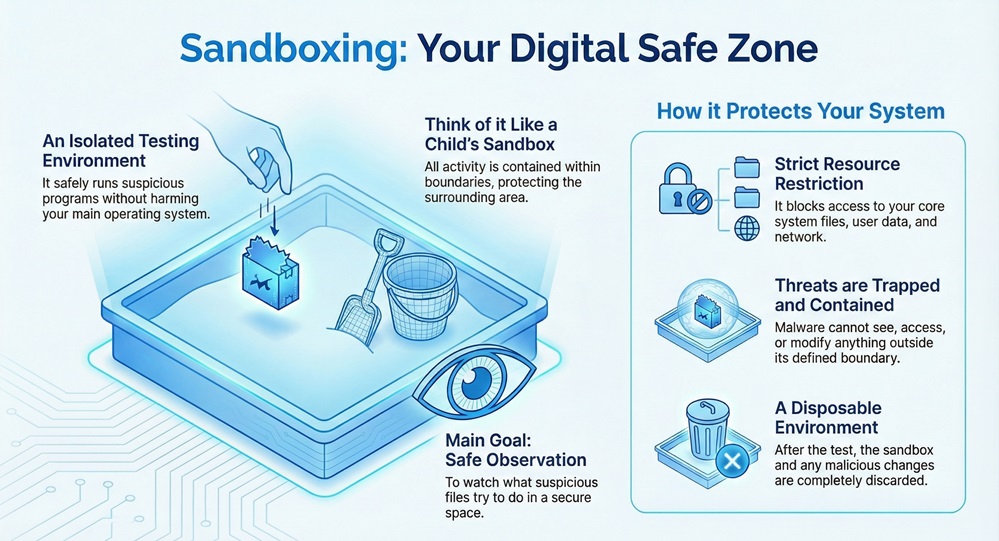
    Sandboxing can be understood as an isolated testing environment. This secure space allows you to run untrusted programs or open suspicious files without risking damage to your main operating system or the underlying network. Think of it like a child's sandbox: the activity stays contained within the boundaries, protecting the surrounding area.


    In simple terms, sandboxing provides a distinct, isolated container. The potentially malicious code inside this container cannot see, access, or modify resources outside of its defined boundary. This segregation is fundamental to effective security. Sandboxing security focuses on minimizing the potential damage a threat can cause.
     

    Sandboxing-infographic


    What is the main goal of using a security sandbox? The main goal is to safely observe the behavior of potentially harmful content. By watching what a suspicious file tries to do in this safe space, security systems can then determine if the file is truly malicious.


    Advanced Sandbox Security


    Defining the Sandbox Meaning

    The sandbox meaning in computing refers to a specific, protected execution environment.


    This environment simulates a user’s actual operating environment, but it strictly controls and limits what the program inside can do. A sandbox restricts access to core system files, user data, network resources, and peripheral devices. This separation ensures that even if a piece of malware runs, it remains trapped and cannot spread.


    A sandbox environment is nothing but a temporary, disposable virtual machine or an equivalent isolated space. When the test finishes, the system discards the sandbox, along with any malicious changes the program may have made. This process completely eliminates the threat without affecting your actual system.


    What is Sandboxing in Browser Security?

    Sandboxing in browser security is one of the most common applications you use daily.


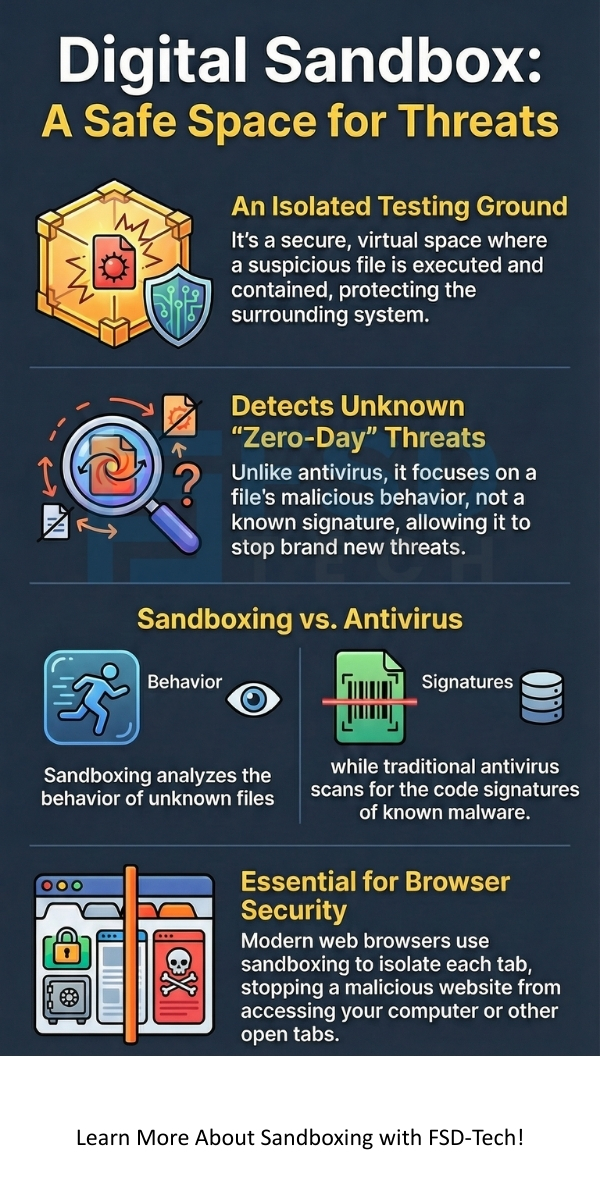
    A modern web browser, such as Chrome or Firefox, runs each website or browser tab in its own sandbox. This feature prevents a malicious website from accessing data or files belonging to another website or, more importantly, your local computer.


    For example, if you visit a compromised website, the code running on that page stays confined to its tab’s sandbox. It cannot access your saved passwords, read files on your hard drive, or interfere with your banking website open in another tab. Sandboxing in browser security fundamentally improves your safety while you browse the internet.


    Also Read: What is Threat Hunting? Proactive Cyber Security


    How Does Sandboxing Work?


    How does sandboxing work? This security measure relies on carefully controlled resource allocation and strict permission settings. The entire process works on the principle of minimal privilege and containment.


    Let us now discuss the systematic steps the sandboxing security process involves:


    1. Intercepting the Untrusted File: The process first begins when a system component, like an email filter or web gateway, intercepts a suspicious file or link.
    2. Creating the Isolated Environment: The sandboxing tool then creates a fresh, clean, and isolated environment. This often involves setting up a virtual machine (VM) that fully emulates the target operating system (e.g., Windows, macOS).
    3. Executing the File: The system places the suspicious file inside the sandbox and executes it. This allows the file to run and behave exactly as it would on a real machine. How does sandboxing work is defined by this controlled execution.
    4. Monitoring and Analysis: A specialized monitor watches and records every action the file takes. The monitor tracks all system calls, file creations, registry changes, network communication attempts, and process memory modifications. This aims at revealing the file's true intent.
    5. Behavioral Analysis and Scoring: The monitor analyzes the captured data for signs of malicious intent. Activities like attempting to encrypt files, contact known command-and-control servers, or spread across the network will increase the file's threat score.
    6. Quarantine or Release: Based on the final threat score and the observed behaviors, the sandboxing system makes a decision.
      • If the file shows malicious behavior, the system immediately quarantines or blocks it.
      • If the file is clean, the system releases it to the user's network or endpoint.


    This sequential pattern ensures that no malicious program can execute its attack on the real system. The isolation mechanism is highly effective.


    Technical Mechanisms of Sandboxing

    Sandboxing implements its isolation using several techniques:


    • Virtualization: Many sandboxing tools use full system virtualization. This means a complete, emulated operating system runs inside a hypervisor, which keeps it totally separate from the host system.
    • Kernel-Level Isolation: Some modern approaches use containerization or lightweight virtualization, which utilizes the operating system's kernel features to strictly limit the process's view of the system resources.
    • Access Control Lists (ACLs): The sandbox modifies the operating system's access lists. This ensures the program inside simply cannot perform critical actions like writing to core directories (C:\Windows\System32) or accessing the network beyond a controlled proxy.
    • Memory Paging: The sandbox ensures that the untrusted code can only read and write within its own designated memory segment, preventing it from interfering with the memory of other critical processes.


    Also Read: Man-in-the-Middle (MITM) Attack - Prevention Guide


    Why is Sandboxing in Cyber Security Important?

    Sandboxing in cyber security plays a vital role in protecting organizations from the latest and most sophisticated threats. It helps in dealing with evasive malware that traditional defenses often miss.


    Here are the key benefits of implementing a robust sandboxing security solution:


    • Detection of Zero-Day Threats: Traditional defenses rely on signatures of known malware. Sandboxing is different. It effectively detects zero-day threats—new, previously unknown malware—because it focuses on behavior, not identity. If a file acts maliciously, the sandbox stops it, regardless of its known signature.
    • Evasion Technique Mitigation: Many sophisticated threats, such as advanced persistent threats (APTs), check for the presence of a sandbox before executing their malicious payload. A good sandboxing tool uses anti-evasion techniques to make the virtual environment look exactly like a real user machine. This fools the malware into revealing its true nature.
    • Post-Breach Analysis: Even if a threat somehow bypasses initial defenses, the sandbox provides a safe environment to thoroughly analyze the malware's properties. Security teams can study the threat's Indicators of Compromise (IoCs), allowing them to create better defenses for the entire network.
    • Preventing Lateral Movement: Because the sandboxed environment is completely separated from the network, a malicious file cannot use the sandbox as a staging ground to attack other devices or servers. This prevents lateral movement, which is a key phase in major network breaches.


    Sandboxing vs. Traditional Antivirus

    Many people wonder about the difference between a traditional antivirus program and sandboxing. While both aim at security, they operate on distinct principles.


    Let us now discuss the differences between Antivirus and Sandboxing:


    Basis for ComparisonTraditional Antivirus (AV)Sandboxing in Cyber Security
    Primary GoalTo identify and remove known threats.To safely execute, observe, and analyze unknown threats.
    Detection MethodSignature-based (Scans files against a database of known malware code).Behavioral analysis (Watches what a file does).
    Effectiveness Against Zero-Day ThreatsLow. AV cannot detect malware not yet in its database.High. It stops any file that exhibits malicious behavior.
    System InteractionScans files before they execute or periodically after they land.Executes the file in a completely isolated, safe environment.
    Core TechnologyCode scanning and pattern matching.Virtualization, Emulation, and Dynamic Analysis.
    Keyword RelevanceKnown malware, virus signature.Zero-day, unknown threat, behavioral analysis.


    While traditional antivirus provides essential, front-line defense against common threats, sandboxing acts as a crucial, secondary line of defense against the most sophisticated and new attacks. For comprehensive protection, most organizations implement both.


    Cloud Sandboxing and Other Applications

    The power of sandboxing extends beyond just endpoint security. New technologies have further utilized this isolation principle.


    What is Cloud Sandboxing?

    Cloud sandboxing involves leveraging the scalability and resources of cloud infrastructure to perform the dynamic analysis. This approach is becoming increasingly popular.


    A cloud sandboxing tool directs suspicious files to an off-site, cloud-based environment for analysis. This provides several benefits:


    • Scalability: The cloud can instantly scale to handle a massive volume of files from multiple clients simultaneously.
    • Resource Efficiency: It prevents resource-heavy analysis from slowing down the user's local network or individual computers.
    • Intelligence Sharing: Threat intelligence gathered from analyzing one file in the cloud can immediately benefit all other cloud users. This enhances sandboxing security for everyone.


    Other Key Areas Utilizing Sandboxing

    Sandboxing is not limited to malware analysis. It performs key functions in various other domains:


    • Software Development: Developers use sandboxes to test new code in a controlled setting. This ensures the new features or fixes do not contain bugs that could crash the main application or corrupt data.
    • Data Sandboxes: For data science and analytics, a data sandbox is a secure, isolated copy of production data. Analysts can experiment with large datasets without risking changes to the original, critical data.
    • Application Security: Many modern operating systems (like iOS and Android) enforce strict sandboxing for every third-party application. This prevents a faulty mobile game from accessing your banking application's data or your private contacts.


    Also Read: Domain Name System (DNS) Security | Threats, DNSSEC & Best Practices


     Implementing a Sandboxing Tool Effectively

    Choosing and implementing a suitable sandboxing tool requires careful planning. You must ensure the tool integrates seamlessly with your existing security infrastructure.


    To implement effective sandboxing security, consider the following aspects:


    1. Integration with Email and Web Gateways: The sandbox must automatically receive files or links coming from your email and web traffic. This allows it to check files before they reach the user.
    2. Anti-Evasion Capabilities: A robust sandbox must contain mechanisms to detect when malware tries to recognize or avoid the virtual environment. It should look like a real machine.
    3. Support for Various File Types: The tool needs to handle a wide range of files, including PDFs, Microsoft Office documents, executable files (.exe), and compressed archives.
    4. Reporting and Logging: The sandbox must generate detailed, easy-to-read reports on the observed behavior. Security teams use these reports to understand the threat's capabilities.
    5. Performance: The system should analyze files quickly to avoid creating delays in email and web delivery.


    Conclusion

    Sandboxing is clearly an indispensable pillar of modern digital defense. You now understand that it is far more than a simple file scanner; it is a dynamic, isolated environment. This secure space allows you to execute and observe the most dangerous, unknown threats without putting your system at risk. 


    Sandboxing security focuses on analyzing behavior, which makes it the best defense against zero-day and advanced persistent threats. 


    By implementing a powerful sandboxing tool, you actively shield your sensitive data and ensure business continuity. Your commitment to understanding and using sandboxing ensures a safer, more resilient digital future.


    Proactive Sandbox Defense Contact our team
     

    Sandboxing


    Key Takeaways

    Here are five key takeaways about sandboxing in cyber security:


    • Isolation and Containment: Sandboxing acts as an isolated environment (like a Virtual Machine) where you can safely run and test untrusted programs or files. This containment prevents potential malware from accessing or damaging your main operating system or network resources.
    • Zero-Day Threat Detection: Sandboxing security focuses on dynamic behavioral analysis, not just signatures. This allows the system to effectively detect and mitigate zero-day threats and advanced, previously unknown malware by observing what the file does once it executes.
    • Essential for Browser and Email Security: Modern web browsers use sandboxing to isolate tabs, preventing malicious websites from interacting with your system or other tabs. Similarly, sandboxing tools examine email attachments before they reach your inbox, preventing phishing and malware delivery.
    • Anti-Evasion Capabilities: A robust sandboxing tool must employ techniques to detect and counter malware that tries to recognize and evade the virtual environment. This forces sophisticated threats to execute their malicious code, revealing their true intent.
    • Complementary Defense: Sandboxing is a crucial layer that complements traditional antivirus. While antivirus protects against known threats, sandboxing provides a vital, secondary line of defense against the newest, most evasive, and sophisticated attacks.


    Frequently Asked Questions (FAQs) About Sandboxing

    What are the limitations of sandboxing?

    While highly effective, sandboxing is not perfect. Highly sophisticated malware may successfully use advanced evasion techniques to lie dormant until they detect a specific user action or a non-sandboxed environment. Also, analyzing massive files can sometimes cause minor delays.


    How does sandboxing help with email security?

    Sandboxing in cyber security is critical for email defense. When your email server receives an attachment, the sandboxing tool runs it first. If the attachment is malicious, the sandbox identifies it, and your server blocks the email. This prevents phishing attacks and malware delivery via email.


    Is sandboxing the same as a Virtual Machine (VM)?

    A Virtual Machine (VM) is a technology that enables sandboxing. Sandboxing is the security concept of isolation and analysis. The VM is the most common tool used to create that isolated execution environment for a sandbox.


    What is Sandboxing in CyberSecurity? How It Works?

    About The Author

    Surbhi Suhane

    Surbhi Suhane is an experienced digital marketing and content specialist with deep expertise in Getting Things Done (GTD) methodology and process automation. Adept at optimizing workflows and leveraging automation tools to enhance productivity and deliver impactful results in content creation and SEO optimization.

    Like This Story?

    Share it with friends!

    Subscribe to our newsletter!

    Atera

    (48)

    Cato Networks

    (111)

    ClickUp

    (64)

    FishOS

    (7)

    Miradore

    (21)

    PointGuard AI

    (9)

    Vembu

    (22)

    Xcitium

    (33)

    ZETA HRMS

    (66)

    Workflow Automation(5)

    Workforce Automation(1)

    AI Project Management(1)

    HR Data Automation(1)

    RMM(1)

    IT Workflow Automation(1)

    GCC compliance(4)

    IT security(2)

    Payroll Integration(2)

    IT support automation(2)

    procurement automation(1)

    lost device management(1)

    IT Management(5)

    IoT Security(2)

    Cato XOps(2)

    IT compliance(4)

    Task Automation(1)

    Workflow Management(1)

    AI-powered cloud ops(1)

    OpenStack automation(1)

    Kubernetes lifecycle management(2)

    SMB Security(8)

    Data Security(1)

    MDR (Managed Detection & Response)(4)

    Atera Integrations(2)

    MSP Automation(2)

    XDR Security(2)

    SMB Cyber Protection(1)

    Ransomware Defense(3)

    HR Tech Solutions(1)

    Zero Trust Network Access(3)

    Zero Trust Security(2)

    Endpoint Management(1)

    SaaS Security(1)

    Payroll Automation(5)

    IT Monitoring(2)

    Xcitium EDR SOC(15)

    Ransomware Protection GCC(1)

    M&A IT Integration(1)

    Network Consolidation UAE(1)

    MSSP for SMBs(1)

    Antivirus vs EDR(1)

    Ransomware Protection(3)

    Managed EDR FSD-Tech(1)

    FSD-Tech MSSP(25)

    SMB Cybersecurity GCC(1)

    Cybersecurity GCC(12)

    Endpoint Security(1)

    Data Breach Costs(1)

    Endpoint Protection(1)

    Managed Security Services(2)

    SMB Cybersecurity(8)

    Zero Dwell Containment(31)

    Xcitium EDR(30)

    Hybrid Backup(1)

    Cloud Backup(1)

    Backup & Recovery(1)

    pointguard ai(4)

    disaster recovery myths(1)

    backup myths(1)

    vembu(9)

    SMB data protection(9)

    Vembu BDR Suite(19)

    Disaster Recovery(4)

    DataProtection(1)

    GCCBusiness(1)

    Secure Access Service Edge(4)

    GCC HR software(14)

    Miradore EMM(15)

    Cato SASE(7)

    Cloud Security(8)

    Talent Development(1)

    AI Cybersecurity(12)

    AI Risk Management(1)

    AI Governance(4)

    AI Security(2)

    AI Compliance(2)

    GCC business security(1)

    GCC network integration(1)

    compliance automation(4)

    GCC cybersecurity(2)

    education security(1)

    App management UAE(1)

    BYOD security Dubai(8)

    Miradore EMM Premium+(5)

    HealthcareSecurity(1)

    MiddleEast(1)

    Team Collaboration(1)

    IT automation(10)

    Zscaler(1)

    SD-WAN(6)

    HR Integration(4)

    Cloud Networking(3)

    device management(9)

    RemoteWork(1)

    ZeroTrust(2)

    VPN(1)

    MPLS(1)

    Project Management(9)

    HR automation(16)

    share your thoughts

    Sandboxing

    What is Sandboxing in CyberSecurity? How It Works?

    🕓 December 27, 2025

    Privilege Escalation

    What Is Privilege Escalation? Types & Prevention

    🕓 December 27, 2025

    Threat Hunting

    What is Threat Hunting? Proactive Cyber Security

    🕓 December 26, 2025

    Decoded(39)

    Cyber Security(112)

    BCP / DR(22)

    Zeta HRMS(65)

    SASE(21)

    Automation(64)

    Next Gen IT-Infra(111)

    Monitoring & Management(69)

    ITSM(22)

    HRMS(21)

    Automation(24)