HomeNext Gen IT-InfraMonitoring & ManagementCyber SecurityBCP / DRAutomationDecoded
Next Gen IT-Infra
Cato’s SASE Supports Cybersecurity Skills Development

How Cato’s SASE Supports Cybersecurity Skills Development

🕓 April 8, 2025

How SASE Supports the Security Needs of SMBs

How SASE Supports the Security Needs of SMBs

🕓 February 9, 2025

Attack Surface Reduction with Cato’s SASE

Attack Surface Reduction with Cato’s SASE

🕓 February 10, 2025

SASE for Digital Transformation in UAE

SASE for Digital Transformation in UAE

🕓 February 8, 2025

Monitoring & Management
Understanding Atera’s SLA Management

Understanding Atera’s SLA Management

🕓 February 7, 2025

Cost-Performance Ratio: Finding the Right Balance in IT Management Networks

Cost-Performance Ratio: Finding the Right Balance in IT Management Networks

🕓 June 16, 2025

Customizing Atera with APIs

Customizing Atera with APIs

🕓 March 3, 2025

Power Up Your IT Team’s Strategy with Atera’s Communication Tools

Power Up Your IT Team’s Strategy with Atera’s Communication Tools

🕓 February 8, 2025

Cyber Security
Visual guide showing Cato CMA interface for configuring Internet and WAN firewall rules, enabling threat protection, and monitoring security events in real time for UAE IT teams.

Enforcing Firewall and Threat Protection Policies in Cato

🕓 July 25, 2025

Isometric illustration of professionals managing network performance, bandwidth analytics, and cloud-based optimization around the Cato Networks platform, symbolizing bandwidth control and QoS visibility.

Mastering Bandwidth Control and QoS in Cato Networks

🕓 July 26, 2025

Illustration of the Cato Cloud architecture showing its role in delivering SASE for secure, optimized global connectivity.

Understanding the Cato Cloud and Its Role in SASE

🕓 January 29, 2025

Global network backbone powering Cato SASE solution for secure, high-performance connectivity across regions.

Global Backbone: The Engine Powering Cato’s SASE Solution

🕓 January 30, 2025

BCP / DR
Illustration showing diverse business and IT professionals collaborating with cloud, backup, and security icons, representing Vembu use cases for SMBs, MSPs, and IT teams.

Who Uses Vembu? Real-World Use Cases for SMBs, MSPs & IT Teams

🕓 July 12, 2025

Graphic showcasing Vembu’s all-in-one backup and disaster recovery platform with icons for cloud, data protection, and business continuity for IT teams and SMBs.

What Is Vembu? A Deep Dive Into the All in One Backup & Disaster Recovery Platform

🕓 July 6, 2025

Illustration showing Vembu backup and disaster recovery system with cloud storage, server racks, analytics dashboard, and IT professionals managing data.

The Rising Cost of Data Loss: Why Backup Is No Longer Optional?

🕓 August 14, 2025

3D isometric illustration of cloud backup and data recovery infrastructure with laptop, data center stack, and digital business icons — FSD Tech

RPO & RTO: The Heart of Business Continuity

🕓 August 15, 2025

Automation
Cross-Functional Collaboration with ClickUp

Fostering Cross-Functional Collaboration with ClickUp for Multi-Departmental Projects

🕓 February 11, 2025

ClickUp Project Reporting

Revolutionizing Enterprise Reporting with ClickUp’s Advanced Analytics and Dashboards

🕓 June 16, 2025

ClickUp’s Design Collaboration and Asset Management Tools

Empowering Creative Teams with ClickUp’s Design Collaboration and Asset Management Tools

🕓 February 26, 2025

ClickUp Communication and Collaboration Tools

ClickUp Communication and Collaboration Tools: Empowering Remote Teams

🕓 March 12, 2025

Decoded
Multi-Factor Authentication (MFA)

Multi-Factor Authentication (MFA): All You Need to Know

🕓 December 7, 2025

L3 Switch

What Is an L3 Switch? L2 vs L3 & Why You Need Layer 3?

🕓 December 8, 2025

IPSec

IPSec Explained: Protocols, Modes, IKE & VPN Security

🕓 December 3, 2025

 Datagram Transport Layer Security (DTLS)

What is Datagram Transport Layer Security (DTLS)? How it works?

🕓 December 4, 2025

    Subscribe to our newsletter!

    About Us

    Follow Us

    Copyright © 2024 | Powered by 

    Cato SASE Architecture

    Inside Cato’s SASE Architecture: A Blueprint for Modern Security

    🕓 January 26, 2025

    Enterprise Data Security and Privacy with ClickUp

    Ensuring Enterprise Data Security and Privacy with ClickUp

    🕓 February 9, 2025

    DDoS protection SASE

    DDoS Protection and Cato’s Defence Mechanisms

    🕓 February 11, 2025

    Table of Contents

    What is a Network Switch? Core of Modern Networking

    Surbhi Suhane
    December 26, 2025
    Comments
    Network Switch

    Hello! Have you ever wondered how all the devices in your office or home talk to each other so fast? The truth is, a network switch is nothing but the essential component that makes this communication possible. It plays a vital role in building and managing local computer networks. You, the reader, need to understand this device because it directly affects your internet speed and network stability.


    We will not immediately reveal all the secrets of network switching. First, let us build a solid understanding of this core networking component. We aim at simplifying this complex topic, helping you grasp exactly what does a network switch do and why it is so crucial. By the end, you will know how to pick the right ethernet network switch for your specific needs.


    Defining the Network Switch

    A network switch can be understood as a networking hardware device. This device connects multiple devices on a computer network. Put it another way, a switch is a central meeting point for all your wired network devices.
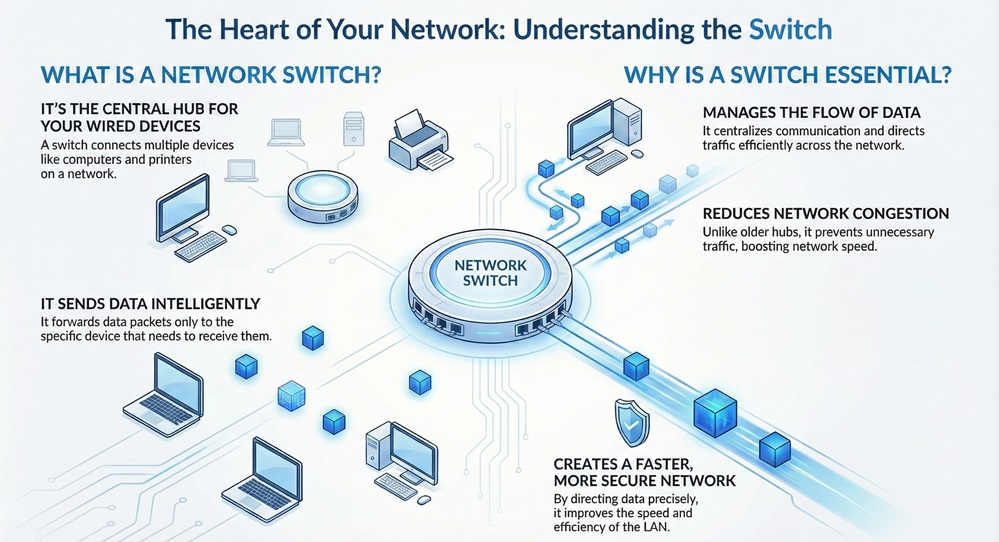
     

    Network Switch Infographic


    The switch works on the principle of receiving a data packet from one connected device and then forwarding that packet only to the device for which it is specifically intended. This process ensures efficient use of network bandwidth.


    Purpose of a Network Switch

    What is the purpose of a network switch? The primary goal is to centralize communication. Before switches, devices like hubs would broadcast data to every device. This method created a lot of unnecessary traffic and reduced network speed.


    A network switch solves this problem. It aims at providing a faster, more secure, and more efficient way for devices to communicate within a Local Area Network (LAN). A typical network switch helps in:


    • Connecting multiple computing devices.
    • Managing the flow of data across the network.
    • Reducing network congestion by sending data only where it needs to go.


    Also Read: What Is an L3 Switch? L2 vs L3 & Why You Need Layer 3?


     Network Switch vs. Other Devices: A Quick Comparison

    To fully appreciate the network switch, let us now understand how it differs from similar networking hardware. We will focus on the Hub and the Router. Always start with clear comparison charts when contrasting concepts.


    Basis for ComparisonNetwork SwitchHubRouter
    Primary FunctionConnects devices within a single LAN and manages data flow.Connects devices within a single LAN; broadcasts all traffic.Connects different networks (LANs and WANs); routes data between them.
    How It WorksUses MAC addresses to send data to a specific port.Simply repeats data signal to all ports indiscriminately.Uses IP addresses to send data to different networks.
    Data TransmissionUnicast (one-to-one), Multicast (one-to-many), Broadcast (one-to-all).Broadcast (one-to-all) only.Routing between networks.
    OSI LayerWorks mainly at Layer 2 (Data Link) and sometimes Layer 3 (Network).Works at Layer 1 (Physical).Works at Layer 3 (Network).
    Network EfficiencyHigh efficiency; reduces collisions and bandwidth waste.Very low efficiency; causes high collision rates.Moderate; optimizes path selection for inter-network traffic.


    How Network Switch Works?

    Now, the question arises, how network switch works to achieve such efficiency? The entire operation is based on MAC addresses (Media Access Control addresses). Each device connected to a network has a unique MAC address that permanently identifies it.


    The Learning Process of a Network Switch

    When you power up an ethernet network switch, it is essentially an "empty book." It must learn where each device is located. This is the learning process.


    1. Initial Data Reception: A connected device (like your computer) sends a data frame to the network switch ethernet.
    2. MAC Address Examination: The switch examines the source MAC address of the incoming frame.
    3. Building the MAC Table: The switch records this source MAC address and the port number where it arrived. It stores this information in a MAC address table (also called a Content-Addressable Memory or CAM table). This process is what we call MAC address learning.


    Also Read: What is Social Engineering? Types, Examples & Prevention


    The Forwarding Process: Directed Traffic

    Once the network switch builds its MAC table, it begins the crucial forwarding process.


    1. Destination Address Check: The switch receives a new data frame and immediately checks the destination MAC address listed in the frame's header.
    2. Table Lookup: The switch looks up this destination MAC address in its MAC address table.
    3. Directed Forwarding: If the address is found, the switch forwards the frame only to the specific port that corresponds to that MAC address. This action prevents unnecessary traffic on other ports.
    4. Unknown Destination: What if the switch does not find the address? This may happen when a new device connects. In this case, the switch broadcasts the frame to all ports except the one it came in on. The intended recipient will reply, and the switch will then learn its MAC address for future traffic.


    The switch implements this process so as to minimize network collisions and maximize throughput. This method is the fundamental difference between a smart network switch and a simple hub.


    Different Types of Network Switch

    The modern market offers many types of network switches. Knowing the distinctions helps you choose the right device for your network needs. How many types of network switch exist? We generally classify them based on their management capabilities and their functionality.


    1. Based on Management

    • Unmanaged Switches: These are the simplest type. They are plug-and-play devices. They do not allow you to make any configuration changes. You connect your devices, and it simply manages traffic using MAC addresses. They are typically used in small offices or home networks.
    • Managed Switches: These switches provide a console interface (e.g., Command Line Interface or Web Interface). This allows network administrators to precisely configure, monitor, and manage the network. This capability helps in implementing security features, Virtual Local Area Networks (VLANs), and quality of service (QoS). They are essential for large, complex networks.
    • Smart Switches: These devices are nothing but a middle ground. They offer some basic management capabilities but are generally less feature-rich and easier to configure than fully managed switches.


    2. Based on Functionality

    • Layer 2 Switches: These are the traditional switches we have discussed. They base all their forwarding decisions strictly on MAC addresses, which operate at the Data Link Layer (Layer 2) of the OSI model.
    • Layer 3 Switches: These are more advanced devices. They can perform routing functions based on IP addresses (Layer 3) in addition to their Layer 2 switching capabilities. They are commonly used to segment large networks and connect different Virtual Local Area Networks (VLANs) without requiring a separate, dedicated router.


    3. Based on Power

    • Power over Ethernet (PoE) Switches: These switches are nothing but a special type of ethernet network switch. They can transmit both data and electrical power to connected devices over the same Ethernet cable. Devices like VoIP phones, wireless access points, and IP cameras benefit greatly from PoE. This method reduces cable clutter and simplifies device installation.


    What About WiFi Network Switch?

    A common question that arises is about the term "wifi network switch." It is important to clarify this terminology.


    A network switch deals only with wired connections using Ethernet cables. Wi-Fi is the technology that uses radio waves for wireless communication.


    • A Wi-Fi Access Point (WAP) or a Wireless Router enables devices to connect wirelessly.
    • The network switch connects the wired devices and the WAPs/Wireless Routers to the rest of the wired network.


    So, while there is no device called a "wifi network switch," the wired switch is a vital part of the network infrastructure that the Wi-Fi system relies on. Simply put, the ethernet network switch gives the WAP a wired connection to the internet.


    Also Read: What is a Network Interface Card? How Does NIC work?


    Why the Network is Not Working: Common Switch-Related Issues

    Sometimes you face a situation when network is not working. A problem with the network switch or its connections is often the cause. Here are some common switch-related issues:


    • Cable Malfunction: The most common problem. A damaged or improperly plugged-in Ethernet cable can break the connection. Always check the lights on the switch port; they indicate the connection status.
    • Configuration Errors (Managed Switches): In a managed environment, an incorrect VLAN setting, a faulty port setting, or an access control list (ACL) error can block traffic unexpectedly.
    • Port Saturation/Overloading: The switch port connects too many devices or experiences extremely high traffic. This can lead to slow performance or dropped connections. A quality network switch ethernet needs appropriate port capacity.
    • Power Failure/Device Failure: The switch itself may have lost power, or the hardware may have failed entirely. Look for power indicator lights to confirm the switch is on.
    • MAC Address Table Overflow: Extremely rare in modern switches, but possible in very large, congested networks. The switch loses the ability to learn new MAC addresses, forcing it to broadcast traffic, which severely reduces speed.


    The solution tends to be simple: start by checking all your physical cables and then restarting the switch to clear temporary errors.


    Conclusion

    All in all, the network switch stands as the critical foundation of any modern local network. You now understand that it is nothing but an intelligent device. It moves beyond simply connecting devices; it actively manages data flow by using MAC addresses to direct traffic precisely where it needs to go. 


    This efficiency is why your data transfers are fast and your network remains stable. Whether you need a simple unmanaged switch for your home or a powerful, configurable ethernet network switch for your business, selecting the right one directly impacts your performance.


    Thus, we assure you that choosing a reliable network switch is the single best way to maximize your wired network's speed and efficiency. We are here to ensure your network infrastructure supports your goals.


    Secure Your Network Reach our experts
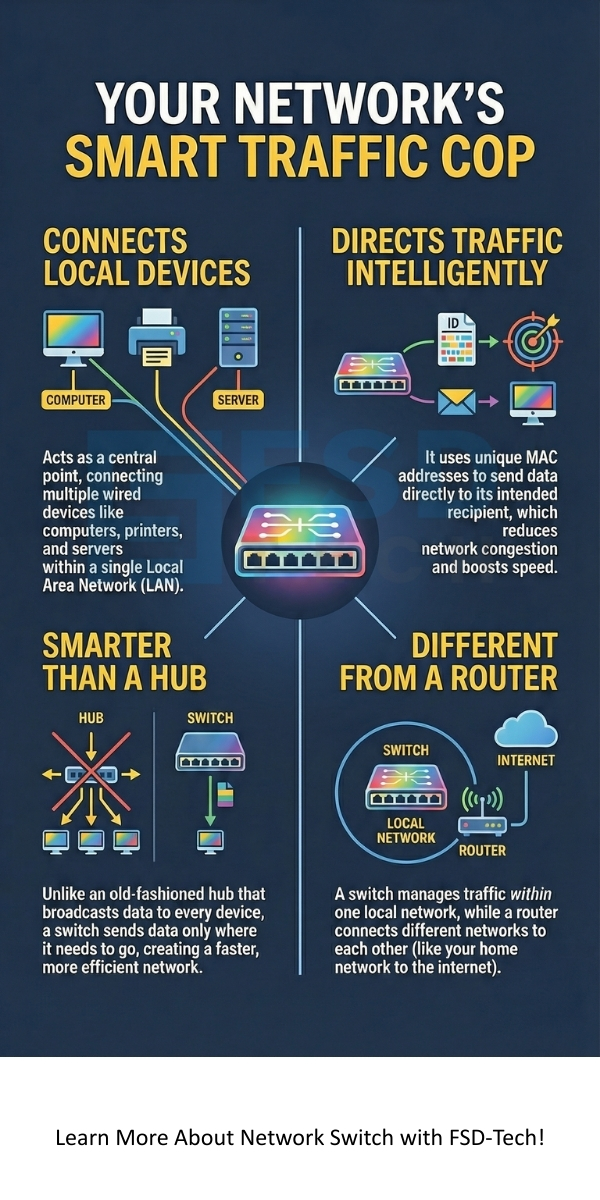
     

    Network Switch


    Key Takeaways

    So, with the above discussion, we can say that the network switch is the silent, essential powerhouse of any wired network.


    • Core Role: The network switch connects multiple devices in a local network, replacing the old, inefficient hub.
    • Intelligent Traffic: It intelligently forwards data frames based on the unique MAC addresses of connected devices. This ensures high-speed, direct, and efficient communication.
    • Different Types: Switches come in many varieties, including unmanaged (simple), managed (configurable), Layer 3 (routing capable), and PoE (power and data over one cable).
    • Wired Backbone: An ethernet network switch provides the stable, wired backbone required for all modern applications, including the reliable operation of your Wi-Fi system.


    Frequently Asked Questions (FAQs) About Network Switches

    What is the difference between a switch and a router?

    A switch connects devices within a single network (like your office LAN) using MAC addresses. A router connects different networks (like your home network to the internet) using IP addresses. The router acts as the network's gateway, while the switch acts as the local traffic cop.


    Does a network switch slow down my internet?

    A good quality network switch does not slow down your internet. Modern switches operate at high speeds, often Gigabit Ethernet (GbE) or faster. They actually speed up your local network by efficiently directing traffic, thereby reducing congestion and collisions.


    Can I connect one network switch to another?

    Yes, you can certainly connect network switches together. This action is called stacking or cascading. It allows you to expand the number of ports available for your devices. You use a standard Ethernet cable (or a special stacking cable) to connect a port on one switch to a port on the next.


    What does a network switch do for a small business?

    For a small business, a network switch enables all computers, servers, printers, and VoIP phones to share resources and the internet connection efficiently. It provides the stable, high-speed wired backbone that business operations rely on.

    What is a Network Switch? Core of Modern Networking

    About The Author

    Surbhi Suhane

    Surbhi Suhane is an experienced digital marketing and content specialist with deep expertise in Getting Things Done (GTD) methodology and process automation. Adept at optimizing workflows and leveraging automation tools to enhance productivity and deliver impactful results in content creation and SEO optimization.

    Like This Story?

    Share it with friends!

    Subscribe to our newsletter!

    Atera

    (48)

    Cato Networks

    (111)

    ClickUp

    (63)

    FishOS

    (7)

    Miradore

    (21)

    PointGuard AI

    (9)

    Vembu

    (22)

    Xcitium

    (33)

    ZETA HRMS

    (66)

    Workflow Automation(4)

    Workforce Automation(1)

    AI Project Management(1)

    HR Data Automation(1)

    RMM(1)

    IT Workflow Automation(1)

    GCC compliance(4)

    IT security(2)

    Payroll Integration(2)

    IT support automation(2)

    procurement automation(1)

    lost device management(1)

    IT Management(5)

    IoT Security(2)

    Cato XOps(2)

    IT compliance(4)

    Task Automation(1)

    Workflow Management(1)

    OpenStack automation(1)

    AI-powered cloud ops(1)

    Kubernetes lifecycle management(2)

    SMB Security(8)

    Data Security(1)

    MDR (Managed Detection & Response)(4)

    MSP Automation(2)

    Atera Integrations(2)

    XDR Security(2)

    SMB Cyber Protection(1)

    Ransomware Defense(3)

    HR Tech Solutions(1)

    Zero Trust Network Access(3)

    Zero Trust Security(2)

    Endpoint Management(1)

    SaaS Security(1)

    Payroll Automation(5)

    IT Monitoring(2)

    Xcitium EDR SOC(15)

    Ransomware Protection GCC(1)

    M&A IT Integration(1)

    Network Consolidation UAE(1)

    MSSP for SMBs(1)

    Antivirus vs EDR(1)

    Managed EDR FSD-Tech(1)

    SMB Cybersecurity GCC(1)

    FSD-Tech MSSP(25)

    Ransomware Protection(3)

    Cybersecurity GCC(12)

    Endpoint Security(1)

    Data Breach Costs(1)

    Endpoint Protection(1)

    Managed Security Services(2)

    Xcitium EDR(30)

    SMB Cybersecurity(8)

    Zero Dwell Containment(31)

    Cloud Backup(1)

    Hybrid Backup(1)

    Backup & Recovery(1)

    pointguard ai(4)

    backup myths(1)

    vembu(9)

    disaster recovery myths(1)

    SMB data protection(9)

    Disaster Recovery(4)

    Vembu BDR Suite(19)

    GCCBusiness(1)

    DataProtection(1)

    Secure Access Service Edge(4)

    GCC HR software(14)

    Miradore EMM(15)

    Cato SASE(7)

    Cloud Security(8)

    Talent Development(1)

    AI Cybersecurity(12)

    AI Security(2)

    AI Risk Management(1)

    AI Governance(4)

    AI Compliance(2)

    GCC business security(1)

    GCC network integration(1)

    compliance automation(4)

    GCC cybersecurity(2)

    education security(1)

    App management UAE(1)

    Miradore EMM Premium+(5)

    BYOD security Dubai(8)

    HealthcareSecurity(1)

    MiddleEast(1)

    Team Collaboration(1)

    IT automation(9)

    Zscaler(1)

    SD-WAN(6)

    HR Integration(4)

    Cloud Networking(3)

    device management(9)

    RemoteWork(1)

    ZeroTrust(2)

    VPN(1)

    MPLS(1)

    Project Management(9)

    HR automation(16)

    share your thoughts

    Threat Hunting

    What is Threat Hunting? Proactive Cyber Security

    🕓 December 26, 2025

    Network Switch

    What is a Network Switch? Core of Modern Networking

    🕓 December 26, 2025

    Edge Computing

    What is Edge Computing? How it Differs from Cloud Computing?

    🕓 December 24, 2025

    Decoded(37)

    Cyber Security(112)

    BCP / DR(22)

    Zeta HRMS(65)

    SASE(21)

    Automation(63)

    Next Gen IT-Infra(111)

    Monitoring & Management(69)

    ITSM(22)

    HRMS(21)

    Automation(24)