HomeNext Gen IT-InfraMonitoring & ManagementCyber SecurityBCP / DRAutomationDecoded
Next Gen IT-Infra
Cato’s SASE Supports Cybersecurity Skills Development

How Cato’s SASE Supports Cybersecurity Skills Development

🕓 April 8, 2025

How SASE Supports the Security Needs of SMBs

How SASE Supports the Security Needs of SMBs

🕓 February 9, 2025

Attack Surface Reduction with Cato’s SASE

Attack Surface Reduction with Cato’s SASE

🕓 February 10, 2025

SASE for Digital Transformation in UAE

SASE for Digital Transformation in UAE

🕓 February 8, 2025

Monitoring & Management
Understanding Atera’s SLA Management

Understanding Atera’s SLA Management

🕓 February 7, 2025

Cost-Performance Ratio: Finding the Right Balance in IT Management Networks

Cost-Performance Ratio: Finding the Right Balance in IT Management Networks

🕓 June 16, 2025

Customizing Atera with APIs

Customizing Atera with APIs

🕓 March 3, 2025

Power Up Your IT Team’s Strategy with Atera’s Communication Tools

Power Up Your IT Team’s Strategy with Atera’s Communication Tools

🕓 February 8, 2025

Cyber Security
Illustration of the Cato Cloud architecture showing its role in delivering SASE for secure, optimized global connectivity.

Understanding the Cato Cloud and Its Role in SASE

🕓 January 29, 2025

Isometric illustration of professionals managing network performance, bandwidth analytics, and cloud-based optimization around the Cato Networks platform, symbolizing bandwidth control and QoS visibility.

Mastering Bandwidth Control and QoS in Cato Networks

🕓 July 26, 2025

Global network backbone powering Cato SASE solution for secure, high-performance connectivity across regions.

Global Backbone: The Engine Powering Cato’s SASE Solution

🕓 January 30, 2025

Illustration of team analyzing application traffic and usage insights on a large laptop screen using Cato’s dashboard, surrounded by network and cloud icons.

Cato Networks Application Visibility | Monitoring & Control

🕓 July 27, 2025

BCP / DR
Illustration showing diverse business and IT professionals collaborating with cloud, backup, and security icons, representing Vembu use cases for SMBs, MSPs, and IT teams.

Who Uses Vembu? Real-World Use Cases for SMBs, MSPs & IT Teams

🕓 July 12, 2025

Graphic showcasing Vembu’s all-in-one backup and disaster recovery platform with icons for cloud, data protection, and business continuity for IT teams and SMBs.

What Is Vembu? A Deep Dive Into the All in One Backup & Disaster Recovery Platform

🕓 July 6, 2025

Illustration showing Vembu backup and disaster recovery system with cloud storage, server racks, analytics dashboard, and IT professionals managing data.

The Rising Cost of Data Loss: Why Backup Is No Longer Optional?

🕓 August 14, 2025

3D isometric illustration of cloud backup and data recovery infrastructure with laptop, data center stack, and digital business icons — FSD Tech

RPO & RTO: The Heart of Business Continuity

🕓 August 15, 2025

Automation
Cross-Functional Collaboration with ClickUp

Fostering Cross-Functional Collaboration with ClickUp for Multi-Departmental Projects

🕓 February 11, 2025

ClickUp Project Reporting

Revolutionizing Enterprise Reporting with ClickUp’s Advanced Analytics and Dashboards

🕓 June 16, 2025

ClickUp’s Design Collaboration and Asset Management Tools

Empowering Creative Teams with ClickUp’s Design Collaboration and Asset Management Tools

🕓 February 26, 2025

ClickUp Communication and Collaboration Tools

ClickUp Communication and Collaboration Tools: Empowering Remote Teams

🕓 March 12, 2025

Decoded
Multi-Factor Authentication (MFA)

Multi-Factor Authentication (MFA): All You Need to Know

🕓 December 7, 2025

L3 Switch

What Is an L3 Switch? L2 vs L3 & Why You Need Layer 3?

🕓 December 8, 2025

IPSec

IPSec Explained: Protocols, Modes, IKE & VPN Security

🕓 December 3, 2025

 Datagram Transport Layer Security (DTLS)

What is Datagram Transport Layer Security (DTLS)? How it works?

🕓 December 4, 2025

    Subscribe to our newsletter!

    About Us

    Follow Us

    Copyright © 2024 | Powered by 

    Isometric illustration of a centralized executive dashboard platform connected to analytics panels, performance charts, security indicators, and strategic milestones, representing real-time business visibility and decision control within ClickUp.

    Executive Visibility in ClickUp – How CXOs Gain Real-Time Control Without Micromanaging

    🕓 February 13, 2026

    Cato SASE Architecture

    Inside Cato’s SASE Architecture: A Blueprint for Modern Security

    🕓 January 26, 2025

    Enterprise Data Security and Privacy with ClickUp

    Ensuring Enterprise Data Security and Privacy with ClickUp

    🕓 February 9, 2025

    Table of Contents

    What is Threat Hunting? Proactive Cyber Security

    Surbhi Suhane
    December 26, 2025
    Comments
    Threat Hunting

    Are you worried about hidden threats lurking in your network? Many cyber security teams only react to alerts their tools generate. But what about the attackers who cleverly sneak past those defenses? Proactive threat hunting changes this defensive game.


    Threat hunting is nothing but a proactive, human-driven process. Threat hunting works by actively searching for malicious, unauthorized, or suspicious activities that have evaded existing security tools. Cyber threat hunting helps you find the bad actors before they cause serious damage. This approach shifts your security posture from reactive to predictive. Threat hunting in cyber security is essential because traditional tools cannot catch everything.


    This guide will help you understand what threat hunting is, why it matters, and how you can implement it. We will explore the methods and tools that professional hunters use to secure your valuable data. Do not reveal all of your security secrets to the attackers; instead, let us threat hunt for them first.


    What is Threat Hunting?

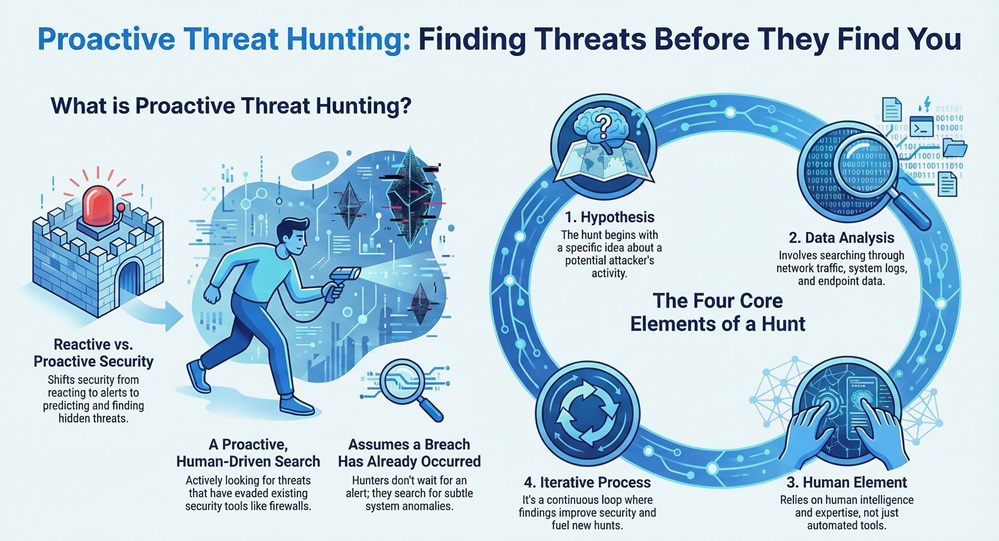
    Threat hunting can be understood as the practice of proactively and iteratively searching through networks and systems to detect advanced threats that target an organization. The goal of cyber threat hunting is to find hidden threats that have bypassed automated security controls, such as firewalls and antivirus software.
     

    what is threat hunting


    A threat hunter does not wait for a security alert. Instead, they assume a breach has already happened. The hunter uses this assumption to look for anomalies, which are small deviations from normal network and system behavior. Threat hunting primarily relies on a deep understanding of the attacker's tactics, techniques, and procedures (TTPs).


    In simple words, what is threat hunting? It is like a detective systematically searching a house for a hidden intruder, even though the alarm system did not go off. This process ensures continuous improvement of your overall security system.


    Managed Threat Hunting


    Defining Key Concepts for Proactive Threat Hunting

    To understand proactive threat hunting fully, you must first know the key elements it comprises:


    • Hypothesis: A threat hunter always starts with a hypothesis. This is a simple idea that a specific type of attack or activity might be present in the environment.
    • Data Analysis: Threat hunting relies heavily on security data. This includes log data, network traffic, endpoint data, and user activity records.
    • Human Element: This process is human-driven. Automated tools collect the data, but human intelligence and domain expertise are the real driving forces behind successful hunts.
    • Iterative Process: Threat hunting is a continuous loop. Finding a threat leads to new intelligence, which then feeds into better security controls and new hypotheses for the next hunt.


    Threat Hunting vs. Threat Intelligence: Know the Difference

    Often, people confuse threat hunting with threat intelligence. While both play a vital role in cyber security, they are distinct functions that complement each other. Let us now discuss the differences.


    Basis for ComparisonThreat HuntingThreat Intelligence
    Primary ActionProactive search for threats already in the network.Collection and analysis of information about potential external threats.
    FocusInternal network data, system logs, and anomalies.External attacker TTPs, malware families, and campaigns.
    GoalTo find and remove hidden threats inside the environment.To inform security decisions and improve defenses before an attack.
    Main OutputNewly discovered threats, indicators of compromise (IOCs).Contextualized reports, TTPs, and actionable defensive advice.
    DriverHuman-driven curiosity and security analyst expertise.Automated feeds, external research, and data from third parties.


    Threat hunting relies on threat intelligence. Threat intelligence provides the context—the what and how of the attacks happening outside—which helps the threat hunter formulate better hypotheses about the where and if of an attack inside your network.


    How Threat Intelligence Aids Cyber Threat Hunting?

    Cyber threat hunting is often based on the information provided by threat intelligence. The intelligence feeds the hunt in various ways:


    1. Hypothesis Generation: Threat intelligence may reveal that a specific group targets your industry using a new backdoor. This knowledge helps the hunter create a hypothesis: "An attacker is using [New Backdoor Name] to gain persistence on our servers."
    2. Focusing the Search: It identifies the relevant Indicators of Compromise (IOCs) or TTPs. For example, knowing that a certain malware uses a specific registry key for startup allows the hunter to search for that key quickly.
    3. Prioritization: Threat intelligence determines which threats pose the most risk, allowing the threat hunting team to prioritize their efforts on the most critical systems or likely attack vectors.


    Also Read: Unified Threat Management (UTM): Key Security Functions


    Threat Hunting Process

    The threat hunting process is not a random search. It is a structured methodology that ensures thoroughness and repeatability. Threat hunting is a continuous cycle.


    The following are the sequential steps that constitute a complete threat hunting process:


    1. Develop a Hypothesis

    Threat hunting always begins with an assumption. This assumption is the hypothesis. The hypothesis typically arises from three primary sources:

    • Threat Intelligence: Example: "We hypothesize that a spear-phishing campaign recently targeting our sector has led to compromised user credentials on our internal systems."
    • Indicators of Compromise (IOCs): Example: "We hypothesize that a specific file hash from a recent industry-wide advisory is present on at least one of our endpoints."
    • Baseline Analysis: Example: "We hypothesize that unauthorized administrative tool usage is occurring because a user's normal application process deviates from the established baseline."


    2. Formulate Queries and Acquire Data

    Once the hypothesis is ready, the hunter must determine what data they need to test it. The threat hunting process requires access to vast amounts of data. This stage involves:


    • Selecting Data Sources: Identify the necessary data, such as Proxy Logs, DNS Logs, Endpoint Detection and Response (EDR) data, or Firewall Logs.
    • Developing Search Queries: The hunter writes specific, technical queries for their security information and event management (SIEM) system or data lakes. These queries aim to find the needles of anomalous activity in the haystack of normal data.


    3. Analyze Data and Investigate

    This is where the actual cyber threat hunting takes place. The hunter runs the queries and starts reviewing the results.


    • Filtering and Normalization: The hunter must refine the search results to eliminate false positives. The hunter compares the data against the known baseline of normal network behavior.
    • Investigating Anomalies: Any result that deviates from the normal behavior is an anomaly. The hunter then deep dives into these anomalies to understand if they represent a legitimate threat or just benign system noise. Threat hunting examples often show how a slight increase in outbound traffic leads to discovering a command-and-control channel.


    4. Response and Remediation

    When the hunter successfully discovers a malicious activity, the process must immediately shift to response.


    • Containment: Isolate the affected system or user account quickly to prevent the threat from spreading further within the network.
    • Eradication: Remove the threat entirely, including any backdoors, persistence mechanisms, and malware files.
    • Recovery: Bring the affected systems back to a secure and operational state.


    5. Enrichment and Improvement

    The final and most crucial step ensures that the hunt pays forward. This stage is about improving the security posture.


    • Develop New Signatures: Create new security alerts (signatures, rules) based on the specific TTPs discovered during the hunt. This ensures automated tools catch similar attacks in the future.
    • Refine the Hypothesis: Document the findings and use the new knowledge to create more sophisticated hypotheses for the next proactive threat hunting cycle.


     What are Threat Hunting Techniques?

    Effective threat hunting relies on a variety of techniques that allow the hunter to approach the problem from different angles. Knowing what are threat hunting techniques is essential for any security team.


    1. Indicator of Compromise (IOC)-Based Hunting

    This is the most basic form of threat hunting. It focuses on known bad artifacts.


    • Technique:Threat hunting teams use IOCs, such as specific file hashes, IP addresses, or domain names from external threat intelligence, to search their internal data.
    • Advantage:Threat hunting using this technique is fast, easy to automate, and confirms known infections quickly.
    • Limitation: It only catches threats that have been previously identified. Sophisticated attackers change their IOCs often.


    2. Anomaly-Based Hunting

    This technique focuses on finding any activity that deviates from what is considered normal behavior.


    • Technique: The hunter establishes a baseline of "normal" for systems, applications, or users. They then search for spikes in data transfer, unusual file access times, or login attempts from unexpected locations.
    • Example: A user account that normally logs in at 9:00 AM suddenly logs in at 2:00 AM and attempts to access the HR database. This anomaly triggers an investigation.


    3. TTP-Based Hunting

    This is the most advanced and effective type of threat hunting. It focuses on the attacker's methods rather than simple file names or IP addresses.


    • Technique:Cyber threat hunting teams use frameworks like the MITRE ATT&CK knowledge base to hypothesize. The hunter searches for the specific way an attack is performed.
    • Example: An attacker might use PowerShell to execute code without writing it to the disk. The hunter would search for any suspicious PowerShell execution patterns, not just a specific malicious file name. Threat hunting techniques that are TTP-based are highly effective against zero-day and custom malware.


    4. Statistical or Cluster Analysis

    This technique involves using data science methods to group similar events and identify outliers.


    • Technique:Threat hunting uses tools that perform clustering algorithms on log data, such as DNS queries. They look for clusters of activity that might be indicative of a remote administration tool or a C2 (Command and Control) channel.
    • Advantage:Threat hunting can find entirely new, unknown threats that no one has identified before.


    Also Read: Threat Modeling in Cyber Security - Process, STRIDE & Benefits


    Benefits of Threat Hunting for Your Cyber Security

    Threat hunting in cyber security is an investment that provides significant returns beyond just finding threats. You should implement a proactive threat hunting program for many reasons.


    1. Reduces the Attacker’s Dwell Time

    Dwell time is the amount of time an attacker stays inside your network before you detect them. Threat hunting helps to drastically minimize this time.


    • Threat hunting actively finds and removes threats that would otherwise remain hidden for months.
    • Shorter dwell time means less data theft and less system damage.


    2. Enhances Security Tool Effectiveness

    Every successful hunt provides crucial intelligence that you can use to tune your existing security defenses.


    • You can create new rules and signatures for your SIEM or EDR tools based on the newly discovered IOCs or TTPs.
    • This makes your automated tools smarter and more effective at catching future attacks.


    3. Improves Organizational Understanding of Risk

    By performing cyber threat hunting, you gain a real-world understanding of your network's vulnerabilities.


    • Threat hunting often exposes misconfigurations, broken logging mechanisms, and gaps in your security architecture.
    • This knowledge allows you to prioritize which fixes will have the biggest security impact.


    4. Fosters a Stronger Security Team

    Threat hunting requires advanced skills, which naturally develops your security analysts.


    • It moves your team from simple alert responders to proactive security researchers.
    • This constant cycle of research and discovery keeps the team engaged and improves their overall expertise.


    Right Tools for Threat Hunting

    You require specialized threat hunting tools to analyze massive volumes of security data. While the hunter's skill is paramount, the right tools make the process efficient.


    1. Security Information and Event Management (SIEM)

    The SIEM system is the core repository for all your log data.


    • Function: It aggregates logs from firewalls, endpoints, servers, and applications into one central place.
    • Role in Threat Hunting: Threat hunting uses the SIEM for large-scale searching and running the complex queries defined in the hypothesis step.


    2. Endpoint Detection and Response (EDR)

    EDR tools focus specifically on activity at the endpoint level (laptops, servers, desktops).


    • Function: They provide rich, behavioral data about every process, file, and network connection on the host.
    • Role in Threat Hunting: Threat hunting relies on EDR data for deep-dive investigations, especially for TTP-based hunts like searching for suspicious process injection or in-memory attacks.


    3. Network Traffic Analysis (NTA) Tools

    NTA tools capture and analyze all traffic flowing across the network.


    • Function: They help detect C2 (Command and Control) traffic, lateral movement, and data exfiltration.
    • Role in Threat Hunting: Threat hunting uses NTA to look for anomalies in communication patterns, such as unusual protocols, high-frequency DNS lookups, or communication with known bad IP addresses.


    4. User and Entity Behavior Analytics (UEBA)

    UEBA tools use machine learning to profile the standard behavior of users and entities.


    • Function: They alert when a user or system acts significantly outside of its learned normal baseline.
    • Role in Threat Hunting: Threat hunting uses UEBA to generate hypotheses about compromised user accounts or insider threats by flagging unusual access patterns or data volumes.


    Also Read: Cyber Threat Intelligence (CTI) in Cybersecurity


    Managed Threat Hunting

    Implementing an in-house cyber threat hunting team requires significant investment in highly skilled personnel, advanced tools, and ongoing training. Many organizations choose managed threat hunting as an effective alternative.


    Managed threat hunting is a service where a third-party security provider performs the proactive hunting activities on your behalf. Managed threat hunting gives you access to an elite team of expert hunters and sophisticated toolsets without the high overhead cost.


    Why Choose Managed Threat Hunting?

    • Expertise Access: You immediately gain a team with deep, current knowledge of the latest global attacker TTPs.
    • 24/7 Coverage: Threats do not keep business hours. A managed threat hunting service ensures continuous, round-the-clock monitoring and hunting.
    • Rapid Deployment: You can implement a proactive threat hunting program almost instantly, rather than spending months hiring and training an internal team.
    • Cost Efficiency: Managed threat hunting reduces the need to purchase and maintain expensive security hardware and software licenses.


    Conclusion

    Threat hunting empowers organizations to shift from passive defense to proactive offense, assuming breaches have occurred and systematically seeking hidden adversaries. By leveraging hypothesis-driven searches, behavioral analysis, and advanced tools like EDR and SIEM, hunters uncover sophisticated threats that evade automated detections. 


    This human-led approach reduces attacker dwell time, enhances incident response, and strengthens overall resilience. Implementing threat hunting—whether in-house or managed—transforms your security posture, minimizing risks and ensuring long-term protection. Invest in threat hunting today to stay ahead of tomorrow’s threats.


    Your Security Matters Reach FSD-Tech
     

    threat hunting infographic


    Key Takeaways on Cyber Threat Hunting

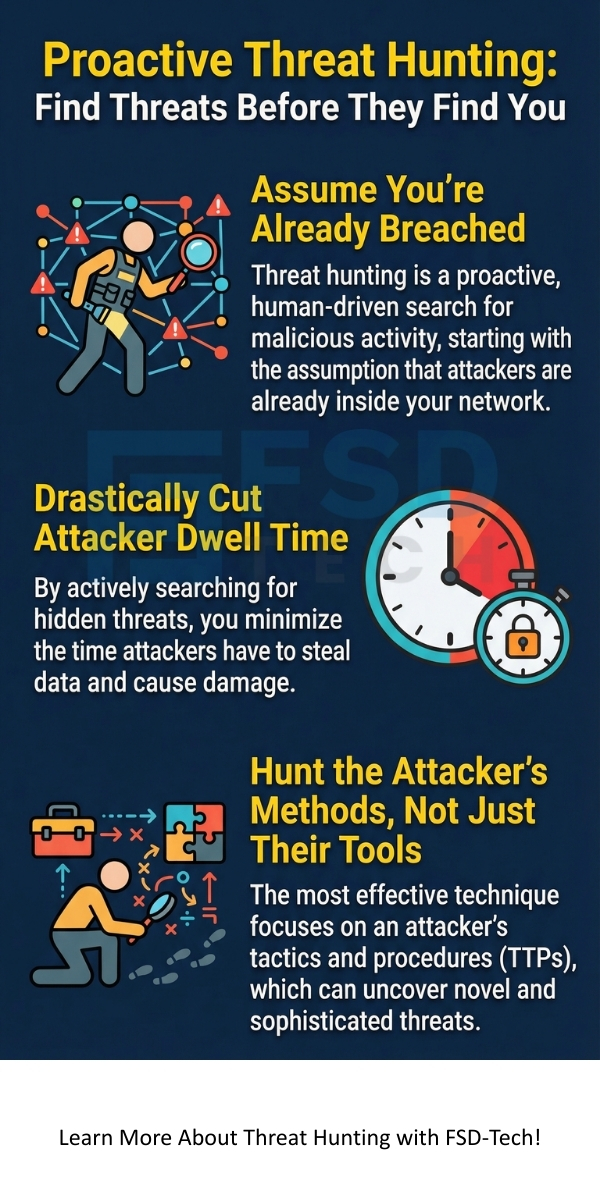
    Cyber threat hunting is a vital role in modern cyber security. It is a proactive and human-driven process that assumes your network is already compromised and seeks to find the evidence.


    • Threat Hunting is proactive; it does not wait for an alert to go off.
    • The Threat Hunting Process begins with a well-defined hypothesis, followed by data acquisition, analysis, and a structured response.
    • TTP-Based Hunting is the most effective approach as it focuses on how the attacker operates, not just what they use.
    • Benefits of Threat Hunting include reducing attacker dwell time, strengthening security tools, and improving the security team's skills.


    Frequently Asked Questions About Threat Hunting

    What is the main goal of threat hunting?

    The main goal of threat hunting is to proactively search for, identify, and contain malicious activity that has bypassed existing automated security measures. Its aim is to significantly reduce an attacker's dwell time in your environment.


    What is the difference between a threat hunt and an investigation?

    A threat hunt starts with a hypothesis and is proactive, looking for unknown, hidden threats. An investigation starts with an alert (an IOC or a rule firing) and is reactive, determining the scope and impact of a known, confirmed incident.


    Do I need threat intelligence to start threat hunting?

    Yes, you should use threat intelligence. While you can start with baseline and anomaly hunting, threat intelligence provides the necessary external context about the latest TTPs. This information helps your threat hunting team formulate high-value, specific hypotheses, making the hunts much more efficient and effective.


    What skill set does a professional threat hunter require?

    A professional threat hunter needs a blend of skills. They need strong analytical abilities, a deep understanding of networking and operating systems, expertise in scripting (e.g., Python), and the ability to formulate complex search queries (e.g., KQL, SPL) for SIEM systems. Cyber threat hunting is a demanding role.

    What is Threat Hunting? Proactive Cyber Security

    About The Author

    Surbhi Suhane

    Surbhi Suhane is an experienced digital marketing and content specialist with deep expertise in Getting Things Done (GTD) methodology and process automation. Adept at optimizing workflows and leveraging automation tools to enhance productivity and deliver impactful results in content creation and SEO optimization.

    Like This Story?

    Share it with friends!

    Subscribe to our newsletter!

    Atera

    (55)

    Cato Networks

    (121)

    ClickUp

    (72)

    FishOS

    (7)

    Miradore

    (21)

    PointGuard AI

    (9)

    Vembu

    (22)

    Xcitium

    (33)

    ZETA HRMS

    (79)

    Workflow Automation(8)

    Workforce Automation(1)

    AI Project Management(1)

    HR Data Automation(1)

    RMM(1)

    IT Workflow Automation(1)

    GCC compliance(4)

    IT security(2)

    Payroll Integration(2)

    IT support automation(3)

    procurement automation(1)

    lost device management(1)

    IT Management(5)

    IoT Security(2)

    Cato XOps(2)

    IT compliance(4)

    Workflow Management(1)

    Task Automation(1)

    Kubernetes lifecycle management(2)

    AI-powered cloud ops(1)

    OpenStack automation(1)

    SMB Security(8)

    Data Security(1)

    MDR (Managed Detection & Response)(4)

    MSP Automation(3)

    Atera Integrations(2)

    XDR Security(2)

    Ransomware Defense(3)

    SMB Cyber Protection(1)

    HR Tech Solutions(1)

    Zero Trust Network Access(3)

    Zero Trust Security(2)

    Endpoint Management(1)

    SaaS Security(1)

    Payroll Automation(5)

    IT Monitoring(2)

    Xcitium EDR SOC(15)

    Ransomware Protection GCC(1)

    Network Consolidation UAE(1)

    M&A IT Integration(1)

    MSSP for SMBs(1)

    Managed EDR FSD-Tech(1)

    Antivirus vs EDR(1)

    FSD-Tech MSSP(25)

    SMB Cybersecurity GCC(1)

    Ransomware Protection(3)

    Cybersecurity GCC(12)

    Endpoint Security(1)

    Endpoint Protection(1)

    Data Breach Costs(1)

    SMB Cybersecurity(8)

    Zero Dwell Containment(31)

    Managed Security Services(2)

    Xcitium EDR(30)

    Hybrid Backup(1)

    Cloud Backup(1)

    Backup & Recovery(1)

    pointguard ai(4)

    vembu(9)

    backup myths(1)

    SMB data protection(9)

    disaster recovery myths(1)

    Disaster Recovery(4)

    Vembu BDR Suite(19)

    GCCBusiness(1)

    DataProtection(1)

    Secure Access Service Edge(4)

    GCC HR software(20)

    Miradore EMM(15)

    Cato SASE(7)

    Cloud Security(9)

    GCC Education(1)

    Hybrid Learning(1)

    Talent Development(1)

    AI Compliance(2)

    AI Governance(4)

    AI Cybersecurity(12)

    AI Risk Management(1)

    AI Security(2)

    GCC business security(1)

    GCC network integration(1)

    compliance automation(5)

    GCC cybersecurity(3)

    education security(1)

    Miradore EMM Premium+(5)

    App management UAE(1)

    BYOD security Dubai(8)

    MiddleEast(1)

    HealthcareSecurity(1)

    Team Collaboration(1)

    IT automation(12)

    Zscaler(1)

    SD-WAN(7)

    HR Integration(4)

    Cloud Networking(4)

    device management(9)

    VPN(1)

    ZeroTrust(2)

    RemoteWork(1)

    MPLS(1)

    share your thoughts

    Full Duplex Communication

    What is Full Duplex Communication? Full vs Half Duplex

    🕓 February 13, 2026

    wide-area-network-wan

    What is a Wide Area Network (WAN)? Architecture & Types Explained

    🕓 February 13, 2026

    Latency in Networking

    What is Latency in Networking? Definition, Causes & Solutions

    🕓 February 12, 2026

    Decoded(109)

    Cyber Security(118)

    BCP / DR(22)

    Zeta HRMS(78)

    SASE(21)

    Automation(72)

    Next Gen IT-Infra(118)

    Monitoring & Management(76)

    ITSM(22)

    HRMS(21)

    Automation(24)