HomeNext Gen IT-InfraMonitoring & ManagementCyber SecurityBCP / DRAutomationDecoded
Next Gen IT-Infra
Cato’s SASE Supports Cybersecurity Skills Development

How Cato’s SASE Supports Cybersecurity Skills Development

🕓 April 8, 2025

How SASE Supports the Security Needs of SMBs

How SASE Supports the Security Needs of SMBs

🕓 February 9, 2025

Attack Surface Reduction with Cato’s SASE

Attack Surface Reduction with Cato’s SASE

🕓 February 10, 2025

SASE for Digital Transformation in UAE

SASE for Digital Transformation in UAE

🕓 February 8, 2025

Monitoring & Management
Understanding Atera’s SLA Management

Understanding Atera’s SLA Management

🕓 February 7, 2025

Cost-Performance Ratio: Finding the Right Balance in IT Management Networks

Cost-Performance Ratio: Finding the Right Balance in IT Management Networks

🕓 June 16, 2025

Customizing Atera with APIs

Customizing Atera with APIs

🕓 March 3, 2025

Power Up Your IT Team’s Strategy with Atera’s Communication Tools

Power Up Your IT Team’s Strategy with Atera’s Communication Tools

🕓 February 8, 2025

Cyber Security
Visual guide showing Cato CMA interface for configuring Internet and WAN firewall rules, enabling threat protection, and monitoring security events in real time for UAE IT teams.

Enforcing Firewall and Threat Protection Policies in Cato

🕓 July 25, 2025

Isometric illustration of professionals managing network performance, bandwidth analytics, and cloud-based optimization around the Cato Networks platform, symbolizing bandwidth control and QoS visibility.

Mastering Bandwidth Control and QoS in Cato Networks

🕓 July 26, 2025

Illustration of the Cato Cloud architecture showing its role in delivering SASE for secure, optimized global connectivity.

Understanding the Cato Cloud and Its Role in SASE

🕓 January 29, 2025

Global network backbone powering Cato SASE solution for secure, high-performance connectivity across regions.

Global Backbone: The Engine Powering Cato’s SASE Solution

🕓 January 30, 2025

BCP / DR
Illustration showing diverse business and IT professionals collaborating with cloud, backup, and security icons, representing Vembu use cases for SMBs, MSPs, and IT teams.

Who Uses Vembu? Real-World Use Cases for SMBs, MSPs & IT Teams

🕓 July 12, 2025

Graphic showcasing Vembu’s all-in-one backup and disaster recovery platform with icons for cloud, data protection, and business continuity for IT teams and SMBs.

What Is Vembu? A Deep Dive Into the All in One Backup & Disaster Recovery Platform

🕓 July 6, 2025

Illustration showing Vembu backup and disaster recovery system with cloud storage, server racks, analytics dashboard, and IT professionals managing data.

The Rising Cost of Data Loss: Why Backup Is No Longer Optional?

🕓 August 14, 2025

3D isometric illustration of cloud backup and data recovery infrastructure with laptop, data center stack, and digital business icons — FSD Tech

RPO & RTO: The Heart of Business Continuity

🕓 August 15, 2025

Automation
Cross-Functional Collaboration with ClickUp

Fostering Cross-Functional Collaboration with ClickUp for Multi-Departmental Projects

🕓 February 11, 2025

ClickUp Project Reporting

Revolutionizing Enterprise Reporting with ClickUp’s Advanced Analytics and Dashboards

🕓 June 16, 2025

ClickUp’s Design Collaboration and Asset Management Tools

Empowering Creative Teams with ClickUp’s Design Collaboration and Asset Management Tools

🕓 February 26, 2025

ClickUp Communication and Collaboration Tools

ClickUp Communication and Collaboration Tools: Empowering Remote Teams

🕓 March 12, 2025

Decoded
Multi-Factor Authentication (MFA)

Multi-Factor Authentication (MFA): All You Need to Know

🕓 December 7, 2025

L3 Switch

What Is an L3 Switch? L2 vs L3 & Why You Need Layer 3?

🕓 December 8, 2025

IPSec

IPSec Explained: Protocols, Modes, IKE & VPN Security

🕓 December 3, 2025

 Datagram Transport Layer Security (DTLS)

What is Datagram Transport Layer Security (DTLS)? How it works?

🕓 December 4, 2025

    Subscribe to our newsletter!

    About Us

    Follow Us

    Copyright © 2024 | Powered by 

    Cato SASE Architecture

    Inside Cato’s SASE Architecture: A Blueprint for Modern Security

    🕓 January 26, 2025

    Enterprise Data Security and Privacy with ClickUp

    Ensuring Enterprise Data Security and Privacy with ClickUp

    🕓 February 9, 2025

    DDoS protection SASE

    DDoS Protection and Cato’s Defence Mechanisms

    🕓 February 11, 2025

    Table of Contents

    What Is Privilege Escalation? Types & Prevention

    Surbhi Suhane
    December 27, 2025
    Comments
    Privilege Escalation

    Are you worried about unauthorized access to your computer systems? Do you want to strengthen your cybersecurity defenses? You know that hackers constantly look for weak spots. One of the most dangerous attack methods they use is privilege escalation. 


    This term, privilege escalation, refers to a critical step in almost any successful cyberattack. You need to understand this concept completely to protect your valuable assets.


    This detailed guide helps you grasp exactly what privilege escalation is. We show you the different types of attacks and explain the methods hackers use. We also provide practical defense strategies so you can secure your environment. We focus on giving you clear, actionable information—no fluff, just facts.


    Let us understand privilege escalation in simple terms, a core concept in the field of cybersecurity.


    What is Privilege Escalation?

    Privilege escalation can be understood as the act of gaining authorization or access to resources that a user or application is not supposed to have. In other words, a cyber attacker exploits a vulnerability to move from a lower level of access (like a regular user) to a higher level of access (like an administrator or root user).


    This unauthorized rise in permissions plays a vital role in most breaches. Why? Because a standard user on your system cannot do much damage. However, a user with elevated privileges can install malicious software, change system settings, access sensitive data, and even create new administrative accounts.
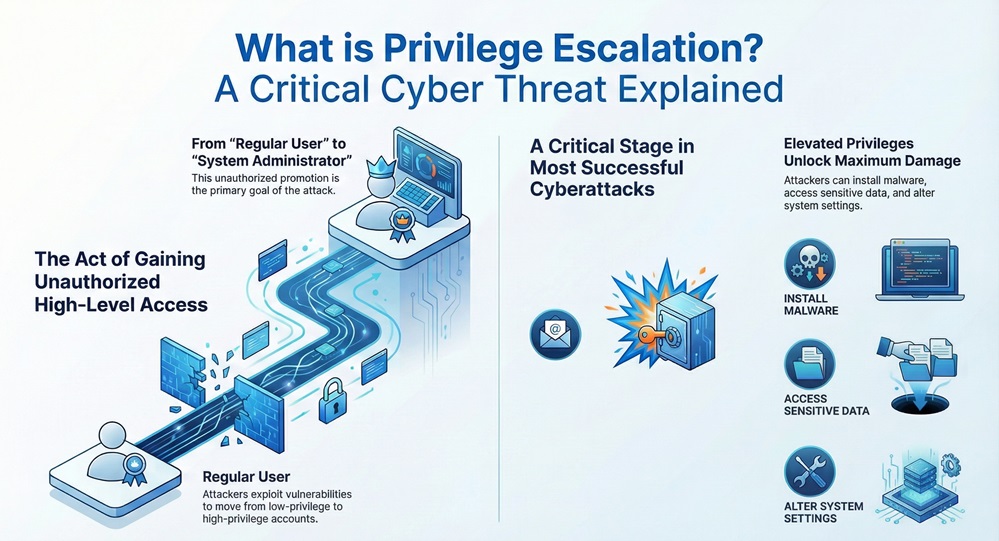
     

    privilege escalation infographic


    Privilege escalation is nothing but an exploitation. It aims at moving past the initial access point to gain maximum control over the target system or network. This is often the second stage in a successful attack chain, right after the hacker gains initial access.


    Proactive Privilege Defense Contact our team


    Key Terms You Need to Know

    To understand privilege escalation deeply, you must know a few essential terms.


    • Privilege: This term refers to the permissions a user or process has on a system. Examples include permission to read a file, modify a setting, or execute a program.
    • User Account: This is the identity that a person or service uses to interact with the system. Accounts usually have different levels of privilege.
    • Vulnerability: This is a flaw or weakness in a system's design, implementation, or configuration. A privilege escalation attack exploits this weakness.
    • Exploit: This refers to a piece of software, data, or sequence of commands that takes advantage of a vulnerability to cause unintended or unanticipated behavior on a computer system. An exploit leads to unauthorized privilege.
    • Root/Administrator: This signifies the highest level of privilege on a system. The Root user in Linux or the Administrator in Windows has complete control over the operating system and its resources.


    Also Read: What is Credential Stuffing? Detection and Prevention


    Two Main Types of Privilege Escalation

    When discussing privilege escalation, security experts mainly categorize the attacks into two primary types. The distinction is crucial for both attackers and defenders.


    Let us explore these two types in detail.


    1. Vertical Privilege Escalation


    Vertical privilege escalation refers to an attack where a user gains a higher level of privilege than their current account possesses.


    • Goal: The primary objective is to move from a standard, low-privilege user to a high-privilege user, like an administrator or "root" user.
    • Example: A hacker first compromises a simple web server account. Due to a system misconfiguration, they can exploit a service to run commands as the "System" user. This action elevates their privileges vertically.
    • Consequence: This type of privilege escalation grants the attacker near-total control of the system. This means they can install malware, steal all data, and create backdoors.


    2. Horizontal Privilege Escalation


    Horizontal privilege escalation refers to an attack where a user gains access to another user's account at the same level of privilege.


    • Goal: The objective is to access information or resources owned by another user who has the same permissions as the attacker.
    • Example: A user logs into an online banking portal. Due to a flaw, the user can change a single parameter in the web address (URL) to view the account details of a different customer. Both accounts have "customer" privileges.
    • Consequence: While the hacker does not gain "root" access, they gain unauthorized access to another person's private data, which is a major security breach.


    The table below clarifies the key differences between these two types of privilege escalation.


    Basis for ComparisonVertical Privilege EscalationHorizontal Privilege Escalation
    Goal of AttackMoving from low privilege to high privilege (e.g., User to Admin).Moving from one user's account to another user's account at the same privilege level.
    Access GainedSuperior access and control over the entire system.Peer-level access to another specific user's data or resources.
    ExampleExploiting an unpatched kernel vulnerability to become root.Changing a session ID to hijack another user's shopping cart or bank session.
    System ImpactComplete system compromise and data theft across all users.Privacy violation and data theft specific to the targeted user.


    How Do Attackers Perform Privilege Escalation?

    Attackers use several methods to perform privilege escalation. These methods rely on finding and exploiting flaws. The process generally starts with reconnaissance to identify potential vulnerabilities.

    Let us now discuss the most common privilege escalation techniques.


    1. Exploiting System and Kernel Vulnerabilities


    Every operating system (OS) uses a kernel, which acts as the core controller. When the OS has a kernel vulnerability, an attacker can exploit it to run malicious code with the highest possible privilege.


    • Vulnerability Pattern: Due to an error in the kernel code, a low-privilege process can make a request that the kernel improperly processes.
    • Result: This improper processing leads to a system crash or, worse, allows the process to execute code in the kernel space. When this occurs, the code automatically runs with root privilege, a common form of vertical privilege escalation.


    What is the mode of exploiting unpatched systems? Attackers often use public exploit databases to find known, unpatched vulnerabilities in older software versions.


    2. Misconfigurations and Weak Service Permissions


    System administrators sometimes make mistakes when setting up systems, which creates openings for privilege escalation. This category is where most attacks happen.


    a. File and Folder Permissions


    • Technique: The attacker searches for executable files or scripts that a low-privilege user can modify. If a regular user can write to an administrative script, they can inject their own malicious code into it.
    • Action: When an administrator runs the script, the malicious code executes with the administrator's elevated privileges, facilitating privilege escalation.


    b. Services and Scheduled Tasks


    • Technique: Many systems run services (background programs) with high privileges (like System or Root). If the binary file of such a service or the script it runs has weak permissions, a regular user can replace it.
    • Action: The next time the system starts the service, it runs the attacker's malicious program with the highest privilege, thus achieving vertical privilege escalation.


    3. Password and Credential Harvesting


    Attackers always look for saved passwords or reusable credentials. This technique helps in privilege escalation in a direct way.


    • Goal: The aim is to find stored credentials, such as passwords in configuration files, system memory, or the registry.
    • Example: A developer saves an administrator's username and password in a text file inside an application folder. A standard user can read this file and gain administrator privilege by simply logging in again with the stolen credentials.
    • Key Insight: This process is often an indirect privilege escalation, as the attacker is not exploiting a code flaw but a security practice flaw.


    4. DLL Hijacking (On Windows Systems)


    When a Windows program starts, it often loads required support files called Dynamic-Link Libraries (DLLs). This loading process often follows a specific search path.


    • Technique: If a program attempts to load a DLL from an unsecured location, an attacker can place a malicious DLL with the same name in that location.
    • Consequence: The legitimate program (which often runs with high privilege) loads and executes the attacker's malicious DLL first. This action gives the attacker the same high privilege as the original program.


    5. Path Interception (Linux/macOS)


    In Linux and similar systems, the system searches the PATH environment variable for executable commands.


    • Technique: An attacker modifies the PATH variable of a low-privilege user so that a directory they control is checked before a system directory.
    • Action: If a user with root privilege then executes a simple command, the system might accidentally execute a malicious program placed by the attacker, achieving privilege escalation.


    Also Read: Multi-Factor Authentication (MFA): All You Need to Know


    Strategies for Privilege Escalation Prevention

    Protecting against privilege escalation requires a comprehensive approach. You must continuously look for flaws in your configuration and ensure that system components follow the principle of least privilege.


    1. Implement the Principle of Least Privilege (PoLP)


    The Principle of Least Privilege (PoLP) serves as the most basic defense against privilege escalation.


    • What it means: Users and programs must have only the minimum privileges necessary to perform their work.
    • Action: If an application needs only to read a file, you should not give it the privilege to write or delete that file. If a user only needs to check emails, they should not have system-wide administration rights.
    • Result: Even if an attacker compromises a low-privilege account, they cannot cause significant damage. This action significantly reduces the impact of privilege escalation.


    2. Patching and Regular Updates


    As we know that many attacks exploit known, unpatched vulnerabilities, regular patching plays a vital role in prevention.


    • Action: System administrators must monitor vendor announcements and apply security updates to operating systems, kernels, and all installed applications immediately.
    • Key Focus: This specifically prevents the first and most common type of privilege escalation—exploiting known OS kernel flaws.


    3. Strict Permission Management


    You must strictly manage the permissions on your files and system resources.


    • Action: Regularly audit permissions. Ensure that only high-privilege users can modify system files and configuration files for administrative services.
    • Checking for Weaknesses: Search for files owned by an administrator that a standard user can still write to. This simple check can prevent many common privilege escalation attempts.
    • Question: But, how does proper permission management help? It immediately stops an attacker from injecting code into critical files, thus preventing escalation.


    4. Application Control and Whitelisting


    This defense technique involves controlling what software can run on a system.


    • Action: Implement application whitelisting. This means you only allow a pre-approved list of programs to run. All other programs are blocked by default.
    • Consequence: This completely prevents an attacker from uploading and running their own tools or exploits on your system, which eliminates a key step in privilege escalation.


    5. Strong Password and Credential Management


    Since password harvesting is a method of privilege escalation, you must use strong measures for credentials.


    • Action: Enforce strong, complex passwords. Use a privileged access management (PAM) system to store and control all high-level credentials securely.
    • Two-Factor Authentication (2FA): Always require 2FA for administrative accounts. Even if an attacker steals the password, they cannot log in without the second factor. This acts as a powerful barrier against horizontal and vertical privilege escalation.


    6. Separation of Privileges


    This method works on the principle that no single process should have complete control over a system.


    • Action: For critical services, separate the process into multiple parts. A small, non-critical part handles network communication, while a completely separate, small part handles the operations that require high privilege.
    • Example: OpenSSH, a popular network protocol, uses privilege separation. The majority of the code runs with low privileges, and only a minimal section runs with root access. This action significantly limits the damage a single exploit can do.


    Conclusion

    Privilege escalation represents a fundamental threat where an attacker seeks unauthorized elevated privileges to gain maximum control over a system. This technique, whether vertical (low to high access) or horizontal (peer-to-peer access), depends entirely on exploiting a vulnerability or a system misconfiguration. You must implement the Principle of Least Privilege (PoLP) and maintain rigorous patching schedules. 


    Continuous auditing of permissions and employing defense mechanisms like privilege separation are crucial steps. You need to take decisive action now. We help you secure your digital foundation by eliminating vulnerabilities that enable privilege escalation. 


    Contact us today to schedule a privilege escalation risk assessment and start building a truly secure environment. Your company's data security is our highest priority, and we ensure that you remain in control, always.
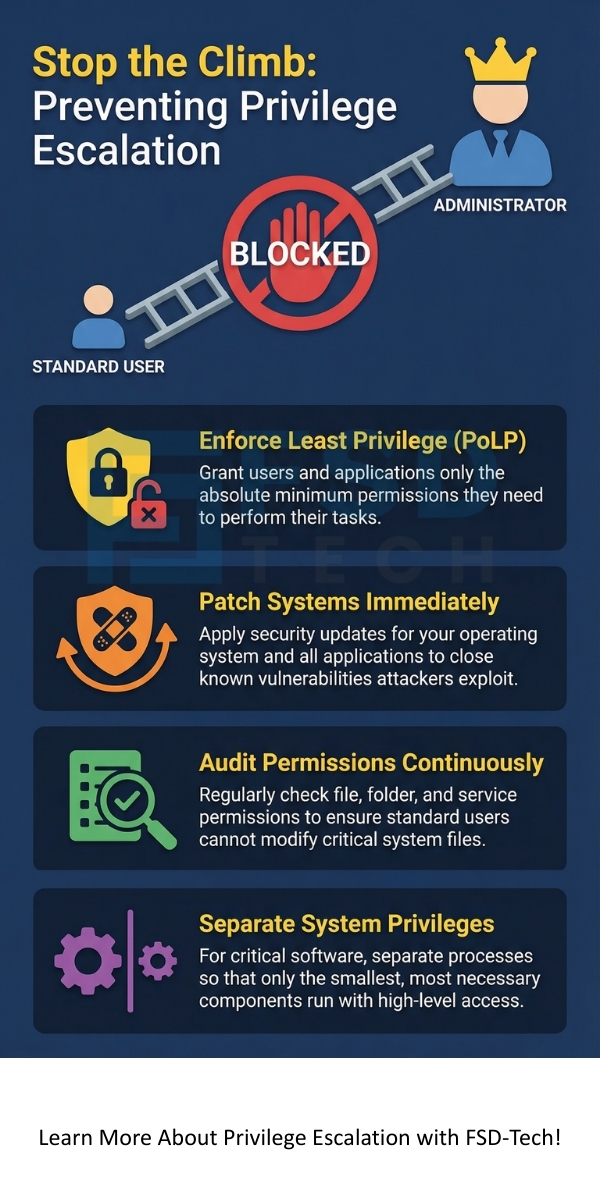
     

    privilege escalation


    Key Takeaways

    So, with the above discussion, we can say that privilege escalation is a severe threat, but it is one you can absolutely defend against. Remember these key points to strengthen your security posture:


    1. Embrace PoLP: Always enforce the Principle of Least Privilege. Give users only the minimum permissions they need. This action significantly reduces the attack surface.
    2. Patch Immediately: Apply security updates and patches immediately to fix known vulnerabilities. This simple step prevents the most common privilege escalation techniques.
    3. Audit Permissions: Continuously audit your file, folder, and service permissions. Ensure that no low-privilege user can write to a file that a high-privilege user executes.
    4. Separate Privileges: For critical software, implement privilege separation so that only necessary components run with root access, limiting the potential impact of an exploit.


    Frequently Asked Questions About Privilege Escalation

    We know you have many questions about privilege escalation. Let us answer the most important ones.


    What is the difference between an exploit and privilege escalation?

    An exploit refers to the specific code or technique that takes advantage of a security flaw. Privilege escalation is the result or the outcome of using that exploit. You use an exploit to achieve privilege escalation.


    How is a broken access control related to privilege escalation?

    Broken access control is the primary cause of many privilege escalation attacks. Access control determines what a user can and cannot do. When this control is "broken"—meaning the code allows a user to access resources they should not—the user has successfully performed privilege escalation. This directly relates to horizontal privilege escalation in web applications.


    Does privilege escalation only happen on servers?

    No. Privilege escalation can happen on any type of computing system—your personal laptop, a smartphone, network devices, and large cloud servers. The core concept remains the same: a user or process gains unauthorized elevated privileges.


    What is the best method to detect privilege escalation attacks?

    The best method is to use security information and event management (SIEM) tools. These tools continuously monitor all user and process activities. They look for suspicious events, such as a low-privilege user suddenly running administrative commands or a common application attempting to access highly sensitive files. This is where continuous security monitoring plays a vital role.

    What Is Privilege Escalation? Types & Prevention

    About The Author

    Surbhi Suhane

    Surbhi Suhane is an experienced digital marketing and content specialist with deep expertise in Getting Things Done (GTD) methodology and process automation. Adept at optimizing workflows and leveraging automation tools to enhance productivity and deliver impactful results in content creation and SEO optimization.

    Like This Story?

    Share it with friends!

    Subscribe to our newsletter!

    Atera

    (48)

    Cato Networks

    (111)

    ClickUp

    (64)

    FishOS

    (7)

    Miradore

    (21)

    PointGuard AI

    (9)

    Vembu

    (22)

    Xcitium

    (33)

    ZETA HRMS

    (66)

    Workflow Automation(5)

    Workforce Automation(1)

    AI Project Management(1)

    HR Data Automation(1)

    RMM(1)

    IT Workflow Automation(1)

    GCC compliance(4)

    IT security(2)

    Payroll Integration(2)

    IT support automation(2)

    procurement automation(1)

    lost device management(1)

    IT Management(5)

    IoT Security(2)

    Cato XOps(2)

    IT compliance(4)

    Task Automation(1)

    Workflow Management(1)

    AI-powered cloud ops(1)

    OpenStack automation(1)

    Kubernetes lifecycle management(2)

    SMB Security(8)

    Data Security(1)

    MDR (Managed Detection & Response)(4)

    Atera Integrations(2)

    MSP Automation(2)

    XDR Security(2)

    SMB Cyber Protection(1)

    Ransomware Defense(3)

    HR Tech Solutions(1)

    Zero Trust Network Access(3)

    Zero Trust Security(2)

    Endpoint Management(1)

    SaaS Security(1)

    Payroll Automation(5)

    IT Monitoring(2)

    Xcitium EDR SOC(15)

    Ransomware Protection GCC(1)

    M&A IT Integration(1)

    Network Consolidation UAE(1)

    MSSP for SMBs(1)

    Antivirus vs EDR(1)

    Ransomware Protection(3)

    Managed EDR FSD-Tech(1)

    FSD-Tech MSSP(25)

    SMB Cybersecurity GCC(1)

    Cybersecurity GCC(12)

    Endpoint Security(1)

    Data Breach Costs(1)

    Endpoint Protection(1)

    Managed Security Services(2)

    SMB Cybersecurity(8)

    Zero Dwell Containment(31)

    Xcitium EDR(30)

    Hybrid Backup(1)

    Cloud Backup(1)

    Backup & Recovery(1)

    pointguard ai(4)

    disaster recovery myths(1)

    backup myths(1)

    vembu(9)

    SMB data protection(9)

    Vembu BDR Suite(19)

    Disaster Recovery(4)

    DataProtection(1)

    GCCBusiness(1)

    Secure Access Service Edge(4)

    GCC HR software(14)

    Miradore EMM(15)

    Cato SASE(7)

    Cloud Security(8)

    Talent Development(1)

    AI Cybersecurity(12)

    AI Risk Management(1)

    AI Governance(4)

    AI Security(2)

    AI Compliance(2)

    GCC business security(1)

    GCC network integration(1)

    compliance automation(4)

    GCC cybersecurity(2)

    education security(1)

    App management UAE(1)

    BYOD security Dubai(8)

    Miradore EMM Premium+(5)

    HealthcareSecurity(1)

    MiddleEast(1)

    Team Collaboration(1)

    IT automation(10)

    Zscaler(1)

    SD-WAN(6)

    HR Integration(4)

    Cloud Networking(3)

    device management(9)

    RemoteWork(1)

    ZeroTrust(2)

    VPN(1)

    MPLS(1)

    Project Management(9)

    HR automation(16)

    share your thoughts

    Sandboxing

    What is Sandboxing in CyberSecurity? How It Works?

    🕓 December 27, 2025

    Privilege Escalation

    What Is Privilege Escalation? Types & Prevention

    🕓 December 27, 2025

    Threat Hunting

    What is Threat Hunting? Proactive Cyber Security

    🕓 December 26, 2025

    Decoded(39)

    Cyber Security(112)

    BCP / DR(22)

    Zeta HRMS(65)

    SASE(21)

    Automation(64)

    Next Gen IT-Infra(111)

    Monitoring & Management(69)

    ITSM(22)

    HRMS(21)

    Automation(24)









