HomeNext Gen IT-InfraMonitoring & ManagementCyber SecurityBCP / DRAutomationDecoded
Next Gen IT-Infra
Cato’s SASE Supports Cybersecurity Skills Development

How Cato’s SASE Supports Cybersecurity Skills Development

🕓 April 8, 2025

How SASE Supports the Security Needs of SMBs

How SASE Supports the Security Needs of SMBs

🕓 February 9, 2025

Attack Surface Reduction with Cato’s SASE

Attack Surface Reduction with Cato’s SASE

🕓 February 10, 2025

SASE for Digital Transformation in UAE

SASE for Digital Transformation in UAE

🕓 February 8, 2025

Monitoring & Management
Understanding Atera’s SLA Management

Understanding Atera’s SLA Management

🕓 February 7, 2025

Cost-Performance Ratio: Finding the Right Balance in IT Management Networks

Cost-Performance Ratio: Finding the Right Balance in IT Management Networks

🕓 June 16, 2025

Customizing Atera with APIs

Customizing Atera with APIs

🕓 March 3, 2025

Power Up Your IT Team’s Strategy with Atera’s Communication Tools

Power Up Your IT Team’s Strategy with Atera’s Communication Tools

🕓 February 8, 2025

Cyber Security
Illustration of the Cato Cloud architecture showing its role in delivering SASE for secure, optimized global connectivity.

Understanding the Cato Cloud and Its Role in SASE

🕓 January 29, 2025

Isometric illustration of professionals managing network performance, bandwidth analytics, and cloud-based optimization around the Cato Networks platform, symbolizing bandwidth control and QoS visibility.

Mastering Bandwidth Control and QoS in Cato Networks

🕓 July 26, 2025

Global network backbone powering Cato SASE solution for secure, high-performance connectivity across regions.

Global Backbone: The Engine Powering Cato’s SASE Solution

🕓 January 30, 2025

Illustration of team analyzing application traffic and usage insights on a large laptop screen using Cato’s dashboard, surrounded by network and cloud icons.

Cato Networks Application Visibility | Monitoring & Control

🕓 July 27, 2025

BCP / DR
Illustration showing diverse business and IT professionals collaborating with cloud, backup, and security icons, representing Vembu use cases for SMBs, MSPs, and IT teams.

Who Uses Vembu? Real-World Use Cases for SMBs, MSPs & IT Teams

🕓 July 12, 2025

Graphic showcasing Vembu’s all-in-one backup and disaster recovery platform with icons for cloud, data protection, and business continuity for IT teams and SMBs.

What Is Vembu? A Deep Dive Into the All in One Backup & Disaster Recovery Platform

🕓 July 6, 2025

Illustration showing Vembu backup and disaster recovery system with cloud storage, server racks, analytics dashboard, and IT professionals managing data.

The Rising Cost of Data Loss: Why Backup Is No Longer Optional?

🕓 August 14, 2025

3D isometric illustration of cloud backup and data recovery infrastructure with laptop, data center stack, and digital business icons — FSD Tech

RPO & RTO: The Heart of Business Continuity

🕓 August 15, 2025

Automation
Cross-Functional Collaboration with ClickUp

Fostering Cross-Functional Collaboration with ClickUp for Multi-Departmental Projects

🕓 February 11, 2025

ClickUp Project Reporting

Revolutionizing Enterprise Reporting with ClickUp’s Advanced Analytics and Dashboards

🕓 June 16, 2025

ClickUp’s Design Collaboration and Asset Management Tools

Empowering Creative Teams with ClickUp’s Design Collaboration and Asset Management Tools

🕓 February 26, 2025

ClickUp Communication and Collaboration Tools

ClickUp Communication and Collaboration Tools: Empowering Remote Teams

🕓 March 12, 2025

Decoded
Multi-Factor Authentication (MFA)

Multi-Factor Authentication (MFA): All You Need to Know

🕓 December 7, 2025

L3 Switch

What Is an L3 Switch? L2 vs L3 & Why You Need Layer 3?

🕓 December 8, 2025

IPSec

IPSec Explained: Protocols, Modes, IKE & VPN Security

🕓 December 3, 2025

 Datagram Transport Layer Security (DTLS)

What is Datagram Transport Layer Security (DTLS)? How it works?

🕓 December 4, 2025

    Subscribe to our newsletter!

    About Us

    Follow Us

    Copyright © 2024 | Powered by 

    Isometric illustration of a centralized executive dashboard platform connected to analytics panels, performance charts, security indicators, and strategic milestones, representing real-time business visibility and decision control within ClickUp.

    Executive Visibility in ClickUp – How CXOs Gain Real-Time Control Without Micromanaging

    🕓 February 13, 2026

    Cato SASE Architecture

    Inside Cato’s SASE Architecture: A Blueprint for Modern Security

    🕓 January 26, 2025

    Enterprise Data Security and Privacy with ClickUp

    Ensuring Enterprise Data Security and Privacy with ClickUp

    🕓 February 9, 2025

    Table of Contents

    What is a Wide Area Network (WAN)? Architecture & Types Explained

    Surbhi Suhane
    February 13, 2026
    Comments
    wide-area-network-wan

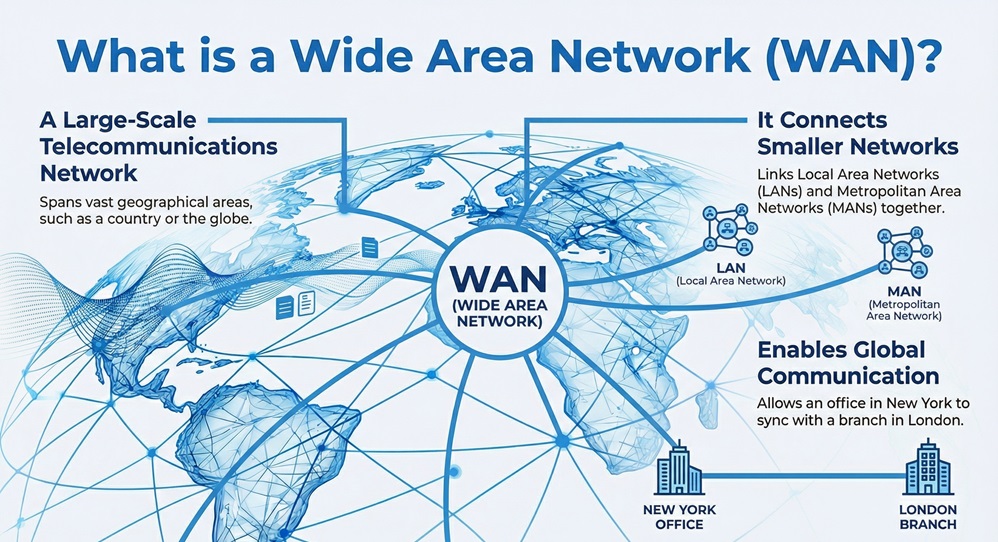
    A Wide Area Network (WAN) is a large-scale telecommunications network that spans a vast geographical area, such as a city, country, or the entire globe. It connects smaller networks, like Local Area Networks (LANs) and Metropolitan Area Networks (MANs), ensuring that computers in one location can communicate with those in another.


    To be honest, most of us use a Wide Area Network (WAN) every single day without even thinking about it. Have you ever wondered how an office in New York stays synced with a branch in London? Or how you can access a server halfway across the world in seconds? That is the power of a WAN at work. In my experience, understanding this technology is the first step toward grasping how the modern internet actually functions.


    Comparison Chart: WAN vs LAN

    Understanding a Wide Area Network (WAN) becomes much easier when you compare it to a Local Area Network (LAN). While one stays within a room, the other crosses borders.


    Basis for ComparisonLocal Area Network (LAN)Wide Area Network (WAN)
    MeaningA network connecting devices within a small area like a home or office.A network covering a large distance, often connecting multiple countries.
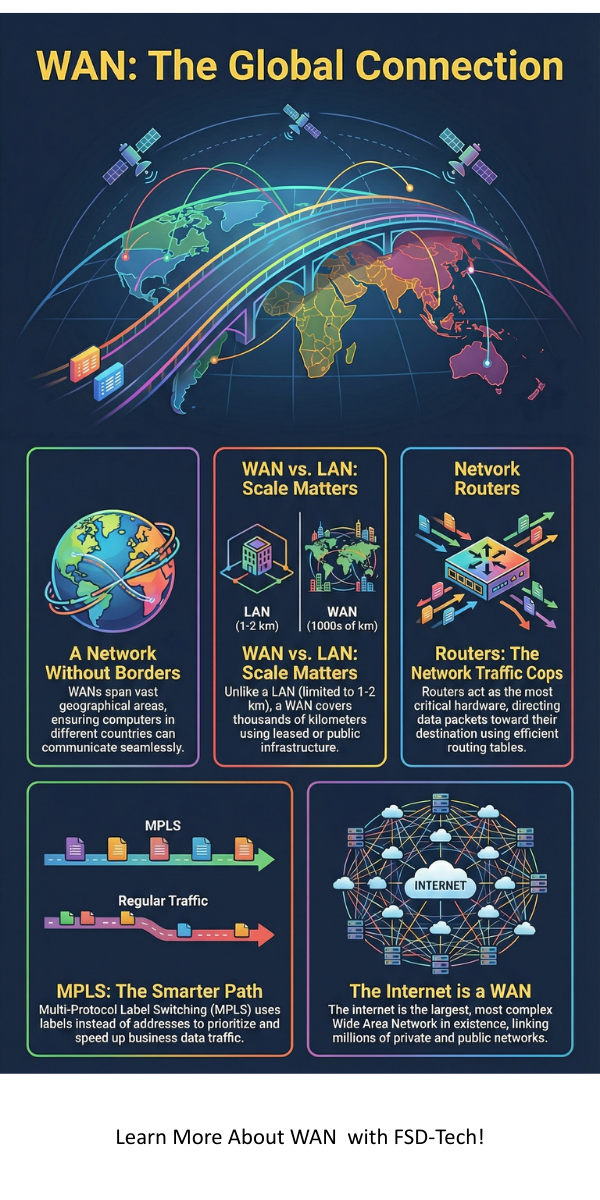
    Geographical AreaVery limited (1-2 km).Vast (100 km to thousands of km).
    OwnershipUsually private (owned by an individual or organization).Usually public or leased (Telecom providers).
    SpeedHigh data transfer speeds (up to 1000 Mbps).Lower speeds compared to LAN (varies by provider).
    Error RateLow error rates due to short cable distances.Higher error rates due to complex routing.
    Technology usedEthernet, Wi-Fi.Leased lines, Fiber optics, Satellite, MPLS.
    CostLow setup and maintenance costs.High setup and monthly recurring costs.


    What is a Wide Area Network (WAN)?

    A Wide Area Network (WAN) serves as the backbone of global communication. If a LAN is a private conversation in a room, a WAN is the international postal system. It exists to bridge the gap between distant local networks. According to academic resources from Basu.org.in, a WAN is often used by businesses to share data across branch offices located in different regions.
     

    Wide Area Network (WAN)


    Wide Area Network (WAN) systems don't just happen by accident. They require specialized hardware like routers, switches, and even satellites. Here is the thing: the internet itself is the largest and most complex Wide Area Network (WAN) in existence. It links millions of private and public networks together using the TCP/IP protocol suite.


    One might wonder, why not just use a long LAN cable? In reality, physical and regulatory hurdles make that impossible. Instead, a Wide Area Network (WAN) uses service providers to lease communication lines. This allows data to travel over public infrastructure while maintaining a sense of privacy for the user through encryption.


    Get Started Today


    Why Your Business Needs a Reliable Wide Area Network (WAN)?

    To be honest, setting up a Wide Area Network (WAN) isn't just about plugging in routers. It is about creating a stable bridge for your data to cross oceans and borders. In my experience, many companies struggle with lag and security because their network architecture wasn't built for scale. Have you noticed your remote offices lagging during video calls? That is often a sign that your Wide Area Network (WAN) is hitting a bottleneck.


    How a Wide Area Network (WAN) Functions?

    A Wide Area Network (WAN) functions by using a "Store and Forward" mechanism. When you send a packet of data, it doesn't go in a straight line. It hops through multiple intermediate nodes or routers. Each router receives the packet, stores it briefly to check for errors, and then forwards it to the next best path.


    The working of a Wide Area Network (WAN) involves two distinct parts: the Communication Subnet and the Host Machines. The hosts are the computers where applications run. The subnet is the collection of transmission lines and routers that carry the data.


    When a host wants to send a message, it breaks the data into small chunks called packets. Each packet contains the destination address. As these packets travel through the Wide Area Network (WAN), routers use routing tables to decide the most efficient path. Does the path change if one line is busy? Absolutely. This dynamic routing makes the network resilient.


    Also Read: What is a Wireless LAN Controller? Configuration & Setup 101


    Core Components of WAN Architecture

    To build a functional Wide Area Network (WAN), you need several key pieces of hardware. Without these, the network would just be a pile of disconnected wires.


    1. Routers

    A router is the most critical device in a Wide Area Network (WAN). It acts as a traffic cop. It examines the destination IP address of incoming data and sends it toward its final destination. In large setups, routers connect different LANs to the main WAN backbone.


    2. WAN Switches

    While LANs use switches for local devices, a Wide Area Network (WAN) uses high-speed switches to handle data transfer over long-distance circuits. These switches often operate at the Data Link layer of the OSI model.


    3. Modems and CSU/DSU

    Since many Wide Area Network (WAN) connections use digital lines, you need a Channel Service Unit/Data Service Unit (CSU/DSU). This device converts the signals from the router into a format that the service provider's line can understand. If you are using an older analog line, a modem performs the digital-to-analog conversion.


    4. Communication Links

    These are the actual paths data takes. A Wide Area Network (WAN) might use fiber optic cables, copper wires, or wireless microwave links. For extremely remote areas, satellite links are the primary choice.


    Different Types of WAN Technologies

    Not all Wide Area Network (WAN) setups are the same. Depending on the budget and the need for speed, organizations choose different technologies to stay connected.


    Leased Lines

    A leased line is a dedicated point-to-point connection between two locations. It offers high security and fixed bandwidth. However, it is also the most expensive way to run a Wide Area Network (WAN) because you pay for the line even when you aren't using it.


    Circuit Switching

    Think of this like a traditional phone call. In this Wide Area Network (WAN) type, a dedicated physical path is established for the duration of the connection. It is great for voice but can be inefficient for data that comes in bursts.


    Packet Switching

    This is the most common technology for a modern Wide Area Network (WAN). Data is broken into packets, and each packet can take a different route. This maximizes the use of the available bandwidth. Technologies like Frame Relay and X.25 fall into this category, though they are being replaced by newer standards.


    MPLS (Multi-Protocol Label Switching)

    Many businesses prefer MPLS for their Wide Area Network (WAN) needs. It uses labels instead of long network addresses to route data. This makes the process much faster and allows the network to prioritize certain types of traffic, like video calls, over others, like email.


    Also Read: Metropolitan Area Network (MAN) - Meaning & Examples


    Advantages of WAN

    Using a Wide Area Network (WAN) offers several benefits that smaller networks simply cannot provide. Let us look at why companies invest so much in this technology.


    • Centralized Data: A Wide Area Network (WAN) allows a company to keep its main servers in one location. Staff from all over the world can access the same files, which ensures everyone is working on the latest version.
    • Global Reach: You can connect branch offices in different time zones. This facilitates 24/7 business operations and global collaboration.
    • Increased Bandwidth: Modern Wide Area Network (WAN) solutions, especially those using fiber optics, offer massive capacity for data-hungry applications.
    • Cost Efficiency (via sharing): Instead of every office buying its own expensive software licenses or hardware, they can share resources over the Wide Area Network (WAN).


    Disadvantages of WAN

    While a Wide Area Network (WAN) is powerful, it is not without its headaches. There are several challenges that network administrators face daily.


    • Security Concerns: Because a Wide Area Network (WAN) sends data over public or shared lines, it is more vulnerable to hackers. You must use firewalls and encryption to stay safe.
    • High Setup Costs: Building a private Wide Area Network (WAN) is incredibly expensive. Even leasing a line involves significant monthly fees that can drain a small company’s budget.
    • Maintenance Issues: When a Wide Area Network (WAN) goes down, it is often difficult to find the exact point of failure. It could be a cut cable under the ocean or a faulty router in a different country.
    • Performance Lag: The "latency" or delay in a Wide Area Networkis much higher than in a LAN. This can make real-time applications like gaming or high-frequency trading difficult.

    Conclusion

    A Wide Area Network (WAN) is nothing but the glue that holds our digital world together. Without it, we would be stuck in isolated bubbles of information. While it comes with high costs and security risks, the ability to communicate across the globe in an instant is a necessity for any modern organization.


    At our firm, we believe that understanding the backbone of your technology is the only way to use it effectively. We focus on providing clear, actionable insights so you can make informed decisions about your networking needs. Whether you are a student or a business owner, knowing how a Wide Area Network (WAN) functions gives you a significant advantage in a connected world.


    At our company, we don't just provide technical advice; we build long-term partnerships. We prioritize your connectivity because we know that when your network stays up, your business grows. We value transparency and client success above all else.
     

    WAN infographic


    Ready to optimize your global connectivity? Our team is standing by to help you design a Wide Area Network (WAN) that is fast, secure, and ready for the future. Contact us today for a network audit and let’s get your team connected the right way!


    Key Takeaways

    • Global Reach: A Wide Area Network (WAN) spans vast distances, connecting local networks across cities, countries, or even continents to ensure your data travels where it is needed.
    • Service Provider Reliance: Unlike local networks you own entirely, a WAN typically uses leased lines or public infrastructure provided by telecommunications companies.
    • Essential Hardware: Successful communication depends on specialized devices like routers, switches, and CSU/DSUs that manage data traffic and translate signals across long distances.
    • Multiple Technologies: You can build a Wide Area Network (WAN) using various methods, from dedicated leased lines for high security to flexible packet-switching and MPLS for cost-effective speed.
    • Centralized Efficiency: Implementing a WAN allows your organization to centralize data and resources, making it easier for distant teams to collaborate on the same files in real time.


    FAQs about Wide Area Network (WAN)

    1. Is the Internet a WAN?

    Yes, the internet is the most famous example of a Wide Area Network (WAN). It is a public network that connects billions of devices globally.


    2. What is the main difference between WAN and the Cloud?

    WAN is the physical and logical infrastructure that connects locations. "The Cloud" refers to the services and storage that you access through that network.


    3. Can a small business use a WAN?

    Absolutely. Most small businesses use a Wide Area Network (WAN) whenever they connect their office to the internet or use a VPN to let employees work from home.


    4. How is a WAN secured?

    A  WAN is usually secured using VPNs (Virtual Private Networks), firewalls, and end-to-end encryption to prevent unauthorized access.

    What is a Wide Area Network (WAN)? Architecture & Types Explained

    About The Author

    Surbhi Suhane

    Surbhi Suhane is an experienced digital marketing and content specialist with deep expertise in Getting Things Done (GTD) methodology and process automation. Adept at optimizing workflows and leveraging automation tools to enhance productivity and deliver impactful results in content creation and SEO optimization.

    Like This Story?

    Share it with friends!

    Subscribe to our newsletter!

    Atera

    (55)

    Cato Networks

    (121)

    ClickUp

    (72)

    FishOS

    (7)

    Miradore

    (21)

    PointGuard AI

    (9)

    Vembu

    (22)

    Xcitium

    (33)

    ZETA HRMS

    (79)

    Workflow Automation(8)

    Workforce Automation(1)

    AI Project Management(1)

    HR Data Automation(1)

    RMM(1)

    IT Workflow Automation(1)

    GCC compliance(4)

    IT security(2)

    Payroll Integration(2)

    IT support automation(3)

    procurement automation(1)

    lost device management(1)

    IT Management(5)

    IoT Security(2)

    Cato XOps(2)

    IT compliance(4)

    Workflow Management(1)

    Task Automation(1)

    Kubernetes lifecycle management(2)

    AI-powered cloud ops(1)

    OpenStack automation(1)

    SMB Security(8)

    Data Security(1)

    MDR (Managed Detection & Response)(4)

    MSP Automation(3)

    Atera Integrations(2)

    XDR Security(2)

    Ransomware Defense(3)

    SMB Cyber Protection(1)

    HR Tech Solutions(1)

    Zero Trust Network Access(3)

    Zero Trust Security(2)

    Endpoint Management(1)

    SaaS Security(1)

    Payroll Automation(5)

    IT Monitoring(2)

    Xcitium EDR SOC(15)

    Ransomware Protection GCC(1)

    Network Consolidation UAE(1)

    M&A IT Integration(1)

    MSSP for SMBs(1)

    Managed EDR FSD-Tech(1)

    Antivirus vs EDR(1)

    FSD-Tech MSSP(25)

    SMB Cybersecurity GCC(1)

    Ransomware Protection(3)

    Cybersecurity GCC(12)

    Endpoint Security(1)

    Endpoint Protection(1)

    Data Breach Costs(1)

    SMB Cybersecurity(8)

    Zero Dwell Containment(31)

    Managed Security Services(2)

    Xcitium EDR(30)

    Hybrid Backup(1)

    Cloud Backup(1)

    Backup & Recovery(1)

    pointguard ai(4)

    vembu(9)

    backup myths(1)

    SMB data protection(9)

    disaster recovery myths(1)

    Disaster Recovery(4)

    Vembu BDR Suite(19)

    GCCBusiness(1)

    DataProtection(1)

    Secure Access Service Edge(4)

    GCC HR software(20)

    Miradore EMM(15)

    Cato SASE(7)

    Cloud Security(9)

    GCC Education(1)

    Hybrid Learning(1)

    Talent Development(1)

    AI Compliance(2)

    AI Governance(4)

    AI Cybersecurity(12)

    AI Risk Management(1)

    AI Security(2)

    GCC business security(1)

    GCC network integration(1)

    compliance automation(5)

    GCC cybersecurity(3)

    education security(1)

    Miradore EMM Premium+(5)

    App management UAE(1)

    BYOD security Dubai(8)

    MiddleEast(1)

    HealthcareSecurity(1)

    Team Collaboration(1)

    IT automation(12)

    Zscaler(1)

    SD-WAN(7)

    HR Integration(4)

    Cloud Networking(4)

    device management(9)

    VPN(1)

    ZeroTrust(2)

    RemoteWork(1)

    MPLS(1)

    share your thoughts

    Full Duplex Communication

    What is Full Duplex Communication? Full vs Half Duplex

    🕓 February 13, 2026

    wide-area-network-wan

    What is a Wide Area Network (WAN)? Architecture & Types Explained

    🕓 February 13, 2026

    Latency in Networking

    What is Latency in Networking? Definition, Causes & Solutions

    🕓 February 12, 2026

    Decoded(109)

    Cyber Security(118)

    BCP / DR(22)

    Zeta HRMS(78)

    SASE(21)

    Automation(72)

    Next Gen IT-Infra(118)

    Monitoring & Management(76)

    ITSM(22)

    HRMS(21)

    Automation(24)