.webp&w=3840&q=75)
How ClickUp Enables Outcome-Based Project Management (Not Just Task Tracking)
🕓 February 15, 2026
Have you ever thought about what would happen if your office server suddenly quit or, worse, caught fire? Offsite data backup storage is your safety net when local hardware fails or physical disasters strike your primary location. In simple terms, it means keeping a copy of your important files in a different building than your original data.
To be honest, we’ve all been there—thinking our external hard drive sitting on the desk is enough. But here’s the thing: if a pipe bursts in your ceiling, both your computer and that drive are toast. Offsite storage solves this by putting distance between your data copies. Whether you use a physical vault or the cloud, the goal is the same: survival.
The term offsite data backup storage refers to a strategy where you send copies of your digital assets to a remote facility. This isn't just about "extra space." It’s about geographic redundancy. If a tornado hits your town, you want your data sitting safely in a different zip code (or even a different state).
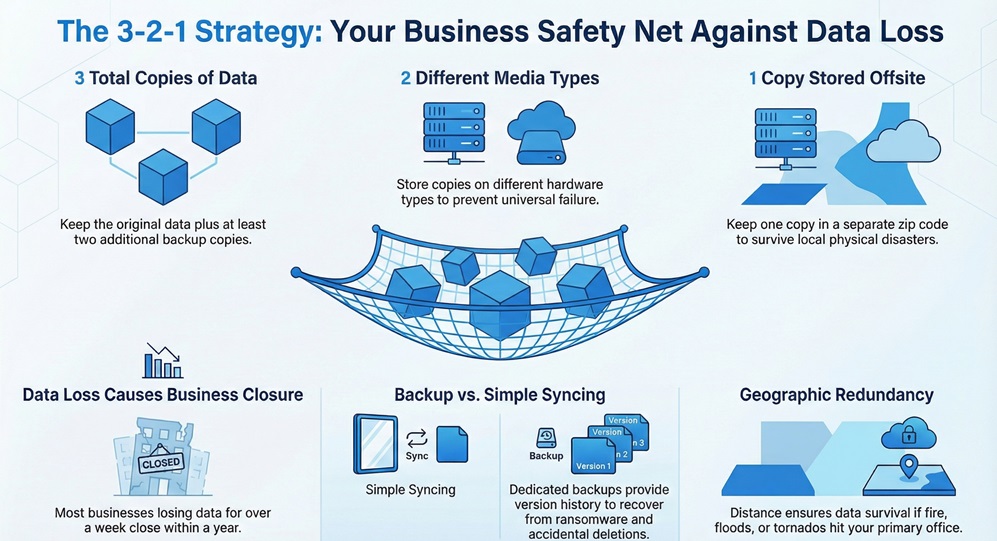
In my view, people often confuse simple file syncing with true backup. Syncing tools like Dropbox might mirror your files, but if you delete a file by mistake, it’s gone everywhere. A dedicated offsite backup keeps versions of your data over time. This way, if you get hit by ransomware on Tuesday, you can just "roll back" to Monday’s version from your remote site.
Why spend money on offsite data backup storage when you already have a server in the closet? Picture this: a disgruntled employee wipes your local drives, or a power surge fries your motherboard. If your only backup is in the same room, you’re looking at total data loss.
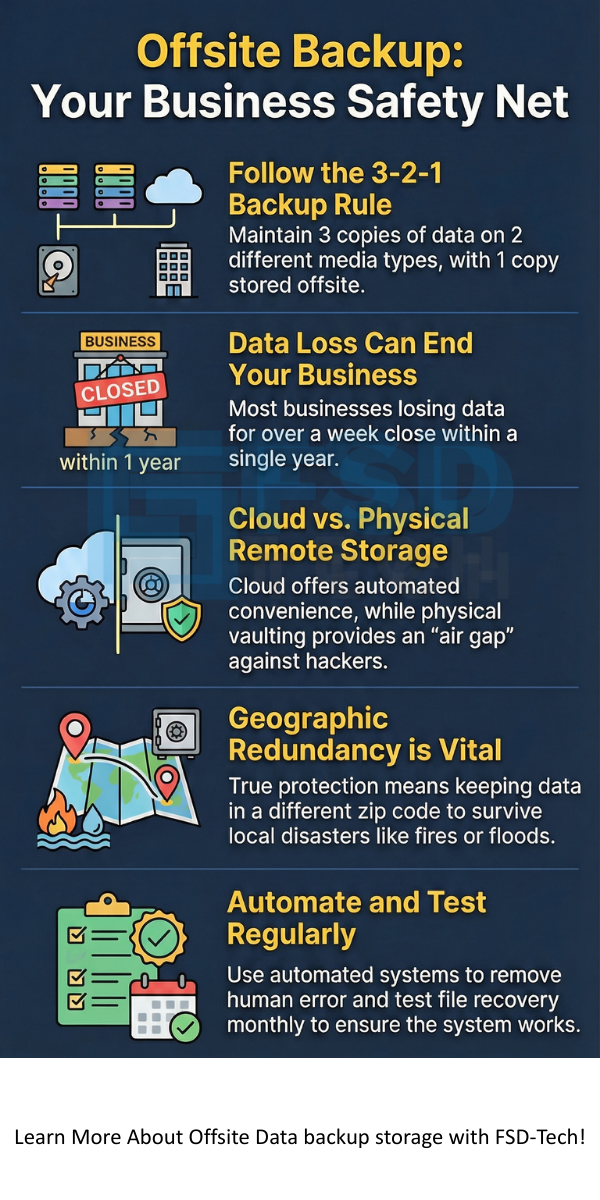
We often talk about the "3-2-1 rule" in the tech world. You should have three copies of your data, on two different types of media, with one copy kept offsite. This strategy covers almost every possible failure point. Can you really afford to lose your client records or financial history? Most businesses that lose their data for more than a week end up closing within a year.
Also Read: What is the Principle of Least Privilege (PoLP)? Guide & Benefits
When we look at offsite data backup storage, there are two main paths you can take. You can go "old school" with physical media or "modern" with the cloud.
1. Physical Offsite Vaulting
This involves backing up your data to tapes or removable disks and physically driving them to a secure location. Many banks and law firms still do this because it creates an "air gap." Since the tape isn't connected to the internet, hackers can’t touch it. However, it’s slow. If you need a file back, someone has to go get the tape and bring it back to the office.
2. Cloud-Based Storage
This is the most popular form of offsite data backup storage today. You send your data over the internet to a provider’s data center. It’s automated, which is a huge plus. You don't have to remember to "swap the tapes" every Friday. It just happens in the background while you sip your coffee.
You might wonder how your files travel from your laptop to a secure bunker miles away. Usually, a small piece of software sits on your computer or server. It watches for changes in your files.
When it finds a change, it encrypts the data—turning it into a secret code—and sends it over the web.
This encryption is vital. It ensures that even if a hacker intercepts the data during the trip, they can't read it. Once it reaches the offsite facility, it’s stored on massive arrays of disks that are themselves backed up. It’s layers of protection all the way down.
Using offsite data backup storage offers several perks that go beyond just "not losing stuff."
Is one better than the other? Not necessarily. They serve different purposes. Onsite backup is great for quick recoveries. If you accidentally delete a spreadsheet, you can pull it back in seconds from a local drive.
Conversely, offsite data backup storage is for the "big stuff." It’s slower to recover from because you have to download data over the internet, but it’s much more resilient. In contrast to local storage, offsite storage doesn't care if your office building is standing or not. That is why most experts suggest using both.
Also Read: What is SD-WAN Architecture? Benefits and Working
This is a common question. While cloud backup is a type of offsite data backup storage, not all offsite storage is the cloud.
Think of it this way: Offsite storage is the category, and the cloud is the most common tool. If you put a hard drive in a safe deposit box at the bank, that is offsite storage, but it definitely isn't the cloud. For most small to medium businesses, the cloud is the most cost-effective way to get data offsite without hiring a courier service.
How do you get started with offsite data backup storage? It’s easier than you think.
First, identify your "crown jewels." What data can you absolutely not live without? You don't need to back up every meme on your desktop, but you do need your accounting files.
Second, choose a provider. Look for someone who offers "end-to-end encryption." This means the data is locked before it even leaves your building.
Finally, test it! I can't tell you how many times I’ve seen people "set and forget" their backups, only to find out six months later that the software stopped working after a Windows update. Try to recover a single file once a month just to make sure the system is healthy.
Nothing is perfect, right? With offsite data backup storage, the main hurdle is bandwidth. If you have five terabytes of data and a slow internet connection, that first backup might take weeks.
Also, consider the "egress fees." Some cloud providers make it cheap to upload data but charge you a fortune to download it during an emergency. Always read the fine print before signing up. You don't want a surprise bill when you're already stressed about a server crash.
We’re all human. We forget things. That’s why the best offsite data backup storage systems are automated.
In the old days, a designated "tech person" had to remember to take a tape home every night. Usually, they’d forget it in their car or leave it on the bus. Modern systems remove the human element. They run at 2 AM while everyone is asleep. By the time you walk in with your morning donut, the reports are already waiting for you, confirming the backup was a success.
Also Read: What is Static Application Security Testing (SAST)?
Is offsite data backup storage expensive? It depends. Physical vaulting can get pricey because of the labor involved. Cloud storage, however, has plummeted in price.
You usually pay by the gigabyte. For a few dollars a month, most small businesses can protect their most vital files. When you weigh that against the cost of losing your entire customer list, it’s one of the cheapest insurance policies you’ll ever buy.
When shopping for offsite data backup storage, don't just look at the price tag. Look at the security specs.
You want AES-256 bit encryption. You also want "two-factor authentication" (2FA) for your account. This means even if a hacker steals your password, they can't delete your backups without a code from your phone. Lastly, ask about "immutable backups." This is a fancy way of saying the data cannot be changed or deleted for a set period, which is a massive defense against ransomware.
In the world of offsite data backup storage, redundancy is the name of the game. Professional data centers don't just save your file once. They save it across multiple disks and often replicate it to a second data center in a different region.
So, if a data center in Virginia loses power, your data is still available from a center in Texas. This level of protection is something you simply can't achieve on your own with a bunch of USB sticks.
At the end of the day, offsite data backup storage is about ensuring your business has a tomorrow. We've seen far too many hardworking people lose everything because they thought "it won't happen to me." But hardware fails, accidents happen, and cyber-attacks are on the rise.
Our company believes in building long-term resilience for our clients. We don't just provide a service; we provide a promise that your hard work is protected by the best technology available. We're here to make sure your data stays safe, no matter what the world throws at you.
Try BDRSuite’s Automated Cloud
1. Is offsite storage better than onsite storage?
It’s not about being "better," it’s about being different. Onsite is for speed; offsite is for disaster survival. You really need both to be fully protected.
2. How often should I run an offsite backup?
Most businesses should run them daily. However, if you handle high volumes of data, you might want to look at "continuous data protection" which backs up changes every few minutes.
3. Is my data safe in the cloud?
Yes, provided you use a reputable provider with strong encryption. In many cases, a professional data center is much more secure than a typical office server room.

Surbhi Suhane is an experienced digital marketing and content specialist with deep expertise in Getting Things Done (GTD) methodology and process automation. Adept at optimizing workflows and leveraging automation tools to enhance productivity and deliver impactful results in content creation and SEO optimization.
Share it with friends!




.webp&w=3840&q=75)






share your thoughts