.webp&w=3840&q=75)
How ClickUp Enables Outcome-Based Project Management (Not Just Task Tracking)
🕓 February 15, 2026
.jpg&w=3840&q=75)
Securing modern software is tough. Application environments become more complex every day. Dynamic Application Security Testing (DAST) offers a practical solution, checking applications for security weaknesses while they run. DAST is nothing but a form of black box testing, meaning it examines the application from the outside, just like a threat agent would.
You likely already use various methods to test your code. However, if you develop web applications or services, you must consider the unique security risks that appear in a live environment. Dynamic Application Security Testing plays a vital role in identifying vulnerabilities that static analysis cannot see. DAST simulates real-world attacks. It interacts with the live application, sends malicious inputs, and observes how the system responds. Dynamic Application Security Testing thus ensures your application handles unexpected input and hostile attacks correctly.
But what exactly sets this technique apart? Why must you integrate Dynamic Application Security Testing into your development process immediately? We will explore how this approach protects your applications where they are most vulnerable—during runtime.
To understand the core value of Dynamic Application Security Testing, you must compare it with other leading security testing techniques. While all approaches aim to improve security, they work on different principles.
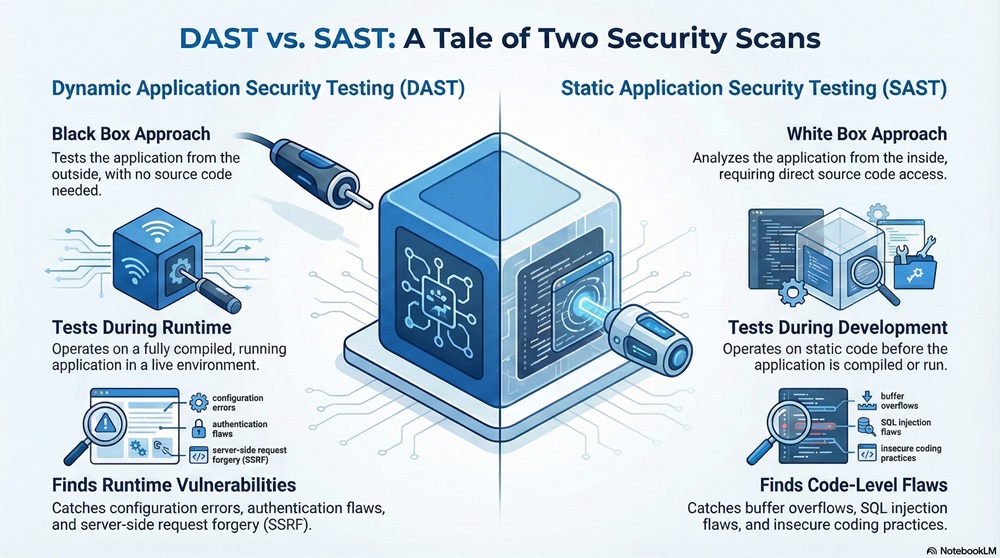
The table below summarizes the key differences between DAST and Static Application Security Testing (SAST), its most common counterpart.
| Basis for Comparison | Dynamic Application Security Testing (DAST) | Static Application Security Testing (SAST) |
|---|---|---|
| Testing Phase | Operates during runtime (running application) | Operates during development/compilation (static code) |
| Approach | Black Box (External viewpoint, no source code needed) | White Box (Internal viewpoint, requires source code) |
| Vulnerabilities Found | Runtime issues: configuration errors, authentication flaws, server-side request forgery (SSRF), DOM XSS. | Code-level flaws: buffer overflows, injection flaws (SQL Injection), insecure coding practices. |
| False Positives | Tends to have fewer false positives. | Tends to have more false positives. |
| Programming Language | Language independent (interacts via HTTP/S). | Language dependent (must understand the source code language). |
| Speed | Often slower; requires the application to be running. | Faster; runs against the code base quickly. |
Dynamic Application Security Testing refers to the technique of analyzing an application by executing attack simulations against it while it is running. This process targets the application through its externally accessible interfaces, such as web protocols (HTTP/S) and APIs. DAST tools essentially behave like a knowledgeable attacker.
Dynamic Application Security Testing operates independently of the application’s source code. You simply provide the tool with the application's URL or endpoint, and it begins to scan. This is a crucial distinction. Dynamic Application Security Testing analyzes the system's behavior, its input validation, and its configuration when facing security defects.
You need Dynamic Application Security Testing because code is not the only problem. Security issues frequently arise from environmental factors or configuration weaknesses. DAST performs, executes, and implements checks that only make sense in a live context.
Dynamic Application Security Testing discovers configuration issues which frequently affect the application’s security posture. For example, a developer might use secure code, but a misconfigured web server or outdated database patch creates a major security hole. DAST simulates an attack, and if the misconfiguration allows the attack to succeed, the tool reports the vulnerability. Dynamic Application Security Testing thus provides a highly accurate view of your actual, in-production risk.
Also Read: What is Biometric Authentication? Methods & Security Guide
How does Dynamic Application Security Testing actually identify weaknesses? The methodology follows a logical, sequential pattern designed to mimic how a malicious user would compromise the application.
This sequence allows Dynamic Application Security Testing to determine if the application handles potentially dangerous data safely.
Dynamic Application Security Testing focuses on real-world issues stemming from the system's interaction with the environment. It is crucial to identify these specific security vulnerabilities.
What kind of security defects does DAST find?
Dynamic Application Security Testing guarantees that you address these critical risks before deployment.
Also Read: What is Internet Key Exchange (IKE)?
Integrating Dynamic Application Security Testing into your workflow needs careful planning. You must align it with your Continuous Integration/Continuous Delivery (CI/CD) pipeline effectively. DAST primarily works on the principle of analyzing the application after deployment to a testing or staging environment.
When you implement Dynamic Application Security Testing, you immediately notice several advantages over manual testing or relying solely on static analysis.
Dynamic Application Security Testing Provides Highly Accurate Results
Dynamic Application Security Testing provides compelling proof of security weaknesses because it actively exploits the flaws. It delivers low false positive rates. This means the security teams spend less time chasing phantom issues and more time fixing actual threats. DAST finds exactly what a threat actor finds.
DAST is Language Independent
Since Dynamic Application Security Testing interacts with the application through standard protocols like HTTP, it does not matter if your application runs on Python, Java, or Node.js. The tool does not need to read the source code. This makes DAST extremely versatile and suitable for heterogeneous development environments.
Dynamic Application Security Testing Finds Configuration Flaws
Dynamic Application Security Testing is the best method to find security issues rooted in the deployment environment. You cannot find flaws like weak transport layer security (TLS) settings, cross-origin resource sharing (CORS) misconfigurations, or exposed server headers by only looking at the code. DAST determines, decides, and influences security policy through its comprehensive security analysis.
DAST Works on External Libraries
Your application relies on countless third-party libraries and frameworks. If a component introduces a configuration vulnerability, Dynamic Application Security Testing detects it by observing the system's behavior. DAST ensures that all parts of your application, whether proprietary or open-source, function securely together.
Also Read: What is Disaster Recovery in Cloud Computing?
While Dynamic Application Security Testing is powerful, it does have specific limitations you must keep in mind.
DAST Requires Comprehensive Coverage
DAST only tests what it can access. If the scanning tool cannot crawl a specific part of your application—perhaps due to complex authentication or a unique data flow—it cannot test that area for vulnerabilities. You must ensure that the scanner explores all application pathways.
Dynamic Application Security Testing Provides Less Detail on Code Location
Unlike SAST, Dynamic Application Security Testing tells you where the vulnerability occurs in the application’s URL or functionality, but it rarely pinpoints the exact line of code causing the flaw. Development teams sometimes need extra time to trace the issue back to the source code for a fix.
DAST Can Be Slower
The process performs detailed attack simulations, often taking longer than a simple static code analysis. DAST necessitates that the application is fully compiled and running correctly in a stable runtime environment. You must factor this timing into your CI/CD process.
Dynamic Application Security Testing remains an indispensable layer in your application security defense strategy. It offers a clear, objective view of the security posture your application presents to the outside world.
You now understand that DAST actively simulates attacks against your running web applications, identifying dangerous vulnerabilities that could expose sensitive data or compromise user integrity. By using Dynamic Application Security Testing, you adopt a proactive stance, ensuring that threat agents find locked doors instead of open pathways. The security of your client’s data and the trust you build with them depends on these critical, continuous checks.
Therefore, you must start integrating Dynamic Application Security Testing today. Protect your applications, validate your defenses, and ship secure software with confidence.
Defend with DAST Talk to a specialist
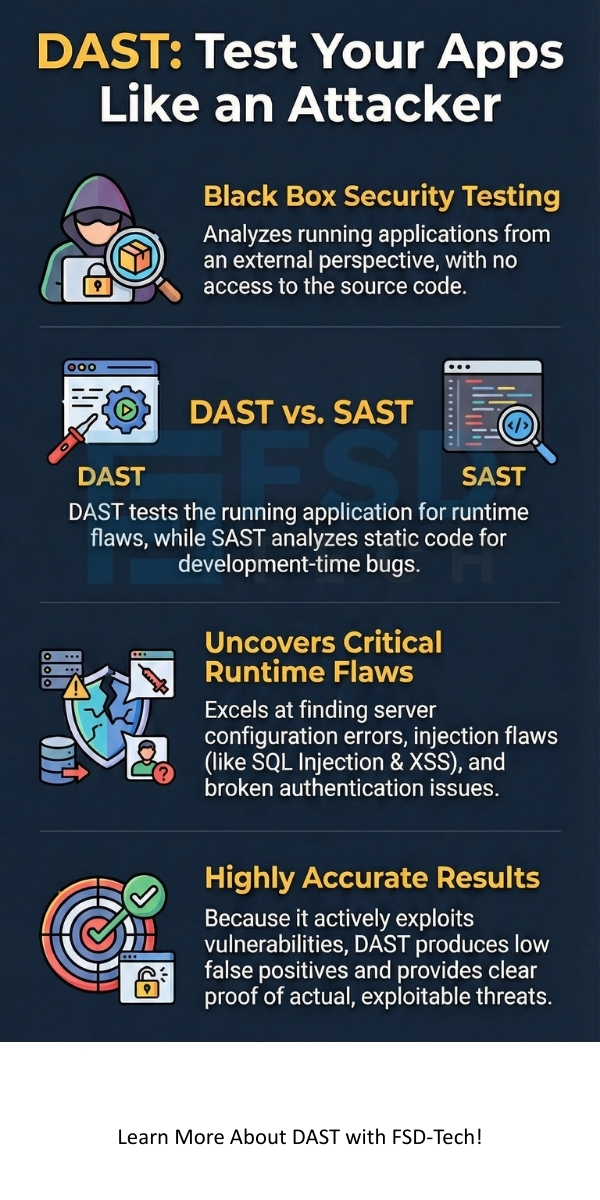
So, with the above discussion, we can say that Dynamic Application Security Testing is an indispensable part of a modern security program.
Now, the question arises: What else should you know about this technology?
Dynamic Application Security Testing uses a purely external perspective, viewing the application as an attacker. DAST requires no source code access. On the other hand, Interactive Application Security Testing (IAST) combines elements of both DAST and SAST. IAST uses an agent inside the application’s runtime environment. The IAST agent observes the application’s execution path while a security test (like a DAST scan or manual test) is running externally. This gives IAST better visibility into the exact line of code causing a detected vulnerability, providing a more detailed report than pure DAST.
The best time to run Dynamic Application Security Testing is whenever a new version of the application is stable and fully deployed in a dedicated testing or staging environment. Many high-velocity development teams perform DAST scans nightly or after every major feature merge. You must run the scan before the code moves to the production environment to ensure that you do not ship known, exploitable security defects.
No, Dynamic Application Security Testing does not replace penetration testing. DAST is an automated, high-volume scan that efficiently checks for common and widespread security flaws. It provides repeatable, systematic coverage. Penetration testing, however, relies on human expertise. Professional penetration testing teams use creativity and domain knowledge to discover business logic flaws and unique, chaining vulnerabilities that automated DAST tools often miss. DAST and penetration testing should work together to provide complete coverage.
Dynamic Application Security Testing tends to struggle with complex business logic flaws. These vulnerabilities require context—for example, a tool cannot easily know that a user should only be allowed to purchase five items, not fifty. Automated DAST primarily detects technical security flaws (e.g., SQL injection, XSS). Human testers perform the security analysis required to find business logic defects effectively.

Surbhi Suhane is an experienced digital marketing and content specialist with deep expertise in Getting Things Done (GTD) methodology and process automation. Adept at optimizing workflows and leveraging automation tools to enhance productivity and deliver impactful results in content creation and SEO optimization.
Share it with friends!




.webp&w=3840&q=75)






share your thoughts