HomeNext Gen IT-InfraMonitoring & ManagementCyber SecurityBCP / DRAutomationDecoded
Next Gen IT-Infra
Cato’s SASE Supports Cybersecurity Skills Development

How Cato’s SASE Supports Cybersecurity Skills Development

🕓 April 8, 2025

How SASE Supports the Security Needs of SMBs

How SASE Supports the Security Needs of SMBs

🕓 February 9, 2025

Attack Surface Reduction with Cato’s SASE

Attack Surface Reduction with Cato’s SASE

🕓 February 10, 2025

SASE for Digital Transformation in UAE

SASE for Digital Transformation in UAE

🕓 February 8, 2025

Monitoring & Management
Understanding Atera’s SLA Management

Understanding Atera’s SLA Management

🕓 February 7, 2025

Cost-Performance Ratio: Finding the Right Balance in IT Management Networks

Cost-Performance Ratio: Finding the Right Balance in IT Management Networks

🕓 June 16, 2025

Customizing Atera with APIs

Customizing Atera with APIs

🕓 March 3, 2025

Power Up Your IT Team’s Strategy with Atera’s Communication Tools

Power Up Your IT Team’s Strategy with Atera’s Communication Tools

🕓 February 8, 2025

Cyber Security
Illustration of the Cato Cloud architecture showing its role in delivering SASE for secure, optimized global connectivity.

Understanding the Cato Cloud and Its Role in SASE

🕓 January 29, 2025

Isometric illustration of professionals managing network performance, bandwidth analytics, and cloud-based optimization around the Cato Networks platform, symbolizing bandwidth control and QoS visibility.

Mastering Bandwidth Control and QoS in Cato Networks

🕓 July 26, 2025

Global network backbone powering Cato SASE solution for secure, high-performance connectivity across regions.

Global Backbone: The Engine Powering Cato’s SASE Solution

🕓 January 30, 2025

Illustration of team analyzing application traffic and usage insights on a large laptop screen using Cato’s dashboard, surrounded by network and cloud icons.

Cato Networks Application Visibility | Monitoring & Control

🕓 July 27, 2025

BCP / DR
Illustration showing diverse business and IT professionals collaborating with cloud, backup, and security icons, representing Vembu use cases for SMBs, MSPs, and IT teams.

Who Uses Vembu? Real-World Use Cases for SMBs, MSPs & IT Teams

🕓 July 12, 2025

Graphic showcasing Vembu’s all-in-one backup and disaster recovery platform with icons for cloud, data protection, and business continuity for IT teams and SMBs.

What Is Vembu? A Deep Dive Into the All in One Backup & Disaster Recovery Platform

🕓 July 6, 2025

Illustration showing Vembu backup and disaster recovery system with cloud storage, server racks, analytics dashboard, and IT professionals managing data.

The Rising Cost of Data Loss: Why Backup Is No Longer Optional?

🕓 August 14, 2025

3D isometric illustration of cloud backup and data recovery infrastructure with laptop, data center stack, and digital business icons — FSD Tech

RPO & RTO: The Heart of Business Continuity

🕓 August 15, 2025

Automation
Cross-Functional Collaboration with ClickUp

Fostering Cross-Functional Collaboration with ClickUp for Multi-Departmental Projects

🕓 February 11, 2025

ClickUp Project Reporting

Revolutionizing Enterprise Reporting with ClickUp’s Advanced Analytics and Dashboards

🕓 June 16, 2025

ClickUp’s Design Collaboration and Asset Management Tools

Empowering Creative Teams with ClickUp’s Design Collaboration and Asset Management Tools

🕓 February 26, 2025

ClickUp Communication and Collaboration Tools

ClickUp Communication and Collaboration Tools: Empowering Remote Teams

🕓 March 12, 2025

Decoded
Multi-Factor Authentication (MFA)

Multi-Factor Authentication (MFA): All You Need to Know

🕓 December 7, 2025

L3 Switch

What Is an L3 Switch? L2 vs L3 & Why You Need Layer 3?

🕓 December 8, 2025

IPSec

IPSec Explained: Protocols, Modes, IKE & VPN Security

🕓 December 3, 2025

 Datagram Transport Layer Security (DTLS)

What is Datagram Transport Layer Security (DTLS)? How it works?

🕓 December 4, 2025

    Subscribe to our newsletter!

    About Us

    Follow Us

    Copyright © 2024 | Powered by 

    Atera

    (56)

    Cato Networks

    (128)

    ClickUp

    (78)

    FishOS

    (7)

    Miradore

    (21)

    PointGuard AI

    (9)

    Vembu

    (22)

    Xcitium

    (33)

    ZETA HRMS

    (79)

    Table of Contents

    What is Cybersecurity? Guide to Digital Safety

    Surbhi Suhane
    March 6, 2026
    Comments
    Cybersecurity

    Cybersecurity is the practice of protecting systems, networks, and programs from digital attacks. These attacks usually aim to access, change, or destroy sensitive information. Think about how much of your life lives online today. From bank details to private photos, everything is a target. But why does this matter to you? Well, imagine waking up and finding your digital identity wiped or your savings gone. It sounds like a movie plot, but it happens to real people every day.


    We've all been there—clicking a link that looks a bit "off" or using the same password for five different sites. In my experience, most people think they aren't "important" enough to be hacked. That is a dangerous mistake. Hackers don't always want you specifically; they want your data or your computer’s power. This guide will walk you through the basics of staying safe without making your head spin with tech jargon.


    What is Cybersecurity?

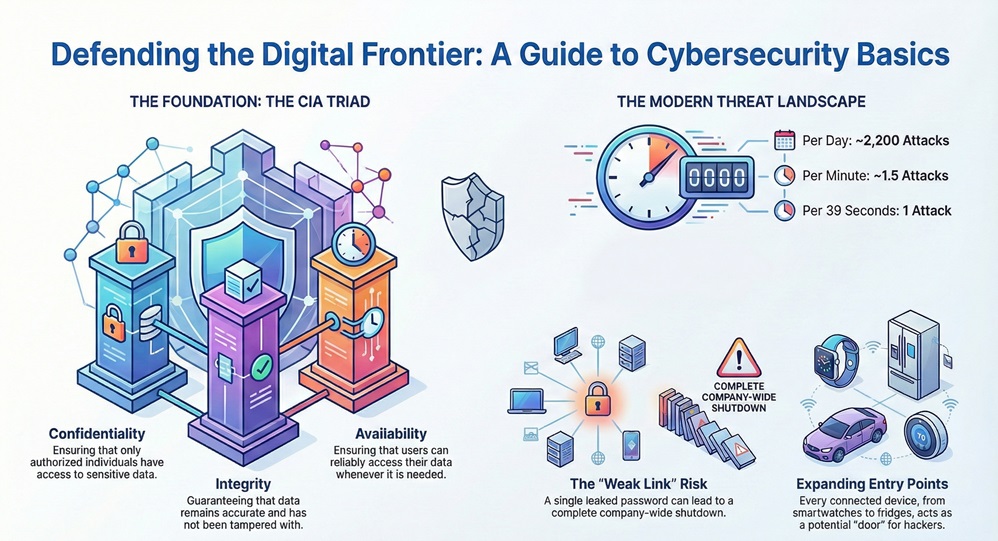
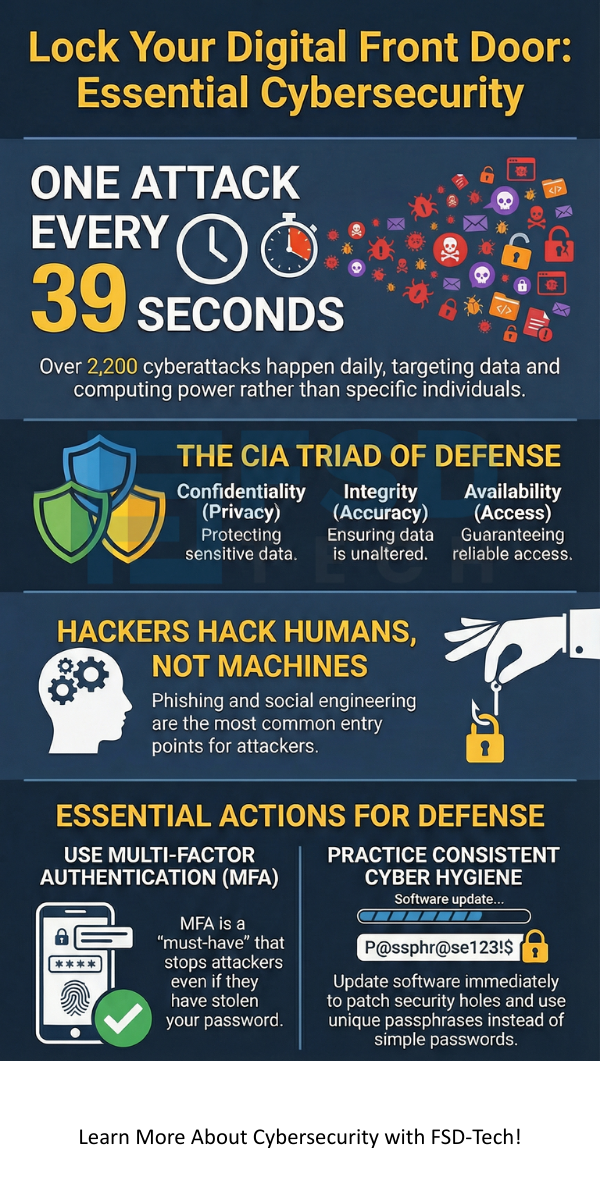
    The term cybersecurity refers to a set of layers spread across computers and networks. To stay safe, these layers must work together. When we talk about defense, we usually look at the "CIA Triad." No, not the secret agents! It stands for Confidentiality, Integrity, and Availability.


    • Confidentiality: Only the right people can see the data.
    • Integrity: The data stays accurate and hasn't been tampered with.
    • Availability: You can actually get to your data when you need it.


    Get a Free Security Audit


    Why is Cybersecurity Necessary Today?

    The world is more connected than ever. We use smart fridges, wearable watches, and cloud storage for everything. Each of these devices is a "door" into your life. Roughly 2,200 cyberattacks happen every day. That’s one every 39 seconds! If we don't take CS (cybersecurity) seriously, we leave our virtual front doors wide open.


    cybersecurity


    Have you ever wondered how a single leaked password can lead to a company-wide shutdown? It’s because everything is linked. One weak link can break the whole chain.


    Also Read: What is a Secure Web Gateway and How Does It Protect You?


    The Different Types of Cyber Threats

    Knowing your enemy is the first step in any fight. In the world of cybersecurity, threats come in many flavors. Most aren't high-tech "Matrix" style code-breaking. They're often simple tricks.


    Phishing and Social Engineering

    Phishing is when someone sends a fake email to trick you. They might pretend to be your bank or a boss. They want you to click a link or give up a password. To be honest, this is the most common way hackers get in. They don't hack the machine; they hack the human.


    Malware and Ransomware

    Malware is "malicious software." This includes viruses, worms, and spyware. A very scary version is ransomware. It locks your files and demands money to give them back. Imagine losing all your family photos unless you pay $500 in Bitcoin. It’s a nightmare scenario we see too often in small businesses.


    Man-in-the-Middle (MitM) Attacks

    Picture this: you're at a coffee shop using their free Wi-Fi. A hacker sits nearby and "listens" to the data traveling between your laptop and the router. They can see your login info as you type it. This is why using public Wi-Fi without a VPN is like whispering your secrets in a crowded room.


    Core Pillars of a Strong Defense

    Building a defense isn't just about installing an antivirus. It is about a mindset. Effective cybersecurity requires a mix of tools, processes, and people.


    Network and Infrastructure Security

    Your network is the highway your data travels on. Network security involves firewalls and encryption to make sure no "hitchhikers" grab your data. For businesses, this often means using a Secure Access Service Edge (SASE). SASE combines networking and security into one cloud service. It makes it much harder for attackers to find a way in.


    Application and Cloud Security

    We use apps for everything. If an app has a bug, a hacker can use it to get into your phone. Developers must write secure code to prevent this. Similarly, cloud security protects data stored on servers like Google Drive or iCloud. While these companies have huge security teams, you still need to lock your "individual" door with a strong password.


    The Human Element

    I've said it before, and I'll say it again: you are the most important part of the shield. No software can stop you from giving away your password if you're tricked. Training and "cyber hygiene" are vital. What does that mean? It means updating your software, using a password manager, and being skeptical of "too good to be true" offers.


    Also Read: Secure Coding Practices: How to Build Apps That Don't Break


    How Does Cybersecurity Work in Practice?

    Now that we know the "what," let's look at the "how." How does a company or a person actually stay safe? It usually involves a cycle of identifying, protecting, detecting, responding, and recovering.


    Identification and Risk Assessment

    You can't protect what you don't know you have. The first step in cybersecurity is making a list of your digital assets. This includes hardware, software, and sensitive data. We then ask: "What is the worst thing that could happen to this?"


    Implementing Protective Measures

    Once we know the risks, we put up guards.


    • Multi-Factor Authentication (MFA): This is a must-have. Even if someone has your password, they can't get in without the code from your phone.
    • Encryption: This turns your data into a secret code. Even if a hacker steals it, they can't read it.
    • Firewalls: These act like security guards at the gate of your network.


    Detection and Response

    What happens when an attacker gets through? You need a way to see them. Systems use "logs" to track activity. If a user logs in from Russia and then two minutes later from New York, the system flags it. A fast response can mean the difference between a small glitch and a total disaster.


    The Role of Government and Law

    Is cybersecurity just a personal problem? Not at all. Governments have passed laws like the GDPR and Various Data Protection Acts. These laws force companies to protect your data. If they lose it because they were lazy, they have to pay massive fines.


    In many countries, there are specific agencies focused on national digital defense. They protect power grids, water systems, and hospitals from foreign attacks. This is often called "Cyber Warfare," and it is a very real part of modern global politics.


    Also Read: Security Automation: How to Protect Your Data Without the Burnout


    Common Myths About Digital Safety

    Let's clear the air on a few things.


    1. "I have a Mac, so I'm safe." This is false. While Macs used to be targeted less, hackers go where the people are. No OS is 100% safe.
    2. "My antivirus is enough." Antivirus is just one tool. It won't stop you from being tricked by a phishing email.
    3. "Cybersecurity is too expensive." In my view, a data breach is much more expensive. For a small business, a single attack can be a "lights out" event.


    Looking Ahead: The Future of Cyber Defense

    The world of cybersecurity is always changing. As we move toward 2026, Artificial Intelligence (AI) is playing a bigger role. Hackers use AI to write better phishing emails. On the flip side, we use AI to spot attacks faster than any human could.


    We're also seeing the rise of "Zero Trust." This is a strategy where the system assumes everyone is a threat until proven otherwise. You have to verify your identity every step of the way. It sounds annoying, but it's the safest way to operate in a digital world.


    Conclusion

    Staying safe online doesn't mean you have to be a tech genius. It starts with small, consistent habits. By understanding what cybersecurity is and how it works, you've already taken the biggest step toward safety. We're all in this together. Our company believes in a digital world where everyone can browse, shop, and work without fear. We're committed to helping you build that secure future, one click at a time.


    Ready to lock down your digital life?  


    cybersecurity


    Contact our experts today


    Key Takeaways

    • Cybersecurity is a continuous process, not a one-time setup.
    • The human factor is often the weakest link in the chain.
    • Use Multi-Factor Authentication (MFA) on every account you can.
    • Keep your software updated to patch "holes" that hackers use.
    • Backup your data regularly to protect against ransomware.


    Frequently Asked Questions About Cybersecurity

    What is the simplest definition of cybersecurity?

    It is the practice of protecting your digital devices, services, and data from unauthorized access or damage.


    Do individuals really need to worry about cyberattacks?

    Yes. Hackers often use automated bots to find any weak password or unpatched device, regardless of who owns it.


    What should I do if I think I've been hacked?

    First, disconnect the device from the internet. Change your passwords from a "clean" device. Then, notify your bank and any relevant services.


    Is free antivirus software good enough?

    It's better than nothing, but paid versions often offer better protection against new threats and "zero-day" exploits.


    How often should I change my passwords?

    Instead of changing them often (which leads to weak passwords), use long, unique "passphrases" and a password manager. Change them immediately if a service you use has a breach.

    What is Cybersecurity? Guide to Digital Safety

    About The Author

    Surbhi Suhane

    Surbhi Suhane is an experienced digital marketing and content specialist with deep expertise in Getting Things Done (GTD) methodology and process automation. Adept at optimizing workflows and leveraging automation tools to enhance productivity and deliver impactful results in content creation and SEO optimization.

    TRY OUR PRODUCTS

    Like This Story?

    Share it with friends!

    Subscribe to our newsletter!

    FishOSCato SASEVembuXcitiumZeta HRMSAtera
    Isometric illustration of a centralized performance platform connected to analytics dashboards and team members, representing goal alignment, measurable outcomes, risk visibility, and strategic project tracking within ClickUp.

    How ClickUp Enables Outcome-Based Project Management (Not Just Task Tracking)

    🕓 February 15, 2026
    Isometric illustration of a centralized executive dashboard platform connected to analytics panels, performance charts, security indicators, and strategic milestones, representing real-time business visibility and decision control within ClickUp.

    Executive Visibility in ClickUp – How CXOs Gain Real-Time Control Without Micromanaging

    🕓 February 13, 2026

    Cato SASE Architecture

    Inside Cato’s SASE Architecture: A Blueprint for Modern Security

    🕓 January 26, 2025

    Workflow Automation(8)

    Workforce Automation(1)

    AI Project Management(1)

    HR Data Automation(1)

    RMM(2)

    IT Workflow Automation(1)

    GCC compliance(4)

    IT security(2)

    Payroll Integration(2)

    IT support automation(3)

    procurement automation(1)

    lost device management(1)

    IT Management(5)

    IoT Security(2)

    Cato XOps(1)

    IT compliance(4)

    Workflow Management(1)

    Task Automation(1)

    Kubernetes lifecycle management(2)

    OpenStack automation(1)

    AI-powered cloud ops(1)

    SMB Security(8)

    Data Security(1)

    MDR (Managed Detection & Response)(3)

    Atera Integrations(2)

    MSP Automation(3)

    XDR Security(2)

    Threat Detection & Response(1)

    SMB Cyber Protection(1)

    Ransomware Defense(3)

    HR Tech Solutions(1)

    Zero Trust Network Access(3)

    Quantum Threat UAE & GCC(1)

    Quantum Security(1)

    Post-Quantum Cryptography(1)

    Cloud IDE Security(1)

    Zero Trust Security(2)

    Endpoint Management(1)

    SaaS Security(2)

    Payroll Automation(5)

    IT Monitoring(2)

    Xcitium EDR SOC(15)

    Ransomware Protection GCC(1)

    Network Consolidation UAE(1)

    M&A IT Integration(1)

    MSSP for SMBs(1)

    Managed EDR FSD-Tech(1)

    SMB Cybersecurity GCC(1)

    FSD-Tech MSSP(25)

    Ransomware Protection(3)

    Antivirus vs EDR(1)

    Endpoint Security(1)

    Cybersecurity GCC(13)

    Data Breach Costs(1)

    Endpoint Protection(1)

    SMB Cybersecurity(8)

    Managed Security Services(2)

    Xcitium EDR(30)

    Zero Dwell Containment(31)

    Cloud Backup(1)

    Hybrid Backup(1)

    Backup & Recovery(1)

    pointguard ai(4)

    vembu(9)

    SMB data protection(9)

    backup myths(1)

    disaster recovery myths(1)

    Disaster Recovery(4)

    Vembu BDR Suite(19)

    DataProtection(1)

    GCCBusiness(1)

    Secure Access Service Edge(4)

    Unified Network Management(1)

    GCC IT Solutions(1)

    GCC HR software(20)

    CC compliance(1)

    open banking(1)

    financial cybersecurity(2)

    Miradore EMM(15)

    Government Security(1)

    Cato SASE(9)

    GCC Education(1)

    Hybrid Learning(1)

    Cloud Security(9)

    Talent Development(1)

    AI Governance(4)

    AI Cybersecurity(13)

    AI Compliance(2)

    AI Risk Management(1)

    AI Security(2)

    Secure Remote Access(1)

    GCC business security(1)

    GCC network integration(1)

    compliance automation(5)

    education security(1)

    GCC cybersecurity(3)

    App management UAE(1)

    BYOD security Dubai(8)

    Miradore EMM Premium+(5)

    HealthcareSecurity(1)

    share your thoughts

    Penetration Testing

    What is Penetration Testing? Guide to Ethical Hacking

    🕓 March 6, 2026

    Cybersecurity

    What is Cybersecurity? Guide to Digital Safety

    🕓 March 6, 2026

    Software-Defined Perimeter

    What is Software-Defined Perimeter? The Expert Guide to SDP and Zero Trust

    🕓 March 5, 2026

    Decoded(143)

    Cyber Security(125)

    BCP / DR(22)

    Zeta HRMS(78)

    SASE(21)

    Automation(78)

    Next Gen IT-Infra(125)

    Monitoring & Management(77)

    ITSM(22)

    HRMS(21)

    Automation(24)