HomeNext Gen IT-InfraMonitoring & ManagementCyber SecurityBCP / DRAutomationDecoded
Next Gen IT-Infra
Cato’s SASE Supports Cybersecurity Skills Development

How Cato’s SASE Supports Cybersecurity Skills Development

🕓 April 8, 2025

How SASE Supports the Security Needs of SMBs

How SASE Supports the Security Needs of SMBs

🕓 February 9, 2025

Attack Surface Reduction with Cato’s SASE

Attack Surface Reduction with Cato’s SASE

🕓 February 10, 2025

SASE for Digital Transformation in UAE

SASE for Digital Transformation in UAE

🕓 February 8, 2025

Monitoring & Management
Understanding Atera’s SLA Management

Understanding Atera’s SLA Management

🕓 February 7, 2025

Cost-Performance Ratio: Finding the Right Balance in IT Management Networks

Cost-Performance Ratio: Finding the Right Balance in IT Management Networks

🕓 June 16, 2025

Customizing Atera with APIs

Customizing Atera with APIs

🕓 March 3, 2025

Power Up Your IT Team’s Strategy with Atera’s Communication Tools

Power Up Your IT Team’s Strategy with Atera’s Communication Tools

🕓 February 8, 2025

Cyber Security
Illustration of the Cato Cloud architecture showing its role in delivering SASE for secure, optimized global connectivity.

Understanding the Cato Cloud and Its Role in SASE

🕓 January 29, 2025

Isometric illustration of professionals managing network performance, bandwidth analytics, and cloud-based optimization around the Cato Networks platform, symbolizing bandwidth control and QoS visibility.

Mastering Bandwidth Control and QoS in Cato Networks

🕓 July 26, 2025

Global network backbone powering Cato SASE solution for secure, high-performance connectivity across regions.

Global Backbone: The Engine Powering Cato’s SASE Solution

🕓 January 30, 2025

Illustration of team analyzing application traffic and usage insights on a large laptop screen using Cato’s dashboard, surrounded by network and cloud icons.

Cato Networks Application Visibility | Monitoring & Control

🕓 July 27, 2025

BCP / DR
Illustration showing diverse business and IT professionals collaborating with cloud, backup, and security icons, representing Vembu use cases for SMBs, MSPs, and IT teams.

Who Uses Vembu? Real-World Use Cases for SMBs, MSPs & IT Teams

🕓 July 12, 2025

Graphic showcasing Vembu’s all-in-one backup and disaster recovery platform with icons for cloud, data protection, and business continuity for IT teams and SMBs.

What Is Vembu? A Deep Dive Into the All in One Backup & Disaster Recovery Platform

🕓 July 6, 2025

Illustration showing Vembu backup and disaster recovery system with cloud storage, server racks, analytics dashboard, and IT professionals managing data.

The Rising Cost of Data Loss: Why Backup Is No Longer Optional?

🕓 August 14, 2025

3D isometric illustration of cloud backup and data recovery infrastructure with laptop, data center stack, and digital business icons — FSD Tech

RPO & RTO: The Heart of Business Continuity

🕓 August 15, 2025

Automation
Cross-Functional Collaboration with ClickUp

Fostering Cross-Functional Collaboration with ClickUp for Multi-Departmental Projects

🕓 February 11, 2025

ClickUp Project Reporting

Revolutionizing Enterprise Reporting with ClickUp’s Advanced Analytics and Dashboards

🕓 June 16, 2025

ClickUp’s Design Collaboration and Asset Management Tools

Empowering Creative Teams with ClickUp’s Design Collaboration and Asset Management Tools

🕓 February 26, 2025

ClickUp Communication and Collaboration Tools

ClickUp Communication and Collaboration Tools: Empowering Remote Teams

🕓 March 12, 2025

Decoded
Multi-Factor Authentication (MFA)

Multi-Factor Authentication (MFA): All You Need to Know

🕓 December 7, 2025

L3 Switch

What Is an L3 Switch? L2 vs L3 & Why You Need Layer 3?

🕓 December 8, 2025

IPSec

IPSec Explained: Protocols, Modes, IKE & VPN Security

🕓 December 3, 2025

 Datagram Transport Layer Security (DTLS)

What is Datagram Transport Layer Security (DTLS)? How it works?

🕓 December 4, 2025

    Subscribe to our newsletter!

    About Us

    Follow Us

    Copyright © 2024 | Powered by 

    Atera

    (56)

    Cato Networks

    (128)

    ClickUp

    (78)

    FishOS

    (7)

    Miradore

    (21)

    PointGuard AI

    (9)

    Vembu

    (22)

    Xcitium

    (33)

    ZETA HRMS

    (79)

    Table of Contents

    What is Penetration Testing? Guide to Ethical Hacking

    Surbhi Suhane
    March 6, 2026
    Comments
    Penetration Testing

    What is Penetration Testing? Your Guide to Ethical Hacking

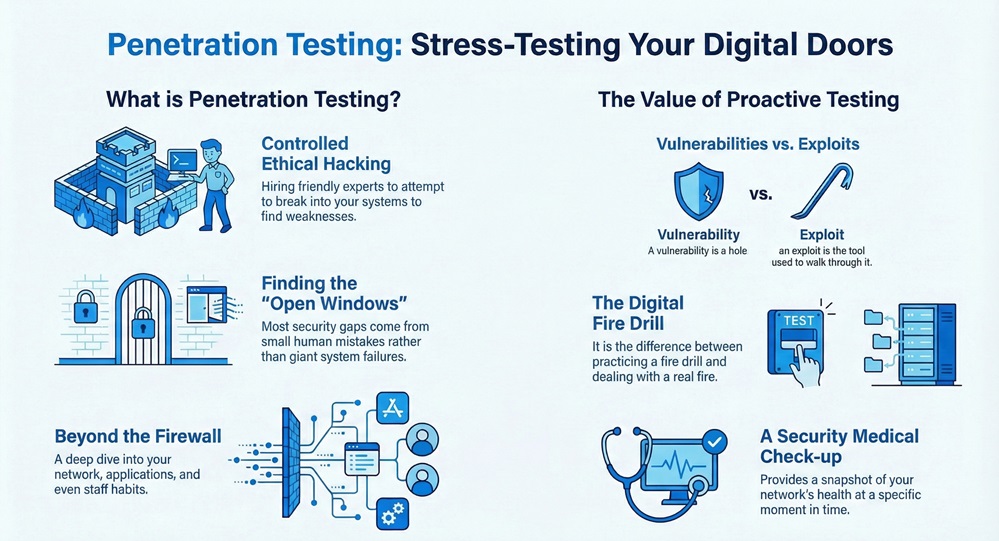
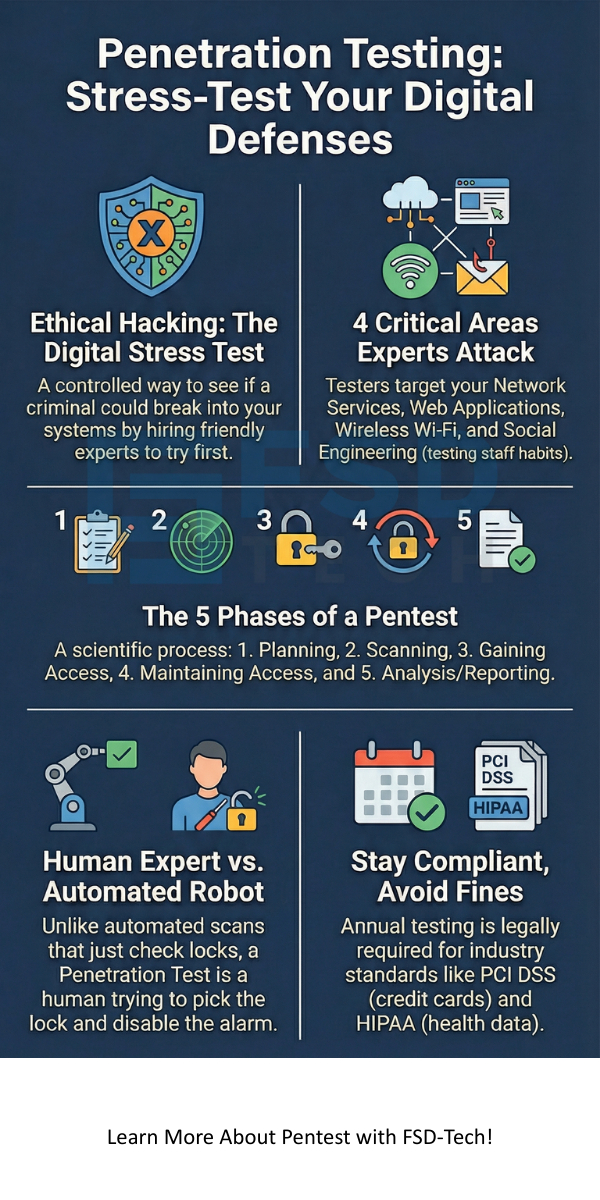
    Have you ever wondered if your digital doors are actually locked? Penetration testing acts as a stress test for your entire digital world. It is a controlled way to see if a hacker could break into your systems. Instead of waiting for a real criminal to show up, you hire a friendly expert to try and get in first. We often call this "ethical hacking."


    Here’s the thing: most companies think they are safe because they have a firewall. But is that enough? In my experience, even the strongest locks don't matter if someone left a window open on the second floor. To be honest, most security gaps come from small mistakes, not giant system failures.


    Does your team know how to spot these gaps? Penetration testing helps you find those "open windows" before the bad guys do. It is a deep dive into your network, apps, and even your staff's habits. By the end of this guide, you’ll see why this process is a must-have for any modern business.


    Get Your Free Security Consultation


    Why Do We Need Penetration Testing?

    We’ve all been there—installing a new piece of software and assuming it's secure. But the digital world changes fast. New bugs appear every day. A penetration testing session provides a snapshot of your security at a specific moment. It’s like a medical check-up for your computer network.


    Penetration Testing


    The main goal of a PT (Penetration Test) is to find "exploitable" weaknesses. A vulnerability is just a hole, but an exploit is the tool used to walk through it. Why wait for a disaster to happen? By running these tests, you stay ahead of the curve. It’s roughly the difference between practicing fire drills and actually dealing with a fire.


    Also Read: What is Ransomware? Definition, Types, and Protection


    The Different Types of Penetration Testing

    Not all tests are the same. Depending on what you want to protect, you might choose a specific "flavor" of testing.


    1. Network Services

    This is the most common type of penetration testing. Experts look at your servers, routers, and switches. They search for open ports or old software that hasn't been updated. If your network is the foundation of your house, this test checks for cracks in the cement.


    2. Web Application Testing

    Do you have a customer portal or an online store? Web apps are huge targets. A penetration testing expert will look for things like SQL injection or cross-site scripting. These are just fancy ways of saying they check if a hacker can trick your website into giving up secret data.


    3. Social Engineering

    Sometimes, the weakest link isn't a computer; it's a person. In this phase, the tester might send "phishing" emails to your staff. They want to see if anyone clicks a suspicious link. It’s a bit eye-opening to see how easily a simple email can bypass a million-dollar firewall.


    4. Wireless Testing

    How secure is your office Wi-Fi? Testers will sit in your parking lot (with permission!) and try to crack your password. They also look for "rogue" access points that shouldn't be there.


    The Five Phases of a Professional Pentest

    A good penetration testing process follows a strict path. It isn't just "smash and grab." It is a careful, scientific method.


    Phase 1: Planning and Recon

    First, we define the scope. What are we testing? Is it the whole office or just one app? Then, the tester gathers "intel." This might include IP addresses or employee names found online. It’s like a scout looking at a map before a big game.


    Phase 2: Scanning

    Next, the tester uses tools to see how the target responds to intruders. They look for "live" hosts and open doors. This is where we see what software you are running and if it's out of date.


    Phase 3: Gaining Access

    This is the "hacking" part. The tester uses the data from the scanning phase to launch an attack. They might try to steal a password or hijack a session. This proves that a hole is not just a theory—it’s a real risk.


    Phase 4: Maintaining Access

    Once inside, can the tester stay there? Real hackers try to hide in your system for months. During penetration testing, the expert tries to see if they can move from a low-level computer to the main "admin" server.


    Phase 5: Analysis and Reporting

    This is the most important part for you. You get a detailed report. It lists what was found, how they got in, and—most importantly—how to fix it. We focus on "remediation," which is just a fancy word for "patching the holes."


    Also Read: What is an Access Control System (ACS) for your security?


    Black Box vs. White Box: Which Is Better?

    When you start a penetration testing project, you have to decide how much info to give the tester.


    Test TypeInformation GivenWhat it Simulates
    Black BoxNone (only a URL or IP)An outside hacker with no inside knowledge.
    White BoxFull Access (code, IP, maps)A rogue employee or "insider threat."
    Grey BoxPartial (user login)A customer or partner with limited access.


    In my view, Grey Box testing is often the best value. It saves time on the "guessing" phase but still feels like a real-world attack.


    Compliance and Why It Matters

    Is your company required to follow PCI DSS or HIPAA? If you handle credit cards or health data, penetration testing isn't just a good idea—it's the law. For example, PCI DSS 11.3 requires yearly testing.

    If you fail to do this, you could face huge fines. Worse, you could lose the trust of your customers. Think of PT as your proof of due diligence. It shows the world (and your lawyers) that you take security seriously.


    Common Tools Used in the Field

    While the human brain is the best tool, experts use software to speed things up. You might hear names like:


    • Metasploit: A framework for finding and using exploits.
    • Nmap: A "map maker" for your network.
    • Wireshark: A tool that "listens" to the data moving through the air.
    • Burp Suite: The gold standard for web app testing.


    Don't worry, you don't need to know how to use these. That’s what the pros are for!


    How Often Should You Test?

    "We did a test last year, we're fine, right?" Not exactly. I recommend penetration testing at least once a year. However, you should also run a test whenever you:


    • Add new network equipment.
    • Update your main applications.
    • Move to a new office.
    • Change your security policies.


    Security is a journey, not a destination. Fast-forward to six months from now—a new virus could exist that didn't exist today. Stay vigilant.


    Is Penetration Testing the Same as a Vulnerability Scan?

    This is a common mix-up. Here is the simple version:


    • Vulnerability Scan: An automated "robot" that looks for known bugs. It’s like a guard walking by and checking if the door is locked.
    • Penetration Testing: A human expert who tries to pick the lock, climb the fence, and disable the alarm.


    You need both. Scans are great for weekly checks, but PT gives you the deep "why" and "how."


    Conclusion

    At the end of the day, penetration testing is about being honest with yourself. It’s easy to assume we are safe, but a PT proves it. Our company values transparency and safety above all else. We don't just find problems; we partner with you to solve them. We’ve helped hundreds of clients turn their weaknesses into strengths. Your data is your most valuable asset—let's make sure it stays yours.


    Penetration Testing infographic


    Talk to a Security Expert


    Key Takeaways

    • Proactive Defense: It finds gaps before criminals do.
    • Compliance: It's required for standards like PCI DSS and SOC2.
    • Risk Management: Helps you decide where to spend your security budget.
    • Human Element: It tests your staff, not just your code.
    • Peace of Mind: You'll know exactly where you stand.


    Frequently Asked Questions

    1. Will a penetration test crash my system?

    Professional testers are very careful. We've all been there where a tool runs too fast and slows things down, but a pro will schedule attacks during "off-hours" to keep your business running.


    2. How long does a test take?

    Usually, it takes between 1 to 3 weeks. It depends on how big your network is and what you want to test.


    3. Is it expensive?

    It costs more than a simple scan because you are paying for a human expert's time. However, it's much cheaper than the cost of a data breach.


    4. What happens after the test?

    You'll get a report. Your IT team will use this to fix the problems. Usually, the tester will do a "re-test" later to make sure the holes are truly closed.

    What is Penetration Testing? Guide to Ethical Hacking

    About The Author

    Surbhi Suhane

    Surbhi Suhane is an experienced digital marketing and content specialist with deep expertise in Getting Things Done (GTD) methodology and process automation. Adept at optimizing workflows and leveraging automation tools to enhance productivity and deliver impactful results in content creation and SEO optimization.

    TRY OUR PRODUCTS

    Like This Story?

    Share it with friends!

    Subscribe to our newsletter!

    FishOSCato SASEVembuXcitiumZeta HRMSAtera
    Isometric illustration of a centralized performance platform connected to analytics dashboards and team members, representing goal alignment, measurable outcomes, risk visibility, and strategic project tracking within ClickUp.

    How ClickUp Enables Outcome-Based Project Management (Not Just Task Tracking)

    🕓 February 15, 2026
    Isometric illustration of a centralized executive dashboard platform connected to analytics panels, performance charts, security indicators, and strategic milestones, representing real-time business visibility and decision control within ClickUp.

    Executive Visibility in ClickUp – How CXOs Gain Real-Time Control Without Micromanaging

    🕓 February 13, 2026

    Cato SASE Architecture

    Inside Cato’s SASE Architecture: A Blueprint for Modern Security

    🕓 January 26, 2025

    Workflow Automation(8)

    Workforce Automation(1)

    AI Project Management(1)

    HR Data Automation(1)

    RMM(2)

    IT Workflow Automation(1)

    GCC compliance(4)

    IT security(2)

    Payroll Integration(2)

    IT support automation(3)

    procurement automation(1)

    lost device management(1)

    IT Management(5)

    IoT Security(2)

    Cato XOps(1)

    IT compliance(4)

    Workflow Management(1)

    Task Automation(1)

    Kubernetes lifecycle management(2)

    OpenStack automation(1)

    AI-powered cloud ops(1)

    SMB Security(8)

    Data Security(1)

    MDR (Managed Detection & Response)(3)

    Atera Integrations(2)

    MSP Automation(3)

    XDR Security(2)

    Threat Detection & Response(1)

    SMB Cyber Protection(1)

    Ransomware Defense(3)

    HR Tech Solutions(1)

    Zero Trust Network Access(3)

    Quantum Threat UAE & GCC(1)

    Quantum Security(1)

    Post-Quantum Cryptography(1)

    Cloud IDE Security(1)

    Zero Trust Security(2)

    Endpoint Management(1)

    SaaS Security(2)

    Payroll Automation(5)

    IT Monitoring(2)

    Xcitium EDR SOC(15)

    Ransomware Protection GCC(1)

    Network Consolidation UAE(1)

    M&A IT Integration(1)

    MSSP for SMBs(1)

    Managed EDR FSD-Tech(1)

    SMB Cybersecurity GCC(1)

    FSD-Tech MSSP(25)

    Ransomware Protection(3)

    Antivirus vs EDR(1)

    Endpoint Security(1)

    Cybersecurity GCC(13)

    Data Breach Costs(1)

    Endpoint Protection(1)

    SMB Cybersecurity(8)

    Managed Security Services(2)

    Xcitium EDR(30)

    Zero Dwell Containment(31)

    Cloud Backup(1)

    Hybrid Backup(1)

    Backup & Recovery(1)

    pointguard ai(4)

    vembu(9)

    SMB data protection(9)

    backup myths(1)

    disaster recovery myths(1)

    Disaster Recovery(4)

    Vembu BDR Suite(19)

    DataProtection(1)

    GCCBusiness(1)

    Secure Access Service Edge(4)

    Unified Network Management(1)

    GCC IT Solutions(1)

    GCC HR software(20)

    CC compliance(1)

    open banking(1)

    financial cybersecurity(2)

    Miradore EMM(15)

    Government Security(1)

    Cato SASE(9)

    GCC Education(1)

    Hybrid Learning(1)

    Cloud Security(9)

    Talent Development(1)

    AI Governance(4)

    AI Cybersecurity(13)

    AI Compliance(2)

    AI Risk Management(1)

    AI Security(2)

    Secure Remote Access(1)

    GCC business security(1)

    GCC network integration(1)

    compliance automation(5)

    education security(1)

    GCC cybersecurity(3)

    App management UAE(1)

    BYOD security Dubai(8)

    Miradore EMM Premium+(5)

    HealthcareSecurity(1)

    share your thoughts

    Penetration Testing

    What is Penetration Testing? Guide to Ethical Hacking

    🕓 March 6, 2026

    Cybersecurity

    What is Cybersecurity? Guide to Digital Safety

    🕓 March 6, 2026

    Software-Defined Perimeter

    What is Software-Defined Perimeter? The Expert Guide to SDP and Zero Trust

    🕓 March 5, 2026

    Decoded(143)

    Cyber Security(125)

    BCP / DR(22)

    Zeta HRMS(78)

    SASE(21)

    Automation(78)

    Next Gen IT-Infra(125)

    Monitoring & Management(77)

    ITSM(22)

    HRMS(21)

    Automation(24)