HomeNext Gen IT-InfraMonitoring & ManagementCyber SecurityBCP / DRAutomationDecoded
Next Gen IT-Infra
Cato’s SASE Supports Cybersecurity Skills Development

How Cato’s SASE Supports Cybersecurity Skills Development

🕓 April 8, 2025

How SASE Supports the Security Needs of SMBs

How SASE Supports the Security Needs of SMBs

🕓 February 9, 2025

Attack Surface Reduction with Cato’s SASE

Attack Surface Reduction with Cato’s SASE

🕓 February 10, 2025

SASE for Digital Transformation in UAE

SASE for Digital Transformation in UAE

🕓 February 8, 2025

Monitoring & Management
Understanding Atera’s SLA Management

Understanding Atera’s SLA Management

🕓 February 7, 2025

Cost-Performance Ratio: Finding the Right Balance in IT Management Networks

Cost-Performance Ratio: Finding the Right Balance in IT Management Networks

🕓 June 16, 2025

Customizing Atera with APIs

Customizing Atera with APIs

🕓 March 3, 2025

Power Up Your IT Team’s Strategy with Atera’s Communication Tools

Power Up Your IT Team’s Strategy with Atera’s Communication Tools

🕓 February 8, 2025

Cyber Security
Visual guide showing Cato CMA interface for configuring Internet and WAN firewall rules, enabling threat protection, and monitoring security events in real time for UAE IT teams.

Enforcing Firewall and Threat Protection Policies in Cato

🕓 July 25, 2025

Isometric illustration of professionals managing network performance, bandwidth analytics, and cloud-based optimization around the Cato Networks platform, symbolizing bandwidth control and QoS visibility.

Mastering Bandwidth Control and QoS in Cato Networks

🕓 July 26, 2025

Illustration of the Cato Cloud architecture showing its role in delivering SASE for secure, optimized global connectivity.

Understanding the Cato Cloud and Its Role in SASE

🕓 January 29, 2025

Global network backbone powering Cato SASE solution for secure, high-performance connectivity across regions.

Global Backbone: The Engine Powering Cato’s SASE Solution

🕓 January 30, 2025

BCP / DR
Illustration showing diverse business and IT professionals collaborating with cloud, backup, and security icons, representing Vembu use cases for SMBs, MSPs, and IT teams.

Who Uses Vembu? Real-World Use Cases for SMBs, MSPs & IT Teams

🕓 July 12, 2025

Graphic showcasing Vembu’s all-in-one backup and disaster recovery platform with icons for cloud, data protection, and business continuity for IT teams and SMBs.

What Is Vembu? A Deep Dive Into the All in One Backup & Disaster Recovery Platform

🕓 July 6, 2025

Illustration showing Vembu backup and disaster recovery system with cloud storage, server racks, analytics dashboard, and IT professionals managing data.

The Rising Cost of Data Loss: Why Backup Is No Longer Optional?

🕓 August 14, 2025

3D isometric illustration of cloud backup and data recovery infrastructure with laptop, data center stack, and digital business icons — FSD Tech

RPO & RTO: The Heart of Business Continuity

🕓 August 15, 2025

Automation
Cross-Functional Collaboration with ClickUp

Fostering Cross-Functional Collaboration with ClickUp for Multi-Departmental Projects

🕓 February 11, 2025

ClickUp Project Reporting

Revolutionizing Enterprise Reporting with ClickUp’s Advanced Analytics and Dashboards

🕓 June 16, 2025

ClickUp’s Design Collaboration and Asset Management Tools

Empowering Creative Teams with ClickUp’s Design Collaboration and Asset Management Tools

🕓 February 26, 2025

ClickUp Communication and Collaboration Tools

ClickUp Communication and Collaboration Tools: Empowering Remote Teams

🕓 March 12, 2025

Decoded
Multi-Factor Authentication (MFA)

Multi-Factor Authentication (MFA): All You Need to Know

🕓 December 7, 2025

L3 Switch

What Is an L3 Switch? L2 vs L3 & Why You Need Layer 3?

🕓 December 8, 2025

IPSec

IPSec Explained: Protocols, Modes, IKE & VPN Security

🕓 December 3, 2025

 Datagram Transport Layer Security (DTLS)

What is Datagram Transport Layer Security (DTLS)? How it works?

🕓 December 4, 2025

    Subscribe to our newsletter!

    About Us

    Follow Us

    Copyright © 2024 | Powered by 

    Cato SASE Architecture

    Inside Cato’s SASE Architecture: A Blueprint for Modern Security

    🕓 January 26, 2025

    Enterprise Data Security and Privacy with ClickUp

    Ensuring Enterprise Data Security and Privacy with ClickUp

    🕓 February 9, 2025

    DDoS protection SASE

    DDoS Protection and Cato’s Defence Mechanisms

    🕓 February 11, 2025

    Table of Contents

    What Is Application Security? Tools, Testing & Best Practices

    Surbhi Suhane
    January 6, 2026
    Comments
    Application Security

    Every modern business uses software applications to run operations, connect with customers, and store sensitive data. These programs, from a simple mobile app to a complex enterprise resource planning (ERP) system, are essential. As we know, cybersecurity threats continue to rise. This means protecting these applications is now a vital business requirement.


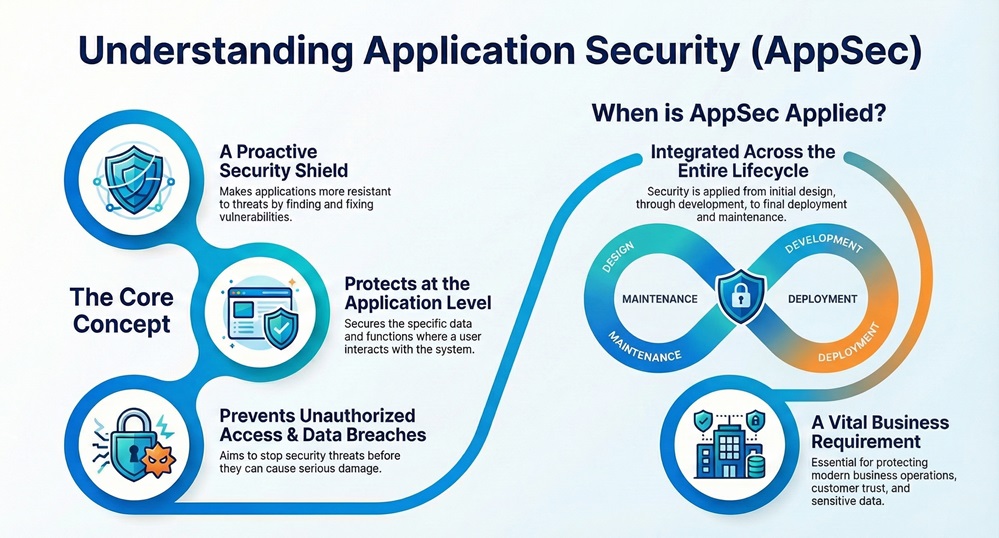
    You might ask, What is Application Security (AppSec)? It refers to the processes, features, and practices that make applications more resistant to security threats. This proactive approach focuses on protecting the software itself. It is a critical layer of defense within the broader cybersecurity discipline.


    We will now discuss the core concept of Application Security, explore its essential components, and explain why implementing application security best practices is non-negotiable for your business.


    Definition Application Security

    Application Security can be understood as the process of applying security controls to software applications. This happens throughout the entire application lifecycle—from the initial design and development phases all the way to deployment and eventual maintenance.
     

    AppSec Infographic


    This process aims at preventing unauthorized access and data breaches by identifying, fixing, and shielding against vulnerabilities within the application code and its surrounding environment. The focus lies on protecting data and functionality where the user interacts with the system.


    Application Security provides protection at the application level. This ensures that the application performs its intended functions securely and correctly.


    Secure Applications Now


    Why is Application Security Important?

    Considering the increasing complexity of modern applications and the sensitive data they handle, the question of why application security is important becomes clear. Failing to secure applications creates huge risks.


    • Protecting Sensitive Data: Applications store or transmit personal identifiable information (PII), financial records, and proprietary business secrets. Effective Application Security prevents attackers from accessing this critical data.
    • Maintaining Customer Trust: A data breach resulting from an application flaw significantly damages your brand’s reputation. A strong AppSec program ensures your users trust your application to handle their information responsibly.
    • Ensuring Business Continuity: A security vulnerability can lead to the application being taken offline or completely compromised. Application Security works with the aim of reducing the risk of downtime and ensuring your business keeps running smoothly.
    • Complying with Regulations: Many industry and government regulations, such as HIPAA, GDPR, and PCI DSS, require organizations to secure their applications to protect user data. Non-compliance often leads to heavy financial penalties.


    Due to the critical nature of these applications, neglecting security means you risk serious financial loss, legal issues, and loss of customer confidence.


    Also Read: What is API Security and Why it matters for your Business?


    Application Security Vs Network Security

    Many people confuse Application Security with Network Security. While both are essential components of cyber security, they deal with different areas of protection. Let us now understand the key differences.


    Basis for ComparisonApplication SecurityNetwork Security
    Focus AreaThe software application itself, including the source code, libraries, and logic.The network infrastructure, including firewalls, routers, and network access points.
    Primary GoalTo prevent attackers from exploiting code vulnerabilities to gain unauthorized access or corrupt data.To prevent attackers from infiltrating the network and moving across systems.
    Methods/ToolsApplication security testing tools (SAST, DAST, IAST), secure coding practices, access controls within the app.Firewalls, intrusion detection/prevention systems (IDS/IPS), Virtual Private Networks (VPNs).
    What it ProtectsData within the application, application logic, and user functionality.Data in transit, servers, endpoints, and the overall network perimeter.
    Threat FocusCross-Site Scripting (XSS), SQL Injection, broken authentication, and business logic flaws.Denial of Service (DoS), unauthorized network ports, eavesdropping, and malware.


    While a network firewall protects the perimeter of your network, Application Security protects what lies inside that perimeter—the critical software. Both are absolutely required for a comprehensive security posture.


    Core Pillars of Application Security Work

    Effective Application Security work is not a single tool or a one-time event. It comprises a collection of integrated practices implemented across the entire software development lifecycle. These practices are commonly divided into four main pillars.


    1. Secure Design and Architecture

    Security starts right at the design phase. If the architecture has flaws, even perfectly written code cannot fix the underlying issue.


    • Threat Modeling: This systematic process identifies potential threats and vulnerabilities in the design phase. Threat modeling helps in proactively designing security controls.
    • Secure Requirements: Requirements should explicitly state security objectives, such as "All user data must be encrypted." This ensures developers know what they must implement.
    • Principle of Least Privilege: This design principle implies that a user or a system component must only have the minimum permissions necessary to perform its required function.


    2. Secure Development

    This pillar focuses on training developers and using tools to write code free of common flaws.


    • Secure Coding Guidelines: Developers follow established guidelines to avoid known security pitfalls, such as improper input validation or weak password storage mechanisms.
    • Developer Training: Continuous training ensures that development teams stay updated on the latest threats and application security best practices.
    • Input Validation: The application strictly validates all user inputs before processing them. This is the primary defense against attacks like SQL Injection and Cross-Site Scripting (XSS).


    3. Application Security Testing (AST)

    This is where you actively look for flaws in the application using specialized application security testing tools. What is application security testing? It is the practice of running tests to identify security weaknesses in the code and deployed application.


    The following are the main types of testing:


    1. Static Application Security Testing (SAST): SAST works on the principle of analyzing the application's source code without executing it. SAST tools scan the code to find flaws like buffer overflows or improper error handling.
    2. Dynamic Application Security Testing (DAST): DAST tests the running application from the outside, simulating an attacker. DAST identifies issues like improper server configuration and session management flaws.
    3. Interactive Application Security Testing (IAST): IAST combines elements of both SAST and DAST. It analyzes the code while the application is running, providing highly accurate results.
    4. Software Composition Analysis (SCA): Modern applications use many open-source libraries. SCA tools analyze these third-party components to check for known vulnerabilities in them.
    5. Penetration Testing: A human expert manually attempts to exploit the application's vulnerabilities to assess its real-world security posture. This process often includes a detailed application security assessment.


    4. Security Operations and Monitoring

    After deployment, Application Security does not stop. Continuous monitoring is vital to catch emerging threats.


    • Web Application Firewall (WAF): A WAF is a primary security measure that filters, monitors, and blocks HTTP traffic to and from a web application. It acts as a shield against common web attacks.
    • Runtime Application Self-Protection (RASP): RASP actively defends the application from within while it is running. It detects attacks in real-time and immediately prevents them from succeeding.
    • Application Security Posture Management (ASPM): ASPM provides a comprehensive view of the application's security status. It collects data from various security tools and helps application security manager teams prioritize and fix the most critical issues.


    Also Read: What is Zero Trust Security Model? All You Need to Know


    Role of Application Security in Cyber Security

    Application Security in cybersecurity represents the shift from a perimeter-focused defense to a depth-in-defence approach. If a motivated attacker bypasses your network defences, the application layer must stand firm.


    • Cloud Application Security: With the move to cloud computing, securing applications hosted on services like AWS, Azure, and Google Cloud has become a specialised field. Cloud application security requires specific tools and practices to secure cloud-native apps and cloud infrastructure.
    • Zero Trust Architecture: This model implies that no user or application is trusted by default, regardless of whether they are inside or outside the network. AppSec implements granular access controls to support this architecture.


    Application Security Services are often utilized by companies to implement these complex security practices. These services can include security audits, managed testing, and developer training.


    Key Application Security Best Practices

    You must follow certain application security best practices to keep your digital assets safe.


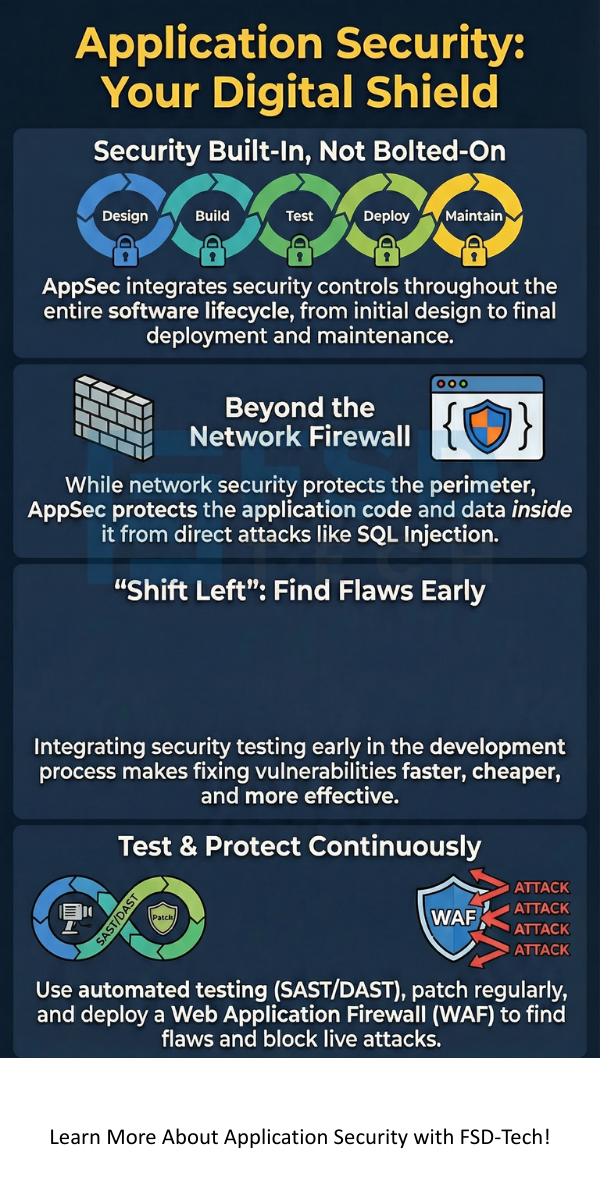
    1. Shift Left: This practice advocates for moving security testing as early as possible in the development lifecycle. Testing earlier makes fixing flaws less costly and time-consuming.
    2. Automate Security Testing: Integrate application security testing tools into your continuous integration/continuous delivery (CI/CD) pipeline. This means security checks run automatically with every code change.
    3. Proper Configuration Management: Securely configure all components, including databases, web servers, and application dependencies. A default or weak configuration often leads to an application blocked security settings message because of a known vulnerability.
    4. Use a WAF: Deploy a Web Application Firewall to provide an immediate shield against common attack types like injection and XSS.
    5. Maintain and Patch Regularly: Continuously update all application components and libraries to patch known vulnerabilities. This crucial step prevents attackers from exploiting easily fixable flaws.


    Also Read: What is an Email Security Gateway? Protecting Your Inbox


    What about Application Security Software?

    The right application security software is essential for implementing a robust AppSec program. This software is often a suite of tools categorized by the testing type they perform.


    • SAST and DAST tools form the backbone of security testing.
    • SCA tools manage third-party risk.
    • ASPM platforms help the application security manager oversee the entire program and track progress.


    Choosing a security solution requires considering your specific needs, such as whether you need a cloud application security solution or a tool focused on mobile apps.


    Conclusion 

    Application Security is an investment, not an expense. It is a fundamental practice that protects your digital foundation and ensures the trust of your customers. Developing software requires prioritizing security from the first line of code to the last deployment.


    We explored what is Application Security, highlighting its primary goal of preventing breaches through continuous vigilance. Remember that securing your applications requires a holistic approach that utilizes people, processes, and technology, including various application security testing tools.


    You must implement strong Application Security practices today. Protect your assets, maintain your reputation, and secure your future. Are you ready to strengthen your defenses and ensure your applications stand firm against all threats? Talk to our experts about a comprehensive application security assessment to secure your software and provide peace of mind.
     

    Application Security


    Key Takeaways

    1. AppSec is Proactive Protection: Application Security involves applying security controls throughout the entire software development lifecycle (SDLC) to proactively identify and fix vulnerabilities within the application code and logic.
    2. It Complements Network Security: AppSec focuses on protecting the application itself, whereas network security secures the perimeter. Both are essential, but AppSec directly combats application-layer attacks like SQL Injection.
    3. Testing is Crucial: Application security testing tools are vital, including SAST (Static), DAST (Dynamic), and IAST (Interactive) testing. These methods identify flaws before attackers can exploit them.
    4. Shift Left is a Core Practice: The "Shift Left" principle dictates that you must move security testing as early as possible in the development process. Testing earlier reduces the cost and complexity of remediation.
    5. Continuous Vigilance is Necessary: Effective AppSec requires more than just testing; it involves using a Web Application Firewall (WAF), maintaining your code base with regular patching, and utilizing tools like Application Security Posture Management (ASPM) for ongoing monitoring.


    Frequently Asked Questions (FAQs)

    What is the most common application security threat?

    The most common threats often involve flaws in input validation. These include SQL Injection and Cross-Site Scripting (XSS). Attackers exploit these flaws to manipulate the application's logic or steal user data.


    Which security app is best for Android or iOS?

    This question usually refers to securing the mobile device itself. For securing the applications you develop, you need professional application security testing tools and development practices. For protecting your personal mobile device, standard mobile security apps typically offer antivirus, anti-phishing, and anti-theft protection.


    What is the role of an Application Security Manager?

    The application security manager oversees the entire AppSec program. This role includes defining security policies, managing the team of security analysts, selecting and deploying application security software, and ensuring the development teams follow all security guidelines.


    Does a firewall protect against all application-layer attacks?

    No. A traditional network firewall primarily controls traffic based on ports and protocols. While a firewall prevents network-level intrusions, it cannot understand the inner logic of an HTTP request. Application-layer attacks (like SQL injection) bypass a regular firewall. This is why you need a Web Application Firewall (WAF) and internal application security controls.

    What Is Application Security? Tools, Testing & Best Practices

    About The Author

    Surbhi Suhane

    Surbhi Suhane is an experienced digital marketing and content specialist with deep expertise in Getting Things Done (GTD) methodology and process automation. Adept at optimizing workflows and leveraging automation tools to enhance productivity and deliver impactful results in content creation and SEO optimization.

    Like This Story?

    Share it with friends!

    Subscribe to our newsletter!

    Atera

    (48)

    Cato Networks

    (111)

    ClickUp

    (68)

    FishOS

    (7)

    Miradore

    (21)

    PointGuard AI

    (9)

    Vembu

    (22)

    Xcitium

    (33)

    ZETA HRMS

    (69)

    Workflow Automation(5)

    Workforce Automation(1)

    AI Project Management(1)

    HR Data Automation(1)

    RMM(1)

    IT Workflow Automation(1)

    IT security(2)

    GCC compliance(4)

    Payroll Integration(2)

    IT support automation(3)

    procurement automation(1)

    lost device management(1)

    IT Management(5)

    IoT Security(2)

    Cato XOps(2)

    IT compliance(4)

    Task Automation(1)

    Workflow Management(1)

    OpenStack automation(1)

    Kubernetes lifecycle management(2)

    AI-powered cloud ops(1)

    SMB Security(8)

    Data Security(1)

    MDR (Managed Detection & Response)(4)

    Atera Integrations(2)

    MSP Automation(3)

    XDR Security(2)

    SMB Cyber Protection(1)

    Ransomware Defense(3)

    HR Tech Solutions(1)

    Zero Trust Network Access(3)

    Zero Trust Security(2)

    Endpoint Management(1)

    SaaS Security(1)

    Payroll Automation(5)

    IT Monitoring(2)

    Xcitium EDR SOC(15)

    Ransomware Protection GCC(1)

    M&A IT Integration(1)

    Network Consolidation UAE(1)

    MSSP for SMBs(1)

    FSD-Tech MSSP(25)

    SMB Cybersecurity GCC(1)

    Managed EDR FSD-Tech(1)

    Ransomware Protection(3)

    Antivirus vs EDR(1)

    Cybersecurity GCC(12)

    Endpoint Security(1)

    Endpoint Protection(1)

    Data Breach Costs(1)

    Managed Security Services(2)

    SMB Cybersecurity(8)

    Zero Dwell Containment(31)

    Xcitium EDR(30)

    Cloud Backup(1)

    Hybrid Backup(1)

    Backup & Recovery(1)

    pointguard ai(4)

    disaster recovery myths(1)

    backup myths(1)

    vembu(9)

    SMB data protection(9)

    Vembu BDR Suite(19)

    Disaster Recovery(4)

    DataProtection(1)

    GCCBusiness(1)

    Secure Access Service Edge(4)

    GCC HR software(15)

    Miradore EMM(15)

    Cato SASE(7)

    Cloud Security(8)

    Talent Development(1)

    AI Cybersecurity(12)

    AI Risk Management(1)

    AI Governance(4)

    AI Security(2)

    AI Compliance(2)

    GCC business security(1)

    GCC network integration(1)

    compliance automation(4)

    GCC cybersecurity(2)

    education security(1)

    App management UAE(1)

    BYOD security Dubai(8)

    Miradore EMM Premium+(5)

    HealthcareSecurity(1)

    MiddleEast(1)

    Team Collaboration(1)

    IT automation(10)

    Zscaler(1)

    SD-WAN(6)

    HR Integration(4)

    Cloud Networking(3)

    device management(9)

    RemoteWork(1)

    ZeroTrust(2)

    VPN(1)

    MPLS(1)

    Project Management(9)

    HR automation(16)

    share your thoughts

    Disaster Recovery in Cloud Computing

    What is Disaster Recovery in Cloud Computing?

    🕓 January 8, 2026

    Computer Virus

    What is Computer Virus? Types, Symptoms & Protection

    🕓 January 8, 2026

    Cyber Kill Chain

    What is the Cyber Kill Chain? Critical Cybersecurity Model

    🕓 January 7, 2026

    Decoded(55)

    Cyber Security(112)

    BCP / DR(22)

    Zeta HRMS(68)

    SASE(21)

    Automation(68)

    Next Gen IT-Infra(111)

    Monitoring & Management(69)

    ITSM(22)

    HRMS(21)

    Automation(24)