HomeNext Gen IT-InfraMonitoring & ManagementCyber SecurityBCP / DRAutomationDecoded
Next Gen IT-Infra
Cato’s SASE Supports Cybersecurity Skills Development

How Cato’s SASE Supports Cybersecurity Skills Development

🕓 April 8, 2025

How SASE Supports the Security Needs of SMBs

How SASE Supports the Security Needs of SMBs

🕓 February 9, 2025

Attack Surface Reduction with Cato’s SASE

Attack Surface Reduction with Cato’s SASE

🕓 February 10, 2025

SASE for Digital Transformation in UAE

SASE for Digital Transformation in UAE

🕓 February 8, 2025

Monitoring & Management
Understanding Atera’s SLA Management

Understanding Atera’s SLA Management

🕓 February 7, 2025

Cost-Performance Ratio: Finding the Right Balance in IT Management Networks

Cost-Performance Ratio: Finding the Right Balance in IT Management Networks

🕓 June 16, 2025

Customizing Atera with APIs

Customizing Atera with APIs

🕓 March 3, 2025

Power Up Your IT Team’s Strategy with Atera’s Communication Tools

Power Up Your IT Team’s Strategy with Atera’s Communication Tools

🕓 February 8, 2025

Cyber Security
Illustration of the Cato Cloud architecture showing its role in delivering SASE for secure, optimized global connectivity.

Understanding the Cato Cloud and Its Role in SASE

🕓 January 29, 2025

Isometric illustration of professionals managing network performance, bandwidth analytics, and cloud-based optimization around the Cato Networks platform, symbolizing bandwidth control and QoS visibility.

Mastering Bandwidth Control and QoS in Cato Networks

🕓 July 26, 2025

Global network backbone powering Cato SASE solution for secure, high-performance connectivity across regions.

Global Backbone: The Engine Powering Cato’s SASE Solution

🕓 January 30, 2025

Illustration of IT team managing user roles and permissions on the Cato CMA dashboard via laptops and cloud interfaces.

Setting Up Role-Based Access Control (RBAC) in Cato

🕓 July 28, 2025

BCP / DR
Illustration showing diverse business and IT professionals collaborating with cloud, backup, and security icons, representing Vembu use cases for SMBs, MSPs, and IT teams.

Who Uses Vembu? Real-World Use Cases for SMBs, MSPs & IT Teams

🕓 July 12, 2025

Graphic showcasing Vembu’s all-in-one backup and disaster recovery platform with icons for cloud, data protection, and business continuity for IT teams and SMBs.

What Is Vembu? A Deep Dive Into the All in One Backup & Disaster Recovery Platform

🕓 July 6, 2025

Illustration showing Vembu backup and disaster recovery system with cloud storage, server racks, analytics dashboard, and IT professionals managing data.

The Rising Cost of Data Loss: Why Backup Is No Longer Optional?

🕓 August 14, 2025

3D isometric illustration of cloud backup and data recovery infrastructure with laptop, data center stack, and digital business icons — FSD Tech

RPO & RTO: The Heart of Business Continuity

🕓 August 15, 2025

Automation
Cross-Functional Collaboration with ClickUp

Fostering Cross-Functional Collaboration with ClickUp for Multi-Departmental Projects

🕓 February 11, 2025

ClickUp Project Reporting

Revolutionizing Enterprise Reporting with ClickUp’s Advanced Analytics and Dashboards

🕓 June 16, 2025

ClickUp’s Design Collaboration and Asset Management Tools

Empowering Creative Teams with ClickUp’s Design Collaboration and Asset Management Tools

🕓 February 26, 2025

ClickUp Communication and Collaboration Tools

ClickUp Communication and Collaboration Tools: Empowering Remote Teams

🕓 March 12, 2025

Decoded
Multi-Factor Authentication (MFA)

Multi-Factor Authentication (MFA): All You Need to Know

🕓 December 7, 2025

L3 Switch

What Is an L3 Switch? L2 vs L3 & Why You Need Layer 3?

🕓 December 8, 2025

IPSec

IPSec Explained: Protocols, Modes, IKE & VPN Security

🕓 December 3, 2025

 Datagram Transport Layer Security (DTLS)

What is Datagram Transport Layer Security (DTLS)? How it works?

🕓 December 4, 2025

    Subscribe to our newsletter!

    About Us

    Follow Us

    Copyright © 2024 | Powered by 

    Cato SASE Architecture

    Inside Cato’s SASE Architecture: A Blueprint for Modern Security

    🕓 January 26, 2025

    Enterprise Data Security and Privacy with ClickUp

    Ensuring Enterprise Data Security and Privacy with ClickUp

    🕓 February 9, 2025

    DDoS protection SASE

    DDoS Protection and Cato’s Defence Mechanisms

    🕓 February 11, 2025

    Table of Contents

    What Is Zero Touch Provisioning (ZTP)? All You Need to Know

    Surbhi Suhane
    December 14, 2025
    Comments
    Zero Touch Provisioning (ZTP)

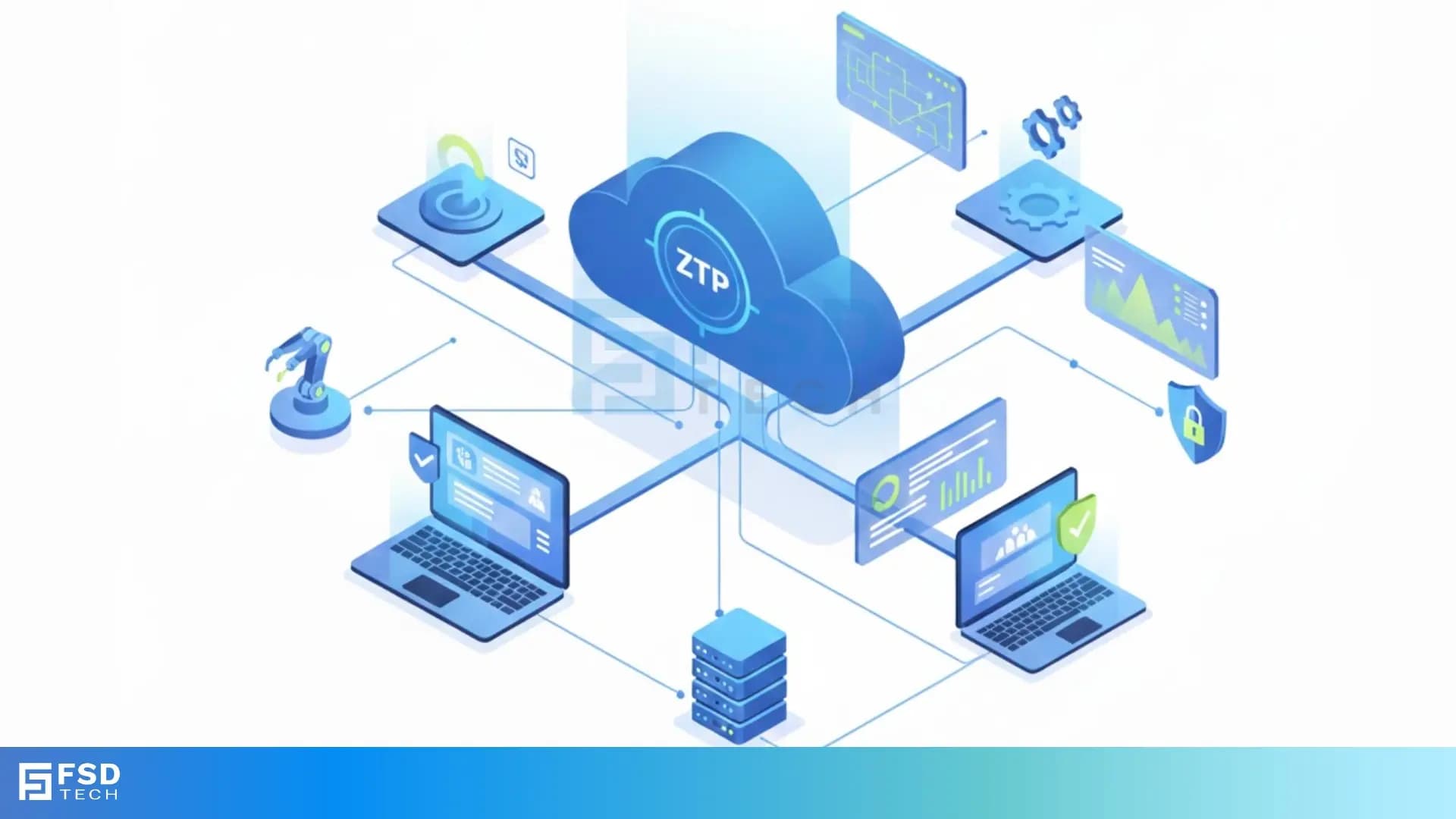
    Zero Touch Provisioning (ZTP) refers to an automated process that allows network devices like switches, routers, and firewalls to configure themselves without the need for manual intervention from a technician. This process is vital for companies managing large-scale networks, as it speeds up deployment and significantly reduces the chance of human errors. Zero Touch Provisioning, often called ZTP, helps new devices become fully operational quickly and efficiently.


    The essential components involved in the Zero Touch Provisioning process are the network device itself and a central server that holds the configuration files and operating system images. It consists of the device booting up, finding the server, and downloading what it needs to join the network. This powerful technique connects to practical application in data centers and branch offices worldwide where fast, reliable deployment is key.


    In this section, we will discuss Zero Touch Provisioning in detail along with its mechanism, components, and significant advantages. To know more about this essential network automation process, read below.


    What is Zero Touch Provisioning (ZTP)?

    Zero Touch Provisioning can be understood as the automatic setup of a new network device. This automation eliminates the tedious, error-prone task of manually configuring a device when you plug it into your network for the first time. Zero Touch Provisioning utilizes existing network services to locate, download, and apply configuration files.


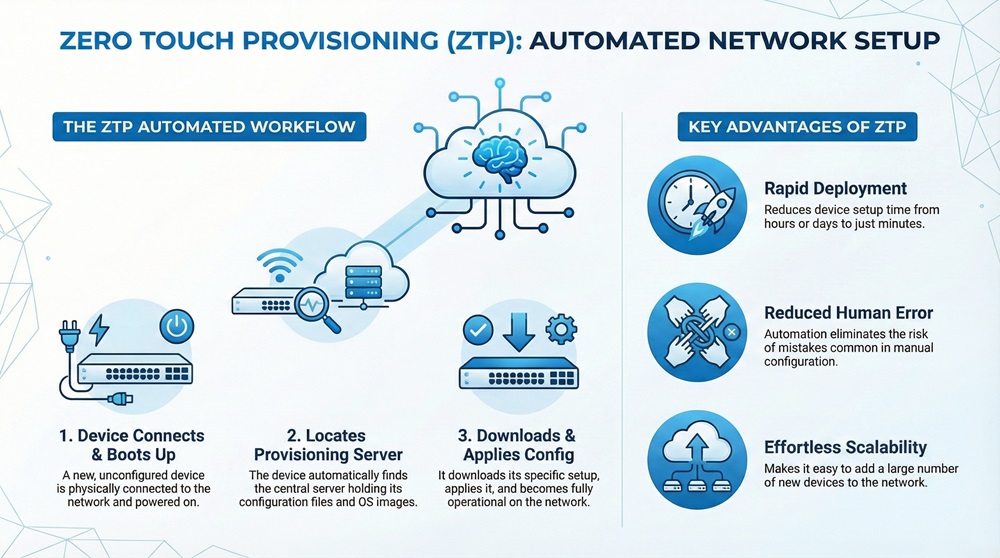
    Zero Touch Provisioning is a critical part of modern network management. Why is Zero Touch Provisioning so important for today's networks? Basically, it makes adding new hardware much faster. Suppose you have to install fifty new network switches. Manually setting up each one would take hours or even days. With ZTP, the process is fully automated, taking only minutes per device. This massive time saving is why many enterprises now adopt ZTP.
     

    Zero Touch Provisioning


    How Zero Touch Provisioning Works?

    In simple words, the Zero Touch Provisioning process starts when a new device connects to the network. The device first looks for a configuration server. It uses network protocols, such as DHCP (Dynamic Host Configuration Protocol), to find the server's location. Once the device finds the right server, it downloads its specific configuration and the latest operating system (OS) image.


    The device then applies the new OS and configuration. After a final reboot, the device is ready to work on the network, just as if an expert technician had set it up by hand. This entire automatic process is the core idea behind Zero Touch Provisioning.


    See Cato in Action!


    Why ZTP is Essential?

    Zero Touch Provisioning is essential because it directly addresses the challenges of scalability and consistency in network deployment. As networks grow bigger and more complex, manual configuration becomes a bottleneck. Errors often happen when a human types commands or misses a step.


    ZTP eliminates these manual errors. Every device receives the exact same configuration from the central source, ensuring network-wide consistency. This consistent deployment is vital for security and reliable operation. Furthermore, ZTP allows an organization to deploy hardware in a distant office without needing an IT expert physically present. This saves travel time and cost. Thus, ZTP is critical for both the speed and the quality of network deployment.


    Zero Touch Provisioning (ZTP) Vs Manual Provisioning

    Basis for ComparisonZero Touch Provisioning (ZTP)Manual Provisioning
    MeaningIt refers to the automated configuration of a network device.It refers to the physical configuration of a network device by a human technician.
    NatureThis process is typically script-based, centralized, and automatic.This process is hands-on, decentralized, and requires human intervention.
    SpeedDeployment is very fast; often takes minutes per device.Deployment is slow; takes significant time per device depending on configuration complexity.
    ConsistencyHigh degree of consistency, as configurations come from a single, verified template.Low to moderate consistency; prone to human error and configuration drift.
    ScalabilityHighly scalable; easy to deploy hundreds of devices at once.Poorly scalable; limited by the number of technicians and time available.
    Function/PurposeTo streamline and automate large-scale network deployment for efficiency.To configure a device by hand, which is useful for small networks or complex, one-off setups.
    CostHigh initial setup cost, but low operational expenditure (OPEX) afterwards.Low initial setup cost, but high operational expenditure due to labor/travel costs.
    Remote UseExcellent for remote sites; requires minimal local technical expertise.Requires a skilled technician to be physically present at the remote site.


    Components of ZTP

    To understand Zero Touch Provisioning, it is necessary to go through the key components that enable the automatic process. These components work together to ensure the device gets the right files and starts working correctly.

    The three essential components of Zero Touch Provisioning are:

    • The Network Device: This is the new switch or router that needs to be provisioned. It must have the built-in capability to support ZTP protocols and logic upon boot-up.
    • The Provisioning Server: This is a central server that hosts all the necessary files. It is the single source of truth for configurations and operating system images.
    • Network Services: These services, primarily DHCP and sometimes DNS, help the new device locate the Provisioning Server on the network.


    The Provisioning Server

    The Provisioning Server is the heart of the Zero Touch Provisioning setup. This server is usually an HTTP, FTP, or TFTP server. It stores the following key elements:

    • Initial Script: A bootstrap script that the device runs first. This script tells the device how to find its specific configuration file.
    • Configuration File: The complete set of commands needed to configure the device for its intended role on the network (e.g., VLANs, routing, security).
    • Operating System Image (OS Image): The latest version of the device's operating system software.


    Also Read: What Is an L3 Switch? L2 vs L3 & Why You Need Layer 3?


    Working Mechanism of ZTP

    Let us now understand the step-by-step working mechanism of ZTP. This automated process, while complex under the hood, follows a clear and logical sequence. The successful deployment of any network device depends on these steps being executed correctly.


    The process of Zero Touch Provisioning occurs as follows:


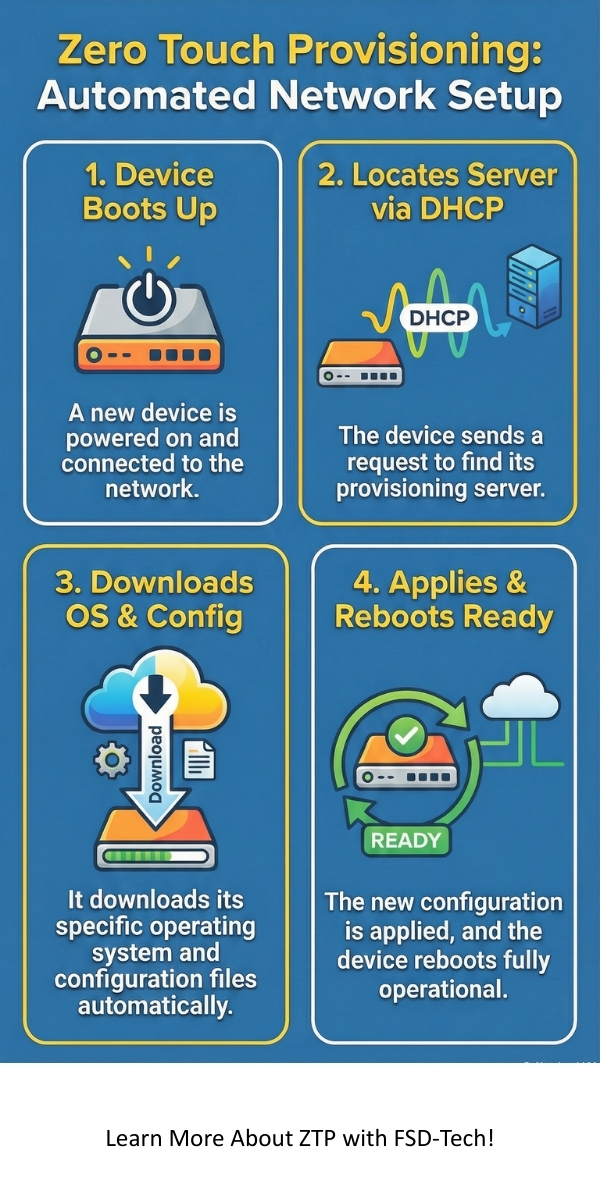
    1. Initial Boot-up: The new network device is powered on. It detects that it is unconfigured. The device enters ZTP mode automatically.
    2. DHCP Request: The device sends out a DHCP request to obtain a temporary IP address. Crucially, the DHCP server is also configured to provide the device with the IP address or URL of the Provisioning Server.
    3. Server Location: Using the information from the DHCP server, the device locates the Provisioning Server (e.g., a TFTP or HTTP server).
    4. File Download: The device attempts to download a specific initial script or configuration file from the server. This file is often based on the device's serial number or MAC address.
    5. OS Image Check/Upgrade: The script checks the device's current OS version against the one on the server. If a newer image is needed, the device downloads the new OS image file.
    6. Configuration Application: After any necessary OS upgrade, the device downloads its final configuration file and applies the settings.
    7. Reboot and Finalization: The device reboots with the new OS and configuration. It is now fully provisioned and ready to join the production network.


    Referencing the Steps

    Here, it must be understood that the most critical part is the initial interaction with the DHCP server. This server acts as the guide, telling the device where to go next. The entire Zero Touch Provisioning mechanism relies on this initial handshake being successful. The final outcome is a fully functional device without any manual command entry.


    Characteristics of ZTP

    Zero Touch Provisioning exhibits several core characteristics that define its value in network automation. These characteristics ensure that the provisioning process is both efficient and reliable.


    Following are the key characteristics of Zero Touch Provisioning:


    • Automation: ZTP is inherently automatic. It eliminates the need for human hands-on work for device setup. This key feature is why it is called "Zero Touch."
    • Scalability:Zero Touch Provisioning enables the easy and fast deployment of hundreds of devices at once. This ability to scale effortlessly is a major benefit for large enterprises and service providers.
    • Consistency: Every device provisioned via ZTP receives a configuration that is identical to the template stored on the server. This ensures uniformity across the network, which is vital for smooth operation and troubleshooting.
    • Error Reduction: Since human interaction is removed from the process, the possibility of configuration errors (such as typos or missed steps) is significantly reduced. This makes deployments more reliable.
    • Security: ZTP can incorporate security checks, ensuring only authenticated or authorized devices receive configurations. It also ensures the latest secure OS image is installed automatically.


    Zero Touch Provisioning fundamentally changes network operations from a manual, step-by-step chore to an automated, centralized function. This shift is the most significant characteristic.


    Also Read: What Is a Proxy Server? Types, Benefits & How It Works


    Advantages of ZTP

    Zero Touch Provisioning brings multiple benefits to organizations, making it a highly desirable solution for network deployment. The advantages directly translate into operational savings and improved network quality.


    1. Faster Time-to-Deployment: Zero Touch Provisioning drastically reduces the time it takes to bring a new device online. Instead of hours of manual work, a device can be fully configured in minutes. This speed is vital when rapidly expanding a network or restoring services.
    2. Reduced Operating Costs: Because technicians do not need to spend time configuring devices or traveling to remote sites, operational expenditures (OPEX) decrease. The automation provided by Zero Touch Provisioning saves on labor costs.
    3. Improved Accuracy and Consistency: The configuration is sourced from a central, verified template. This ensures that every device has the correct settings, eliminating configuration drift and manual errors. This increased consistency improves network stability.
    4. Simplified Remote Deployment: Devices can be shipped directly to a remote location. Local staff or non-technical personnel can simply plug in the device. Zero Touch Provisioning handles the rest.
    5. Enhanced Security Posture: ZTP ensures that devices are running the latest, most secure operating system image and a baseline security configuration. This automatic update process helps protect the network right from the start.


    Limitations of ZTP

    While Zero Touch Provisioning offers many benefits, it also has certain limitations and requirements that organizations must consider. It is not a magical fix for all network problems.


    1. Initial Setup Complexity: The upfront cost and complexity of setting up the Zero Touch Provisioning environment can be high. This includes configuring the DHCP server, provisioning server, and creating reliable, parameterized configuration templates.
    2. Dependencies on Core Services: ZTP heavily relies on services like DHCP and DNS being fully operational and correctly configured. If these core network services fail or are misconfigured, the entire Zero Touch Provisioning process stops working.
    3. Requires ZTP-Enabled Devices: Not all network hardware supports Zero Touch Provisioning. Older or lower-end devices might lack the necessary firmware or software logic to initiate the process automatically. Organizations must ensure they purchase ZTP-compatible hardware.
    4. Troubleshooting Can Be Difficult: When the ZTP process fails, determining the exact point of failure (e.g., DHCP issue, firewall blocking the server, wrong file name) can be harder than troubleshooting a manual configuration failure.


    Zero Touch Provisioning is a powerful tool, but it demands careful planning and a robust, reliable infrastructure to work correctly.


    Applications of ZTP

    Zero Touch Provisioning has wide-ranging applications across different network environments. It is utilized wherever rapid and consistent device deployment is necessary.


    Following are the major applications where Zero Touch Provisioning is effectively employed:


    1. Data Center Deployment: In large data centers, hundreds or thousands of switches and servers might be deployed at once. ZTP allows for the rapid, parallel provisioning of this massive hardware scale, cutting deployment time from weeks to days.
    2. Branch Office Rollouts: Companies opening new branch offices can ship network devices directly to the site. Local staff can connect the cables, and Zero Touch Provisioning handles the configuration remotely. This saves significant travel time and cost for IT teams.
    3. Campus Network Upgrades: When upgrading a large university or corporate campus network, ZTP helps replace old hardware with new, pre-configured devices quickly and with minimal disruption.
    4. Service Provider Customer Edge: Telecom service providers use ZTP to provision customer-facing equipment (CPE). This allows them to quickly deploy services to new subscribers without sending a skilled technician on-site for every installation.
    5. Industrial Internet of Things (IIoT): In large-scale industrial settings, ZTP can provision gateways and edge devices, ensuring they are instantly operational and configured to secure industrial protocols.


    Zero Touch Provisioning is primarily employed to automate network deployment, ensuring devices are ready to perform their function in diverse environments, from large data centers to small branch offices.


    Conclusion

    Zero Touch Provisioning is a fundamental shift in how we approach network deployment, moving from slow, error-prone manual tasks to fast, consistent automation. This critical technology provides the mechanism for devices to automatically configure themselves by downloading necessary files from a central server. ZTP ensures that every new switch or router is provisioned identically and securely.


    By adopting Zero Touch Provisioning, companies achieve significant operational benefits, chiefly in reduced time-to-deployment and lower labor costs. The trade-off is the need for a well-designed, robust supporting infrastructure, particularly the DHCP and Provisioning Servers. Hence, ZTP is a powerful enabler of network scalability, but it requires careful planning to maximize its advantages and overcome initial setup challenges.


    Therefore, for any company aiming for large-scale, consistent, and fast network rollouts, investing in Zero Touch Provisioning capabilities is not optional. It is essential for future growth and operational efficiency. Zero Touch Provisioning simplifies life for IT teams and allows them to focus on high-level network design and innovation.


    Zero Touch Provisioning = Zero Tech Visits – Book Your Cato Demo!
     

    Zero Touch Provisioning


    Key Takeaways

    • Zero Touch Provisioning (ZTP) is the automated configuration of network devices upon initial boot-up.
    • The goal of ZTP is to eliminate manual configuration, significantly reducing deployment time and human error.
    • Key components include the ZTP-enabled device, a Provisioning Server (hosting configs and OS images), and DHCP/DNS to locate the server.
    • ZTP is essential for scalability, ensuring consistency, and reducing operating costs in large network rollouts.
    • Implementation requires a careful, initial setup of the underlying network services to succeed.


    Frequently Asked Questions (FAQs) on ZTP

    Q1. What is the main purpose of Zero Touch Provisioning?

    The main purpose of Zero Touch Provisioning is to automate the installation and configuration of new network devices. This helps to reduce the time needed for deployment and ensures that all devices have a consistent and correct setup.


    Q2. Does Zero Touch Provisioning work for all network devices?

    No. Zero Touch Provisioning only works for devices that have built-in support for ZTP. This means the device's operating system must contain the logic to automatically initiate the ZTP process upon boot-up when it detects an unconfigured state.


    Q3. What is the role of the DHCP server in ZTP?

    The DHCP server is vital in the Zero Touch Provisioning process. Its role is not just to assign a temporary IP address to the new device but also to provide the specific option that tells the device where the Provisioning Server is located. This location information is often an IP address or a URL.


    Q4. Is ZTP only for switches?

    No, Zero Touch Provisioning is used for various types of network hardware, including switches, routers, firewalls, and other appliances. Any device that needs configuration before joining the network can potentially utilize ZTP if it is supported by the vendor.


    Q5. Can I use ZTP to upgrade the device’s operating system?

    Yes. A key function of Zero Touch Provisioning is the ability to check the current OS version on the device against the latest image stored on the Provisioning Server. If a newer version is available, the ZTP process downloads and installs the new OS image automatically before applying the final configuration.

    What Is Zero Touch Provisioning (ZTP)? All You Need to Know

    About The Author

    Surbhi Suhane

    Surbhi Suhane is an experienced digital marketing and content specialist with deep expertise in Getting Things Done (GTD) methodology and process automation. Adept at optimizing workflows and leveraging automation tools to enhance productivity and deliver impactful results in content creation and SEO optimization.

    Like This Story?

    Share it with friends!

    Subscribe to our newsletter!

    Atera

    (48)

    Cato Networks

    (118)

    ClickUp

    (70)

    FishOS

    (7)

    Miradore

    (21)

    PointGuard AI

    (9)

    Vembu

    (22)

    Xcitium

    (33)

    ZETA HRMS

    (76)

    Workflow Automation(8)

    Workforce Automation(1)

    AI Project Management(1)

    HR Data Automation(1)

    RMM(1)

    IT Workflow Automation(1)

    GCC compliance(4)

    IT security(2)

    Payroll Integration(2)

    IT support automation(3)

    procurement automation(1)

    lost device management(1)

    IT Management(5)

    IoT Security(2)

    Cato XOps(2)

    IT compliance(4)

    Task Automation(1)

    Workflow Management(1)

    OpenStack automation(1)

    Kubernetes lifecycle management(2)

    AI-powered cloud ops(1)

    SMB Security(8)

    Data Security(1)

    MDR (Managed Detection & Response)(4)

    Atera Integrations(2)

    MSP Automation(3)

    XDR Security(2)

    Ransomware Defense(3)

    SMB Cyber Protection(1)

    HR Tech Solutions(1)

    Zero Trust Network Access(3)

    Zero Trust Security(2)

    Endpoint Management(1)

    SaaS Security(1)

    Payroll Automation(5)

    IT Monitoring(2)

    Xcitium EDR SOC(15)

    Ransomware Protection GCC(1)

    Network Consolidation UAE(1)

    M&A IT Integration(1)

    MSSP for SMBs(1)

    Managed EDR FSD-Tech(1)

    FSD-Tech MSSP(25)

    Ransomware Protection(3)

    SMB Cybersecurity GCC(1)

    Antivirus vs EDR(1)

    Cybersecurity GCC(12)

    Endpoint Security(1)

    Endpoint Protection(1)

    Data Breach Costs(1)

    SMB Cybersecurity(8)

    Zero Dwell Containment(31)

    Managed Security Services(2)

    Xcitium EDR(30)

    Cloud Backup(1)

    Hybrid Backup(1)

    Backup & Recovery(1)

    pointguard ai(4)

    backup myths(1)

    vembu(9)

    SMB data protection(9)

    disaster recovery myths(1)

    Disaster Recovery(4)

    Vembu BDR Suite(19)

    GCCBusiness(1)

    DataProtection(1)

    Secure Access Service Edge(4)

    GCC HR software(18)

    Miradore EMM(15)

    Cato SASE(7)

    Cloud Security(8)

    Talent Development(1)

    AI Cybersecurity(12)

    AI Security(2)

    AI Governance(4)

    AI Risk Management(1)

    AI Compliance(2)

    GCC business security(1)

    GCC network integration(1)

    compliance automation(5)

    education security(1)

    GCC cybersecurity(2)

    BYOD security Dubai(8)

    App management UAE(1)

    Miradore EMM Premium+(5)

    MiddleEast(1)

    HealthcareSecurity(1)

    Team Collaboration(1)

    IT automation(12)

    Zscaler(1)

    SD-WAN(6)

    HR Integration(4)

    Cloud Networking(3)

    device management(9)

    VPN(1)

    RemoteWork(1)

    ZeroTrust(2)

    MPLS(1)

    Project Management(9)

    HR automation(16)

    share your thoughts

    Zombie Computer

    What Is a Zombie Computer? Botnet Threats Guide

    🕓 January 29, 2026

    Metadata Analysis

    What is Metadata Analysis? Guide to Data Insights

    🕓 January 29, 2026

    Decryption and Encryption

    What is Decryption and Encryption in Modern Data Security?

    🕓 January 28, 2026

    Decoded(87)

    Cyber Security(118)

    BCP / DR(22)

    Zeta HRMS(75)

    SASE(21)

    Automation(70)

    Next Gen IT-Infra(118)

    Monitoring & Management(69)

    ITSM(22)

    HRMS(21)

    Automation(24)