.webp&w=3840&q=75)
How ClickUp Enables Outcome-Based Project Management (Not Just Task Tracking)
🕓 February 15, 2026

The Zero Day Attack is among the most dangerous attacks because it exploits a vulnerability that is completely unknown to the software vendor or the public. When you are hit by a zero day attack, the company that makes the software has had "zero days" to fix the problem.
Why does this matter to you? A successful zero day exploit in cyber security can mean hackers steal your data, take over your computer systems, or simply shut down your operations. It can lead to massive financial losses and a complete loss of trust.
In this section, we will explore this significant security threat and the essential steps you can take for zero day attack prevention.
A zero day attack can be understood as an assault that leverages a previously unknown vulnerability in a computer system or application. This is a flaw that the software developer has not yet patched or even identified.
In other words, a zero day exploit in cyber security is a piece of code written to take advantage of this secret flaw. Once an attacker finds this vulnerability, they develop an exploit and use it to launch an attack before any security patch exists.
The name, Zero Day Attack, refers to the fact that the vendor has zero days to prepare a fix when the exploit is first used. It is to be noted that this vulnerability exists in software that you likely use every day, such as your operating system, web browser, or common office applications.
To understand this better, let us now discuss the systematic process behind a typical zero day attack. The entire process usually comprises four main steps.
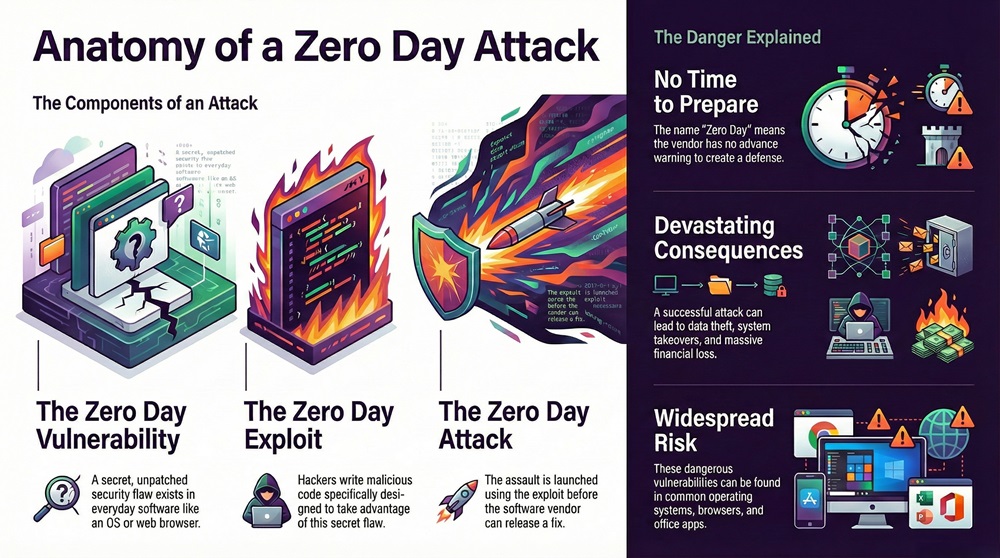
1. Finding the Zero Day Vulnerability
The process begins when an attacker, or a group of attackers, finds a zero day vulnerability. This vulnerability is nothing but an error in the programming code of a software application.
This error allows the attacker to perform an action that the software developer never intended. For example, the vulnerability might allow a hacker to write data to a protected memory space.
2. Developing the Zero Day Exploit
Once an attacker identifies the flaw, they develop a specific tool called a zero day exploit. This exploit is a carefully crafted code sequence.
The purpose of this code is to interact with the vulnerable software in a way that triggers the flaw and gives the attacker control. This exploit code acts as the key that unlocks the system's defenses.
3. Launching the Zero Day Attack
The attacker uses the zero day exploit to launch the actual attack. This often involves delivering the exploit code to the target system.
This action takes place through various means, such as a malicious email attachment, a compromised website, or a network intrusion. The attack aims at installing malicious software, i.e., malware, onto the target system without the user's knowledge.
4. Creating the Patch
The final stage is the vendor's response. This happens after the attack is discovered, which is often only after real-world attacks have already taken place.
The software vendor then rushes to write a fix, which is called a patch. This new patch is nothing but a security update that eliminates the specific vulnerability. Once the patch is available, the vulnerability is no longer a "zero day" but a "known" vulnerability.
Also Read: What Is a Whaling Attack? How It Works & Prevention
Now, the question arises, why zero day attack? What motivates sophisticated attackers to spend vast time and resources finding these rare vulnerabilities? The primary motivations are highly diverse and depend on the target.
The high value of a zero day vulnerability means that these exploits are often sold on underground markets for millions of dollars. The one who sells this exploit gets paid for their findings.
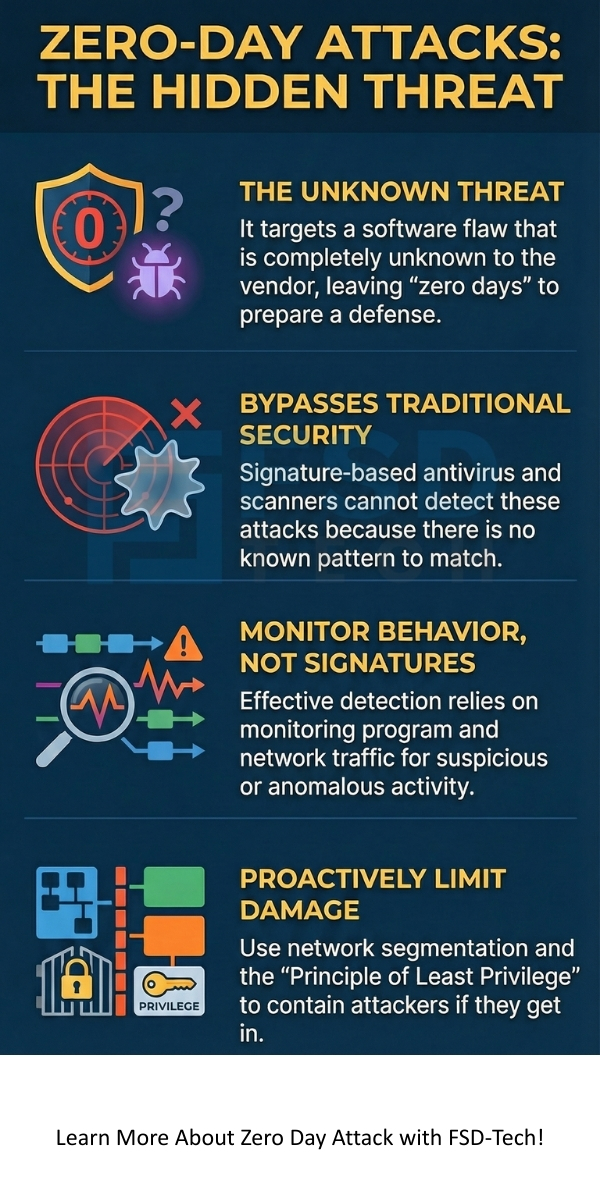
Traditional security defenses, e.g., signature-based antivirus software, cannot stop a zero day attack because the attack signature is entirely new. Therefore, successful zero day attack prevention requires moving beyond these older security models.
1. Implementing Zero Day Attack Detection with Behavior Analysis
Effective zero day attack detection relies on observing the behavior of the programs rather than looking for a known malware signature. This means that instead of asking "Is this program known bad?", the system asks: "Is this program doing something unusual or suspicious?"
2. Adopting Proactive Defense Measures
Beyond real-time detection, several proactive steps can significantly reduce your system's exposure to a zero day attack.
3. Using Advanced Hardware-Level Security
Modern security also extends into the hardware itself. The chips and processors in your devices now play a vital role in security.
Also Read: Dictionary Attack in Cybersecurity - How it Works and How to Stop?
It is important to understand the specific differences between a zero day attack and an N-day attack, as this clarifies the true nature of the threat. While both involve exploiting a vulnerability, the key difference lies in the time the vulnerability has been known and patch availability.
Let us now understand the key distinctions between these two types of attacks.
| Basis for Comparison | Zero Day Attack | N-Day Attack |
|---|---|---|
| Vulnerability Status | The flaw is unknown to the vendor and public. | The flaw is known publicly and to the vendor. |
| Patch Availability | A patch to fix the vulnerability does not exist at the time of the attack. | A patch or fix is available (or has been available) for $N$ number of days. |
| Nature of Exploit | Uses a highly specific, custom-written zero day exploit code. | Uses an exploit that leverages a known flaw; often uses publicly available tools or proofs-of-concept. |
| Detection Method | Zero day attack detection requires advanced behavioral analysis, EDR, and network monitoring. | Detection is typically effective with traditional signature-based security software after the patch is released. |
| Attacker Sophistication | Typically requires highly skilled, well-funded groups (e.g., nation-states or top-tier criminal organizations). | Can be performed by less skilled hackers or automated botnets. |
| Risk Factor | High risk due to no defense layer existing at the time of the initial attack. | Risk is due to poor patch management and user delay in applying the vendor's fix. |
| Cost of Exploit | Extremely high due to its scarcity and effectiveness. | Low or none, as the tools are often published on the internet |
Let us now discuss a few notable examples of a zero day exploit in cyber security to show the real-world impact of these threats.
Also Read: Spear Phishing: Learn About #1 CEO fraud
Understanding the zero day attack is only the first step. True security comes from acting on this knowledge. Our commitment is to provide you with a comprehensive cyber defense strategy that includes advanced behavior-based zero day attack detection and proactive security architecture.
We focus on securing your business against the threats of tomorrow, ensuring your systems are not just patched but truly resilient.
Contact us today to learn how our solutions can integrate the latest behavioral analysis techniques to protect your critical assets from the most sophisticated threats.
So, with the above discussion, we can say that the zero day attack represents a serious challenge to modern cyber security. Keeping this in mind, here are the essential points you should remember about this threat:
A zero day vulnerability is a flaw that the vendor does not know about, i.e., a patch does not exist. A 'known' vulnerability is one that has been publicly reported, and the vendor has typically released a patch for it. Attackers often target systems that have failed to apply the patch for a known vulnerability.
A vulnerability remains a zero day only until the vendor releases a software patch that fixes it. Once the patch is available, it is no longer a zero day, even if many users have not yet applied the fix.
Traditional, signature-based antivirus software often cannot stop a zero day attack because the attack code is entirely new and does not match any known signature in the antivirus database. You require advanced solutions, e.g., Endpoint Detection and Response (EDR), that use behavioral analysis for effective zero day attack detection.
If you suspect an attack, you should immediately isolate the affected system from the network. This action aims at preventing the exploit from spreading further. Thereafter, you should initiate a full forensic analysis to understand the scope of the breach and identify the specific vulnerability that was targeted.

Surbhi Suhane is an experienced digital marketing and content specialist with deep expertise in Getting Things Done (GTD) methodology and process automation. Adept at optimizing workflows and leveraging automation tools to enhance productivity and deliver impactful results in content creation and SEO optimization.
Share it with friends!




.webp&w=3840&q=75)






share your thoughts