HomeNext Gen IT-InfraMonitoring & ManagementCyber SecurityBCP / DRAutomationDecoded
Next Gen IT-Infra
Cato’s SASE Supports Cybersecurity Skills Development

How Cato’s SASE Supports Cybersecurity Skills Development

🕓 April 8, 2025

How SASE Supports the Security Needs of SMBs

How SASE Supports the Security Needs of SMBs

🕓 February 9, 2025

Attack Surface Reduction with Cato’s SASE

Attack Surface Reduction with Cato’s SASE

🕓 February 10, 2025

SASE for Digital Transformation in UAE

SASE for Digital Transformation in UAE

🕓 February 8, 2025

Monitoring & Management
Understanding Atera’s SLA Management

Understanding Atera’s SLA Management

🕓 February 7, 2025

Cost-Performance Ratio: Finding the Right Balance in IT Management Networks

Cost-Performance Ratio: Finding the Right Balance in IT Management Networks

🕓 June 16, 2025

Customizing Atera with APIs

Customizing Atera with APIs

🕓 March 3, 2025

Power Up Your IT Team’s Strategy with Atera’s Communication Tools

Power Up Your IT Team’s Strategy with Atera’s Communication Tools

🕓 February 8, 2025

Cyber Security
Illustration of the Cato Cloud architecture showing its role in delivering SASE for secure, optimized global connectivity.

Understanding the Cato Cloud and Its Role in SASE

🕓 January 29, 2025

Isometric illustration of professionals managing network performance, bandwidth analytics, and cloud-based optimization around the Cato Networks platform, symbolizing bandwidth control and QoS visibility.

Mastering Bandwidth Control and QoS in Cato Networks

🕓 July 26, 2025

Global network backbone powering Cato SASE solution for secure, high-performance connectivity across regions.

Global Backbone: The Engine Powering Cato’s SASE Solution

🕓 January 30, 2025

Illustration of team analyzing application traffic and usage insights on a large laptop screen using Cato’s dashboard, surrounded by network and cloud icons.

Cato Networks Application Visibility | Monitoring & Control

🕓 July 27, 2025

BCP / DR
Illustration showing diverse business and IT professionals collaborating with cloud, backup, and security icons, representing Vembu use cases for SMBs, MSPs, and IT teams.

Who Uses Vembu? Real-World Use Cases for SMBs, MSPs & IT Teams

🕓 July 12, 2025

Graphic showcasing Vembu’s all-in-one backup and disaster recovery platform with icons for cloud, data protection, and business continuity for IT teams and SMBs.

What Is Vembu? A Deep Dive Into the All in One Backup & Disaster Recovery Platform

🕓 July 6, 2025

Illustration showing Vembu backup and disaster recovery system with cloud storage, server racks, analytics dashboard, and IT professionals managing data.

The Rising Cost of Data Loss: Why Backup Is No Longer Optional?

🕓 August 14, 2025

3D isometric illustration of cloud backup and data recovery infrastructure with laptop, data center stack, and digital business icons — FSD Tech

RPO & RTO: The Heart of Business Continuity

🕓 August 15, 2025

Automation
Cross-Functional Collaboration with ClickUp

Fostering Cross-Functional Collaboration with ClickUp for Multi-Departmental Projects

🕓 February 11, 2025

ClickUp Project Reporting

Revolutionizing Enterprise Reporting with ClickUp’s Advanced Analytics and Dashboards

🕓 June 16, 2025

ClickUp’s Design Collaboration and Asset Management Tools

Empowering Creative Teams with ClickUp’s Design Collaboration and Asset Management Tools

🕓 February 26, 2025

ClickUp Communication and Collaboration Tools

ClickUp Communication and Collaboration Tools: Empowering Remote Teams

🕓 March 12, 2025

Decoded
Multi-Factor Authentication (MFA)

Multi-Factor Authentication (MFA): All You Need to Know

🕓 December 7, 2025

L3 Switch

What Is an L3 Switch? L2 vs L3 & Why You Need Layer 3?

🕓 December 8, 2025

IPSec

IPSec Explained: Protocols, Modes, IKE & VPN Security

🕓 December 3, 2025

 Datagram Transport Layer Security (DTLS)

What is Datagram Transport Layer Security (DTLS)? How it works?

🕓 December 4, 2025

    Subscribe to our newsletter!

    About Us

    Follow Us

    Copyright © 2024 | Powered by 

    Cato SASE Architecture

    Inside Cato’s SASE Architecture: A Blueprint for Modern Security

    🕓 January 26, 2025

    Enterprise Data Security and Privacy with ClickUp

    Ensuring Enterprise Data Security and Privacy with ClickUp

    🕓 February 9, 2025

    DDoS protection SASE

    DDoS Protection and Cato’s Defence Mechanisms

    🕓 February 11, 2025

    Table of Contents

    Dictionary Attack in Cybersecurity - How it Works and How to Stop?

    Surbhi Suhane
    December 12, 2025
    Comments
    Dictionary Attack

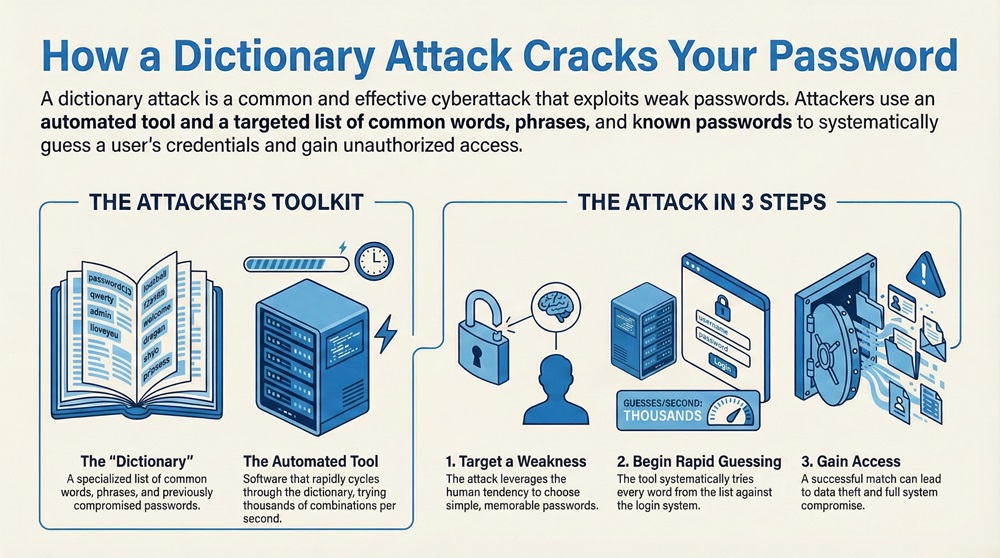
    A dictionary attack is a type of cyberattack that involves an attacker trying to crack a password or passphrase by inputting words from a list. This list is essentially a "dictionary" of common words, phrases, and previously compromised passwords. The attacker uses an automated tool to quickly cycle through these words until a match is found. This is a very common method used in password cracking.


    The two essential components of a successful dictionary attack are the password list and the automated tool. The password list contains all the possible words and phrases that the attacker will try. The automated tool handles the speed and volume of attempts, trying thousands of combinations per second against a target's login portal or hashed password file. This whole process leverages human tendencies to choose simple, memorable passwords.


    To know more about this specific form of brute-force attack, read below. This content explains what a dictionary attack is, how it works, its different forms, and how you can defend your systems against this cybersecurity threat.


    What is a Dictionary Attack?

    A dictionary attack can be defined as an attempt to breach a secure system by repeatedly trying potential passwords from a specific, targeted list. This attack exploits weak passwords that are simple words found in a dictionary, which is why it has this name. It is a straightforward yet highly effective hacking technique against users who choose common words for their login credentials.


    In simple words, the dictionary attack is a systematic way to guess passwords. It relies on the simple fact that many people use passwords that are easy to remember. These easy-to-remember passwords often include words like "password," "welcome," or names, which are all included in the attacker's specialized wordlist. Therefore, the goal of the dictionary attack is to find a match in this list before the system locks the account.


    It must be noted that these attacks are a major cyber threat to organizations and individual users alike. Successful attempts can lead to unauthorized access, data theft, or system compromise. Is your password strong enough to withstand a dictionary attack? We will look at how to secure your accounts later.


    The figure below shows the basic concept of a dictionary attack.
     

    Dictionary Attack


    As you can see in the figure, the attack relies on a predefined list of words instead of trying every single possible combination of characters. This makes it much faster than a pure brute-force attack.


    Stop Dictionary Attacks Now


    How does a Dictionary Attack work?

    Let us now understand the mechanism behind a dictionary attack. The way the dictionary attack works is a simple three-step process. First, the attacker needs a target and a special wordlist. Second, they use a tool to automate the process. Third, the tool submits the words as passwords until it finds the correct one.


    The process of a dictionary attack involves:


    1. Preparation of the Wordlist: The attacker prepares a large file, the "dictionary," which contains hundreds of thousands or even millions of common passwords, usernames, names, places, and famous phrases. This list is the core of the dictionary attack.
    2. Targeting and Hashing: If the attacker is aiming for a remote login page, the tool simply sends the login requests. If the attacker has obtained a copy of the system's hashed passwords (which is common), the tool compares the hash of each word in the list to the stolen password hashes.
    3. Automated Attempt: The cracking tool systematically takes each word from the list and attempts to use it as the password for the target account. This tool can submit many guesses per second.


    Here, it must be understood that even small variations, such as adding numbers or symbols to common words (e.g., "P@ssword1"), are often included in a modern, sophisticated dictionary attack list. These modifications are called hybrid attacks, and they greatly increase the attack's effectiveness.


    Let us now discuss the speed advantage of this password attack. Since the attacker is not trying random strings, the number of guesses is dramatically reduced. For example, trying every possible eight-character password can take years. However, a dictionary attack with a list of one million common words takes only a few minutes to complete the checking process.


    Also Read: What is a Next Generation Firewall (NGFW)? Why UAE/GCC businesses need it?


    Types of Dictionary Attack

    To understand the full scope of dictionary attack security concerns, it is necessary to go through its various types. This form of password attack can be classified based on the wordlist and the target. The main types include the basic dictionary attack, the hybrid attack, and the specific dictionary attack.


    Basic Dictionary Attack

    This is the simplest form of the dictionary attack. It involves using a straightforward list of common words, names, and phrases, which are the same as found in any standard dictionary.


    • The list does not include any character modifications.
    • It is used against systems with very weak passwords like "monkey" or "shadow."
    • It is often less successful against systems that force users to use special characters.


    Hybrid Dictionary Attack

    A hybrid attack is a more effective method that combines the wordlist with a small brute-force attack component. This is one of the most common forms of password cracking.


    • The attacker uses dictionary words but adds numbers, symbols, or capital letters to them.
    • For instance, instead of only trying "summer," the tool will also try "Summer1," "summer!," "Summer2024," and so on.
    • This significantly increases the chances of success against systems that require a mix of characters in the password.


    Specific Dictionary Attack

    This type of dictionary attack uses a wordlist built specifically for a target or organization. This technique is sometimes called a focused attack.


    • The wordlist includes terms related to the target, such as company names, employee names, product names, local sports teams, or common geographical names.
    • For example, an attack on a bank might include words like "finance," "loan," and the names of the bank's branches.
    • It is much more effective because it uses insider knowledge to narrow down the possible passwords.


    It is to be noted that all these types of dictionary attacks show why relying on common terms, even with slight modifications, makes your authentication credentials vulnerable.


    Characteristics of a Dictionary Attack

    Following are the key characteristics that define a dictionary attack and make it a persistent cybersecurity threat. These features explain its nature as an efficient password guessing method.


    • Speed and Efficiency: It is much faster than a full brute-force attack because it tests a smaller, more probable set of strings. This focused effort saves the attacker time and computational power.
    • Reliance on Common Passwords: The success of the dictionary attack is directly dependent on users choosing common or guessable passwords. It is an exploit of poor password hygiene.
    • Low Resource Requirement: The tools used for a basic dictionary attack are widely available and do not require massive amounts of computing power, making them accessible to many attackers.
    • Automation: The entire process is automated by software. The attacker simply sets up the tool with the wordlist and the target, and the tool runs until the password cracking is complete or until it is blocked.
    • Targeting Human Behavior: Basically, the dictionary attack targets human error. People often use meaningful words or personal details for passwords because it is easier to remember.


    One must note here that the continuous growth of huge wordlists, sometimes containing billions of entries from past data breaches, has made the dictionary attack more powerful than ever before.


    Also Read: Multi-Factor Authentication (MFA): All You Need to Know


    Dictionary Attack Vs Brute Force Attack

    Basis for ComparisonDictionary AttackBrute-Force Attack
    MeaningTries to guess passwords from a pre-compiled list of words.Tries every possible character combination to guess the password.
    NatureHighly targeted and efficient guess work.Exhaustive and untargeted attempt.
    ExamplesTrying "secret123," "password," "admin."Trying "aaaaa," then "aaaab," then "aaaac," and so on.
    Function/PurposeTo crack weak passwords quickly.To crack any password, given enough time and power.
    Based onHuman tendency to choose common, memorable passwords.Mathematical possibility of character combinations.
    MethodUses a specialized wordlist.Uses an algorithmic character generator.
    When Used/ApplicationUsed when speed is critical and passwords are expected to be weak.Used when the password length is known or when a dictionary attack fails.
    LimitationsFails against long, random passwords.Requires enormous computational power and time.


    Disadvantages of dictionary attack

    While the dictionary attack is efficient against weak passwords, it also has certain limitations that the attacker must face. These disadvantages make the attack less effective against systems with strong security measures.


    1. Ineffective Against Complex Passwords: The dictionary attack completely fails against truly random, long passwords that include a mix of special characters, numbers, and capital and lowercase letters. If the password is not in the dictionary, even in a modified form, the attack will not succeed.
    2. Vulnerability to Account Lockouts: Many security systems implement a lockout policy after a few failed login attempts (e.g., three or five attempts). This feature stops the automated tool of the dictionary attack immediately, forcing the attacker to move to a new target or wait.
    3. Detection by Intrusion Detection Systems (IDS): The rapid and continuous sequence of failed login attempts characteristic of a dictionary attack is easily flagged by advanced intrusion detection systems. These systems can block the attacker's IP address, stopping the attack right away.
    4. Wordlist Dependency: The dictionary attack is only as good as the wordlist it uses. If a user chooses an unusual word, phrase, or language not included in the dictionary, the attack will fail.


    Therefore, strong password policies and multi-factor authentication are critical in neutralizing the threat of a dictionary attack.


    Applications and use cases

    The dictionary attack has several applications, most of which are malicious. However, it is also used in a positive way for security testing. The main use cases center around gaining unauthorized access.


    1. Cracking Online Accounts: This is the most common malicious use case. Attackers use the dictionary attack to gain access to email accounts, social media profiles, or banking websites. The goal is often identity theft or financial fraud.
    2. Testing System Security (Ethical Hacking): Security professionals and ethical hackers use the dictionary attack as a legitimate tool to test the strength of an organization's password policies. By running the attack, they can quickly identify and flag weak passwords used by employees. This is called penetration testing.
    3. Accessing Encrypted Data: If an attacker obtains an encrypted file or a compressed folder protected by a password, they can use a dictionary attack to find the encryption key or password and unlock the data.
    4. Targeting Wireless Networks: Many Wi-Fi networks are protected by a single passphrase. Attackers can use a specialized dictionary attack to crack the Wi-Fi password and gain access to the private network.


    For instance, consider a company, Alpha Corp, that uses simple passwords. An ethical hacker might run a dictionary attack during a security audit. If the attack successfully compromises 50 employee accounts, it proves that Alpha Corp needs to enforce a stronger password policy.


    Also read: What is an Intrusion Detection System (IDS)? Components and Types


    Defending against dictionary attack

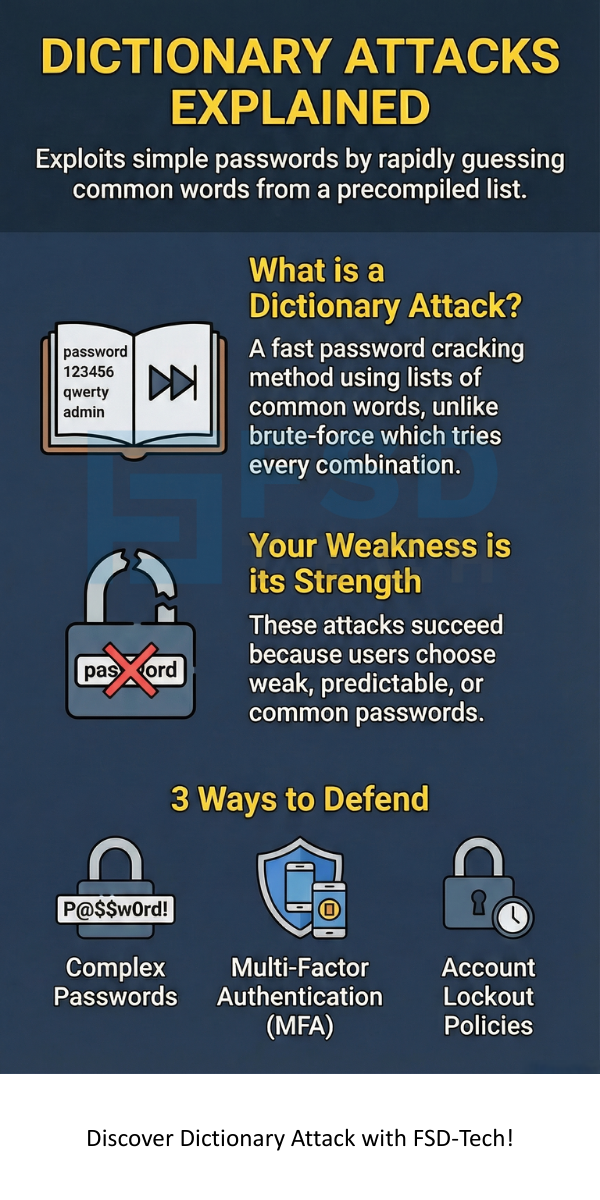
    Defending against a dictionary attack involves a mix of user education and technical safeguards. You need to focus on making the password difficult to guess and making the attack detectable. Following are the most significant measures to protect against this cyber threat.


    Strong Password Policy

    The first and most vital defense is to enforce a strong password policy. If passwords are not words found in a dictionary, the attack is defeated immediately.


    1. Length Requirement: Require a minimum password length of 12 or more characters. Longer passwords exponentially increase the time needed for any brute-force attack, including a dictionary attack.
    2. Complexity Requirement: Enforce the use of a combination of upper- and lowercase letters, numbers, and special symbols. This prevents the success of both basic and hybrid dictionary attacks.
    3. Avoid Common Words: Systems should check new passwords against a list of the 10,000 most common passwords and reject any matches.


    Account Lockout Policies

    This is a technical safeguard that stops the automated nature of the dictionary attack.


    • Limit the number of consecutive failed login attempts within a short period of time (e.g., lock the account for 15 minutes after 5 failed attempts).
    • This immediately stops the cracking tool from cycling through the wordlist.
    • Throttling: Implement rate limiting, which slows down the speed at which login requests can be submitted from a single IP address.


    Multi-Factor Authentication (MFA)

    This security layer makes a huge difference. Even if the attacker manages to find your password using a dictionary attack, they still cannot access your account.


    • MFA requires a second form of verification, such as a code sent to your mobile phone or a biometric scan.
    • It ensures that even if a password is compromised, the attacker is still locked out.


    Salting and Hashing Passwords

    For systems that store passwords, never store them in plain text. Always use strong, modern hashing algorithms combined with salting.


    • Hashing turns the password into a non-reversible string of characters.
    • Salting is the addition of a random, unique string of data to the password before hashing.
    • This makes it nearly impossible for an attacker to use a large, pre-calculated table (a rainbow table) to reverse the stolen password hashes, which is a method often used in conjunction with dictionary attacks.


    Please refer to the example below.

    Example: If your password is "flower," a salt is added to it, such as "flower" + "xY7z." This new, combined string is then hashed. Every user has a different salt, making it so that the attacker must perform a separate, time-consuming dictionary attack for every single password hash they steal, rather than comparing them all to a single, pre-calculated list.


    Conclusion

    A dictionary attack is a powerful and efficient password attack that targets the weak link in almost all security systems: human beings. It leverages the tendency of users to choose common, easily remembered words for their authentication credentials. This type of cyber threat is a specialized version of a brute-force attack, but it achieves high success by focusing on a probable list of words rather than random characters.


    Therefore, the key to successful defense lies in adopting a mindset of zero tolerance for simple passwords. Enforcing long, complex, and random passwords, coupled with technical safeguards like multi-factor authentication and strict account lockout policies, is essential.


    Our core value at FSD-tech is to empower you with the knowledge to stay secure in a complex digital world. We provide solutions and insights to ensure that your digital assets are not just protected, but fortified against evolving cybersecurity challenges. 
     

    Contact us today to learn how our products and services can help you build an impenetrable defense against dictionary attacks and other sophisticated threats.


    Dictionary Attack


    Key Takeaways

    • A dictionary attack attempts to crack a password by automatically trying a list of common words.
    • It is a form of brute-force attack that is faster because it uses a targeted list (the wordlist).
    • Hybrid attacks are a sophisticated type that adds numbers and symbols to dictionary words.
    • The attack succeeds only when a user chooses a weak, word-based password.
    • Defense requires using complex passwords (12+ characters, mixed case, symbols), multi-factor authentication (MFA), and account lockout policies.


    Frequently Asked Questions (FAQs)

    What is the difference between a dictionary attack and a brute-force attack?

    A brute-force attack tries every possible combination of characters until it finds the password. A dictionary attack, conversely, only tries words and variations from a predetermined list of common passwords. The dictionary attack is much faster but less comprehensive than a full brute-force attack.


    Is a dictionary attack legal?

    No, conducting a dictionary attack against an account you do not own or are not authorized to test is illegal hacking and a serious cybercrime. However, security professionals use it legally for penetration testing to find system weaknesses with explicit permission.


    Why do hackers use dictionary attacks?

    Hackers use dictionary attacks because they are very efficient and have a high chance of success against accounts with poor password hygiene. The tools are easy to use, and the method requires less computing power compared to other types of password cracking.


    Can multi-factor authentication stop a dictionary attack?

    Yes, multi-factor authentication (MFA) is one of the most effective defenses. Even if a dictionary attack successfully guesses the password, the attacker cannot complete the login process without the second factor (like a code from your phone), which they do not have.


    Dictionary Attack in Cybersecurity - How it Works and How to Stop?

    About The Author

    Surbhi Suhane

    Surbhi Suhane is an experienced digital marketing and content specialist with deep expertise in Getting Things Done (GTD) methodology and process automation. Adept at optimizing workflows and leveraging automation tools to enhance productivity and deliver impactful results in content creation and SEO optimization.

    Like This Story?

    Share it with friends!

    Subscribe to our newsletter!

    Atera

    (49)

    Cato Networks

    (121)

    ClickUp

    (70)

    FishOS

    (7)

    Miradore

    (21)

    PointGuard AI

    (9)

    Vembu

    (22)

    Xcitium

    (33)

    ZETA HRMS

    (79)

    Workflow Automation(8)

    Workforce Automation(1)

    AI Project Management(1)

    HR Data Automation(1)

    RMM(1)

    IT Workflow Automation(1)

    IT security(2)

    GCC compliance(4)

    Payroll Integration(2)

    IT support automation(3)

    procurement automation(1)

    lost device management(1)

    IT Management(5)

    IoT Security(2)

    Cato XOps(2)

    IT compliance(4)

    Workflow Management(1)

    Task Automation(1)

    Kubernetes lifecycle management(2)

    OpenStack automation(1)

    AI-powered cloud ops(1)

    SMB Security(8)

    Data Security(1)

    MDR (Managed Detection & Response)(4)

    MSP Automation(3)

    Atera Integrations(2)

    XDR Security(2)

    SMB Cyber Protection(1)

    Ransomware Defense(3)

    HR Tech Solutions(1)

    Zero Trust Network Access(3)

    Zero Trust Security(2)

    Endpoint Management(1)

    SaaS Security(1)

    Payroll Automation(5)

    IT Monitoring(2)

    Xcitium EDR SOC(15)

    Ransomware Protection GCC(1)

    Network Consolidation UAE(1)

    M&A IT Integration(1)

    MSSP for SMBs(1)

    SMB Cybersecurity GCC(1)

    Managed EDR FSD-Tech(1)

    Ransomware Protection(3)

    Antivirus vs EDR(1)

    FSD-Tech MSSP(25)

    Cybersecurity GCC(12)

    Endpoint Security(1)

    Endpoint Protection(1)

    Data Breach Costs(1)

    SMB Cybersecurity(8)

    Zero Dwell Containment(31)

    Managed Security Services(2)

    Xcitium EDR(30)

    Hybrid Backup(1)

    Cloud Backup(1)

    Backup & Recovery(1)

    pointguard ai(4)

    backup myths(1)

    disaster recovery myths(1)

    SMB data protection(9)

    vembu(9)

    Disaster Recovery(4)

    Vembu BDR Suite(19)

    GCCBusiness(1)

    DataProtection(1)

    Secure Access Service Edge(4)

    GCC HR software(20)

    Miradore EMM(15)

    Cato SASE(7)

    Cloud Security(8)

    Talent Development(1)

    AI Compliance(2)

    AI Security(2)

    AI Risk Management(1)

    AI Cybersecurity(12)

    AI Governance(4)

    GCC business security(1)

    GCC network integration(1)

    compliance automation(5)

    education security(1)

    GCC cybersecurity(2)

    Miradore EMM Premium+(5)

    App management UAE(1)

    BYOD security Dubai(8)

    MiddleEast(1)

    HealthcareSecurity(1)

    Team Collaboration(1)

    IT automation(12)

    Zscaler(1)

    SD-WAN(6)

    HR Integration(4)

    Cloud Networking(3)

    device management(9)

    VPN(1)

    RemoteWork(1)

    ZeroTrust(2)

    MPLS(1)

    Project Management(9)

    HR automation(16)

    share your thoughts

    Digital Twin Technology

    What is a Digital Twin? Technology, Examples & Benefits

    🕓 February 4, 2026

    SD WAN Architecture

    What is SD-WAN Architecture? Benefits and Working

    🕓 February 4, 2026

    SQL Injection (SQLi)

    What is SQL Injection (SQLi) Attack? Examples & Prevention

    🕓 February 3, 2026

    Decoded(95)

    Cyber Security(118)

    BCP / DR(22)

    Zeta HRMS(78)

    SASE(21)

    Automation(70)

    Next Gen IT-Infra(118)

    Monitoring & Management(70)

    ITSM(22)

    HRMS(21)

    Automation(24)