.webp&w=3840&q=75)
How ClickUp Enables Outcome-Based Project Management (Not Just Task Tracking)
🕓 February 15, 2026
.jpg&w=3840&q=75)
A Virtual Private Network (VPN) is an advanced technology used to create a secure, encrypted connection over a less secure network, most often the public internet. Understanding the fundamentals of Virtual Private Network (VPN) technology is essential for ensuring data security and privacy in modern business and personal computing environments.
In this section, we will discuss the formal definition of a Virtual Private Network (VPN), how its core technology functions, the different types of VPNs, and the protocols that make secure connections possible.
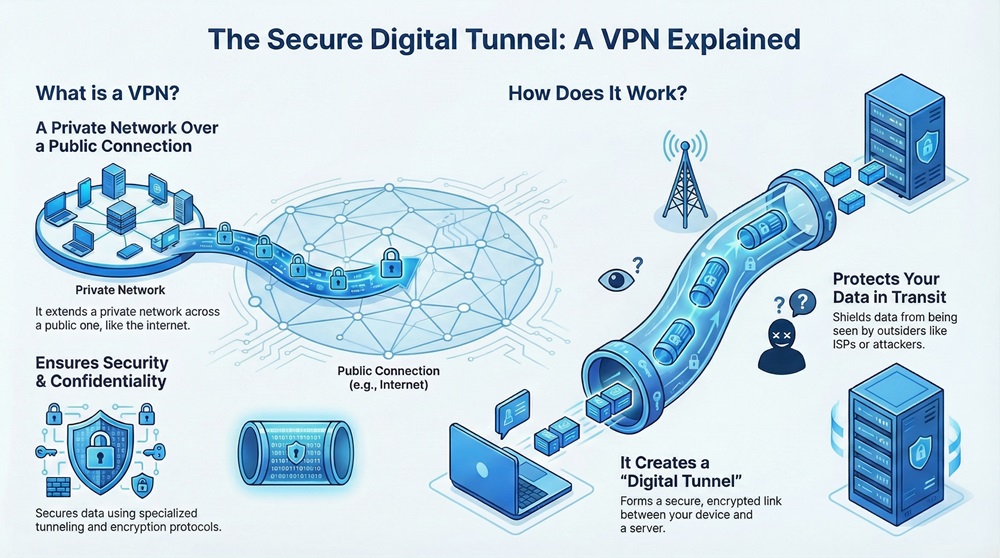
A Virtual Private Network (VPN) refers to a communication technology that extends a private network across a public network. This allows users to send and receive data across shared or public networks as if their computing devices were directly connected to the private network.
The primary function of a Virtual Private Network (VPN) is to provide security and confidentiality to data traffic using specialized tunneling and encryption protocols.
In simple words, the Virtual Private Network (VPN) technology creates a secure digital tunnel between your device and a specific server. This tunnel protects your data from being seen by outsiders, including internet service providers or potential attackers, while the data travels across the internet.
Virtual Private Network (VPN) technology operates based on three main concepts: tunneling, encryption, and authentication.
Virtual Private Network (VPN) tunneling is the process of encapsulating one network protocol within another. This process creates the secure, virtual link over the public network.
The VPN client software wraps the original data packet, which includes the sender’s IP address, inside a new packet. This new outer packet has the IP address of the VPN server. This process makes the data invisible and untouchable during its journey.
The VPN server then decrypts the outer packet and sends the original, protected data packet to its intended destination on the private network.
Virtual Private Network (VPN) encryption is perhaps the most important security measure. Encryption scrambles the data before it enters the VPN tunnel, ensuring that only the authorized recipient can read the information.
Virtual Private Network (VPN) solutions use sophisticated algorithms, such as Advanced Encryption Standard (AES), to convert readable data (plaintext) into an unreadable format (ciphertext). Even if an attacker intercepts the data within the VPN tunnel, they cannot decipher it without the correct cryptographic key.
Virtual Private Network (VPN) authentication ensures that only authorized users or devices can establish the secure connection. Before setting up the VPN tunnel, both the client and the server must verify each other's identities.
Virtual Private Network (VPN) systems often use credentials such as usernames and passwords, digital certificates, or pre-shared keys for this authentication process. This step prevents unauthorized parties from accessing the private network resources.
Deploy enterprise-grade VPN for your team
The method a Virtual Private Network (VPN) uses to connect users defines its architecture type. Generally, there are two primary types of Virtual Private Network solutions: Remote-Access VPN and Site-to-Site VPN.
1. Remote-Access Virtual Private Network (VPN)
Remote-Access VPNs allow individual users to securely connect to a private network, often a corporate network, from a remote location.
Virtual Private Network (VPN) clients, which are typically installed on a user’s laptop or phone, initiate the connection to a VPN concentrator on the private network. This is the most common type of Virtual Private Network used by individuals and employees working from home. The VPN provides remote employees with secure access to company resources, such as internal servers and applications.
2. Site-to-Site Virtual Private Network (VPN)
Site-to-Site VPNs connect entire networks to each other, rather than individual users. This architecture establishes a continuous, secured connection between two or more fixed geographic locations, such as branch offices of a single company.
Site-to-Site Virtual Private Network (VPN) connections are usually established between dedicated gateways, like routers or firewalls, at each location. Users at these sites do not need individual VPN client software; the gateway handles the tunneling and encryption for all traffic entering and leaving the network.
Also Read: Device Inventory Drill-Down Enhancements in Cato SASE: Deeper Visibility, Smarter Troubleshooting
Virtual Private Network (VPN) functionality relies heavily on specific protocols that govern the tunneling and security standards. Each protocol has different strengths regarding speed, security, and compatibility.
IPSec is critical to the security architecture of many modern Virtual Private Networks. It provides a robust framework for securing data transmission across a network layer.
IPSec is not a single protocol but rather a comprehensive suite of protocols and services. IPSec utilizes two main components to secure the Virtual Private Network connection:
Authentication Header (AH)
Authentication Header (AH) provides data origin authentication and data integrity check for the IP packet. AH confirms that the data truly came from the claimed sender and that the data has not been altered during transmission. AH does not, however, offer data confidentiality (encryption).
Encapsulating Security Payload (ESP)
Encapsulating Security Payload (ESP) is the component that handles the actual encryption of the data. ESP provides confidentiality by scrambling the data, ensuring privacy. It also offers authentication and integrity checks, similar to AH. In most Virtual Private Network (VPN) deployments, ESP is the preferred method because it offers a complete security package, including strong encryption for the user’s data.
IPSec in the Virtual Private Network (VPN) operates in two primary modes:
| Basis for Comparison | Transport Mode | Tunnel Mode |
|---|---|---|
| Meaning | Encrypts only the data payload (the contents of the packet). | Encrypts the entire original IP packet (header and payload). |
| Nature | Used primarily for end-to-end communication between two hosts. | Used to secure communication between two security gateways (e.g., routers or firewalls). |
| Encryption | Less extensive; only the data is protected. | Comprehensive; the entire original packet is protected and new header information is added. |
| Function | Secures communications between two endpoints that are both IPSec aware. | Secures communications for an entire network, hiding the original source and destination IPs. |
| Use Case | Protecting application data between a server and a client (less common for full VPN). | The standard method for building both Site-to-Site and Remote-Access Virtual Private Network connections. |
Tunnel Mode is the essential component that makes the Virtual Private Network (VPN) concept viable. It completely hides the internal network addressing scheme, which provides the necessary privacy and security.
Also Read: IPSec Explained: Protocols, Modes, IKE & VPN Security
Understanding the pros and cons of Virtual Private Network (VPN) technology is key to deciding where and how to implement it effectively.
All in All, the Virtual Private Network (VPN) is a foundational tool for securing data transmission in the modern, connected world. VPN technology creates secure tunnels, uses strong data encryption, and requires user authentication to ensure that information remains confidential and integral across public networks.
The primary takeaway is that a well-implemented Virtual Private Network (VPN) provides a crucial layer of defense, whether you require secure remote access for employees or secure site-to-site connectivity.
Switch to next-gen VPN that beats legacy solutions – schedule your personalized walkthrough!
Here are detailed answers to common questions about Virtual Private Network (VPN) technology and its implementation.
The primary purpose of a Virtual Private Network (VPN) is to create a secure, encrypted connection—often referred to as a digital tunnel—over a public network like the internet. This VPN connection ensures that data transmitted between a user and a private network remains confidential and integral, protecting it from interception or eavesdropping by unauthorized third parties.
A Virtual Private Network (VPN) ensures a secure connection through three essential processes. First, tunneling encapsulates the original data packet inside a new, secure packet. Second, data encryption scrambles the information within the tunnel, making it unreadable to outsiders. Finally, authentication confirms the identities of both the user and the VPN server before the secure connection is established.
The difference lies in the endpoints of the connection. A Remote-Access Virtual Private Network (VPN) connects an individual user (e.g., an employee working from home) to a central private network. Conversely, a Site-to-Site Virtual Private Network (VPN) connects two or more established local area networks (LANs), such as branch offices, establishing a permanent, secure link between the networks themselves.
Several key protocols facilitate the functions of a Virtual Private Network (VPN). IP Security (IPSec) is a widely used suite that provides robust encryption and authentication, often coupled with Layer 2 Tunneling Protocol (L2TP/IPSec). Additionally, SSL/TLS protocols form the basis for many modern web browser-based VPN solutions, known as SSL VPNs, which simplify remote access.
IPSec is fundamental to many high-security Virtual Private Network (VPN) implementations. It operates in two modes: Transport and Tunnel. In a VPN, IPSec is typically used in Tunnel Mode, which encrypts the entire original IP packet, header included. This action effectively hides the original source and destination addresses, providing a critical layer of network security and privacy.
Point-to-Point Tunneling Protocol (PPTP) is considered outdated because its underlying authentication methods have known security vulnerabilities. While PPTP is fast and easy to configure, modern security standards necessitate the use of more secure Virtual Private Network protocols like IPSec or SSL/TLS to protect sensitive data from current hacking threats and techniques.

Surbhi Suhane is an experienced digital marketing and content specialist with deep expertise in Getting Things Done (GTD) methodology and process automation. Adept at optimizing workflows and leveraging automation tools to enhance productivity and deliver impactful results in content creation and SEO optimization.
Share it with friends!




.webp&w=3840&q=75)






share your thoughts