.webp&w=3840&q=75)
How ClickUp Enables Outcome-Based Project Management (Not Just Task Tracking)
🕓 February 15, 2026

An Intrusion Prevention System (IPS) is a network security technology that inspects network traffic flows to proactively identify and prevent vulnerabilities and malicious activities. The Intrusion Prevention System acts like a security guard for your digital network, constantly watching for suspicious behavior. This system is essential because it moves beyond just detecting threats—it takes action to stop them before any damage occurs.
The Intrusion Prevention System consists of several key components that work together. It primarily includes the sensor (the monitoring point), the detection engine (the brain that analyzes traffic), and the response component (the part that takes action). These elements ensure the continuous monitoring and active defense of network resources. This proactive approach to network security is a fundamental shift from traditional reactive measures.
In this section, we will discuss the Intrusion Prevention System in detail along with its types, working, and benefits. Let us now understand how this security system provides a vital defense layer for your data security.
The Intrusion Prevention System refers to a crucial component of a modern network defense strategy. Basically, an Intrusion Prevention System actively monitors network traffic for signs of attacks and automatically takes steps to block those attacks. It is an inline device, meaning all network traffic must pass through the IPS before reaching its intended destination. This positioning is critical for its ability to prevent an intrusion in real-time.
Intrusion Prevention System devices are typically placed behind a firewall, adding a second, deeper layer of defense. They are designed to find attacks that may have bypassed the initial firewall filters. This comprehensive security system ensures that the network is protected from both known and new cyber threats. Why is this deep-packet inspection so important for your business’s information security?
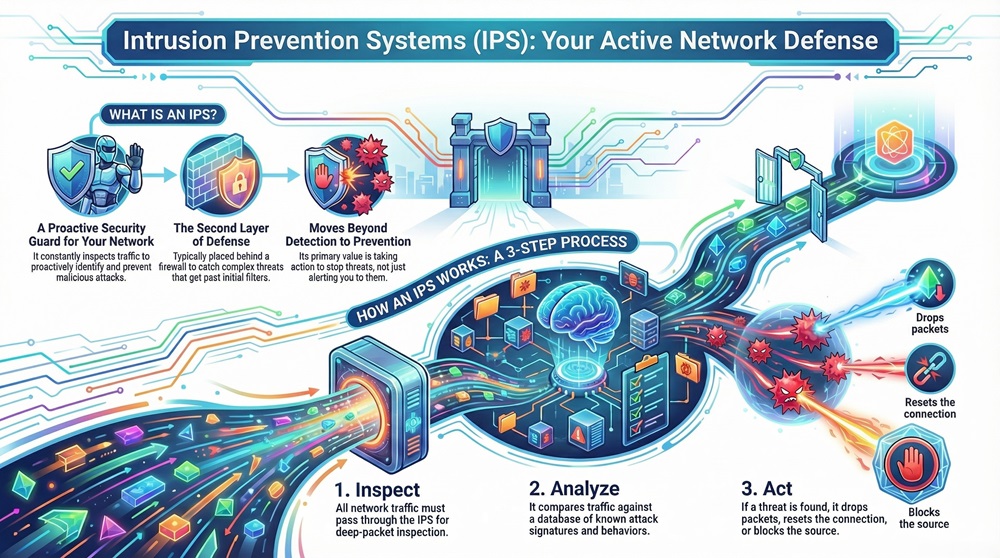
The Intrusion Prevention System works by inspecting packet headers and payloads. It then compares them against a database of known attack signatures and normal network behavior patterns. If a malicious pattern is detected, the IPS acts immediately to stop the traffic. This action might involve dropping the malicious packets, resetting the connection, or blocking the source IP address.
To understand Intrusion Prevention System operation, you must know its main parts. It is composed of several key functional elements that collaborate to deliver active threat detection and prevention. The integration of these components allows the IPS to make fast, accurate decisions about network traffic.
The major components are:
Let us now understand how these parts connect to make the whole Intrusion Prevention System effective. For instance, the detection engine must be constantly updated with new vulnerability information to remain effective against evolving malware and zero-day exploits. The figure below shows the conceptual architecture of a generic Intrusion Prevention System.
Observe that the sensor is positioned inline to intercept all traffic. This allows the Intrusion Prevention System to be a true prevention system, not just a detection system.
Also Read: What is an Intrusion Detection System (IDS)? Components and Types
Let us now discuss the working mechanism of the Intrusion Prevention System. The entire process revolves around inspecting data packets and enforcing security rules. The Intrusion Prevention System works through a continuous cycle of monitoring, analysis, and response.
The following steps are involved:
The Intrusion Prevention System can implement various responses to stop an attack. Suppose a system detects a flood of connection requests typical of a Denial of Service (DoS) attack. The IPS will quickly drop those packets and block the source IP address. This speed of response is critical for preventing intrusions.
In finer terms, the core function is based on deep packet inspection (DPI). This means the Intrusion Prevention System does not just look at the source and destination addresses; it digs deep into the data payload to find harmful content.
The Intrusion Prevention System can be classified based on where it is deployed and what it monitors. Understanding the different types will help you choose the right security solution for your specific network needs.
The main types of Intrusion Prevention System are:
Network-Based Intrusion Prevention System monitors traffic across the entire network to protect all devices. It is placed at strategic points in the network, often right after the main firewall or at network segment borders. NIPS uses signature-based detection and anomaly detection to find threats.
NIPS is excellent for stopping common network attacks like DoS, port scans, and worms. For example, a NIPS placed between the company's internal network and the internet would instantly block packets carrying the signature of a known virus. This type of Intrusion Prevention System is vital for perimeter network defense.
Wireless Intrusion Prevention System specifically monitors the organization's wireless network traffic. Its primary goal is to protect against unauthorized access, rogue access points, and wireless protocol attacks. It is a specialized form of NIPS.
WIPS is essential because traditional firewalls and NIPS often miss threats coming through a rogue Wi-Fi access point connected to the internal network. It ensures the integrity of your wireless access points.
Host-Based Intrusion Prevention System runs on a single host or server. This Intrusion Prevention System monitors all activity on that specific machine. It looks at system files, logs, and application execution attempts.
HIPS provides a final, critical layer of data protection because it can catch attacks that have already bypassed the network perimeter security. It helps to secure the endpoint, which is often the target of attacks. A HIPS can prevent a process from modifying a crucial system file, even if the attack traffic got past the NIPS.
Network Behavior Analysis focuses on detecting unusual traffic flows and patterns. This Intrusion Prevention System does not inspect the content of individual packets as much as it monitors the volume, frequency, and type of traffic. It is superb at catching zero-day attacks and sophisticated malware.
NBA works by creating a statistical baseline of normal network activity. When traffic suddenly spikes, or an internal device starts communicating with suspicious external servers, the NBA flags it as a potential security incident. This method is effective for detecting things like botnet activity.
Also Read: What is a Firewall as a Service (FWaaS)?
The characteristics of an effective Intrusion Prevention System define its ability to provide strong security management. These features ensure the system can adapt to evolving threat landscapes and maintain network performance.
Following are the key characteristics:
It is to be noted that without low latency, the entire purpose of having an inline Intrusion Prevention System would be defeated, as it would cause network congestion.
The Intrusion Prevention System offers significant benefits for cybersecurity posture. The primary advantage is the move from reactive security monitoring to proactive threat mitigation.
The Intrusion Prevention System gives you the confidence that your network is not only watched but actively defended 24/7.
Also Read: What is a Virtual Private Network? How does VPN works?
While the Intrusion Prevention System is a vital network security tool, it does have a few limitations that you must be aware of. No single security system is perfect.
Therefore, the Intrusion Prevention System must be part of a layered defense strategy, not the only solution.
The Intrusion Prevention System is utilized in almost every industry that needs to protect sensitive digital assets. Its ability to provide real-time defense makes it suitable for many different network environments.
For instance, an Intrusion Prevention System installed at a bank's data center will immediately block any traffic pattern matching a known attempt to steal database credentials. This ensures the ongoing data integrity.
Many people confuse the Intrusion Prevention System with a firewall. However, they perform distinctly different functions in network security. While both are crucial, understanding their difference is key to proper network defense architecture.
| Basis for Comparison | Intrusion Prevention System (IPS) | Firewall |
|---|---|---|
| Meaning | It is a security device that actively scans network traffic for malicious content and instantly prevents the intrusion. | It is a filter that controls network access based on predetermined rules like IP address or port number. |
| Nature | It is a proactive, content-aware device that focuses on detecting threats within the allowed traffic. | It is a reactive, state-aware device that focuses on controlling which traffic is allowed to enter or leave the network. |
| Definition | IPS refers to a system for recognizing and taking action against threats and exploits of software vulnerabilities. | A firewall is a barrier that establishes a defined boundary between two or more networks. |
| Examples | NIPS, HIPS, and WIPS are common forms of this technology. | Packet-filtering, stateful inspection, and application-level gateway are common forms. |
| Function/Purpose | Its primary purpose is to stop malicious activities and exploit attempts on the network layer. | Its primary purpose is to block unauthorized access and connections. |
| Characteristics | Performs deep packet inspection (DPI) and uses attack signatures. | Operates based on source/destination and port/protocol rules. |
| Based on | It bases its decisions on the content of the packet and its behavior. | It bases its decisions on pre-configured access control lists (ACLs). |
| Method | It uses techniques like signature-matching and anomaly detection. | It uses techniques like stateful inspection and packet filtering. |
| When Used/Application | Used to protect against exploits, malware, and network-level attacks. | Used for network segmentation and controlling external access. |
The Intrusion Prevention System is the next-generation evolution of the Intrusion Detection System (IDS). Whereas an IDS only alerts you to an intrusion, the IPS has the capacity to stop it.
The Intrusion Prevention System is a vital, frontline defense tool that ensures the security and integrity of your network. The Intrusion Prevention System proactively inspects traffic, moving beyond simple threat detection to actual, real-time threat prevention. This system's reliance on deep packet inspection and its ability to act immediately against threats like malware and zero-day exploits makes it an essential layer in your overall network security strategy.
It is clear that deploying a robust Intrusion Prevention System is not an option but a necessity in today's cyber threat landscape. It works best when combined with a strong firewall and other security systems. Therefore, securing your digital assets demands a multi-layered, proactive defense approach centered around the IPS.
We believe in providing you with the most effective and proactive network security solutions. Our focus is always on understanding your unique network environment to deploy an Intrusion Prevention System that guarantees maximum data protection and business continuity. Do you have the right Intrusion Prevention System in place to protect your critical data?
Intrusion Detection System (IDS) only monitors and alerts security teams to a potential intrusion. On the other hand, the Intrusion Prevention System (IPS) monitors, alerts, and actively takes automated steps to prevent the intrusion, such as dropping malicious packets or blocking the source IP.
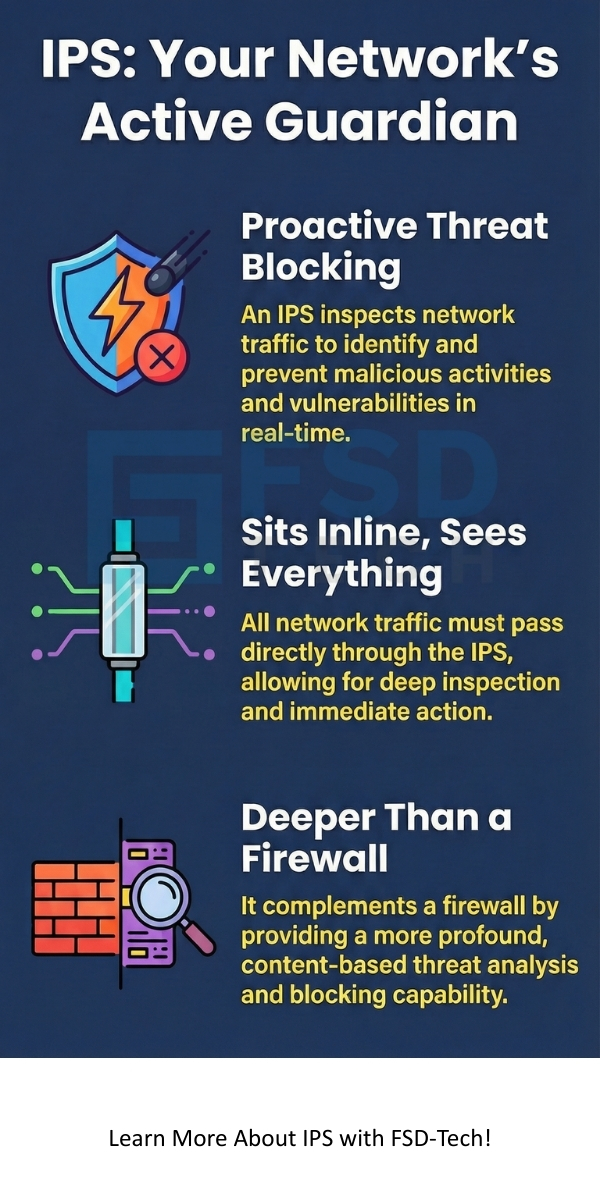
No, the Intrusion Prevention System does not replace a firewall; instead, it complements it. A firewall handles basic access control and traffic filtering. The IPS provides a deeper layer of threat analysis and content inspection for the traffic the firewall has already allowed. They work best when deployed together.
Deep Packet Inspection (DPI) is the method the Intrusion Prevention System uses to look at the entire data packet, including the header and the data payload. This allows the IPS to identify attacks embedded within the data, which a simple packet filter might miss.

Surbhi Suhane is an experienced digital marketing and content specialist with deep expertise in Getting Things Done (GTD) methodology and process automation. Adept at optimizing workflows and leveraging automation tools to enhance productivity and deliver impactful results in content creation and SEO optimization.
Share it with friends!




.webp&w=3840&q=75)






share your thoughts