HomeNext Gen IT-InfraMonitoring & ManagementCyber SecurityBCP / DRAutomationDecoded
Next Gen IT-Infra
Cato’s SASE Supports Cybersecurity Skills Development

How Cato’s SASE Supports Cybersecurity Skills Development

🕓 April 8, 2025

How SASE Supports the Security Needs of SMBs

How SASE Supports the Security Needs of SMBs

🕓 February 9, 2025

Attack Surface Reduction with Cato’s SASE

Attack Surface Reduction with Cato’s SASE

🕓 February 10, 2025

SASE for Digital Transformation in UAE

SASE for Digital Transformation in UAE

🕓 February 8, 2025

Monitoring & Management
Understanding Atera’s SLA Management

Understanding Atera’s SLA Management

🕓 February 7, 2025

Cost-Performance Ratio: Finding the Right Balance in IT Management Networks

Cost-Performance Ratio: Finding the Right Balance in IT Management Networks

🕓 June 16, 2025

Customizing Atera with APIs

Customizing Atera with APIs

🕓 March 3, 2025

Power Up Your IT Team’s Strategy with Atera’s Communication Tools

Power Up Your IT Team’s Strategy with Atera’s Communication Tools

🕓 February 8, 2025

Cyber Security
Illustration of the Cato Cloud architecture showing its role in delivering SASE for secure, optimized global connectivity.

Understanding the Cato Cloud and Its Role in SASE

🕓 January 29, 2025

Isometric illustration of professionals managing network performance, bandwidth analytics, and cloud-based optimization around the Cato Networks platform, symbolizing bandwidth control and QoS visibility.

Mastering Bandwidth Control and QoS in Cato Networks

🕓 July 26, 2025

Global network backbone powering Cato SASE solution for secure, high-performance connectivity across regions.

Global Backbone: The Engine Powering Cato’s SASE Solution

🕓 January 30, 2025

Illustration of team analyzing application traffic and usage insights on a large laptop screen using Cato’s dashboard, surrounded by network and cloud icons.

Cato Networks Application Visibility | Monitoring & Control

🕓 July 27, 2025

BCP / DR
Illustration showing diverse business and IT professionals collaborating with cloud, backup, and security icons, representing Vembu use cases for SMBs, MSPs, and IT teams.

Who Uses Vembu? Real-World Use Cases for SMBs, MSPs & IT Teams

🕓 July 12, 2025

Graphic showcasing Vembu’s all-in-one backup and disaster recovery platform with icons for cloud, data protection, and business continuity for IT teams and SMBs.

What Is Vembu? A Deep Dive Into the All in One Backup & Disaster Recovery Platform

🕓 July 6, 2025

Illustration showing Vembu backup and disaster recovery system with cloud storage, server racks, analytics dashboard, and IT professionals managing data.

The Rising Cost of Data Loss: Why Backup Is No Longer Optional?

🕓 August 14, 2025

3D isometric illustration of cloud backup and data recovery infrastructure with laptop, data center stack, and digital business icons — FSD Tech

RPO & RTO: The Heart of Business Continuity

🕓 August 15, 2025

Automation
Cross-Functional Collaboration with ClickUp

Fostering Cross-Functional Collaboration with ClickUp for Multi-Departmental Projects

🕓 February 11, 2025

ClickUp Project Reporting

Revolutionizing Enterprise Reporting with ClickUp’s Advanced Analytics and Dashboards

🕓 June 16, 2025

ClickUp’s Design Collaboration and Asset Management Tools

Empowering Creative Teams with ClickUp’s Design Collaboration and Asset Management Tools

🕓 February 26, 2025

ClickUp Communication and Collaboration Tools

ClickUp Communication and Collaboration Tools: Empowering Remote Teams

🕓 March 12, 2025

Decoded
Multi-Factor Authentication (MFA)

Multi-Factor Authentication (MFA): All You Need to Know

🕓 December 7, 2025

L3 Switch

What Is an L3 Switch? L2 vs L3 & Why You Need Layer 3?

🕓 December 8, 2025

IPSec

IPSec Explained: Protocols, Modes, IKE & VPN Security

🕓 December 3, 2025

 Datagram Transport Layer Security (DTLS)

What is Datagram Transport Layer Security (DTLS)? How it works?

🕓 December 4, 2025

    Subscribe to our newsletter!

    About Us

    Follow Us

    Copyright © 2024 | Powered by 

    Cato SASE Architecture

    Inside Cato’s SASE Architecture: A Blueprint for Modern Security

    🕓 January 26, 2025

    Enterprise Data Security and Privacy with ClickUp

    Ensuring Enterprise Data Security and Privacy with ClickUp

    🕓 February 9, 2025

    DDoS protection SASE

    DDoS Protection and Cato’s Defence Mechanisms

    🕓 February 11, 2025

    Table of Contents

    What is Container Security? Best Practices, Tools, and Risks

    Surbhi Suhane
    January 30, 2026
    Comments
    Container Security

    Have you ever wondered how big apps run smoothly without crashing? They often use small, portable units called containers. These units hold everything an app needs to work. But what happens if someone tries to break into those units? You might feel safe using them, but containers have their own set of risks. Are you protecting your digital assets correctly?


    Container security involves much more than just locking a digital door. It is a full process of protecting the entire life cycle of a container. This starts from the moment you build it until it stops running. It covers the tools, the rules, and the steps you take to keep your data safe from hackers.


    Let us look at why this matters for your business. When you use containers, you share the same host system. If one container is weak, the whole system could be at risk. Would you like to know how to stop that from happening?


    What is Container Security?

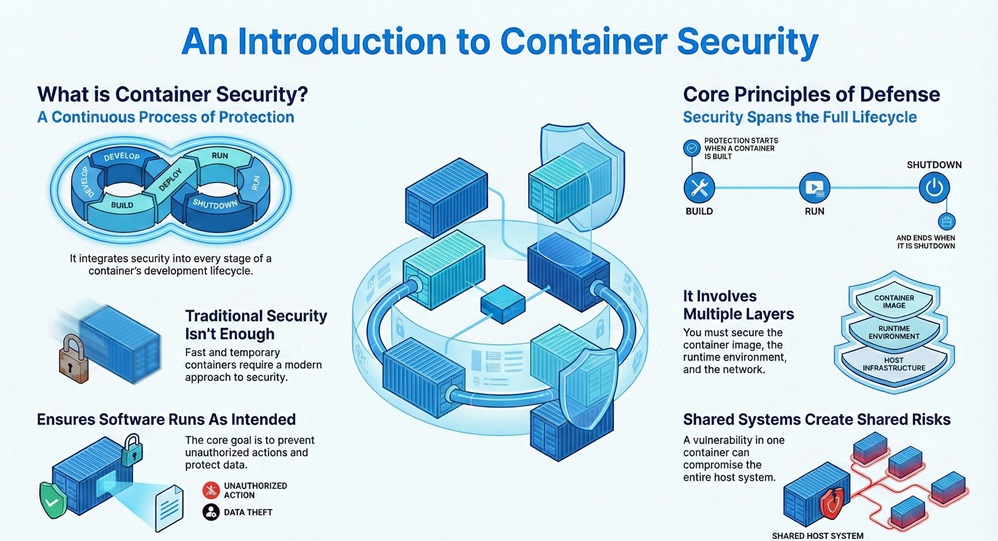
    Container security refers to the practice of protecting containerized applications and the infrastructure they run on. It is a continuous process that integrates into every stage of development. Because containers are meant to be fast and temporary, traditional security often fails to keep up.
     

    Container Security


    It requires you to look at multiple layers. These layers include the container image, the runtime environment, and the network. You must ensure that each part is hard to break. In simple words, it is about making sure your software runs only as intended and nothing else.


    It is important to note that container security is not a one-time setup. It is a habit you must build into your daily workflow. Do you have a plan to monitor your containers after they go live?


    Secure Your Apps


    Comparison Between Virtual Machines and Container Security

    To understand what is container security, we should compare it to something familiar like Virtual Machines (VMs). While both help run apps, they handle safety differently.


    Basis for Comparison Table

    Basis for ComparisonVirtual Machines (VMs)Container Security
    Isolation LevelHigh (uses a full Guest OS)Medium (shares the host OS kernel)
    Attack SurfaceLarger due to full OSSmaller but more concentrated
    SpeedSlow to boot and scanVery fast to start and monitor
    Resource UsageHigh (heavy on RAM/CPU)Low (efficient and lightweight)
    PersistenceLong-livedOften temporary and "ephemeral"


    Why Container Security Matters Today?

    Container security helps you prevent data leaks and service downtime. As more companies move to the cloud, the "Container Security Initiative" (CSI) concept often comes up. Originally, this term related to shipping trade, but in IT, it focuses on the global standard for keeping containerized data safe.


    It is vital because containers are often "transparent" to traditional firewalls. Hackers can use a single flaw in an image to move through your entire network. This is why you need specific tools to watch what happens inside the container.


    Also Read: What is Network Sniffing? Attack and Prevention


    Common Risks in the Container World

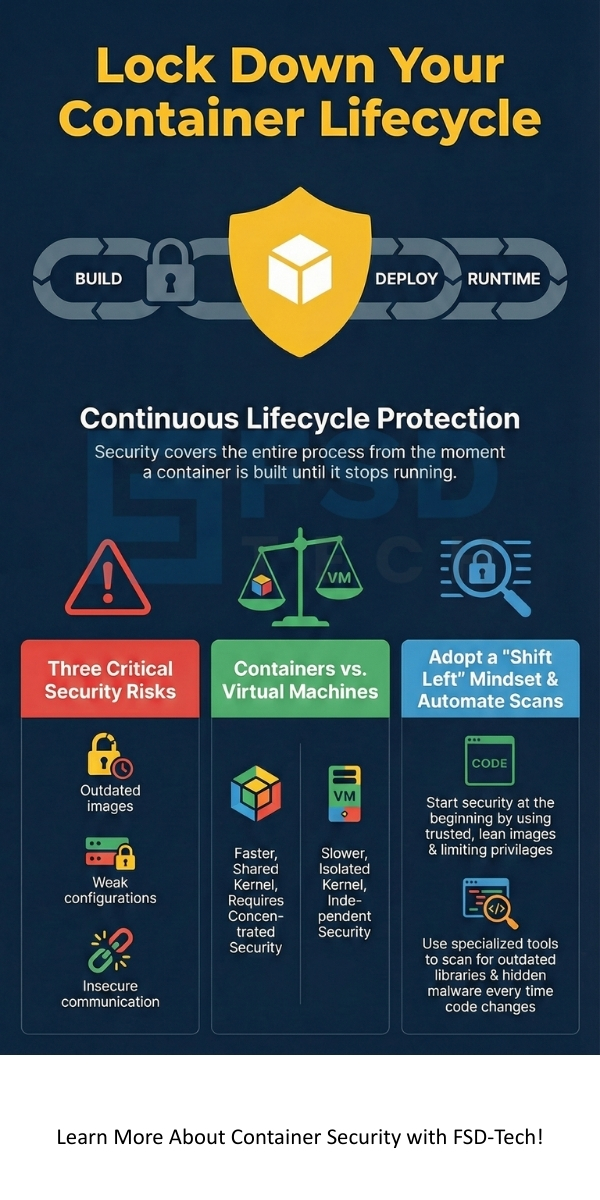
    1. Image Vulnerabilities: Using old or unverified software images.
    2. Weak Configurations: Giving containers too much power over the host system.
    3. Insecure Communication: Letting containers talk to each other without encryption.


    Using Container Security Tools Effectively

    Container security tools are specialized software designed to find and fix holes in your system. You cannot rely on standard antivirus for this task. These tools look for "vulnerabilities" or weak spots in the code before you even launch the app.


    Container security tools like Qualys, Tenable, or Trend Micro provide deep visibility. They can see inside the "layers" of a container. Have you checked if your current tools can scan for hidden malware in your registry?


    Types of Security Tools

    • Static Analysis Tools: These check the code while it is sitting still.
    • Dynamic Analysis Tools: These watch the app while it is actually running.
    • Orchestration Guards: These tools protect platforms like Kubernetes.


    Key Container Security Best Practices

    Container security best practices are the rules you should follow to stay safe. If you follow these, you lower your chances of a successful attack. It starts with a "Shift Left" mindset. This means you think about safety at the very start of your project.


    It include using "lean" images. This means you only include the files the app needs to run. The fewer files you have, the fewer places a hacker can hide. Let us look at some specific steps you can take.


    Also Read: What is Kerberoasting Attack? Detection & Prevention


    List of Best Practices

    1. Use Trusted Images: Only download images from official sources.
    2. Scan Regularly: Use a container security scan at every stage of the build.
    3. Limit Privileges: Never run a container as a "root" user unless it is necessary.
    4. Update Often: Keep your host operating system and container engine patched.
    5. Segment Networks: Group your containers so a breach in one does not affect all.


    Performing a Container Security Scan

    A container security scan is a detailed check of your container image. It looks for known bugs or "CVEs" (Common Vulnerabilities and Exposures). Think of it like a health checkup for your software.


    It should happen every time you change your code. Automated scanners can stop a "bad" image from ever reaching your customers. This saves you time and keeps your reputation clean.


    What Does a Scan Look For?

    • Outdated Libraries: Software that needs an update.
    • Secrets: Plain-text passwords or keys accidentally left in the code.
    • Malware: Malicious files that might have been bundled in.


    Finding the Right Container Security Solution

    A container security solution is a complete package that handles everything for you. Instead of buying five different tools, a single platform manages your risks. This is often the best choice for growing companies.


    It provides a "single pane of glass." This means you can see the safety status of all your apps in one dashboard. It simplifies your work and helps your team respond faster to threats.


    Benefits of a Unified Solution

    • Compliance: It helps you meet legal standards like PCI-DSS or HIPAA.
    • Automation: It fixes common issues without human help.
    • Real-time Alerts: It tells you the second something looks wrong.


    Also Read: What is Cloud Access Security Broker (CASB)?


    When Opening and Closing a Security Container

    When opening and closing a security container, you must follow strict protocols. While this phrase sometimes refers to physical safes, in the IT world, it means managing the "lifecycle" of your digital container.


    When opening and closing a security container in a cloud environment, you must manage access keys carefully. You should ensure that when a container "closes" (terminates), all temporary data is wiped clean. This prevents "data remnants" that hackers could find later.


    Understanding the Host Security Layer

    What is container security without host security? The host is the physical or virtual server that holds your containers. If the host is weak, the containers are not safe. You must harden the host OS by removing unnecessary services.


    Container security logic says you should use a "Container-Optimized OS." These are stripped-down versions of Linux built specifically to run containers. They have a very small attack surface, which makes them much harder to hack.


    Conclusion

    Container security is a vital part of modern software growth. It involves using the right container security tools and following container security best practices. By integrating a container security scan into your daily routine, you protect your company from hidden dangers.


    It is not just a technical task; it is a promise to your users. It shows you care about their data and the stability of your services. When you choose a strong container security solution, you are investing in the future of your business.


    We believe that every company deserves a safe digital environment. Our team focuses on providing clear, actionable advice to help you stay ahead of threats. We put our clients first by staying updated on the latest security trends. Are you ready to make your containers unshakeable? Reach us now
     

    Container security infographic


    Key Takeaways

    • Container Security is a continuous process that covers the entire lifecycle of an application, from the initial build to the moment it stops running.
    • Virtual Machines offer higher isolation because they use a full Guest OS, while containers are faster and more efficient but share the host's system kernel.
    • Container Security Tools are essential for deep visibility into container layers, as traditional antivirus programs often cannot see inside or keep up with fast-paced digital environments.
    • Container Security Best Practices include shifting security to the "left" (starting early), using trusted "lean" images, and never running containers with root privileges.
    • Container Security Scan procedures must be automated and performed every time code changes to catch outdated libraries, hidden secrets, or bundled malware.
    • A Unified Container Security Solution simplifies management by providing a "single pane of glass" to monitor compliance, automation, and real-time alerts.


    Frequently Asked Questions (FAQs)

    What is the primary goal of container security?

    The main goal is to protect the application and its data from threats. It ensures that the container environment remains stable and private throughout its life.


    Is Docker security different from Kubernetes security?

    Yes, they are different but related. Docker security focuses on the individual container and its image. Kubernetes security focuses on how those containers talk to each other and how they are managed at scale.


    Can I use traditional antivirus for containers?

    It is not recommended. Traditional antivirus often lacks the visibility to see into container layers or handle the fast-paced nature of container starts and stops.


    How often should I run a container security scan?

    You should scan every time a developer "commits" new code. Continuous scanning is the only way to stay ahead of new threats that emerge daily.


    What is a "distroless" image?

    A distroless image contains only your application and its dependencies. It does not contain a shell, package manager, or any other tools a hacker might use once they get inside.


    What is Container Security? Best Practices, Tools, and Risks

    About The Author

    Surbhi Suhane

    Surbhi Suhane is an experienced digital marketing and content specialist with deep expertise in Getting Things Done (GTD) methodology and process automation. Adept at optimizing workflows and leveraging automation tools to enhance productivity and deliver impactful results in content creation and SEO optimization.

    Like This Story?

    Share it with friends!

    Subscribe to our newsletter!

    Atera

    (49)

    Cato Networks

    (120)

    ClickUp

    (70)

    FishOS

    (7)

    Miradore

    (21)

    PointGuard AI

    (9)

    Vembu

    (22)

    Xcitium

    (33)

    ZETA HRMS

    (79)

    Workflow Automation(8)

    Workforce Automation(1)

    AI Project Management(1)

    HR Data Automation(1)

    RMM(1)

    IT Workflow Automation(1)

    IT security(2)

    GCC compliance(4)

    Payroll Integration(2)

    IT support automation(3)

    procurement automation(1)

    lost device management(1)

    IT Management(5)

    IoT Security(2)

    Cato XOps(2)

    IT compliance(4)

    Workflow Management(1)

    Task Automation(1)

    Kubernetes lifecycle management(2)

    OpenStack automation(1)

    AI-powered cloud ops(1)

    SMB Security(8)

    Data Security(1)

    MDR (Managed Detection & Response)(4)

    MSP Automation(3)

    Atera Integrations(2)

    XDR Security(2)

    SMB Cyber Protection(1)

    Ransomware Defense(3)

    HR Tech Solutions(1)

    Zero Trust Network Access(3)

    Zero Trust Security(2)

    Endpoint Management(1)

    SaaS Security(1)

    Payroll Automation(5)

    IT Monitoring(2)

    Xcitium EDR SOC(15)

    Ransomware Protection GCC(1)

    Network Consolidation UAE(1)

    M&A IT Integration(1)

    MSSP for SMBs(1)

    SMB Cybersecurity GCC(1)

    Managed EDR FSD-Tech(1)

    Ransomware Protection(3)

    Antivirus vs EDR(1)

    FSD-Tech MSSP(25)

    Cybersecurity GCC(12)

    Endpoint Security(1)

    Endpoint Protection(1)

    Data Breach Costs(1)

    SMB Cybersecurity(8)

    Zero Dwell Containment(31)

    Managed Security Services(2)

    Xcitium EDR(30)

    Hybrid Backup(1)

    Cloud Backup(1)

    Backup & Recovery(1)

    pointguard ai(4)

    backup myths(1)

    disaster recovery myths(1)

    SMB data protection(9)

    vembu(9)

    Disaster Recovery(4)

    Vembu BDR Suite(19)

    GCCBusiness(1)

    DataProtection(1)

    Secure Access Service Edge(4)

    GCC HR software(20)

    Miradore EMM(15)

    Cato SASE(7)

    Cloud Security(8)

    Talent Development(1)

    AI Compliance(2)

    AI Security(2)

    AI Risk Management(1)

    AI Cybersecurity(12)

    AI Governance(4)

    GCC business security(1)

    GCC network integration(1)

    compliance automation(5)

    education security(1)

    GCC cybersecurity(2)

    Miradore EMM Premium+(5)

    App management UAE(1)

    BYOD security Dubai(8)

    MiddleEast(1)

    HealthcareSecurity(1)

    Team Collaboration(1)

    IT automation(12)

    Zscaler(1)

    SD-WAN(6)

    HR Integration(4)

    Cloud Networking(3)

    device management(9)

    VPN(1)

    RemoteWork(1)

    ZeroTrust(2)

    MPLS(1)

    Project Management(9)

    HR automation(16)

    share your thoughts

    SQL Injection (SQLi)

    What is SQL Injection (SQLi) Attack? Examples & Prevention

    🕓 February 3, 2026

    Cloud Access Security Broker (CASB)

    What is Cloud Access Security Broker (CASB)?

    🕓 February 3, 2026

    What is Static Application Security Testing (SAST)?

    What is Static Application Security Testing (SAST)?

    🕓 February 2, 2026

    Decoded(93)

    Cyber Security(118)

    BCP / DR(22)

    Zeta HRMS(78)

    SASE(21)

    Automation(70)

    Next Gen IT-Infra(118)

    Monitoring & Management(70)

    ITSM(22)

    HRMS(21)

    Automation(24)