HomeNext Gen IT-InfraMonitoring & ManagementCyber SecurityBCP / DRAutomationDecoded
Next Gen IT-Infra
Cato’s SASE Supports Cybersecurity Skills Development

How Cato’s SASE Supports Cybersecurity Skills Development

🕓 April 8, 2025

How SASE Supports the Security Needs of SMBs

How SASE Supports the Security Needs of SMBs

🕓 February 9, 2025

Attack Surface Reduction with Cato’s SASE

Attack Surface Reduction with Cato’s SASE

🕓 February 10, 2025

SASE for Digital Transformation in UAE

SASE for Digital Transformation in UAE

🕓 February 8, 2025

Monitoring & Management
Understanding Atera’s SLA Management

Understanding Atera’s SLA Management

🕓 February 7, 2025

Cost-Performance Ratio: Finding the Right Balance in IT Management Networks

Cost-Performance Ratio: Finding the Right Balance in IT Management Networks

🕓 June 16, 2025

Customizing Atera with APIs

Customizing Atera with APIs

🕓 March 3, 2025

Power Up Your IT Team’s Strategy with Atera’s Communication Tools

Power Up Your IT Team’s Strategy with Atera’s Communication Tools

🕓 February 8, 2025

Cyber Security
Illustration of the Cato Cloud architecture showing its role in delivering SASE for secure, optimized global connectivity.

Understanding the Cato Cloud and Its Role in SASE

🕓 January 29, 2025

Isometric illustration of professionals managing network performance, bandwidth analytics, and cloud-based optimization around the Cato Networks platform, symbolizing bandwidth control and QoS visibility.

Mastering Bandwidth Control and QoS in Cato Networks

🕓 July 26, 2025

Global network backbone powering Cato SASE solution for secure, high-performance connectivity across regions.

Global Backbone: The Engine Powering Cato’s SASE Solution

🕓 January 30, 2025

Illustration of team analyzing application traffic and usage insights on a large laptop screen using Cato’s dashboard, surrounded by network and cloud icons.

Cato Networks Application Visibility | Monitoring & Control

🕓 July 27, 2025

BCP / DR
Illustration showing diverse business and IT professionals collaborating with cloud, backup, and security icons, representing Vembu use cases for SMBs, MSPs, and IT teams.

Who Uses Vembu? Real-World Use Cases for SMBs, MSPs & IT Teams

🕓 July 12, 2025

Graphic showcasing Vembu’s all-in-one backup and disaster recovery platform with icons for cloud, data protection, and business continuity for IT teams and SMBs.

What Is Vembu? A Deep Dive Into the All in One Backup & Disaster Recovery Platform

🕓 July 6, 2025

Illustration showing Vembu backup and disaster recovery system with cloud storage, server racks, analytics dashboard, and IT professionals managing data.

The Rising Cost of Data Loss: Why Backup Is No Longer Optional?

🕓 August 14, 2025

3D isometric illustration of cloud backup and data recovery infrastructure with laptop, data center stack, and digital business icons — FSD Tech

RPO & RTO: The Heart of Business Continuity

🕓 August 15, 2025

Automation
Cross-Functional Collaboration with ClickUp

Fostering Cross-Functional Collaboration with ClickUp for Multi-Departmental Projects

🕓 February 11, 2025

ClickUp Project Reporting

Revolutionizing Enterprise Reporting with ClickUp’s Advanced Analytics and Dashboards

🕓 June 16, 2025

ClickUp’s Design Collaboration and Asset Management Tools

Empowering Creative Teams with ClickUp’s Design Collaboration and Asset Management Tools

🕓 February 26, 2025

ClickUp Communication and Collaboration Tools

ClickUp Communication and Collaboration Tools: Empowering Remote Teams

🕓 March 12, 2025

Decoded
Multi-Factor Authentication (MFA)

Multi-Factor Authentication (MFA): All You Need to Know

🕓 December 7, 2025

L3 Switch

What Is an L3 Switch? L2 vs L3 & Why You Need Layer 3?

🕓 December 8, 2025

IPSec

IPSec Explained: Protocols, Modes, IKE & VPN Security

🕓 December 3, 2025

 Datagram Transport Layer Security (DTLS)

What is Datagram Transport Layer Security (DTLS)? How it works?

🕓 December 4, 2025

    Subscribe to our newsletter!

    About Us

    Follow Us

    Copyright © 2024 | Powered by 

    Atera

    (55)

    Cato Networks

    (121)

    ClickUp

    (78)

    FishOS

    (7)

    Miradore

    (21)

    PointGuard AI

    (9)

    Vembu

    (22)

    Xcitium

    (33)

    ZETA HRMS

    (79)

    Table of Contents

    What is Recovery Point Objective? Why Does Your Data Depend on It?

    Surbhi Suhane
    February 20, 2026
    Comments
    Recovery Point Objective

    Recovery Point Objective acts as the heartbeat of your company’s disaster recovery strategy. Imagine your office loses power or a hacker locks your files at 2:00 PM. If your last backup happened at 10:00 AM, you just lost four hours of hard work. Can your business survive that gap? That specific four-hour window is what we call your RPO.


    To be honest, most people ignore this metric until something goes wrong. We’ve all been there, thinking our data is safe just because "we have a backup." But here is the thing: a backup is only as good as its timing. In my experience, companies that don't define a clear Recovery Point Objective often face devastating financial hits during a crisis.


    Are you actually prepared for a data breach? Or are you just hoping for the best? Let’s break down how this technical term keeps your business running when things go south.


    Basics of Recovery Point Objective

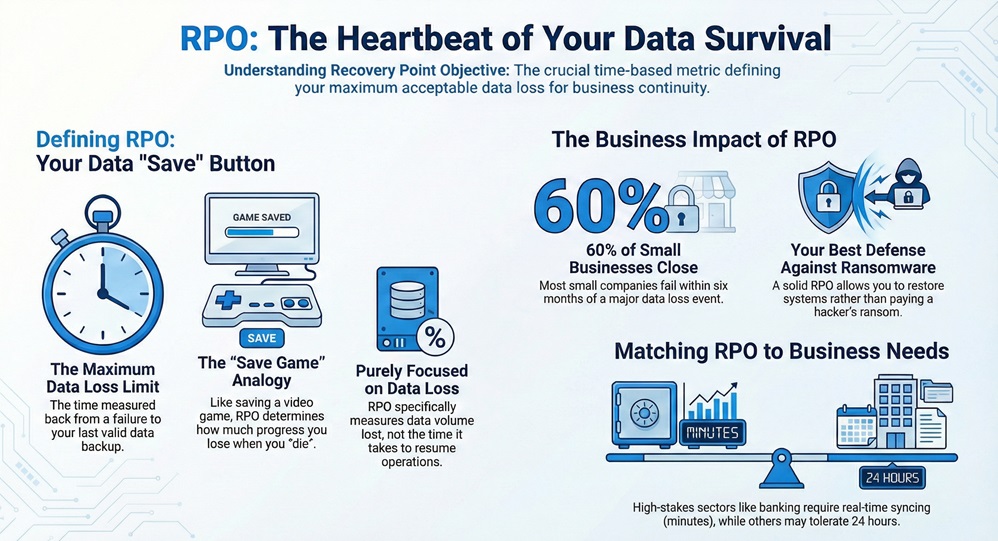
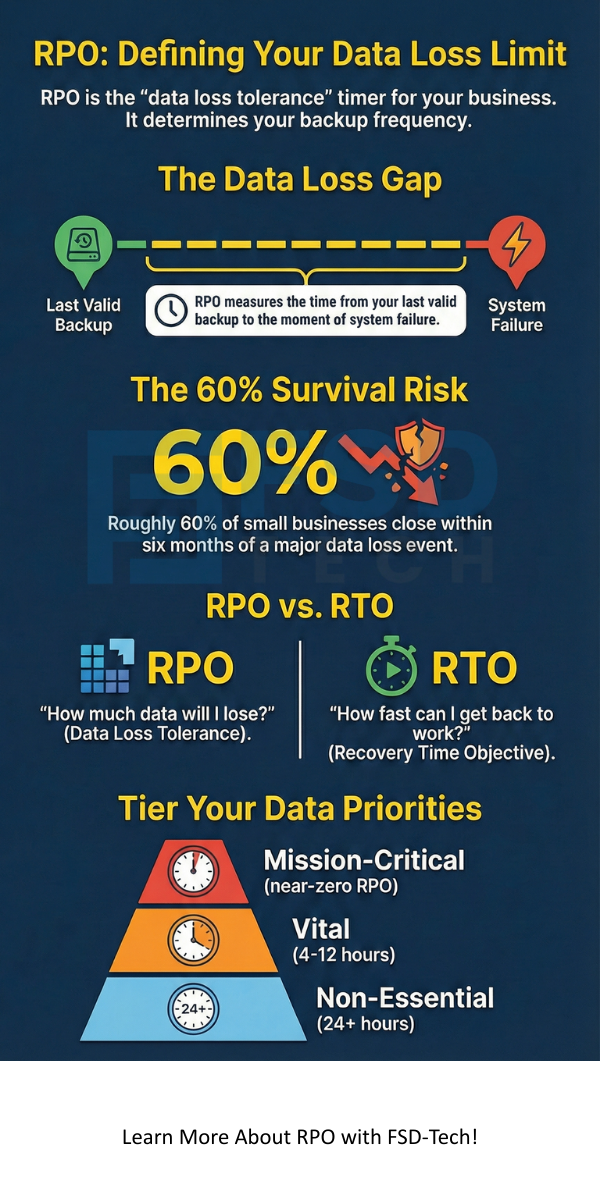
    The Recovery Point Objective refers to the maximum amount of data your organization can afford to lose. It is essentially a measurement of time. You look back from the moment of a failure to the last valid backup. If you set an RPO of one hour, you must back up your data every hour.


    Recovery Point Objective


    This metric tells your IT team how often they need to copy data. Think of it like a "save" button in a video game. If you only save once a day, and you "die" in the game at night, you lose the whole day's progress. In cybersecurity, we use this to ensure that we don't lose vital customer info or financial records.


    Now, let’s discuss the technical side. According to industry whitepapers, RPO focuses purely on data loss. It does not look at how long it takes to get back to work. It only cares about the "point" in time you can return to. This is why it is a pillar of any modern Business Continuity Plan (BCP).


    Get a Free Disaster Recovery Assessment


    Why is Recovery Point Objective Vital for Cybersecurity?

    In a world full of ransomware, having a solid Recovery Point Objective is your best defense. When a virus encrypts your servers, you have two choices. You can pay the ransom, or you can wipe the system and restore from a backup. Your RPO determines how much work you have to redo once that restoration is finished.


    Here, the Recovery Point Objective acts as a safety net. If you work in a bank, losing even one minute of data could mean losing thousands of transactions. Conversely, a small local plumbing shop might only need an RPO of 24 hours. Does your current backup schedule match the speed of your business?


    Roughly 60% of small businesses close within six months of a major data loss event. That is a scary thought. By defining your RPO, you are essentially setting a "loss tolerance" level. It helps you decide which systems need expensive, real-time syncing and which ones can wait until the end of the day.


    How to Calculate Your Recovery Point Objective?

    Calculating a Recovery Point Objective isn't just about picking a random number. You must look at how your data changes throughout the day. In my view, the best way to start is by categorizing your data into tiers. Not all files have the same value.


    Tier 1: Mission-Critical Data

    This includes your live databases, customer orders, and financial transactions. For these, you likely need an RPO of zero or near-zero. This means you use "high availability" tools that copy data the second it is created.


    Tier 2: Vital Data

    These are files you use daily but aren't "live" every second. Think of internal project trackers or HR records. An RPO of 4 to 12 hours might work here.


    Tier 3: Non-Essential Data

    This covers old archives or marketing assets that don't change much. A 24-hour or even weekly RPO is usually fine for this group.


    Picture this: your main server crashes. If you have Tier 1 data with a 24-hour RPO, you are in big trouble. You'll spend weeks trying to figure out what customers bought in those 24 hours. That’s why we use these tiers to balance cost and safety.


    Also Read: Is Your Business PCI Compliant? A 12-Step Roadmap


    Recovery Point Objective vs. Recovery Time Objective (RTO)

    People often get RPO mixed up with RTO. While they sound similar, they solve different problems. As we have already discussed, RPO is about "How much data will I lose?" On the other hand, RTO (Recovery Time Objective) asks, "How fast can I get back to work?"


    Let's consider an example. A server fails at noon.


    • If your RPO is 1 hour, you go back to the 11:00 AM backup. (You lost 1 hour of data).
    • If your RTO is 2 hours, you should be back online by 2:00 PM. (The downtime lasted 2 hours).


    You need both to have a full plan. High-end systems aim for "zero RPO" and "zero RTO," but that costs a lot of money. Most businesses find a middle ground that keeps them safe without breaking the bank.


    Factors That Influence Your Recovery Point Objective

    Several things will dictate how you set your targets. First, look at your industry regulations. Some laws require certain types of businesses to keep data very current. If you fail to meet these, you could face huge fines.


    Second, consider the cost of downtime. How much money do you lose every hour your team can't work? If that number is high, you need a very short RPO. This forces you to invest in better backup technology.


    Finally, think about your storage capacity. If you want a 5-minute RPO, you will be saving a lot of data. Do you have the cloud space or physical hard drives to handle that? This is where many companies struggle. They want no data loss, but they don't want to pay for the storage required to keep those constant snapshots.


    Also Read: What is VPN Gateway? 7 Key Ways It Secures Your Network


    The Role of Technology in Achieving Low RPO

    We live in a great time for tech. In the past, we used tapes that we moved to a vault once a week. Now, we have cloud-based tools that offer "Continuous Data Protection" (CDP).

    CDP is the gold standard for Recovery Point Objective management. It captures every change to your data in real-time. This allows you to roll back to almost any second before a disaster hit. It is like a "Time Machine" for your whole company.


    Other tools use "Snapshots." This takes a picture of your data at set intervals, like every 15 minutes. This is often more affordable than CDP but still provides a very tight RPO. Which one fits your budget?


    Challenges in Maintaining a Strict RPO

    It is easy to write a number on a piece of paper. It is harder to make it happen. One big challenge is "Data Gravity." As your company grows, you have more data to move. If your internet connection is slow, you might not be able to send backups to the cloud fast enough to meet a 15-minute RPO.


    Another issue is system performance. Constant backups can slow down your computers. If your employees can't work because the backup software is hogging all the RAM, your "safety" is actually hurting your productivity.


    Thus, we can say that RPO is a balancing act. You want it to be as short as possible, but it must be realistic for your hardware and your staff.


    Questions to Ask Your IT Team

    To get a better handle on your situation, try asking these questions during your next meeting:


    1. What is our current Recovery Point Objective for our customer database?
    2. When was the last time we tested a restore from that specific point?
    3. Do we have enough bandwidth to lower our RPO if we need to?
    4. What happens to our data if the backup server itself fails?


    These questions move the conversation from "Are we backed up?" to "How resilient are we really?"


    Conclusion

    Setting a clear Recovery Point Objective is the difference between a minor hiccup and a business-ending disaster. It gives your team a target and your business a shield. By understanding your data tiers and investing in the right frequency of backups, you ensure that a "bad day" doesn't become the "last day" for your company.


    In our view, protecting your data is about more than just technology; it is about respecting the hard work you and your clients put in every day. We believe in building systems that aren't just "robust," but truly resilient. Our team focuses on your specific needs to ensure your data is always right where you left it.


    Contact Us to Secure Your Future


    Recovery Point Objective infographic


    Key Takeaways

    • RPO measures data loss: It defines the maximum age of files that an organization must recover from backup storage for operations to resume.
    • Time-based metric: It is always expressed in minutes, hours, or days.
    • Frequency dictates RPO: If you want a 1-hour RPO, you must back up at least every hour.
    • Business-driven: Your RPO should be based on how much money you lose when data vanishes, not just what the IT department likes.
    • Distinct from RTO: RPO is about data loss; RTO is about downtime duration.


    Frequently Asked Questions (FAQs) on RPO

    What is a good Recovery Point Objective?

    There is no single "good" number. A bank might need 0 seconds, while a personal blog might be fine with 24 hours. It depends on your "data loss tolerance."


    How does RPO affect backup costs?

    A shorter RPO usually costs more. It requires more frequent backups, more storage space, and faster network speeds to move that data.


    Can you have an RPO of zero?

    Yes, this is called "Synchronous Replication." Data is written to two places at the exact same time. It is expensive but prevents all data loss.


    Does RPO apply to cloud services like Office 365?

    Absolutely. Even if your data is in the cloud, you should know how often the provider backs it up. You might need a third-party tool to reach your desired RPO.


    Who decides the RPO?

    The business owners or stakeholders should decide based on risk. The IT team then implements the technology to meet that goal.

    What is Recovery Point Objective? Why Does Your Data Depend on It?

    About The Author

    Surbhi Suhane

    Surbhi Suhane is an experienced digital marketing and content specialist with deep expertise in Getting Things Done (GTD) methodology and process automation. Adept at optimizing workflows and leveraging automation tools to enhance productivity and deliver impactful results in content creation and SEO optimization.

    TRY OUR PRODUCTS

    Like This Story?

    Share it with friends!

    Subscribe to our newsletter!

    FishOSCato SASEVembuXcitiumZeta HRMSAtera
    Isometric illustration of a centralized performance platform connected to analytics dashboards and team members, representing goal alignment, measurable outcomes, risk visibility, and strategic project tracking within ClickUp.

    How ClickUp Enables Outcome-Based Project Management (Not Just Task Tracking)

    🕓 February 15, 2026
    Isometric illustration of a centralized executive dashboard platform connected to analytics panels, performance charts, security indicators, and strategic milestones, representing real-time business visibility and decision control within ClickUp.

    Executive Visibility in ClickUp – How CXOs Gain Real-Time Control Without Micromanaging

    🕓 February 13, 2026

    Cato SASE Architecture

    Inside Cato’s SASE Architecture: A Blueprint for Modern Security

    🕓 January 26, 2025

    Decoded(121)

    Cyber Security(118)

    BCP / DR(22)

    Zeta HRMS(78)

    SASE(21)

    Automation(78)

    Next Gen IT-Infra(118)

    Monitoring & Management(76)

    ITSM(22)

    HRMS(21)

    Automation(24)

    Workflow Automation(8)

    Workforce Automation(1)

    AI Project Management(1)

    HR Data Automation(1)

    RMM(1)

    IT Workflow Automation(1)

    GCC compliance(4)

    IT security(2)

    Payroll Integration(2)

    IT support automation(3)

    procurement automation(1)

    lost device management(1)

    IT Management(5)

    IoT Security(2)

    Cato XOps(2)

    IT compliance(4)

    Task Automation(1)

    Workflow Management(1)

    Kubernetes lifecycle management(2)

    OpenStack automation(1)

    AI-powered cloud ops(1)

    SMB Security(8)

    Data Security(1)

    MDR (Managed Detection & Response)(4)

    MSP Automation(3)

    Atera Integrations(2)

    XDR Security(2)

    Ransomware Defense(3)

    SMB Cyber Protection(1)

    HR Tech Solutions(1)

    Zero Trust Network Access(3)

    Zero Trust Security(2)

    Endpoint Management(1)

    SaaS Security(1)

    Payroll Automation(5)

    IT Monitoring(2)

    Xcitium EDR SOC(15)

    Ransomware Protection GCC(1)

    Network Consolidation UAE(1)

    M&A IT Integration(1)

    MSSP for SMBs(1)

    FSD-Tech MSSP(25)

    Managed EDR FSD-Tech(1)

    SMB Cybersecurity GCC(1)

    Ransomware Protection(3)

    Antivirus vs EDR(1)

    Endpoint Security(1)

    Cybersecurity GCC(12)

    Data Breach Costs(1)

    Endpoint Protection(1)

    Xcitium EDR(30)

    Managed Security Services(2)

    SMB Cybersecurity(8)

    Zero Dwell Containment(31)

    Cloud Backup(1)

    Hybrid Backup(1)

    Backup & Recovery(1)

    pointguard ai(4)

    SMB data protection(9)

    backup myths(1)

    disaster recovery myths(1)

    vembu(9)

    Disaster Recovery(4)

    Vembu BDR Suite(19)

    DataProtection(1)

    GCCBusiness(1)

    GCC IT Solutions(1)

    Secure Access Service Edge(4)

    Unified Network Management(1)

    GCC HR software(20)

    CC compliance(1)

    open banking(1)

    financial cybersecurity(2)

    Miradore EMM(15)

    Government Security(1)

    Cato SASE(8)

    Hybrid Learning(1)

    Cloud Security(9)

    GCC Education(1)

    Talent Development(1)

    AI Risk Management(1)

    AI Compliance(2)

    AI Cybersecurity(12)

    AI Governance(4)

    AI Security(2)

    Secure Remote Access(1)

    GCC business security(1)

    GCC network integration(1)

    compliance automation(5)

    GCC cybersecurity(3)

    education security(1)

    BYOD security Dubai(8)

    Miradore EMM Premium+(5)

    App management UAE(1)

    MiddleEast(1)

    HealthcareSecurity(1)

    Team Collaboration(1)

    IT automation(12)

    Zscaler(1)

    SD-WAN(7)

    share your thoughts

    Insider Threat Detection

    Insider Threat Detection: How to Protect Your Business from the Inside Out

    🕓 February 20, 2026

    Recovery Point Objective

    What is Recovery Point Objective? Why Does Your Data Depend on It?

    🕓 February 20, 2026

    Offsite Data Backup Storage

    What is Offsite Data Backup Storage? Secure Remote Backups

    🕓 February 19, 2026