HomeNext Gen IT-InfraMonitoring & ManagementCyber SecurityBCP / DRAutomationDecoded
Next Gen IT-Infra
Cato’s SASE Supports Cybersecurity Skills Development

How Cato’s SASE Supports Cybersecurity Skills Development

🕓 April 8, 2025

How SASE Supports the Security Needs of SMBs

How SASE Supports the Security Needs of SMBs

🕓 February 9, 2025

Attack Surface Reduction with Cato’s SASE

Attack Surface Reduction with Cato’s SASE

🕓 February 10, 2025

SASE for Digital Transformation in UAE

SASE for Digital Transformation in UAE

🕓 February 8, 2025

Monitoring & Management
Understanding Atera’s SLA Management

Understanding Atera’s SLA Management

🕓 February 7, 2025

Cost-Performance Ratio: Finding the Right Balance in IT Management Networks

Cost-Performance Ratio: Finding the Right Balance in IT Management Networks

🕓 June 16, 2025

Customizing Atera with APIs

Customizing Atera with APIs

🕓 March 3, 2025

Power Up Your IT Team’s Strategy with Atera’s Communication Tools

Power Up Your IT Team’s Strategy with Atera’s Communication Tools

🕓 February 8, 2025

Cyber Security
Illustration of the Cato Cloud architecture showing its role in delivering SASE for secure, optimized global connectivity.

Understanding the Cato Cloud and Its Role in SASE

🕓 January 29, 2025

Isometric illustration of professionals managing network performance, bandwidth analytics, and cloud-based optimization around the Cato Networks platform, symbolizing bandwidth control and QoS visibility.

Mastering Bandwidth Control and QoS in Cato Networks

🕓 July 26, 2025

Global network backbone powering Cato SASE solution for secure, high-performance connectivity across regions.

Global Backbone: The Engine Powering Cato’s SASE Solution

🕓 January 30, 2025

Illustration of team analyzing application traffic and usage insights on a large laptop screen using Cato’s dashboard, surrounded by network and cloud icons.

Cato Networks Application Visibility | Monitoring & Control

🕓 July 27, 2025

BCP / DR
Illustration showing diverse business and IT professionals collaborating with cloud, backup, and security icons, representing Vembu use cases for SMBs, MSPs, and IT teams.

Who Uses Vembu? Real-World Use Cases for SMBs, MSPs & IT Teams

🕓 July 12, 2025

Graphic showcasing Vembu’s all-in-one backup and disaster recovery platform with icons for cloud, data protection, and business continuity for IT teams and SMBs.

What Is Vembu? A Deep Dive Into the All in One Backup & Disaster Recovery Platform

🕓 July 6, 2025

Illustration showing Vembu backup and disaster recovery system with cloud storage, server racks, analytics dashboard, and IT professionals managing data.

The Rising Cost of Data Loss: Why Backup Is No Longer Optional?

🕓 August 14, 2025

3D isometric illustration of cloud backup and data recovery infrastructure with laptop, data center stack, and digital business icons — FSD Tech

RPO & RTO: The Heart of Business Continuity

🕓 August 15, 2025

Automation
Cross-Functional Collaboration with ClickUp

Fostering Cross-Functional Collaboration with ClickUp for Multi-Departmental Projects

🕓 February 11, 2025

ClickUp Project Reporting

Revolutionizing Enterprise Reporting with ClickUp’s Advanced Analytics and Dashboards

🕓 June 16, 2025

ClickUp’s Design Collaboration and Asset Management Tools

Empowering Creative Teams with ClickUp’s Design Collaboration and Asset Management Tools

🕓 February 26, 2025

ClickUp Communication and Collaboration Tools

ClickUp Communication and Collaboration Tools: Empowering Remote Teams

🕓 March 12, 2025

Decoded
Multi-Factor Authentication (MFA)

Multi-Factor Authentication (MFA): All You Need to Know

🕓 December 7, 2025

L3 Switch

What Is an L3 Switch? L2 vs L3 & Why You Need Layer 3?

🕓 December 8, 2025

IPSec

IPSec Explained: Protocols, Modes, IKE & VPN Security

🕓 December 3, 2025

 Datagram Transport Layer Security (DTLS)

What is Datagram Transport Layer Security (DTLS)? How it works?

🕓 December 4, 2025

    Subscribe to our newsletter!

    About Us

    Follow Us

    Copyright © 2024 | Powered by 

    Cato SASE Architecture

    Inside Cato’s SASE Architecture: A Blueprint for Modern Security

    🕓 January 26, 2025

    Enterprise Data Security and Privacy with ClickUp

    Ensuring Enterprise Data Security and Privacy with ClickUp

    🕓 February 9, 2025

    DDoS protection SASE

    DDoS Protection and Cato’s Defence Mechanisms

    🕓 February 11, 2025

    Table of Contents

    What is VPN Gateway? 7 Key Ways It Secures Your Network

    Surbhi Suhane
    February 11, 2026
    Comments
    VPN Gateway

    When you work from a coffee shop or a home office, you likely need a secure way to reach your office files. You might wonder how your computer stays safe while talking to a private server miles away. This is where a specialized piece of networking hardware or software comes into play. It acts as a sentry, guarding the entrance to a private network. But how exactly does this "sentry" handle your data?


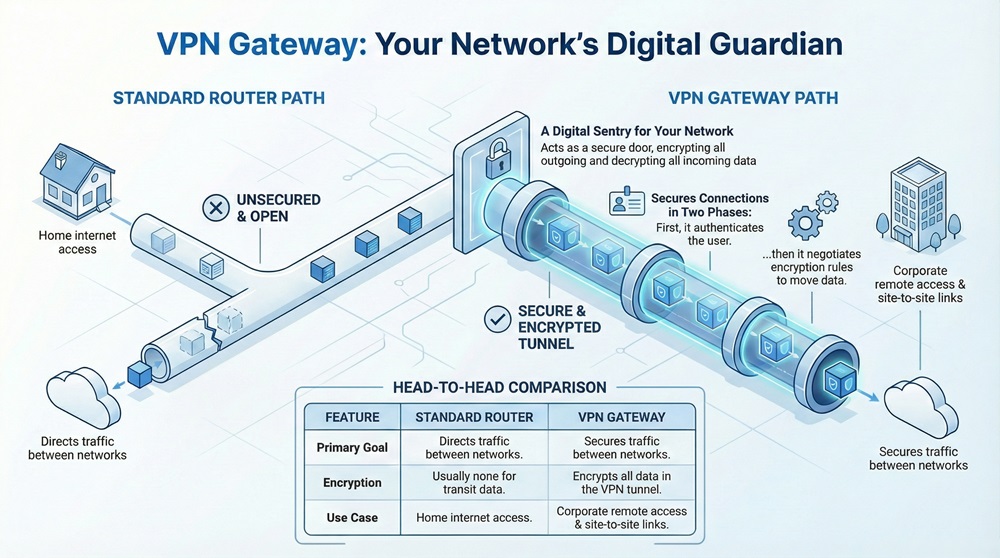
    The VPN gateway is a networking device that connects two or more networks or devices in a VPN structure. To understand it simply, think of it as a physical or virtual door. This door only opens for data that has the right key. It sits at the edge of a local network. When you send data, the VPN gateway encrypts it. When data arrives, the gateway decrypts it. This ensures that even if someone intercepts your data on the internet, they cannot read it.


    Role of the VPN Gateway

    A VPN gateway provides a secure path through an unsecure network like the internet. Most businesses use it to link branch offices or to allow remote employees to log in safely. It uses protocols like IPsec or SSL to create a "tunnel." This tunnel wraps your data packets in a protective layer. Without this gateway, your private company data would travel across the web in plain text. Would you want your bank details or trade secrets floating around for anyone to see?


    Basis for Comparison: VPN Gateway vs. Standard Router

    Before we dive deeper, it helps to see how a VPN gateway differs from a standard home router. While they look similar, their jobs are quite different.


    FeatureStandard RouterVPN Gateway
    Primary GoalDirects traffic between networks.Secures traffic between networks.
    EncryptionUsually none for transit data.Encrypts all data in the VPN tunnel.
    AuthenticationBasic Wi-Fi password.Strong certificates or multi-factor keys.
    HardwareSimple consumer-grade chips.High-speed chips for encryption tasks.
    Use CaseHome internet access.Corporate remote access and site-to-site links.


    What is the VPN Gateway in Technical Terms?

    To define it more formally, a VPN gateway is a type of networking device that terminates VPN tunnels. It can be a dedicated router, a firewall, or even a software service in the cloud. It manages the connection between a local area network (LAN) and a remote device.
     

    VPN Gateway


    VPN gateway operations rely on two main phases. First, it establishes a secure handshake with the sender. It checks if the user is who they claim to be. Second, it negotiates the "ciphers" or rules for encryption. Once both sides agree, the gateway starts moving data. This device must handle a lot of math. Encrypting every single packet of data requires significant processing power.


    Shop our latest enterprise-grade networking solutions.


    What is Remote Gateway in VPN Connections?

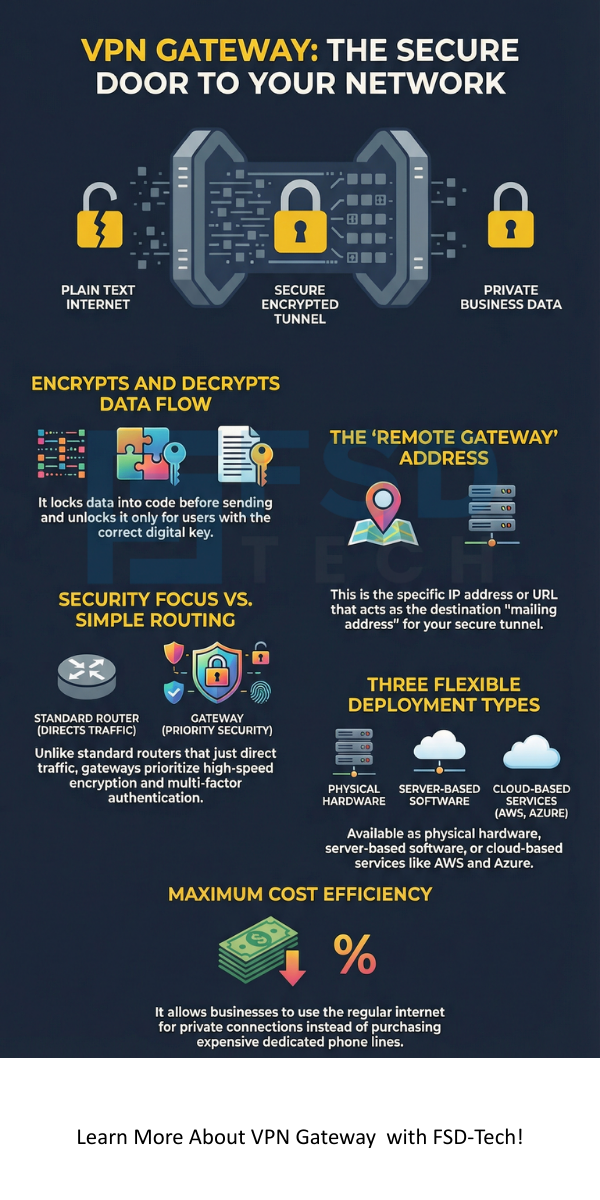
    You might see the term "remote gateway" when setting up your software. So, what is remote gateway in vpn settings? The remote gateway refers to the IP address or the URL of the device on the other end of your connection. If you are at home, your computer is the local client. The big server at your office is the remote gateway.


    Remote gateway in vpn configurations tells your computer exactly where to send the encrypted "tunnel" packets. If you enter the wrong address here, your computer will not know where the secure door is located. Think of it as the mailing address for your private digital tunnel.


    How a VPN Gateway Functions?

    A VPN gateway works by using a set of rules called protocols. These protocols decide how the data is locked and unlocked. The most common protocol used by a VPN gateway is IPsec (Internet Protocol Security).


    1. Initiation: You try to access a file on the company server.
    2. Authentication: The VPN gateway asks for your digital ID or certificate.
    3. Tunneling: The gateway creates a virtual path.
    4. Encryption: The gateway takes your data and turns it into code.
    5. Transmission: The data travels across the internet safely.
    6. Decryption: The gateway at the office receives the code and turns it back into a file.


    VPN gateway devices often include a firewall. This adds another layer of safety. It checks not just if the data is encrypted, but also if the data is "allowed" to enter based on company policy.


    Also Read: What is Cloud Access Security Broker (CASB)?

    Types of VPN Gateways

    Not every VPN gateway is a physical box. Depending on your needs, you might use different forms:


    • Hardware Gateways: These are physical appliances. They are great for big offices with hundreds of workers. They have special chips meant for fast encryption.
    • Software Gateways: These run on a standard server. They are flexible and cheaper for small teams.
    • Cloud Gateways: These live in environments like AWS or Azure. They help you connect your office to your cloud-based apps.


    Is VPN Gate Client Safe for Use?

    Many people look for free ways to stay secure. One common tool is the VPN Gate project. This leads to a common question: is vpn gate client safe?


    VPN gate client safe concerns stem from the fact that it is an academic project. It relies on volunteers to provide the servers. While the software itself is usually clean, the "nodes" you connect to are owned by strangers. Unlike a corporate VPN gateway, you do not know who is on the other side.


    If you use it for casual browsing, it might be fine. However, for sensitive work or banking, a volunteer-run system is risky. A volunteer could theoretically log your traffic before it leaves their server. For true safety, a private or managed VPN gateway is always the better choice.


    Key Benefits of Using a VPN Gateway

    A VPN gateway offers more than just privacy. It provides a foundation for modern business logic.


    1. Secure Remote Access

    A VPN gateway allows you to work from anywhere. It treats your home laptop as if it were plugged into the office wall. This keeps your internal apps off the public internet.


    2. Site-to-Site Connectivity

    A VPN gateway can link two entire offices. If you have a branch in New York and one in London, the gateway makes them feel like one big office. The staff in London can print to a printer in New York seamlessly.


    3. Cost Efficiency

    A VPN gateway saves money. In the old days, companies had to buy expensive private lines from phone companies. Now, you can use the regular internet to create a private network for a fraction of the cost.


    4. Data Integrity

    A VPN gateway ensures your data does not change during transit. It uses "hashes" to check if anyone tampered with the packets. If a single bit of data is changed by a hacker, the gateway will drop the packet..


    Also Read: What is Geofencing Technology? All You Need to Know


    Setting Up Your VPN Gateway

    Setting up a VPN gateway requires a few specific steps. You must be careful with the details to avoid security holes.


    Step 1: Define Your Network Ranges

    It needs to know which IP addresses are "inside" and which are "outside." You must ensure your home network and office network do not use the same IP numbers.


    Step 2: Choose Your Protocol

    Most experts suggest using IPsec for site-to-site links. For individual users, SSL/TLS is often easier. The VPN gateway must be configured to support the choice you make.


    Step 3: Configure Authentication

    How will the VPN gateway know it is you? You can use simple passwords, but certificates are much safer. A certificate is like a digital passport that is very hard to fake.


    Step 4: Test the Tunnel

    Once configured, you try to "ping" a device on the other side. If the VPN gateway logs show a "successful handshake," your tunnel is active.


    Common Challenges with VPN Gateways

    While a VPN gateway is powerful, it is not perfect. You might run into some hurdles.

    • Latency: Because the VPN gateway has to encrypt every bit of data, it can slow down your connection. This is often called "encryption overhead."
    • Configuration Errors: If you get one setting wrong, the tunnel will not open. This is the most common cause of VPN downtime.
    • Hardware Limits: A small VPN gateway might crash if too many people try to log in at the same time. You must pick hardware that matches your team size.

    Conclusion

    We live in a world where data is a primary target. A VPN gateway acts as your first line of defense. It allows your team to stay productive without risking the company's "crown jewels." By choosing the right gateway and configuring it with care, you build a wall that is hard for any intruder to climb.


    Talk to an expert about securing your remote workforce.
     

    VPN Gateway infographic


    Key Takeaways

    A VPN gateway is an essential tool for any modern organization. It bridges the gap between convenience and security.


    • Definition: A VPN gateway is a device that creates and manages encrypted tunnels.
    • Function: It handles authentication, encryption, and decryption of data packets.
    • Remote Gateway: The remote gateway in vpn settings is the destination address of your secure connection.
    • Safety: While tools like VPN Gate exist, a dedicated corporate VPN gateway is the only way to ensure total privacy for sensitive data.
    • Versatility: You can deploy these as hardware, software, or cloud-based services.


    Frequently Asked Questions on VPN Gateway

    What is the main purpose of a VPN gateway?

    The primary goal is to provide a secure, encrypted entrance to a private network. It protects data as it moves across public spaces.


    Can a firewall act as a VPN gateway?

    Yes. Many modern firewalls include VPN gateway features. This allows one device to handle both security filtering and encrypted tunneling.


    Is a VPN gateway the same as a VPN service?

    No. A VPN service (like NordVPN or ExpressVPN) is for hiding your personal browsing. A VPN gateway is for connecting specific networks or remote workers to a private business environment.


    Why is my VPN gateway slow?

    Slowness usually comes from the processor. If the VPN gateway has a weak CPU, it cannot encrypt data fast enough for a high-speed fiber connection.


    What is VPN Gateway? 7 Key Ways It Secures Your Network

    About The Author

    Surbhi Suhane

    Surbhi Suhane is an experienced digital marketing and content specialist with deep expertise in Getting Things Done (GTD) methodology and process automation. Adept at optimizing workflows and leveraging automation tools to enhance productivity and deliver impactful results in content creation and SEO optimization.

    Like This Story?

    Share it with friends!

    Subscribe to our newsletter!

    Atera

    (55)

    Cato Networks

    (121)

    ClickUp

    (70)

    FishOS

    (7)

    Miradore

    (21)

    PointGuard AI

    (9)

    Vembu

    (22)

    Xcitium

    (33)

    ZETA HRMS

    (79)

    Workflow Automation(8)

    Workforce Automation(1)

    AI Project Management(1)

    HR Data Automation(1)

    RMM(1)

    IT Workflow Automation(1)

    IT security(2)

    GCC compliance(4)

    Payroll Integration(2)

    IT support automation(3)

    procurement automation(1)

    lost device management(1)

    IT Management(5)

    IoT Security(2)

    Cato XOps(2)

    IT compliance(4)

    Workflow Management(1)

    Task Automation(1)

    Kubernetes lifecycle management(2)

    OpenStack automation(1)

    AI-powered cloud ops(1)

    SMB Security(8)

    Data Security(1)

    MDR (Managed Detection & Response)(4)

    MSP Automation(3)

    Atera Integrations(2)

    XDR Security(2)

    SMB Cyber Protection(1)

    Ransomware Defense(3)

    HR Tech Solutions(1)

    Zero Trust Network Access(3)

    Zero Trust Security(2)

    Endpoint Management(1)

    SaaS Security(1)

    Payroll Automation(5)

    IT Monitoring(2)

    Xcitium EDR SOC(15)

    Ransomware Protection GCC(1)

    Network Consolidation UAE(1)

    M&A IT Integration(1)

    MSSP for SMBs(1)

    SMB Cybersecurity GCC(1)

    Antivirus vs EDR(1)

    FSD-Tech MSSP(25)

    Ransomware Protection(3)

    Managed EDR FSD-Tech(1)

    Cybersecurity GCC(12)

    Endpoint Security(1)

    Endpoint Protection(1)

    Data Breach Costs(1)

    SMB Cybersecurity(8)

    Zero Dwell Containment(31)

    Xcitium EDR(30)

    Managed Security Services(2)

    Cloud Backup(1)

    Hybrid Backup(1)

    Backup & Recovery(1)

    pointguard ai(4)

    backup myths(1)

    disaster recovery myths(1)

    SMB data protection(9)

    vembu(9)

    Vembu BDR Suite(19)

    Disaster Recovery(4)

    GCCBusiness(1)

    DataProtection(1)

    Secure Access Service Edge(4)

    GCC HR software(20)

    Miradore EMM(15)

    Cato SASE(7)

    Cloud Security(8)

    Talent Development(1)

    AI Security(2)

    AI Cybersecurity(12)

    AI Governance(4)

    AI Risk Management(1)

    AI Compliance(2)

    GCC business security(1)

    GCC network integration(1)

    compliance automation(5)

    education security(1)

    GCC cybersecurity(2)

    BYOD security Dubai(8)

    App management UAE(1)

    Miradore EMM Premium+(5)

    MiddleEast(1)

    HealthcareSecurity(1)

    Team Collaboration(1)

    IT automation(12)

    Zscaler(1)

    SD-WAN(7)

    HR Integration(4)

    Cloud Networking(4)

    device management(9)

    RemoteWork(1)

    VPN(1)

    ZeroTrust(2)

    MPLS(1)

    Project Management(9)

    HR automation(16)

    share your thoughts

    Wireless LAN Controller

    What is a Wireless LAN Controller? Configuration & Setup 101

    🕓 February 11, 2026

    VPN Gateway

    What is VPN Gateway? 7 Key Ways It Secures Your Network

    🕓 February 11, 2026

    Access Point in Networking

    What is Access Point in Networking? 7 Key Benefits

    🕓 February 10, 2026

    Decoded(105)

    Cyber Security(118)

    BCP / DR(22)

    Zeta HRMS(78)

    SASE(21)

    Automation(70)

    Next Gen IT-Infra(118)

    Monitoring & Management(76)

    ITSM(22)

    HRMS(21)

    Automation(24)