HomeNext Gen IT-InfraMonitoring & ManagementCyber SecurityBCP / DRAutomationDecoded
Next Gen IT-Infra
Cato’s SASE Supports Cybersecurity Skills Development

How Cato’s SASE Supports Cybersecurity Skills Development

🕓 April 8, 2025

How SASE Supports the Security Needs of SMBs

How SASE Supports the Security Needs of SMBs

🕓 February 9, 2025

Attack Surface Reduction with Cato’s SASE

Attack Surface Reduction with Cato’s SASE

🕓 February 10, 2025

SASE for Digital Transformation in UAE

SASE for Digital Transformation in UAE

🕓 February 8, 2025

Monitoring & Management
Understanding Atera’s SLA Management

Understanding Atera’s SLA Management

🕓 February 7, 2025

Cost-Performance Ratio: Finding the Right Balance in IT Management Networks

Cost-Performance Ratio: Finding the Right Balance in IT Management Networks

🕓 June 16, 2025

Customizing Atera with APIs

Customizing Atera with APIs

🕓 March 3, 2025

Power Up Your IT Team’s Strategy with Atera’s Communication Tools

Power Up Your IT Team’s Strategy with Atera’s Communication Tools

🕓 February 8, 2025

Cyber Security
Illustration of the Cato Cloud architecture showing its role in delivering SASE for secure, optimized global connectivity.

Understanding the Cato Cloud and Its Role in SASE

🕓 January 29, 2025

Isometric illustration of professionals managing network performance, bandwidth analytics, and cloud-based optimization around the Cato Networks platform, symbolizing bandwidth control and QoS visibility.

Mastering Bandwidth Control and QoS in Cato Networks

🕓 July 26, 2025

Global network backbone powering Cato SASE solution for secure, high-performance connectivity across regions.

Global Backbone: The Engine Powering Cato’s SASE Solution

🕓 January 30, 2025

Illustration of team analyzing application traffic and usage insights on a large laptop screen using Cato’s dashboard, surrounded by network and cloud icons.

Cato Networks Application Visibility | Monitoring & Control

🕓 July 27, 2025

BCP / DR
Illustration showing diverse business and IT professionals collaborating with cloud, backup, and security icons, representing Vembu use cases for SMBs, MSPs, and IT teams.

Who Uses Vembu? Real-World Use Cases for SMBs, MSPs & IT Teams

🕓 July 12, 2025

Graphic showcasing Vembu’s all-in-one backup and disaster recovery platform with icons for cloud, data protection, and business continuity for IT teams and SMBs.

What Is Vembu? A Deep Dive Into the All in One Backup & Disaster Recovery Platform

🕓 July 6, 2025

Illustration showing Vembu backup and disaster recovery system with cloud storage, server racks, analytics dashboard, and IT professionals managing data.

The Rising Cost of Data Loss: Why Backup Is No Longer Optional?

🕓 August 14, 2025

3D isometric illustration of cloud backup and data recovery infrastructure with laptop, data center stack, and digital business icons — FSD Tech

RPO & RTO: The Heart of Business Continuity

🕓 August 15, 2025

Automation
Cross-Functional Collaboration with ClickUp

Fostering Cross-Functional Collaboration with ClickUp for Multi-Departmental Projects

🕓 February 11, 2025

ClickUp Project Reporting

Revolutionizing Enterprise Reporting with ClickUp’s Advanced Analytics and Dashboards

🕓 June 16, 2025

ClickUp’s Design Collaboration and Asset Management Tools

Empowering Creative Teams with ClickUp’s Design Collaboration and Asset Management Tools

🕓 February 26, 2025

ClickUp Communication and Collaboration Tools

ClickUp Communication and Collaboration Tools: Empowering Remote Teams

🕓 March 12, 2025

Decoded
Multi-Factor Authentication (MFA)

Multi-Factor Authentication (MFA): All You Need to Know

🕓 December 7, 2025

L3 Switch

What Is an L3 Switch? L2 vs L3 & Why You Need Layer 3?

🕓 December 8, 2025

IPSec

IPSec Explained: Protocols, Modes, IKE & VPN Security

🕓 December 3, 2025

 Datagram Transport Layer Security (DTLS)

What is Datagram Transport Layer Security (DTLS)? How it works?

🕓 December 4, 2025

    Subscribe to our newsletter!

    About Us

    Follow Us

    Copyright © 2024 | Powered by 

    Cato SASE Architecture

    Inside Cato’s SASE Architecture: A Blueprint for Modern Security

    🕓 January 26, 2025

    Enterprise Data Security and Privacy with ClickUp

    Ensuring Enterprise Data Security and Privacy with ClickUp

    🕓 February 9, 2025

    DDoS protection SASE

    DDoS Protection and Cato’s Defence Mechanisms

    🕓 February 11, 2025

    Table of Contents

    What is Load Balancer and How it Works?

    Surbhi Suhane
    February 6, 2026
    Comments
    Load Balancer in Networking

    A load balancer acts as a digital traffic cop for your servers. Imagine a busy restaurant with only one waiter. If ten tables arrive at once, that waiter will struggle. Customers will wait too long for food. Some might even leave. Now, imagine a host at the front door who sends each guest to one of five different waiters. Everyone gets served faster. This is exactly what a load balancer does for websites and applications.


    In the world of technology, a load balancer distributes incoming network traffic across a group of backend servers. These servers are often called a server farm or a server pool. By spreading the work around, a load balancer ensures that no single server becomes overwhelmed. This process keeps applications running smoothly and prevents downtime.


    But how does it handle thousands of requests every second? Does it just pick a server at random, or is there a smarter method involved? To understand this, we must look at the core mechanics of how a load balancer functions within a network.


    What is Load Balancer in Networking?

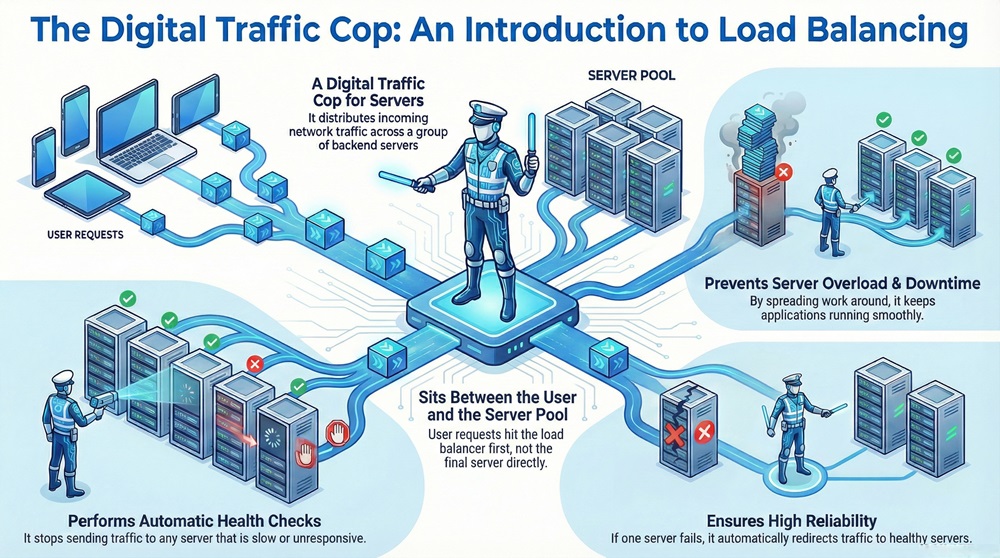
    A load balancer in networking is a device or software that sits between the user and the server pool. When you type a website address into your browser, your request does not go straight to the final server. Instead, it hits the load balancer first.
     

    load balancer infographic


    The load balancer manages the flow of data to optimize resource use. It improves the response time of the application. If one server fails, the load balancer redirects traffic to the remaining healthy servers. This creates a highly reliable system. Without a load balancer, a single server crash could take your entire website offline.


    Is a load balancer just a simple switch? No, it is much more. It performs "health checks" on every server in the pool. If a server is slow or unresponsive, the load balancer stops sending traffic to it. Once the server is fixed, it automatically joins the rotation again.


    Learn More Today


    What is Load Balancer and How it Works?

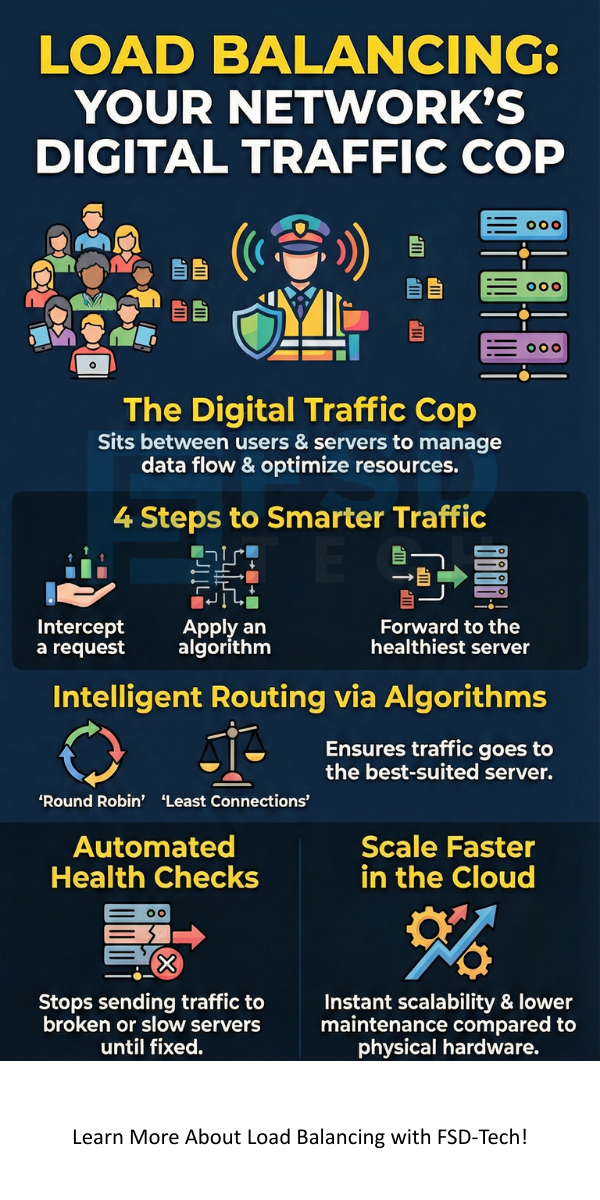
    To understand what is load balancer and how it works, we can break the process into four simple steps:


    1. Request Arrival: A user sends a request to a website or application.
    2. Intercepting Traffic: The load balancer receives the request. It acts as the single point of contact for the application.
    3. Applying Algorithms: The load balancer uses a specific load balancer algorithm to choose which server is best suited for the task.
    4. Forwarding the Request: The load balancer sends the request to the chosen load balancer server.


    The server processes the request and sends the data back to the load balancer. Finally, the load balancer passes that data back to the user. This cycle happens in milliseconds. It happens so fast that you never notice the middleman.


    Also Read: What is Cloud Access Security Broker (CASB)?


    Comparison of Load Balancer Types


    Basis for ComparisonHardware Load BalancerSoftware Load BalancerCloud Load Balancer
    DefinitionPhysical load balancer device installed in a rack.Application installed on standard servers.Managed service provided by cloud vendors.
    CostHigh initial investment for hardware.Lower cost; relies on existing hardware.Pay-as-you-go pricing model.
    ScalabilityLimited by physical hardware capacity.Highly scalable through software updates.Instantly scales with traffic spikes.
    MaintenanceRequires physical space and cooling.Requires manual configuration and patches.Managed entirely by the provider.
    DeploymentOn-premise data centers.Local servers or virtual machines.Load balancer in cloud computing.


    Different Load Balancer Types

    Load balancer types are usually categorized by where they sit in the Open Systems Interconnection (OSI) model. Understanding these levels helps you choose the right tool for your specific needs.


    Layer 4 Load Balancers

    A Layer 4 load balancer works at the transport level. It uses data from network protocols like TCP or UDP. It does not look at the actual content of the message. It only looks at the IP address and the port number. Because it does not "read" the data, it is extremely fast and efficient.


    Layer 7 Load Balancers

    A Layer 7 load balancer works at the application level. This type of load balancer is much smarter. It can look at HTTP headers, cookies, and even the content of the message. For example, it can send requests for images to one server and requests for videos to another. This allows for very precise traffic management.


    Global Server Load Balancing (GSLB)

    GSLB extends the concept across multiple geographic locations. If you have data centers in New York and London, GSLB sends the user to the closest one. This reduces "latency," which is the delay you feel when a website takes a long time to load.


    Choosing a Load Balancer Algorithm

    A load balancer algorithm is the set of rules that determines where traffic goes. There are several common load balancer methods used in the industry today.


    1. Round Robin: This is the simplest method. The load balancer goes down the list of servers in order. It sends the first request to Server A, the second to Server B, and so on.
    2. Least Connections: The load balancer checks which server has the fewest active users. It sends the new request to the least busy server. This is great for long tasks, like downloading large files.
    3. IP Hash: The load balancer uses the user's IP address to determine the server. This ensures that a specific user always connects to the same server during their session.
    4. Weighted Round Robin: You can give more "weight" to more powerful servers. A server with more RAM might receive two requests for every one request sent to a smaller server.


    Also Read: What is Network Sniffing? Attack and Prevention


    Load Balancer in Cloud Computing

    The load balancer in cloud computing has changed how businesses manage traffic. In the past, you had to buy a physical load balancer device. This was expensive and hard to set up. Today, services like Oracle Cloud or AWS provide these as virtual tools.


    A load balancer in cloud computing is highly flexible. If your website suddenly gets a million hits, the cloud provider automatically adds more capacity. This is often called "Elastic Load Balancing." It ensures that your application stays available even during massive traffic surges.


    Why is this so useful? It removes the need for manual hardware management. You do not have to worry about cables, power, or physical space. You simply configure the rules in a dashboard, and the load balancer handles the rest.


    Why is Load Balancing Important?

    You might wonder why is load balancing important if you only have a small amount of traffic. The truth is that load balancing is about more than just speed. It is about reliability and security.

    Load balancer systems provide a layer of defense. They can help stop Distributed Denial of Service (DDoS) attacks. By spreading traffic, they prevent a flood of fake requests from crashing a single server.


    Furthermore, load balancer setups allow for "Zero Downtime" updates. You can take one server offline for maintenance while the others keep running. The users will never know a server was missing. This makes the load balancer server pool a vital part of professional IT infrastructure.


    Is Load Balancer a Reverse Proxy?

    A common question is: is load balancer a reverse proxy? The answer is yes, but with a specific focus. A reverse proxy is any server that sits in front of web servers and forwards client requests to them.


    While all load balancers are reverse proxies, not all reverse proxies are load balancers. A simple reverse proxy might just handle encryption or caching for one server. A load balancer specifically focuses on distributing that traffic across multiple servers. Think of the load balancer as a sophisticated version of a reverse proxy designed for scale.


    Also Read: What is Public Key Infrastructure (PKI)? Technology and Components


    Load Balancer in Microservices

    Modern apps often use many small pieces of code instead of one big program. This is called a microservices architecture. A load balancer in microservices is essential for communication.

    In this setup, each service might have its own pool of instances. A load balancer ensures that when Service A needs to talk to Service B, it finds an available instance.


    How load balancer works in microservices involves a process called "Service Discovery." The load balancer keeps a live list of every small service currently running. This allows the system to be very dynamic. Services can start and stop at any time without breaking the connection.


    The Load Balancer Device vs Software

    Deciding between a physical load balancer device and a software solution depends on your budget and needs.


    A physical load balancer device is often a high-performance appliance. It has specialized chips designed to handle massive amounts of data. These are common in large corporate data centers where security and raw power are the top priorities.


    On the other hand, software-based load balancer solutions run on standard hardware. They are much cheaper and easier to update. Many companies prefer software because it can be integrated into "DevOps" pipelines. This means the code that builds your website can also build your load balancer automatically.


    Common Load Balancer Methods for Optimization

    To get the most out of your load balancer network, you must use the right optimization methods.


    • SSL Offloading: The load balancer handles the heavy task of encrypting and decrypting data. This frees up the load balancer server to focus purely on processing requests.
    • Compression: The load balancer can shrink files before sending them to the user. This makes the website load faster on mobile devices.
    • TCP Buffering: The load balancer can hold onto pieces of data to ensure they are sent in the most efficient way possible.


    These load balancer methods transform a simple traffic distributor into a powerful performance engine.


    Load Balancer Server Health Checks

    How does the system know if a server is broken? The load balancer performs constant "Health Checks."


    The load balancer sends a small "ping" or request to each server every few seconds. If the server says "I am okay," traffic continues. If the server does not respond, the load balancer marks it as "down."


    This happens automatically. It prevents users from seeing "404 Error" or "Server Not Found" pages. By the time a human technician realizes a server is down, the load balancer has already protected the users by moving them to a different server.


    Future of Load Balancer Technology

    The load balancer is evolving. We are moving toward "Application Delivery Controllers" (ADCs). These are next-generation load balancers that include firewalls, data compression, and advanced security.


    We are also seeing more "Predictive Load Balancing." This uses artificial intelligence to look at past traffic patterns. If the system knows you get more traffic every Friday at 5 PM, it can start preparing the load balancer server pool in advance.


    Conclusion

    Managing network traffic is a complex task, but a load balancer makes it simple. By acting as a central hub, it ensures that every user gets a fast and reliable experience. Whether you use a physical load balancer device or a load balancer in cloud computing, the benefits are clear. You gain better speed, stronger security, and the ability to grow your business without fear of a crash.


    Our team focuses on building robust systems that stand the test of time. We believe that your technology should work for you, not the other way around. By focusing on smart networking and client-centric solutions, we help you stay ahead in a digital world. Let us help you build a network that never sleeps.


    Contact our Networking Team Today
     

    load balancer


    Key Takeaways

    • A load balancer is a vital tool for distributing traffic and ensuring application uptime.
    • The load balancer network uses various algorithms like Round Robin and Least Connections to manage data flow.
    • Load balancer types include Layer 4 (fast and simple) and Layer 7 (smart and content-aware).
    • A load balancer in cloud computing offers instant scalability and lower maintenance than physical hardware.
    • Implementing a load balancer server pool protects your business from server failures and traffic spikes.
    • Load balancer methods such as SSL offloading and health checks significantly improve performance and reliability.


    Frequently Asked Questions

    What is the primary purpose of a load balancer?

    The primary purpose is to distribute incoming network traffic across multiple servers. This prevents any single server from becoming a bottleneck and ensures high availability for the application.


    Can a load balancer handle global traffic?

    Yes, using Global Server Load Balancing (GSLB), a load balancer can route users to the data center that is physically closest to them, which significantly reduces latency.


    Is load balancing only for web traffic?

    No, a load balancer can manage many types of traffic, including database queries, email protocols (like SMTP), and DNS requests.


    What happens if the load balancer itself fails?

    To prevent this, engineers usually deploy load balancers in "High Availability" pairs. If the primary load balancer device fails, the secondary one takes over instantly.


    How does a load balancer improve security?

    It masks the IP addresses of the backend servers, making it harder for hackers to target them directly. It also provides a central point to apply security patches and filter out malicious traffic.

    What is Load Balancer and How it Works?

    About The Author

    Surbhi Suhane

    Surbhi Suhane is an experienced digital marketing and content specialist with deep expertise in Getting Things Done (GTD) methodology and process automation. Adept at optimizing workflows and leveraging automation tools to enhance productivity and deliver impactful results in content creation and SEO optimization.

    Like This Story?

    Share it with friends!

    Subscribe to our newsletter!

    Atera

    (52)

    Cato Networks

    (121)

    ClickUp

    (70)

    FishOS

    (7)

    Miradore

    (21)

    PointGuard AI

    (9)

    Vembu

    (22)

    Xcitium

    (33)

    ZETA HRMS

    (79)

    Workflow Automation(8)

    Workforce Automation(1)

    AI Project Management(1)

    HR Data Automation(1)

    RMM(1)

    IT Workflow Automation(1)

    GCC compliance(4)

    IT security(2)

    Payroll Integration(2)

    IT support automation(3)

    procurement automation(1)

    lost device management(1)

    IT Management(5)

    IoT Security(2)

    Cato XOps(2)

    IT compliance(4)

    Task Automation(1)

    Workflow Management(1)

    Kubernetes lifecycle management(2)

    AI-powered cloud ops(1)

    OpenStack automation(1)

    SMB Security(8)

    Data Security(1)

    MDR (Managed Detection & Response)(4)

    MSP Automation(3)

    Atera Integrations(2)

    XDR Security(2)

    SMB Cyber Protection(1)

    Ransomware Defense(3)

    HR Tech Solutions(1)

    Zero Trust Network Access(3)

    Zero Trust Security(2)

    Endpoint Management(1)

    SaaS Security(1)

    Payroll Automation(5)

    IT Monitoring(2)

    Xcitium EDR SOC(15)

    Ransomware Protection GCC(1)

    Network Consolidation UAE(1)

    M&A IT Integration(1)

    MSSP for SMBs(1)

    SMB Cybersecurity GCC(1)

    Antivirus vs EDR(1)

    Ransomware Protection(3)

    FSD-Tech MSSP(25)

    Managed EDR FSD-Tech(1)

    Cybersecurity GCC(12)

    Endpoint Security(1)

    Endpoint Protection(1)

    Data Breach Costs(1)

    SMB Cybersecurity(8)

    Zero Dwell Containment(31)

    Xcitium EDR(30)

    Managed Security Services(2)

    Cloud Backup(1)

    Hybrid Backup(1)

    Backup & Recovery(1)

    pointguard ai(4)

    backup myths(1)

    disaster recovery myths(1)

    SMB data protection(9)

    vembu(9)

    Vembu BDR Suite(19)

    Disaster Recovery(4)

    GCCBusiness(1)

    DataProtection(1)

    Secure Access Service Edge(4)

    GCC HR software(20)

    Miradore EMM(15)

    Cato SASE(7)

    Cloud Security(8)

    Talent Development(1)

    AI Security(2)

    AI Cybersecurity(12)

    AI Governance(4)

    AI Risk Management(1)

    AI Compliance(2)

    GCC business security(1)

    GCC network integration(1)

    compliance automation(5)

    education security(1)

    GCC cybersecurity(2)

    BYOD security Dubai(8)

    App management UAE(1)

    Miradore EMM Premium+(5)

    MiddleEast(1)

    HealthcareSecurity(1)

    Team Collaboration(1)

    IT automation(12)

    Zscaler(1)

    SD-WAN(6)

    HR Integration(4)

    Cloud Networking(4)

    device management(9)

    RemoteWork(1)

    VPN(1)

    ZeroTrust(2)

    MPLS(1)

    Project Management(9)

    HR automation(16)

    share your thoughts

    Metropolitan Area Network (MAN)

    Metropolitan Area Network (MAN) - Meaning & Examples

    🕓 February 6, 2026

    Load Balancer in Networking

    What is Load Balancer and How it Works?

    🕓 February 6, 2026

    Principle of Least Privilege (PoLP)

    What is the Principle of Least Privilege (PoLP)? Guide & Benefits

    🕓 February 5, 2026

    Decoded(99)

    Cyber Security(118)

    BCP / DR(22)

    Zeta HRMS(78)

    SASE(21)

    Automation(70)

    Next Gen IT-Infra(118)

    Monitoring & Management(73)

    ITSM(22)

    HRMS(21)

    Automation(24)