HomeNext Gen IT-InfraMonitoring & ManagementCyber SecurityBCP / DRAutomationDecoded
Next Gen IT-Infra
Cato’s SASE Supports Cybersecurity Skills Development

How Cato’s SASE Supports Cybersecurity Skills Development

🕓 April 8, 2025

How SASE Supports the Security Needs of SMBs

How SASE Supports the Security Needs of SMBs

🕓 February 9, 2025

Attack Surface Reduction with Cato’s SASE

Attack Surface Reduction with Cato’s SASE

🕓 February 10, 2025

SASE for Digital Transformation in UAE

SASE for Digital Transformation in UAE

🕓 February 8, 2025

Monitoring & Management
Understanding Atera’s SLA Management

Understanding Atera’s SLA Management

🕓 February 7, 2025

Cost-Performance Ratio: Finding the Right Balance in IT Management Networks

Cost-Performance Ratio: Finding the Right Balance in IT Management Networks

🕓 June 16, 2025

Customizing Atera with APIs

Customizing Atera with APIs

🕓 March 3, 2025

Power Up Your IT Team’s Strategy with Atera’s Communication Tools

Power Up Your IT Team’s Strategy with Atera’s Communication Tools

🕓 February 8, 2025

Cyber Security
Illustration of the Cato Cloud architecture showing its role in delivering SASE for secure, optimized global connectivity.

Understanding the Cato Cloud and Its Role in SASE

🕓 January 29, 2025

Isometric illustration of professionals managing network performance, bandwidth analytics, and cloud-based optimization around the Cato Networks platform, symbolizing bandwidth control and QoS visibility.

Mastering Bandwidth Control and QoS in Cato Networks

🕓 July 26, 2025

Global network backbone powering Cato SASE solution for secure, high-performance connectivity across regions.

Global Backbone: The Engine Powering Cato’s SASE Solution

🕓 January 30, 2025

Illustration of team analyzing application traffic and usage insights on a large laptop screen using Cato’s dashboard, surrounded by network and cloud icons.

Cato Networks Application Visibility | Monitoring & Control

🕓 July 27, 2025

BCP / DR
Illustration showing diverse business and IT professionals collaborating with cloud, backup, and security icons, representing Vembu use cases for SMBs, MSPs, and IT teams.

Who Uses Vembu? Real-World Use Cases for SMBs, MSPs & IT Teams

🕓 July 12, 2025

Graphic showcasing Vembu’s all-in-one backup and disaster recovery platform with icons for cloud, data protection, and business continuity for IT teams and SMBs.

What Is Vembu? A Deep Dive Into the All in One Backup & Disaster Recovery Platform

🕓 July 6, 2025

Illustration showing Vembu backup and disaster recovery system with cloud storage, server racks, analytics dashboard, and IT professionals managing data.

The Rising Cost of Data Loss: Why Backup Is No Longer Optional?

🕓 August 14, 2025

3D isometric illustration of cloud backup and data recovery infrastructure with laptop, data center stack, and digital business icons — FSD Tech

RPO & RTO: The Heart of Business Continuity

🕓 August 15, 2025

Automation
Cross-Functional Collaboration with ClickUp

Fostering Cross-Functional Collaboration with ClickUp for Multi-Departmental Projects

🕓 February 11, 2025

ClickUp Project Reporting

Revolutionizing Enterprise Reporting with ClickUp’s Advanced Analytics and Dashboards

🕓 June 16, 2025

ClickUp’s Design Collaboration and Asset Management Tools

Empowering Creative Teams with ClickUp’s Design Collaboration and Asset Management Tools

🕓 February 26, 2025

ClickUp Communication and Collaboration Tools

ClickUp Communication and Collaboration Tools: Empowering Remote Teams

🕓 March 12, 2025

Decoded
Multi-Factor Authentication (MFA)

Multi-Factor Authentication (MFA): All You Need to Know

🕓 December 7, 2025

L3 Switch

What Is an L3 Switch? L2 vs L3 & Why You Need Layer 3?

🕓 December 8, 2025

IPSec

IPSec Explained: Protocols, Modes, IKE & VPN Security

🕓 December 3, 2025

 Datagram Transport Layer Security (DTLS)

What is Datagram Transport Layer Security (DTLS)? How it works?

🕓 December 4, 2025

    Subscribe to our newsletter!

    About Us

    Follow Us

    Copyright © 2024 | Powered by 

    Atera

    (55)

    Cato Networks

    (121)

    ClickUp

    (76)

    FishOS

    (7)

    Miradore

    (21)

    PointGuard AI

    (9)

    Vembu

    (22)

    Xcitium

    (33)

    ZETA HRMS

    (79)

    Table of Contents

    What is File Integrity Monitoring (FIM)? Security Guide

    Surbhi Suhane
    February 16, 2026
    Comments
    File Integrity Monitoring (FIM)

    Have you ever wondered if someone changed a sensitive file on your server without you knowing? It is a scary thought for any business owner or IT manager. Most people think a firewall is enough, but what happens when the threat is already inside? To be honest, most data breaches involve unauthorized changes that go unnoticed for months. In my experience, catching these small tweaks early is the difference between a minor fix and a total system collapse.


    File integrity monitoring acts as your digital security camera. It watches your files 2026/7, 24 hours a day, and alerts you the moment something smells fishy. But how does it actually work? Why do compliance auditors obsess over it? Let us dive into the details of this essential security tool.


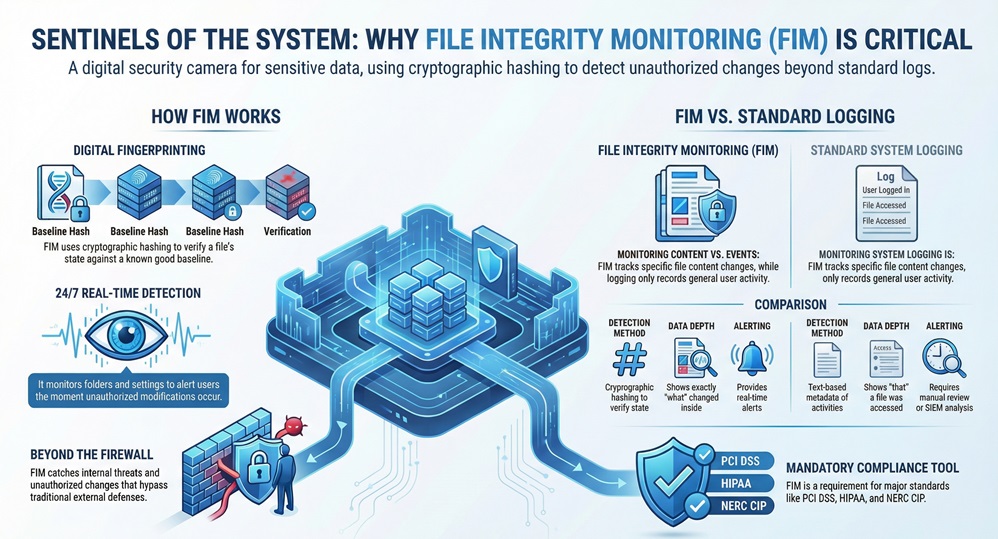
    Comparison Chart: FIM vs. Standard Logging

    Basis for ComparisonFile Integrity Monitoring (FIM)Standard System Logging
    Primary FocusMonitors specific file changes and content integrity.Records general system events and user logins.
    Detection MethodUses cryptographic hashing to verify file state.Records text-based metadata of activities.
    AlertingProvides real-time alerts for unauthorized modifications.Usually requires manual review or SIEM analysis.
    Data DepthShows exactly what changed inside the file.Shows that a file was accessed, but rarely "what" changed.
    ComplianceMandatory for PCI DSS, HIPAA, and NERC CIP.Generally helpful but often insufficient alone.


    Definition of File Integrity Monitoring (FIM)

    File integrity monitoring, often called FIM, is an internal security process that validates the integrity of operating system and application software files through a verification method between the current state and a known good baseline. It monitors for changes in folders, files, and settings that could indicate a cyberattack or human error.


    File Integrity Monitoring (FIM)


    To understand this, we need to look at it as a "digital fingerprinting" system. Every file has a unique identity. When a hacker or a rogue employee modifies a configuration file, that identity changes. File integrity monitoring ensures that you are the first to know when that fingerprint no longer matches the original record.


    Secure your data now with Cimtrak


    How File Integrity Monitoring Works?

    The working of file integrity monitoring can be understood through a simple four-step cycle. It does not just "look" at files; it uses math to prove they are safe.


    1. Establishing the Baseline

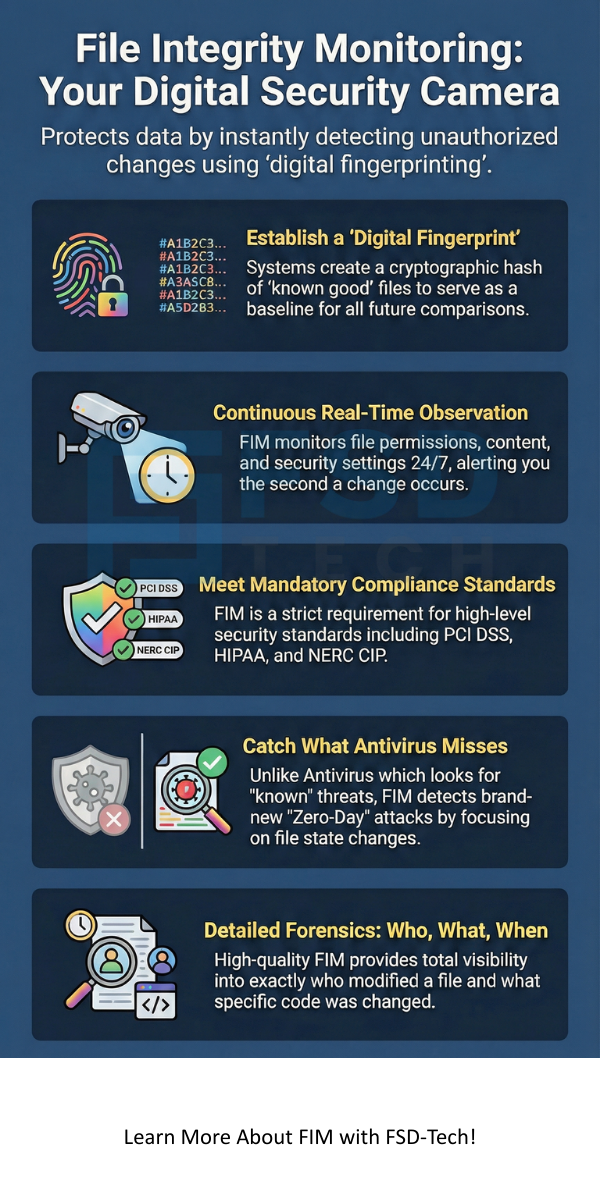
    First, the file integrity monitoring software scans your system to find "known good" versions of your files. It creates a cryptographic hash (like SHA-256) for each one. This hash is a long string of characters that represents the file's exact contents. If even one pixel in an image or one character in a text file changes, the hash changes completely.


    2. Constant Observation

    Once the baseline exists, the file integrity monitoring tool starts its watch. It periodically or in real-time re-calculates the hashes of your protected files. It looks at:


    • File permissions and attributes
    • Security settings
    • Content within the file
    • Credentials and local policies


    3. Comparison and Detection

    Now the question arises: what happens during a scan? The system compares the new hash to the baseline hash. If they are identical, everything is fine. However, if they differ, the file integrity monitoring system flags it as a change.


    4. Alerting and Reporting

    If the change is unauthorized, the system sends an alert to your security team. High-quality file integrity monitoring tools like Cimcor's CimTrak can even show you exactly who made the change and what the new code looks like compared to the old code.


    Also Read: What is a Wireless LAN Controller? Configuration & Setup 101


    Why Your Business Needs File Integrity Monitoring?

    File integrity monitoring is not just a "nice-to-have" feature. It is a fundamental layer of defense. Here is the thing: hackers love to hide in plain sight. They might change a system file to create a "backdoor" so they can return later. Without file integrity monitoring, you might never see that backdoor.


    Meeting Strict Compliance Standards

    If you handle credit card data, you must follow PCI DSS. Requirement 11.5 of PCI DSS specifically demands file integrity monitoring. The same goes for healthcare (HIPAA) and federal agencies (FISMA). These organizations know that logs can be faked, but hashes do not lie.


    Detecting Zero-Day Attacks

    Antivirus software looks for "known" viruses. But what if the virus is brand new? File integrity monitoring does not care what the virus looks like. It only cares that your system files changed. By focusing on the "state" of your files, file integrity monitoring catches threats that other tools miss.


    Stopping Internal Human Error

    Let us be honest; sometimes the "threat" is just a tired IT admin. A simple mistake in a configuration file can take down an entire network. File integrity monitoring helps you identify these accidental changes instantly, allowing you to roll back to a safe state before the customers even notice.


    Key Features of a Great FIM Solution

    When you are looking for file integrity monitoring software, you shouldn't just pick the cheapest option. You need a tool that simplifies your life, not one that floods your inbox with useless alerts.


    • Real-Time Detection: Some tools only scan once a day. That is not enough. You need file integrity monitoring that catches changes the second they happen.
    • Change Noise Reduction: You don't want an alert every time a log file updates. Good file integrity monitoring allows you to "exclude" certain files or patterns.
    • Detailed Forensics: It is not enough to know a file changed. You need to know "Who, What, Where, and When."
    • Remediation and Recovery: The best file integrity monitoring tools can actually "undo" an unauthorized change automatically. Imagine your server healing itself!


    Also Read: What is VPN Gateway? 7 Key Ways It Secures Your Network


    Steps to Implement File Integrity Monitoring

    Implementing file integrity monitoring requires a bit of strategy. You can't monitor every single file on a hard drive; it would slow your computer to a crawl. Follow these steps for a smooth rollout:


    1. Identify Critical Assets: Start with your most important files. This includes OS kernels, web server configs, and database schemas.
    2. Define Your Baseline: Ensure your system is clean before you start. If you baseline a system that is already infected, the file integrity monitoring will think the virus is "normal."
    3. Set Alert Policies: Decide who gets an email when a change happens. Do you want a text message at 2 AM for a minor change? Probably not.
    4. Audit and Review: Regularly check your file integrity monitoring reports. This helps you spot patterns, like an admin who keeps "forgetting" to follow change control protocols.


    Common FIM Use Cases

    File integrity monitoring is incredibly versatile. While we usually talk about it in terms of "hackers," it serves many purposes in a modern business.


    Monitoring Cloud Environments

    As companies move to the cloud, they lose some control over their hardware. File integrity monitoring gives that control back. It monitors your cloud instances to ensure the provider or an external attacker hasn't tweaked your virtual machines.


    Protecting Point-of-Sale (POS) Systems

    Retailers are huge targets. Hackers try to install "scrapers" on POS systems to steal credit card numbers. File integrity monitoring watches the POS software files. If a scraper tries to install itself, the file integrity monitoring system kills the process or alerts the manager immediately.


    Enhancing DevOps Security

    In a fast-paced coding environment, "configuration drift" is a nightmare. This happens when different servers slowly become different from each other due to manual tweaks. File integrity monitoring ensures every server in your cluster stays exactly the same as your master blueprint.


    Conclusion

    File integrity monitoring is the backbone of a proactive security strategy. It moves you away from "guessing" if you are safe and gives you mathematical proof that your systems remain untampered. At our company, we believe that security should be transparent and undeniable. We focus on giving you total visibility into your infrastructure because you can't protect what you can't see.


    By prioritizing the integrity of your data, you aren't just checking a box for a compliance auditor—you are building a wall of trust around your business and your customers. To be honest, in a world where data is the most valuable currency, file integrity monitoring is the vault that keeps it safe.


    Prevent data breaches today, Contact Our FIM Experts


    File Integrity Monitoring (FIM) infographic


    Key Takeaways

    • File integrity monitoring is a security process that detects unauthorized changes to files.
    • It uses cryptographic hashing to create a baseline of "good" files.
    • FIM is a mandatory requirement for many compliance standards like PCI DSS and HIPAA.
    • Effective file integrity monitoring provides the "who, what, and when" of every change.
    • It protects against both external hackers and internal human errors.


    FAQs on File Integrity Monitoring

    1. Is File Integrity Monitoring the same as Antivirus?

    No, they are different. Antivirus looks for malicious code (the "bad guys"). File integrity monitoring looks for changes to your files (the "crime scene"). You need both for a complete security stack.


    2. Does FIM slow down my server performance?

    If configured poorly, it can. However, modern file integrity monitoring tools are very lightweight. By focusing only on critical system files and using efficient hashing, the impact on your CPU is usually less than 1%.


    3. Can FIM monitor database changes?

    Yes! Advanced file integrity monitoring solutions can monitor database schemas, stored procedures, and triggers. This is vital because many attacks target the data stored inside the database rather than the files on the disk.


    4. What is "Change Noise" in FIM?

    Change noise refers to the hundreds of "normal" changes that happen on a computer every day (like log updates). A good file integrity monitoring tool filters these out so you only see the important, unauthorized changes.


    What is File Integrity Monitoring (FIM)? Security Guide

    About The Author

    Surbhi Suhane

    Surbhi Suhane is an experienced digital marketing and content specialist with deep expertise in Getting Things Done (GTD) methodology and process automation. Adept at optimizing workflows and leveraging automation tools to enhance productivity and deliver impactful results in content creation and SEO optimization.

    Like This Story?

    Share it with friends!

    Subscribe to our newsletter!

    Isometric illustration of a centralized performance platform connected to analytics dashboards and team members, representing goal alignment, measurable outcomes, risk visibility, and strategic project tracking within ClickUp.

    How ClickUp Enables Outcome-Based Project Management (Not Just Task Tracking)

    🕓 February 15, 2026
    Isometric illustration of a centralized executive dashboard platform connected to analytics panels, performance charts, security indicators, and strategic milestones, representing real-time business visibility and decision control within ClickUp.

    Executive Visibility in ClickUp – How CXOs Gain Real-Time Control Without Micromanaging

    🕓 February 13, 2026

    Cato SASE Architecture

    Inside Cato’s SASE Architecture: A Blueprint for Modern Security

    🕓 January 26, 2025

    Workflow Automation(8)

    Workforce Automation(1)

    AI Project Management(1)

    HR Data Automation(1)

    RMM(1)

    IT Workflow Automation(1)

    GCC compliance(4)

    IT security(2)

    Payroll Integration(2)

    IT support automation(3)

    procurement automation(1)

    lost device management(1)

    IT Management(5)

    IoT Security(2)

    Cato XOps(2)

    IT compliance(4)

    Task Automation(1)

    Workflow Management(1)

    AI-powered cloud ops(1)

    Kubernetes lifecycle management(2)

    OpenStack automation(1)

    SMB Security(8)

    Data Security(1)

    MDR (Managed Detection & Response)(4)

    Atera Integrations(2)

    MSP Automation(3)

    XDR Security(2)

    Ransomware Defense(3)

    SMB Cyber Protection(1)

    HR Tech Solutions(1)

    Zero Trust Network Access(3)

    Zero Trust Security(2)

    Endpoint Management(1)

    SaaS Security(1)

    Payroll Automation(5)

    IT Monitoring(2)

    Xcitium EDR SOC(15)

    Ransomware Protection GCC(1)

    M&A IT Integration(1)

    Network Consolidation UAE(1)

    MSSP for SMBs(1)

    Ransomware Protection(3)

    SMB Cybersecurity GCC(1)

    Antivirus vs EDR(1)

    Managed EDR FSD-Tech(1)

    FSD-Tech MSSP(25)

    Cybersecurity GCC(12)

    Endpoint Security(1)

    Endpoint Protection(1)

    Data Breach Costs(1)

    Zero Dwell Containment(31)

    SMB Cybersecurity(8)

    Xcitium EDR(30)

    Managed Security Services(2)

    Cloud Backup(1)

    Hybrid Backup(1)

    Backup & Recovery(1)

    pointguard ai(4)

    backup myths(1)

    vembu(9)

    disaster recovery myths(1)

    SMB data protection(9)

    Vembu BDR Suite(19)

    Disaster Recovery(4)

    GCCBusiness(1)

    DataProtection(1)

    Secure Access Service Edge(4)

    GCC HR software(20)

    Miradore EMM(15)

    Cato SASE(7)

    Hybrid Learning(1)

    Cloud Security(9)

    GCC Education(1)

    Talent Development(1)

    AI Risk Management(1)

    AI Compliance(2)

    AI Governance(4)

    AI Cybersecurity(12)

    AI Security(2)

    Secure Remote Access(1)

    GCC business security(1)

    GCC network integration(1)

    compliance automation(5)

    GCC cybersecurity(3)

    education security(1)

    BYOD security Dubai(8)

    Miradore EMM Premium+(5)

    App management UAE(1)

    MiddleEast(1)

    HealthcareSecurity(1)

    Team Collaboration(1)

    IT automation(12)

    Zscaler(1)

    SD-WAN(7)

    HR Integration(4)

    Cloud Networking(4)

    device management(9)

    VPN(1)

    ZeroTrust(2)

    RemoteWork(1)

    share your thoughts

    pci compliance

    Is Your Business PCI Compliant? A 12-Step Roadmap

    🕓 February 16, 2026

    File Integrity Monitoring (FIM)

    What is File Integrity Monitoring (FIM)? Security Guide

    🕓 February 16, 2026

    Unicast

    What is Unicast? Definition, Working & WAN Role

    🕓 February 14, 2026

    Decoded(113)

    Cyber Security(118)

    BCP / DR(22)

    Zeta HRMS(78)

    SASE(21)

    Automation(76)

    Next Gen IT-Infra(118)

    Monitoring & Management(76)

    ITSM(22)

    HRMS(21)

    Automation(24)