HomeNext Gen IT-InfraMonitoring & ManagementCyber SecurityBCP / DRAutomationDecoded
Next Gen IT-Infra
Cato’s SASE Supports Cybersecurity Skills Development

How Cato’s SASE Supports Cybersecurity Skills Development

🕓 April 8, 2025

How SASE Supports the Security Needs of SMBs

How SASE Supports the Security Needs of SMBs

🕓 February 9, 2025

Attack Surface Reduction with Cato’s SASE

Attack Surface Reduction with Cato’s SASE

🕓 February 10, 2025

SASE for Digital Transformation in UAE

SASE for Digital Transformation in UAE

🕓 February 8, 2025

Monitoring & Management
Understanding Atera’s SLA Management

Understanding Atera’s SLA Management

🕓 February 7, 2025

Cost-Performance Ratio: Finding the Right Balance in IT Management Networks

Cost-Performance Ratio: Finding the Right Balance in IT Management Networks

🕓 June 16, 2025

Customizing Atera with APIs

Customizing Atera with APIs

🕓 March 3, 2025

Power Up Your IT Team’s Strategy with Atera’s Communication Tools

Power Up Your IT Team’s Strategy with Atera’s Communication Tools

🕓 February 8, 2025

Cyber Security
Visual guide showing Cato CMA interface for configuring Internet and WAN firewall rules, enabling threat protection, and monitoring security events in real time for UAE IT teams.

Enforcing Firewall and Threat Protection Policies in Cato

🕓 July 25, 2025

Isometric illustration of professionals managing network performance, bandwidth analytics, and cloud-based optimization around the Cato Networks platform, symbolizing bandwidth control and QoS visibility.

Mastering Bandwidth Control and QoS in Cato Networks

🕓 July 26, 2025

Illustration of the Cato Cloud architecture showing its role in delivering SASE for secure, optimized global connectivity.

Understanding the Cato Cloud and Its Role in SASE

🕓 January 29, 2025

Global network backbone powering Cato SASE solution for secure, high-performance connectivity across regions.

Global Backbone: The Engine Powering Cato’s SASE Solution

🕓 January 30, 2025

BCP / DR
Illustration showing diverse business and IT professionals collaborating with cloud, backup, and security icons, representing Vembu use cases for SMBs, MSPs, and IT teams.

Who Uses Vembu? Real-World Use Cases for SMBs, MSPs & IT Teams

🕓 July 12, 2025

Graphic showcasing Vembu’s all-in-one backup and disaster recovery platform with icons for cloud, data protection, and business continuity for IT teams and SMBs.

What Is Vembu? A Deep Dive Into the All in One Backup & Disaster Recovery Platform

🕓 July 6, 2025

Illustration showing Vembu backup and disaster recovery system with cloud storage, server racks, analytics dashboard, and IT professionals managing data.

The Rising Cost of Data Loss: Why Backup Is No Longer Optional?

🕓 August 14, 2025

3D isometric illustration of cloud backup and data recovery infrastructure with laptop, data center stack, and digital business icons — FSD Tech

RPO & RTO: The Heart of Business Continuity

🕓 August 15, 2025

Automation
Cross-Functional Collaboration with ClickUp

Fostering Cross-Functional Collaboration with ClickUp for Multi-Departmental Projects

🕓 February 11, 2025

ClickUp Project Reporting

Revolutionizing Enterprise Reporting with ClickUp’s Advanced Analytics and Dashboards

🕓 June 16, 2025

ClickUp’s Design Collaboration and Asset Management Tools

Empowering Creative Teams with ClickUp’s Design Collaboration and Asset Management Tools

🕓 February 26, 2025

ClickUp Communication and Collaboration Tools

ClickUp Communication and Collaboration Tools: Empowering Remote Teams

🕓 March 12, 2025

Decoded
Multi-Factor Authentication (MFA)

Multi-Factor Authentication (MFA): All You Need to Know

🕓 December 7, 2025

L3 Switch

What Is an L3 Switch? L2 vs L3 & Why You Need Layer 3?

🕓 December 8, 2025

IPSec

IPSec Explained: Protocols, Modes, IKE & VPN Security

🕓 December 3, 2025

 Datagram Transport Layer Security (DTLS)

What is Datagram Transport Layer Security (DTLS)? How it works?

🕓 December 4, 2025

    Subscribe to our newsletter!

    About Us

    Follow Us

    Copyright © 2024 | Powered by 

    Cato SASE Architecture

    Inside Cato’s SASE Architecture: A Blueprint for Modern Security

    🕓 January 26, 2025

    Enterprise Data Security and Privacy with ClickUp

    Ensuring Enterprise Data Security and Privacy with ClickUp

    🕓 February 9, 2025

    DDoS protection SASE

    DDoS Protection and Cato’s Defence Mechanisms

    🕓 February 11, 2025

    Table of Contents

    What is a Digital Certificate? Guide to Online Trust

    Surbhi Suhane
    December 29, 2025
    Comments
    Digital Certificate

    You use the internet every day for banking, shopping, and sharing information. You expect these actions to be safe. But how does your computer or smartphone know that the website you visit or the person you are communicating with is genuine?


    This is where a digital certificate plays a vital role. This little file acts as your digital passport, proving your identity or the identity of a website, device, or individual online. It is a fundamental component of network security and online trust. Digital certificates ensure that your private information remains private and secure from cyber criminals.


    In this comprehensive guide, we will explore what a digital certificate is, why it is essential, what it contains, and the various ways you use it every day without even realizing it.


    What is a Digital Certificate?

    A digital certificate can be understood as an electronic file that uses Public Key Infrastructure (PKI) to verify the identity of an entity. Think of it like a photo ID card or a driver’s license in the real world. This certificate is issued by a trusted third-party organization called a Certificate Authority (CA).


    The primary function of a digital certificate is to bind a public key to an owner's identity. This binding ensures that the public key you receive truly belongs to the entity claiming that identity. Digital certificates are critical for enabling secure communication and transactions over the internet.
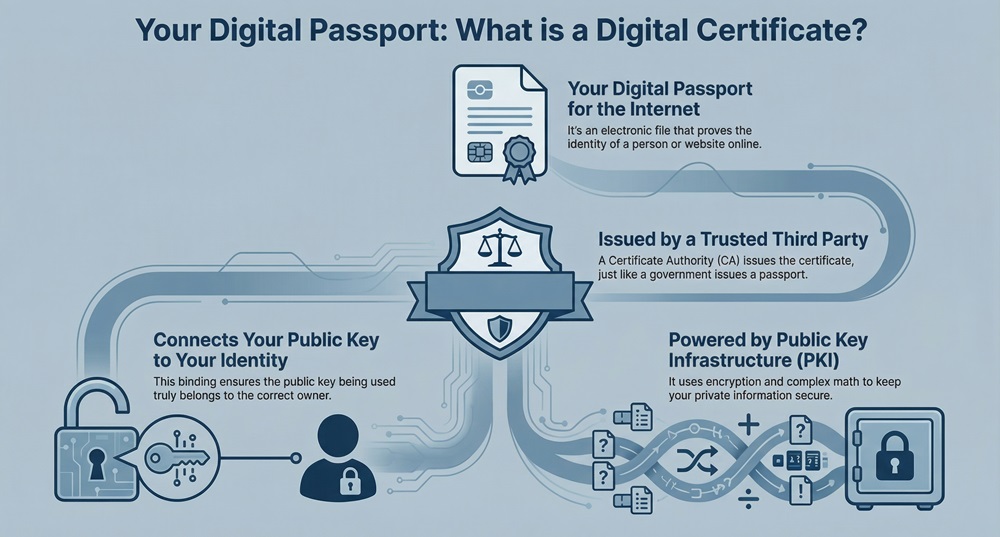
     

    Digital certificate infographic


    Now, the question arises: what makes this certificate secure? It all comes down to the cryptographic science of PKI. Digital certificates use encryption and mathematical algorithms to protect the data they contain.


    Secure online trust


    Public Key Infrastructure (PKI)

    PKI is nothing but a set of roles, policies, and procedures needed to create, manage, distribute, use, store, and revoke digital certificates. It is the entire security system that makes certificates work.


    To understand this better, you must first know about public-key cryptography. This system uses a pair of mathematical keys:


    1. Public Key: Everyone can see and use this key to encrypt data. If you want to send a secret message to a website, you use its public key to lock the message.
    2. Private Key: Only the owner possesses this key. The owner uses their private key to decrypt the message that was locked with their public key.


    The digital certificate ensures that the public key is authentic. It prevents someone else from pretending to be your bank by giving you a fake public key.


    Also Read: Man-in-the-Middle (MITM) Attack - Prevention Guide


    What Does a Digital Certificate Contain?

    A digital certificate is a structured file, typically following the X.509 standard. It contains specific, essential pieces of information that ensure authenticity and functionality.


    ElementDescriptionPurpose
    Subject's Public KeyThe cryptographic key used to encrypt data sent to the certificate holder.Enables secure communication and data encryption.
    Subject's IdentityThe name of the person, device, or organization the certificate belongs to.Proves who the certificate is for.
    Issuer's IdentityThe name of the Certificate Authority (CA) that issued the certificate.Proves the certificate's authenticity and trustworthiness.
    Validity PeriodThe "Issued On" and "Expires On" dates.Defines the time frame during which the certificate is considered valid.
    Serial NumberA unique number assigned by the CA.Distinguishes this specific certificate from all others.
    Signature AlgorithmThe algorithm used to sign the certificate.Indicates the method used to secure the certificate data.
    CA Digital SignatureA signature created with the CA's private key.Ensures the certificate has not been tampered with and verifies the issuer.


    This detailed content within the certificate allows a computer to run a quick digital certificate checker process. Your browser checks the validity period and the CA's digital signature to ensure everything is correct before creating a secure connection.


    Who Issues Digital Certificate and Why Do We Trust Them?

    The entity that issues a digital certificate is called a Certificate Authority (CA).


    A Certificate Authority refers to the trusted organization that validates the identities of entities and issues the certificates. A few well-known CAs include DigiCert, Sectigo, and GlobalSign. These companies are audited and regulated worldwide.


    You can compare a CA to a government agency that issues your passport. You trust the passport because you trust the issuing government agency. Similarly, your browser and operating system trust a CA because their root certificates are pre-installed in your software.


    The process of getting a digital certificate involves the CA verifying the applicant's identity.


    • For a Website (SSL/TLS Certificate): The CA confirms that the applicant controls the domain name.
    • For an Individual (Digital Signature Certificate): The CA verifies the person's identity documents, much like a background check.


    Once the CA validates the identity, it creates the certificate, signs it with its own private key, and sends it to the applicant.


    Also Read: Cyber Threat Intelligence (CTI) in Cybersecurity


    What are Digital Certificates Used for?

    Digital certificates have various applications, which makes them essential for modern security. They play a vital role in four main areas: securing websites, protecting email, authenticating users, and facilitating legal documents.


    1. Securing Websites (SSL/TLS)

    The most common use is securing the connection between your browser and a website. When you see a padlock icon in your browser's address bar and the URL starts with https://, you are using a secure connection.


    This security relies entirely on an SSL/TLS digital certificate. Digital certificates ensure the following:


    • Encryption: They allow the transfer of data (passwords, credit card numbers, etc.) in an encrypted format, so only the intended recipient can read it.
    • Authentication: They confirm that the website is genuinely owned by the entity it claims to be, protecting you from fake (phishing) sites.


    2. Digital Signatures and Legal Documents

    A crucial application is the creation of a digital signature. A digital signature provides the same legal standing as a physical signature on paper. It ensures the following two key things:


    • Integrity: It proves that the document has not been altered after it was signed.
    • Non-Repudiation: The signer cannot later deny that they signed the document.


    You need a Digital Signature Certificate (DSC) to create this signature. Where digital signature is used often includes:


    • Filing income tax returns (ITR) online.
    • Signing e-tenders and other government-related documents.
    • Signing corporate documents for business registrations.


    3. Secure Email Communication (S/MIME)

    Just like websites, you can use digital certificates to secure your email. Using the S/MIME protocol, you can:


    • Encrypt your email: This ensures that only the intended recipient can read your message, safeguarding sensitive information. This protects your data from eavesdroppers.
    • Digitally sign your email: This verifies your identity as the sender, which fights against email phishing and spam. A digital certificate email solution makes your professional communication trustworthy.


    4. Device and User Authentication

    In large organizations and corporate networks, digital certificates are used to authenticate users and devices. Digital certificates act as credentials, eliminating the need for simple passwords.


    • Machine Authentication: Only authorized servers, printers, or Wi-Fi access points can join the network.
    • User Authentication: Employees can access internal applications only after their identity is verified by their certificate.


    Also Read: Spear Phishing: Learn About #1 CEO fraud


    Where are Digital Certificates Stored?

    Understanding where digital certificates are stored is important for managing your security.


    A digital certificate has two parts that must be stored securely: the public certificate (the file itself) and the private key.


    1. For Websites (SSL/TLS): The certificate file and the private key are stored on the web server that hosts the website. The server software (like Apache or Nginx) uses them to establish the secure connection when a visitor arrives.
    2. For Individual Users (DSC): Digital Signature Certificates are typically stored in a cryptographic USB token (a small, secure flash drive). This portable device ensures that the private key never leaves the secure token. This is where to get digital signature certificate and keep it safe.
    3. For Software and Operating Systems: Root and intermediate CA certificates are stored in a designated Trust Store on your computer or device. Your browser or operating system references this store to verify the authenticity of any website's certificate.


    Comparison: Digital Certificate vs. Digital Signature

    People often use these terms interchangeably, but they represent different things. Let us now discuss the specific difference between a digital certificate and a digital signature.


    Basis for ComparisonDigital CertificateDigital Signature
    NatureAn electronic file used for identity verification.A mathematical scheme used to prove the authenticity and integrity of a message or document.
    Primary GoalTo verify the identity of the holder and secure a communication channel.To guarantee the origin, integrity, and non-repudiation of a data item (a document or email).
    Component UsedContains the Public Key and identity information, signed by a CA.Created using a person’s Private Key and a hash of the data.
    FunctionEnables secure encryption and authentication.Proves that a specific person signed a specific document at a specific time.
    ExampleThe SSL/TLS file that makes an "https" website secure.The authenticated mark placed on an e-tender document.


    In simple terms, you need a digital certificate to create a digital signature. The certificate is the identity; the signature is the act of proving authenticity.


    Also Read: Multi-Factor Authentication (MFA): All You Need to Know


    Digital Certificate in Cyber Security

    It is a fundamental defense mechanism against some of the most common online threats. It plays a significant role in creating a trustworthy internet environment.


    Digital certificates help prevent three major cyber threats:


    1. Man-in-the-Middle (MITM) Attacks: If a cyber attacker tries to intercept your communication with a website, your browser checks the site's certificate. If the certificate is fake or tampered with, the browser shows a warning, breaking the attack.
    2. Phishing: Attackers try to trick you with fake websites that look real. But a legitimate banking website will always have a valid, high-assurance digital certificate. Checking for the correct certificate details is a strong countermeasure.
    3. Data Tampering: The CA's digital signature on the certificate ensures that the contents—especially the public key—have not been changed since it was issued. This integrity check is vital for establishing trust.


    Therefore, you can see that certificates are not just an extra feature; they are the bedrock for encrypted and trusted digital transactions worldwide.


    Conclusion

    A digital certificate is not just technical jargon; it is the invisible guardian of your online world. It is the core of trust that enables you to safely conduct transactions, send sensitive emails, and know that the website you are visiting is authentic. Digital certificates ensure that secure, authenticated communication is possible for everyone.


    We believe in providing the tools and knowledge you need to navigate the digital world securely. By understanding what is a digital certificate and its powerful role, you can take control of your online safety.


    If your business handles sensitive customer data or requires authenticated signatures on documents, you must implement the appropriate digital certificate solution. 
     

    Let us know today how we can help you secure your digital environment and build unparalleled trust with your customers.


    Digital certificate

    Key Takeaways

    Here are five key takeaways summarizing the importance and function of digital certificates:


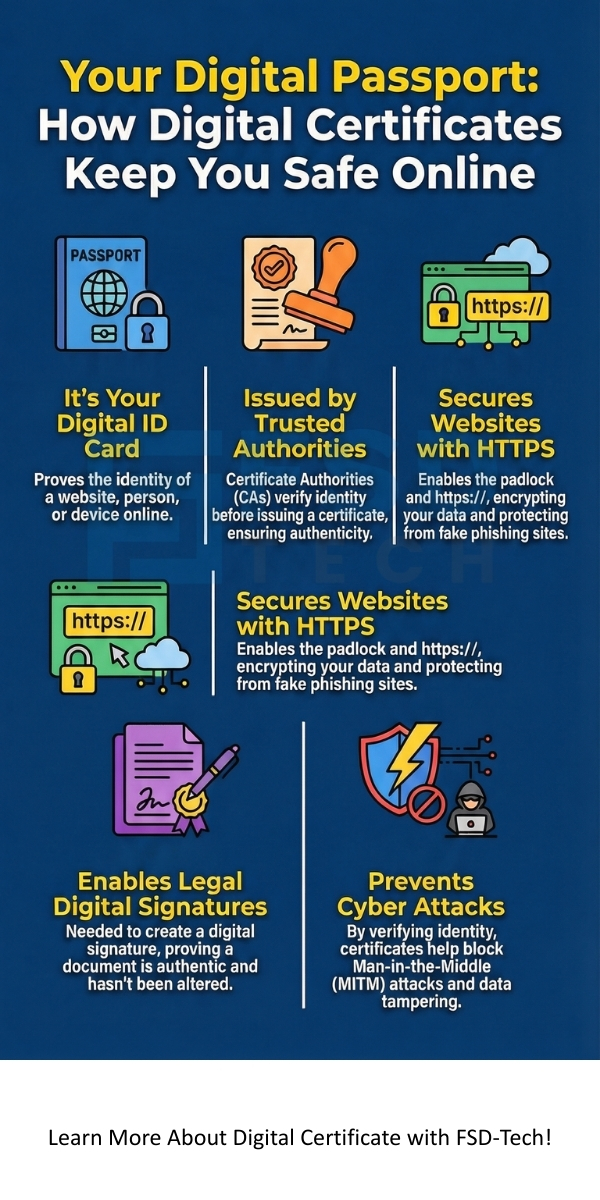
    1. Identity Verification and Trust: A digital certificate acts as an electronic passport, proving the identity of a website, device, or individual using Public Key Infrastructure (PKI). It binds a public key to a verified identity, which is essential for establishing trust and security online.
    2. Issued by Trusted Authorities: Only a trusted third-party organization, known as a Certificate Authority (CA), can issue a digital certificate. You trust these certificates because the CA verifies the applicant's identity before signing the certificate, ensuring authenticity and preventing tampering.
    3. Foundation for Secure Communication: The most widespread use of digital certificates is in securing web connections via SSL/TLS, enabling the https:// protocol. Digital certificates ensure data encryption and authenticate the server, protecting users from threats like phishing and Man-in-the-Middle (MITM) attacks.
    4. Enables Digital Signatures: You need a Digital Signature Certificate (DSC) to create a legally valid digital signature. This signature proves the integrity of an electronic document (that it hasn't been changed) and ensures non-repudiation, which makes it vital for e-filing and e-tendering.
    5. Secure Storage is Crucial: The certificate and its associated private key must be stored securely. For individual use, Digital Signature Certificates are kept on secure cryptographic USB tokens, guaranteeing that only the owner can access the private key to create a signature.


    Frequently Asked Questions (FAQs) About Digital Certificates

    1. How is a Digital Certificate Related to My Digilocker Documents?

    Your Digilocker documents are digital copies of your official papers (like your driver's license or academic mark sheets). Are Digilocker documents valid? Yes, they are legally valid and recognized as original documents under the IT Act, 2000.


    The validity is largely guaranteed because they are issued by the original source (like the transport department or a university) and are secured within the Digilocker ecosystem. 


    While Digilocker uses various security measures, including digital certificates for platform security, the term digital certificate is mainly used for the Digital Signature Certificate used for signing documents or the SSL/TLS certificate securing the website connection.


    2. How Do I Check if a Digital Certificate is Valid?

    When you visit a secure website, your browser performs an instant check using a four-step process:


    1. Trust Check: Is the certificate signed by a trusted CA (one that is in the browser's Trust Store)?
    2. Revocation Status: Has the certificate been revoked (canceled) by the CA?
    3. Validity Period: Is the current date within the "Valid From" and "Valid To" dates?
    4. Domain Match: Does the name on the certificate exactly match the website address you typed in?


    You can manually inspect the certificate by clicking on the padlock icon in your browser's address bar.


    3. Where to Get Digital Signature Certificate?

    To get digital signature certificate involves approaching a Registering Authority (RA) or a partner of a licensed Certificate Authority (CA) in your country.


    In India, for example, CAs like e-Mudhra or Sify are licensed to issue these certificates. You must submit an application form, proof of identity, and proof of address. The CA or its RA will verify your documents before issuing the DSC, usually on a secure USB token.


    4. How Long Do Digital Certificates Last?

    The standard maximum lifespan for an SSL/TLS digital certificate (the kind used for websites) is currently 398 days (about 13 months). CAs must revoke older, longer-lived certificates.


    Shorter validity periods ensure that keys are frequently rotated, which helps maintain higher security standards. For a Digital Signature Certificate for individuals, they are often issued for a one-year or two-year validity period.

    What is a Digital Certificate? Guide to Online Trust

    About The Author

    Surbhi Suhane

    Surbhi Suhane is an experienced digital marketing and content specialist with deep expertise in Getting Things Done (GTD) methodology and process automation. Adept at optimizing workflows and leveraging automation tools to enhance productivity and deliver impactful results in content creation and SEO optimization.

    Like This Story?

    Share it with friends!

    Subscribe to our newsletter!

    Atera

    (48)

    Cato Networks

    (111)

    ClickUp

    (64)

    FishOS

    (7)

    Miradore

    (21)

    PointGuard AI

    (9)

    Vembu

    (22)

    Xcitium

    (33)

    ZETA HRMS

    (66)

    Workflow Automation(5)

    Workforce Automation(1)

    AI Project Management(1)

    HR Data Automation(1)

    RMM(1)

    IT Workflow Automation(1)

    GCC compliance(4)

    IT security(2)

    Payroll Integration(2)

    IT support automation(2)

    procurement automation(1)

    lost device management(1)

    IT Management(5)

    IoT Security(2)

    Cato XOps(2)

    IT compliance(4)

    Task Automation(1)

    Workflow Management(1)

    AI-powered cloud ops(1)

    OpenStack automation(1)

    Kubernetes lifecycle management(2)

    SMB Security(8)

    Data Security(1)

    MDR (Managed Detection & Response)(4)

    Atera Integrations(2)

    MSP Automation(2)

    XDR Security(2)

    SMB Cyber Protection(1)

    Ransomware Defense(3)

    HR Tech Solutions(1)

    Zero Trust Network Access(3)

    Zero Trust Security(2)

    Endpoint Management(1)

    SaaS Security(1)

    Payroll Automation(5)

    IT Monitoring(2)

    Xcitium EDR SOC(15)

    Ransomware Protection GCC(1)

    M&A IT Integration(1)

    Network Consolidation UAE(1)

    MSSP for SMBs(1)

    Antivirus vs EDR(1)

    Ransomware Protection(3)

    Managed EDR FSD-Tech(1)

    FSD-Tech MSSP(25)

    SMB Cybersecurity GCC(1)

    Cybersecurity GCC(12)

    Endpoint Security(1)

    Data Breach Costs(1)

    Endpoint Protection(1)

    Managed Security Services(2)

    SMB Cybersecurity(8)

    Zero Dwell Containment(31)

    Xcitium EDR(30)

    Hybrid Backup(1)

    Cloud Backup(1)

    Backup & Recovery(1)

    pointguard ai(4)

    disaster recovery myths(1)

    backup myths(1)

    vembu(9)

    SMB data protection(9)

    Vembu BDR Suite(19)

    Disaster Recovery(4)

    DataProtection(1)

    GCCBusiness(1)

    Secure Access Service Edge(4)

    GCC HR software(14)

    Miradore EMM(15)

    Cato SASE(7)

    Cloud Security(8)

    Talent Development(1)

    AI Cybersecurity(12)

    AI Risk Management(1)

    AI Governance(4)

    AI Security(2)

    AI Compliance(2)

    GCC business security(1)

    GCC network integration(1)

    compliance automation(4)

    GCC cybersecurity(2)

    education security(1)

    App management UAE(1)

    BYOD security Dubai(8)

    Miradore EMM Premium+(5)

    HealthcareSecurity(1)

    MiddleEast(1)

    Team Collaboration(1)

    IT automation(10)

    Zscaler(1)

    SD-WAN(6)

    HR Integration(4)

    Cloud Networking(3)

    device management(9)

    RemoteWork(1)

    ZeroTrust(2)

    VPN(1)

    MPLS(1)

    Project Management(9)

    HR automation(16)

    share your thoughts

    Email Security Gateway

    What is an Email Security Gateway? Protecting Your Inbox

    🕓 December 29, 2025

    Digital Certificate

    What is a Digital Certificate? Guide to Online Trust

    🕓 December 29, 2025

    Sandboxing

    What is Sandboxing in CyberSecurity? How It Works?

    🕓 December 27, 2025

    Decoded(41)

    Cyber Security(112)

    BCP / DR(22)

    Zeta HRMS(65)

    SASE(21)

    Automation(64)

    Next Gen IT-Infra(111)

    Monitoring & Management(69)

    ITSM(22)

    HRMS(21)

    Automation(24)