HomeNext Gen IT-InfraMonitoring & ManagementCyber SecurityBCP / DRAutomationDecoded
Next Gen IT-Infra
Cato’s SASE Supports Cybersecurity Skills Development

How Cato’s SASE Supports Cybersecurity Skills Development

🕓 April 8, 2025

How SASE Supports the Security Needs of SMBs

How SASE Supports the Security Needs of SMBs

🕓 February 9, 2025

Attack Surface Reduction with Cato’s SASE

Attack Surface Reduction with Cato’s SASE

🕓 February 10, 2025

SASE for Digital Transformation in UAE

SASE for Digital Transformation in UAE

🕓 February 8, 2025

Monitoring & Management
Understanding Atera’s SLA Management

Understanding Atera’s SLA Management

🕓 February 7, 2025

Cost-Performance Ratio: Finding the Right Balance in IT Management Networks

Cost-Performance Ratio: Finding the Right Balance in IT Management Networks

🕓 June 16, 2025

Customizing Atera with APIs

Customizing Atera with APIs

🕓 March 3, 2025

Power Up Your IT Team’s Strategy with Atera’s Communication Tools

Power Up Your IT Team’s Strategy with Atera’s Communication Tools

🕓 February 8, 2025

Cyber Security
Visual guide showing Cato CMA interface for configuring Internet and WAN firewall rules, enabling threat protection, and monitoring security events in real time for UAE IT teams.

Enforcing Firewall and Threat Protection Policies in Cato

🕓 July 25, 2025

Isometric illustration of professionals managing network performance, bandwidth analytics, and cloud-based optimization around the Cato Networks platform, symbolizing bandwidth control and QoS visibility.

Mastering Bandwidth Control and QoS in Cato Networks

🕓 July 26, 2025

Illustration of the Cato Cloud architecture showing its role in delivering SASE for secure, optimized global connectivity.

Understanding the Cato Cloud and Its Role in SASE

🕓 January 29, 2025

Global network backbone powering Cato SASE solution for secure, high-performance connectivity across regions.

Global Backbone: The Engine Powering Cato’s SASE Solution

🕓 January 30, 2025

BCP / DR
Illustration showing diverse business and IT professionals collaborating with cloud, backup, and security icons, representing Vembu use cases for SMBs, MSPs, and IT teams.

Who Uses Vembu? Real-World Use Cases for SMBs, MSPs & IT Teams

🕓 July 12, 2025

Graphic showcasing Vembu’s all-in-one backup and disaster recovery platform with icons for cloud, data protection, and business continuity for IT teams and SMBs.

What Is Vembu? A Deep Dive Into the All in One Backup & Disaster Recovery Platform

🕓 July 6, 2025

Illustration showing Vembu backup and disaster recovery system with cloud storage, server racks, analytics dashboard, and IT professionals managing data.

The Rising Cost of Data Loss: Why Backup Is No Longer Optional?

🕓 August 14, 2025

3D isometric illustration of cloud backup and data recovery infrastructure with laptop, data center stack, and digital business icons — FSD Tech

RPO & RTO: The Heart of Business Continuity

🕓 August 15, 2025

Automation
Cross-Functional Collaboration with ClickUp

Fostering Cross-Functional Collaboration with ClickUp for Multi-Departmental Projects

🕓 February 11, 2025

ClickUp Project Reporting

Revolutionizing Enterprise Reporting with ClickUp’s Advanced Analytics and Dashboards

🕓 June 16, 2025

ClickUp’s Design Collaboration and Asset Management Tools

Empowering Creative Teams with ClickUp’s Design Collaboration and Asset Management Tools

🕓 February 26, 2025

ClickUp Communication and Collaboration Tools

ClickUp Communication and Collaboration Tools: Empowering Remote Teams

🕓 March 12, 2025

Decoded
Multi-Factor Authentication (MFA)

Multi-Factor Authentication (MFA): All You Need to Know

🕓 December 7, 2025

L3 Switch

What Is an L3 Switch? L2 vs L3 & Why You Need Layer 3?

🕓 December 8, 2025

IPSec

IPSec Explained: Protocols, Modes, IKE & VPN Security

🕓 December 3, 2025

 Datagram Transport Layer Security (DTLS)

What is Datagram Transport Layer Security (DTLS)? How it works?

🕓 December 4, 2025

    Subscribe to our newsletter!

    About Us

    Follow Us

    Copyright © 2024 | Powered by 

    Cato SASE Architecture

    Inside Cato’s SASE Architecture: A Blueprint for Modern Security

    🕓 January 26, 2025

    Enterprise Data Security and Privacy with ClickUp

    Ensuring Enterprise Data Security and Privacy with ClickUp

    🕓 February 9, 2025

    DDoS protection SASE

    DDoS Protection and Cato’s Defence Mechanisms

    🕓 February 11, 2025

    Table of Contents

    Client Success Tracking in ClickUp: Keep Every Engagement Transparent

    NHAIF NOUSHAD
    September 30, 2025
    Comments
    Illustration of ClickUp client success dashboard with KPIs, satisfaction trends, renewals, and client health metrics for transparent engagement tracking.

    Why Client Success Needs More Than Just a CRM

    In today’s service-driven economy, delivering value after the sale is just as crucial as making the sale itself. While traditional CRMs focus on lead capture and conversion, client success tracking is about sustaining satisfaction, engagement, and retention. This shift in focus requires tools that are more flexible, collaborative, and transparent.

    That’s where ClickUp makes a significant difference.


    ClickUp is more than a project management tool—it’s a centralized platform where customer-facing teams can track deliverables, monitor satisfaction, manage escalations, and ensure every client receives the attention they deserve.

    This blog explores how to implement a scalable, visibility-rich client success process inside ClickUp, keeping both your internal teams and external clients aligned every step of the way.


    What Does Client Success Tracking Involve?

    Unlike sales-focused pipelines, client success tracking focuses on:

    • Onboarding and training timelines
    • Usage or engagement milestones
    • Ongoing support requests
    • Renewal and upsell cycles
    • Feedback loops and satisfaction surveys
    • Internal alignment between customer-facing teams

    The challenge? These elements often span across different departments, tools, and workflows—leading to gaps in visibility and delays in delivery.

    ClickUp brings these elements under one roof with dynamic views, templates, automation, and collaborative tools tailored to client success needs.


    Create a Dedicated Client Success Space in ClickUp

    Start by creating a separate Space in ClickUp just for client success. This allows your team to organize everything related to customer engagement, including:

    • Client Folders (by company or segment)
    • Onboarding Lists
    • Account Health Reports
    • Support Escalations
    • Renewal Pipelines

    Having a clean separation from sales or project delivery ensures the client success team can focus solely on post-sale relationship management.

    Use Custom Fields to Track Client Health and Status

    ClickUp’s Custom Fields enable you to track account-specific data such as:

    • Current subscription tier
    • Health status (Green, Yellow, Red)
    • Last touchpoint date
    • Assigned Customer Success Manager
    • NPS score
    • Renewal date
    • Feedback rating

    This metadata helps your team instantly assess the status of any client and allows you to segment workflows accordingly.

    Build Onboarding and Engagement Templates

    Onboarding is the foundation of long-term client success. Use ClickUp’s Templates to streamline this phase:

    • Create templated onboarding checklists by client type or product
    • Assign tasks to relevant departments (tech setup, training, kickoff call)
    • Attach documentation, user guides, or videos directly in tasks
    • Set due dates based on client start dates

    Once onboarding completes, you can trigger new workflows for engagement, QBRs, or feature adoption.

    Automate Follow-Ups and Milestones

    Client success is all about timing—and ClickUp Automations ensure no critical step gets missed.

    • Auto-assign CSMs when a new onboarding task is created
    • Send reminders for 30-60-90 day check-ins
    • Change account health status based on missed milestones
    • Trigger renewal tasks 60 days before contract end
    • Notify leadership when a high-value client turns red

    By automating these workflows, your team can stay proactive instead of reactive.

    Use Dashboards for 360° Account Visibility

    ClickUp Dashboards give CSMs, managers, and executives a real-time view into account health across the portfolio.

    Include widgets for:

    • Accounts by status (Healthy, At Risk, Escalated)
    • Onboarding progress
    • CSM workloads
    • Client satisfaction trends
    • Feedback cycles in progress
    • Upcoming renewals

    Dashboards provide at-a-glance insights without digging through individual tasks or Lists—perfect for weekly standups or performance reviews.

    Client-Facing Status Views and Reporting

    Transparency builds trust. With ClickUp’s Public Sharing and Custom Views, you can create:

    • Client-specific dashboards (filtered by tag or folder)
    • Shareable project timelines
    • Real-time task status updates
    • Embedded forms for feedback or surveys

    This reduces the need for status calls or back-and-forth emails while reinforcing accountability.

    Track Feedback Loops with ClickUp Forms

    Customer feedback is critical to continuous success. ClickUp Forms allow you to:

    • Capture post-onboarding surveys
    • Track feature requests
    • Receive escalation alerts from clients
    • Submit quarterly feedback forms
    • Collect testimonials or product usage insights

    Form responses automatically create tasks, ensuring no voice goes unheard and no follow-up is forgotten.

    Manage Client Check-Ins with Recurring Tasks

    Maintain a consistent relationship cadence with Recurring Tasks in ClickUp. For example:

    • Monthly usage review
    • Quarterly business review
    • Annual ROI analysis
    • Biweekly product support sync

    Include agendas and client details inside each recurring task, so your team is always prepared and consistent.

    Collaborate Across Teams with Assigned Comments

    ClickUp’s Assigned Comments keep internal collaboration fluid and accountable:

    • “@Support – please provide update on ticket #3491 for ACME Corp”
    • “@Sales – any insight on expansion opportunity for next quarter?”
    • “@CSM – please confirm if renewal notice has been sent”

    This eliminates miscommunication and ensures every comment is actionable.

    Client Success and Product Teams: Closing the Loop

    ClickUp’s interconnected ecosystem allows client success teams to loop in product, support, and engineering when needed:

    • Link feature requests to product backlogs
    • Add client feedback to sprint planning
    • Track open bugs or enhancements
    • Notify clients once issues are resolved

    This tight feedback loop improves product development and boosts customer satisfaction.

    Track Key Metrics and KPIs Inside ClickUp

    Use ClickUp Goals and Custom Fields to monitor:

    • Onboarding completion rate
    • NPS score by segment
    • Churn vs. renewal rates
    • Feedback response times
    • Time-to-first-value
    • Feature adoption trends

    CS leaders can use this data to identify risks, measure performance, and report outcomes to executive teams.

    Use Goals to Drive Client Success Outcomes

    ClickUp’s Goals module is perfect for long-term client objectives:

    • Set a goal like “Increase Engagement for Tier-1 Clients by 15%”
    • Link tasks such as onboarding, feature training, feedback calls
    • Track progress and completion percentages
    • Celebrate wins with your team

    Goals shift the focus from output to outcomes—ensuring every action drives client results.


    Best Practices for Client Success in ClickUp

    1. Document everything – Keep all client files and communications attached to tasks
    2. Avoid email silos – Use task comments to keep conversations organized
    3. Standardize with templates – Build consistency and speed with repeatable workflows
    4. Set SLAs with due dates – Improve response and resolution times
    5. Monitor trends in dashboards – Act early based on health indicators
    6. Close the loop with feedback – Use forms and follow-up tasks to address concerns


    Ready to see client success tracking in action? Schedule a free consultation with our experts today and discover how ClickUp can help your team boost retention, increase transparency, and deliver consistent client outcomes at scale.
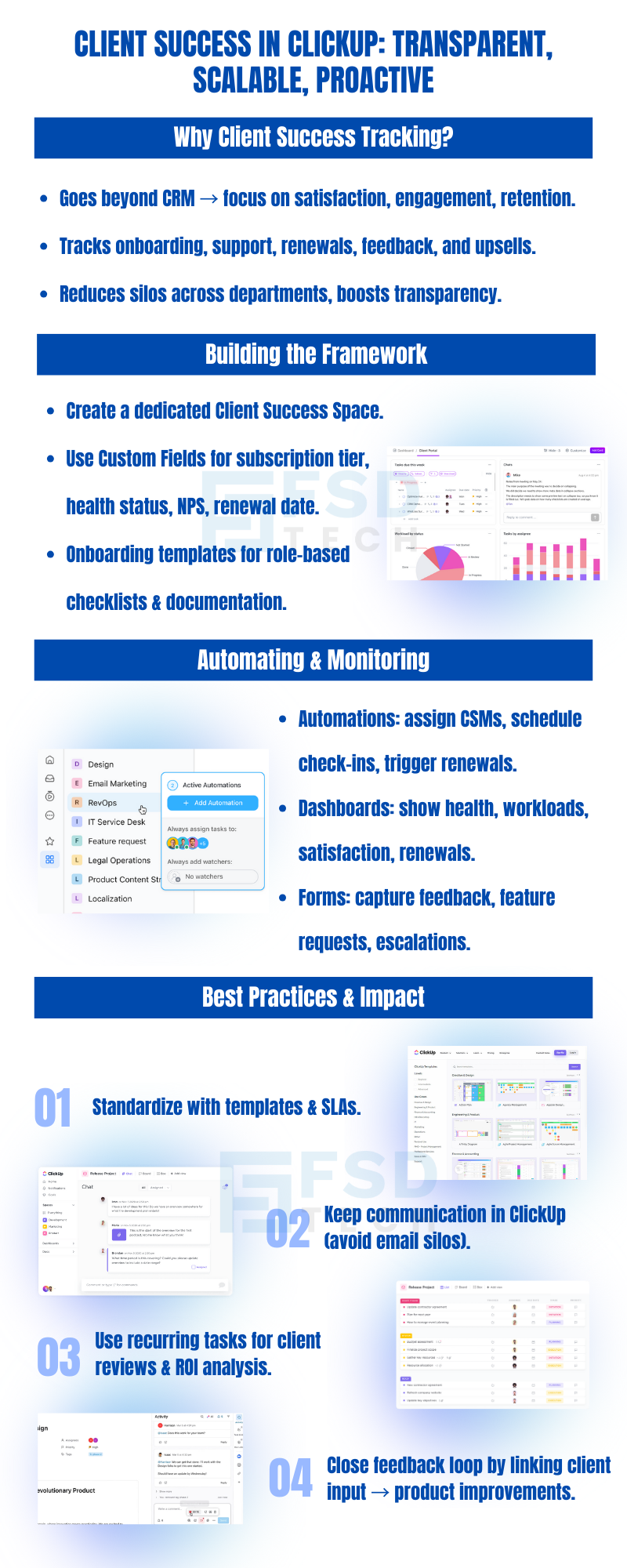
    ClickUp client success tracking infographic showing onboarding, renewals, feedback automation, dashboards, and best practices for boosting satisfaction, engagement, and retention


    FAQ

    How is ClickUp different from a traditional CRM for client success?

    Unlike CRMs that focus on leads, ClickUp helps manage the entire client lifecycle post-sale with task tracking, collaboration, documentation, and reporting.


    Can I track account health and renewal dates in ClickUp?

    Yes, using Custom Fields you can monitor account health, assign CSMs, and set reminders for renewals or reviews.


    How do I create an onboarding checklist for new clients?

    Use task templates in ClickUp with pre-defined subtasks, documents, and deadlines to ensure consistent onboarding across all accounts.


    Can clients see their task progress in ClickUp?

    Absolutely. You can share filtered views, dashboards, or public task links to keep clients updated in real time.


    Is ClickUp useful for teams handling multiple client accounts?

    Yes. With features like folders, tags, custom fields, and dashboards, ClickUp makes it easy to manage hundreds of clients in a single workspace.

    Client Success Tracking in ClickUp: Keep Every Engagement Transparent

    About The Author

    NHAIF NOUSHAD

    Nhaif is an AI Automation Engineer & Business Analyst focused on ClickUp, AI, Automation, and Workflow Optimization. He helps businesses shift from scattered processes to streamlined, data-driven operations. With hands-on expertise, he simplifies complex tools into clear, easy-to-apply solutions.

    Like This Story?

    Share it with friends!

    Subscribe to our newsletter!

    Atera

    (48)

    Cato Networks

    (111)

    ClickUp

    (65)

    FishOS

    (7)

    Miradore

    (21)

    PointGuard AI

    (9)

    Vembu

    (22)

    Xcitium

    (33)

    ZETA HRMS

    (67)

    Workflow Automation(5)

    Workforce Automation(1)

    AI Project Management(1)

    HR Data Automation(1)

    RMM(1)

    IT Workflow Automation(1)

    IT security(2)

    GCC compliance(4)

    Payroll Integration(2)

    IT support automation(3)

    procurement automation(1)

    lost device management(1)

    IT Management(5)

    IoT Security(2)

    Cato XOps(2)

    IT compliance(4)

    Task Automation(1)

    Workflow Management(1)

    OpenStack automation(1)

    Kubernetes lifecycle management(2)

    AI-powered cloud ops(1)

    SMB Security(8)

    Data Security(1)

    MDR (Managed Detection & Response)(4)

    Atera Integrations(2)

    MSP Automation(3)

    XDR Security(2)

    SMB Cyber Protection(1)

    Ransomware Defense(3)

    HR Tech Solutions(1)

    Zero Trust Network Access(3)

    Zero Trust Security(2)

    Endpoint Management(1)

    SaaS Security(1)

    Payroll Automation(5)

    IT Monitoring(2)

    Xcitium EDR SOC(15)

    Ransomware Protection GCC(1)

    M&A IT Integration(1)

    Network Consolidation UAE(1)

    MSSP for SMBs(1)

    FSD-Tech MSSP(25)

    SMB Cybersecurity GCC(1)

    Managed EDR FSD-Tech(1)

    Ransomware Protection(3)

    Antivirus vs EDR(1)

    Cybersecurity GCC(12)

    Endpoint Security(1)

    Endpoint Protection(1)

    Data Breach Costs(1)

    Managed Security Services(2)

    SMB Cybersecurity(8)

    Zero Dwell Containment(31)

    Xcitium EDR(30)

    Cloud Backup(1)

    Hybrid Backup(1)

    Backup & Recovery(1)

    pointguard ai(4)

    disaster recovery myths(1)

    backup myths(1)

    vembu(9)

    SMB data protection(9)

    Vembu BDR Suite(19)

    Disaster Recovery(4)

    DataProtection(1)

    GCCBusiness(1)

    Secure Access Service Edge(4)

    GCC HR software(15)

    Miradore EMM(15)

    Cato SASE(7)

    Cloud Security(8)

    Talent Development(1)

    AI Cybersecurity(12)

    AI Risk Management(1)

    AI Governance(4)

    AI Security(2)

    AI Compliance(2)

    GCC business security(1)

    GCC network integration(1)

    compliance automation(4)

    GCC cybersecurity(2)

    education security(1)

    App management UAE(1)

    BYOD security Dubai(8)

    Miradore EMM Premium+(5)

    HealthcareSecurity(1)

    MiddleEast(1)

    Team Collaboration(1)

    IT automation(10)

    Zscaler(1)

    SD-WAN(6)

    HR Integration(4)

    Cloud Networking(3)

    device management(9)

    RemoteWork(1)

    ZeroTrust(2)

    VPN(1)

    MPLS(1)

    Project Management(9)

    HR automation(16)

    share your thoughts

    Illustration of ClickUp construction project management platform connecting multiple Dubai construction sites with real-time dashboards, scheduling, contractor workflows, document control, and enterprise collaboration.

    ClickUp for Construction Project Management in Dubai

    🕓 December 29, 2025

    Illustration showing the transition from manual spreadsheets and paper-based HR processes to the Zeta HRMS digital platform. Depicts HR teams moving data into a centralized, automated HR system with modules for payroll, attendance, compliance, and employee management, highlighting improved efficiency and collaboration. FSD Tech branding visible at the bottom.

    Legal Teams & Case Management in ClickUp Workspaces

    🕓 December 25, 2025

    Illustration showing the transition from manual spreadsheets and paper-based HR processes to the Zeta HRMS digital platform. Depicts HR teams moving data into a centralized, automated HR system with modules for payroll, attendance, compliance, and employee management, highlighting improved efficiency and collaboration. FSD Tech branding visible at the bottom.

    ClickUp for Healthcare Operations & Patient Workflows

    🕓 December 22, 2025

    Decoded(43)

    Cyber Security(112)

    BCP / DR(22)

    Zeta HRMS(66)

    SASE(21)

    Automation(65)

    Next Gen IT-Infra(111)

    Monitoring & Management(69)

    ITSM(22)

    HRMS(21)

    Automation(24)









