.webp&w=3840&q=75)
How ClickUp Enables Outcome-Based Project Management (Not Just Task Tracking)
🕓 February 15, 2026
.webp&w=3840&q=75)
Zero Trust does not fail because of missing controls.
It fails when organizations cannot enforce controls consistently across real-world environments.
Every enterprise faces the same reality: a mix of modern, fully supported endpoints and legacy or partially supported clients that cannot be upgraded overnight. The challenge is not whether these devices exist—it is how security teams manage them without breaking access, productivity, or Zero Trust intent.
Cato SASE addresses this challenge explicitly by giving administrators controlled, policy-driven options for handling unsupported or legacy clients—without creating blind trust or operational chaos.
This blog explains how Cato handles unsupported clients, why this matters for Zero Trust maturity, and how to design policies that balance risk, continuity, and enforcement.
Zero Trust assumes continuous verification of:
However, posture verification depends on client capability. If a device cannot technically perform a specific posture check, security teams must choose between:
Cato does not force a single answer. Instead, it enables explicit, auditable decision-making inside the policy engine.
In Cato SASE, a client is considered unsupported only in the context of a specific device check, not globally.
Examples:
Importantly:
This distinction is critical for designing precise policies instead of blanket exceptions.
Cato provides two explicit behaviors when a device does not support a required posture check. These behaviors are configured per Device Check, not globally.
When Skip check is enabled:
When this is used
Security implication
This option allows Zero Trust programs to progress without operational disruption.
When Apply check is disabled:
When this is used
Security implication
This model enforces posture compliance as a non-negotiable requirement.
Zero Trust is not binary. It evolves.
Cato’s approach enables organizations to:
Instead of weakening Zero Trust, this model makes it deployable in real enterprises.
To use these controls effectively:
Cato ensures that unsupported client behavior is not hidden:
This allows security teams to:
Cato’s handling of unsupported clients enables:
This is how Zero Trust succeeds in production—not through rigidity, but through intentional control.
Balance security, compliance, and operational continuity with the right Cato SASE design → Reserve your 30-minute Zero Trust consultation with our experts now.
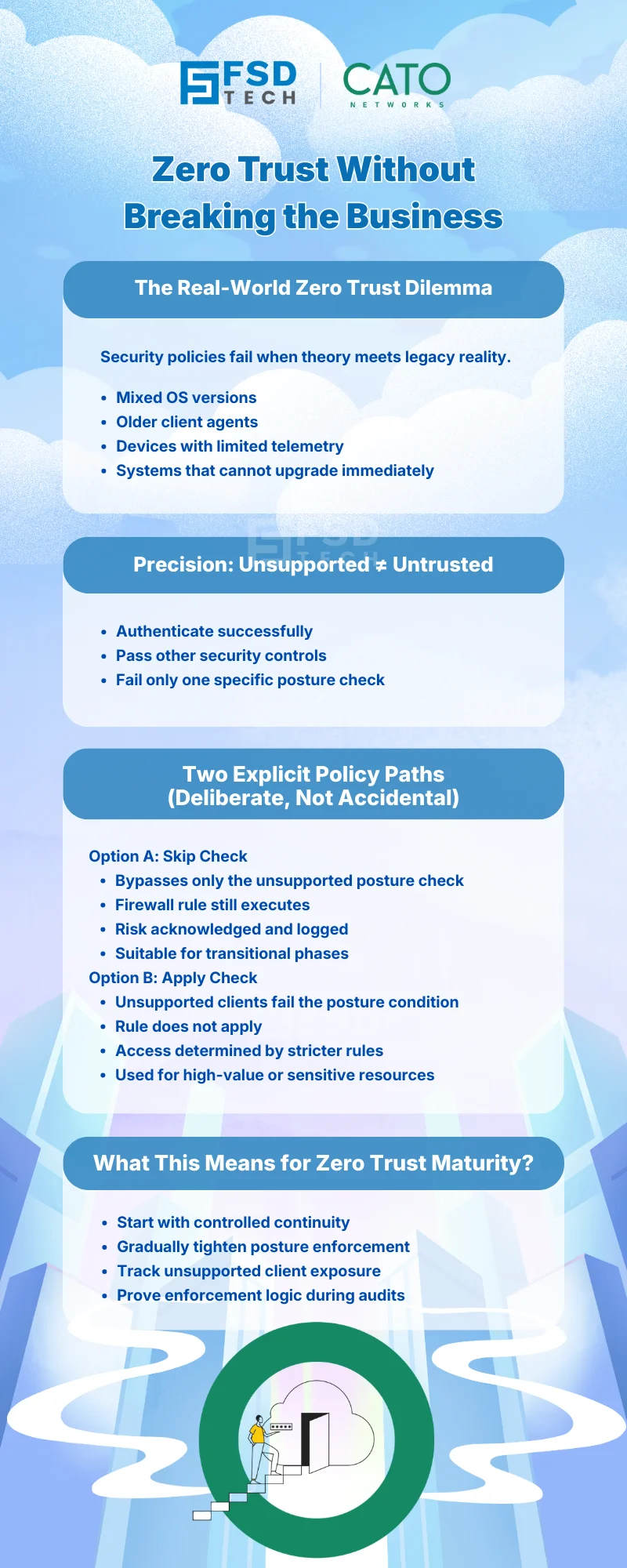
Cato SASE allows administrators to explicitly define how unsupported clients behave using Skip Check or Apply Check options within Device Posture Profiles, ensuring controlled and auditable enforcement.
Skip Check allows unsupported clients to bypass a specific posture check while still enforcing the firewall rule action, whereas Apply Check causes unsupported clients to fail the posture condition and skip the rule entirely.
No. Skip Check in Cato SASE enables transitional enforcement while still applying identity, location, and firewall controls. It is a deliberate risk-management choice, not implicit trust.
Apply Check should be used in Cato SASE environments protecting sensitive resources, where device compliance is mandatory and unsupported clients must not gain access.
Cato SASE provides visibility into unsupported client usage and allows phased enforcement, enabling organizations to tighten posture requirements over time without sudden disruptions.
Yes. Cato SASE logs posture-related enforcement behavior and events, allowing security teams to audit exceptions and demonstrate controlled Zero Trust enforcement.

Anas is an Expert in Network and Security Infrastructure, With over seven years of industry experience, holding certifications Including CCIE- Enterprise, PCNSE, Cato SASE Expert, and Atera Certified Master. Anas provides his valuable insights and expertise to readers.
Share it with friends!




.webp&w=3840&q=75)




.webp&w=3840&q=75)
share your thoughts