HomeNext Gen IT-InfraMonitoring & ManagementCyber SecurityBCP / DRAutomationDecoded
Next Gen IT-Infra
Cato’s SASE Supports Cybersecurity Skills Development

How Cato’s SASE Supports Cybersecurity Skills Development

🕓 April 8, 2025

How SASE Supports the Security Needs of SMBs

How SASE Supports the Security Needs of SMBs

🕓 February 9, 2025

Attack Surface Reduction with Cato’s SASE

Attack Surface Reduction with Cato’s SASE

🕓 February 10, 2025

SASE for Digital Transformation in UAE

SASE for Digital Transformation in UAE

🕓 February 8, 2025

Monitoring & Management
Understanding Atera’s SLA Management

Understanding Atera’s SLA Management

🕓 February 7, 2025

Cost-Performance Ratio: Finding the Right Balance in IT Management Networks

Cost-Performance Ratio: Finding the Right Balance in IT Management Networks

🕓 June 16, 2025

Customizing Atera with APIs

Customizing Atera with APIs

🕓 March 3, 2025

Power Up Your IT Team’s Strategy with Atera’s Communication Tools

Power Up Your IT Team’s Strategy with Atera’s Communication Tools

🕓 February 8, 2025

Cyber Security
Visual guide showing Cato CMA interface for configuring Internet and WAN firewall rules, enabling threat protection, and monitoring security events in real time for UAE IT teams.

Enforcing Firewall and Threat Protection Policies in Cato

🕓 July 25, 2025

Isometric illustration of professionals managing network performance, bandwidth analytics, and cloud-based optimization around the Cato Networks platform, symbolizing bandwidth control and QoS visibility.

Mastering Bandwidth Control and QoS in Cato Networks

🕓 July 26, 2025

Illustration of the Cato Cloud architecture showing its role in delivering SASE for secure, optimized global connectivity.

Understanding the Cato Cloud and Its Role in SASE

🕓 January 29, 2025

Global network backbone powering Cato SASE solution for secure, high-performance connectivity across regions.

Global Backbone: The Engine Powering Cato’s SASE Solution

🕓 January 30, 2025

BCP / DR
Illustration showing diverse business and IT professionals collaborating with cloud, backup, and security icons, representing Vembu use cases for SMBs, MSPs, and IT teams.

Who Uses Vembu? Real-World Use Cases for SMBs, MSPs & IT Teams

🕓 July 12, 2025

Graphic showcasing Vembu’s all-in-one backup and disaster recovery platform with icons for cloud, data protection, and business continuity for IT teams and SMBs.

What Is Vembu? A Deep Dive Into the All in One Backup & Disaster Recovery Platform

🕓 July 6, 2025

Illustration showing Vembu backup and disaster recovery system with cloud storage, server racks, analytics dashboard, and IT professionals managing data.

The Rising Cost of Data Loss: Why Backup Is No Longer Optional?

🕓 August 14, 2025

3D isometric illustration of cloud backup and data recovery infrastructure with laptop, data center stack, and digital business icons — FSD Tech

RPO & RTO: The Heart of Business Continuity

🕓 August 15, 2025

Automation
Cross-Functional Collaboration with ClickUp

Fostering Cross-Functional Collaboration with ClickUp for Multi-Departmental Projects

🕓 February 11, 2025

ClickUp Project Reporting

Revolutionizing Enterprise Reporting with ClickUp’s Advanced Analytics and Dashboards

🕓 June 16, 2025

ClickUp’s Design Collaboration and Asset Management Tools

Empowering Creative Teams with ClickUp’s Design Collaboration and Asset Management Tools

🕓 February 26, 2025

ClickUp Communication and Collaboration Tools

ClickUp Communication and Collaboration Tools: Empowering Remote Teams

🕓 March 12, 2025

Decoded
Multi-Factor Authentication (MFA)

Multi-Factor Authentication (MFA): All You Need to Know

🕓 December 7, 2025

L3 Switch

What Is an L3 Switch? L2 vs L3 & Why You Need Layer 3?

🕓 December 8, 2025

IPSec

IPSec Explained: Protocols, Modes, IKE & VPN Security

🕓 December 3, 2025

 Datagram Transport Layer Security (DTLS)

What is Datagram Transport Layer Security (DTLS)? How it works?

🕓 December 4, 2025

    Subscribe to our newsletter!

    About Us

    Follow Us

    Copyright © 2024 | Powered by 

    Cato SASE Architecture

    Inside Cato’s SASE Architecture: A Blueprint for Modern Security

    🕓 January 26, 2025

    Enterprise Data Security and Privacy with ClickUp

    Ensuring Enterprise Data Security and Privacy with ClickUp

    🕓 February 9, 2025

    DDoS protection SASE

    DDoS Protection and Cato’s Defence Mechanisms

    🕓 February 11, 2025

    Table of Contents

    Brute Force Attack in Cybersecurity - How it Works?

    Surbhi Suhane
    December 20, 2025
    Comments
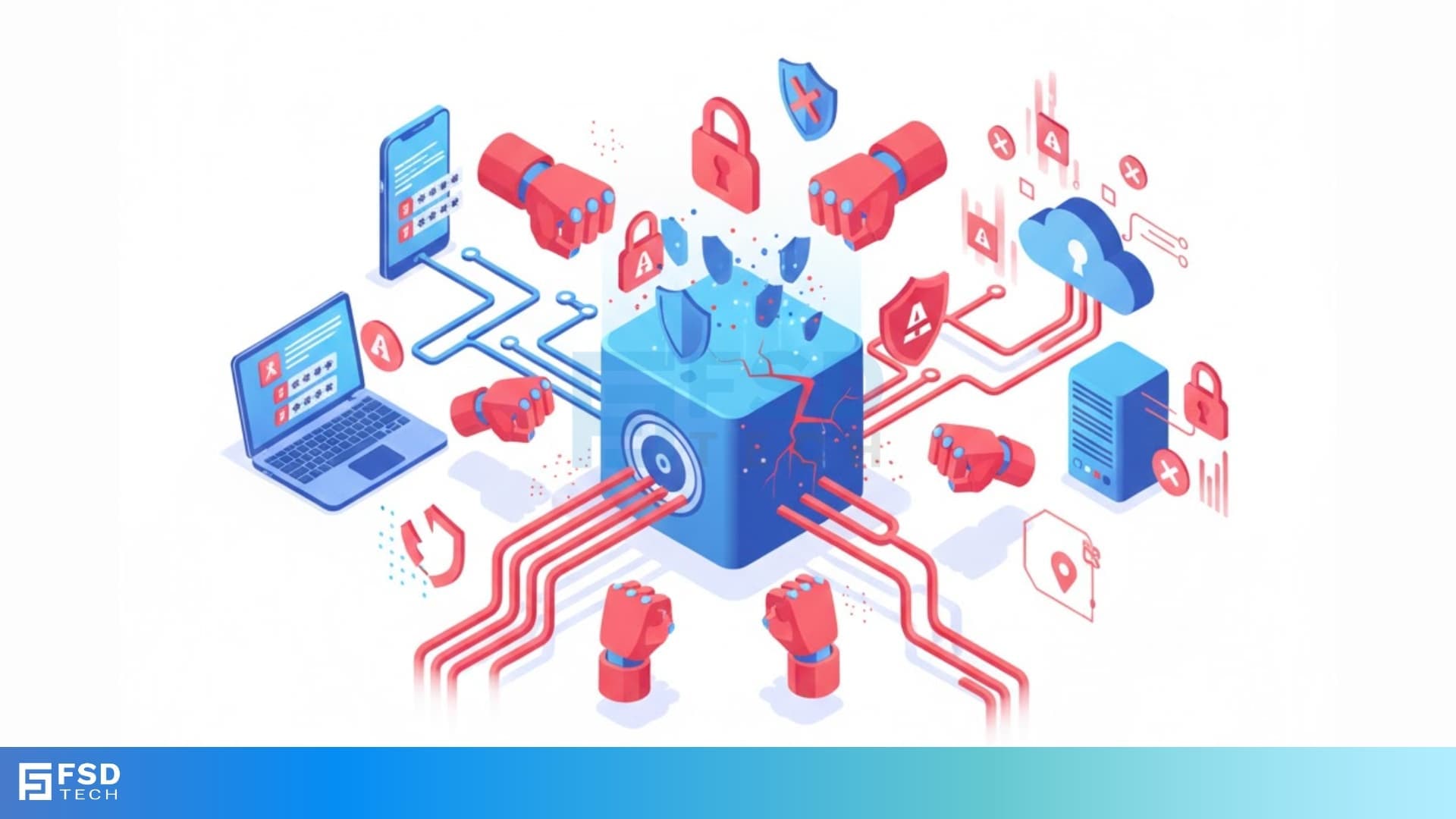
    Brute Force Attack in Cybersecurity

    Cybersecurity is a vital aspect of your digital life. You secure your accounts with passwords, assuming they are safe. But, do you really know how a determined attacker tries to break those passwords? Let us understand a major threat in digital security: the brute force attack.


    This type of attack is nothing but a persistent guessing game carried out by a machine. An attacker uses specialized software to automatically try every possible combination of characters until they find the correct password or decryption key. It is worth noting that this approach relies on sheer computational power and time to ultimately gain unauthorised access to your system or data.


    As we know, this method is often effective against weak or simple passwords; understanding the mechanism and defences is crucial for robust protection against brute force attacks. How do attackers carry out this tireless task, and more importantly, how can you stop a brute force attack before it succeeds? We will explore these critical questions and provide you with actionable steps to safeguard your accounts.


    What is a Brute Force Attack in Cybersecurity?

    The brute force attack can be understood as a trial-and-error method an application program uses to decode encrypted data, such as passwords or hidden web pages. In simple words, the attacker tries every potential key or password until the correct one works. This approach relies on repeatedly attempting to guess the required information.
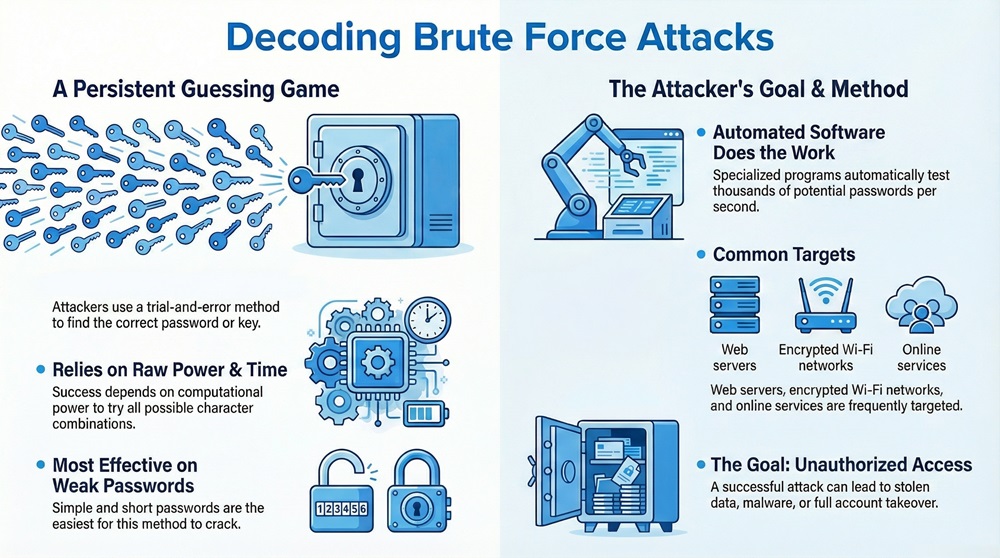
     

    Brute Force Attack Infographic


    This method typically targets web servers, encrypted Wi-Fi networks, and online services. A successful brute force attack in cybersecurity means the attacker now possesses your credentials, allowing them to steal data, install malware, or even take control of your entire account. The primary goal is to define brute force attack as an attempt to compromise security by exhausting all possibilities.


    Secure Logins Cato SASE


    How Does a Brute Force Attack Work?

    The fundamental working principle of a brute force attack is systematic trial. The attack process generally involves these sequential steps:


    1. Selection of Target: The attacker first selects a target system or account, such as a login page for a banking service or an encrypted file.
    2. Creation of Character Set: The attacker defines the set of characters to use. This set includes letters, numbers, and symbols.
    3. Initiation of Guessing: The specialized software, often referred to as a brute force attack tool, begins generating and testing password combinations.
    4. Sequential Pattern: The tool starts with the simplest and shortest combinations first (e.g., "a", "b", "aa", "ab," brute force attack password checker) and then progressively moves to longer, more complex sequences.
    5. Validation and Access: If a combination matches the target's password, the tool stops, and the attacker gains access.


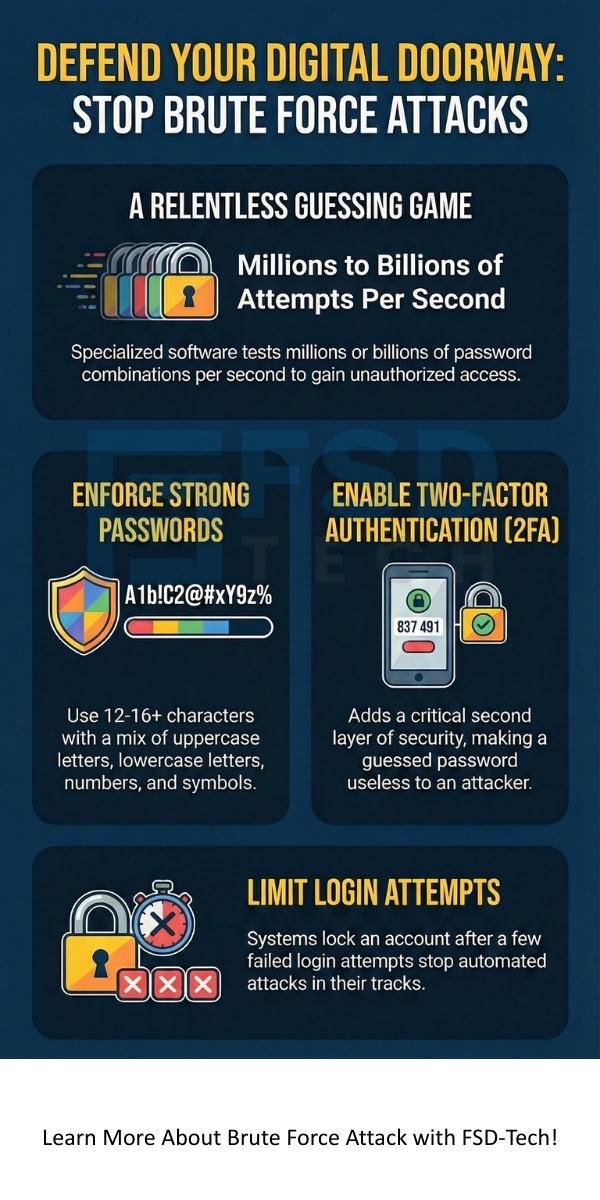
    But, how does a brute force attack work so fast? Due to the immense processing speed of modern computers, the tools can test millions or even billions of combinations per second.


    Also Read: Dictionary Attack in Cybersecurity - How it Works and How to Stop?


    Key Differences Between Brute Force Attack and Dictionary Attack

    While both methods aim to guess passwords, they differ significantly in their approach. Understanding this contrast is essential for forming a comprehensive brute force attack protection strategy.


    Comparison Chart: Brute Force Attack vs. Dictionary Attack

    Basis for ComparisonBrute Force AttackDictionary Attack
    StrategyTries every possible combination of characters.Tries combinations based on a list of common words, phrases, and passwords.
    Time RequiredCan be very long, depending on password length and complexity.Generally faster, but only if the password is on the list.
    Success RateGuaranteed success eventually, provided enough time and computational power.Lower success rate against strong, complex, or unusual passwords.
    Wordlist UseDoes not primarily rely on a pre-compiled wordlist.Heavily relies on a pre-compiled wordlist or 'dictionary'.
    ComplexityHigh complexity; tests random strings.Lower complexity; tests known, commonly used strings.


    Types of Brute Force Attack

    The term brute force attack is a general category. Attackers employ several specific methods under this umbrella, each with a slightly different focus. Let us now discuss the major types of brute force attack.


    1. Simple Brute Force Attack

    This is the most basic form, which simply tries all combinations. It does not use any specific intelligence, like wordlists or previously known credentials. This means that a simple brute force attack requires the most time and computational effort.


    2. Dictionary Attack

    A dictionary attack is an evolved form. It significantly reduces the time required by starting with common passwords, phrases, and words from a dictionary file. This attack aims at a faster result when a user chooses a non-complex word-based password.


    3. Reverse Brute Force Attack

    In this unique method, the attacker already knows the password, which is often a commonly used one. They then use the password to try to find the corresponding username. This helps in finding multiple accounts that share the same common password. For example, the attacker might try the password "password123" against millions of usernames.


    4. Credential Stuffing

    This type of attack refers to the use of compromised username/password pairs from a data breach on one service to attempt logins on a large number of other services. The attacker relies on the fact that many users reuse the same login credentials across various platforms.


    5. Hybrid Brute Force Attack

    The hybrid approach combines elements of simple brute force and dictionary attacks. It takes dictionary words and then adds variations like numbers or symbols at the beginning or end. For example, it might try "password123!" or "Summer2025" for a better chance of success. This approach tends to be more effective and efficient than a simple dictionary attack.


    Also Read: What is Credential Stuffing? Detection and Prevention


    Brute Force Attack in Cryptography and Information Security

    The brute force attack plays a vital role in understanding the security strength of cryptographic systems. What is brute force attack in cryptography? It refers to the process of trying every possible key to decrypt a message or break a cipher.


    In this context, the security of an encryption algorithm is often measured by the total time it would take a powerful computer to carry out a successful brute force key search. The strength of the encryption depends on the key length. 


    This attack indicates that strong encryption is nothing but the usage of a sufficiently long key space. 


    A key that is too short allows the attacker to break the cipher in a reasonable amount of time. Therefore, brute force attack in information security often acts as a benchmark for security strength.


    Brute Force Attack Prevention and Protection Techniques

    The key to preventing a brute force attack lies in making the process computationally and temporally expensive for the attacker. You must implement multiple layers of defense to significantly reduce the risk.


    1. Enforce Strong Passwords and Passphrases

    The simplest defense is a complex password. Strong passwords comprise of a mix of upper and lower-case letters, numbers, and symbols, and must be at least 12-16 characters long. Longer, non-dictionary passwords exponentially increase the time needed for a successful guess.


    2. Implement Rate Limiting and Account Lockout

    Rate limiting allows the system to restrict the number of login attempts from a single IP address within a specific timeframe (e.g., 5 attempts in 5 minutes).


    • Account Lockout: If the login attempts exceed the threshold, the system automatically locks the account for a set period. This mechanism prevents the attacker from making continuous attempts.


    3. Use Two-Factor Authentication (2FA)

    Two-factor authentication (2FA) is a critical defense mechanism. Even if the attacker successfully guesses the password, they cannot access the account without the second factor. This second factor is usually a code sent to a mobile device or generated by a hardware key. 2FA ensures that the password alone is not enough to gain entry.


    4. Deploy CAPTCHAs

    A CAPTCHA (Completely Automated Public Turing test to tell Computers and Humans Apart) helps in distinguishing between a human user and an automated script. Requiring the completion of a CAPTCHA after a few failed login attempts eliminates the use of most brute force attack tools.


    5. Monitor and Analyze Login Traffic

    Systematic monitoring of login attempts is based on checking for unusual activity.


    • Geographical Location: Logins from unexpected countries or regions.
    • Failed Attempts: A sudden high volume of failed login attempts from one IP address.


    Such monitoring indicates an ongoing brute force attack in network security, allowing the administrator to block the suspicious IP address immediately.


    6. Change Default Credentials

    Many systems come with default usernames and passwords (like "admin/admin"). Attackers often target these well-known defaults first. You must change all default credentials immediately after setting up any new system or server.


    Also Read: What Is a Whaling Attack? How It Works & Prevention


    How to stop brute force attack on server?

    To stop the attack on a server, you must configure the firewall or the web application firewall (WAF) to block IP addresses showing too many failed login attempts in a short span. Using services like Fail2ban helps in automatically blacklisting these malicious IPs.


    Brute Force Attack Mitigation with Salts and Hashes

    In brute force attack in information security, a significant aspect of brute force attack protection involves how you store passwords on your server. When a user creates a password, the system should not store the password in plain text. Instead, it generates a one-way cryptographic hash of the password.


    Hashing and Salting

    • Hashing: The password goes through a mathematical function that turns it into a fixed-length string of characters (the hash). Since the hash function is a one-way process, you cannot easily reverse the hash to get the original password.
    • Salting: A "salt" is nothing but a unique, random string of characters added to the password before the hashing process. This prevents attackers from using "Rainbow Tables" (pre-computed hash lists) to crack passwords.


    The server stores the salt and the salted hash. When you log in, the system applies the same salt to the password you enter, hashes the result, and compares it with the stored salted hash. If the two hashes match, access is granted. This approach makes the brute force attack significantly harder because the attacker must brute force the hash of each individual, unique, salted password, rather than a single common hash.


    Conclusion

    The brute force attack is a patient, tireless guessing method that aims to compromise your credentials. Understanding this attack, from its basic meaning to the types of brute force attack, empowers you to build stronger defenses. You must employ crucial measures like strong, unique passwords and the mandatory use of Two-Factor Authentication (2FA). 


    Implementing account lockout policies and ensuring proper password hashing and salting significantly increases the cost and time required for an attacker to succeed. Robust brute force attack protection requires continuous vigilance and layered security. We believe that informed action is your best defense against unauthorized access, helping you maintain a secure and resilient digital presence.


    We are committed to helping you implement robust brute force attack protection measures and secure your digital environment. Your security is our priority, and we provide the expert support and solutions you require to stay ahead of the threats.


    Contact us today to understand how we can further strengthen your defense strategy.
     

    Brute Force Attack


    Key Takeaways for Brute Force Attack Protection

    To protect your personal and corporate assets from a brute force attack, remember these essential steps:


    • You must enforce strong, long passwords.
    • Always enable Two-Factor Authentication (2FA) on all critical accounts.
    • Make sure that you implement rate limiting and account lockout policies on your servers.
    • You must salt and hash all passwords when storing them.
    • Maintain constant vigilance through the monitoring of login activities.


    Frequently Asked Questions about Brute Force Attack

    Q. What does brute force attack mean in simple terms?

    A. Brute force attack simply means trying every possible password or key until the correct one is found. It is an automated, tireless guessing game played by a computer.


    Q. What is the difference between a brute force attack and a DDoS attack?

    A. A brute force attack aims at unauthorized access by guessing credentials. Conversely, a Distributed Denial of Service (DDoS) attack focuses on overwhelming a server with traffic, making it unavailable to legitimate users.


    Q. Can strong passwords completely prevent a brute force attack?

    A. Strong passwords cannot completely prevent the attempt, but they reduce the chance of success to near zero. A complex password with 16 characters requires too much time for a successful brute-force guess, even with the most powerful computers.


    Q. Are there brute force attack tools that a beginner can use?

    A. Yes, there are tools available online. However, using any tool for an unauthorized brute force attack against a system is considered illegal and unethical. You should use these tools only for educational purposes and on systems where you have explicit permission.

    Brute Force Attack in Cybersecurity - How it Works?

    About The Author

    Surbhi Suhane

    Surbhi Suhane is an experienced digital marketing and content specialist with deep expertise in Getting Things Done (GTD) methodology and process automation. Adept at optimizing workflows and leveraging automation tools to enhance productivity and deliver impactful results in content creation and SEO optimization.

    Like This Story?

    Share it with friends!

    Subscribe to our newsletter!

    Atera

    (48)

    Cato Networks

    (109)

    ClickUp

    (62)

    FishOS

    (7)

    Miradore

    (21)

    PointGuard AI

    (9)

    Vembu

    (22)

    Xcitium

    (33)

    ZETA HRMS

    (63)

    Workflow Automation(3)

    Workforce Automation(1)

    AI Project Management(1)

    HR Data Automation(1)

    RMM(1)

    IT Workflow Automation(1)

    IT security(2)

    GCC compliance(3)

    Payroll Integration(2)

    IT support automation(2)

    procurement automation(1)

    lost device management(1)

    IT Management(5)

    IoT Security(2)

    Cato XOps(2)

    IT compliance(4)

    Workflow Management(1)

    Task Automation(1)

    OpenStack automation(1)

    AI-powered cloud ops(1)

    Kubernetes lifecycle management(2)

    SMB Security(8)

    Data Security(1)

    MDR (Managed Detection & Response)(4)

    MSP Automation(2)

    Atera Integrations(2)

    XDR Security(2)

    SMB Cyber Protection(1)

    Ransomware Defense(3)

    HR Tech Solutions(1)

    Zero Trust Network Access(3)

    Zero Trust Security(2)

    Endpoint Management(1)

    SaaS Security(1)

    Payroll Automation(5)

    IT Monitoring(2)

    Xcitium EDR SOC(15)

    Ransomware Protection GCC(1)

    M&A IT Integration(1)

    Network Consolidation UAE(1)

    MSSP for SMBs(1)

    Ransomware Protection(3)

    Managed EDR FSD-Tech(1)

    SMB Cybersecurity GCC(1)

    Antivirus vs EDR(1)

    FSD-Tech MSSP(25)

    Cybersecurity GCC(12)

    Endpoint Security(1)

    Endpoint Protection(1)

    Data Breach Costs(1)

    SMB Cybersecurity(8)

    Managed Security Services(2)

    Xcitium EDR(30)

    Zero Dwell Containment(31)

    Hybrid Backup(1)

    Cloud Backup(1)

    Backup & Recovery(1)

    pointguard ai(4)

    disaster recovery myths(1)

    backup myths(1)

    vembu(9)

    SMB data protection(9)

    Vembu BDR Suite(19)

    Disaster Recovery(4)

    GCCBusiness(1)

    DataProtection(1)

    Secure Access Service Edge(4)

    GCC HR software(14)

    Miradore EMM(15)

    Cato SASE(7)

    Cloud Security(8)

    Talent Development(1)

    AI Compliance(2)

    AI Governance(4)

    AI Risk Management(1)

    AI Security(2)

    AI Cybersecurity(12)

    GCC business security(1)

    GCC network integration(1)

    compliance automation(3)

    GCC cybersecurity(2)

    education security(1)

    Miradore EMM Premium+(5)

    BYOD security Dubai(8)

    App management UAE(1)

    MiddleEast(1)

    HealthcareSecurity(1)

    Team Collaboration(1)

    IT automation(9)

    Zscaler(1)

    SD-WAN(6)

    HR Integration(4)

    Cloud Networking(3)

    device management(9)

    VPN(1)

    ZeroTrust(2)

    RemoteWork(1)

    MPLS(1)

    Project Management(9)

    HR automation(14)

    share your thoughts

    Threat Modeling in Cyber Security

    Threat Modeling in Cyber Security - Process, STRIDE & Benefits

    🕓 December 20, 2025

    Brute Force Attack in Cybersecurity

    Brute Force Attack in Cybersecurity - How it Works?

    🕓 December 20, 2025

    Botnet

    What is a Botnet? How Botnet Attacks Work & Prevention

    🕓 December 19, 2025

    Decoded(29)

    Cyber Security(110)

    BCP / DR(22)

    Zeta HRMS(62)

    SASE(21)

    Automation(62)

    Next Gen IT-Infra(109)

    Monitoring & Management(69)

    ITSM(22)

    HRMS(21)

    Automation(24)