HomeNext Gen IT-InfraMonitoring & ManagementCyber SecurityBCP / DRAutomationDecoded
Next Gen IT-Infra
Cato’s SASE Supports Cybersecurity Skills Development

How Cato’s SASE Supports Cybersecurity Skills Development

🕓 April 8, 2025

How SASE Supports the Security Needs of SMBs

How SASE Supports the Security Needs of SMBs

🕓 February 9, 2025

Attack Surface Reduction with Cato’s SASE

Attack Surface Reduction with Cato’s SASE

🕓 February 10, 2025

SASE for Digital Transformation in UAE

SASE for Digital Transformation in UAE

🕓 February 8, 2025

Monitoring & Management
Understanding Atera’s SLA Management

Understanding Atera’s SLA Management

🕓 February 7, 2025

Cost-Performance Ratio: Finding the Right Balance in IT Management Networks

Cost-Performance Ratio: Finding the Right Balance in IT Management Networks

🕓 June 16, 2025

Customizing Atera with APIs

Customizing Atera with APIs

🕓 March 3, 2025

Power Up Your IT Team’s Strategy with Atera’s Communication Tools

Power Up Your IT Team’s Strategy with Atera’s Communication Tools

🕓 February 8, 2025

Cyber Security
Illustration of the Cato Cloud architecture showing its role in delivering SASE for secure, optimized global connectivity.

Understanding the Cato Cloud and Its Role in SASE

🕓 January 29, 2025

Isometric illustration of professionals managing network performance, bandwidth analytics, and cloud-based optimization around the Cato Networks platform, symbolizing bandwidth control and QoS visibility.

Mastering Bandwidth Control and QoS in Cato Networks

🕓 July 26, 2025

Global network backbone powering Cato SASE solution for secure, high-performance connectivity across regions.

Global Backbone: The Engine Powering Cato’s SASE Solution

🕓 January 30, 2025

Illustration of IT team managing user roles and permissions on the Cato CMA dashboard via laptops and cloud interfaces.

Setting Up Role-Based Access Control (RBAC) in Cato

🕓 July 28, 2025

BCP / DR
Illustration showing diverse business and IT professionals collaborating with cloud, backup, and security icons, representing Vembu use cases for SMBs, MSPs, and IT teams.

Who Uses Vembu? Real-World Use Cases for SMBs, MSPs & IT Teams

🕓 July 12, 2025

Graphic showcasing Vembu’s all-in-one backup and disaster recovery platform with icons for cloud, data protection, and business continuity for IT teams and SMBs.

What Is Vembu? A Deep Dive Into the All in One Backup & Disaster Recovery Platform

🕓 July 6, 2025

Illustration showing Vembu backup and disaster recovery system with cloud storage, server racks, analytics dashboard, and IT professionals managing data.

The Rising Cost of Data Loss: Why Backup Is No Longer Optional?

🕓 August 14, 2025

3D isometric illustration of cloud backup and data recovery infrastructure with laptop, data center stack, and digital business icons — FSD Tech

RPO & RTO: The Heart of Business Continuity

🕓 August 15, 2025

Automation
Cross-Functional Collaboration with ClickUp

Fostering Cross-Functional Collaboration with ClickUp for Multi-Departmental Projects

🕓 February 11, 2025

ClickUp Project Reporting

Revolutionizing Enterprise Reporting with ClickUp’s Advanced Analytics and Dashboards

🕓 June 16, 2025

ClickUp’s Design Collaboration and Asset Management Tools

Empowering Creative Teams with ClickUp’s Design Collaboration and Asset Management Tools

🕓 February 26, 2025

ClickUp Communication and Collaboration Tools

ClickUp Communication and Collaboration Tools: Empowering Remote Teams

🕓 March 12, 2025

Decoded
Multi-Factor Authentication (MFA)

Multi-Factor Authentication (MFA): All You Need to Know

🕓 December 7, 2025

L3 Switch

What Is an L3 Switch? L2 vs L3 & Why You Need Layer 3?

🕓 December 8, 2025

IPSec

IPSec Explained: Protocols, Modes, IKE & VPN Security

🕓 December 3, 2025

 Datagram Transport Layer Security (DTLS)

What is Datagram Transport Layer Security (DTLS)? How it works?

🕓 December 4, 2025

    Subscribe to our newsletter!

    About Us

    Follow Us

    Copyright © 2024 | Powered by 

    Cato SASE Architecture

    Inside Cato’s SASE Architecture: A Blueprint for Modern Security

    🕓 January 26, 2025

    Enterprise Data Security and Privacy with ClickUp

    Ensuring Enterprise Data Security and Privacy with ClickUp

    🕓 February 9, 2025

    DDoS protection SASE

    DDoS Protection and Cato’s Defence Mechanisms

    🕓 February 11, 2025

    Table of Contents

    New AI-Driven Firewall Analysis and Insights: Making Internet Firewall Smarter, Safer, and Simpler

    Anas Abdu Rauf
    September 4, 2025
    Comments
    Modern Illustration Of AI-Driven Firewall Analysis And Insights By FSD Tech And Cato Networks. Shows Advanced AI Firewall Engine Filtering Traffic, Optimizing Firewall Rulebases, Improving Security Posture, And Delivering Continuous Compliance With Zero-Trust Principles.

    Firewall rulebases are at the heart of enterprise network security—but let’s be honest: they’re messy. Over time, temporary fixes, expired entries, and redundant rules accumulate, creating complexity that weakens both performance and protection. Security teams often spend hours manually combing through policies, only to miss risky configurations or face compliance headaches later.
     

    Cato is addressing this challenge head-on with the introduction of AI-Driven Firewall Analysis and Insights, an enhancement to the Internet Firewall policy powered by the Autonomous Firewall engine. This feature brings automation, intelligence, and best-practice guidance to what used to be a time-consuming, error-prone task.
     

    In this blog, we’ll explore what this means for IT administrators, how it helps simplify daily operations, and why it’s a game-changer for enterprise security and compliance.


    1. What Is the Autonomous Firewall Insights Feature?

    The Autonomous Firewall Insights engine automatically analyzes the Internet Firewall rulebase and provides actionable recommendations. Instead of forcing admins to manually inspect hundreds of rules, it continuously scans for misconfigurations, redundant entries, and overlooked risks.

    Key Issues the AI Detects

    • Temporary Rules: Identifies rules created for short-term use that are still active.
    • Expired or Soon-to-Expire Rules: Flags policies that no longer apply or are about to lapse.
    • Testing Rules: Highlights experimental rules added for troubleshooting that should be retired.
    • Unused Rules: Detects “Allow” rules with no traffic for the past 30 days.
    • Contradicting Rules: Identifies duplicate rules with conflicting actions that create policy ambiguity.
    • Configuration Gaps: Surfaces deviations from best-practice recommendations.

    All of these findings are presented through a Firewall Configuration Wizard that guides administrators step by step in resolving issues—whether that’s deleting, disabling, or updating a rule.


    2. Why This Matters for End Users

    From an administrator’s perspective, the feature translates into tangible improvements in daily security operations.

    a) Less Manual Work, More Impact

    Reviewing rulebases is one of the most tedious and repetitive security chores. With AI doing the heavy lifting, admins get clear, actionable insights—no more line-by-line reviews or chasing down stale entries.
     

    b) A Cleaner, Leaner Firewall

    A cluttered firewall isn’t just an annoyance; it’s a liability. By removing expired, unused, or temporary rules, admins maintain a streamlined rulebase that’s easier to manage and less prone to error.
     

    c) Proactive Security Hygiene

    Rather than waiting for a breach or audit to reveal a problem, the system continuously monitors and flags risks in real time. This allows teams to stay ahead of potential threats before they escalate.
     

    d) Easier Compliance and Auditing

    Auditors love clean, documented rulebases. With AI surfacing expired rules and enforcing best practices, organizations reduce compliance headaches and shorten audit preparation time.
     

    e) Consistency With Zero-Trust Principles

    The feature supports least-privilege access by pruning excessive or unnecessary permissions. Every rule that stays active has a purpose, reinforcing zero-trust security.


    3. Daily Life With Autonomous Firewall Insights

    Let’s look at how this plays out in day-to-day operations:

    Morning Check-In
    An admin logs into the Cato Management Application and immediately sees flagged items: “Rule #45 expired yesterday” or “Testing rule active but unused for 30 days.” With a few clicks, they clean it up before it becomes a problem.
     

    Midday Troubleshooting
    A user reports blocked traffic. Instead of hunting through dozens of overlapping rules, the admin checks the insights panel, where conflicting rules are already highlighted. Resolution takes minutes, not hours.
     

    Audit Prep
    Compliance reviews no longer mean frantic policy rewrites. The system continuously validates rule health, so by the time auditors arrive, the firewall is already in top shape.
     

    Long-Term Maintenance
    Over months and years, rules don’t pile up unchecked. The AI ensures unused or outdated entries are flagged and removed, keeping the firewall consistently efficient.


    Want a clearer view of your firewall risks? Get Your free Firewall Health Checklist.

    4. Advantages at a Glance

    Here’s what organizations gain from adopting this AI-driven capability:
     

    AdvantageWhat It Means
    Operational EfficiencyAutomates routine rule reviews, saving time and resources.
    Stronger Security PostureRemoves weak points like expired or conflicting rules.
    Audit & Compliance ReadinessKeeps rulebase clean, documented, and aligned with standards.
    Reduced Human ErrorAI highlights issues admins might overlook.
    Improved PerformanceFewer rules = faster processing and leaner system operations.
    Zero-Trust AlignmentEnsures firewall access remains minimal and purposeful.
    Simplified ManagementDelivered through an intuitive wizard in the Cato console.


    5. Beyond Just the Firewall: Part of Cato’s AI Evolution

    The Autonomous Firewall Insights feature isn’t a standalone upgrade—it’s part of Cato’s broader strategy to integrate AI-driven automation across its entire SASE platform.

    Broader Enhancements Include:

    • Policy Optimization Across Domains: Not just firewalls, but security, networking, and access policies.
    • Continuous Zero-Trust Validation: Ensures policies remain aligned with least-privilege principles.
    • Proactive Risk Detection: Flags misconfigurations and drifts before they become breaches.
    • Unified Experience: All delivered natively within the Cato Management Application—no separate add-ons or interfaces.

    The long-term vision is clear: shift security operations from reactive firefighting to proactive governance.


    6. Practical Scenarios

    Scenario 1: The Forgotten Temporary Rule

    A contractor was granted temporary internet access for a migration project. The rule was supposed to expire last month but didn’t. The AI flags it immediately, allowing the admin to remove a potential backdoor.
     

    Scenario 2: Redundant “Allow” Policy

    A broad “Allow All” rule sits unused for 45 days. The engine highlights it as unused, and the admin deletes it—reducing the attack surface significantly.
     

    Scenario 3: Conflicting Entries

    One rule allows access from a subnet, while another denies the same traffic. The insights tool lists them as contradictory, prompting a quick resolution.


    7. Strategic Impact for Organizations

    The daily convenience is important, but the strategic benefits go even deeper:

    • Security Teams Reclaim Time: With less time wasted on rule cleanup, teams can focus on incident response, strategic policy design, and threat hunting.
    • Reduced Operational Risk: Continuous analysis means fewer blind spots and less chance of human oversight leading to breaches.
    • Cost Efficiency: Leaner operations and audit-readiness reduce the overhead of compliance cycles and manual interventions.
    • Future-Proofing: As environments grow more dynamic—cloud migrations, hybrid workforces, third-party integrations—the AI engine scales to keep rulebases under control.


    8. The Bigger Picture: From Manual to Autonomous

    For decades, firewall administration has been stuck in a manual loop: create, test, document, review, repeat. This cycle leads to bloated rulebases, missed risks, and overworked teams.

    Cato’s Autonomous Firewall Insights marks a turning point. It’s not just about making administration easier—it’s about transforming how enterprises approach security policy altogether. By embedding AI-driven intelligence into daily workflows, organizations can move from a reactive mindset (fixing problems as they come) to a proactive, optimized posture where risks are anticipated and resolved automatically.


    Conclusion

    The introduction of AI-Driven Firewall Analysis and Insights is more than a new feature—it’s a rethinking of firewall management in the modern era.

    For IT teams, it means fewer tedious reviews, a leaner and safer rulebase, and simplified compliance. For CISOs, it translates into stronger governance, reduced risk exposure, and operational efficiency. And for the business as a whole, it ensures that the network security foundation remains resilient, agile, and aligned with zero-trust best practices.

    In an environment where threats evolve daily, autonomous, AI-driven security isn’t just nice to have—it’s essential.


    See how Cato’s Autonomous Firewall Insights can simplify your security. Book your free Consultation today
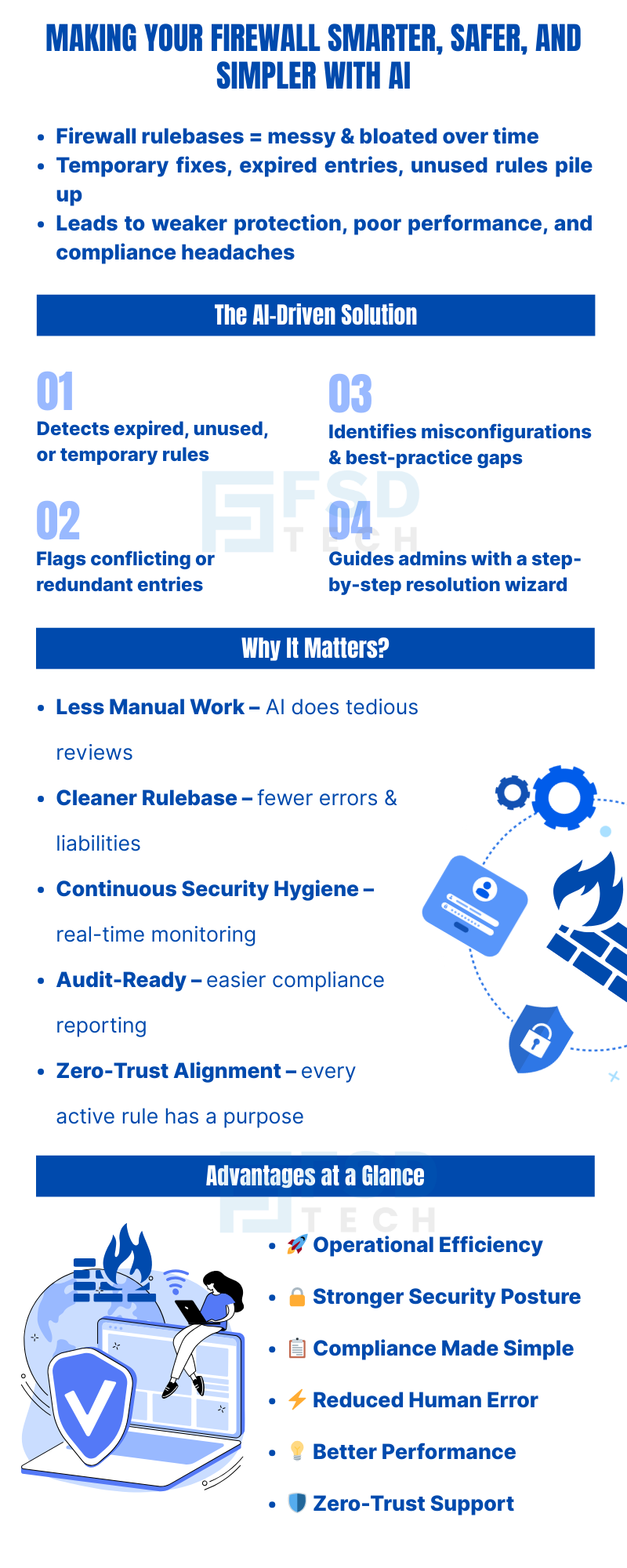
     

    Infographic Explaining AI-Driven Firewall Insights For Smarter, Safer, And Simpler Firewall Management. Shows How AI Detects Expired, Unused, Or Temporary Rules, Flags Redundant Entries, Identifies Misconfigurations, And Guides Admins With A Step-By-Step Resolution Wizard. Highlights Benefits Including Cleaner Rulebase, Continuous Security Hygiene, Audit Readiness, Zero-Trust Alignment, Stronger Security Posture, Reduced Human Error, And Better Performance.

    FAQ

    1. What Is AI-Driven Firewall Analysis And Insights In Cato Networks?

    AI-Driven Firewall Analysis And Insights is a feature powered by Cato’s Autonomous Firewall engine that continuously scans firewall rulebases for expired, unused, or conflicting rules. It provides actionable recommendations to simplify firewall management, strengthen enterprise network security, and ensure compliance.
     

    2. How Does Cato’s Autonomous Firewall Insights Improve Firewall Security?

    Cato’s Autonomous Firewall Insights improves security by detecting temporary rules, redundant entries, unused “allow” policies, and misconfigurations. This ensures a cleaner, leaner, and safer firewall aligned with zero-trust security principles.
     

    3. Can AI-Driven Firewall Analysis Reduce Firewall Rulebase Complexity?

    Yes. The AI engine automates rulebase reviews by flagging expired, testing, and unused rules, helping administrators eliminate clutter. This firewall optimization reduces complexity, minimizes risk, and boosts overall firewall performance.
     

    4. How Does AI-Driven Firewall Analysis Help With Compliance And Audits?

    By continuously monitoring firewall rules and highlighting expired or risky entries, AI-driven firewall analysis ensures rulebases remain audit-ready. This reduces compliance overhead, shortens audit preparation time, and aligns policies with industry standards.
     

    5. What Problems Can Autonomous Firewall Insights Detect Automatically?

    The AI engine detects:

    • Expired or soon-to-expire rules
    • Temporary or testing rules still active
    • Redundant or conflicting rules
    • Unused “allow” entries
    • Gaps in firewall best practices
      This proactive detection enhances firewall security hygiene and reduces human error.
       

    6. How Does AI-Driven Firewall Analysis Align With Zero-Trust Security?

    AI-Driven Firewall Analysis enforces least-privilege access by pruning unnecessary permissions. Every firewall rule that remains active serves a clear purpose, ensuring alignment with zero-trust firewall policies and reducing the attack surface.
     

    7. What Are The Operational Benefits Of AI-Driven Firewall Automation?

    Key benefits include:

    • Automated rulebase reviews
    • Reduced manual workload
    • Faster troubleshooting of firewall conflicts
    • Improved firewall performance
    • Continuous compliance validation
      This enhances IT operational efficiency and security governance.
       

    8. How Does Autonomous Firewall Insights Improve Daily IT Operations?

    Admins can quickly see flagged items like expired or unused rules during daily check-ins. Instead of manually scanning hundreds of rules, firewall analysis automation highlights issues in real time, saving hours and preventing misconfigurations.
     

    9. Is AI-Driven Firewall Analysis Scalable For Enterprises With Large Networks?

    Yes. The AI firewall engine scales seamlessly across hybrid, cloud, and multi-branch networks. It continuously optimizes rulebases regardless of size, making it ideal for large enterprise firewall management.
     

    10. Why Should Enterprises Adopt AI-Driven Firewall Analysis?

    Enterprises should adopt this feature to reduce operational risk, maintain compliance, cut down manual effort, and proactively secure firewalls. By shifting from reactive fixes to autonomous firewall management, organizations achieve stronger governance and resilience.

    New AI-Driven Firewall Analysis and Insights: Making Internet Firewall Smarter, Safer, and Simpler

    About The Author

    Anas Abdu Rauf

    Anas is an Expert in Network and Security Infrastructure, With over seven years of industry experience, holding certifications Including CCIE- Enterprise, PCNSE, Cato SASE Expert, and Atera Certified Master. Anas provides his valuable insights and expertise to readers.

    Like This Story?

    Share it with friends!

    Subscribe to our newsletter!

    Atera

    (48)

    Cato Networks

    (118)

    ClickUp

    (70)

    FishOS

    (7)

    Miradore

    (21)

    PointGuard AI

    (9)

    Vembu

    (22)

    Xcitium

    (33)

    ZETA HRMS

    (76)

    Workflow Automation(8)

    Workforce Automation(1)

    AI Project Management(1)

    HR Data Automation(1)

    RMM(1)

    IT Workflow Automation(1)

    IT security(2)

    GCC compliance(4)

    Payroll Integration(2)

    IT support automation(3)

    procurement automation(1)

    lost device management(1)

    IT Management(5)

    IoT Security(2)

    Cato XOps(2)

    IT compliance(4)

    Workflow Management(1)

    Task Automation(1)

    OpenStack automation(1)

    Kubernetes lifecycle management(2)

    AI-powered cloud ops(1)

    SMB Security(8)

    Data Security(1)

    MDR (Managed Detection & Response)(4)

    Atera Integrations(2)

    MSP Automation(3)

    XDR Security(2)

    SMB Cyber Protection(1)

    Ransomware Defense(3)

    HR Tech Solutions(1)

    Zero Trust Network Access(3)

    Zero Trust Security(2)

    Endpoint Management(1)

    SaaS Security(1)

    Payroll Automation(5)

    IT Monitoring(2)

    Xcitium EDR SOC(15)

    Ransomware Protection GCC(1)

    M&A IT Integration(1)

    Network Consolidation UAE(1)

    MSSP for SMBs(1)

    Managed EDR FSD-Tech(1)

    Ransomware Protection(3)

    SMB Cybersecurity GCC(1)

    FSD-Tech MSSP(25)

    Antivirus vs EDR(1)

    Endpoint Security(1)

    Cybersecurity GCC(12)

    Data Breach Costs(1)

    Endpoint Protection(1)

    SMB Cybersecurity(8)

    Zero Dwell Containment(31)

    Managed Security Services(2)

    Xcitium EDR(30)

    Cloud Backup(1)

    Hybrid Backup(1)

    Backup & Recovery(1)

    pointguard ai(4)

    backup myths(1)

    vembu(9)

    SMB data protection(9)

    disaster recovery myths(1)

    Disaster Recovery(4)

    Vembu BDR Suite(19)

    GCCBusiness(1)

    DataProtection(1)

    Secure Access Service Edge(4)

    GCC HR software(18)

    Miradore EMM(15)

    Cato SASE(7)

    Cloud Security(8)

    Talent Development(1)

    AI Cybersecurity(12)

    AI Governance(4)

    AI Security(2)

    AI Compliance(2)

    AI Risk Management(1)

    GCC business security(1)

    GCC network integration(1)

    compliance automation(5)

    education security(1)

    GCC cybersecurity(2)

    BYOD security Dubai(8)

    App management UAE(1)

    Miradore EMM Premium+(5)

    MiddleEast(1)

    HealthcareSecurity(1)

    Team Collaboration(1)

    IT automation(12)

    Zscaler(1)

    SD-WAN(6)

    HR Integration(4)

    Cloud Networking(3)

    device management(9)

    VPN(1)

    RemoteWork(1)

    ZeroTrust(2)

    MPLS(1)

    Project Management(9)

    HR automation(16)

    share your thoughts

    Illustration showing identity-centric Zero Trust security with the Cato Client acting as a continuous identity signal, connecting users, devices, cloud resources, and OT systems through unified policy enforcement.”

    How the Cato Client Becomes the Identity Anchor for Zero Trust Access

    🕓 January 25, 2026

    Context-aware firewall enforcement in Cato SASE illustrating how device platform, country, and origin of connection enhance Zero Trust security beyond basic device context.

    Platforms, Countries, and Origin of Connection: Advanced Device Criteria in Cato Firewall

    🕓 January 24, 2026

    Cato SASE platform visual showing device-aware WAN firewall enforcement with centralized security controls, analytics dashboards, IPS, and Zero Trust policy monitoring across enterprise infrastructure.

    Device-Aware WAN Firewall Policies in Cato SASE

    🕓 January 23, 2026

    Decoded(87)

    Cyber Security(118)

    BCP / DR(22)

    Zeta HRMS(75)

    SASE(21)

    Automation(70)

    Next Gen IT-Infra(118)

    Monitoring & Management(69)

    ITSM(22)

    HRMS(21)

    Automation(24)