HomeNext Gen IT-InfraMonitoring & ManagementCyber SecurityBCP / DRAutomationDecoded
Next Gen IT-Infra
Cato’s SASE Supports Cybersecurity Skills Development

How Cato’s SASE Supports Cybersecurity Skills Development

🕓 April 8, 2025

How SASE Supports the Security Needs of SMBs

How SASE Supports the Security Needs of SMBs

🕓 February 9, 2025

Attack Surface Reduction with Cato’s SASE

Attack Surface Reduction with Cato’s SASE

🕓 February 10, 2025

SASE for Digital Transformation in UAE

SASE for Digital Transformation in UAE

🕓 February 8, 2025

Monitoring & Management
Understanding Atera’s SLA Management

Understanding Atera’s SLA Management

🕓 February 7, 2025

Cost-Performance Ratio: Finding the Right Balance in IT Management Networks

Cost-Performance Ratio: Finding the Right Balance in IT Management Networks

🕓 June 16, 2025

Customizing Atera with APIs

Customizing Atera with APIs

🕓 March 3, 2025

Power Up Your IT Team’s Strategy with Atera’s Communication Tools

Power Up Your IT Team’s Strategy with Atera’s Communication Tools

🕓 February 8, 2025

Cyber Security
Illustration of the Cato Cloud architecture showing its role in delivering SASE for secure, optimized global connectivity.

Understanding the Cato Cloud and Its Role in SASE

🕓 January 29, 2025

Isometric illustration of professionals managing network performance, bandwidth analytics, and cloud-based optimization around the Cato Networks platform, symbolizing bandwidth control and QoS visibility.

Mastering Bandwidth Control and QoS in Cato Networks

🕓 July 26, 2025

Global network backbone powering Cato SASE solution for secure, high-performance connectivity across regions.

Global Backbone: The Engine Powering Cato’s SASE Solution

🕓 January 30, 2025

Illustration of IT team managing user roles and permissions on the Cato CMA dashboard via laptops and cloud interfaces.

Setting Up Role-Based Access Control (RBAC) in Cato

🕓 July 28, 2025

BCP / DR
Illustration showing diverse business and IT professionals collaborating with cloud, backup, and security icons, representing Vembu use cases for SMBs, MSPs, and IT teams.

Who Uses Vembu? Real-World Use Cases for SMBs, MSPs & IT Teams

🕓 July 12, 2025

Graphic showcasing Vembu’s all-in-one backup and disaster recovery platform with icons for cloud, data protection, and business continuity for IT teams and SMBs.

What Is Vembu? A Deep Dive Into the All in One Backup & Disaster Recovery Platform

🕓 July 6, 2025

Illustration showing Vembu backup and disaster recovery system with cloud storage, server racks, analytics dashboard, and IT professionals managing data.

The Rising Cost of Data Loss: Why Backup Is No Longer Optional?

🕓 August 14, 2025

3D isometric illustration of cloud backup and data recovery infrastructure with laptop, data center stack, and digital business icons — FSD Tech

RPO & RTO: The Heart of Business Continuity

🕓 August 15, 2025

Automation
Cross-Functional Collaboration with ClickUp

Fostering Cross-Functional Collaboration with ClickUp for Multi-Departmental Projects

🕓 February 11, 2025

ClickUp Project Reporting

Revolutionizing Enterprise Reporting with ClickUp’s Advanced Analytics and Dashboards

🕓 June 16, 2025

ClickUp’s Design Collaboration and Asset Management Tools

Empowering Creative Teams with ClickUp’s Design Collaboration and Asset Management Tools

🕓 February 26, 2025

ClickUp Communication and Collaboration Tools

ClickUp Communication and Collaboration Tools: Empowering Remote Teams

🕓 March 12, 2025

Decoded
Multi-Factor Authentication (MFA)

Multi-Factor Authentication (MFA): All You Need to Know

🕓 December 7, 2025

L3 Switch

What Is an L3 Switch? L2 vs L3 & Why You Need Layer 3?

🕓 December 8, 2025

IPSec

IPSec Explained: Protocols, Modes, IKE & VPN Security

🕓 December 3, 2025

 Datagram Transport Layer Security (DTLS)

What is Datagram Transport Layer Security (DTLS)? How it works?

🕓 December 4, 2025

    Subscribe to our newsletter!

    About Us

    Follow Us

    Copyright © 2024 | Powered by 

    Cato SASE Architecture

    Inside Cato’s SASE Architecture: A Blueprint for Modern Security

    🕓 January 26, 2025

    Enterprise Data Security and Privacy with ClickUp

    Ensuring Enterprise Data Security and Privacy with ClickUp

    🕓 February 9, 2025

    DDoS protection SASE

    DDoS Protection and Cato’s Defence Mechanisms

    🕓 February 11, 2025

    Table of Contents

    How to Choose the Right Backup Schedule for Your Business Needs

    Nasmal
    September 4, 2025
    Comments
    Vembu Backup Illustration Featuring Database Cloud And Scheduling Icons Representing Data Protection And Automated Backup Management

    The Company That Thought Weekly Backups Were Enough

    A small trading company in Muscat had what they believed was a solid backup plan.

    Every Friday night, their system automatically created a backup of all files and stored it safely on an external device.

    It worked fine for months — until one Wednesday morning, their main server crashed.
     

    When the IT team tried to restore the backup, they realized something shocking:

    • The most recent backup was five days old.
    • Everything they had done since the previous Friday — sales orders, invoices, emails, and customer updates — was gone.
       

    In business terms, they had lost almost an entire week of work.

    That meant delays, unhappy customers, and staff working overtime to recreate the missing information.

    The problem wasn’t that they didn’t back up — it was that their backup schedule didn’t match their business needs.


    What Is a Backup Schedule?

    A backup schedule is simply how often you create copies of your data.

    It decides:

    1. Your Recovery Point Objective (RPO) – How much data you can afford to lose if something goes wrong.
    2. Your Recovery Time Objective (RTO) – How quickly you can get your systems back up and running.

    If your backup schedule is too infrequent, you’ll lose more data when a problem happens.


    Why Backup Frequency Matters

    The more often you back up:

    • The less data you lose in an incident.
    • The faster you can resume normal business.
    • The less stress and pressure there is on your team to recover lost work.
      • If you run a busy e-commerce site or handle hundreds of transactions a day, your data changes constantly. You need frequent backups — hourly or even real-time.
      • If you run a small consultancy that updates files once a week, daily backups might be enough.
      • If losing a whole day’s work would be a disaster, you can’t stick to once-a-day backups.
      • The lower your tolerance for data loss, the more often you should back up.
      • Some businesses prefer backups at night when systems are less busy.
      • Others do multiple backups during the day, especially if work is continuous.
      • More frequent backups mean more storage, but storage is cheaper than losing sales, customers, and time.

    But frequent backups require more storage space and proper software to manage them efficiently.


    Make sure your backups match your business reality — Get a personalized backup schedule review. 
     

    Factors to Consider When Choosing Your Backup Schedule

    1. How Often Your Data Changes
    2. How Much Data You Can Afford to Lose (RPO)
    3. Your Business Hours
    4. Budget and Storage


    Common Backup Schedule Options

    1. Weekly Backups
    • Only suitable for businesses where files rarely change.
    • Risk: You could lose up to a week of data.
    • Good for most businesses where data changes daily.
    • Risk: You could still lose that day’s work.
    • Best for businesses with frequent transactions or edits.
    • Minimizes data loss to less than an hour’s worth of work.
    • Every change is saved in near real-time.
    • Offers the best protection but requires robust backup software.
    1. Daily Backups
    2. Hourly Backups
    3. Continuous Data Protection (CDP)


    How Vembu BDR Suite Makes It Easy

    • Flexible Scheduling – Choose weekly, daily, hourly, or real-time backups.
    • Incremental Backups – Saves only the changes made since the last backup, saving storage space.
    • Automated Process – Once set, backups happen automatically.
    • Alerts and Reports – You’re notified if a backup is missed or fails.


    Real-World Example

    A retail shop in Sharjah used to run daily backups.

    After switching to hourly backups with Vembu, they were hit by ransomware.

    They lost only 45 minutes of data instead of an entire day’s work — saving them thousands in sales and hours of recovery work.


    The Big Lesson

    Backing up your data is important — but how often you do it is just as important.

    Your backup schedule should match:

    • How valuable your data is.
    • How often it changes.
    • How much loss you can tolerate.

    Vembu BDR Suite makes it easy to customize a schedule that works for your exact needs.


    When was your last backup, and how much data would you lose if disaster struck today? Let’s create a Vembu backup schedule that ensures you never lose more than you can handle. Book your free backup assessment today
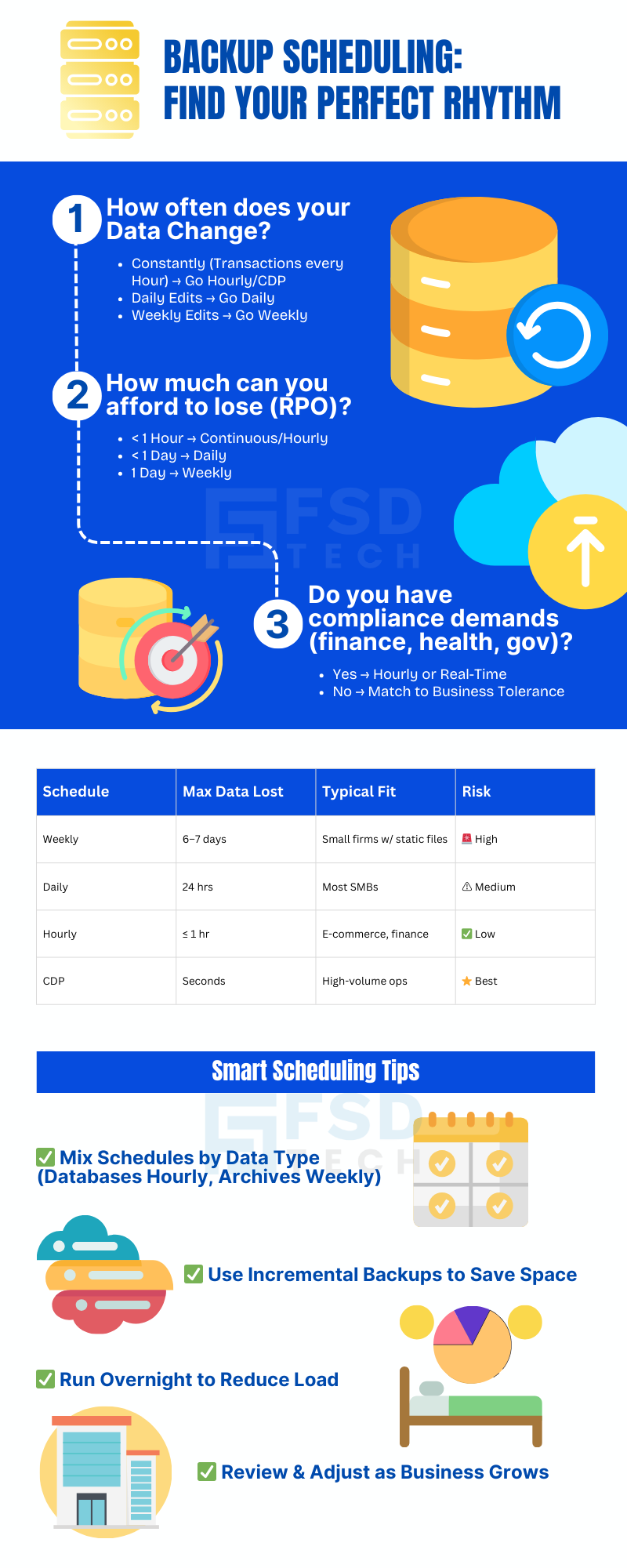
     

    Backup Scheduling Infographic Showing How To Choose Frequency Based On Data Change Recovery Point Objective And Compliance Needs With Smart Scheduling Tips

    FAQ

    1. What is a backup schedule?

    A backup schedule is simply the plan for how often your data is copied and saved so you have a safe version to restore if something goes wrong.

    It’s like deciding how often you want to make a spare key for your house — the more often you do it, the more up to date your copy will be if you lose the original.


    2. Why is backup scheduling important?

    Because it directly affects two important things:

    1. How much data you could lose if disaster strikes (this is called your Recovery Point Objective, or RPO).
    2. How quickly you can get your systems working again after a problem (your Recovery Time Objective, or RTO).

    If you back up too rarely, you risk losing a lot of work. If you back up often, your loss will be much smaller.


    3. What does RPO mean in simple words?

    RPO is the maximum amount of work you are willing to lose if something bad happens.

    Example: If your RPO is 1 hour, that means you are okay with losing up to 1 hour’s worth of work — so your backups need to run at least every hour.


    4. How do I decide how often to back up?

    Ask yourself these questions:

    • How often do we create or change important files? (If it’s every few minutes, your backups need to be very frequent.)
    • If we lost data, how much would it cost us to replace it? (This could be time, money, or lost customer trust.)
    • Do we have enough storage space for frequent backups? (Modern systems like Vembu make this easier by saving only changes, not full copies every time.)
      • Best for businesses where data rarely changes.
      • Risk: If your system crashes midweek, you could lose days of work.
      • Works well for most small to medium businesses.
      • Risk: You could lose that day’s work if disaster happens before the next backup.
      • Ideal for businesses with frequent transactions or updates (e.g., retail, finance, e-commerce).
      • Risk: Minimal — you only lose up to 1 hour’s data.
      • Every change is saved instantly or within seconds.
      • Risk: Almost zero, but requires powerful software.


    5. What are the most common backup schedules?

    1. Weekly Backups
    2. Daily Backups
    3. Hourly Backups
    4. Real-Time or Continuous Data Protection (CDP)


    6. What happens if I back up too infrequently?

    If your backups are too far apart, you risk losing large amounts of work.

    Example: A weekly backup could mean losing six full days of sales orders, emails, and updates if a crash happens the day before your next backup.


    7. Does backing up more often cost more?

    It might require more storage space, but modern tools like Vembu BDR Suite use incremental backups, which save only the changes since the last backup.

    This makes frequent backups affordable and fast.


    8. What is an incremental backup?

    An incremental backup only saves what has changed since the last backup — not the entire set of files again.

    Example: If you backed up yesterday and only 10 files changed today, it saves just those 10 files.


    9. Can frequent backups slow down my systems?

    Not if you use the right software.

    Vembu runs backups in the background and is designed to have minimal impact on system performance.


    10. Can I have different schedules for different data?

    Yes. For example:

    • Backup customer databases every hour.
    • Backup archived project files once a week.

    Vembu allows you to create custom schedules for different types of data.


    11. What if my internet is slow?

    You can still run frequent local backups (saved to a device in your office) and send a copy to the cloud less often. This way you get both speed and safety.


    12. How does backup scheduling affect downtime?

    If your most recent backup is fresh, you can restore it quickly and lose very little data.

    If it’s old, you’ll lose more — and it will take longer to rebuild the missing work.


    13. How does Vembu BDR Suite help with backup scheduling?

    • Lets you choose weekly, daily, hourly, or real-time backups.
    • Automates the entire process.
    • Sends you alerts if a backup fails or is missed.
    • Uses incremental backups to save space and time.


    14. Should I change my backup schedule over time?

    Yes. As your business grows and your data changes more often, you might need to switch to more frequent backups.


    15. What’s the best first step?

    Start by asking: “If disaster struck right now, how much work could I afford to lose?”

    Then choose a schedule that keeps your data loss within that limit — and adjust as needed.

    How to Choose the Right Backup Schedule for Your Business Needs

    About The Author

    Nasmal

    Nasmal is a Solution Architect & Business Analyst focused on AI, Data, Automation, BCP, and Process Optimization. He helps businesses evolve from reactive to proactive, data-driven, and resilient operations. With hands-on expertise, he simplifies complex tech into clear, easy-to-understand blogs.

    Like This Story?

    Share it with friends!

    Subscribe to our newsletter!

    Atera

    (48)

    Cato Networks

    (118)

    ClickUp

    (70)

    FishOS

    (7)

    Miradore

    (21)

    PointGuard AI

    (9)

    Vembu

    (22)

    Xcitium

    (33)

    ZETA HRMS

    (76)

    Workflow Automation(8)

    Workforce Automation(1)

    AI Project Management(1)

    HR Data Automation(1)

    RMM(1)

    IT Workflow Automation(1)

    IT security(2)

    GCC compliance(4)

    Payroll Integration(2)

    IT support automation(3)

    procurement automation(1)

    lost device management(1)

    IT Management(5)

    IoT Security(2)

    Cato XOps(2)

    IT compliance(4)

    Workflow Management(1)

    Task Automation(1)

    OpenStack automation(1)

    Kubernetes lifecycle management(2)

    AI-powered cloud ops(1)

    SMB Security(8)

    Data Security(1)

    MDR (Managed Detection & Response)(4)

    Atera Integrations(2)

    MSP Automation(3)

    XDR Security(2)

    SMB Cyber Protection(1)

    Ransomware Defense(3)

    HR Tech Solutions(1)

    Zero Trust Network Access(3)

    Zero Trust Security(2)

    Endpoint Management(1)

    SaaS Security(1)

    Payroll Automation(5)

    IT Monitoring(2)

    Xcitium EDR SOC(15)

    Ransomware Protection GCC(1)

    M&A IT Integration(1)

    Network Consolidation UAE(1)

    MSSP for SMBs(1)

    Managed EDR FSD-Tech(1)

    Ransomware Protection(3)

    SMB Cybersecurity GCC(1)

    FSD-Tech MSSP(25)

    Antivirus vs EDR(1)

    Endpoint Security(1)

    Cybersecurity GCC(12)

    Data Breach Costs(1)

    Endpoint Protection(1)

    SMB Cybersecurity(8)

    Zero Dwell Containment(31)

    Managed Security Services(2)

    Xcitium EDR(30)

    Cloud Backup(1)

    Hybrid Backup(1)

    Backup & Recovery(1)

    pointguard ai(4)

    backup myths(1)

    vembu(9)

    SMB data protection(9)

    disaster recovery myths(1)

    Disaster Recovery(4)

    Vembu BDR Suite(19)

    GCCBusiness(1)

    DataProtection(1)

    Secure Access Service Edge(4)

    GCC HR software(18)

    Miradore EMM(15)

    Cato SASE(7)

    Cloud Security(8)

    Talent Development(1)

    AI Cybersecurity(12)

    AI Governance(4)

    AI Security(2)

    AI Compliance(2)

    AI Risk Management(1)

    GCC business security(1)

    GCC network integration(1)

    compliance automation(5)

    education security(1)

    GCC cybersecurity(2)

    BYOD security Dubai(8)

    App management UAE(1)

    Miradore EMM Premium+(5)

    MiddleEast(1)

    HealthcareSecurity(1)

    Team Collaboration(1)

    IT automation(12)

    Zscaler(1)

    SD-WAN(6)

    HR Integration(4)

    Cloud Networking(3)

    device management(9)

    VPN(1)

    RemoteWork(1)

    ZeroTrust(2)

    MPLS(1)

    Project Management(9)

    HR automation(16)

    share your thoughts

    Why Is Data Backup Crucial for Cybersecurity

    Why Is Data Backup Crucial for Cybersecurity? Protect Your Business from Ransomware & Data Loss

    🕓 November 24, 2025

    Vector illustration showcasing Vembu cloud backup solutions. A central laptop screen displays the Vembu logo, surrounded by connected cloud storage icons, files, and mobile devices representing seamless data synchronization. Additional graphics include a store with "3-2-1" backup signage, servers, and secure connections, symbolizing hybrid cloud storage and reliable data protection for SMBs.

    SMB Backup Starter Pack: What to Back Up, Where to Store It & How Often (3-2-1 Checklist)

    🕓 September 16, 2025

    Illustration showing data being backed up from two on-premise servers to the Vembu cloud, with two people sitting on the servers and looking at laptops. The image visually represents the concept of offsite data backup to a remote cloud location.

    The Importance of Offsite Backups in Disaster Recovery Planning

    🕓 September 5, 2025

    Decoded(87)

    Cyber Security(118)

    BCP / DR(22)

    Zeta HRMS(75)

    SASE(21)

    Automation(70)

    Next Gen IT-Infra(118)

    Monitoring & Management(69)

    ITSM(22)

    HRMS(21)

    Automation(24)