HomeNext Gen IT-InfraMonitoring & ManagementCyber SecurityBCP / DRAutomationDecoded
Next Gen IT-Infra
Cato’s SASE Supports Cybersecurity Skills Development

How Cato’s SASE Supports Cybersecurity Skills Development

🕓 April 8, 2025

How SASE Supports the Security Needs of SMBs

How SASE Supports the Security Needs of SMBs

🕓 February 9, 2025

Attack Surface Reduction with Cato’s SASE

Attack Surface Reduction with Cato’s SASE

🕓 February 10, 2025

SASE for Digital Transformation in UAE

SASE for Digital Transformation in UAE

🕓 February 8, 2025

Monitoring & Management
Understanding Atera’s SLA Management

Understanding Atera’s SLA Management

🕓 February 7, 2025

Cost-Performance Ratio: Finding the Right Balance in IT Management Networks

Cost-Performance Ratio: Finding the Right Balance in IT Management Networks

🕓 June 16, 2025

Customizing Atera with APIs

Customizing Atera with APIs

🕓 March 3, 2025

Power Up Your IT Team’s Strategy with Atera’s Communication Tools

Power Up Your IT Team’s Strategy with Atera’s Communication Tools

🕓 February 8, 2025

Cyber Security
Illustration of the Cato Cloud architecture showing its role in delivering SASE for secure, optimized global connectivity.

Understanding the Cato Cloud and Its Role in SASE

🕓 January 29, 2025

Isometric illustration of professionals managing network performance, bandwidth analytics, and cloud-based optimization around the Cato Networks platform, symbolizing bandwidth control and QoS visibility.

Mastering Bandwidth Control and QoS in Cato Networks

🕓 July 26, 2025

Global network backbone powering Cato SASE solution for secure, high-performance connectivity across regions.

Global Backbone: The Engine Powering Cato’s SASE Solution

🕓 January 30, 2025

Illustration of team analyzing application traffic and usage insights on a large laptop screen using Cato’s dashboard, surrounded by network and cloud icons.

Cato Networks Application Visibility | Monitoring & Control

🕓 July 27, 2025

BCP / DR
Illustration showing diverse business and IT professionals collaborating with cloud, backup, and security icons, representing Vembu use cases for SMBs, MSPs, and IT teams.

Who Uses Vembu? Real-World Use Cases for SMBs, MSPs & IT Teams

🕓 July 12, 2025

Graphic showcasing Vembu’s all-in-one backup and disaster recovery platform with icons for cloud, data protection, and business continuity for IT teams and SMBs.

What Is Vembu? A Deep Dive Into the All in One Backup & Disaster Recovery Platform

🕓 July 6, 2025

Illustration showing Vembu backup and disaster recovery system with cloud storage, server racks, analytics dashboard, and IT professionals managing data.

The Rising Cost of Data Loss: Why Backup Is No Longer Optional?

🕓 August 14, 2025

3D isometric illustration of cloud backup and data recovery infrastructure with laptop, data center stack, and digital business icons — FSD Tech

RPO & RTO: The Heart of Business Continuity

🕓 August 15, 2025

Automation
Cross-Functional Collaboration with ClickUp

Fostering Cross-Functional Collaboration with ClickUp for Multi-Departmental Projects

🕓 February 11, 2025

ClickUp Project Reporting

Revolutionizing Enterprise Reporting with ClickUp’s Advanced Analytics and Dashboards

🕓 June 16, 2025

ClickUp’s Design Collaboration and Asset Management Tools

Empowering Creative Teams with ClickUp’s Design Collaboration and Asset Management Tools

🕓 February 26, 2025

ClickUp Communication and Collaboration Tools

ClickUp Communication and Collaboration Tools: Empowering Remote Teams

🕓 March 12, 2025

Decoded
Multi-Factor Authentication (MFA)

Multi-Factor Authentication (MFA): All You Need to Know

🕓 December 7, 2025

L3 Switch

What Is an L3 Switch? L2 vs L3 & Why You Need Layer 3?

🕓 December 8, 2025

IPSec

IPSec Explained: Protocols, Modes, IKE & VPN Security

🕓 December 3, 2025

 Datagram Transport Layer Security (DTLS)

What is Datagram Transport Layer Security (DTLS)? How it works?

🕓 December 4, 2025

    Subscribe to our newsletter!

    About Us

    Follow Us

    Copyright © 2024 | Powered by 

    Cato SASE Architecture

    Inside Cato’s SASE Architecture: A Blueprint for Modern Security

    🕓 January 26, 2025

    Enterprise Data Security and Privacy with ClickUp

    Ensuring Enterprise Data Security and Privacy with ClickUp

    🕓 February 9, 2025

    DDoS protection SASE

    DDoS Protection and Cato’s Defence Mechanisms

    🕓 February 11, 2025

    Table of Contents

    What is Access Point in Networking? 7 Key Benefits

    Surbhi Suhane
    February 10, 2026
    Comments
    Access Point in Networking

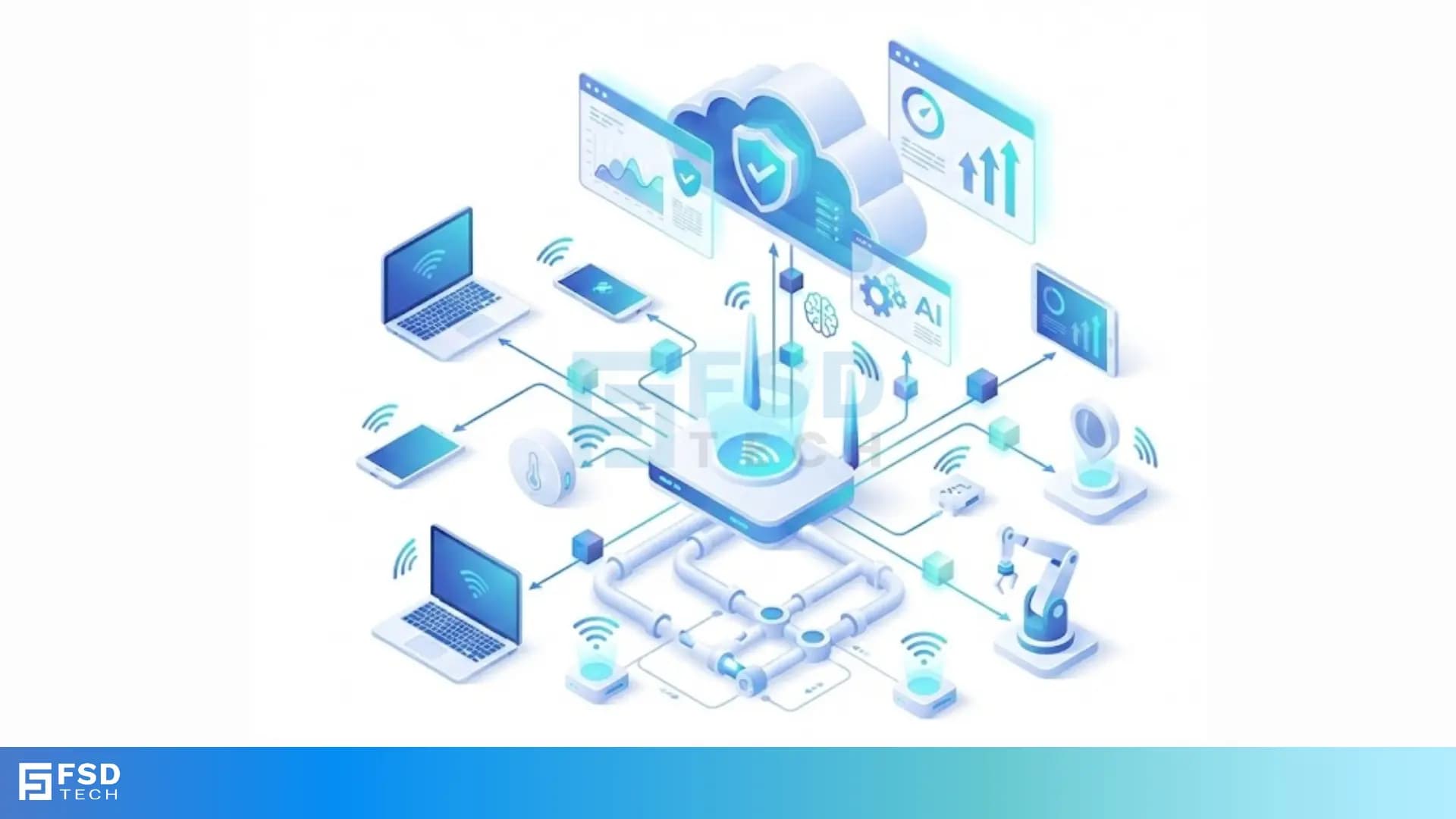
    The way we connect to the internet has changed fast. You likely use Wi-Fi every day at home or work. But have you ever wondered how that wireless signal actually reaches your phone? Many people think a router does all the work. While a router is important, a larger building needs something more. This is where an access point comes into play. It acts as a bridge that allows your devices to talk to a wired network without using cables.


    But what does an access point actually do? Why can’t you just use a standard router for everything? If you want to build a strong network, you need to know these answers. Let us explore how these devices function and why they are vital for modern connectivity.


    Access Point vs. Wireless Router: A Quick Comparison

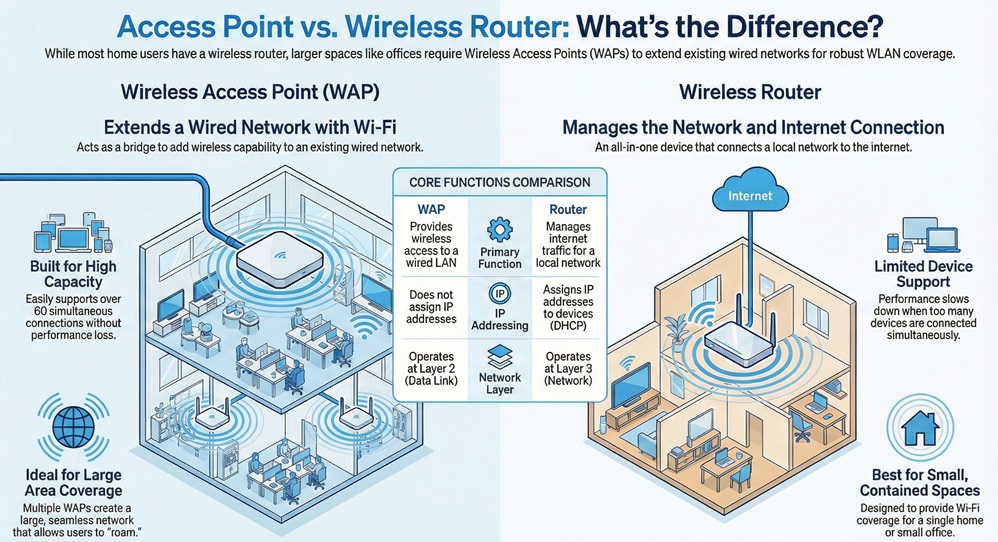
    Before we dive deep, it is helpful to see how an access point differs from a standard router. Most home users have a "2-in-1" device. In a business, these roles are often split.


    Basis for ComparisonWireless Access Point (WAP)Wireless Router
    Primary FunctionProvides wireless access to a wired local area network (LAN).Connects local networks and manages internet traffic.
    Network LayerOperates mainly at Layer 2 (Data Link).Operates at Layer 3 (Network).
    IP AddressingDoes not usually assign IP addresses.Uses DHCP to assign IP addresses to devices.
    Coverage AreaCan be linked together to cover massive buildings.Best for homes or small offices.
    Connection PortTypically has one Ethernet port for data and power.Has multiple LAN ports and one WAN port.
    CapacitySupports 60+ simultaneous connections easily.Supports a limited number of devices before slowing down.


    What is an Access Point in Networking?

    An access point is a hardware device that adds Wi-Fi to an existing wired network. Think of it as a portal. You plug the access point into a wall jack or a switch using an Ethernet cable. It then broadcasts a wireless signal.
     

    Access Point in Networking


    Access point means creating a Wireless Local Area Network (WLAN). In a large office, you might see these white boxes mounted on the ceiling. They allow employees to walk from one end of the building to the other without losing their connection. This is called roaming. Without an access point, you would be stuck near the main router.


    See which access point is right for your square footage.


    How Access Point Functions?

    The device receives data from the wired network and converts it into a 2.4GHz or 5GHz radio signal. Your laptop or smartphone picks up this signal. When you send an email, the process happens in reverse. The device converts the radio waves back into digital data for the wire.


    What Access Point Means for Your Business?

    An access point allows for much more freedom than a simple router. In a professional setting, the access point means you can scale your network as you grow. If you hire ten more people, you simply add another unit.


    Access point units handle high traffic better than home hardware. They use technologies like MIMO (Multiple Input, Multiple Output) to talk to many devices at once. This ensures that a video call in one room does not lag because someone is downloading a file in another.


    Also Read: Metropolitan Area Network (MAN) - Meaning & Examples


    What's Access Point Mode?

    You might see a setting in your device menu called access point mode. What does this actually do? What's access point mode is a common question for those trying to reuse old hardware.

    Access point mode turns off the "routing" parts of a device. It stops the device from managing the internet connection or handing out IP addresses. Instead, it only acts as a wireless bridge. You use this when you already have a main router and just want to extend the Wi-Fi signal to a dead zone.


    When to Use This Mode

    1. You have a wired basement and want Wi-Fi there.
    2. Your main router has weak Wi-Fi but good wired speeds.
    3. You want to create a separate guest network.


    How to Access Point Router Settings

    If you need to configure your device, you must know how to access point router settings. Every manufacturer has a slightly different method. However, the basic steps remain the same.


    1. Connect the Hardware: Use an Ethernet cable to link your computer to the access point.
    2. Find the IP Address: Check the label on the bottom of the device. It usually lists a default IP like 192.168.1.1 or 192.168.0.50.
    3. Open a Browser: Type that IP address into your web browser.
    4. Log In: Use the default username and password. Often, these are "admin" and "password."
    5. Adjust Settings: Now you can change the SSID (Wi-Fi name) and set a strong password.


    You should always change the default login immediately to prevent hackers from entering your network.


    Also Read: What is Network Access Control (NAC)? with Process


    Where is the Access Point on the router?

    If you have a home router, the access point is built inside the box. There is no physical button for it. It is a part of the internal radio system.


    However, if you are looking for the physical port to connect a standalone access point, look at the back of your router. You will see several ports labeled "LAN." You plug your access point into any of these LAN ports.


    Access point on router software is usually in the "Advanced" or "Operation Mode" section of the web interface. Here, you can toggle between "Router Mode" and "AP Mode."


    What is Access Point in Router Software?

    When you look at your settings, you might wonder what is access point in router configuration. In this context, it refers to the software bridge. When the router is in this mode, it stops acting as a gateway.


    What is access point in router settings basically tells the device to "be quiet" and just pass data through. It stops the NAT (Network Address Translation) process. This prevents a common problem called "Double NAT," which can break online gaming and VPNs.


    Advantages of Access Point Deployment

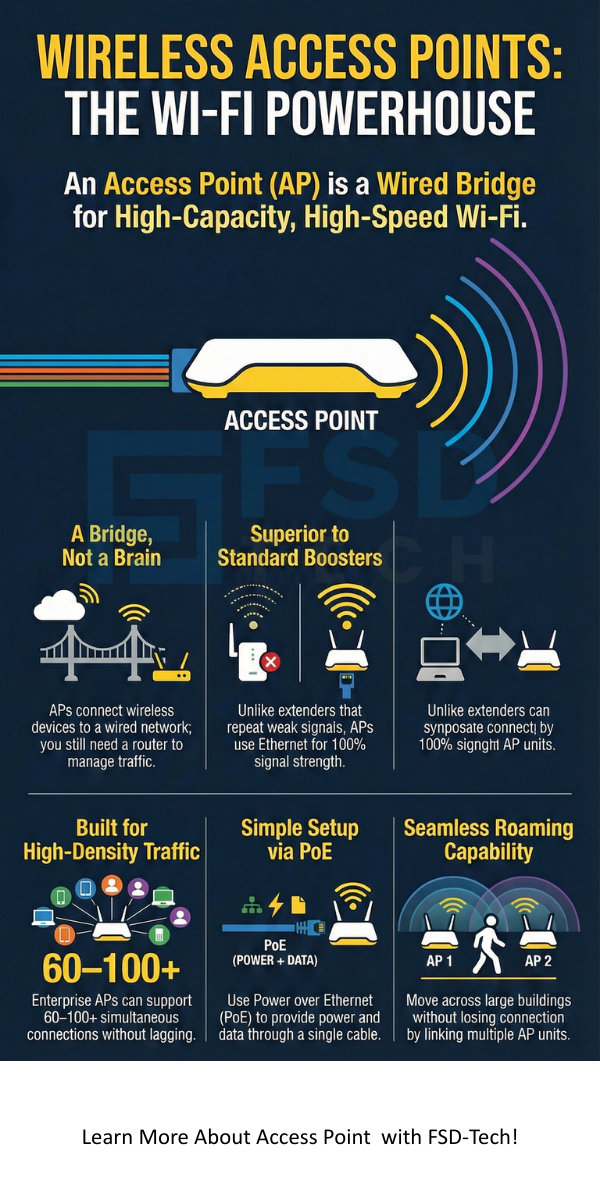
    There are many advantages of access point use over simple range extenders. While extenders repeat a weak signal, an access point creates a fresh, strong signal from a wire.


    Better Range and Coverage

    Advantages of access point systems include the ability to cover thousands of square feet. Since they connect via Ethernet, there is no signal loss between the main router and the AP.


    Higher User Capacity

    An access point can handle many more users than a standard router. A typical enterprise AP can support over 100 devices. This makes them perfect for coffee shops, schools, and offices.


    Power over Ethernet (PoE)

    Most modern units use PoE. This means a single cable provides both the internet connection and the power. You do not need an outlet near the ceiling where you mount the device.


    Centralized Management

    If you have ten access point units, you do not want to log into ten different websites. Business-grade systems let you control every access point from one single dashboard.


    Which Access Point Should You Choose?

    Deciding which access point to buy depends on your specific needs. You must look at the environment where you will use it.


    • Indoor Units: These are sleek and designed to mount on walls or ceilings.
    • Outdoor Units: These have rugged shells. They resist rain, wind, and heat. Use these for parking lots or patios.
    • Desktop Units: These are small and sit on a desk. They are great for small home offices.


    When asking which access point fits your budget, check the Wi-Fi standard. Look for Wi-Fi 6 (802.11ax) if you want the fastest speeds and best future-proofing.


    Also Read: What is Internet Key Exchange (IKE)?


    What Access Point Means for Home Users?

    You might think an access point is only for big companies. That is not true. If you live in a house with thick brick walls, your Wi-Fi probably struggles. Access point means you can have full bars in every room.


    By running a single cable to the far side of your house, you can install an access point. This is much more reliable than those "plug-in" mesh nodes that often drop the connection. It provides a stable experience for streaming 4K movies or playing games.


    Key Features to Look For

    When you shop for an access point, do not just look at the price. Look at the technical specs to ensure it meets your needs.


    1. Dual-Band Support: Ensure it supports both 2.4GHz and 5GHz.
    2. MU-MIMO: This allows the device to talk to multiple users at the same time.
    3. Guest Network Support: This keeps your private files safe from visitors.
    4. Band Steering: This automatically pushes faster devices to the 5GHz band.


    Common Myths About Access Points

    Many people believe that an access point is the same as a Wi-Fi booster. This is a mistake. A booster or "repeater" picks up a wireless signal and shouts it further. If the original signal is weak, the boosted signal will be slow. An access point starts with a high-speed wired connection, so the speed is always top-notch.


    Another myth is that you do not need a router if you have an access point. This is also false. You still need a router to talk to the internet service provider (ISP) and manage your data. The access point just handles the "last leg" of the journey to your wireless device.


    Conclusion

    Understanding what is access point in networking is the first step toward a better internet experience. Whether you are running a busy office or just want Wi-Fi in your backyard, these devices offer a professional solution. They remove the limits of a single router and give you the freedom to connect anywhere.


    At our core, we believe that technology should work for you, not against you. We focus on providing clear, honest advice to help you build a network that stays fast and secure. Your success is our priority, and we are committed to supporting your growth with the best networking insights. If you are ready to stop dealing with dead zones and start enjoying seamless connectivity, exploring the world of access point technology is the best move you can make.


    Contact our experts for a custom network coverage map.
     

    Access Point


    Key Takeaways

    • Access point units bridge the gap between wired and wireless networks.
    • What is access point in networking is a tool to extend Wi-Fi coverage without losing speed.
    • Access point mode is a setting that turns a router into a simple wireless bridge.
    • The advantages of access point include higher device capacity and better range.
    • You still need a router to manage the network; the AP just provides the wireless signal.
    • Which access point you choose depends on the area you need to cover and the number of users.


    Frequently Asked Questions

    Is an access point better than a mesh system?

    An access point system is usually faster because every unit is wired. Mesh systems are easier to set up because they connect wirelessly. For the best performance, a wired access point is the winner.


    Do I need a switch to use an access point?

    If you only have one access point, you can plug it directly into your router. If you have several, you will need a PoE switch to provide power and data to all of them.


    Can an access point work without a router?

    No. An access point does not have the "brain" to manage an internet connection. It needs a router to handle the traffic and assign IP addresses to your devices.


    How many access points do I need?

    This depends on your walls. Usually, one access point for every 1,500 to 2,000 square feet is a good rule of thumb.


    Does an access point slow down the internet?

    Actually, an access point often makes the internet feel faster. It reduces the congestion on your main router and provides a stronger signal to your devices.

    What is Access Point in Networking? 7 Key Benefits

    About The Author

    Surbhi Suhane

    Surbhi Suhane is an experienced digital marketing and content specialist with deep expertise in Getting Things Done (GTD) methodology and process automation. Adept at optimizing workflows and leveraging automation tools to enhance productivity and deliver impactful results in content creation and SEO optimization.

    Like This Story?

    Share it with friends!

    Subscribe to our newsletter!

    Atera

    (55)

    Cato Networks

    (121)

    ClickUp

    (70)

    FishOS

    (7)

    Miradore

    (21)

    PointGuard AI

    (9)

    Vembu

    (22)

    Xcitium

    (33)

    ZETA HRMS

    (79)

    Workflow Automation(8)

    Workforce Automation(1)

    AI Project Management(1)

    HR Data Automation(1)

    RMM(1)

    IT Workflow Automation(1)

    IT security(2)

    GCC compliance(4)

    Payroll Integration(2)

    IT support automation(3)

    procurement automation(1)

    lost device management(1)

    IT Management(5)

    IoT Security(2)

    Cato XOps(2)

    IT compliance(4)

    Workflow Management(1)

    Task Automation(1)

    Kubernetes lifecycle management(2)

    OpenStack automation(1)

    AI-powered cloud ops(1)

    SMB Security(8)

    Data Security(1)

    MDR (Managed Detection & Response)(4)

    MSP Automation(3)

    Atera Integrations(2)

    XDR Security(2)

    SMB Cyber Protection(1)

    Ransomware Defense(3)

    HR Tech Solutions(1)

    Zero Trust Network Access(3)

    Zero Trust Security(2)

    Endpoint Management(1)

    SaaS Security(1)

    Payroll Automation(5)

    IT Monitoring(2)

    Xcitium EDR SOC(15)

    Ransomware Protection GCC(1)

    Network Consolidation UAE(1)

    M&A IT Integration(1)

    MSSP for SMBs(1)

    SMB Cybersecurity GCC(1)

    Antivirus vs EDR(1)

    FSD-Tech MSSP(25)

    Ransomware Protection(3)

    Managed EDR FSD-Tech(1)

    Cybersecurity GCC(12)

    Endpoint Security(1)

    Endpoint Protection(1)

    Data Breach Costs(1)

    SMB Cybersecurity(8)

    Zero Dwell Containment(31)

    Xcitium EDR(30)

    Managed Security Services(2)

    Cloud Backup(1)

    Hybrid Backup(1)

    Backup & Recovery(1)

    pointguard ai(4)

    backup myths(1)

    disaster recovery myths(1)

    SMB data protection(9)

    vembu(9)

    Vembu BDR Suite(19)

    Disaster Recovery(4)

    GCCBusiness(1)

    DataProtection(1)

    Secure Access Service Edge(4)

    GCC HR software(20)

    Miradore EMM(15)

    Cato SASE(7)

    Cloud Security(8)

    Talent Development(1)

    AI Security(2)

    AI Cybersecurity(12)

    AI Governance(4)

    AI Risk Management(1)

    AI Compliance(2)

    GCC business security(1)

    GCC network integration(1)

    compliance automation(5)

    education security(1)

    GCC cybersecurity(2)

    BYOD security Dubai(8)

    App management UAE(1)

    Miradore EMM Premium+(5)

    MiddleEast(1)

    HealthcareSecurity(1)

    Team Collaboration(1)

    IT automation(12)

    Zscaler(1)

    SD-WAN(7)

    HR Integration(4)

    Cloud Networking(4)

    device management(9)

    RemoteWork(1)

    VPN(1)

    ZeroTrust(2)

    MPLS(1)

    Project Management(9)

    HR automation(16)

    share your thoughts

    Access Point in Networking

    What is Access Point in Networking? 7 Key Benefits

    🕓 February 10, 2026

    Triad

    What is Triad? 3 Core Pillars of Networked Systems

    🕓 February 10, 2026

    Security Operations Center (SOC)

    What is Security Operations Center (SOC)?

    🕓 February 9, 2026

    Decoded(103)

    Cyber Security(118)

    BCP / DR(22)

    Zeta HRMS(78)

    SASE(21)

    Automation(70)

    Next Gen IT-Infra(118)

    Monitoring & Management(76)

    ITSM(22)

    HRMS(21)

    Automation(24)