HomeNext Gen IT-InfraMonitoring & ManagementCyber SecurityBCP / DRAutomationDecoded
Next Gen IT-Infra
Cato’s SASE Supports Cybersecurity Skills Development

How Cato’s SASE Supports Cybersecurity Skills Development

🕓 April 8, 2025

How SASE Supports the Security Needs of SMBs

How SASE Supports the Security Needs of SMBs

🕓 February 9, 2025

Attack Surface Reduction with Cato’s SASE

Attack Surface Reduction with Cato’s SASE

🕓 February 10, 2025

SASE for Digital Transformation in UAE

SASE for Digital Transformation in UAE

🕓 February 8, 2025

Monitoring & Management
Understanding Atera’s SLA Management

Understanding Atera’s SLA Management

🕓 February 7, 2025

Cost-Performance Ratio: Finding the Right Balance in IT Management Networks

Cost-Performance Ratio: Finding the Right Balance in IT Management Networks

🕓 June 16, 2025

Customizing Atera with APIs

Customizing Atera with APIs

🕓 March 3, 2025

Power Up Your IT Team’s Strategy with Atera’s Communication Tools

Power Up Your IT Team’s Strategy with Atera’s Communication Tools

🕓 February 8, 2025

Cyber Security
Visual guide showing Cato CMA interface for configuring Internet and WAN firewall rules, enabling threat protection, and monitoring security events in real time for UAE IT teams.

Enforcing Firewall and Threat Protection Policies in Cato

🕓 July 25, 2025

Isometric illustration of professionals managing network performance, bandwidth analytics, and cloud-based optimization around the Cato Networks platform, symbolizing bandwidth control and QoS visibility.

Mastering Bandwidth Control and QoS in Cato Networks

🕓 July 26, 2025

Illustration of the Cato Cloud architecture showing its role in delivering SASE for secure, optimized global connectivity.

Understanding the Cato Cloud and Its Role in SASE

🕓 January 29, 2025

Global network backbone powering Cato SASE solution for secure, high-performance connectivity across regions.

Global Backbone: The Engine Powering Cato’s SASE Solution

🕓 January 30, 2025

BCP / DR
Illustration showing diverse business and IT professionals collaborating with cloud, backup, and security icons, representing Vembu use cases for SMBs, MSPs, and IT teams.

Who Uses Vembu? Real-World Use Cases for SMBs, MSPs & IT Teams

🕓 July 12, 2025

Graphic showcasing Vembu’s all-in-one backup and disaster recovery platform with icons for cloud, data protection, and business continuity for IT teams and SMBs.

What Is Vembu? A Deep Dive Into the All in One Backup & Disaster Recovery Platform

🕓 July 6, 2025

Illustration showing Vembu backup and disaster recovery system with cloud storage, server racks, analytics dashboard, and IT professionals managing data.

The Rising Cost of Data Loss: Why Backup Is No Longer Optional?

🕓 August 14, 2025

3D isometric illustration of cloud backup and data recovery infrastructure with laptop, data center stack, and digital business icons — FSD Tech

RPO & RTO: The Heart of Business Continuity

🕓 August 15, 2025

Automation
Cross-Functional Collaboration with ClickUp

Fostering Cross-Functional Collaboration with ClickUp for Multi-Departmental Projects

🕓 February 11, 2025

ClickUp Project Reporting

Revolutionizing Enterprise Reporting with ClickUp’s Advanced Analytics and Dashboards

🕓 June 16, 2025

ClickUp’s Design Collaboration and Asset Management Tools

Empowering Creative Teams with ClickUp’s Design Collaboration and Asset Management Tools

🕓 February 26, 2025

ClickUp Communication and Collaboration Tools

ClickUp Communication and Collaboration Tools: Empowering Remote Teams

🕓 March 12, 2025

Decoded
Multi-Factor Authentication (MFA)

Multi-Factor Authentication (MFA): All You Need to Know

🕓 December 7, 2025

L3 Switch

What Is an L3 Switch? L2 vs L3 & Why You Need Layer 3?

🕓 December 8, 2025

IPSec

IPSec Explained: Protocols, Modes, IKE & VPN Security

🕓 December 3, 2025

 Datagram Transport Layer Security (DTLS)

What is Datagram Transport Layer Security (DTLS)? How it works?

🕓 December 4, 2025

    Subscribe to our newsletter!

    About Us

    Follow Us

    Copyright © 2024 | Powered by 

    Cato SASE Architecture

    Inside Cato’s SASE Architecture: A Blueprint for Modern Security

    🕓 January 26, 2025

    Enterprise Data Security and Privacy with ClickUp

    Ensuring Enterprise Data Security and Privacy with ClickUp

    🕓 February 9, 2025

    DDoS protection SASE

    DDoS Protection and Cato’s Defence Mechanisms

    🕓 February 11, 2025

    Table of Contents

    Unlocking the Power of ClickUp Brain: How AI Transforms Workflows

    NHAIF NOUSHAD
    November 26, 2025
    Comments
    Infographic showing ClickUp Brain AI features, including automated project management updates, AI stand-ups, intelligent task allocation, centralized documentation search, and custom AI agents for workflow automation, with illustrations of robots and team task distribution

    Key Takeaways

    •  AI-powered project management automation:  ClickUp Brain reduces manual admin by automating status updates, progress tracking, and identifying blockers, freeing teams to focus on high-impact work.
    •  Intelligent task assignment and prioritization:  AI matches tasks to team members based on expertise and workload, dynamically reprioritizing as project needs evolve for optimal resource allocation.
    •  Instant, context-rich knowledge management:  ClickUp Brain delivers immediate answers from across your workspace—tasks, docs, and comments—eliminating knowledge silos and accelerating onboarding.
    •  Automated content creation and meeting management:  AI generates technical docs, project briefs, and actionable meeting summaries, ensuring no detail is missed and every conversation is actionable.
    •  Customizable AI agents and workflow automation:  No-code AI agents automate unique business processes, handle client inquiries, and enforce compliance, supporting scalable, region-specific operations.
    •  Seamless scaling for growing teams:  Unified AI-driven collaboration and workflow optimization ensure ClickUp Brain adapts as your team expands, supporting productivity across diverse industries and regions.


    Introduction

    The New Era of AI-Driven Workflow Management

    Operations managers and productivity leaders face mounting pressure to streamline processes, reduce manual overhead, and scale teams efficiently. Traditional project management tools often fall short—requiring constant manual updates, repetitive check-ins, and fragmented knowledge sharing. ClickUp Brain marks a paradigm shift: an AI-powered platform that automates, optimizes, and connects every facet of modern workflow management.


    What is ClickUp Brain?

    The Vision Behind ClickUp’s AI Platform

    ClickUp Brain is not a bolt-on AI feature—it’s a deeply integrated intelligence layer that connects projects, documentation, people, and organizational knowledge through a unified interface. The platform’s vision is clear: eliminate busywork, unlock team potential, and make every workflow smarter and more responsive.

    Core Components of ClickUp Brain

    •  AI Project Manager:  Automates project planning, task assignment, and real-time progress tracking.
    •  AI Knowledge Manager:  Instantly retrieves context-rich answers from your entire workspace.
    •  AI Content Creator:  Drafts documentation, briefs, and tasks at scale.
    •  Custom AI Agents:  Enable no-code automation for unique workflows and compliance needs.
    •  AI Meeting Assistant:  Captures, summarizes, and transforms meetings into actionable plans.


    Automating Project Management with AI

    Eliminating “Work About Work”

    Administrative overhead—status updates, progress checks, and manual reporting—consumes valuable time. ClickUp Brain’s AI automation targets these pain points, reducing the need for repetitive manual input and allowing teams to focus on strategic initiatives.

    AI Stand-ups and Auto-Tracking Progress

    •  AI Stand-ups: Automatically generate daily summaries of progress, blockers, and next steps, minimizing the need for synchronous status meetings.
    •  Auto-Tracking Progress:  Milestones, risks, and deliverables are monitored and updated in real time, ensuring project visibility without manual intervention.

    Real-World Example: Marketing Campaign Launch

    A marketing team uploads a campaign brief. ClickUp Brain instantly generates tasks, assigns deadlines, and triggers reminders. Daily AI stand-ups summarize progress, keeping stakeholders aligned and eliminating the need for constant check-ins.                                                                                                                                  

    Intelligent Task Assignment and Dynamic Prioritization

    How AI Matches Tasks to Talent

    ClickUp Brain analyzes each team member’s expertise, availability, and workload, ensuring that tasks are assigned to the right person at the right time. This intelligent allocation prevents bottlenecks and optimizes resource utilization, especially for UAE-based operations or distributed teams.

    Keeping High-Impact Work Front and Center

    With self-prioritizing tasks, ClickUp Brain dynamically adjusts priorities as project requirements shift. High-impact work remains visible, and deadlines are less likely to slip, supporting productivity AI strategies across fast-moving industries.

    Hypothetical Example: Software Development Sprint

    During a sprint, ClickUp Brain assigns bug fixes to developers with the most relevant experience and available bandwidth. As new issues arise, priorities shift automatically, and daily summaries keep the team focused on what matters most.


    Also Read:  How to Train Your Team on ClickUp Using Internal Docs & Automation
     

    Contextual Knowledge Management

    Instant Answers from Your Workspace

    ClickUp Brain acts as an AI knowledge manager, instantly surfacing context-rich answers from tasks, docs, comments, and more. Instead of searching through fragmented systems, team members can ask questions and receive immediate, actionable responses—crucial for fast onboarding or compliance-driven environments.

    Breaking Down Knowledge Silos

    Centralized knowledge management accelerates onboarding, supports rapid decision-making, and ensures everyone works from a single source of truth. This is particularly valuable for teams operating across multiple regions or business units.

    Example: Onboarding a New Team Member

    A new hire asks ClickUp Brain for a summary of the last quarter’s projects. The AI delivers a digest of key decisions, milestones, and links to relevant documentation, enabling rapid ramp-up and reducing the risk of missed context.


    AI-Powered Content Creation and Documentation

    From Meetings to Actionable Plans

    ClickUp Brain’s AI Doc Writer and AI Task Builder transform meeting notes, chats, and ideas into structured documentation and actionable tasks. This automation ensures that no detail is overlooked and that project plans are always up to date.

    Generating Technical Docs and Briefs

    Whether you need API documentation, deployment guides, or project briefs, ClickUp Brain drafts content in your preferred style, referencing relevant background and success metrics from previous projects.

    Example: Product Launch Documentation

    After a product kickoff meeting, ClickUp Brain analyzes the transcript, extracts action items, and creates a comprehensive launch plan—complete with assigned tasks, deadlines, and technical documentation. This accelerates project initiation and reduces manual follow-up.


    Transforming Meetings with AI

    Automated Summaries and Action Items

    Meetings become more productive when every conversation is captured and converted into actionable insights. ClickUp Brain auto-captures notes, generates searchable summaries, and extracts next steps—eliminating the need for manual note-taking.

    Smart Agenda and Follow-Up

    Features like Smart Agenda Builder create meeting agendas based on previous discussions, project status, and team priorities. After the meeting, action items are automatically assigned and tracked, reducing meeting fatigue and ensuring accountability.

    Example: Weekly Operations Sync

    During a weekly operations sync, ClickUp Brain records the discussion, summarizes key points, and assigns follow-up tasks. Team members receive a digest with links to relevant docs and next steps, ensuring nothing falls through the cracks.


    Custom AI Agents and Workflow Automation

    Building No-Code AI Agents

    Every organization has unique processes. ClickUp Brain’s no-code builder allows users to create custom AI agents that automate workflows, handle client inquiries, enforce compliance, and route requests—all without writing a single line of code.

    Autopilot Agents in Action

    Autopilot Agents can update tasks based on triggers (such as emails or project milestones), respond to client requests, and manage routine communications. This reduces manual intervention and supports scalable, region-specific operations.

    Example: Automated Client Status Updates

    A client emails for a project update. ClickUp Brain’s custom agent scans the project, generates a status report, and replies automatically—keeping clients informed and freeing your team for higher-value work.


    Scaling Teams with ClickUp Brain

    Unified Collaboration and Growth

    As teams grow, collaboration and workflow management become more complex. ClickUp Brain’s unified AI layer ensures that automations, knowledge management, and task assignment scale seamlessly, supporting transparent ownership, timelines, and accountability.

    Adapting Workflows as You Scale

    Customizable views, collaborative docs, and real-time chat keep everyone aligned. As your team expands—whether across the GCC, MENA, or globally—ClickUp Brain adapts workflows without requiring a complete process overhaul.
     

    Streamline Every Process with AI Automation — Talk to Our ClickUp Experts
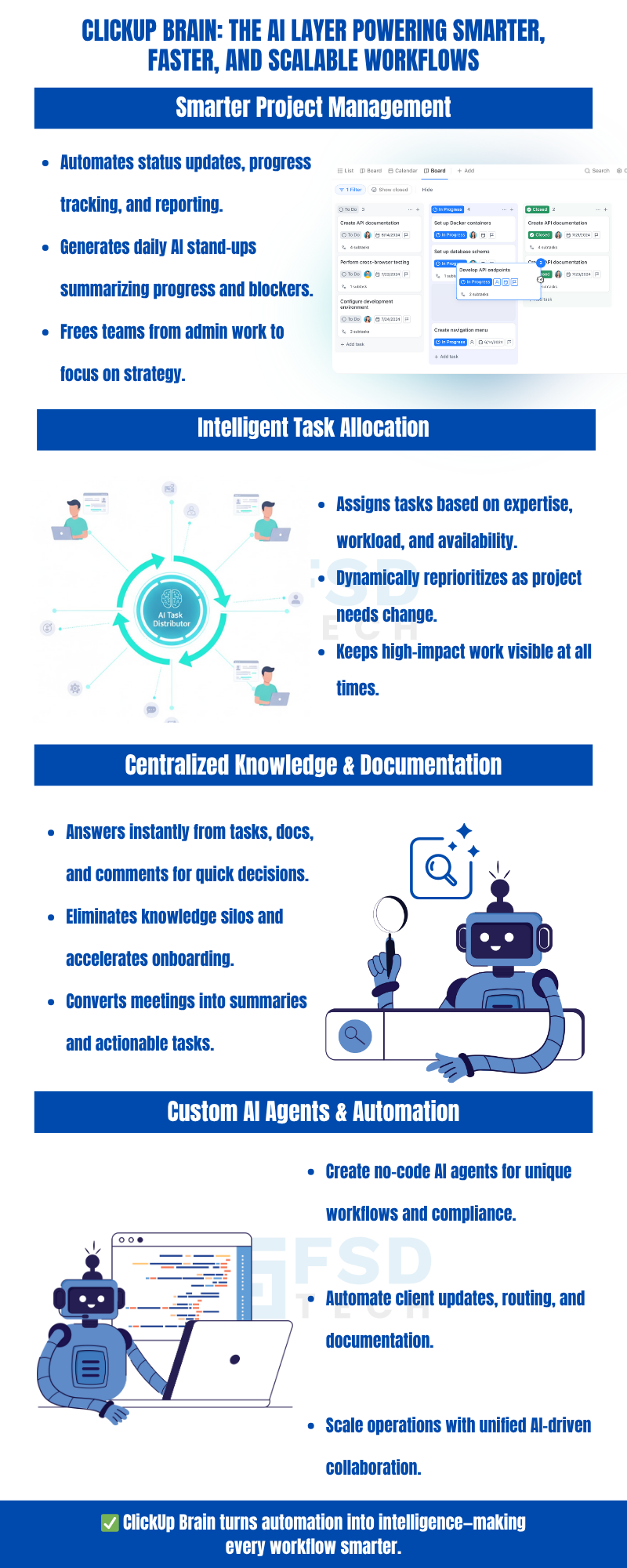
     

    Infographic showing ClickUp Brain AI features, including automated project management updates, AI stand-ups, intelligent task allocation, centralized documentation search, and custom AI agents for workflow automation, with illustrations of robots and team task distribution


    FAQ

    What makes ClickUp Brain different from other AI project management tools?

    ClickUp Brain stands out by unifying project management, knowledge sharing, and content creation within a single AI-driven platform. Its context-aware automation and instant answers are delivered directly inside your workspace, eliminating the need for fragmented tools and manual searching. This integrated approach is particularly valuable for operations managers seeking comprehensive workflow optimization.
     

    Can ClickUp Brain automate specialized workflows?

    Yes, ClickUp Brain enables users to build custom AI agents using a no-code builder. These agents can automate unique business processes, handle client inquiries, enforce compliance, and route requests—all tailored to your organization’s needs. This flexibility is especially useful for UAE-based operations or teams with region-specific requirements.


    How does ClickUp Brain improve team collaboration?

    By centralizing knowledge, automating routine updates, and providing real-time insights, ClickUp Brain reduces the need for excessive meetings and manual work. Teams stay aligned through shared docs, real-time chat, and automated task tracking, ensuring everyone is working from the same source of truth.


    Is ClickUp Brain suitable for scaling teams?

    Absolutely. ClickUp Brain’s automation and knowledge management features are designed to scale with your team, supporting seamless collaboration and workflow optimization as your organization grows—whether locally or across multiple regions.


    Does ClickUp Brain require technical expertise to set up?

    No. Many of ClickUp Brain’s features, including custom AI agents, are accessible via a no-code builder. This makes advanced automation available to all users, regardless of technical background, and accelerates deployment for both small teams and large enterprises.


    How does ClickUp Brain handle knowledge management for distributed teams?

    ClickUp Brain centralizes all project information, documentation, and communications, making it easy for distributed teams to access context-rich answers instantly. This reduces onboarding time, eliminates knowledge silos, and supports consistent decision-making across time zones and regions.


    Can ClickUp Brain generate technical documentation automatically?

    Yes, the AI Doc Writer and Task Builder can generate technical documentation, project briefs, and detailed tasks directly from meetings, chats, or existing docs. This ensures accuracy, consistency, and speed in documentation workflows, which is especially valuable for project management automation.


    What types of tasks can ClickUp Brain automate?

    ClickUp Brain automates a wide range of tasks, including status updates, progress tracking, task assignment, meeting summaries, content creation, client communications, and workflow routing. Its flexibility supports diverse industries and operational models.


    How does ClickUp Brain support compliance in regulated industries?

    Custom AI agents can be configured to enforce compliance by automating documentation, tracking approvals, and routing requests according to regulatory requirements. This is particularly useful for organizations operating under GCC compliance standards or other regional frameworks.


    Is ClickUp Brain effective for onboarding new team members?

    Yes, ClickUp Brain accelerates onboarding by providing instant, context-rich answers to new hires’ questions. It surfaces key decisions, project histories, and relevant documentation, enabling rapid integration and reducing the learning curve.


    Can ClickUp Brain integrate with existing tools and workflows?

    ClickUp Brain is designed to work within the ClickUp ecosystem, which offers integrations with popular productivity, communication, and file-sharing tools. This ensures that AI-driven automation and insights are accessible within your existing workflows.


    How does ClickUp Brain adapt to changing project priorities?

    Self-prioritizing tasks and dynamic AI-driven assignment ensure that as project needs evolve, ClickUp Brain automatically adjusts priorities and resource allocation. This keeps high-impact work front and center, minimizing the risk of missed deadlines.


    What are the benefits of using ClickUp Brain for Middle East deployments?

    For teams operating in the Middle East, ClickUp Brain’s automation and knowledge management features support regional compliance, multilingual collaboration, and scalable workflows. Its no-code customization allows for rapid adaptation to local business practices.


    How does ClickUp Brain help reduce meeting fatigue?

    By automating meeting summaries, capturing action items, and generating agendas, ClickUp Brain minimizes the need for repetitive check-ins and manual note-taking. This streamlines meetings and ensures that every conversation leads to actionable outcomes.


    Can ClickUp Brain be used by non-technical teams?

    Yes, ClickUp Brain’s intuitive interface and no-code automation tools make it accessible to non-technical users. Operations managers, HR, marketing, and other business functions can leverage AI-driven productivity without specialized training.


    What is the impact of ClickUp Brain on overall workflow optimization?

    ClickUp Brain delivers measurable improvements in workflow optimization by automating repetitive tasks, centralizing knowledge, and enabling intelligent task management. Teams experience increased productivity, reduced manual overhead, and greater agility in responding to business needs.


    Unlocking the Power of ClickUp Brain: How AI Transforms Workflows

    About The Author

    NHAIF NOUSHAD

    Nhaif is an AI Automation Engineer & Business Analyst focused on ClickUp, AI, Automation, and Workflow Optimization. He helps businesses shift from scattered processes to streamlined, data-driven operations. With hands-on expertise, he simplifies complex tools into clear, easy-to-apply solutions.

    Like This Story?

    Share it with friends!

    Subscribe to our newsletter!

    Atera

    (48)

    Cato Networks

    (111)

    ClickUp

    (68)

    FishOS

    (7)

    Miradore

    (21)

    PointGuard AI

    (9)

    Vembu

    (22)

    Xcitium

    (33)

    ZETA HRMS

    (70)

    Workflow Automation(5)

    Workforce Automation(1)

    AI Project Management(1)

    HR Data Automation(1)

    RMM(1)

    IT Workflow Automation(1)

    GCC compliance(4)

    IT security(2)

    Payroll Integration(2)

    IT support automation(3)

    procurement automation(1)

    lost device management(1)

    IT Management(5)

    IoT Security(2)

    Cato XOps(2)

    IT compliance(4)

    Workflow Management(1)

    Task Automation(1)

    OpenStack automation(1)

    AI-powered cloud ops(1)

    Kubernetes lifecycle management(2)

    SMB Security(8)

    Data Security(1)

    MDR (Managed Detection & Response)(4)

    Atera Integrations(2)

    MSP Automation(3)

    XDR Security(2)

    SMB Cyber Protection(1)

    Ransomware Defense(3)

    HR Tech Solutions(1)

    Zero Trust Network Access(3)

    Zero Trust Security(2)

    Endpoint Management(1)

    SaaS Security(1)

    Payroll Automation(5)

    IT Monitoring(2)

    Xcitium EDR SOC(15)

    Ransomware Protection GCC(1)

    M&A IT Integration(1)

    Network Consolidation UAE(1)

    MSSP for SMBs(1)

    FSD-Tech MSSP(25)

    Ransomware Protection(3)

    SMB Cybersecurity GCC(1)

    Managed EDR FSD-Tech(1)

    Antivirus vs EDR(1)

    Cybersecurity GCC(12)

    Endpoint Security(1)

    Endpoint Protection(1)

    Data Breach Costs(1)

    Managed Security Services(2)

    SMB Cybersecurity(8)

    Zero Dwell Containment(31)

    Xcitium EDR(30)

    Cloud Backup(1)

    Hybrid Backup(1)

    Backup & Recovery(1)

    pointguard ai(4)

    disaster recovery myths(1)

    backup myths(1)

    vembu(9)

    SMB data protection(9)

    Vembu BDR Suite(19)

    Disaster Recovery(4)

    DataProtection(1)

    GCCBusiness(1)

    Secure Access Service Edge(4)

    GCC HR software(16)

    Miradore EMM(15)

    Cato SASE(7)

    Cloud Security(8)

    Talent Development(1)

    AI Cybersecurity(12)

    AI Risk Management(1)

    AI Governance(4)

    AI Security(2)

    AI Compliance(2)

    GCC business security(1)

    GCC network integration(1)

    compliance automation(4)

    GCC cybersecurity(2)

    education security(1)

    App management UAE(1)

    BYOD security Dubai(8)

    Miradore EMM Premium+(5)

    HealthcareSecurity(1)

    MiddleEast(1)

    Team Collaboration(1)

    IT automation(10)

    Zscaler(1)

    SD-WAN(6)

    HR Integration(4)

    Cloud Networking(3)

    device management(9)

    RemoteWork(1)

    ZeroTrust(2)

    VPN(1)

    MPLS(1)

    Project Management(9)

    HR automation(16)

    share your thoughts

    Illustration showing ClickUp connected with Slack and Microsoft Teams, enabling real-time collaboration, automated task creation, secure workflows, and centralized communication for distributed teams.

    Using ClickUp with Slack & Teams: Real-Time Workflow Automation

    🕓 January 10, 2026

    ClickUp and Power BI integration infographic showing automated client reporting, real-time dashboards, secure API-based data sync, and compliance-focused analytics for UAE and GCC service providers.

    Powering Client Reports with ClickUp + Power BI Integration

    🕓 January 6, 2026

    Diagram illustrating ClickUp and Zapier integration for automating workflows, syncing CRMs, Google Sheets, forms, and notifications to improve productivity for business teams.

    Top Zapier Automations for ClickUp Power Users

    🕓 January 2, 2026

    Decoded(58)

    Cyber Security(112)

    BCP / DR(22)

    Zeta HRMS(69)

    SASE(21)

    Automation(68)

    Next Gen IT-Infra(111)

    Monitoring & Management(69)

    ITSM(22)

    HRMS(21)

    Automation(24)